
ON THIS PAGE
Example: Configuring Ingress Replication for IP Multicast Using MBGP MVPNs
Requirements
The routers used in this example are Juniper Networks M Series Multiservice Edge Routers, T Series Core Routers, or MX Series 5G Universal Routing Platforms. When using ingress replication for IP multicast, each participating router must be configured with BGP for control plane procedures and with ingress replication for the data provider tunnel, which forms a full mesh of MPLS point-to-point LSPs. The ingress replication tunnel can be selective or inclusive, depending on the configuration of the provider tunnel in the routing instance.
Overview
The ingress-replication provider tunnel type uses
unicast tunnels between routers to create a multicast distribution
tree.
The mpls-internet-multicast routing instance type uses
ingress replication provider tunnels to carry IP multicast data between
routers through an MPLS cloud, using MBGP (or Next Gen) MVPN. Ingress
replication can also be configured when using MVPN to carry multicast
data between PE routers.
The mpls-internet-multicast routing instance is a non-forwarding
instance used only for control plane procedures. It does not support
any interface configurations. Only one mpls-internet-multicast routing instance can be defined for a logical system. All
multicast and unicast routes used for IP multicast are associated
only with the default routing instance (inet.0), not with
a configured routing instance. The mpls-internet-multicast routing instance type is configured for the default master
instance on each router, and is also included at the [edit protocols
pim] hierarchy level in the default instance.
For each mpls-internet-multicast routing instance, the ingress-replication statement is required under the provider-tunnel statement and also under the [edit routing-instances routing-instance-name provider-tunnel selective group
source] hierarchy level.
When a new destination needs to be added to the ingress replication provider tunnel, the resulting behavior differs depending on how the ingress replication provider tunnel is configured:
create-new-ucast-tunnel—When this statement is configured, a new unicast tunnel to the destination is created, and is deleted when the destination is no longer needed. Use this mode for RSVP LSPs using ingress replication.label-switched-path-template (Multicast)—When this statement is configured, an LSP template is used for the for the point-to-multipoint LSP for ingress replication.
Topology
The IP topology consists of routers on the edge of the IP multicast domain. Each router has a set of IP interfaces configured toward the MPLS cloud and a set of interfaces configured toward the IP routers. See Figure 1. Internet multicast traffic is carried between the IP routers, through the MPLS cloud, using ingress replication tunnels for the data plane and a full-mesh IBGP session for the control plane.
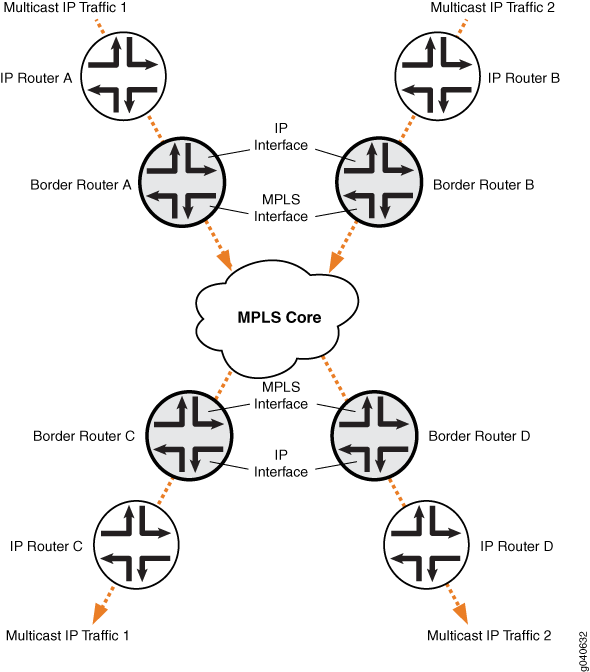
Configuration
Procedure
CLI Quick Configuration
To quickly configure this example, copy the
following commands, paste them into a text file, remove any line breaks,
change any details necessary to match your network configuration,
and then copy and paste the commands into the CLI at the [edit] hierarchy level.
Border Router C
set protocols mpls ipv6-tunneling set protocols mpls interface all set protocols bgp group ibgp type internal set protocols bgp group ibgp local-address 10.255.10.61 set protocols bgp group ibgp family inet unicast set protocols bgp group ibgp family inet-vpn any set protocols bgp group ibgp family inet6 unicast set protocols bgp group ibgp family inet6-vpn any set protocols bgp group ibgp family inet-mvpn signaling set protocols bgp group ibgp family inet6-mvpn signaling set protocols bgp group ibgp export to-bgp set protocols bgp group ibgp neighbor 10.255.10.97 set protocols bgp group ibgp neighbor 10.255.10.55 set protocols bgp group ibgp neighbor 10.255.10.57 set protocols bgp group ibgp neighbor 10.255.10.59 set protocols ospf traffic-engineering set protocols ospf area 0.0.0.0 interface fxp0.0 disable set protocols ospf area 0.0.0.0 interface lo0.0 set protocols ospf area 0.0.0.0 interface so-1/3/1.0 set protocols ospf area 0.0.0.0 interface so-0/3/0.0 set protocols ospf3 area 0.0.0.0 interface lo0.0 set protocols ospf3 area 0.0.0.0 interface so-1/3/1.0 set protocols ospf3 area 0.0.0.0 interface so-0/3/0.0 set protocols ldp interface all set protocols pim rp static address 192.0.2.2 set protocols pim rp static address 2::192.0.2.2 set protocols pim interface fe-0/1/0.0 set protocols pim mpls-internet-multicast set routing-instances test instance-type mpls-internet-multicast set routing-instances test provider-tunnel ingress-replication label-switched-path set routing-instances test protocols mvpn
Step-by-Step Procedure
The following example requires you to navigate various levels in the configuration hierarchy. For information about navigating the CLI, see Using the CLI Editor in Configuration Mode in the CLI User Guide.
The following example shows how to configure ingress replication
on an IP multicast instance with the routing instance type mpls-internet-multicast. Additionally, this example shows how to configure a selective provider
tunnel that selects a new unicast tunnel each time a new destination
needs to be added to the multicast distribution tree.
This example shows the configuration of the link between Border Router C and edge IP Router C, from which Border Router C receives PIM join messages.
Enable MPLS.
[edit protocols mpls] user@Border_Router_C# set ipv6-tunneling user@Border_Router_C# set interface all
Configure a signaling protocol, such as RSVP or LDP.
[edit protocols ldp] user@Border_Router_C# set interface all
Configure a full-mesh of IBGP peering sessions.
[edit protocols bgp group ibgp] user@Border_Router_C# set type internal user@Border_Router_C# set local-address 10.255.10.61 user@Border_Router_C# set neighbor 10.255.10.97 user@Border_Router_C# set neighbor 10.255.10.55 user@Border_Router_C# set neighbor 10.255.10.57 user@Border_Router_C# set neighbor 10.255.10.59 user@Border_Router_C# set export to-bgp
Configure the multiprotocol BGP-related settings so that the BGP sessions carry the necessary NLRI.
[edit protocols bgp group ibgp] user@Border_Router_C# set family inet unicast user@Border_Router_C# set family inet-vpn any user@Border_Router_C# set family inet6 unicast user@Border_Router_C# set family inet6-vpn any user@Border_Router_C# set family inet-mvpn signaling user@Border_Router_C# set family inet6-mvpn signaling
Configure an interior gateway protocol (IGP).
This example shows a dual stacking configuration with OSPF and OSPF version 3 configured on the interfaces.
[edit protocols ospf3] user@Border_Router_C# set area 0.0.0.0 interface lo0.0 user@Border_Router_C# set area 0.0.0.0 interface so-1/3/1.0 user@Border_Router_C# set area 0.0.0.0 interface so-0/3/0.0 [edit protocols ospf] user@Border_Router_C# set traffic-engineering user@Border_Router_C# set area 0.0.0.0 interface fxp0.0 disable user@Border_Router_C# set area 0.0.0.0 interface lo0.0 user@Border_Router_C# set area 0.0.0.0 interface so-1/3/1.0 user@Border_Router_C# set area 0.0.0.0 interface so-0/3/0.0
Configure a global PIM instance on the interface facing the edge device.
PIM is not configured in the core.
[edit protocols pim] user@Border_Router_C# set rp static address 192.0.2.2 user@Border_Router_C# set rp static address 2::192.0.2.2 user@Border_Router_C# set interface fe-0/1/0.0 user@Border_Router_C# set mpls-internet-multicast
Configure the ingress replication provider tunnel to create a new unicast tunnel each time a destination needs to be added to the multicast distribution tree.
[edit routing-instances test]
user@Border_Router_C# set instance-type mpls-internet-multicast
user@Border_Router_C# set provider-tunnel ingress-replication label-switched-path
user@Border_Router_C# set protocols mvpn
Note:Alternatively, use the label-switched-path-template statement to configure a point-to-point LSP for the ingress tunnel.
Configure the point-to-point LSP to use the default template settings (this is needed only when using RSVP tunnels). For example:
[edit routing-instances test provider-tunnel]
user@Border_Router_C# set ingress-replication label-switched-path label-switched-path-template default-template
user@Border_Router_C# set selective group 203.0.113.0/24 source 192.168.195.145/32 ingress-replication label-switched-path
Commit the configuration.
user@Border_Router_C# commit
Results
From configuration mode, confirm your configuration by issuing
the show protocols and show routing-instances command. If the output does not display the intended configuration,
repeat the instructions in this example to correct the configuration.
user@Border_Router_C# show protocols
mpls {
    ipv6-tunneling;
    interface all;
}
bgp {
    group ibgp {
        type internal;
        local-address 10.255.10.61;
        family inet {
            unicast;
        }
        family inet-vpn {
            any;
        }
        family inet6 {
            unicast;
        }
        family inet6-vpn {
            any;
        }
        family inet-mvpn {
            signaling;
        }
        family inet6-mvpn {
            signaling;
        }
        export to-bgp; ## 'to-bgp' is not defined
        neighbor 10.255.10.97;
        neighbor 10.255.10.55;
        neighbor 10.255.10.57;
        neighbor 10.255.10.59;
    }
}
ospf {
    traffic-engineering;
    area 0.0.0.0 {
        interface fxp0.0 {
            disable;
        }
        interface lo0.0;
        interface so-1/3/1.0;
        interface so-0/3/0.0;
    }
}
ospf3 {
    area 0.0.0.0 {
        interface lo0.0;
        interface so-1/3/1.0;
        interface so-0/3/0.0;
    }
}
ldp {
    interface all;
}
pim {
    rp {
        static {
            address 192.0.2.2;
            address 2::192.0.2.2;
        }
    }
    interface fe-0/1/0.0;
    mpls-internet-multicast;
}
user@Border_Router_C# show routing-instances
test {
    instance-type mpls-internet-multicast;
    provider-tunnel {
        ingress-replication {
            label-switched-path;
        }
    }
    protocols {
        mvpn;
    }
}
Verification
Confirm that the configuration is working properly. The following operational output is for LDP ingress replication SPT-only mode. The multicast source behind IP Router B. The multicast receiver is behind IP Router C.
- Checking the Ingress Replication Status on Border Router C
- Checking the Routing Table for the MVPN Routing Instance on Border Router C
- Checking the MVPN Neighbors on Border Router C
- Checking the PIM Join Status on Border Router C
- Checking the Multicast Route Status on Border Router C
- Checking the Ingress Replication Status on Border Router B
- Checking the Routing Table for the MVPN Routing Instance on Border Router B
- Checking the MVPN Neighbors on Border Router B
- Checking the PIM Join Status on Border Router B
- Checking the Multicast Route Status on Border Router B
Checking the Ingress Replication Status on Border Router C
Purpose
Use the show ingress-replication mvpn command
to check the ingress replication status.
Action
user@Border_Router_C> show ingress-replication mvpn

Ingress Tunnel: mvpn:1
  Application: MVPN
  Unicast tunnels
    Leaf Address       Tunnel-type      Mode         State
    10.255.10.61       P2P LSP          Existing     Up
Meaning
The ingress replication is using a point-to-point LSP, and is in the Up state.
Checking the Routing Table for the MVPN Routing Instance on Border Router C
Purpose
Use the show route table command to check
the route status.
Action
user@Border_Router_C> show route table test.mvpn

test.mvpn.0: 5 destinations, 7 routes (5 active, 1 holddown, 0 hidden)
+ = Active Route, - = Last Active, * = Both

1:0:0:10.255.10.61/240
                   *[BGP/170] 00:45:55, localpref 100, from 10.255.10.61
                      AS path: I, validation-state: unverified
                    > via so-2/0/1.0
1:0:0:10.255.10.97/240
                   *[MVPN/70] 00:47:19, metric2 1
                      Indirect
5:0:0:32:192.168.195.106:32:198.51.100.1/240
                   *[PIM/105] 00:06:35
                      Multicast (IPv4) Composite
                    [BGP/170] 00:06:35, localpref 100, from 10.255.10.61
                      AS path: I, validation-state: unverified
                    > via so-2/0/1.0
6:0:0:1000:32:192.0.2.2:32:198.51.100.1/240
                   *[PIM/105] 00:07:03
                      Multicast (IPv4) Composite
7:0:0:1000:32:192.168.195.106:32:198.51.100.1/240
                   *[MVPN/70] 00:06:35, metric2 1
                      Multicast (IPv4) Composite
                    [PIM/105] 00:05:35
                      Multicast (IPv4) Composite

test.mvpn-inet6.0: 2 destinations, 2 routes (2 active, 0 holddown, 0 hidden)
+ = Active Route, - = Last Active, * = Both

1:0:0:10.255.10.61/432
                   *[BGP/170] 00:45:55, localpref 100, from 10.255.10.61
                      AS path: I, validation-state: unverified
                    > via so-2/0/1.0
1:0:0:10.255.10.97/432
                   *[MVPN/70] 00:47:19, metric2 1
                      Indirect
Meaning
The expected routes are populating the test.mvpn routing table.
Checking the MVPN Neighbors on Border Router C
Purpose
Use the show mvpn neighbor command to check
the neighbor status.
Action
user@Border_Router_C> show mvpn neighbor

MVPN instance:
Legend for provider tunnel
S-    Selective provider tunnel

Legend for c-multicast routes properties (Pr)
DS -- derived from (*, c-g)          RM -- remote VPN route
Family : INET

Instance : test
  MVPN Mode : SPT-ONLY
  Neighbor                              Inclusive Provider Tunnel
  10.255.10.61                          INGRESS-REPLICATION:MPLS Label 16:10.255.10.61

MVPN instance:
Legend for provider tunnel
S-    Selective provider tunnel

Legend for c-multicast routes properties (Pr)
DS -- derived from (*, c-g)          RM -- remote VPN route
Family : INET6

Instance : test
  MVPN Mode : SPT-ONLY
  Neighbor                              Inclusive Provider Tunnel
  10.255.10.61                          INGRESS-REPLICATION:MPLS Label 16:10.255.10.61
Checking the PIM Join Status on Border Router C
Purpose
Use the show pim join extensive command
to check the PIM join status.
Action
user@Border_Router_C> show pim join extensive
Instance: PIM.master Family: INET
R = Rendezvous Point Tree, S = Sparse, W = Wildcard

Group: 198.51.100.1
    Source: *
    RP: 192.0.2.2
    Flags: sparse,rptree,wildcard
    Upstream interface: Local
    Upstream neighbor: Local
    Upstream state: Local RP
    Uptime: 00:07:49
    Downstream neighbors:
        Interface: ge-3/0/6.0
            192.0.2.2 State: Join Flags: SRW  Timeout: Infinity
            Uptime: 00:07:49 Time since last Join: 00:07:49
    Number of downstream interfaces: 1

Group: 198.51.100.1
    Source: 192.168.195.106
    Flags: sparse
    Upstream protocol: BGP
    Upstream interface: Through BGP
    Upstream neighbor: Through MVPN
    Upstream state: Local RP, Join to Source, No Prune to RP
    Keepalive timeout: 69
    Uptime: 00:06:21
    Number of downstream interfaces: 0

Instance: PIM.master Family: INET6
R = Rendezvous Point Tree, S = Sparse, W = Wildcard
Checking the Multicast Route Status on Border Router C
Purpose
Use the show multicast route extensive command
to check the multicast route status.
Action
user@Border_Router_C> show multicast route extensive
Instance: master Family: INET

Group: 198.51.100.1
    Source: 192.168.195.106/32
    Upstream interface: lsi.0
    Downstream interface list:
        ge-3/0/6.0
    Number of outgoing interfaces: 1
    Session description: NOB Cross media facilities
    Statistics: 18 kBps, 200 pps, 88907 packets
    Next-hop ID: 1048577
    Upstream protocol: MVPN
    Route state: Active
    Forwarding state: Forwarding
    Cache lifetime/timeout: forever
    Wrong incoming interface notifications: 0
    Uptime: 00:07:25

Instance: master Family: INET6
Checking the Ingress Replication Status on Border Router B
Purpose
Use the show ingress-replication mvpn command
to check the ingress replication status.
Action
user@Border_Router_B> show ingress-replication mvpn

Ingress Tunnel: mvpn:1
  Application: MVPN
  Unicast tunnels
    Leaf Address       Tunnel-type      Mode         State
    10.255.10.97       P2P LSP          Existing     Up
Meaning
The ingress replication is using a point-to-point LSP, and is in the Up state.
Checking the Routing Table for the MVPN Routing Instance on Border Router B
Purpose
Use the show route table command to check
the route status.
Action
user@Border_Router_B> show route table test.mvpn

test.mvpn.0: 5 destinations, 7 routes (5 active, 0 holddown, 0 hidden)
+ = Active Route, - = Last Active, * = Both

1:0:0:10.255.10.61/240
                   *[MVPN/70] 00:49:26, metric2 1
                      Indirect
1:0:0:10.255.10.97/240
                   *[BGP/170] 00:48:22, localpref 100, from 10.255.10.97
                      AS path: I, validation-state: unverified
                    > via so-1/3/1.0
5:0:0:32:192.168.195.106:32:198.51.100.1/240
                   *[PIM/105] 00:09:02
                      Multicast (IPv4) Composite
                    [BGP/170] 00:09:02, localpref 100, from 10.255.10.97
                      AS path: I, validation-state: unverified
                    > via so-1/3/1.0
7:0:0:1000:32:192.168.195.106:32:198.51.100.1/240
                   *[PIM/105] 00:09:02
                      Multicast (IPv4) Composite
                    [BGP/170] 00:09:02, localpref 100, from 10.255.10.97
                      AS path: I, validation-state: unverified
                    > via so-1/3/1.0

test.mvpn-inet6.0: 2 destinations, 2 routes (2 active, 0 holddown, 0 hidden)
+ = Active Route, - = Last Active, * = Both

1:0:0:10.255.10.61/432
                   *[MVPN/70] 00:49:26, metric2 1
                      Indirect
1:0:0:10.255.10.97/432
                   *[BGP/170] 00:48:22, localpref 100, from 10.255.10.97
                      AS path: I, validation-state: unverified
                    > via so-1/3/1.0
Meaning
The expected routes are populating the test.mvpn routing table.
Checking the MVPN Neighbors on Border Router B
Purpose
Use the show mvpn neighbor command to check
the neighbor status.
Action
user@Border_Router_B> show mvpn neighbor

MVPN instance:
Legend for provider tunnel
S-    Selective provider tunnel

Legend for c-multicast routes properties (Pr)
DS -- derived from (*, c-g)          RM -- remote VPN route
Family : INET

Instance : test
  MVPN Mode : SPT-ONLY
  Neighbor                              Inclusive Provider Tunnel
  10.255.10.97                          INGRESS-REPLICATION:MPLS Label 16:10.255.10.97

MVPN instance:
Legend for provider tunnel
S-    Selective provider tunnel

Legend for c-multicast routes properties (Pr)
DS -- derived from (*, c-g)          RM -- remote VPN route
Family : INET6

Instance : test
  MVPN Mode : SPT-ONLY
  Neighbor                              Inclusive Provider Tunnel
  10.255.10.97                          INGRESS-REPLICATION:MPLS Label 16:10.255.10.97
Checking the PIM Join Status on Border Router B
Purpose
Use the show pim join extensive command
to check the PIM join status.
Action
user@Border_Router_B> show pim join extensive
Instance: PIM.master Family: INET
R = Rendezvous Point Tree, S = Sparse, W = Wildcard

Group: 198.51.100.1
    Source: 192.168.195.106
    Flags: sparse,spt
    Upstream interface: fe-0/1/0.0
    Upstream neighbor: Direct
    Upstream state: Local Source
    Keepalive timeout: 0
    Uptime: 00:09:39
    Downstream neighbors:
        Interface: Pseudo-MVPN
            Uptime: 00:09:39 Time since last Join: 00:09:39
    Number of downstream interfaces: 1


Instance: PIM.master Family: INET6
R = Rendezvous Point Tree, S = Sparse, W = Wildcard
Checking the Multicast Route Status on Border Router B
Purpose
Use the show multicast route extensive command
to check the multicast route status.
Action
user@Border_Router_B> show multicast route extensive
Instance: master Family: INET

Group: 198.51.100.1
    Source: 192.168.195.106/32
    Upstream interface: fe-0/1/0.0
    Downstream interface list:
        so-1/3/1.0
    Number of outgoing interfaces: 1
    Session description: NOB Cross media facilities
    Statistics: 18 kBps, 200 pps, 116531 packets
    Next-hop ID: 1048580
    Upstream protocol: MVPN
    Route state: Active
    Forwarding state: Forwarding
    Cache lifetime/timeout: forever
    Wrong incoming interface notifications: 0
    Uptime: 00:09:43