
ON THIS PAGE
DNS Snooping for Security Policies
Read this topic to understand how DNS snooping feature offers a mechanism for dynamically inspecting and caching DNS responses in real time on security devices.
Overview
DNS name servers provide an IP address of the hostname to users. The TTL field in the resource record defines the period for which DNS query results are cached. When the TTL value expires, the name server sends a fresh DNS query and updates the cache.
A policy or NAT source/destination address can be a Fully Qualified Domain Names (FQDN). If the DNS changes, the policy updates with new IP addresses. In some deployments, resolved IP addresses change quickly due to load balancers, which might not provide all IP addresses for a DNS query. Old DNS IP addresses with longer TTL remain valid, but new IP addresses resolve in 4-5 seconds, which might result in unsynchronized FQDN-IP mapping.
To address this issue, SRX Series Firewalls support DNS snooping feature. The DNS snooping feature offers a mechanism for dynamically inspecting and caching DNS responses in real time. When you enable DNS snooping, the system captures DNS response packets as traffic traverse the network, extracting the relevant DNS records and build mapping of FQDN and IP address in a local cache. This cache provides accurate and timely DNS mappings by ensuring that IP addresses associated with Fully Qualified Domain Names (FQDNs) remain current.
Benefits of DNS Snooping
- Ensures real-time updates of DNS mappings in environments with frequently changing DNS entries.
- Allows for granular control over DNS snooping configuration, enabling you to activate the feature globally or restrict it to specific trusted DNS servers.
- Supports both IPv4 and IPv6 traffic.
How DNS Snooping Works?
DNS traffic originating from the client passes through the SRX Series Firewall. This illustration is a symmetrical traffic case where SRX Series Firewall sees both DNS query and the DNS responses. DNS snooping also supports asymmetrical traffic deployment where the firewall sees only the DNS response.
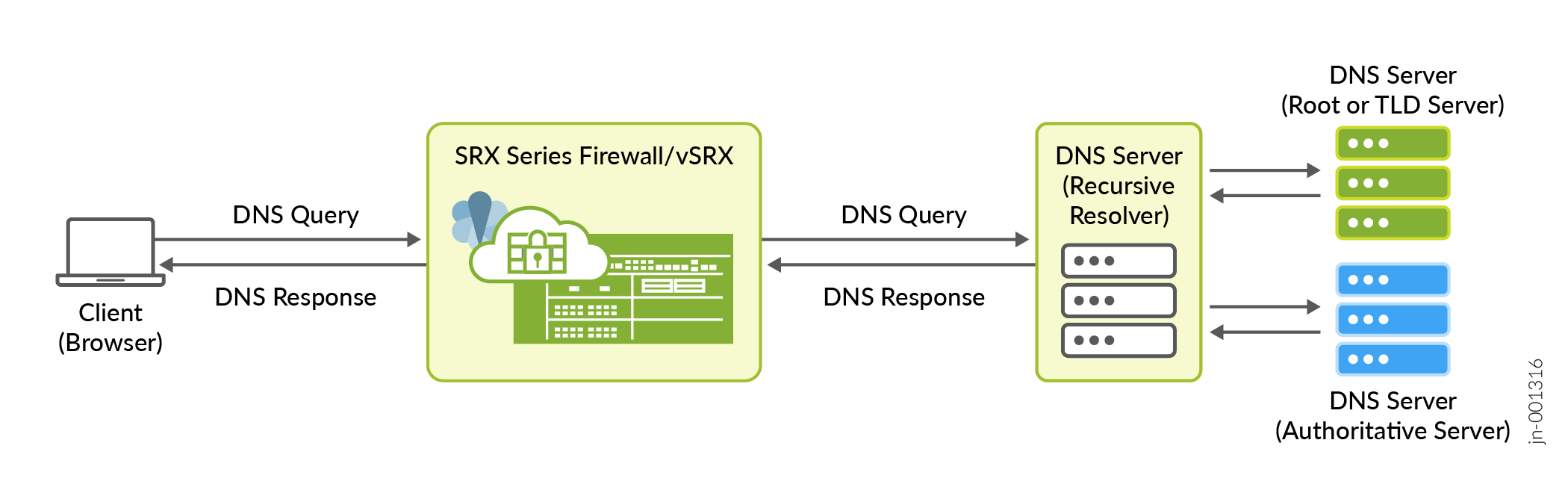
To resolve a DNS, the client browser sends DNS query to DNS resolver, which in turn resolves the IP using Root server, TLD (top-level domain) server and Authoritative server. Client gets the DNS response. After this exchange, the client starts communication with the server.
As a packet passes through SRX Series Firewall, the firewall uses application identification and deep packet inspection (DPI), to obtain DNS-related contexts. Based on these contexts, the firewall builds a cache of DNS records for FQDNs that are configured in the policy. The cache maintains FQDN, IP, and TTL information. Any updates in the DNS cache, the change propagates to the NAT or security policy module.
- DNS snooping builds DNS cache on SRX Series Firewall for the traffic originated from the end user client and not from one DNS server to another, or host-bound packets, or packets to DNS proxy.
- You can enable either the DNS proxy or DNS snooping at a time.
- We support snooping of DNS traffic over UDP and DNS traffic over TCP (symmetric traffic deployments).
Support for Logical System and Tenant System
DNS snooping configured at the root logical system applies to all logical-systems; any DNS-snooping done at the logical-system level gets included into the system-wide DNS-snooping cache.
DNS Snooping and DNS Module Integration
DNS Snooping feature also integrates with existing DNS cache module in the RE. This common DNS cache provides comprehensive and up-to-date DNS database.
The system merges entries from following sources to provide data for common DNS cache:
- DNS-resolver that resolves FQDN using explicit DNS-query
- DNS-snooping that resolves FQDN after inspecting the DNS traffic in the dataplane.
The show security dns-cache command displays the entries from both
DNS-resolver and DNS-snooping.
Security Policies Utilyzing DNS Snooping Cache
In this example, you enable DNS snooping and create a address book with FQDN name. Then create a security policy and add the address book (FQDN name) as destination address. When the traffic matches security policy, the system captures DNS response packets as traffic traverse the network, extracting the relevant DNS records and build mapping of FQDN and IP address in a local cache.
In addition, you can configure a security policy to use the DNS cache and enforce the intended policy. For example, in the following sample, the system obtains data through DNS-snooping, which allows policy P1 to match the desired traffic.
[edit]
user@host# set security address-book global address addr1 dns-name www.example.com
user@host# set services dns-snooping global-enable
user@host# set security policies from-zone trust to-zone untrust policy P1 match source-address addr1
user@host# set security policies from-zone trust to-zone untrust policy P1 match destination-address any
user@host# set security policies from-zone trust to-zone untrust policy P1 match application any
user@host# set security policies from-zone trust to-zone untrust policy P1 match source-identity authenticated-user
user@host# set security policies from-zone trust to-zone untrust policy P1 then permit
The above configuration ensures that the policy (P1) matches traffic originating from the address associated with "www.example.com". With this configuration, only authenticated users from "www.example.com" will be permitted. This example demonstrates how DNS-snooping-based policies provide precise control and enhance network security by dynamically adjusting to real-time DNS data.
Set DNS Snooping Report Interval
You can control how often DNS-snooping data from the data plane populates in the comon DNS cache using the following statement:
[edit]
user@host# set services dns-snooping report-interval  <1..10>
You can set the interval between 1 to 10 seconds. The default interval is 5 seconds.
A lower interval propagates data earlier and expedites policy enforcement but increases device communications and frequent policy changes. Use a lower interval when DNS-snooping churn is minimal, as indicated by show services dns-snooping counters.
A higher interval reduces policy modifications and device communications.