
SCTP Features and Architecture
Learn about SCTP, including its types, features, architecture, limitations, and its behavior in a chassis cluster.
Stream Control Transmission Protocol (SCTP) is a transport-layer protocol that ensures reliable, in-sequence transport of data. SCTP provides multihoming support where one or both endpoints of a connection can consist of more than one IP address. This enables transparent failover between redundant network paths.
Introduction to SCTP
SCTP is a robust transport-layer protocol within the Internet protocol (IP) suite, operating alongside UDP and TCP. It is designed to offer reliable, connection-oriented transport for various Internet applications. Key features of SCTP include:
Multi-stream Protocol: SCTP supports multiple streams of messages for each endpoint, catering to applications that require different message priorities and strict ordering within streams.
User Data Fragmentation: To handle messages exceeding the path's maximum transmission unit (MTU), SCTP fragments the data into chunks, marking the last chunk with a specific flag. The receiver side reassembles these chunks before passing the complete message to the upper-layer protocol.
- Chunk Bundling: SCTP allows bundling chunks from multiple messages into a single SCTP packet, facilitating efficient data transfer. The receiver disassembles these chunks before delivering them to the upper-layer protocol.
- Packet Validation: SCTP includes a verification tag in its header to uniquely identify association sessions. This tag helps protect against masquerade attacks and prevents the processing of stale SCTP packets from previous associations.
- Multihoming Support: SCTP allows endpoints to specify a list of local transport addresses during association setup, promoting high availability for data transfer by establishing routes for each destination address.
Moreover, SCTP offers transparent failover between redundant network paths, making it an ideal choice for applications requiring reliable, in-sequence data transport. It operates on top of connectionless packet networks like IP and supports single or multi-IP scenarios.
Additionally, SCTP finds application in transporting signaling messages for 3G mobile networks through protocols such as M3UA, M2UA, or SUA. It is optimized to avoid multithread infrastructure problems during high traffic, enhance association searching rate, and improve Finite State Machine (FSM) for retransmission cases.
SCTP is particularly well-suited for applications requiring monitoring and loss-of-session detection. The heartbeat mechanism monitors session connectivity, ensuring a reliable and secure transport with minimal end-to-end delay and quick failover time in the event of network failures.
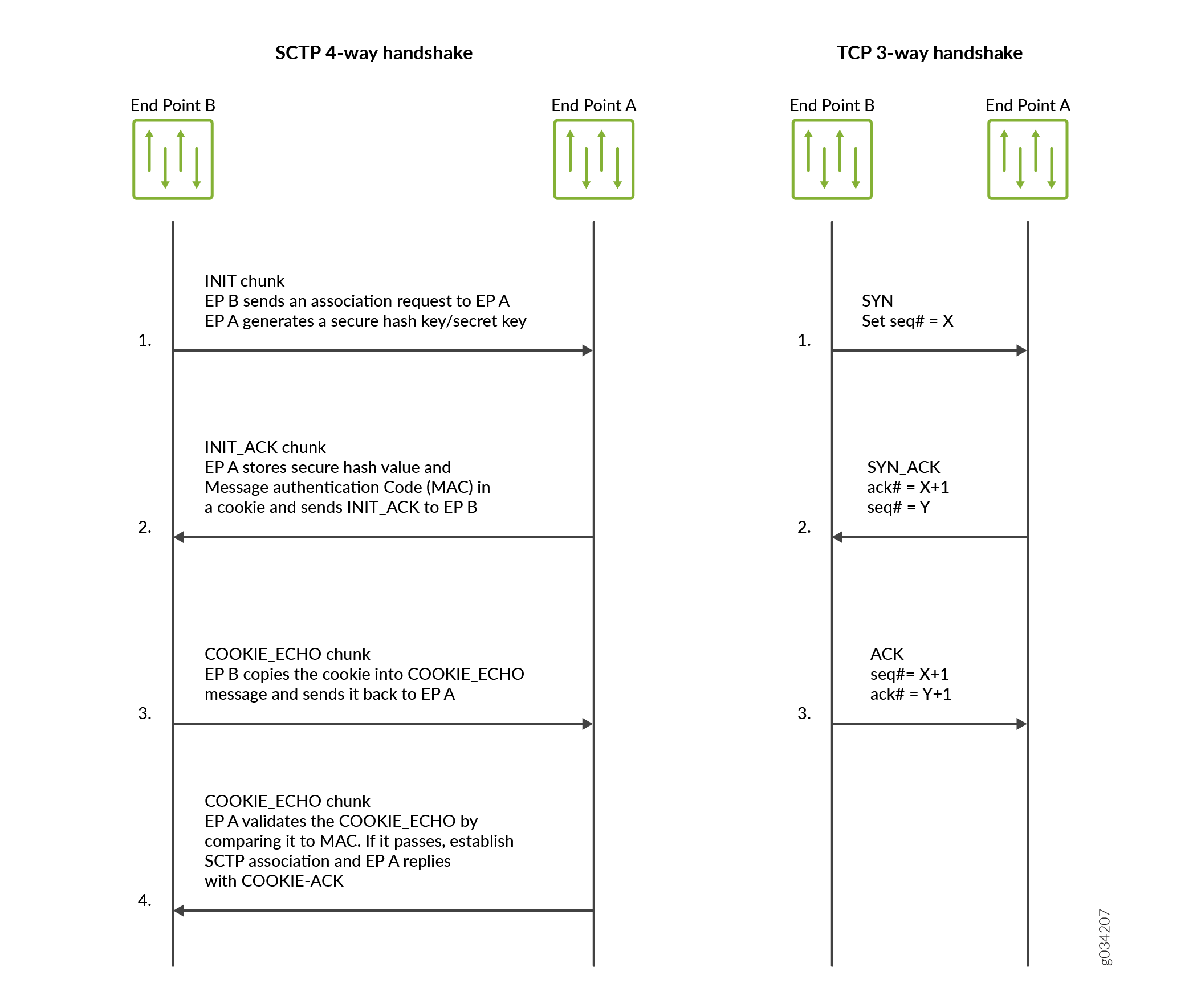
In these sections, we will explore SCTP capabilities and deployment considerations, including:
- SCTP Services
- SCTP Limitations and Constraints
- SCTP Features Overview
- Understanding Central Point Architecture Support for SCTP
- SCTP Support for Virtual Routing and Forwarding (VRF)
- SCTP One‑to‑Many Style Socket
SCTP Services
SCTP provides the following services:
Aggregate Server Access Protocol (ASAP)
Bearer-independent Call Control (BICC)
Direct Data Placement Segment chunk (DDP-segment)
Direct Data Placement Stream session control (DDP-stream)
Diameter in a DTLS/SCTP DATA chunk (Diameter-DTLS)
Diameter in an SCTP DATA chunk (Diameter-SCTP)
DPNSS/DASS 2 extensions to IUA Protocol (DUA)
Endpoint Handlescape Redundancy Protocol (ENRP)
H.248 Protocol (H248)
H.323 Protocol (H323)
ISDN User Adaptation Layer (IUA)
MTP2 User Peer-to-Peer Adaptation Layer (M2PA)
MTP2 User Adaptation Layer (M2UA)
MTP3 User Adaptation Layer (M3UA)
Other unspecified-configured SCTP payload protocols (Others)
Q.IPC
Reserved
S1 Application Protocol (S1AP)
Simple Middlebox Configuration (SIMCO)
SCCP User Adaptation Layer (SUA)
Transport Adapter Layer Interface (TALI)
V5.2 User Adaptation Layer (V5UA)
X2 Application Protocol (X2AP)
SCTP Limitations and Constraints
SCTP has the following limitations and constraints:
IP Addresses
Only static IP NAT is supported.
Interface packets (from either client or server side) must belong to the same zone.
Policies
- Dynamic policies are not supported; you must configure all policies for SCTP sessions.
- When a policy is deleted, related sessions and associations are cleared.
- One policy must permit SCTP traffic from all client IPs to all server IPs, and another must permit server-to-client SCTP traffic. If one policy includes an SCTP profile, the reverse policy must also include the same profile.
If you configure different policies for each session belonging to one association, there will be multiple policies related to one association. The SCTP packet management (drop, rate-limit, and so on) uses the profile attached to the handling SCTP session's policy.
If different policies are configured for sessions within one association, multiple policies may apply. Packet management actions (drop, rate-limit, etc.) use the profile attached to the policy handling the SCTP session.- Applications used in security policies to permit SCTP ALG traffic cannot be configured with the
application-protocol ignoreoption, even when SCTP ALG inspection is not configured.
SCTP enable/disable is controlled by whether a SCTP profile configured.
SCTP Enable/Disable and Profile Behavior
- SCTP enable/disable is controlled by whether an SCTP profile is attached to a policy.
- If no profile is attached, SCTP packets are forwarded without inspection.
- If a profile includes
nat-only, only NAT translation is performed; otherwise, both NAT translation and SCTP inspection occur. - When SCTP is disabled, all associations are deleted; subsequent packets are passed or dropped based on policy.
- When
If you want to enable SCTP again, all the running SCTP communications will be dropped, because no associations exist. New SCTP communications can establish an association and perform the inspections. Clear old SCTP sessions when SCTP is reenabled; doing so will avoid any impact caused by the old SCTP sessions on the new SCTP communications.
SCTP is enabled, existing SCTP sessions must be cleared, otherwise old sessions forward traffic without inspection. Reenabling SCTP drops all current SCTP communications; new associations can then be created with inspections. - If a profile is added to an existing policy, clear related sessions or remove and recreate the policy.
- Changing timeout values in the profile does not affect timeout values of existing associations. Always clear old SCTP sessions when re-enabling SCTP to prevent impacts on new communications.
SCTP Rate-Limiting
- Configuration changes apply only to newly established associations.
- Supported protocol decimal values: 0–63 (48 IANA assigned + 16 unassigned).
A maximum of 80 addresses is rate limited in one profile.
Maximum 80 addresses rate-limited in one profile.A maximum of 10 protocols is rate limited for one address in one profile.
Maximum 10 protocols rate-limited per address.- Rate limit range: 1–12000.
SCTP Payload Protocol Blocking
- Changes affect subsequent traffic of existing associations immediately.
- Supported protocol decimal value range: 0–63.
- NAT-PT supported only for IPv4 ↔ IPv6 in both directions; mixed-up multihoming and mixed-up NAT-PT are not supported.
- Only static NAT is supported.
For static NAT to work, the interface packets (from one side: client or server side) coming in must belong to the same zone.
For static NAT, packets from one direction must belong to the same zone.- For multihoming, only IPv4 address parameters in INIT/INIT_ACK are supported.
- Only established SCTP associations are synchronized to peer sessions.
- SCTP sessions are not deleted when associations end; they time out in 30 minutes (configurable).
If the 4-way handshake process is not handled on one node and instead handled on instead on two nodes (for example, two sessions on two nodes in active/active mode). If the cluster is in failover before the 4-way handshake is completed, the association will not be established successfully.
If the 4-way handshake is split across nodes or a cluster failover occurs before completion, the association fails to establish.- ISSU to earlier Junos OS releases is not supported.
The M3UA/SCCP message parsing is checked, but the M3UA/SCCP stateful inspection is not checked.
M3UA/SCCP message parsing is supported; stateful inspection is not.- Only ITU-T Q.711–Q.714 (07/96) standards are supported; ANSI, ETSI, China, and other variants are not.
- Only RFC 4960 is supported.
VPN session affinity does not support GTP and SCTP.
VPN session affinity does not support GTP or SCTP.
SCTP Features Overview
The following are the important features of SCTP:
Multihoming support enabling failover through multiple network paths.
Stream-based delivery of data chunks, preventing head-of-line blocking.
Path selection and monitoring to choose and validate primary transmission paths.
Validation and acknowledgment to guard against flooding attacks and detect missing or duplicated data.
Enhanced error detection suitable for jumbo Ethernet frames.
Understanding Central Point Architecture Support for SCTP
An SCTP association is a connection between two SCTP endpoints. Each SCTP endpoint identifies the association with a tag. During an SCTP association setup, two SCTP endpoints exchange their own tags for receiving packets. During the exchange of packets between two SCTP endpoints, both the source address and the destination address can change in the association life cycle.
A separate SCTP session will be created for each of the first three packets—that is, one session for INIT, INIT-ACK, and COOKIE-ECHO, respectively. Because, the reverse-direction traffic has its own session, the session can no longer match the existing forward-direction session and pass through automatically. Therefore, similar to the forward-direction policy, an explicit policy is needed for approving the reverse-direction SCTP traffic. In this scenario, the SCTP flow session requires a bidirectional policy configuration to be established for even a basic connection.
Use Feature Explorer to confirm platform and release support for specific features.
Review the Platform-Specific SCTP ALG Behavior section for notes related to your platform.
SCTP Support for Virtual Routing and Forwarding (VRF)
The VRF feature allows for the management of remote IP addresses. Before initiating a new SCTP association, the SCTP client must set the socket option for the route‑table index (VRF index) if the egress interface to the SCTP server is configured inside a VRF. Otherwise, the association will not be established because the SCTP client will use the default/global routing instance for association establishment. On the SCTP server side, if the VRF‑index socket option is not set on the listening socket, association requests received on all VRFs are accepted. However, if the VRF‑index socket option is set on the listening socket, only association establishment requests arriving on that particular VRF are accepted.
The application can either set a socket option with a custom flag to provide the route‑table index to SCTP, to handle VRF‑based SCTP association, to place the association in that particular VRF, or to let the SCTP kernel to choose the VRF during association establishment. In the latter case, the kernel chooses the VRF based on the VRF in which the ingress interface is configured during the 4‑way handshake.
When a SCTP association is established over a VRF instance, the kernel must take into account an additional parameter, the unique VRF ID, when looking up unique associations by using the existing 4-tuple used in SCTP (source IP, source port, destination IP, and destination port).
- Inbound SCTP packets over VRF:
When a SCTP packet arrives on an ingress interface, a lookup is conducted using the 5-tuple (source IP, source port, destination IP, destination port, and 'VRF ID on which the packet was received') to determine if there is an existing SCTP association present in the kernel.
- Outbound SCTP packets over VRF:
For every SCTP packet that is sent out from the kernel, the corresponding VRF ID is obtained from the association data using the 5-tuple (source IP, source port, destination IP, destination port, and 'VRF ID on which the packet is to be sent').
SCTP One‑to‑Many Style Socket
SCTP supports two socket styles: 1 to 1 (comparable to TCP) and 1 to many (allowing multiple active associations on a single socket). The latter facilitates communication with several peer endpoints simultaneously, using association identifiers (assoc-id) to distinguish between them.
The following system APIs are used by the application avail the SCTP 1:1 or 1:n style socket:
System Calls for 1 to 1 Style Socket
Server role: socket(), bind(), listen(), accept(), write()/read(), close()
Client role: socket(), connect(), write()/read(), close()
System Calls for 1 to Many Style Socket
Server role: socket(), bind(), listen(), recvmsg(), sendmsg(), close()
Client role: socket(), sendmsg(), recvmsg(), close()
See Also
SCTP Packet Structure Overview
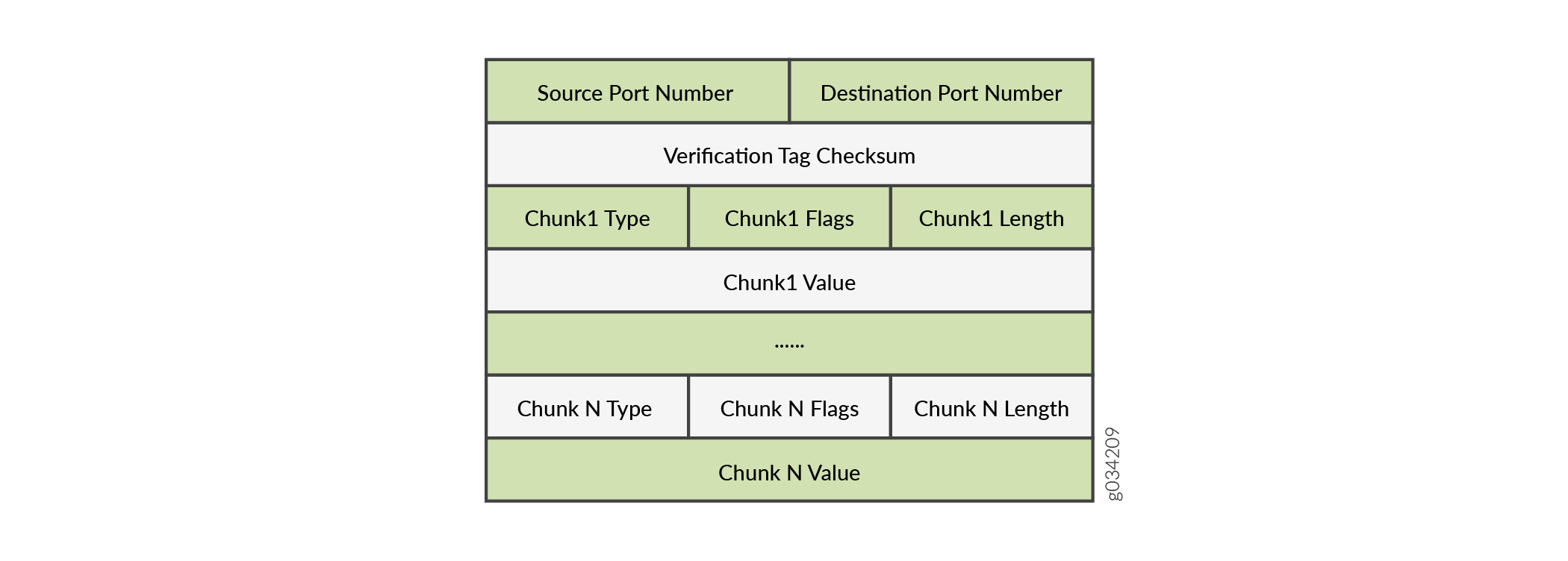
An SCTP packet consists of the following sections:
-
Common Header Section
-
Data Chunk Section
The below figure illustrates the structure of an SCTP packet.
Common Header Section
All SCTP packets require a common header section. This section occupies the first 12 bytes of the packet. The common header fields section describes the fields in the common header section.
|
Field |
Description |
|---|---|
|
Source port number |
Identifies the sending port. |
|
Destination port number |
Identifies the receiving port. The hosts use the destination port number to route the packet to the appropriate destination or an application. |
|
Verification tag |
Distinguishes stale packets from a previous connection. This is a 32-bit random value created during initialization. |
|
Checksum |
Uses the cyclic redundancy check (CRC32) algorithm to detect errors that might have been introduced during data transmission. |
Data Chunk Section
This section occupies the remaining portion of the packet. The data chunk fields section describes the fields in the data chunk section.
|
Field |
Description |
|---|---|
|
Chunk Type |
Identifies the contents of the chunk value field. This is 1-byte long. |
|
Chunk Flags |
Consists of 8 flag-bits whose definition varies with the chunk type. The default value is zero. This indicates that no application identifier is specified by the upper layer for the data. |
|
Chunk Length |
Specifies the total length of the chunk in bytes. This field is 2-bytes long. If the chunk does not form a multiple of 4 bytes (that is, the length is not a multiple of 4), it is implicitly padded with zeros which are not included in the chunk length. |
|
Chunk Value |
A general purpose data field. |
The resource manager (RM) allows eight source IP addresses and eight destination IP addresses during an SCTP communication.
SCTP Multihoming
A SCTP endpoint can be a multihomed host with either all IPv4 addresses or all IPv6 addresses. In the below fifure, endpoint A is connected to two IPv4 addresses, and endpoint B is connected to two IPv4 addresses. Therefore, endpoint A and endpoint B can set up an association using four different pairs of IP addresses, resulting in four valid paths for communication.

In the below figure, endpoint A is connected to two IPv6 addresses, and endpoint B is connected to two IPv6 addresses. Therefore, endpoint A and endpoint B can set up an association using four different pairs of IP addresses, resulting in four valid paths for communication.

SCTP Multichunk Inspection
The SCTP firewall checks all chunks in a message and then permits or drops the packet based on the policy. Use the set security sctp multichunk-inspection enable command to enable SCTP multichunk inspection to check all chunks in a message. Use the delete security sctp multichunk-inspection enable or set security sctp multichunk-inspection disable command to disable SCTP multichunk inspection to check only the first chunk.
After enabling SCTP multichunk inspection, the SCTP firewall checks all chunks in a message and permits or drops the packet. The SCTP firewall drops the packet in the following cases:
The layout of the SCTP chunks do not follow RFC 4960.
A control chunk cannot pass the inspection of the SCTP finite state machine (FSM) or sanity checks.
A data chunk is not allowed to pass the SCTP profile because of the SCTP FSM or sanity checks.
A data chunk is not allowed to pass through the SCTP profile because of protocol blocking or rate limiting. The SCTP firewall resets this chunk to a null PDU and continues to check the next chunk. A data chunk is set to a null PDU based on the following rules:
When you set the null PDU value to
0xFFFFusing theset security sctp nullpdu protocol ID-0xFFFFcommand, then the payload protocol identifier value is replaced with0xFFFFand the user data field is not modified.When you set the null PDU value to
0x0000using theset security sctp nullpdu protocol ID-0x0000command, then the payload protocol identifier value is replaced with0x0000and the first four bytes of the user data field is replaced with zeroes.
If all chunks in a packet are null PDUs, the SCTP firewall drops the packet.
SCTP Behavior in Chassis Cluster
In a chassis cluster configuration mode, the SCTP configuration and the established SCTP association are synced with the peer device. The SCTP module supports both active-active and active-passive modes.
The established SCTP association sends a creation or deletion message to the peer whenever an association is created or deleted on the active device. The secondary device adds or deletes an association respectively upon receiving the message from the established SCTP association. SCTP module then registers the corresponding callback function to receive and handle this message. There is no continuous timer sync between the two associations.
SCTP module registers a cold start sync function when a secondary device joins the cluster or reboots. The SCTP cold start function is called to sync all SCTP associations with the peer devices at the same time.
After the switchover, the established SCTP associations remain functioning, but the associations in the progress of establishment will be lost and the establishment procedure needs to be re-initiated. It is also possible that the associations in the progress of teardown miss the ack message and leaves unestablished SCTP associations in the firewall. These associations will be cleaned up when the timer expires (five hours by default) due to no activity in the association.
-
You should configure all policies for your required SCTP sessions. For example, suppose you have endpoints A and B. Endpoint A has one SCTP association with x number of IPs (IP_a1, IP_a2, IP_a3...IP_ax). Endpoint B has one SCTP association with y number of IPs (IP_b1, IP_b2, IP_b3...IP_by.) The policy on the security device should permit all possible x*y paths in both directions.
-
When an SCTP association is removed, the related SCTP sessions still exist and time out by themselves.
Platform-Specific SCTP ALG Behavior
Use Feature Explorer to confirm platform and release support for specific features.
Use the following table to review platform-specific storage media behaviors for your platform:
|
Platform |
Difference |
|---|---|
|
SRX Series |
|