
Overview of GTP Handover Group and Messages
Learn about GTP handover group and messages, which is a set of SGSNs or SGWs that share a common address‑book library.
GTP Handover Group Overview
A GPRS tunneling protocol (GTP) handover group is a set of Serving GPRS Support Node (SGSNs) or Serving Gateways (SGWs) that share a common address‑book library. An administrator can configure a GTP profile and associate an GTP handover group to the GTP profile. When a GTP handover group name is referenced by a GTP profile, the device checks to see if the current SGSN or SGW address and the proposed SGSN orSGW address are both contained within the same GTP handover group. If both SGSN/SGW addresses are contained within the same GTP handover group, then the handover is allowed. If both the current and proposed SGSN/SGW addresses are not within the same GTP handover group, then the profile for the default handover group is used.
GTP handover across different GTP handover groups is not allowed.
You can configure the handover group using the set security gtp profile <profile-name>
handover-group command. If there is no handover group defined in the GTP
profile and if the traffic reaches the policy configured with this profile, handover
between all GTPs matching this policy is permitted by default. Handover is denied if the
configuration command is set using the set security gtp handover-default
deny command.
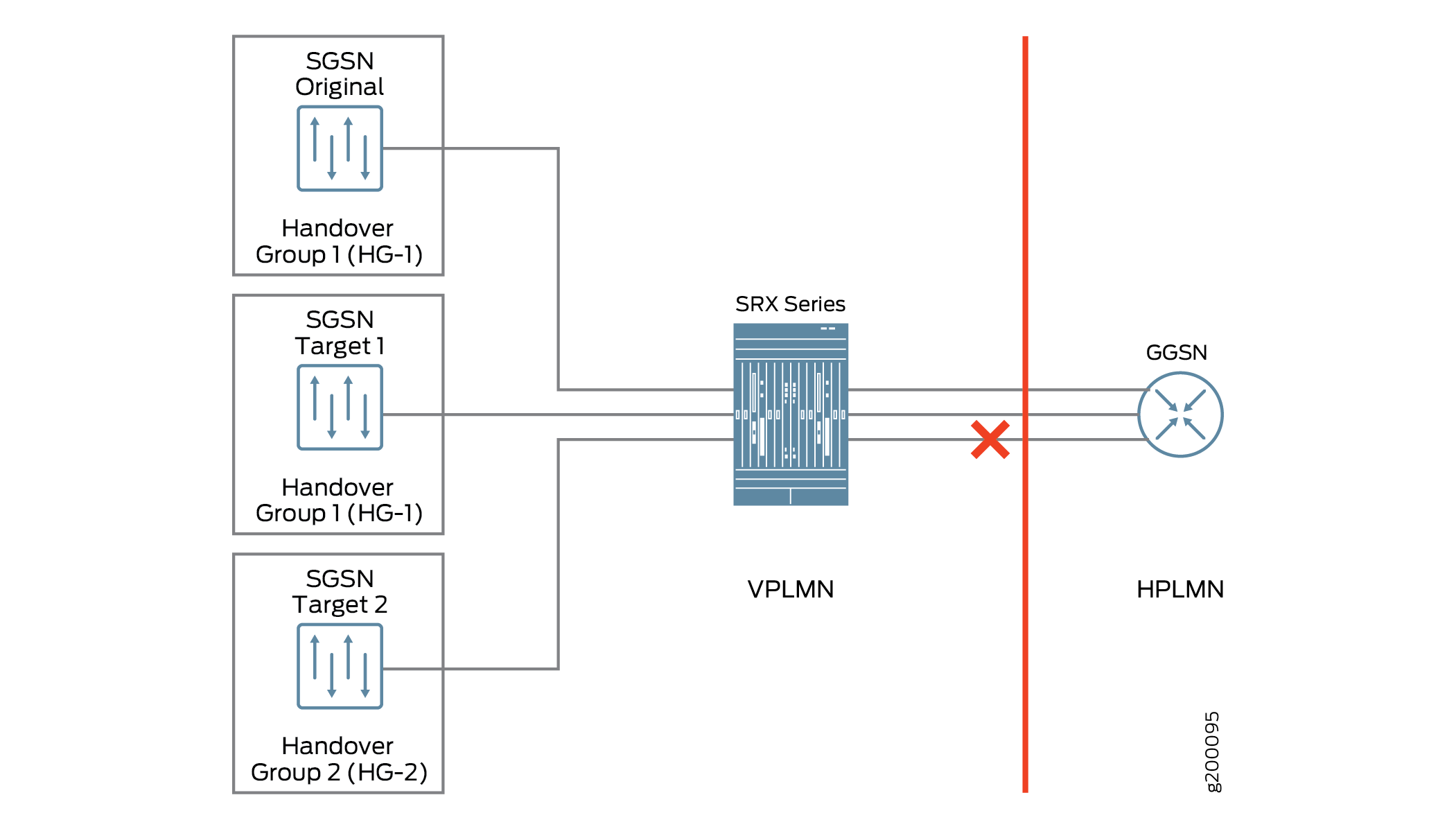
For example, the user equipment accesses the Internet through the GTP tunnels built over the SGSN and the gateway GPRS support node (GGSN). The SGSN builds GTP tunnels to the GGSN to transfer the user equipment data, which attaches to the SGSN. In a home-routed roaming architecture, a roaming user equipment device roams back to the GGSN of a home home public land mobile network (HPLMN) through a visited SGSN (VSGSN) of a visited PLMN (VPLMN). If the original SGSN and the SGSN target 1 as shown in Figure 1 belong to the same handover group (HG-1), then handover occurs. If the SGSN original seeks to handover to SGSN target 2, which is in a different handover group (HG-2), then handover is denied.
GTP Handover Messages
Support for GTP handover messages enables the system to maintain session continuity during mobility events. During handover procedures, Serving GPRS Support Node (SGSN) context messages (request, response, and acknowledge) or forward relocation messages are sent between the new and the old mobility management entity (MME) and SGSN. For GTPv2, the messages should be context messages or forward relocation messages. For simplicity, these types of messages are uniformly referred to as handover messages. The packet data protocol (PDP) context information is acquired from these messages. The PDP context is set up on the SRX Series Firewall when these messages are received, and then subsequent GTP messages can be normally inspected according to the new PDP context.
Use the set security gtp profile <profile-name>
handover-on-roaming-intf command to enable
PDP context setup by handover messages. Use the delete
security gtp profile
<profile-name>
handover-on-roaming-intf command to disable
PDP context setup by handover messages.
The addresses and tunnel endpoint identifiers (TEIDs) for forwarding data traffic are also acquired from handover messages. In addition, the forward tunnel can be set up on SRX Series Firewalls for forwarding GPRS tunneling protocol, user plane (GTP-U) stateful check.
Key features of GTP handover are:
Support for GTP inter-MME/SGSN handover messages for GTPv0, v1, and v2
Inter-MME/SGSN handover messages inspection
GTP PDP context and forwarding tunnel setup according to the information in handover messages
GTP-U inspection for forwarding data traffic
Support for PDP context update by updating and modifying messages with different versions
System log and counter for handover messages
Support for communication between different GTP versions is limited. The Serving GPRS Support Node (SGSN) and Gateway GPRS Support Node (GGSN) using GTPv1 cannot communicate with a GTPv0 node. If a device sends a GTPv1 message to update tunnels that were originally created using GTPv0, the message is dropped and the GTPv0 tunnel is not updated.
Example: Configure Handover Groups
This example shows how to configure GTP handover groups on GTP profiles.
Requirements
Before you begin, you need a virtual Firewall instance and user equipment that needs to connect to the Internet. You will also need a 3G or 4G mobile core network and a home and a visited network.
Use Feature Explorer to confirm platform and release support for specific features.
Review the Platform-Specific Mobile Network Deployment Media Behavior section for notes related to your platform.
Overview
A user equipment accesses the Internet through SGSN and GGSN or PGW in a 3G or 4G core network. The SGSN or SGW builds GTP tunnels to the GGSN or PGW to transfer the user equipment data, which attaches to the SGSN or SGW. In a home-routed roaming architecture, a roaming user equipment roams back to its GGSN of HPLMN through a VSGSN of a VPLMN. If the user equipment device moves out of the coverage area of the visited VSGSN or SGW, it is handed over to another VSGSN or SGW.
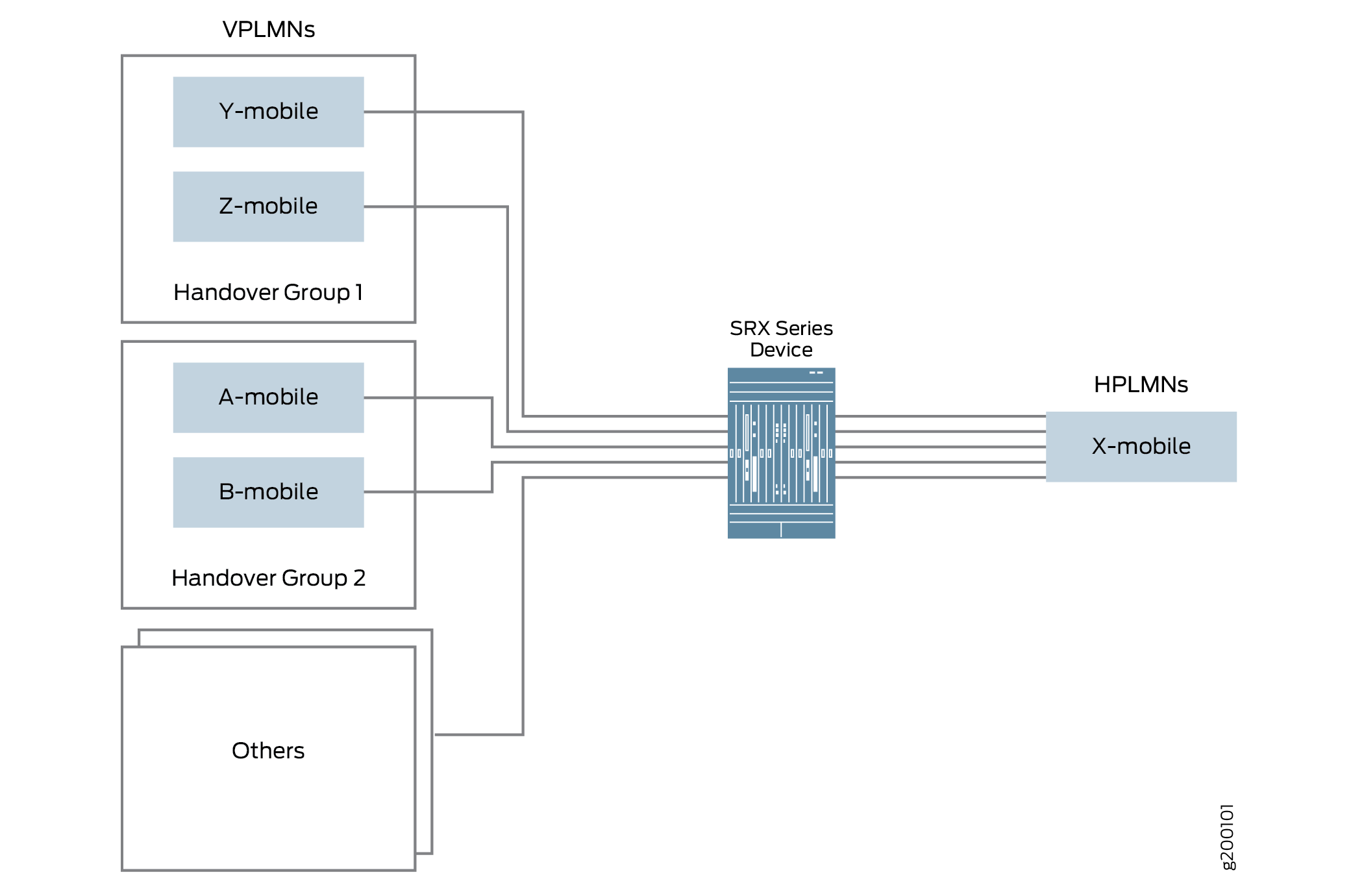
In this example, see Figure 2 X-mobile is the HPLMN and the VPLMN is the Y-mobile and the Z-mobile. You can configure GTP handover groups for the X-mobile and perform the handover within the same handover group.
Configuration
CLI Quick Configuration
To quickly configure this section of the example, copy the following commands,
paste them into a text file, remove any line breaks, change any details
necessary to match your network configuration, copy and paste the commands into
the CLI at the [edit] hierarchy level, and then enter
commit from configuration mode.
set security address-book global address X-mobile-hMME 10.10.10.1/32
set security address-book global address X-mobile-hPGW 10.10.10.2/32
set security address-book global address-set X-mobile address X-mobile-hMME
set security address-book global address-set X-mobile address X-mobile-hPGW
set security address-book global address-set X-mobile description hPLMN
set security address-book global address Y-mobile-vMME-2a 20.20.20.1/32
set security address-book global address Y-mobile-vMME-2b 20.20.20.2/32
set security address-book global address Y-mobile-vSGW-2a 20.20.20.10/32
set security address-book global address Y-mobile-vSGW-2b 20.20.20.11/32
set security address-book global address-set Y-mobile address Y-mobile-vMME-2a
set security address-book global address-set Y-mobile address Y-mobile-vMME-2b
set security address-book global address-set Y-mobile address Y-mobile-vSGW-2a
set security address-book global address-set Y-mobile address Y-mobile-vSGW-2b
set security address-book global address-set Y-mobile description vPLMN2
set security address-book global address Z-mobile-vMME-3a 30.30.30.1/32
set security address-book global address Z-mobile-vMME-3b 30.30.30.2/32
set security address-book global address Z-mobile-vSGW-3a 30.30.30.10/32
set security address-book global address Z-mobile-vSGW-3b 30.30.30.11/32
set security address-book global address-set Z-mobile address Z-mobile-vMME-3a
set security address-book global address-set Z-mobile address Z-mobile-vMME-3b
set security address-book global address-set Z-mobile address Z-mobile-vSGW-3a
set security address-book global address-set Z-mobile address Z-mobile-vSGW-3b
set security address-book global address-set Z-mobile description vPLMN3
set security address-book global address-set as-AT address-set Z-mobile
set security address-book global address-set as-AT address-set Y-mobile
set security address-book global address-set as-AT address-set X-mobile
set security gtp handover-group hg-AT address-book global address-set as-AT
set security gtp profile Scenario-1 handover-on-roaming-intf
set security gtp profile Scenario-1 handover-group hg-AT
set security zones security-zone vplmn
set security zones security-zone hplmn
set security policies from-zone vplmn to-zone hplmn policy ply-vh1 match source-address Y-mobile
set security policies from-zone vplmn to-zone hplmn policy ply-vh2 match source-address Z-mobile
set security policies from-zone vplmn to-zone hplmn policy ply-vh match destination-address X-mobile
set security policies from-zone vplmn to-zone hplmn policy ply-vh match application junos-gprs-gtp
set security policies from-zone vplmn to-zone hplmn policy ply-vh then permit application-services gprs-gtp-profile Scenario-1
set security policies from-zone hplmn to-zone vplmn policy ply-vh-r match source-address X-mobile
set security policies from-zone hplmn to-zone vplmn policy ply-vh-r match destination-address Y-mobile
set security policies from-zone hplmn to-zone vplmn policy ply-vh-r match destination-address Z-mobile
set security policies from-zone hplmn to-zone vplmn policy ply-vh-r match application junos-gprs-gtp
set security policies from-zone hplmn to-zone vplmn policy ply-vh-r then permit application-services gprs-gtp-profile Scenario-1
Step-by-Step Procedure
The following example requires you to navigate various levels in the configuration hierarchy. For instructions on how to do that, see Using the CLI Editor in Configuration mode in the Junos OS CLI User Guide.
To configure GTP handover group in a GTP profile:
Specify the addresses in the address book.
[edit]
user@host# set security address-book global address X-mobile-hMME 10.10.10.1/32
user@host# set security address-book global address X-mobile-hPGW 10.10.10.2/32
user@host# set security address-book global address-set X-mobile address X-mobile-hMME
user@host# set security address-book global address-set X-mobile address X-mobile-hPGW
user@host# set security address-book global address-set X-mobile description hPLMN
user@host# set security address-book global address Y-mobile-vMME-2a 20.20.20.1/32
user@host# set security address-book global address Y-mobile-vMME-2b 20.20.20.2/32
user@host# set security address-book global address Y-mobile-vSGW-2a 20.20.20.10/32
user@host# set security address-book global address Y-mobile-vSGW-2b 20.20.20.11/32
user@host# set security address-book global address-set Y-mobile address Y-mobile-vMME-2a
user@host# set security address-book global address-set Y-mobile address Y-mobile-vMME-2b
user@host# set security address-book global address-set Y-mobile address Y-mobile-vSGW-2a
user@host# set security address-book global address-set Y-mobile address Y-mobile-vSGW-2b
user@host# set security address-book global address-set Y-mobile description vPLMN2
user@host# set security address-book global address Z-mobile-vMME-3a 30.30.30.1/32
user@host# set security address-book global address Z-mobile-vMME-3b 30.30.30.2/32
user@host# set security address-book global address Z-mobile-vSGW-3a 30.30.30.10/32
user@host# set security address-book global address Z-mobile-vSGW-3b 30.30.30.11/32
user@host# set security address-book global address-set Z-mobile address Z-mobile-vMME-3a
user@host# set security address-book global address-set Z-mobile address Z-mobile-vMME-3b
user@host# set security address-book global address-set Z-mobile address Z-mobile-vSGW-3a
user@host# set security address-book global address-set Z-mobile address Z-mobile-vSGW-3b
user@host# set security address-book global address-set Z-mobile description vPLMN3
user@host# set security address-book global address-set as-AT address-set X-mobile
user@host# set security address-book global address-set as-AT address-set Y-mobile
user@host# set security address-book global address-set as-AT address-set Z-mobile
Specify the handover group.
user@host# set security gtp handover-group hg-AT address-book global address-set as-AT
Configure the handover groups on the GTP profile.
user@host# set security gtp profile Scenario-1 handover-on-roaming-intf
user@host# set security gtp profile Scenario-1 handover-group hg-AT
Configure security zones for the GTP profile.
user@host# set security zones security-zone vplmn
user@host# set security zones security-zone hplmn
Define security policies for the GTP profile.
set security policies from-zone vplmn to-zone hplmn policy ply-vh1 match source-address Y-mobile
set security policies from-zone vplmn to-zone hplmn policy ply-vh2 match source-address Z-mobile
user@host# set security policies from-zone vplmn to-zone hplmn policy ply-vh match destination-address X-mobile
user@host# set security policies from-zone vplmn to-zone hplmn policy ply-vh then permit application-services gprs-gtp-profile Scenario-1
user@host# set security policies from-zone hplmn to-zone vplmn policy ply-vh-r match source-address X-mobile
set security policies from-zone hplmn to-zone vplmn policy ply-vh-r match destination-address Y-mobile
set security policies from-zone hplmn to-zone vplmn policy ply-vh-r match destination-address Z-mobile
user@host# set security policies from-zone hplmn to-zone vplmn policy ply-vh-r match application junos-gprs-gtp
user@host# set security policies from-zone hplmn to-zone vplmn policy ply-vh-r then permit application-services gprs-gtp-profile Scenario-1
Results
From configuration mode, confirm your configuration by entering the
show security gtp profile, show security
address-book, and show security policies
commands. If the output does not display the intended configuration, repeat
the configuration instructions in this example to correct it.
[edit]

user@host# show security gtp
profile Scenario-1 {
    handover-on-roaming-intf;
    handover-group {
        hg-AT;
    }
}
handover-group hg-AT {
    address-book global {
        address-set {
            as-AT;
        }
    }
}
[edit]

user@host# show security address-book
global {
    address X-mobile-hMME 10.10.10.1/32;
    address X-mobile-hPGW 10.10.10.2/32;
    address Y-mobile-vMME-2a 20.20.20.1/32;
    address Y-mobile-vMME-2b 20.20.20.2/32;
    address Y-mobile-vSGW-2a 20.20.20.10/32;
    address Y-mobile-vSGW-2b 20.20.20.11/32;
    address Z-mobile-vMME-3a 30.30.30.1/32;
    address Z-mobile-vMME-3b 30.30.30.2/32;
    address Z-mobile-vSGW-3a 30.30.30.10/32;
    address Z-mobile-vSGW-3b 30.30.30.11/32;
    address-set X-mobile {
        description hPLMN;
        address X-mobile-hMME;
        address X-mobile-hPGW;
    }
    address-set Y-mobile {
        description vPLMN2;
        address Y-mobile-vMME-2a;
        address Y-mobile-vMME-2b;
        address Y-mobile-vSGW-2a;
        address Y-mobile-vSGW-2b;
    }
    address-set Z-mobile {
        description vPLMN3;
        address Z-mobile-vMME-3a;
        address Z-mobile-vMME-3b;
        address Z-mobile-vSGW-3a;
        address Z-mobile-vSGW-3b;
    }
    address-set as-AT {
        address-set Z-mobile;
        address-set Y-mobile;
        address-set X-mobile;
    }
}
[edit]

user@host# show security policies
from-zone vplmn to-zone hplmn {
    policy ply-vh {
        match {
            source-address [ Y-mobile Z-mobile ];
            destination-address X-mobile;
            application junos-gprs-gtp;
        }
        then {
            permit {
                application-services {
                    gprs-gtp-profile Scenario-1;
                }
            }
        }
    }
}
from-zone hplmn to-zone vplmn {
    policy ply-vh-r {
        match {
            source-address X-mobile;
            destination-address [ Y-mobile Z-mobile ];
            application junos-gprs-gtp;
        }
        then {
            permit {
                application-services {
                    gprs-gtp-profile Scenario-1;
                }
            }
        }
    }
}
If you are done configuring the device, enter commit from
configuration mode.
Verification
Confirm that the configuration is working properly. The show security gtp
command displays all the handover groups configured for the GTP profile Scenario-1.
Platform-Specific Mobile Network Deployment Media Behavior
Use Feature Explorer to confirm platform and release support for specific features.
Use the following table to review platform-specific storage media behaviors for your platform:
| Platform | Difference |
|---|---|
|
SRX Series |
|
Change History Table
Feature support depends on the platform and the Junos OS release you are using. Use Feature Explorer to determine if a feature is supported on your platform.
| Release | Description |
|---|---|
| 15.1X49-D70 |
Starting in Junos OS Release 15.1X49-D70 and Junos OS Release 17.3R1, the SGSN, GGSN of the GTPv1 or GTPv2 nodes cannot communicate with the GTPv0 node. |
|
15.1X49-D40 |
Starting in Junos OS Release 15.1X49-D40 and Junos OS Release 17.3R1, support for GTP handover messages is provided. |