
gNOI LinkQualification Service
Use the gNOI LinkQualification service to test the reliability of a
link between two devices.
Overview
Use the LinkQualification service RPCs to perform a packet-based
link qualification (PBLQ) test on a pair of connected ports. The
LinkQualification service proto definition file is located at
https://github.com/openconfig/gnoi/blob/main/packet_link_qualification/packet_link_qualification.proto.
A packet-based link qualification (PBLQ) test checks the reliability of a link. A
GNOI client (or remote controller) is connected to both endpoints of the link to be
tested. The client sends LinkQualification service RPCs to both
devices to test their capability to run the test before initiating the test. When
the test is initiated, the near end device generates test packets based on the
information it receives from the client. The near end device sends the test packets
to the far end device, which reflects the packets back to the near end device in a
closed loop. When the test is complete, both devices send aggregate packet
statistics to the client. The client examines how many of the sent packets were
received or dropped. The client uses this information to determine the quality of
the link. The client can then manage and load balance traffic across the network
based on the link quality.
The near end device operates as the injector in packet injector mode. In this mode, the device generates packets and injects them into the link between the two devices. The device generates the number of packets in the packet size instructed by the client.
The far end device operates as the reflector in ASIC loopback mode. While the test is running, both interfaces involved in the test to go into loopback mode. The devices exchange the test packets in a closed loop between the interfaces so other packets do not affect the results of the test.
Supported RPCs
| RPC | Description | Introduced in Release |
|---|---|---|
Capabilities() |
Return whether the device meets the requirements to perform the test. |
Junos OS Evolved 25.2X100D20 |
Create() |
Start a PBLQ test on a set of interfaces. |
Junos OS Evolved 25.2X100D20 |
Get() |
Return the results of the test. |
Junos OS Evolved 25.2X100D20 |
List() |
List the results of the tests that are available for the specified interface. |
Junos OS Evolved 25.2X100D20 |
Delete() |
Remove the specified test and its results. If the test is in progress, this RPC cancels and then deletes the test. |
Junos OS Evolved 25.2X100D20 |
Topology
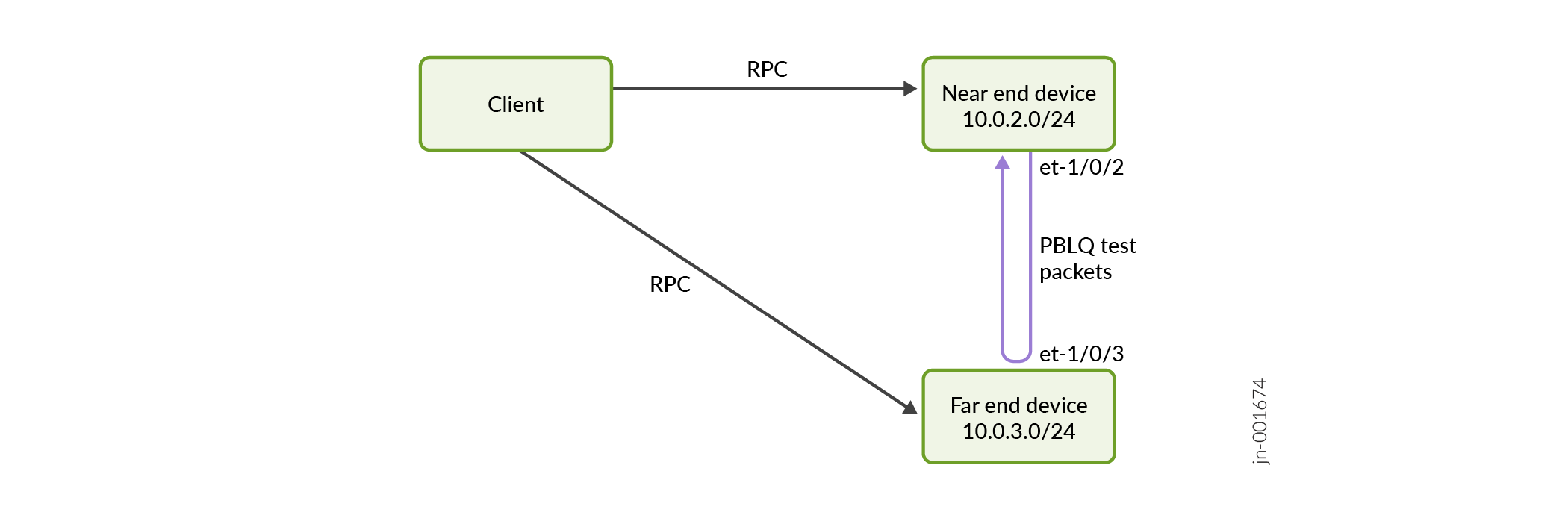
In this topology, the client has already confirmed that both devices meet the
capability requirements to run the PBLQ test. The client initiates the test by
sending the Create() RPC to both devices. The near end device
generates test packets based on the client's instructions. The near end device sends
the test packets out the interface et-1/0/2 and across the link to the far end
device. The far end device reflects the test packets back to the near end device in
a closed loop through interface et-1/0/3.
Network Device Configuration
Before you begin, confirm that:
Your devices support this feature. The endpoints must support PBLQ testing using
LinkQualificationservice RPCs. Use Feature Explorer to confirm platform and release support for this feature.The endpoints are connected physically.
Both interfaces involved in the test are active. Run the
show
                                interfaces terse
command on each device to check that the status of both interfaces isUP.
To prepare your devices to run the PBLQ test:
Run the PBLQ Test
After you have configured the gNOI client and the endpoint devices, you are ready to write and execute your application.