
Configuring Traffic Sampling on MX, M and T Series Routers
Traffic sampling enables you to copy traffic to a Physical Interface Card (PIC) that performs flow accounting while the router forwards the packet to its original destination. You can configure the router to perform sampling in one of the following three locations:
-
On the Routing Engine, using the sampled process. To select this method, use a filter (input or output) with a matching term that contains the
then samplestatement. -
On the Monitoring Services, Adaptive Services, or Multiservices PIC.
-
On an inline data path without the need for a services Dense Port Concentrator (DPC). To do this inline active sampling, you define a sampling instance with specific properties. One Flexible PIC Concentrator (FPC) can support only one instance; for each instance, either services PIC-based sampling or inline sampling is supported per family. Inline sampling supports version 9 and IPFIX flow collection templates.
Routing Engine based sampling is not supported on VPN routing and forwarding (VRF) instances.
Configuring Firewall Filter for Traffic Sampling
To configure firewall filter for traffic sampling, you must perform the following tasks:
-
Create a firewall filter to apply to the logical interfaces being sampled by including the
filterstatement at the[edit firewall family family-name]hierarchy level. In the filterthenstatement, you must specify the action modifiersampleand the actionaccept.filter filter-name { term term-name { then { sample; accept; } } }
For more information about firewall filter actions and action modifiers, see the Routing Policies, Firewall Filters, and Traffic Policers User Guide.
-
Apply the filter to the interfaces on which you want to sample traffic by including the
addressandfilterstatements at the[edit interfaces interface-name unit logical-unit-number family family-name]hierarchy level:address address { } filter { input filter-name; }
The following prerequisites apply to M, MX, and T Series routers when you configure traffic sampling on interfaces and in firewall filters:
-
If you configure a sample action in a firewall filter for an inet or inet6 family on an interface without configuring the forwarding-options settings, operational problems might occur if you also configure port mirroring or flow-tap functionalities. In such a scenario, all the packets that match the firewall filter are incorrectly sent to the service PIC.
-
If you include the
then samplestatement at the[edit firewall family inet filter filter-name term term-name]hierarchy level to specify a sample action in a firewall filter for IPv4 packets, you must also include thefamily inetstatement at the[edit forwarding-options sampling]hierarchy level or theinstance instance-name family inetstatement at the[edit forwarding-options sampling]hierarchy level. Similarly, if you include the thensamplestatement at the[edit firewall family inet6 filter filter-name term term-name]hierarchy level to specify a sample action in a firewall filter for IPv6 packets, you must also includefamily inet6statement at the[edit forwarding-options sampling]hierarchy level or theinstance instance-name family inet6statement at the[edit forwarding-options sampling]hierarchy level. Otherwise, a commit error occurs when you attempt to commit the configuration. -
Also, if you configure traffic sampling on a logical interface by including the sampling input or sampling output statements at the
[edit interface interface-name unit logical-unit-number]hierarchy level, you must also include thefamily inet | inet6statement at the[edit forwarding-options sampling]hierarchy level, or theinstance instance-name family inet | inet6statement at the[edit forwarding-options sampling]hierarchy level.
Configuring Traffic Sampling on a Logical Interface
To configure traffic sampling on any logical interface, enable
sampling and specify a non zero sampling rate by including the sampling
statement at the [edit forwarding-options] hierarchy level:
sampling {
    input {
        rate number;
        run-length number;
        max-packets-per-second number;
        maximum-packet-length bytes;
    }
When you use Routing Engine-based sampling, specify the threshold
traffic value by including the max-packets-per-second statement.
The value is the maximum number of packets to be sampled, beyond which
the sampling mechanism begins dropping packets. The range is from
0 through 65,535. A value of 0 instructs the Packet Forwarding Engine
not to sample any packets. The default value is 1000.
When
you configure active monitoring and specify a Monitoring Services,
Adaptive Services, or Multiservices PIC in the output statement,
or when you configure inline sampling, the max-packets-per-second value is ignored.
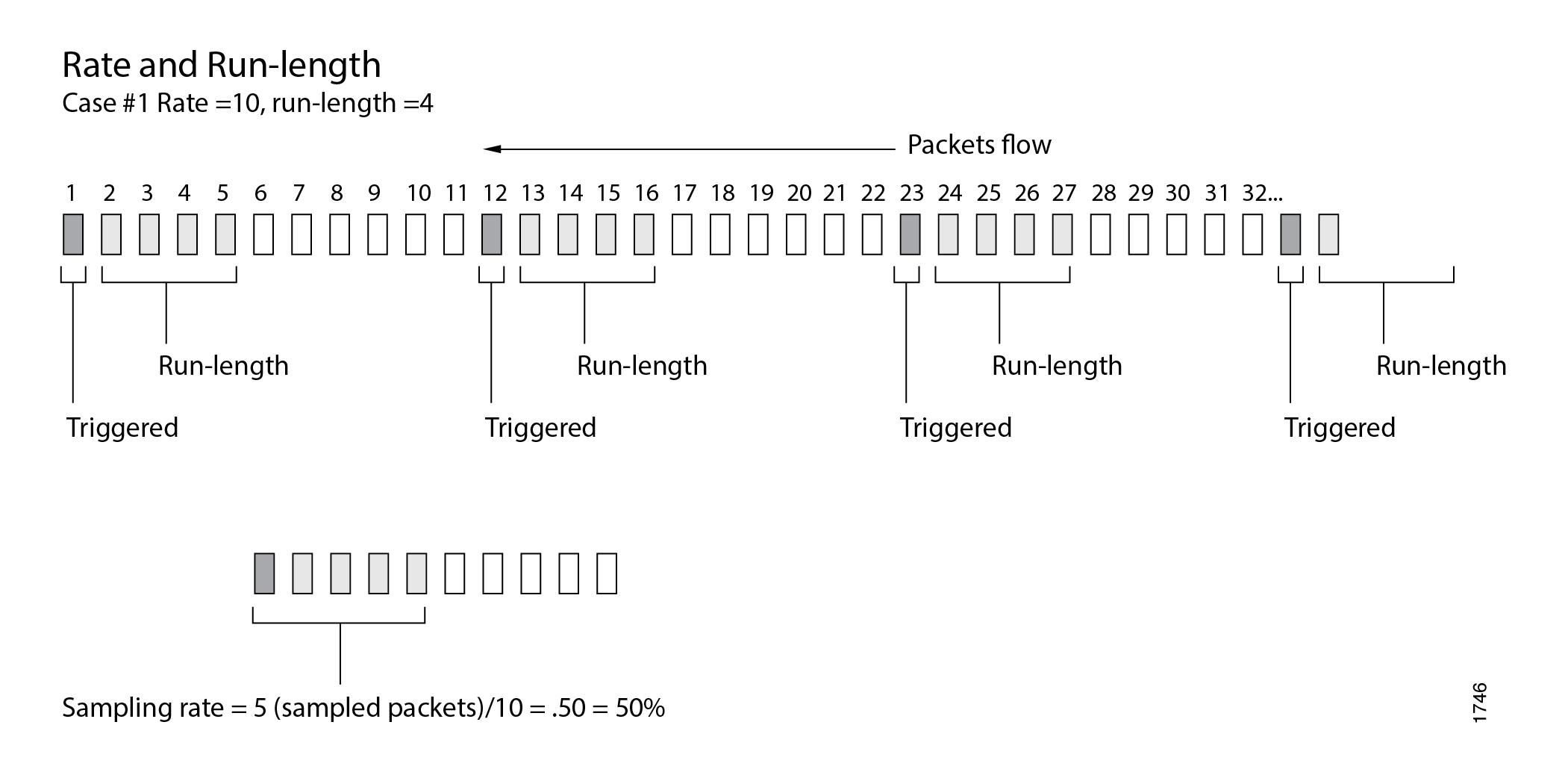
Specify the sampling rate by setting the values for rate and run-length (see Figure 1).
Do not configure ingress sampling on ms- logical
interfaces on which PIC-based flow monitoring is enabled, which causes
undesired flow monitoring behavior and might result in repeated sampling
of a single packet. Starting in Junos OS Release 15.1, a commit error
occurs when you try to configure ingress traffic sampling on that
interface. In Junos OS Release 14.2 and earlier, the commit error
does not occur, but you should not configure ingress traffic sampling
on that interface.
If PIC-based flow monitoring is enabled on an ms-fpc/pic/port.logical-unit interface, a commit check error occurs when you attempt to configure
ingress traffic sampling on that interface. This error occurs because
a combination of ingress sampling and PIC-based flow monitoring operations
on an ms- logical interface causes undesired flow monitoring
behavior and might result in repeated sampling of a single packet.
You must not configure ingress sampling on ms- logical
interfaces on which PIC-based flow monitoring is enabled.
The rate statement specifies the ratio of packets
to be sampled. For example, if you configure a rate of 10, x number of packets out of every 10 is sampled, where x=run length + 1. By default, the rate is 0, which means
that no traffic is sampled.
The run-length statement specifies the number of
matching packets to sample following the initial one-packet trigger
event. By default, the run length is 0, which means that no more traffic
is sampled after the trigger event. The range is from 0 through 20.
Configuring a run length greater than 0 allows you to sample packets
following those already being sampled.
The run-length and maximum-packet-length configuration statements are not supported on MX80 routers.
If you do not include the input statement, sampling
is disabled.
To collect the sampled packets in a file, include the file statement at the [edit forwarding-options sampling output] hierarchy level. Output file formats are discussed later in the
chapter.
Disabling Traffic Sampling
To explicitly disable traffic sampling on the router, include
the disable statement at the [edit forwarding-options
sampling] hierarchy level:
disable;
Sampling Once
To explicitly sample a packet for active monitoring only once,
include the sample-once statement at the [edit forwarding-options
sampling] hierarchy level:
sample-once;
Setting this option avoids duplication of packets in cases where sampling is enabled at both the ingress and egress interfaces and simplifies analysis of the sampled traffic.
Preserving Prerewrite ToS Value for Egress Sampled or Mirrored Packets
Starting in Junos OS Release
14.1, you can preserve the prenormalized type-of-service (ToS) value
in egress sampled or mirrored packets. Include the pre-rewrite-tos statement at the [edit forwarding-options sampling] hierarchy level.
On MPC-based interfaces, you can configure ToS rewrite either
using class-of-service (CoS) configuration by including the rewrite-rules
dscp rule_name
statement at the [edit
class-of-service interfaces interface-name unit logical-unit-number] hierarchy level or using firewall
filter configuration by including the dscp statement at
the [edit firewall family family-name filter filter-name term term-name then] hierarchy level. If ToS rewrite is configured, the egress mirrored
or sampled copies contain the post-rewrite ToS values by default.
With the pre-rewrite-tos configuration, you can retain
the prerewrite ToS value in the sampled or mirrored packets.
-
If ToS rewrite is configured on the egress interface by using both CoS and firewall filter configuration, and if the
pre-rewrite-tosstatement is also configured, then the egress sampled packets contain the DSCP value set using the firewall filter configuration. However, if thepre-rewrite-tosstatement is not configured, the egress sampled packets contain the DSCP value set by the CoS configuration. -
With the
pre-rewrite-tosstatement, you can configure retaining prenormalization ToS values only for sampling done underfamily inetandfamily inet6. -
This feature cannot be configured at the
[edit logical-systems]hierarchy level. It can be configured only at the global level under theforwarding-optionconfiguration. -
When ToS rewrite is configured by using a firewall filter on both ingress and egress interfaces, the egress sampled packets contain the DSCP value set by the ingress ToS rewrite configuration if the
pre-rewrite-tosstatement is configured. However, if thepre-rewrite-tosstatement is not configured, the egress sampled packets contain the DSCP value set by the ToS rewrite configuration for the egress firewall filter. -
If the
pre-rewrite-tosstatement is configured, and a deactivate or delete operation is performed at the[edit forwarding-options]hierarchy level,pre-rewrite-tosconfiguration still remains active. To disable thepre-rewrite-tosconfiguration for such a case, you must explicitly deactivate or delete thepre-rewrite-tosstatement at the[edit forwarding-options sampling]hierarchy level before performing a deactivate or delete operation at the[edit forwarding-options]hierarchy level.
Configuring Traffic Sampling Output
To configure traffic sampling output, include the following
statements at the [edit forwarding-options sampling family (inet
| inet6 | mpls) output] hierarchy level:
aggregate-export-intervalseconds; flow-active-timeoutseconds; flow-inactive-timeoutseconds; extension-serviceservice-name; flow-serverhostname { aggregation { autonomous-system; destination-prefix; protocol-port; source-destination-prefix { caida-compliant; } source-prefix; } autonomous-system-type (origin | peer); (local-dump | no-local-dump); portport-number; source-address address; versionformat; version9 { template template-name; } } interfaceinterface-name { engine-idnumber; engine-typenumber; source-addressaddress; } file { disable; filenamefilename; filesnumber; sizebytes; (stamp | no-stamp); (world-readable | no-world-readable); }
To configure inline flow monitoring on MX Series routers, include
the inline-jflow statement at the [edit forwarding-options
sampling instance instance-name family (inet
| inet6 | mpls) output] hierarchy level. Inline sampling exclusively
supports a new format called IP_FIX that uses UDP as the transport
protocol. When you configure inline sampling, you must include the version-ipfix statement at the [edit forwarding-options
sampling instance instance-name family (inet
| inet6 | mpls) output flow-server address] hierarchy level and also at the [edit services flow-monitoring] hierarchy level. For more information about configuring inline flow
monitoring, see Configuring Inline Active
Flow Monitoring Using Routers, Switches or NFX250.
To direct sampled traffic to a flow-monitoring interface, include
the interface statement. The engine-id and engine-type statements specify the identity and type numbers
of the interface; they are dynamically generated based on the Flexible
PIC Concentrator (FPC), PIC, and slot numbers and the chassis type.
The source-address statement specifies the traffic source.
Starting in Junos OS Release 19.3R1, to configure inline flow
monitoring on Juniper Advanced Threat Prevention Cloud (ATP Cloud), include
the flow-server statement at the [edit forwarding-options
sampling instance instance-name family (inet
| inet6 | mpls) output] hierarchy level. Inline sampling exclusively
supports a new format called IP_FIX that uses UDP as the transport
protocol. When you configure inline sampling, you must include the version-ipfix statement at the [edit forwarding-options
sampling instance instance-name family (inet
| inet6 | mpls) output flow-server address] hierarchy level and also at the [edit services flow-monitoring] hierarchy level.
To configure flow sampling version 9 output, you need to include
the template statement at the [edit forwarding-options
sampling output version9] hierarchy level. For information on
cflowd, see Enabling Flow Aggregation.
The aggregate-export-interval statement is described
in Configuring Discard Accounting, and the flow-active-timeout and flow-inactive-timeout statements are described in Configuring
Flow Monitoring.
Traffic sampling results are automatically saved to a file in
the/var/tmp directory. To collect
the sampled packets in a file, include the file statement
at the [edit forwarding-options sampling family inet output] hierarchy level:
file { disable; filename filename; files number; size bytes; (stamp | no-stamp); (world-readable | no-world-readable); }
Traffic Sampling Output Format
Traffic sampling output is saved to an ASCII text file. The following is an example of the traffic sampling output that is saved to a file in the/var/tmp directory. Each line in the output file contains information for one sampled packet. You can optionally display a timestamp for each line.
The column headers are repeated after each group of 1000 packets.
# Apr 7 15:48:50
Time Dest Src Dest Src Proto TOS Pkt Intf IP TCP
addr addr port port len num frag flags
Apr 7 15:48:54 192.168.9.194 192.168.9.195 0 0 1 0x0 84 8 0x0 0x0
Apr 7 15:48:55 192.168.9.194 192.168.9.195 0 0 1 0x0 84 8 0x0 0x0
Apr 7 15:48:56 192.168.9.194 192.168.9.195 0 0 1 0x0 84 8 0x0 0x0
Apr 7 15:48:57 192.168.9.194 192.168.9.195 0 0 1 0x0 84 8 0x0 0x0
Apr 7 15:48:58 192.168.9.194 192.168.9.195 0 0 1 0x0 84 8 0x0 0x0
To set the timestamp option for the file my-sample, enter the following:
[edit forwarding-options sampling output file] user@host# set filename my-sample files 5 size 2m world-readable stamp;
Whenever you toggle the timestamp option, a new header is included
in the file. If you set the stamp option, the Time field is displayed.
# Apr 7 15:48:50 # Time Dest Src Dest Src Proto TOS Pkt Intf IP TCP # addr addr port port len num frag flags # Feb 1 20:31:21 # Dest Src Dest Src Proto TOS Pkt Intf IP TCP # addr addr port port len num frag flags
Tracing Traffic Sampling Operations
Tracing operations track all traffic sampling operations and record them in a log file in the/var/log directory. By default, this file is named /var/log/sampled. The default file size is 128K, and 10 files are created before the first one gets overwritten.
To trace traffic sampling operations, include the traceoptions statement at the [edit forwarding-options sampling] hierarchy
level:
traceoptions { no-remote-trace; file filename <files number> <size bytes> <match expression> <world-readable | no-world-readable>; }
Traffic Sampling Examples
- Example: Sampling a Single SONET/SDH Interface
- Example: Sampling All Traffic from a Single IP Address
- Example: Sampling All FTP Traffic
Example: Sampling a Single SONET/SDH Interface
The following configuration gathers statistical sampling information
from a small percentage of all traffic on a single SONET/SDH interface
and collects it in a file named sonet-samples.txt.
Create the filter:
[edit firewall family inet]
filter {
input sample-sonet {
then {
sample;
accept;
}
}
}
Apply the filter to the SONET/SDH interface:
[edit interfaces]
so-0/0/1 {
unit 0 {
family inet {
filter {
input sample-sonet;
}
address 10.127.68.254/32 {
destination 172.16.74.7;
}
}
}
}
Finally, configure traffic sampling:
[edit
forwarding-options]
sampling {
input {
family inet {
rate 100;
run-length 2;
}
}
family inet {
output {
file {
filename sonet-samples.txt;
files 40;
size 5m;
}
}
}
}
Example: Sampling All Traffic from a Single IP Address
The following configuration gathers statistical information
about every packet entering the router on a specific Gigabit Ethernet
port originating from a single source IP address of 172.16.92.31, and collects it in a file named samples-172-16-92-31.txt.
Create the filter:
[edit firewall family inet]
filter one-ip {
    term get-ip {
        from {
            source-address 172.16.92.31;
        }
        then {
            sample;
            accept;
        }
    }
}
Apply the filter to the Gigabit Ethernet interface:
[edit interfaces]
ge-4/1/1 {
    unit 0 {
        family inet {
            filter {
                input one-ip;
            }
            address 10.45.92.254;
        }
    }
}
Finally, gather statistics on all the candidate samples; in this case, gather all statistics:
[edit forwarding-options]
sampling {
    input {
        family inet {
            rate 1;
        }
    }
    family inet {
        output {
            file {
                filename samples-172-16-92-31.txt;
                files 100;
                size 100k;
            }
        }
    }
}
Example: Sampling All FTP Traffic
The following configuration gathers statistical information
about a moderate percentage of packets using the FTP data transfer
protocol in the output path of a specific T3 interface, and collects
the information in a file named t3-ftp-traffic.txt.
Create a filter:
[edit firewall family inet]
filter ftp-stats {
    term ftp-usage {
        from {
            destination-port [ftp ftp-data];
        }
        then {
            sample;
            accept;
        }
    }
}
Apply the filter to the T3 interface:
[edit interfaces]
t3-7/0/2 {
    unit 0 {
        family inet {
            filter {
                input ftp-stats;
            }
            address 10.35.78.254/32 {
                destination 10.35.78.4;
            }
        }
    }
}
Finally, gather statistics on 10 percent of the candidate samples:
[edit forwarding-options]
sampling {
    input {
        family inet {
            rate 10;
        }
    }
    family inet {
        output {
            file {
                filename t3-ftp-traffic.txt;
                files 50;
                size 1m;
            }
        }
    }
}
Change History Table
Feature support is determined by the platform and release you are using. Use Feature Explorer to determine if a feature is supported on your platform.
pre-rewrite-tos statement at the [edit forwarding-options sampling] hierarchy level.