
EVPN-VXLAN Lightweight Leaf to Server Loop Detection
Configure EVPN-VXLAN lightweight provider edge (PE) to customer edge (CE) loop detection to quickly detect and break local area network (LAN) Ethernet loops downstream on the leaf-to-server port side. We call this feature lightweight leaf to server loop detect, lightweight PE-CE loop detect, or enhanced loop detect. This feature detects and breaks loops for:
-
Inaccurate wiring of the fabric components.
-
Inaccurate wiring or misconfiguration of third party switches to EVPN fabric devices (such as when connecting customer edge (CE) switches).
This feature helps you find and repair loops that the EVPN control plane can't detect without having to rely on the state of BGP EVPN signaling.
How Lightweight PE-CE Loop Detect Works
When you configure lightweight PE-CE loop detect, the device transmits periodic multicast protocol data units (PDUs) on PE to CE interfaces for detecting loops. The device can then block the interface upon receiving these self-generated PDUs. When the device receives a loop detect PDU, it breaks the loop by blocking (operationally shutting down) the ingress port.
The loop detect PDUs use the Connectivity Fault Management (CFM) protocol PDU format, although you don't explicitly configure CFM with this feature. The loop detect error messages logged by this feature include the CFM keyword, such as CFMD_LOOP_DETECTED and CFMD_LOOP_CLEARED.
We recommend that you enable lightweight PE-CE loop detect initially before you configure EVPN-VXLAN, so you can detect any loops and take corrective actions before EVPN traffic is flowing through the network. When this feature detects loops, the device raises loop detect error messages immediately. However, if you bring up a large-scale EVPN network that already contains loops, even with this feature enabled, the interface doesn't come down immediately and traffic continues to flow through the loop for some time while the network stabilizes.
If a loop is introduced into the network later in a stable running EVPN-VXLAN fabric, this feature will detect the loop and stop traffic flow through the loop immediately.
Options for Repairing Loops
If required, break and clear the loop. To bring the interface back online, you can
configure a revert interval using the revert-interval
seconds
statement at the [edit protocols
loop-detect interface name] hierarchy level. When
the revert interval expires, the device automatically brings the interface back
online. The default revert interval is 0 seconds, which means the interval never
expires and the interface doesn't automatically revert to its prior state.
If you don’t explicitly configure a revert interval other than 0, the port never
reverts to its state before the loop detect event and action. To manually bring the
interface back online, you must clear the status using the clear loop-detect
enhanced interface name
command.
Supported Interface Configurations
To configure this lightweight PE-CE loop detect feature, specify a logical interface name. We don't support this feature with physical interfaces, only with logical interfaces as follows:
-
Enterprise style interface configurations without flexible Ethernet services—Only with logical unit 0.
-
Enterprise style interface configurations with flexible Ethernet services—On any logical interfaces you can configure on the device, including logical interfaces for a trunk interface with the native VLAN ID and other configured VLANs.
-
Service provider style interface configurations—Only on QFX10002-60C, QFX10002, QFX10008, and QFX10016 switches, starting in Junos OS Release 22.4R1. We don't support this lightweight loop detect feature on service provider style interfaces with any other devices.
-
Aggregated Ethernet interfaces—On a logical unit X of an aggregated Ethernet interface (aeN.X). With enterprise style aggregated Ethernet interface configurations without flexible Ethernet services configured, we only support logical unit 0. Otherwise you can use any configured logical unit X.
On aggregated Ethernet interfaces with Link Aggregation Control Protocol (LACP) enabled, the LACP state remains up (Collecting or Distributing) even if the loop detect action brings the logical interface down.
See Flexible Ethernet Services Encapsulation for more on flexible Ethernet services, enterprise style interface configurations, and service provider style interface configurations.
Lightweight PE-CE Loop Detect Scenarios
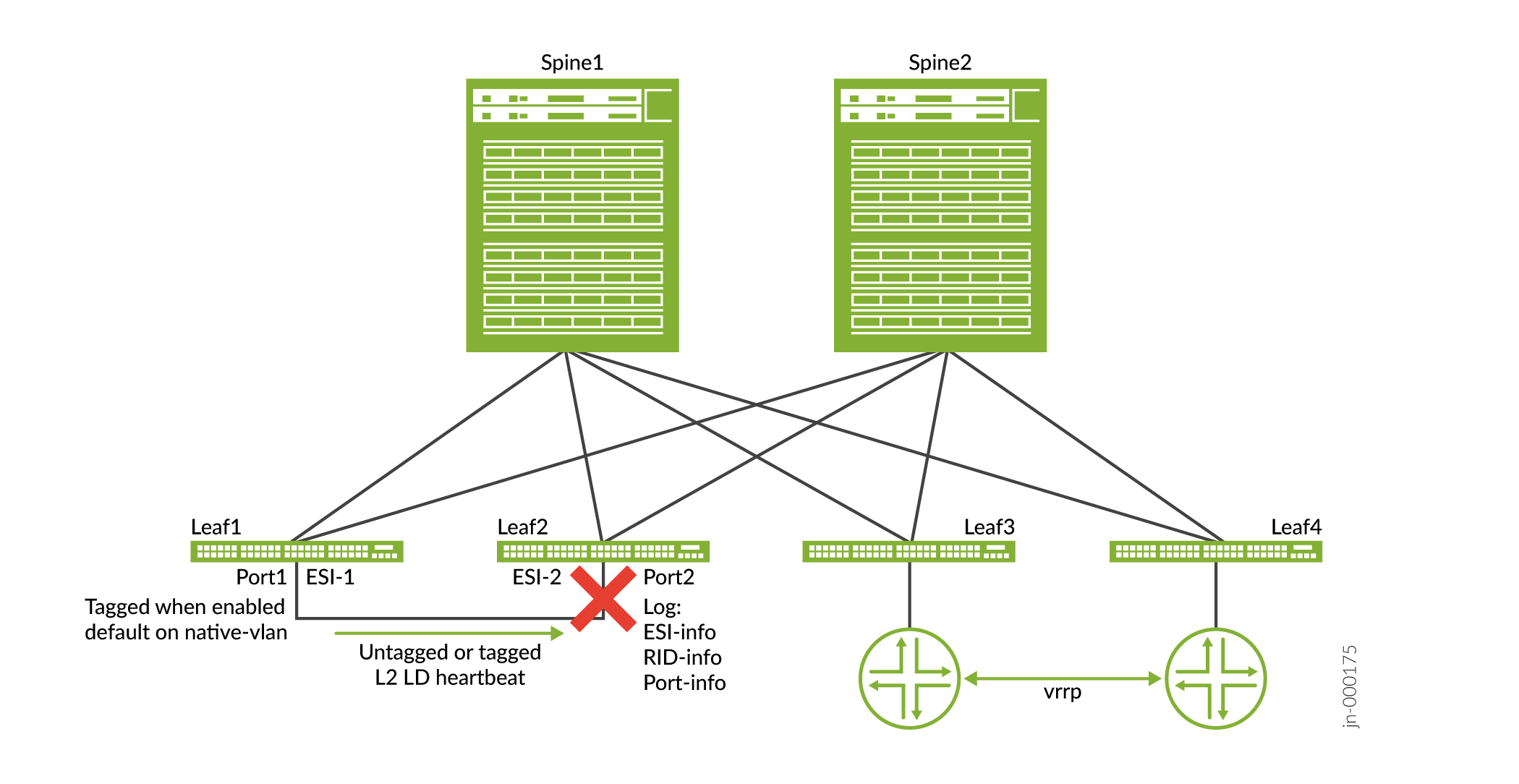
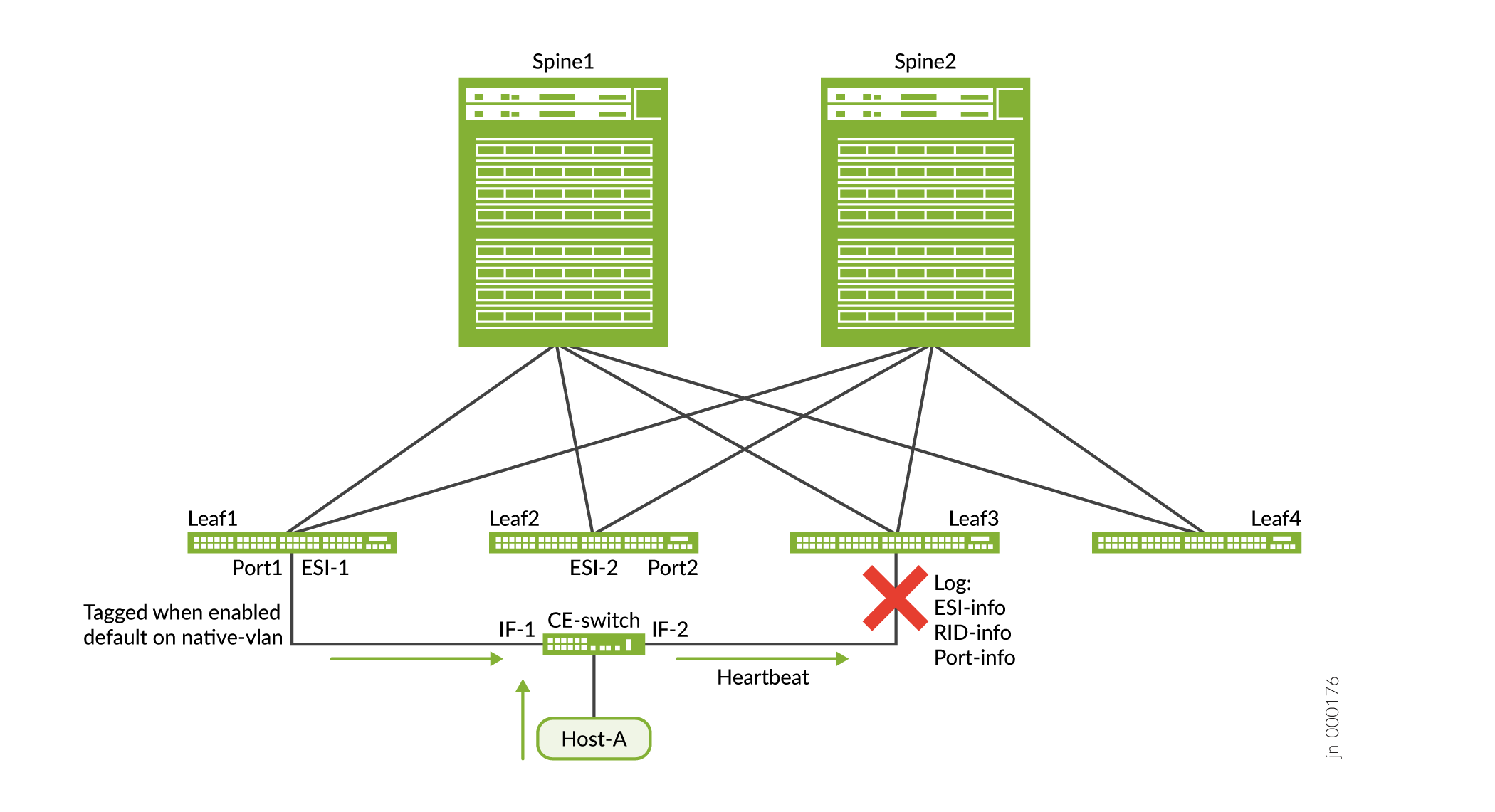
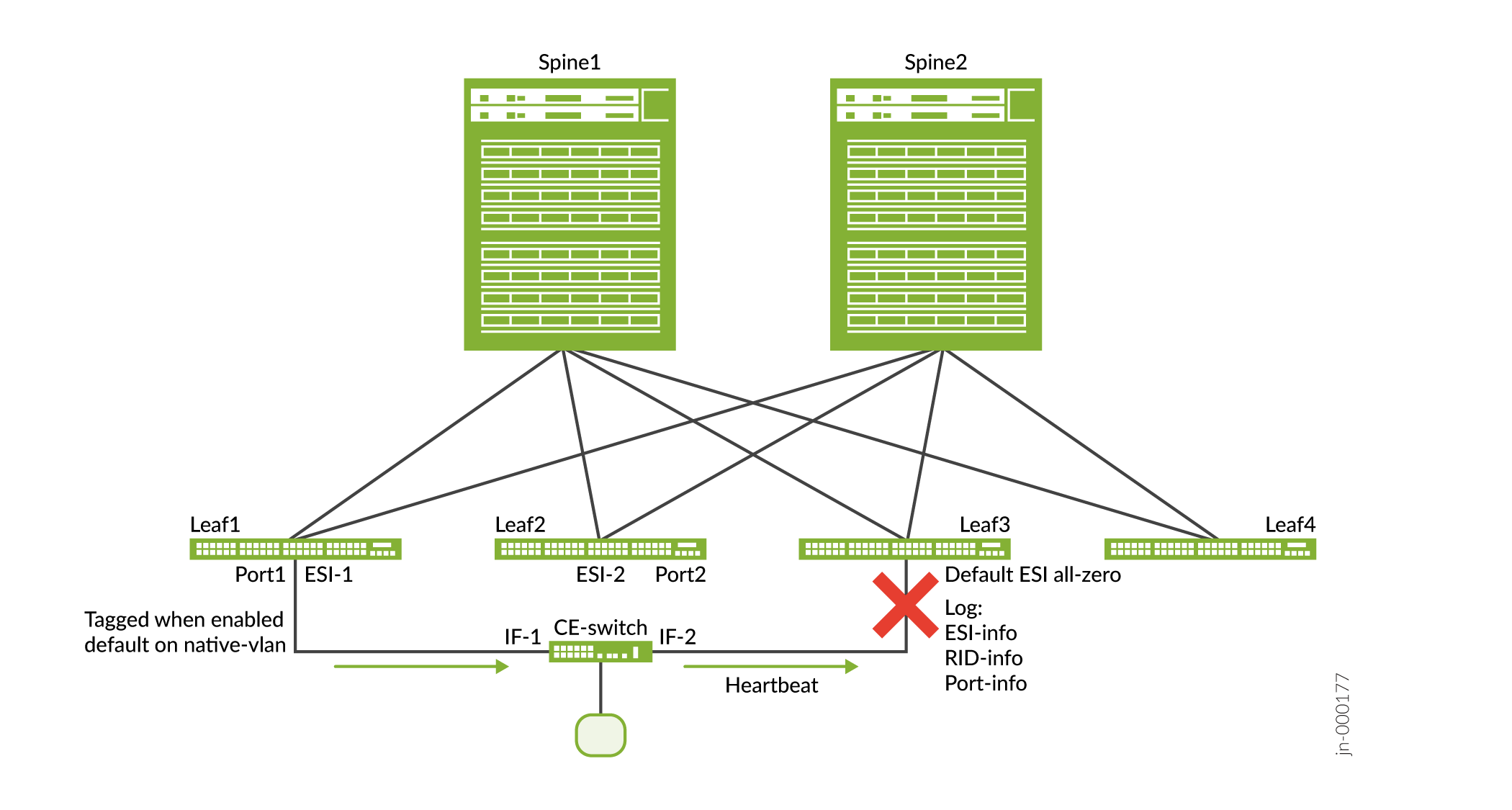
The following three lightweight PE-CE loop detect scenarios demonstrate that loops can form with different Ethernet segment identifiers (ESIs), with the same ESI, or with no ESI.
Different ESI Looped
When the loop occurs with different ESIs, you can enable a range of fabric router IDs on which the device triggers the loop detect feature (mandatory). Or, you can build the list automatically using router IDs based on EVPN Type 1 auto-discovery route signaling (optional).
Same ESI Looped
When the loop occurs with the same ESI, the CE switch is not using the same bridged interface when connecting to Leaf1 and Leaf3.
No ESI on Looped Ports
When one of the looped ports doesn't have an ESI, the loop goes through the CE switch from Leaf1 to Leaf3.
Lightweight PE-CE Loop Detect Use Cases using Layer 2 Heartbeats
In this section we show the following use cases with lightweight PE-CE loop detect enabled:
-
Use Case 1: The loop is occurring through the switch due to misconfiguration of the switch.
-
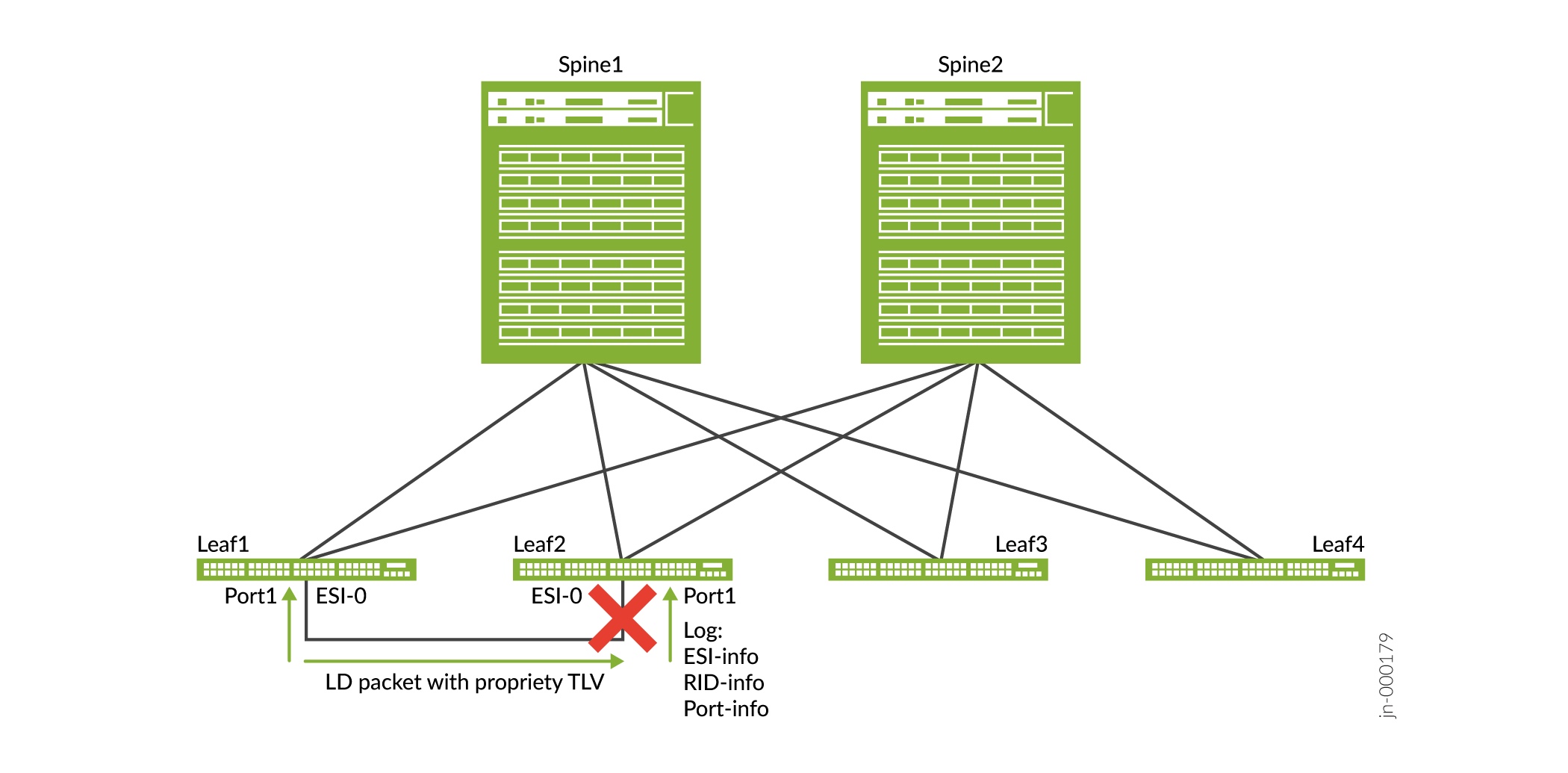
Use Case 2: The loop is caused by misalignment of cable connections on the switch.
In both use cases, the functionality is not dependent on the BGP speed of control-plane advertisement, and the lightweight PE-CE loop detect is independent of the configured ESI values.
- EVPN-VXLAN Lightweight PE-CE Loop Detect Use Case 1
- EVPN-VXLAN Lightweight PE-CE Loop Detect Use Case 2
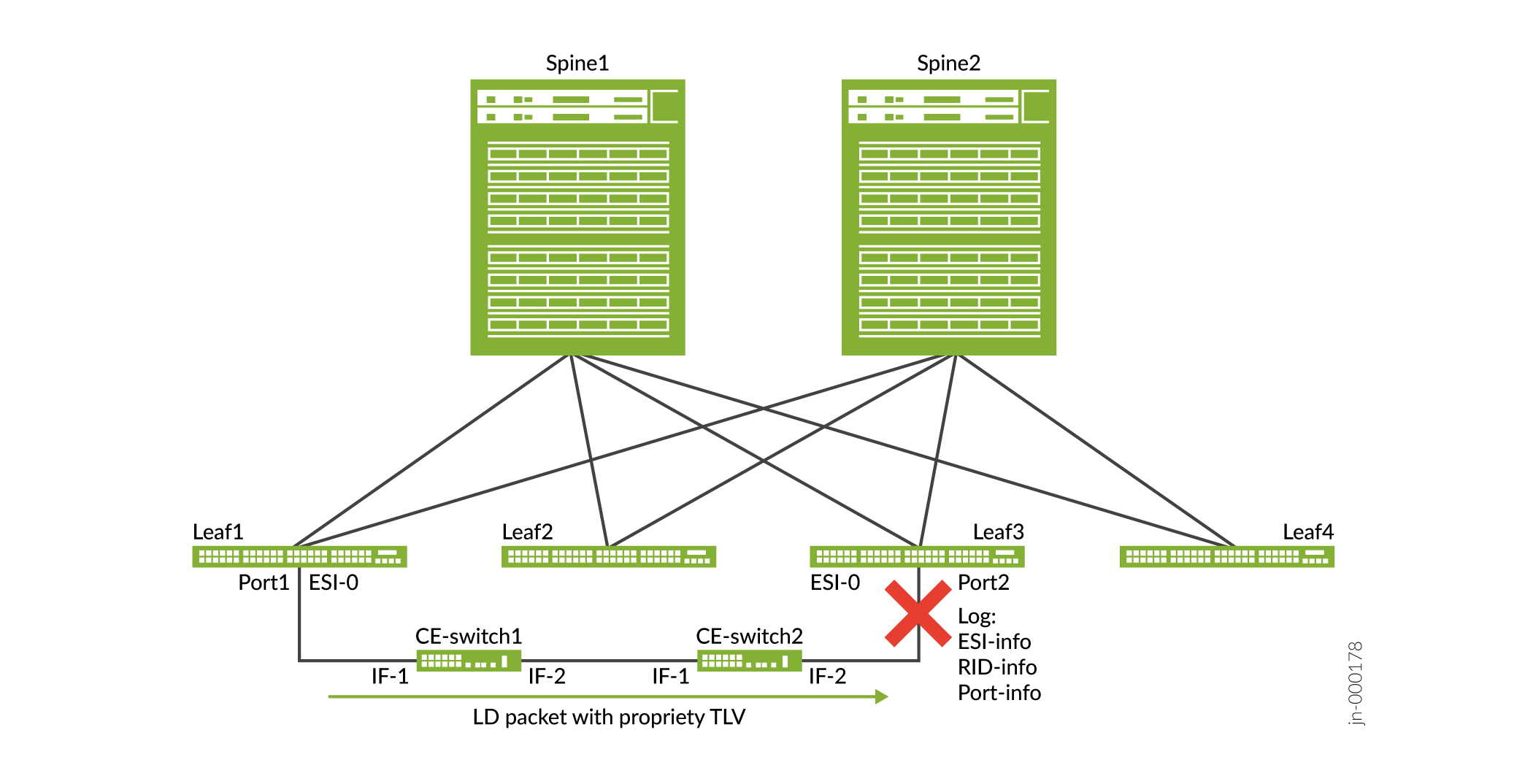
EVPN-VXLAN Lightweight PE-CE Loop Detect Use Case 1
In this first case, the loop occurs at Leaf3. CE-switch1 and CE-switch2 don't have loop detect enabled. Leaf1 and Leaf3 have loop detect enabled. The Layer 2 (L2) loop detect PDU uses a proprietary type, length, value (TLV) format.
EVPN-VXLAN Lightweight PE-CE Loop Detect Use Case 2
The L2 loop detect PDU uses is a proprietary type, length, and value (TLV) and the loop occurs on Leaf1. Instead of relying on the speed of BGP, the MAC route reflections speed, and the duplicate MAC or MAC move detections in larger DC fabrics, the lightweight PE-CE loop detect is independent of the state of the BGP EVPN signaling.
Enable Lightweight PE-CE Loop Detect on a Logical Interface
To enable lightewight loop detect for a logical interface or for all logical
interfaces, use the
loop-detect
statement at the [edit protocols]
hierarchy level. Include a supported loop-detect-action for the
interface(s) and optionally specify a vlan-id, as follows:
[edit protocols]
set loop-detect enhanced interface (logical-interface-name | all);
set loop-detect enhanced interface (logical-interface-name | all) loop-detect-action (interface-down | laser-off);
set loop-detect enhanced interface (logical-interface-name | all) vlan-id (vlan-id | all);
We require the vlan-id option for trunk interfaces, and
enterprise style or service provider style interface configurations.
You can also optionally set the following values at the [edit protocols
loop-detect enhanced interface (logical-interface-name |
all)] hierarchy level:
-
The
revert-intervaloption—After you repair the loop, the device brings the interface(s) up again after this interval expires (default is 0 seconds). -
The
transmit-intervaloption—Customize how often to transmit loop detect PDUs (default is 1 second, see loop-detect for more on the values you can set for this interval).
Starting
with Junos 24.4 we’ve added support for monitoring all VLANs on a logical interface
with the vlan-id all configuration statement option at the [edit
protocols loop-detect enhanced interface] hierarchy level. This enhancement
detects network loops across multiple VLANs and interfaces, improving network
stability and performance in scaled environments.
When you configure the vlan-id all option on supported devices, the
devices show the following behavioral changes for this feature:
-
The
revert-intervalconfiguration is not effective for scaled loop-detect sessions, which makes them non-revertive. You must issue theclear loop-detect enhanced interfacecommand to clear the loop condition. -
The receive statistics for loop-detect PDUs do not increment for scaled
loop-detectsessions during a loop condition. -
We support only a 1-second transmit interval for scaled
loop-detectsessions.
See Feature Explorer for the platforms that support lightweight PE-CE loop detect as follows:
-
Lightweight PE-CE Loop Detection on EVPN-VXLAN Fabrics—Support for lightweight PE-CE loop detect
-
Lightweight Loop Detection with Scale—Support for scaled lightweight PE-CE loop detect with the
vlan-id
                            all
option
Sample Configuration with Trunk Mode Enterprise Style Interface
The following sample configuration enables lightweight PE-CE loop detect on interface
ge-0/0/1.0, which is a trunk interface with vlan-id 100.
set interfaces ge-0/0/1.0 unit 0 family ethernet-switching interface-mode trunk
set interfaces ge-0/0/1.0 unit 0 family ethernet-switching vlan members [ v100 v101 v102 v103 v104 ]
set protocols loop-detect enhanced interface ge-0/0/1.0 vlan-id 100
set protocols loop-detect enhanced interface ge-0/0/1.0 loop-detect-action interface-down
set protocols loop-detect enhanced interface ge-0/0/1.0 transmit-interval 1s
set protocols loop-detect enhanced interface ge-0/0/1.0 revert-interval 50s
Sample Configuration with Service Provider Style Interface
The following sample configuration enables loop detect for vlan-id
100 on provider edge (PE) and CE devices with service provider style interface
configurations. This configuration doesn't specify a revert interval. As a result,
after the device detects a loop and you correct the loop, enter the clear
loop detect enhanced interface name
command to bring
the interface back online.
PE device configuration:
set interfaces xe-0/0/0 flexible-vlan-tagging
set interfaces xe-0/0/0 encapsulation flexible-ethernet-services
set interfaces xe-0/0/0 unit 10 encapsulation vlan-bridge
set interfaces xe-0/0/0 unit 10 vlan-id 100
set protocols loop-detect enhanced interface xe-0/0/0.10 vlan-id 100
set vlans vlan100 vlan-id 100
set vlans vlan100 interface xe-0/0/0.10
CE device configuration:
set interfaces xe-0/0/3 flexible-vlan-tagging
set interfaces xe-0/0/3 encapsulation flexible-ethernet-services
set interfaces xe-0/0/3 unit 10 encapsulation vlan-bridge
set interfaces xe-0/0/3 unit 10 vlan-id 100
set protocols loop-detect enhanced interface xe-0/0/3.10 vlan-id 100
set vlans vlan100 vlan-id 100
set vlans vlan100 interface xe-0/0/3.10
CLI Commands to Display or Clear Loop Detect Status
Use the show loop-detect enhanced interface command to display loop status on an interface or all interfaces.
Use the clear loop-detect enhanced interface command to restore an interface or all interfaces to their prior state after the device detects a loop and applies a configured action to break the loop.
Show command without any loop
user@leaf-device# run show loop-detect enhanced interface
Interface                :ge-0/0/1.0
Vlan-id                  :100
ESI                      :00:00:00:00:00:00:00:00:00:00
Current status           :Normal[Link Up]
Last loop-detect time    :-
Receive statistics       :0
Action configured        :Interface-down
Action count             :0
Transmit Interval        :1s
Revert Interval          :60s
Show command with loop detect status
user@leaf-device# run show loop-detect enhanced interface
Interface                  :ge-0/0/1.0
Vlan-id                    :100
ESI                        :00:00:00:00:00:00:00:00:00:00
Current status             :Loop-detected
               Remote Host         :leaf04
               Remote Chassis      :94:f7:ad:94:dd:40
               Remote Interface    :xe-0/0/2.0
               Remote ESI          :00:00:00:00:00:00:00:00:00:00
Last loop-detect time      :Tue May 26 04:36:37 2020
Receive statistics         :4
Action configured          :Interface-down
Action count               :1
Transmit Interval          :1s
Revert Interval            :60s
Change History Table
Feature support is determined by the platform and release you are using. Use Feature Explorer to determine if a feature is supported on your platform.