
Automatically Monitor Device and Interface Health and Detect Anomalies
Use this topic to understand how Routing Director automatically monitors device health and detects anomalies, and how you can use the GUI to view anomalies related to device health.
Device and Interface Health Monitoring and Anomaly Detection Overview
-
Device Health and anomaly detection is a beta feature in this release.
-
To monitor device health, you must enable AI/ML (
install-aiml) and device health monitoring (enable-device-health) when you install the Routing Director cluster. For more information, see Deploy the Cluster.Enabling AI/ML requires additional system resources (CPU and memory). For information about the additional resources required for AI/ML, see Hardware Requirements.
To ascertain the health of a network, you need to monitor the health of the devices and their interfaces in the network. Routing Director uses AI/ML (artificial intelligence [AI] and machine learning [ML]) techniques to automatically monitor Key Performance Indicators (KPIs) related to a device's health, and automatically detects any anomalies that occur. Routing Director also performs a root-cause analysis (RCA) of device temperature anomalies when the device is in operation.
The periodic monitoring of the device's health status and the timely detection of device and interface health anomalies enables operators to take action and minimize the impact of any issues that occur
Routing Director monitors device health in the following scenarios:
-
During device onboarding—When a device is being onboarded, Routing Director monitors the device's health and generates an alert if any anomalies occur.
When a device is being onboarded, if other devices of the same model that were previously onboarded exist, Routing Director compares the data to detect anomalies. However, if a device of a particular model is being onboarded for the first time, then the efficacy of the anomaly detection is limited because of lack of historical data.
-
During device operation—After the device is onboarded successfully and is managed, Routing Director continuously monitors the KPIs related to device heath. For each KPI of each device, Routing Director monitors the KPI, forecasts the range, and detects any anomalies that occur. During device operation, Routing Director detects device health anomalies (within 30 minutes) based on historical data for that device and the forecasted range.
-
In the validation phase, the MAPE score for the ML models used in device health monitoring was observed as varying between 2.5 to 6.5.
-
After a KPI value changes, the forecasted range takes approximately two hours to stabilize.
RCA of Temperature Anomalies
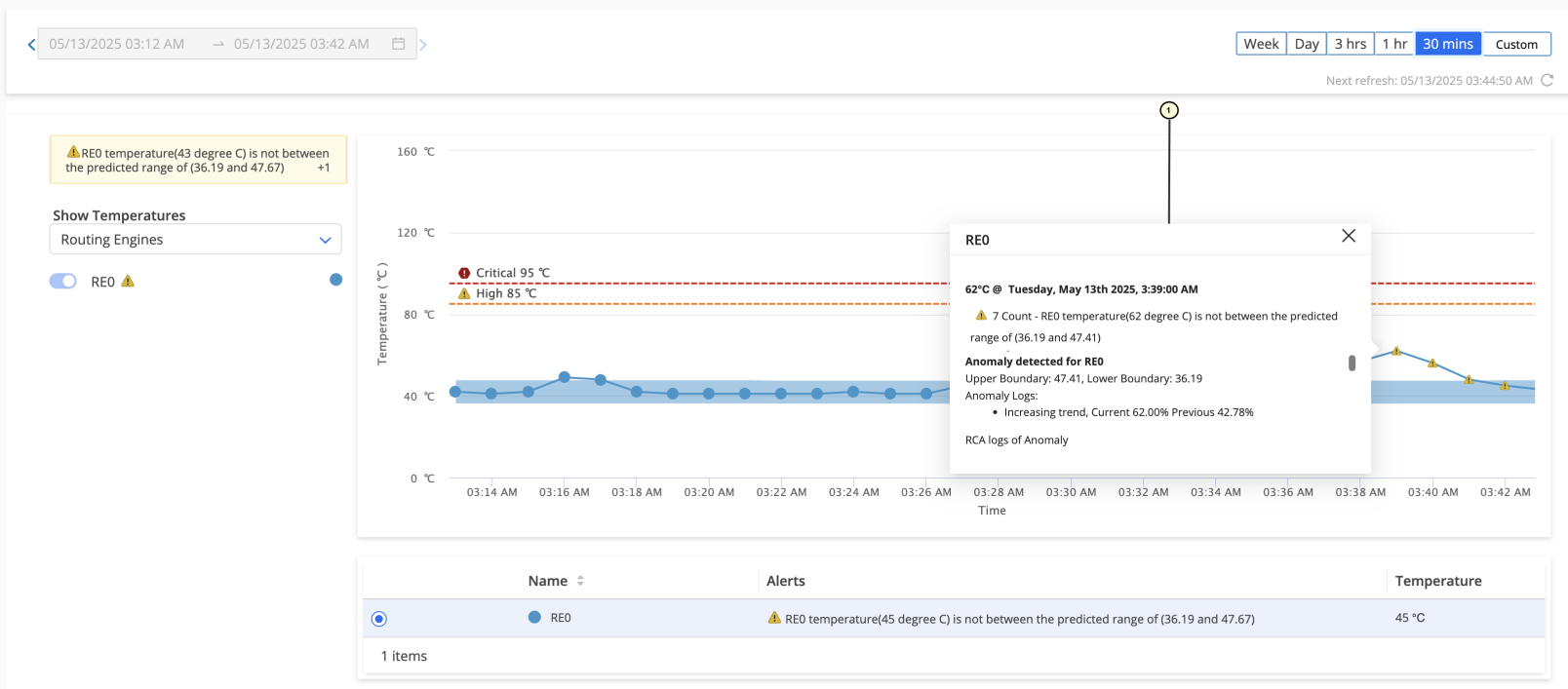
When a device is in operation, Routing Director provides RCA for issues related to the Routing Engine temperature and Routing Engine CPU temperature. Routing Director analyzes the different attributes (CPU utilization percentage, fan RPM percentage, and inlet temperature) that could cause a temperature issue. Routing Director also compares the device's temperature to an expected range. Based on the analysis and comparison, Routing Director provides an alert, an expected reason for the issue, and details on the events that might have caused the issue. Figure 1 displays a sample page showing the RCA logs for an anomaly in the Routing Engine temperature.
1 — Device Temperature RCA Details |
Device Health KPIs
Table 1 displays the device health KPIs that Routing Director monitors for each device.
| KPI | Component | Parameters |
|---|---|---|
| CPU |
Routing Engine Line card |
CPU Utilization Percentage (%) |
| Memory |
Routing Engine Line card |
Memory Utilization Percentage (%) |
| Fan | Not applicable |
RPM Percentage (%) |
| Temperature |
|
Current temperature |
Table 2 lists the KPIs related to interface health that Routing Director monitors for each interface.
| KPI | Description |
|---|---|
|
Optics Rx power Optics Tx power |
Current optics power level in dBm. |
|
Input traffic Output traffic |
Current traffic in Mbps. |
|
Optical/Module temperature |
Current optics temperature in ℃. |
View Device and Interface Health Anomalies on the GUI
You can view and monitor the device health anomalies for a device on the Hardware accordion of the Device-Name page.
To view and monitor device health anomalies:
For more information on the hardware accordion, see Hardware Data and Test Results and on interface accordion, see Interfaces Data and Test Results.
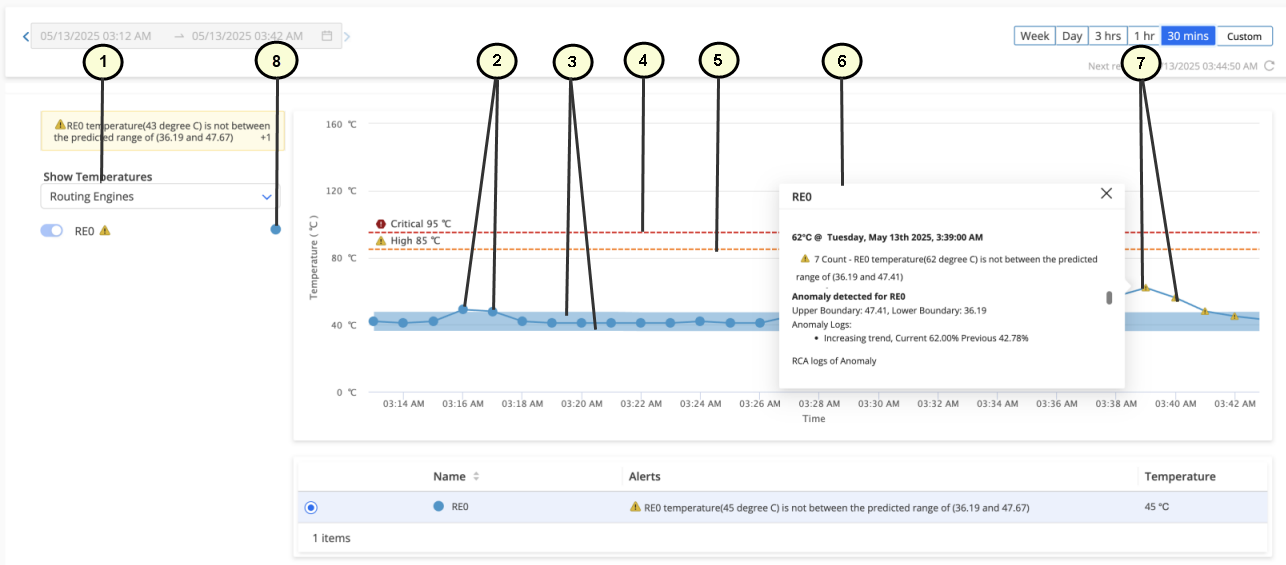
1 — KPI | 5 — High threshold marker |
2 — Circle icons indicating that the KPI is normal | 6 — Pop-up showing details of device health anomaly. |
3 — Upper and lower boundaries (dynamic thresholds) for the data displayed in the graph | 7 — Triangle icons indicating an anomaly when the higher threshold is breached. |
4 — Critical threshold marker | 8 — Legend showing the colors for different sub-components used in the graphs |
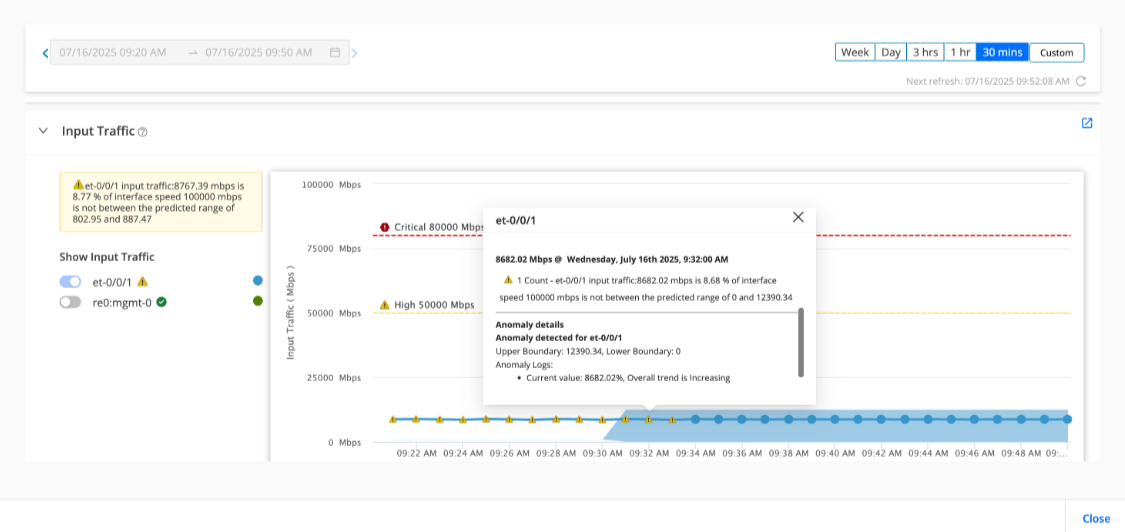
Figure shows the input traffic through et-0/0/1 interface on a device during a 30 minute interval. A warning (indicated by the yellow triangle icon) is raised to indicate an anomaly in the projected input traffic rate,
A KPI value is considered:
-
Anomalous if the KPI value is outside the dynamic threshold (shaded area of the map) for nine consecutive intervals or nine minutes of data collection.
-
Normal if the KPI value falls within the dynamic threshold for three consecutive intervals of data collection.
If the KPI value continues to be outside the dynamic threshold for more than nine consecutive intervals, the dynamic threshold adapts to the new values and a new dynamic threshold is created. An alert is raised if the KPI value crosses the High or Critical values irrespective of whether the value falls within the dynamic threshold or not.