
Routing Director System Requirements
Before you install the Routing Director software, ensure that your system meets the requirements that we describe in these sections.
Software Requirements
You can deploy Routing Director on one or more servers of the following bare-metal hypervisors:
-
VMware ESXi 8.0
-
Red Hat Enterprise Linux (RHEL) 8.10 and Ubuntu 22.04.05 kernel-based virtual machines (KVMs).
You must install the libvirt, libvirt-daemon-kvm, bridge-utils, and qemu-kvm packages. The hypervisor must have an Intel-based CPU.
-
Proxmox VE
Hardware Requirements
This section describes the minimum hardware resources that are required on each node virtual machine (VM) in the Routing Director cluster, for evaluation purposes or for small deployments.
The compute, memory, and disk requirements of the cluster nodes can vary based on the intended capacity of the system. The intended capacity depends on the number of devices to be onboarded and monitored, types of sensors, and frequency of telemetry messages. If you increase the number of devices, you'll need higher CPU and memory capacities.
To get a scale and size estimate of a production deployment and to discuss detailed dimensioning requirements, contact your Juniper Partner or Juniper Sales Representative.
The bare minimum resources required for each of the four nodes in the cluster are:
-
16-core vCPU
-
32-GB RAM
-
512-GB SSD. SSDs are mandatory.
-
48-core vCPU
-
96-GB RAM
-
2000-GB SSD
The servers must have enough CPU, memory, and disk space to accommodate the hardware resources listed in this section. For node and server high-availability, deploy the four VMs on four servers.
Network Requirements
The four nodes must be able to communicate with each other through SSH. The nodes must be able to sync to an NTP server. SSH is enabled automatically during the VM creation, and you will be asked to enter the NTP server address during the cluster creation. Ensure that there is no firewall blocking NTP or blocking SSH traffic between the nodes in case they are on different servers.
Single-subnet Cluster
The cluster nodes and VIP addresses can all be on the same subnet with L2 connectivity between them. IP Addressing Requirements in a Single Subnet Cluster illustrates the IP and VIP addresses within the same subnet required to install a Routing Director cluster.
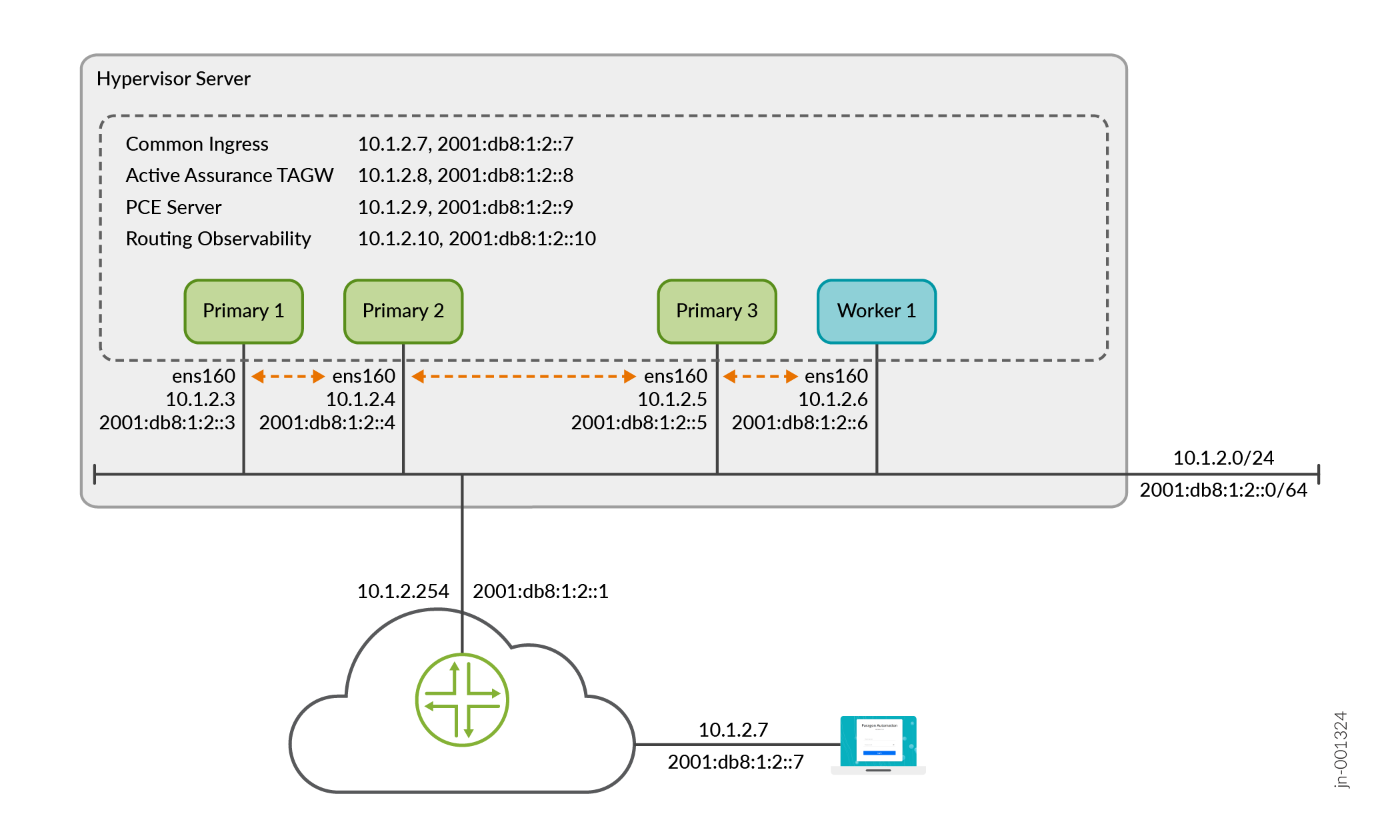
Multi-subnet Cluster
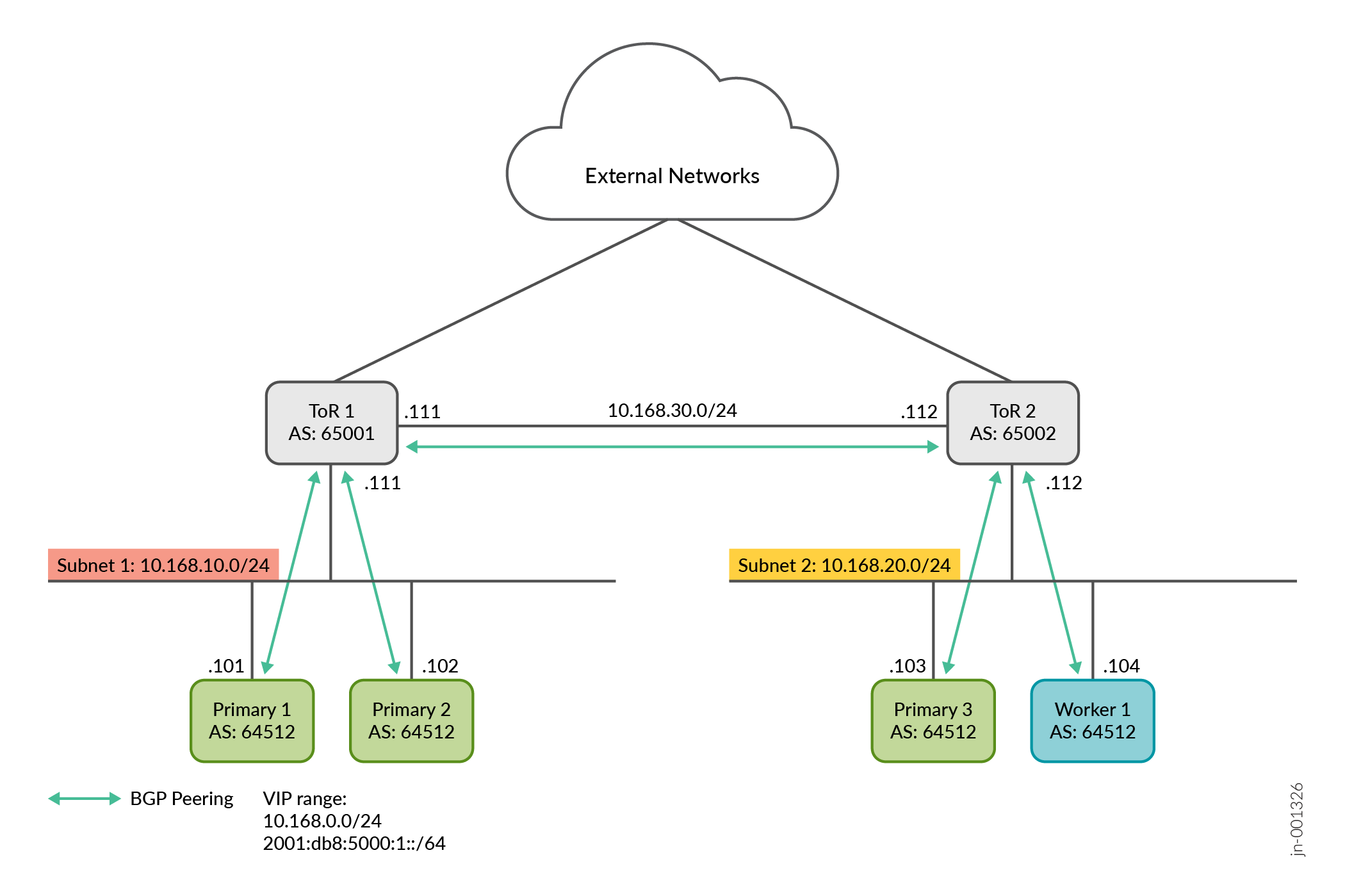
Alternatively, in cases where the cluster nodes are geographically distributed or are located in multiple data centers, the nodes and the VIP addresses can be in different subnets. You must configure BGP peering between each cluster node and the respective upstream gateway top-of-rack (ToR) router as well as between the routers. Additionally, the cluster nodes must have the same configured AS number.
Figure 2 illustrates a cluster in two different networks. Two nodes are served by ToR1 router and two nodes are served by ToR2 router. In this example, you must configure EBGP using interface peering between ToR1 and Primary1 and Primary2, and between ToR2 and Primary3 and Primary4, as well as between ToR1 and ToR2. Your BGP configuration might differ based on your setup.
Configure IPv4 Addresses
You need to have the following IP addresses available for the installation.
-
Four interface IP addresses, one for each of the four nodes
-
Internet gateway IP address
-
Virtual IP (VIP) addresses for:
-
Generic ingress IP address shared between gNMI, NETCONF (SSH connections from devices), and the Web GUI—This is a general-purpose VIP address that is shared between multiple services and used to access Routing Director from outside the cluster.
Alternatively, in cases where the device management network is on a different subnet than the network used to access the GUI, you can also use one VIP address for the Web GUI and a separate VIP address for gNMI and NETCONF access.
If an additional IP address is defined (using
ingress
                           ingress-vip
option) and configured (usingoc-term oc-term-hostandgnmi gnmi-term-hostoptions), the additional IP address is added to the outbound SSH configuration used to adopt devices from that network. The VIP address from the first network is ideally used to access the GUI. While both sets of IP addresses can be used to access the GUI, NETCONF, and gNMI, only the defined and configured address is added to the outbound SSH configuration for NETCONF and gNMI. If you want to adopt devices from the first subnet, you must manually edit the outbound SSH command to over-write the configured IP address for NETCONF and gNMI access. -
Active Assurance Test Agent gateway (TAGW)—This VIP address serves HTTP-based traffic to the Active Assurance Test Agent endpoint.
-
PCE server—This VIP address is used to establish Path Computational Element Protocol (PCEP) sessions between Routing Director and the devices. The PCE server VIP configuration is necessary to view dynamic topology updates in your network in real-time. For information on establishing BGP-LS peering and PCEP sessions, see Dynamic Topology Workflow.
If your cluster is a multi-subnet cluster, you can also configure multiple VIP addresses, one from each subnet, for the devices to establish PCEP sessions on all VIPs.
-
Routing observability cRPD—This VIP is used by external network devices as BGP Monitoring Protocol (BMP) station IP address to establish the BMP session.
-
Routing observability IPFIX—This VIP is used to collect IPFIX data to view predictor events. Predictor events indicate routing, forwarding, and OS exceptions that are identified by Routing Director as a potential indicator of traffic loss.
The VIP addresses are added to the outbound SSH configuration that is required for a device to establish a connection with Routing Director.
Note: In a multi-subnet cluster installation, the VIP addresses must not be on the same subnet as the cluster nodes. -
-
Hostnames mapped to the VIP addresses—Along with VIP addresses, you can also enable devices to connect to Routing Director using hostnames. However, you must ensure that the hostnames and the VIP addresses are correctly mapped in the DNS and your device is able to connect to the DNS. If you configure Routing Director to use hostnames, the hostnames take precedence over VIP addresses and are added to the outbound SSH configuration used during onboarding devices.
Configure IPv6 Addresses
You can configure the Routing Director cluster using IPv6 addresses in addition to the existing IPv4 addresses. With IPv6 addressing configured, you can use IPv6 addresses for NETCONF, gNMI, the Active Assurance TAGW,and access to the Web GUI. You must have the following additional addresses available at the time of installation:
-
Four interface IPv6 addresses, one for each of the four nodes
-
Internet gateway IPv6 address
-
One IPv6 VIP address for generic ingress or two IPv6 VIP addresses, one for the Web GUI and one for NETCONF and gNMI access
-
One IPv6 VIP address for Active Assurance TAGW
-
Hostnames mapped to the IPv6 VIP addresses—You can also use hostnames to connect to IPv6 addresses. You must ensure that the hostnames are mapped correctly in the DNS to resolve to the IPv6 addresses.
If hostnames are not configured and IPv6 addressing is enabled in the cluster, the IPv6 VIP addresses are added to the outbound SSH configuration, used for device onboarding, instead of IPv4 addresses.
You must configure the IPv6 addresses at the time of cluster deployment. You cannot configure IPv6 addresses after a cluster has been deployed using only IPv4 addresses.
We do not support configuring an IPv6 address for the PCE server and the routing observability feature.
In addition to the listed IP addresses and hostnames, you need to have the following information available with you at the time of installation:
-
Primary and secondary DNS server addresses for IPv4 and IPv6 (if needed)
-
NTP server information
Firewall Requirements
The following section lists the ports that firewalls must allow for communication within and from outside of the cluster.
You must allow intracluster communication between the nodes. In particular, you must keep the ports listed in Table 1 open for communication.
|
Port |
Usage |
From |
To |
Comments |
|---|---|---|---|---|
| Infrastructure Ports | ||||
|
22 |
SSH for management |
All cluster nodes |
All cluster nodes |
Require a password or SSH-key |
|
2222 TCP |
Paragon Shell configuration sync |
All cluster nodes |
All cluster nodes |
Require password or SSH-key |
|
443 TCP |
HTTPS for registry |
All cluster nodes |
Primary nodes |
Anonymous read access Write access is authenticated |
|
2379 TCP |
etcd client port |
Primary nodes |
Primary nodes |
Certificate-based authentication |
|
2380 TCP |
etcd peer port |
Primary nodes |
Primary nodes |
Certificate-based authentication |
|
5473
|
Calico CNI with Typha |
All cluster nodes |
All cluster nodes |
— |
|
6443 |
Kubernetes API |
All cluster nodes |
All cluster nodes |
Certificate-based authentication |
|
7472 TCP |
MetalLB metric port |
All cluster nodes |
All cluster nodes |
Anonymous read only, no write access |
|
7946 UDP |
MetalLB member election port |
All cluster nodes |
All cluster nodes |
— |
| 8443 |
HTTPS for registry data sync |
Primary nodes |
Primary nodes |
Anonymous read access Write access is authenticated |
|
9345 |
rke2-server |
All cluster nodes |
All cluster nodes |
Token based authentication |
|
10250 |
kubelet metrics |
All cluster nodes |
All cluster nodes |
Standard Kubernetes authentication |
|
10260 |
RKE2 cloud controller |
All cluster nodes |
All cluster nodes |
Standard Kubernetes authentication |
|
32766 TCP |
Kubernetes node check for PCE service local traffic policy |
All cluster nodes |
All cluster nodes |
Read access only |
|
Calico CNI Ports |
||||
|
4789 UDP |
Calico CNI with VXLAN |
All cluster nodes |
All cluster nodes |
— |
|
5473 TCP |
Calico CNI with Typha |
All cluster nodes |
All cluster nodes |
— |
|
51820 UDP |
Calico CNI with Wireguard |
All cluster nodes |
All cluster nodes |
— |
The following ports must be open for communication from outside the cluster.
|
Port |
Usage |
From |
To |
|---|---|---|---|
|
179 TCP |
Topology visualization and traffic engineering using the topology information |
Routing Director cluster node IP address |
Router IP address to which you want to set up BGP peering from Routing Director. You can use the router management IP address or the router interface IP address. |
|
443 |
Web GUI + API |
External user computer/desktop |
Web GUI Ingress VIP address(es) |
|
443 |
Active Assurance Test Agent |
External network devices |
Active Assurance Test Agent VIP address |
|
2200 |
NETCONF |
External network devices |
Web GUI Ingress VIP address(es) |
|
4189 |
PCE Server |
External network devices |
PCE Server VIP address |
|
6800 |
Active Assurance Test Agent |
External network devices |
Active Assurance Test Agent VIP address |
|
32767 |
gNMI |
External network devices |
Web GUI Ingress VIP address(es) |
|
17002 |
Routing Observability |
External network devices |
Routing observability cRPD load balancer IP address |
Web Browser Requirements
The latest versions of Google Chrome, Mozilla Firefox, and Safari.
We recommend that you use Google Chrome.