
Device Onboarding Workflow
The workflow for onboarding a new device (greenfield device) includes creating network resource pools, device and interface profiles, and a network implementation plan.
Table 1 lists the different personas and the roles in Routing Director that are involved in onboarding a device.
| Persona | Role in Routing Director |
|---|---|
|
Network architect |
Super User or Network Admin |
|
Network planner |
Super User or Network Admin |
|
Field Technician |
Installer |
|
NOC Engineer (Network administrator) |
Super User or Network Admin |
To onboard a new device to Routing Director:
Figure 1 shows the device onboarding workflow in Routing Director for a new device (greenfield).
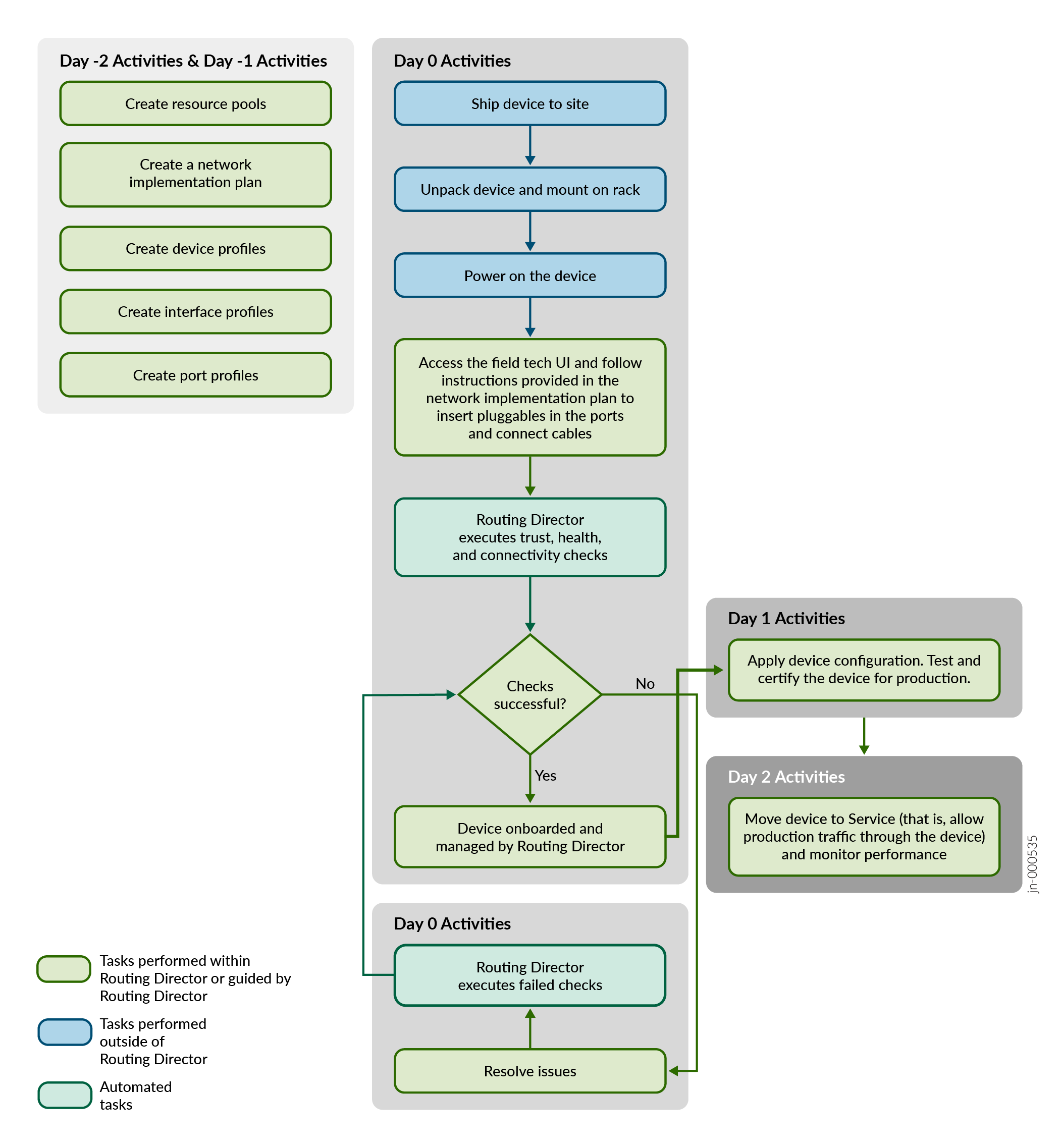
You can adopt a device to Routing Director without adding the device to a network implementation plan. In this case, you will be able to adopt the device to Routing Director. You can view the device and its details n the Inventory (Network Inventory > Devices > Inventory) and its details. To view performance, device and health metrics and manage the device, you must configure and use conventional tools such as configuration templates and rules. See Table 1 for a comparison of the features available when a device is adopted versus when a device is onboarded.
To onboard a device by adding it to a network implementation plan:
Create network resources. See Configure Resource Pools for Resource Instances.
-
Create a network implementation plan and add the device profile and interface profile to the network implementation plan. See Add a Network Implementation Plan.
Create device profiles with Trust enabled (in device profile) and all other configurations disabled, interface profiles, and port profiles as needed. See Add a Device Profile, Add an Interface Profile, and Add a Port Profile.
-
Add the device to the network implementation plan.
-
Publish the network implementation plan. See Provision a Network Implementation Plan.
After a device is onboarded to Routing Director and listed in the Inventory page (Inventory > Network Inventory), you can monitor the device and interface health from the Device accordion and Interface accordion on the device-name page. See About the Device-Name Page.