
Routing Director Implementation
Before deploying Routing Director, you should understand the Kubernetes infrastructure on which it runs and plan the cluster size based on your capacity, availability, and performance requirements.
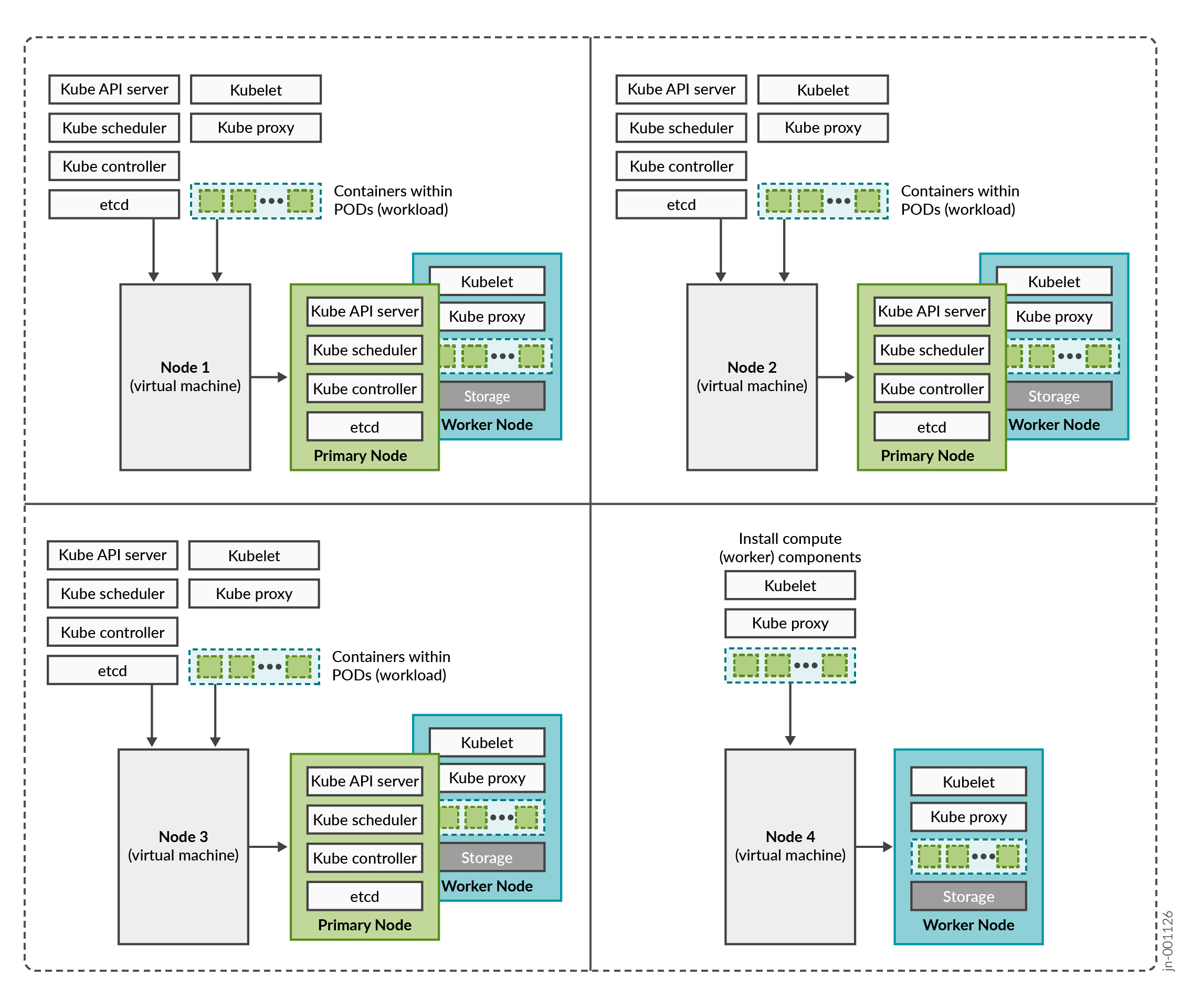
Routing Director is deployed on a Kubernetes cluster and consists of multiple containerized microservices that communicate through APIs. The Kubernetes cluster runs on one or more virtual machines (VMs), referred to as nodes.
Kubernetes Node Roles
A Kubernetes cluster node performs one or more of the following roles:
-
Control plane (primary) node—Hosts Kubernetes control plane services and manages cluster operations.
-
Compute (worker) node—Provides compute resources for running application workloads and pods. Worker nodes do not perform control plane functions.
A node can perform a single role or both roles. In Routing Director deployments, primary nodes also function as worker nodes by default.
Planning your Deployment
When designing a Routing Director deployment, consider the following factors:
- Number of devices to be managed
- Intended use cases
- Availability requirements
- Performance expectations
These factors determine:
- The total number of cluster nodes
- CPU, memory, and storage requirements for each node
- The number of primary and worker nodes required in the deployment
The amount of resources on each node are described later in this guide in Platform and Infrastructure Requirements.
Supported Deployments
Routing Director supports single-node and multinode deployments.
For production deployments, at minimum, three nodes that function as both primary and worker nodes are required for a functional cluster. This implementation not only improves performance but allows for high availability within the cluster:
-
Control plane high availability—The three nodes that function as both primary and worker nodes provide the required control plane redundancy. We do not support more than three primary nodes.
-
Workload high availability—For workload high availability and workload performance, you must have more than one worker. In Routing Director, the three nodes that function as both primary and worker nodes provide the required workload high availability. If your cluster contains four nodes, the fourth node functions as a worker only node providing additional workload high availability.
-
Storage high availability—For storage high availability, all the nodes provide Ceph storage.
Routing Director can be implemented as:
-
Four-node cluster—Here, three nodes function as primary and worker nodes, and one node functions as a worker only node. This implementation provides control plane, workload, and storage high availability.
-
Three-node cluster—Here, all three nodes function as primary and worker nodes. This implementation provides control plane, workload, and storage high availability.
-
Single node cluster—Here, the single node functions both as a primary and worker node. A single node deployment is used in lab environments, POCs, and small scale deployments where only a minimal number of devices (under 10) need to be managed. The single-node deployment must be used only when scalability or availability requirements are far less stringent than those of production deployments. Because all services run on a single node, high availability is not supported.
The installation workflow is similar for single-node, three-node, and four-node deployments. The primary differences involve:
- Hardware resource allocation
- Kubernetes node role assignments and indexes
The rest of this document focuses on installing and configuring a four-node cluster. Any configuration differences for three-node or single-node deployments are identified in the relevant procedures.
In summary, a three-node or four-node deployment provides the availability, resiliency, and scalability required for production environments, while a single-node deployment is suitable only for evaluation, testing, and small-scale use cases.
Cluster Nodes and Server High Availability
A multinode Routing Director cluster can continue operating after the failure of a single node, provided that the round-trip latency between nodes remains below less than 25 ms.
To maximize availability, deploy cluster nodes across separate physical servers. Distributing nodes across multiple servers helps ensure that the cluster remains operational even if an entire server becomes unavailable. The recommended implementation to maintain both server and node high availability is illustrated in Figure 2.
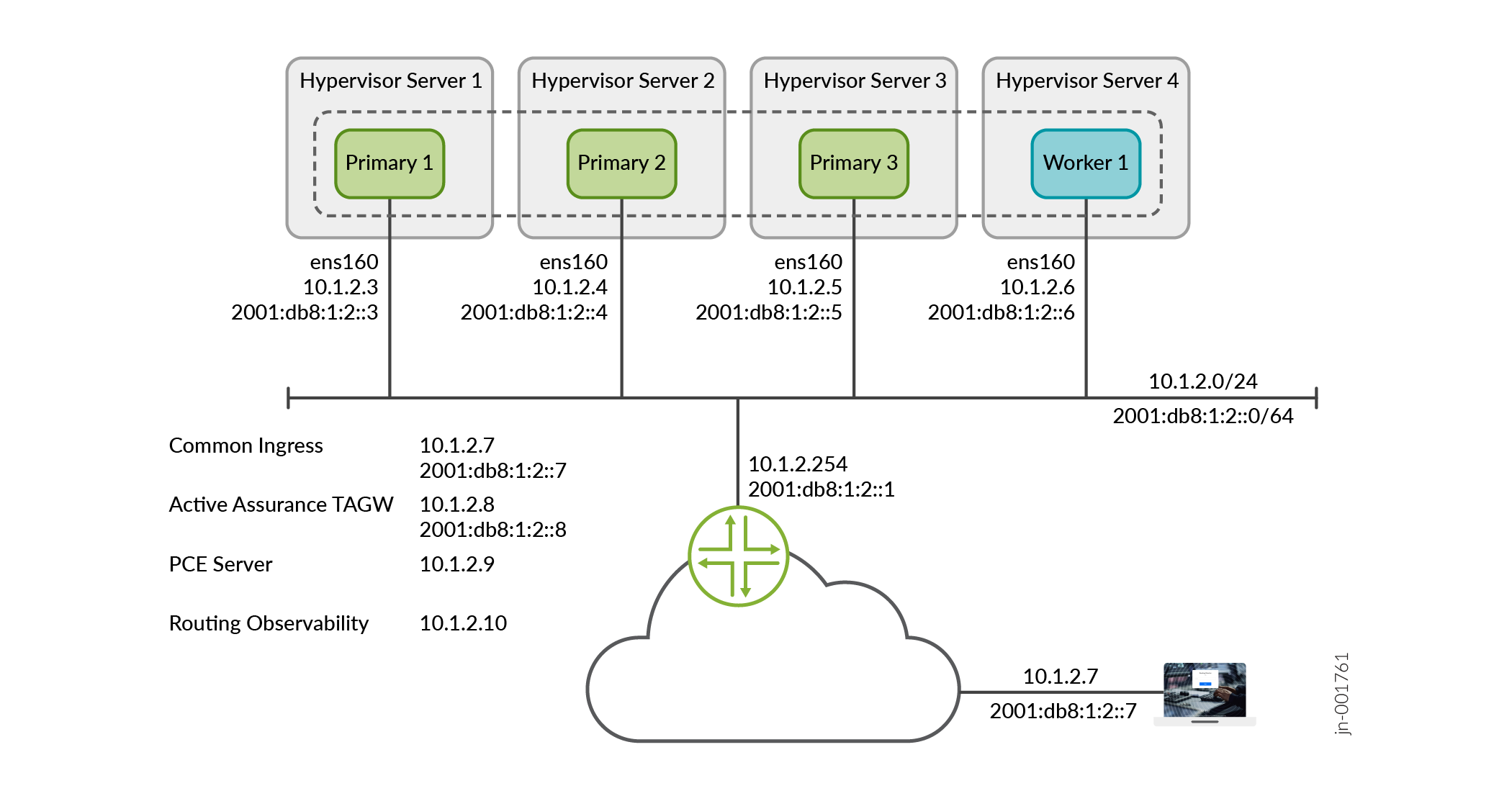
The illustration displays a four-node cluster where the cluster nodes and VIP addresses are all in the same subnet. The cluster can have three nodes and the nodes and VIP addresses can also be located in different subnets.
In this example, 10.1.2.7 is the VIP address for the GUI and is on the 10.1.2.0/24 network. You can reach 10.1.2.7 locally on the 10.1.2.0/24 network. You can also reach 10.1.2.7 externally by using NAT to translate the external IP address to 10.1.2.7.
On AWS, to ensure high availability, we recommend that you distribute the nodes across separate fault domains. Place each node in separate availability zones to ensure node and infrastructure high availability.
What's Next
To determine the system requirements (hardware, software, network, and so on) required to install a cluster. Go to Platform and Infrastructure Requirements.