Understanding Router Connection Status
Use this topic to interpret router connection states.
Routers use the following communication channels to establish connection with the Juniper Cloud. These connections allow Juniper Routing Assurance to collect operational data from routers for continuous monitoring and analysis:
-
Management connection—Primary control plane for device monitoring and operational visibility. Juniper Routing Assurance establishes its management connection through the oc-term service to facilitate communication between routers and the Juniper Cloud.
-
Telemetry connection—Transmission of router health and performance metrics from routers to the Juniper cloud. Juniper Routing Assurance establishes its telemetry connection through the gRPC Network Management Interface (gNMI) service. This service retrieves and processes telemetry data from the router to enable real-time telemetry features.
See Configure Ports for the list of ports that you need to enable to establish these communication channels.
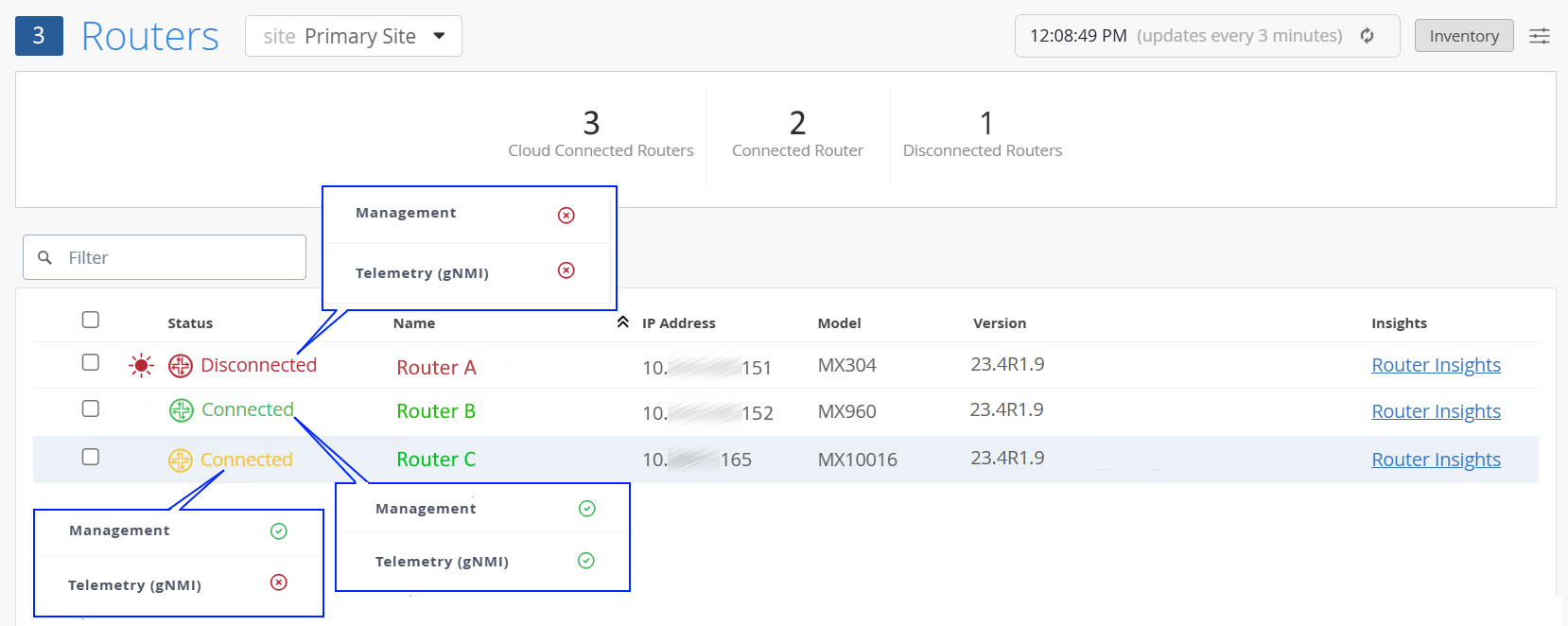
The connection status displayed in the Routers page reflects the current state of these channels and helps you assess the router's overall connectivity and operational readiness.
|
Overall Router Status |
Color |
Management Connection |
Telemetry (gNMI) Connection |
Description |
|---|---|---|---|---|
| Connected | Green | Connected | Enabled | Full Connectivity—Outbound connection and gNMI telemetry connection are fully
established between the router and the Juniper Cloud. All features within Juniper Routing Assurance are fully operational, and you can begin monitoring the routers. |
| Connected | Amber | Connected | Disabled |
Partial connectivity—Telemetry data is not transmitted from the router to the Juniper Cloud. As a result, features that rely on gNMI telemetry data are unavailable. See gNMI Telemetry Overview for the complete list of features dependent on gNMI telemetry. See Configure gNMI Telemetry to enable gNMI telemetry. |
| Disconnected | Red | Disconnected | Enabled or Disabled |
No connectivity—Router is disconnected from Juniper Routing Assurance and cannot be monitored from the application. See Configure Ports for the list of ports that you need to enable to establish connectivity between the router and the Juniper Cloud. |