MTU Mismatch
Use the Marvis Actions dashboard to analyze MTU errors on the router's interfaces.
Maximum Transmission Unit (MTU) is the largest data unit that can be forwarded on a link without fragmentation. An MTU mismatch error occurs when two connected network devices have different MTU size configured on their respective ports. If a packet exceeds the MTU size configured on the interface it passes through, the device either drops the packet or fragments it. Fragmentation results in network overhead and even packet drops. Hence, ensuring a consistent MTU size across interfaces on connected devices is critical for maintaining efficient, reliable, and error-free communication in a network.
Marvis detects such MTU mismatch errors between router ports and connected devices. Marvis reports MTU errors that occur on both ingress (incoming traffic) and egress (outgoing traffic) sides of a router's interface.
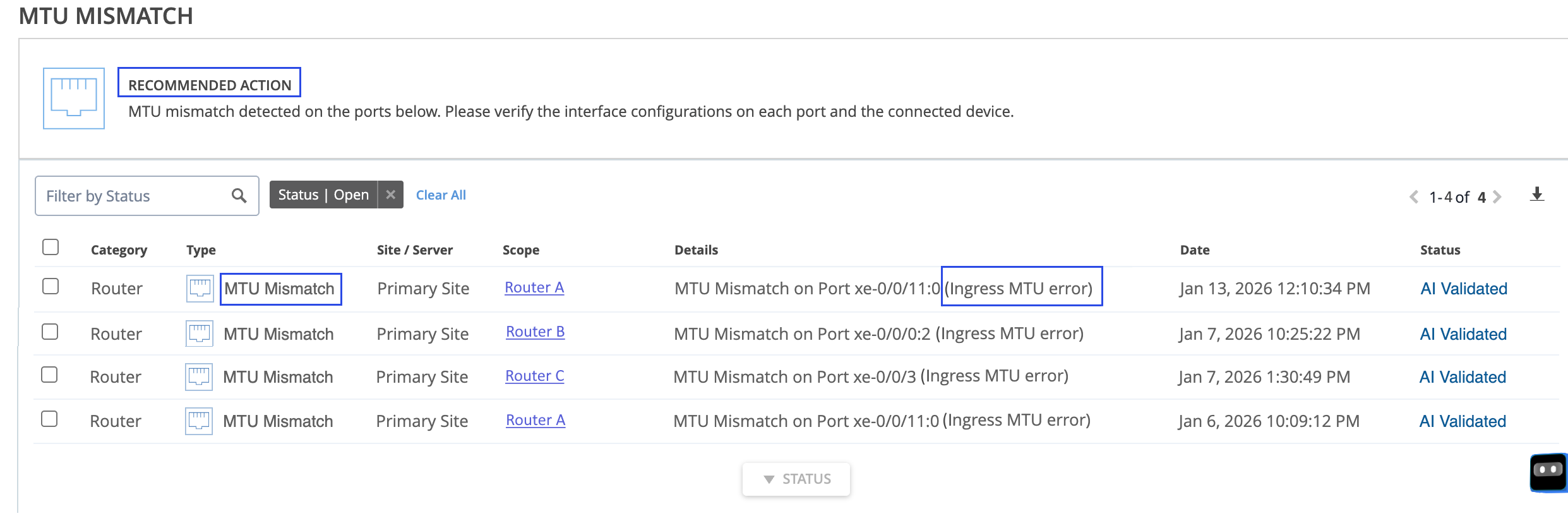
To view the MTU Mismatch event, click Marvis > Interfaces > MTU Mismatch.
To enable gNMI Telemetry, see Configure gNMI Telemetry. To know more about gNMI Telemetry in Juniper Routing Assurance, see gNMI Telemetry Overview.
Marvis monitors the interfaces of a router for a continuous three-hour period and reports an MTU mismatch event in one of the following situations:
-
A nonzero MTU error
-
A nonzero oversized frame count
-
Oversized frames count is nine times the framing errors count
Oversized Frame Count
The Maximum Receive Unit (MRU) of an interface indicates the largest size of a packet that
the interface can accept. When an interface receives packets whose size is greater than its
MRU, the router's forwarding plane drops these packets. The Oversized Frames Count is
the number of incoming Ethernet frames that exceed the interface's MRU. This count appears
in the output of show interface extensive as Oversized
Frames and
indicates a clear signal of an MTU mismatch.
If the Oversized Frames Count remains consistently above zero throughout the three‑hour period, Marvis reports an ingress MTU error.
Framing Errors
A framing error on an interface indicates that it received a packet with an invalid Frame
Check Sequence (FCS). Framing Errors Count for an interface is the number of packets
received with an invalid frame checksum (FCS). This count appears in the output of
show interface extensive as Framing Errors.
Issues
with physical components
such as
faulty cables, transceivers, and network interface
cards
(NIC) are the common causes of framing errors.
Marvis continuously monitors the ratio of the number of oversized frames to the number of framing errors and reports an ingress MTU error if Oversized Frames Count is nine times the Framing Errors Count for a continuous three-hour period.
A high Oversized Frames Count to Framing Errors Count ratio indicates that the frames arriving at an interface are well-formed, but are larger than the value configured on the interface. The router detects that the length of incoming packets exceeds the interface's MRU and results in the router dropping packets as oversized frames. Marvis monitors the ratio between these two counters to distinguish whether packet loss at ingress is caused by incompatible MTUs or by physical layer issues.
MTU Mismatch
Marvis collects MTU error samples at short, periodic intervals during the three-hour monitoring period. These samples are used to determine whether MTU errors persist for the entire three-hour duration. If MTU errors remain consistently above zero throughout the three‑hour window, Marvis reports an MTU Mismatch event.
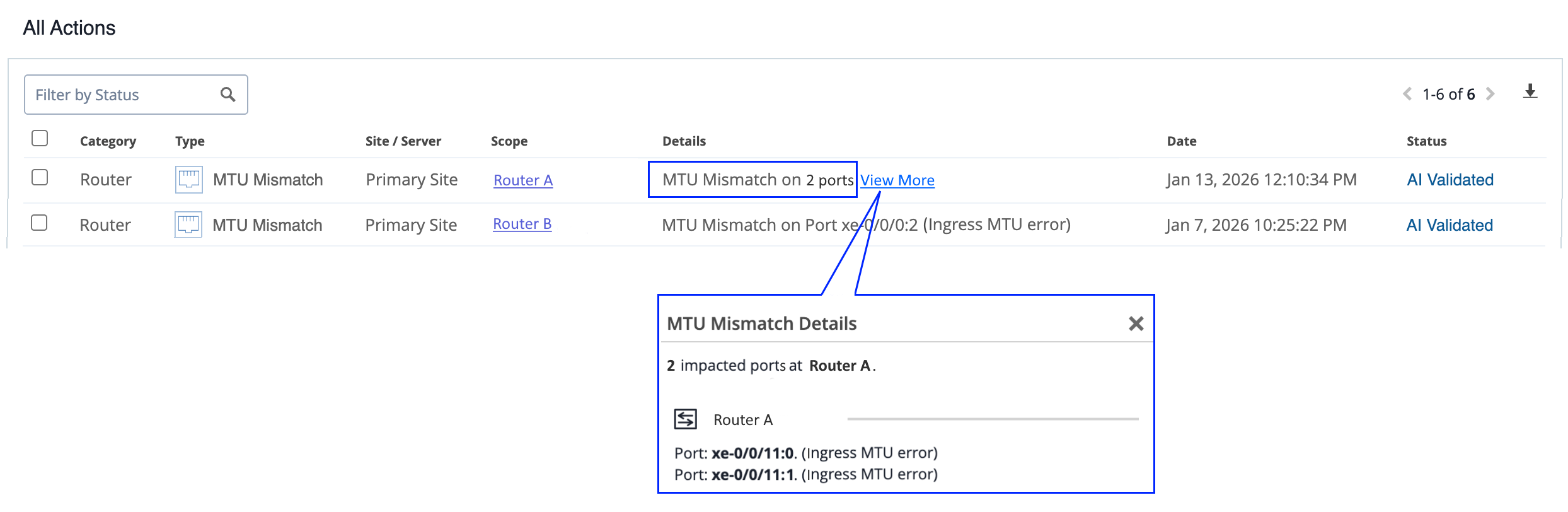
The MTU mismatch event in the Marvis Actions dashboard provides details such as the affected router, site, date and time when the event was recorded, event status and even the recommended action to resolve the event. Click View More to view the list of ports with MTU size mismatches.
As a troubleshooting step, network administrators can verify the interface configurations on each of the ports and the connected device.
You can mark the status of an event as In Progress to indicate that an administrator is working on resolving the event. Resolving a specific event will only resolve that occurrence of the event and will not resolve future occurrences of the same event. If a congestion event has occurred and remains inactive for 24 hours, Marvis moves its status to AI Validated.