
HTTP File Download Overview
Access the HTTP File Download page from the Monitor > Files > HTTP File Downloads menu.
Benefits of viewing HTTP File Downloads
-
Allows you to view a compiled list of suspicious downloaded files all in one place, including the signature, threat level, URL, and malware type.
-
Allows you to filter the list of downloaded files by individual categories.
Export Data—Click the Export button to download file scanning data to a CSV file. You are prompted to narrow the data download to a selected time-frame.
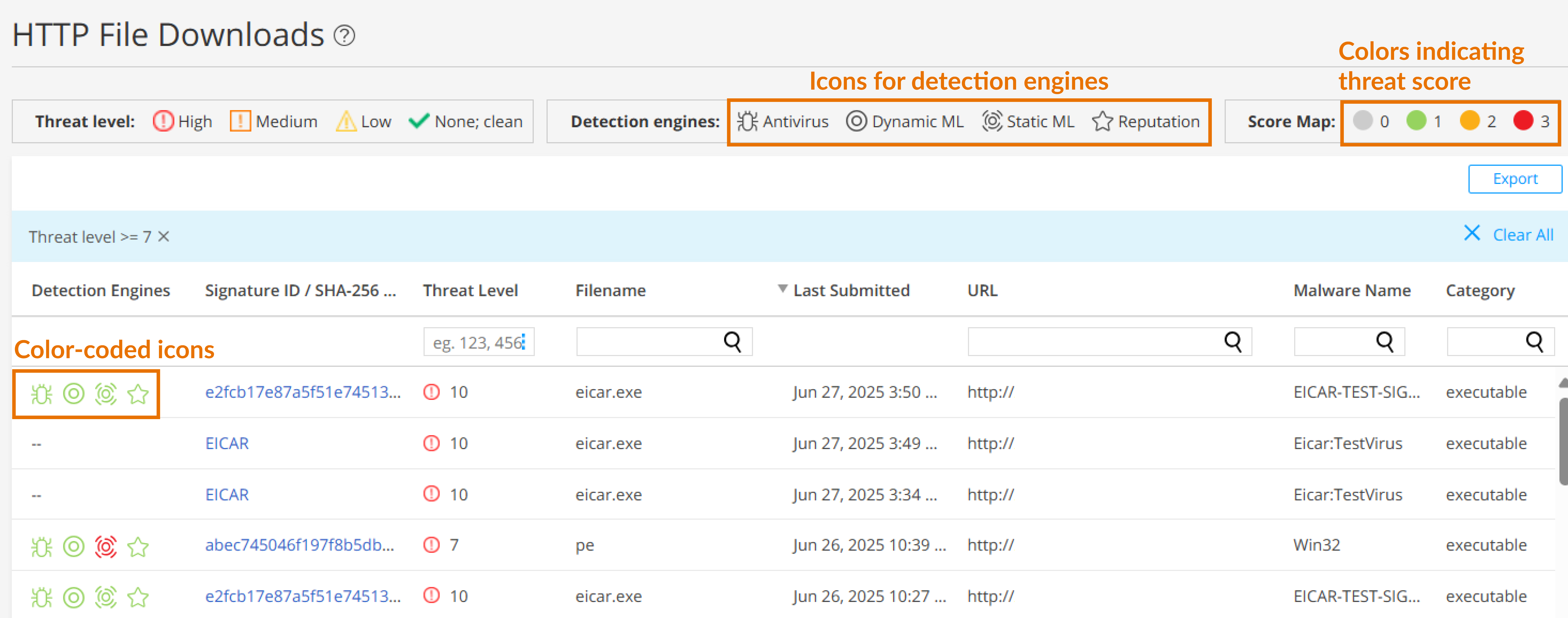
The following information is available on this page.
|
Field |
Definition |
|---|---|
| Detection Engine |
Displays color-coded icons representing the confidence levels of various detection engines in identifying threats. For more information more detection engines, see Table 2. The color codes signify the following threat severities:
To view the threat severity score assigned by each detection engine, hover over the icons. |
|
Signature ID / SHA-256 / ML Hit |
If applicable, the Signature ID uniquely identifies the signature that is triggered for this detection; otherwise, the SHA-256 file hash is displayed.
|
|
Threat Level |
The threat score. Click the three vertical dots at the top of the column to filter the information in the page by threat level. |
|
Filename |
The name of the file, including the extension |
|
Last Submitted |
The time and date of the most recent file scan |
|
URL |
The URL from which the file originated |
|
Malware Name |
The name of file and the type of threat if the verdict is positive for malware. Examples: Trojan, Application, Adware. If the file is not malware, the verdict is "clean." |
|
Category |
The type of file Examples: PDF, executable, document |
|
Detection Engines |
Description |
|---|---|
|
Antivirus |
|
|
Dynamic ML |
|
| Static ML |
|
|
Reputation |
File hash reputation |