
Enrolled Devices
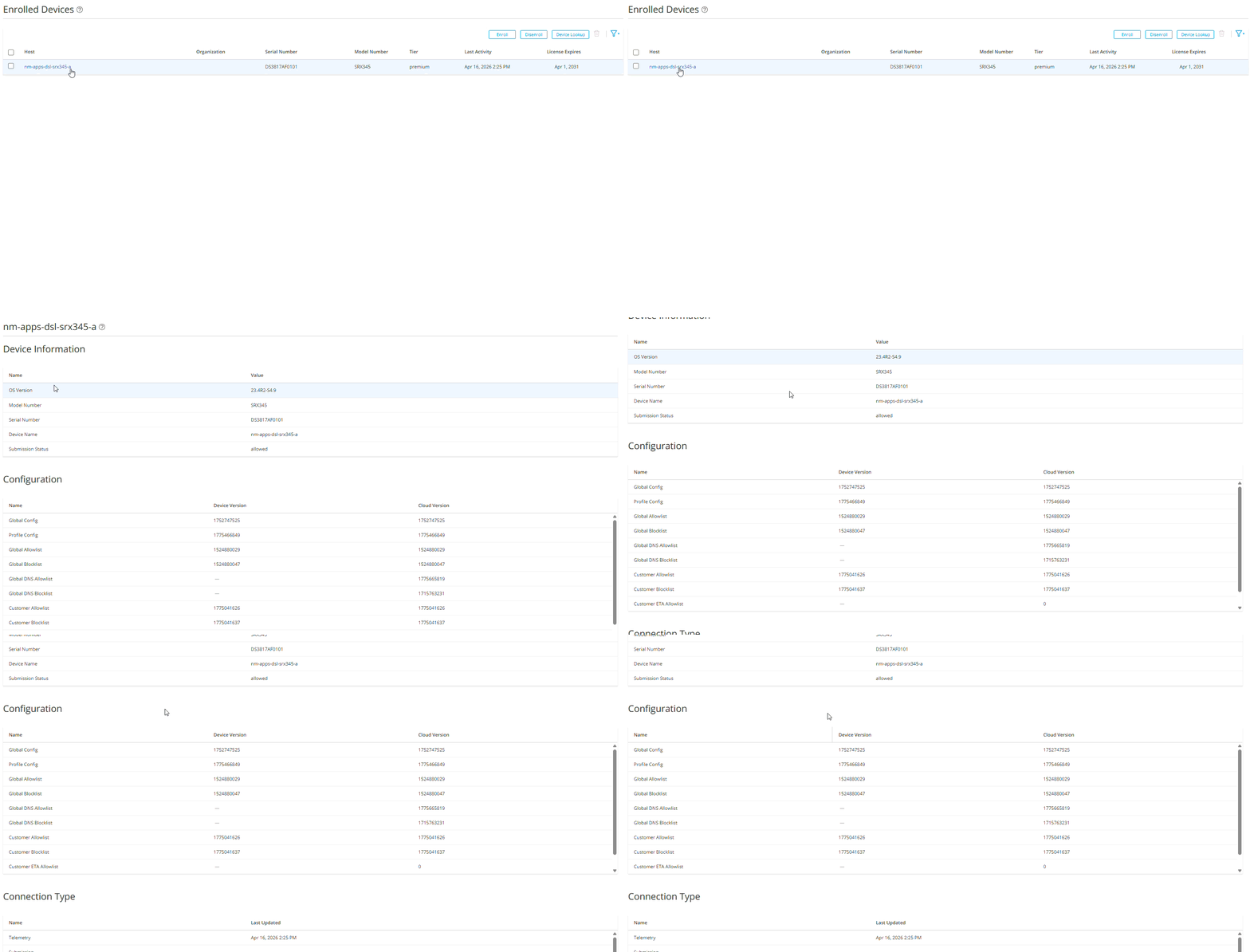
After you enroll the SRX Series Firewalls with Juniper ATP Cloud, you can view the list of all enrolled devices in the Juniper ATP Cloud UI.
To view the list of enrolled devices:
Log in to Juniper ATP Cloud UI.
Click .
The Enrolled Devices page is displayed.
In the Enrolled Devices page, you can view the following information about the enrolled SRX Series Firewalls:
Table 1: Enrolled Devices Field Description Host
Hostname of the enrolled SRX Series Firewall
Serial Number
Serial number of the enrolled SRX Series Firewall
Model Number
Model number of the enrolled SRX Series Firewall
Tier
License tier of the enrolled SRX Series Firewall
For example - Basic, Advanced, or Premium
Last Activity
Displays the date and time when ATP Cloud last received communication from the enrolled SRX Series Firewall.
License Expires
License expiration date for the enrolled SRX Series Firewall
Click the hostname of the enrolled SRX Series Firewall to view the following details about the device:
Table 2: Device Information Fields Field
Definition
Device Information
OS Version
SRX Series Firewall Junos OS version
Model Number
SRX Series Firewall model number
Serial Number
SRX Series Firewall serial number
Host
Hostname of the device
Devices enrolled through the Juniper Security Director Cloud Portal display (SDC) next to their hostnames.
Device Name Name of your SRX Series Firewall Submission Status
Allowed or Paused
This status indicates whether the device can submit files to Juniper ATP Cloud or if it has reached its daily limit. See File Scanning Limits.
Configuration
Global Config
The Device Version and Cloud Version fields indicate the version numbers of each configuration, both on the device and in the cloud. You can compare these numbers to see if the device and the cloud are in sync.
Profile Config
Global Allowlist
Global Blocklist
Global DNS Allowlist
Global DNS Blocklist
Customer Allowlist
Customer Blocklist
Customer ETA Allowlist
PHASE Signature
Connection Type
Telemetry
The time when the last telemetry submission was received.
Submission
The time when the last file submission was received.
C&C Event
The time when the last C&C event was received.
License Expiration Notifications for SRX Series Firewalls
Juniper ATP Cloud sends automated e-mail notifications when the license for your enrolled SRX Series Firewall is about to expire. You receive these notifications 90, 60, and 30 days before the license expiry date. Only the administrators of the associated organization in the Juniper ATP Cloud UI receive these notifications. For information about organization management, see Organization Overview.
These e-mail notifications alert you to the upcoming device license renewals without requiring you to log in to the Juniper ATP Cloud UI.
For more information about the licenses for SRX Series Firewalls, see Software Licenses for SRX Series Firewalls.