
Templates Introduction
Templates are used to create blueprints. They define a network's policy intent and structure. The global catalog (Design > Templates) includes predefined templates based on common designs.
From the left navigation menu, navigate to Design > Templates to go
to the templates table view. Many predefined templates are provided for you. Click a template
name to see its details. You can create, clone, edit, and delete templates. 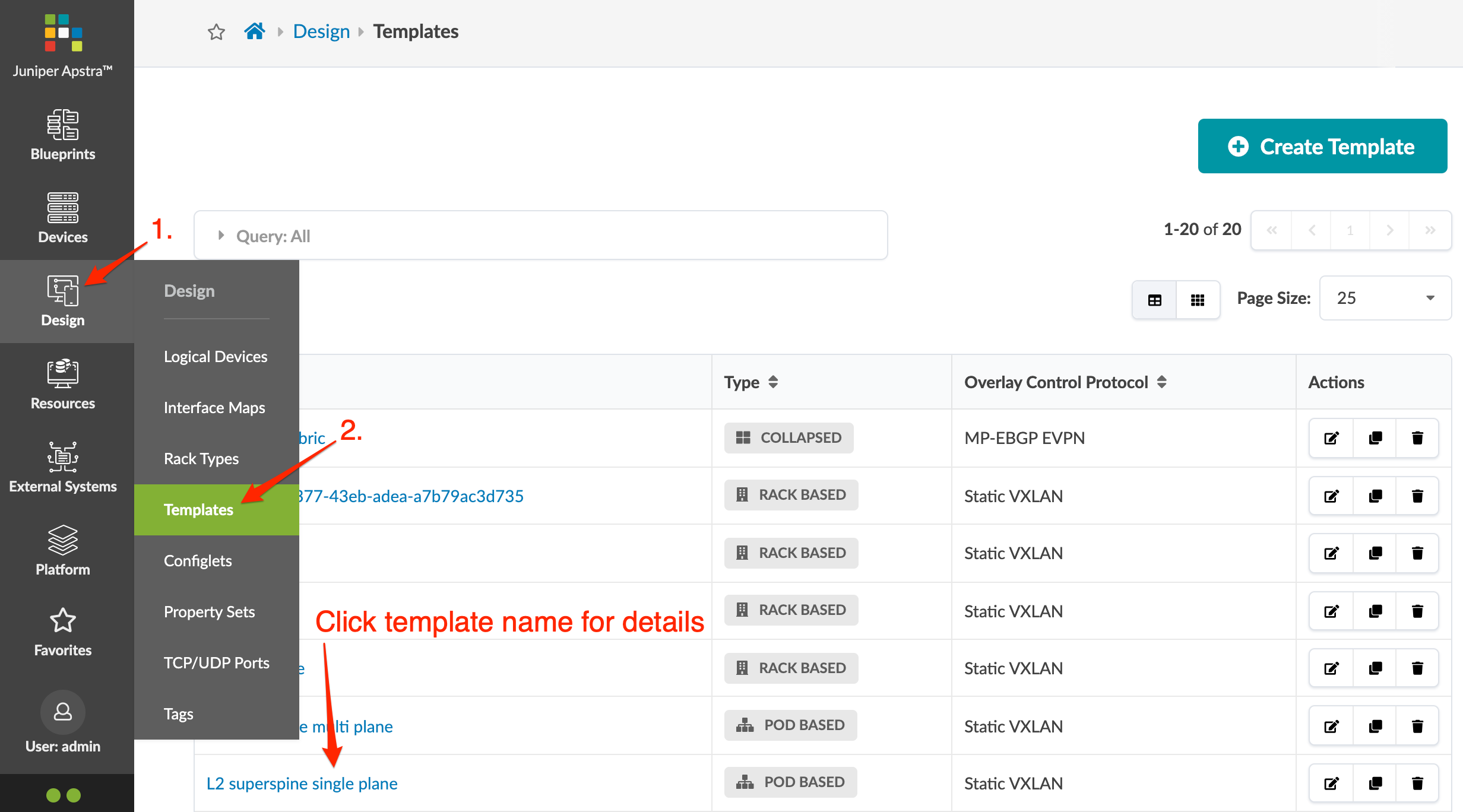
See the sections below for details on each type of template.
Rack-based Template
Rack-based templates define the type and number of racks to connect as top-of-rack (ToR) switches (or pairs of ToR switches). Rack-based templates include the following details:
| Policy | Options |
|---|---|
| ASN Allocation Scheme (spine) |
|
| Overlay Control Protocol |
|
| Spine to Leaf Links Underlay Type |
|
| Structure | Options |
|---|---|
| Rack Types | Type of rack and number of each selected rack type. ESI-based rack types in rack-based templates without EVPN are invalid. |
| Spines |
|
Pod-based Template
Pod-based templates are used to create large, 5-stage Clos networks, essentially combining multiple rack-based templates using an additional layer of superspine devices. The following images show examples of 5-stage Clos architectures built using pod-based templates (Superspine links are not shown for readability purposes). See 5-Stage Clos Architecture for more information.

Single plane, dual superspine 4 x plane, 4 x superspine
Pod-based templates include the following details:
| Policy | Option |
|---|---|
| Spine to Superspine Links |
|
| Overlay Control Protocol |
|
| Structure | Options |
|---|---|
| Pods | Type of rack-based template and number of each selected template |
| Superspines |
|
Collapsed Template
Collapsed templates allow you to consolidate leaf, border leaf and spine functions into a single pair of devices. A full mesh topology is created at the leaf level instead of at leaf-spine connections. This spineless template uses L3 collapsed rack types. Collapsed templates have the following limitations:
- No support for upgrading collapsed L3 templates to L3 templates with spine devices (To achieve the same result you could move devices from the collapsed L3 blueprint to an L3 Clos blueprint.)
- Collapsed L3 templates can't be used as pods in 5-stage templates.
- You can't mix vendors inside redundant leaf devices - the two leaf devices must be from the same vendor and model.
- Leaf-to-leaf links can't be added, edited or deleted.
- Inter-leaf connections are limited to full-mesh.
- IPv6 is not supported.
Collapsed templates include the following details:
| Policy | Options |
|---|---|
| Overlay Control Protocol |
|
| Structure | Options |
|---|---|
| Rack Types | Type of L3 collapsed rack and number of each selected rack type. |
| Mesh Links Count and Speed | Defines the link set created between every pair of physical devices, including devices in redundancy groups (MLAG / ESI). These links are always physical L3. No logical links are needed at the mesh level. |