
Contact Customer Support and Return the Chassis or Components
If you need to return a hardware component to Juniper Networks, Inc., you need a Return Material Authorization (RMA) number and the equipment serial number. Contact the Juniper Networks Technical Assistance Center (JTAC) to generate an RMA number. You may also need to locate the chassis or component details using the CLI or by referring to equipment labels. You then pack and ship the component.
Contact Customer Support
You can contact JTAC 24 hours a day, seven days a week.
| Chat |
Use the Ask me icon at the bottom right of the Support page. Don't see the Chat icon? Read this. |
| Web | |
| Telephone |
U.S. and Canada (Toll-free): 1-888-314-JTAC (5822) Outside the US or Canada, use the relevant country number listed on the regional tabs listed on the Contact Support page. Federal Government Support: 1-833-900-1454 |
We do not support opening new cases through e-mail. Please use one of the above options to contact JTAC.
Return a Hardware Component to Juniper Networks
If a hardware component fails, contact Juniper Networks to obtain an RMA number. We use this number to track the returned material at the factory and to return the repaired or new components to you, as needed.
Do not return any component to Juniper Networks unless you have first obtained an RMA number. Juniper Networks reserves the right to refuse shipments that do not have an RMA number. Refused shipments are returned to you by collect freight.
To return a defective hardware component:
- Determine the part number and the serial number of the defective component. See Locate the Serial Number of the SRX4120 or its Components.
- Obtain an RMA number from JTAC as described in Request a Return Material Authorization.
- Pack the component for shipment. See Packing the SRX4120 for Shipment.
For more information about return and repair policies, see the Support page at https://support.juniper.net/support/.
Locate the Serial Number of the SRX4120 or its Components
If the device is operational and you can access the CLI, you can list serial numbers for the device and for some components with a CLI command. If you don’t have access to the CLI, or if the serial number for the component doesn’t appear in the command output, you can locate the serial number ID label on the device or component.
If you want to find the serial number ID label on a component, you need to remove the component from the device chassis.
- List the SRX4120 Chassis and Component Details Using the CLI
- Locate the Chassis Serial Number ID Label
List the SRX4120 Chassis and Component Details Using the CLI
To list the device and device components and their serial numbers, enter the show
chassis hardware command on the CLI.
user@host> show chassis hardware
Hardware inventory:
Item             Version  Part number  Serial number     Description
Chassis                                FP4023AN0038      SRX4120
Midplane         REV 06   650-191121   FP4023AN0038      SRX4120
Routing Engine 0          BUILTIN      BUILTIN           SRX Routing Engine
CB 0                      BUILTIN      BUILTIN           Control Board
FPC 0                     BUILTIN      BUILTIN           SRX4120 FPC
  PIC 0                   BUILTIN      BUILTIN           8x10G-T
  PIC 1                   BUILTIN      BUILTIN           8xSFP+
  PIC 2                   BUILTIN      BUILTIN           4xSFP28
  PIC 3                   BUILTIN      BUILTIN           2xQSFP28
Power Supply 0   REV 01   740-168323   1EDPD2000TZ       PS 450W 90-264V AC in
Fan Tray 0                                               Fan Tray 0, Front to Back Airflow - AFO
Fan Tray 1                                               Fan Tray 1, Front to Back Airflow - AFO
Fan Tray 2                                               Fan Tray 2, Front to Back Airflow - AFO
Fan Tray 3                                               Fan Tray 3, Front to Back Airflow - AFO
Locate the Chassis Serial Number ID Label
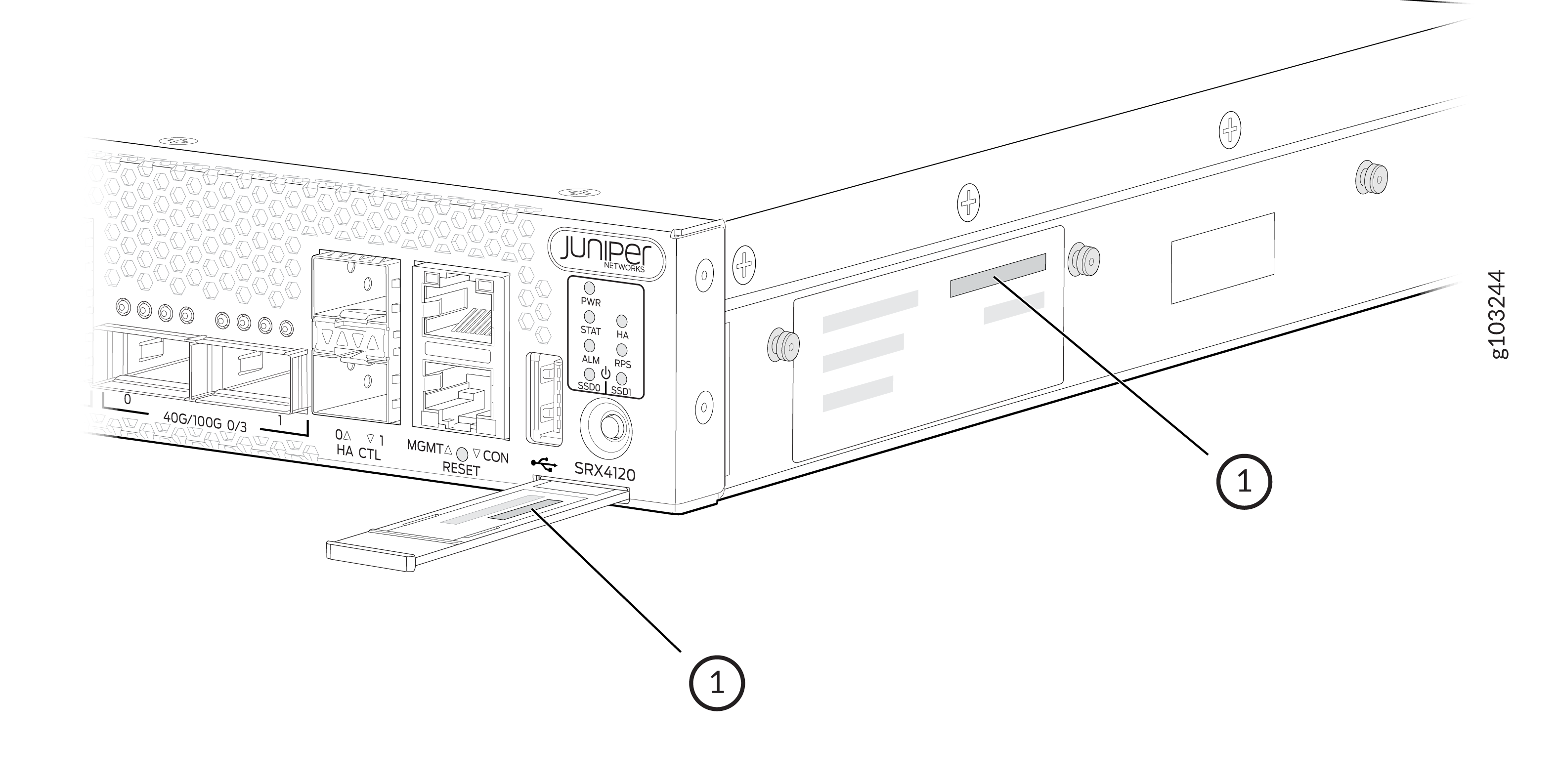
You can find the serial number on the pull out tab on the front panel of the device, or on the label on the side of the device.
Request a Return Material Authorization
If you are returning a device or hardware component to Juniper Networks for repair or replacement, obtain an RMA number from JTAC.
Before you request an RMA from JTAC, be prepared to provide the following information:
-
Your existing service request number, if you have one
-
Serial number of the device or component
-
Your name, organization name, telephone number, fax number, and shipping address
-
Details of the failure or problem
-
Type of activity you were performing on the device when the problem occurred
-
Configuration data displayed by one or more
showcommands
If you're contacting JTAC by telephone:
-
To report a new incident, press the star (*) key to be routed to the next available support engineer.
-
To enquire about an existing case, enter your 12-digit service request number followed by the pound (#) key.
The support representative validates your request and issues an RMA number for return of the device or component.
Packing the SRX4120 for Shipment
To pack your device for shipment:
Guidelines for Packing and Shipping Hardware Components
When you return the chassis or components:
- Make sure to adequately protect them with packing materials. Pack them properly to prevent the pieces from moving around the carton.
- Use the original shipping materials, if they are available.
- Place the individual components in antistatic bags.
- Write the RMA number on the exterior of the box to ensure proper tracking.