
QFX5241-64OD and QFX5241-64QD Ports Panel
The ports panel of the QFX5241-64OD and QFX5241-64QD switches have 64 high-speed network ports each. These ports support data transmission speeds of up to 800 Gbps. The 64 ports (numbered 0 to 63) in the QFX5241-64OD support octal small form-factor pluggable (OSFP) transceivers. The 64 ports in the QFX5241-64QD (numbered 0 to 63) support quad SFP double-density (QSFP-DD) transceivers.
For information about the optical transceivers and cables that support 800 Gbps transmission in QFX5241-64OD and QFX5241-64QD, see Hardware Compatibility Tool (HCT).
For information about the port configuration and channelization in QFX5241-64OD and QFX5241-64QD, see Port Checker Tool.
Apart from the 64 network ports in the ports panel, both the QFX5241-64OD and QFX5241-64QD switches offer the following ports in the management panel:
-
Two SFP28 ports
-
One USB 3.0 port
-
One RJ-45 console (CON) port
-
One management (MGMT) port
-
Note: For information about the ports in management panel, see QFX5241-64OD and QFX5241-64QD Management Panel.
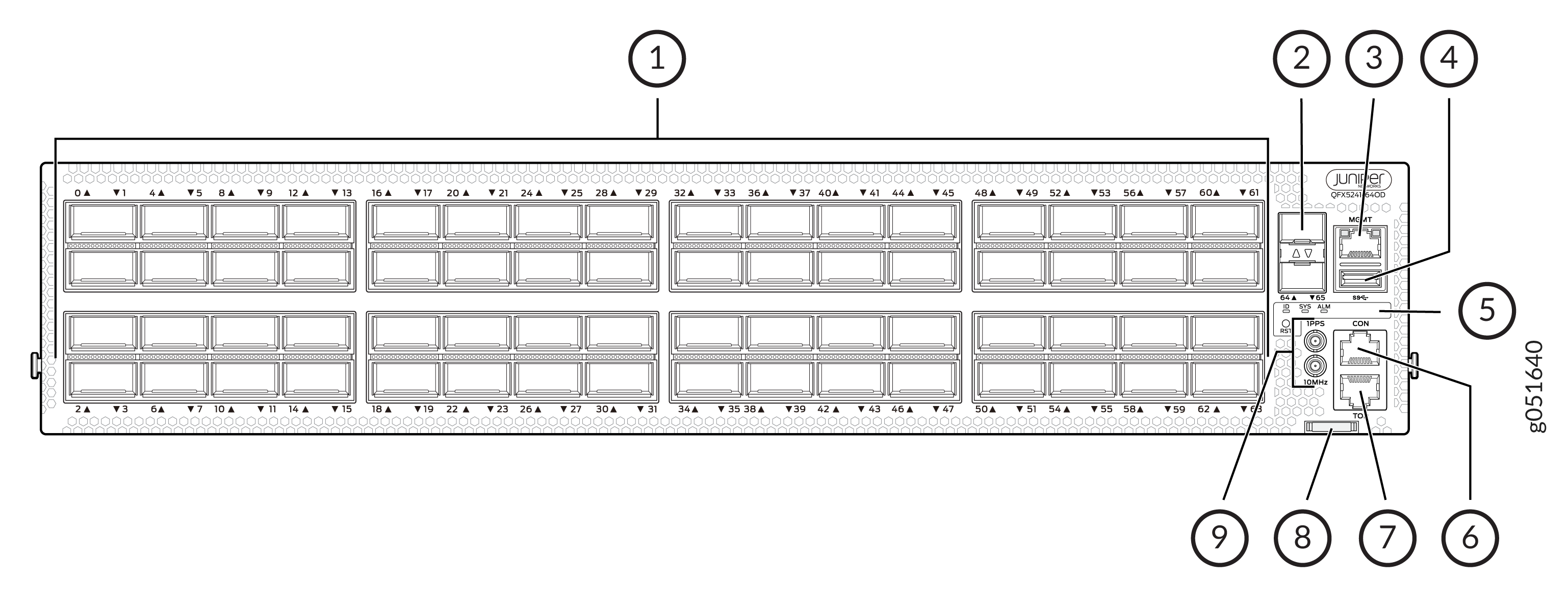
1 — Network ports panel (with 64 800GbE OSFP ports) | 6 — RJ-45 console port (CON) |
2 — SFP28 ports | 7 — Time of Delay (TOD) port |
3 — RJ-45 Management port (MGMT) | 8 — Chassis serial number pull-out |
4 — USB 3.0 port | 9 — Clock input and output connectors (10 MHz and 1 PPS) |
5 — Status LEDs (ID, SYS, ALM) and reset (RST) button |
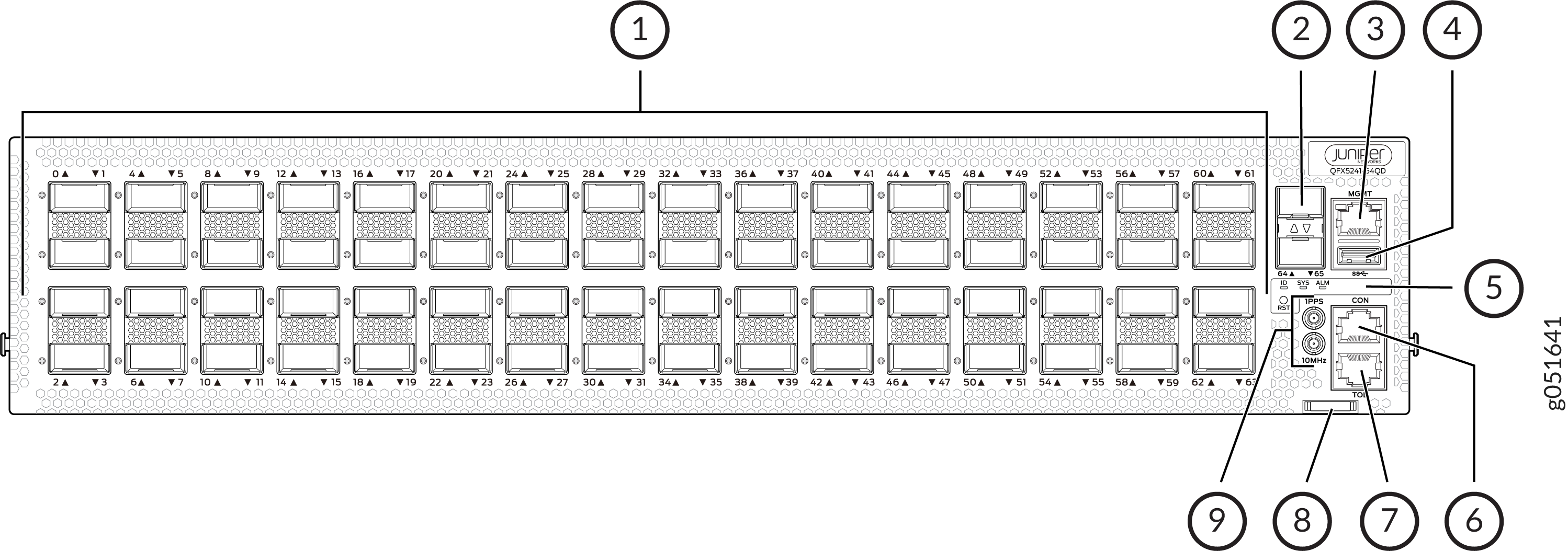
1 — Network ports panel (with 64 800GbE OSFP ports) | 6 — RJ-45 console port (CON) |
2 — SFP28 ports | 7 — Time of Delay (TOD) port |
3 — RJ-45 Management port (MGMT) | 8 — Chassis serial number pull-out |
4 — USB 3.0 port | 9 — Clock input and output connectors (10 MHz and 1 PPS) |
5 — Status LEDs (ID, SYS, ALM) and reset (RST) button |
Not all front-panel ports on the QFX5240 and QFX5241 support high-power optics, such as 800G-ZR and 800G-ZR+. On the QFX5240-64OD and QFX5241-64QD platforms, only the front-panel ports in the middle rows (second and third rows) support high-power optics. Ports in first and fourth row do not support high-power optics. The ports that support high-power optics are 1, 2, 5, 6, 9, 10, 13, 14, 17, 18, 21, 22, 25, 26, 29, 30, 33, 34, 37, 38, 41, 42, 45, 46, 49, 50, 53, 54, 57, 58, 61, and 62. Before installing a high-power optic, use the Port Checker tool for this platform to verify port support.
QFX5241-64QD switches support high-power coherent optics, such as the 800G-ZR-M-HP transceivers. On the ports in the second and third rows, 800G-ZR-M-HP transceivers can operate at temperatures of up to 35 °C at sea level. QFX5241-64QD switches are designed to support coherent transceiver modules in second and third rows at this temperature, with a maximum power consumption of 31 W per module. For detailed specifications and deployment considerations for 800G-ZR-M-HP transceivers, see Hardware Compatibility Tool (HCT). For information on port rows and support in QFX5241-64QD switches, see Port Checker tool.
QFX5241-64OD and QFX5241-64QD Network Port LEDs
The high-speed OSFP network ports on QFX5241-64OD and the high-speed QSFP-DD network ports on the QFX5241-64QD use a single RGB LED to indicate link status, activity on the link, or a fault condition.
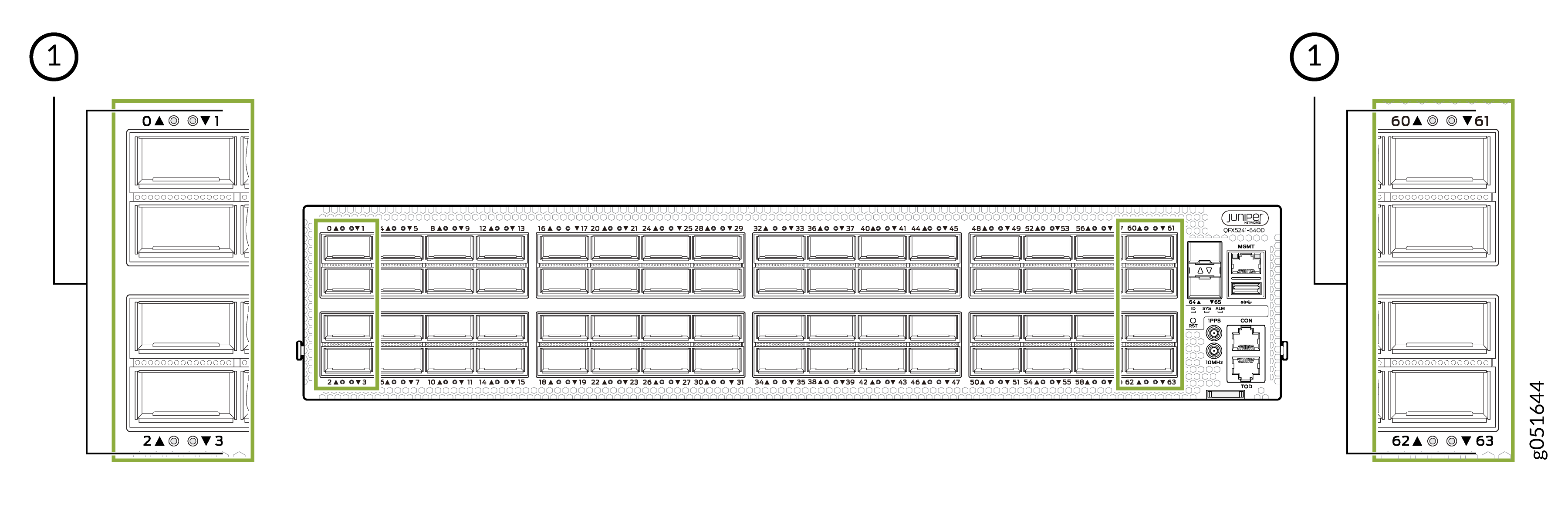
1 — Network port LEDs |
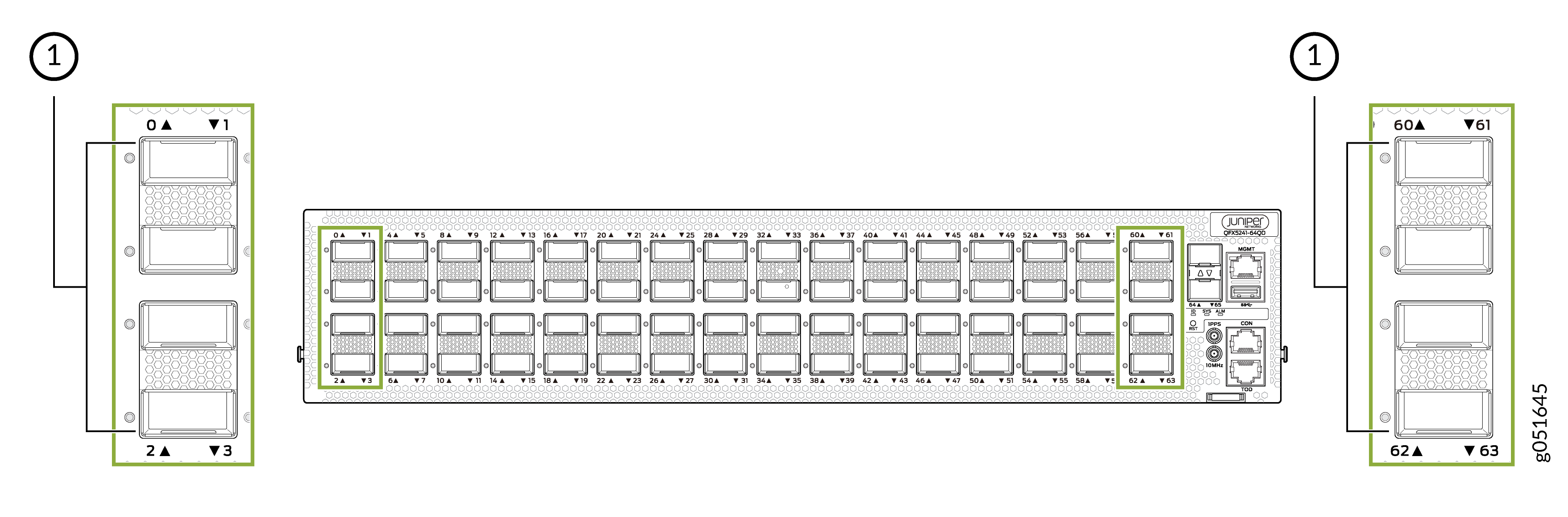
1 — Network port LEDs |
Table 1 explains the behavior of the nonchannelized network ports LEDs of the QFX5241-64OD and QFX5241-64QD switches.
|
Color |
State |
Description |
|---|---|---|
|
Unlit |
Off |
By default, the LED is unlit, so it is in the Off state. The LED can be unlit even when power is present and a transceiver is present in the port. |
|
The link is down. |
||
|
Transceiver is not installed. |
||
|
Green |
On steadily |
A 400/800-Gbps link is established, and there is link activity. |
|
Yellow |
On steadily |
The link is down or the port experiences a fault other than loss of signal or transceiver hardware failure. |
|
The link is down because of a remote error or because the port was disabled through the CLI. |
||
|
Red |
On steadily |
The link is down because the port or transceiver has a hardware failure. |