
ON THIS PAGE
Return a QFX541-32OD Switch or Component for Repair or Replacement
Contact Customer Support to Obtain a Return Material Authorization
Locate the Serial Number on QFX5241-32OD Devices or Components
Remove the Solid-State Drives for RMA on a QFX5241-32OD Switch
How to Return a Hardware Component to Juniper Networks, Inc.
Return QFX5241-32OD Chassis or Components
Return a QFX541-32OD Switch or Component for Repair or Replacement
Use this procedure to return QFX541-32OD hardware to Juniper Networks for repair or replacement:
-
Determine the serial number of the chassis if you need to return the switch. If you need to return one or more components, determine the serial number for each component. For instructions, see Locate the Serial Number on QFX5241-32OD Devices or Components.
-
Obtain a Return Material Authorization (RMA) number from Juniper Networks Technical Assistance Center (JTAC) as described in Contact Customer Support to Obtain a Return Material Authorization.
-
Pack the switch or component for shipping.
For more information about return and repair policies, see the customer support page at https://support.juniper.net/support/guidelines/.
Contact Customer Support to Obtain a Return Material Authorization
If you need to return a device or hardware component to Juniper Networks for repair or replacement, obtain an RMA number from JTAC. You must obtain an RMA number before you attempt to return the component.
After locating the serial number of the device or hardware component you want to return, open a service request with the JTAC on the Web or by telephone.
Before you request an RMA number from JTAC, be prepared to provide the following information:
-
Your existing service request number, if you have one
-
Serial number of the component
-
Your name, organization name, telephone number, fax number, and shipping address
-
Details of the failure or problem
-
Type of activity being performed on the device when the problem occurred
-
Configuration data displayed by one or more
showcommands
You can contact JTAC 24 hours a day, seven days a week, on the Web or by telephone:
-
Service Request Manager: https://support.juniper.net/support
-
Telephone: +1-888-314-JTAC (+1-888-314-5822), toll free in U.S., Canada, and Mexico
For international or direct-dial options in countries without toll free numbers, see https://support.juniper.net/support.
If you are contacting JTAC by telephone, enter your 12-digit service request number followed by the pound (#) key for an existing case, or press the star (*) key to be routed to the next available support engineer.
The support representative validates your request and issues an RMA number for return of the component.
Locate the Serial Number on QFX5241-32OD Devices or Components
If you need to return a switch or component to Juniper Networks for repair or replacement, you must locate the serial number of the switch or component. You must provide this serial number to the Juniper Networks Technical Assistance Center (JTAC) when you contact them to obtain a Return Materials Authorization (RMA).
If the switch is operational and you can access the CLI, you can list serial numbers for the switch and for some components with a CLI command. If you do not have access to the CLI or if the serial number for the component does not appear in the command output, you can locate the serial number ID label on the switch or component.
If you want to find the serial number ID label on a component, you need to remove the component from the switch chassis, for which you must have the required parts and tools available.
- List the Chassis and Component Details with the CLI
- Locate the Chassis Serial Number ID Label on QFX5241-32OD Switch
- Locate the Serial Number ID Labels on FRUs in a QFX5241-32OD Switch
List the Chassis and Component Details with the CLI
To list the switch and components and their serial numbers, enter the following CLI command:
show chassis hardware
The following output lists the switch components and serial numbers for a QFX5241-32OD switch. The output is similar for other QFX5241-32OD switches:
user@device> show chassis hardware
Hardware inventory:
Item             Version  Part number  Serial number     Description
Chassis                                HV1925AX0004      QFX5241-32OD
PSM 0            REV 02   640-184862   1EXXF140013       AC AFO 2400W PSU
PSM 1            REV 02   640-184862   1EXXF14001E       AC AFO 2400W PSU
Routing Engine 0          BUILTIN      BUILTIN           RE-QFX5241
CB 0             REV 06   650-184058   HV1925AX0004      QFX5241-32OD
FPC 0                     BUILTIN      BUILTIN           QFX5241-32OD
  PIC 0                   BUILTIN      BUILTIN           32X800G-OSFPDD
    Xcvr 0       REV 01   740-174933   1W1CVWA90100N     OSFP-800G-DR8
    Xcvr 1       REV 01   740-174933   XA9BQ3D           OSFP-800G-DR8
    Xcvr 2       REV 01   740-174933   1W1CVWA90100S     OSFP-800G-DR8
    Xcvr 3       REV 01   740-174940   1F1THVA951001     OSFP-800G-DR8-2-P
    Xcvr 4       REV 01   740-174940   1F1THVA95101B     OSFP-800G-DR8-2-P
    Xcvr 5       REV 01   740-174933   XA8AKWV           OSFP-800G-DR8
    Xcvr 6       REV 01   740-174933   XA8AKTL           OSFP-800G-DR8
    Xcvr 7       REV 01   740-174933   1W1CVWA84301V     OSFP-800G-DR8
    Xcvr 8       REV 01   740-174933   1W1CVWA84301X     OSFP-800G-DR8
    Xcvr 9       REV 01   740-174933   XA8AKW4           OSFP-800G-DR8
    Xcvr 10      REV 01   740-174933   XA8AKX7           OSFP-800G-DR8
    Xcvr 11      REV 01   740-174933   XA8AKRD           OSFP-800G-DR8
    Xcvr 12      REV 01   740-174933   XA8AKRA           OSFP-800G-DR8
    Xcvr 13      REV 01   740-174942   1W1CHAA935003     OSFP-800G-AOC-1M
    Xcvr 14      REV 01   740-174942   1W1CHAA935003     OSFP-800G-AOC-1M
    Xcvr 15      REV 01   740-174942   1A1CHAA944T0G     OSFP-800G-AOC-1M
    Xcvr 16      REV 01   740-174942   1A1CHAA944T0G     OSFP-800G-AOC-1M
    Xcvr 17      REV 01   740-174948   1W1CHGA935003     OSFP-800G-AOC-20M
    Xcvr 18      REV 01   740-174948   1W1CHGA935003     OSFP-800G-AOC-20M
    Xcvr 19      REV 01   740-183989   1W1CJAAA0200F     OSFP-800G-DR8-LPO
    Xcvr 20      REV 01   740-183989   1W1CJAAA0200D     OSFP-800G-DR8-LPO
    Xcvr 21      REV 01   740-174942   1W1CHAA935002     OSFP-800G-AOC-1M
    Xcvr 22      REV 01   740-174942   1W1CHAA935002     OSFP-800G-AOC-1M
    Xcvr 23      REV 01   740-183989   1W1CJAAA0200E     OSFP-800G-DR8-LPO
    Xcvr 24      REV 01   740-183989   1W1CJAAA0200C     OSFP-800G-DR8-LPO
    Xcvr 25      REV 01   740-174933   1W1CVWA90100E     OSFP-800G-DR8
    Xcvr 26      REV 01   740-174933   1W1CVWA84301W     OSFP-800G-DR8
    Xcvr 27      REV 01   740-174940   1F1THVA95101H     OSFP-800G-DR8-2-P
    Xcvr 28      REV 01   740-174940   1F1THVA951017     OSFP-800G-DR8-2-P
    Xcvr 29      REV 01   740-174933   1W1CVWA90100T     OSFP-800G-DR8
    Xcvr 30      REV 01   740-174933   1W1CVWA90100Q     OSFP-800G-DR8
    Xcvr 31      REV 01   740-174933   XA8AKXJ           OSFP-800G-DR8
    Xcvr 32      REV 01   740-021308   NAJD00Z           SFP+-10G-SR
    Xcvr 33      REV 01   740-021308   NAJCY4W           SFP+-10G-SR
Fan Tray 0                                               Fan Tray, Front to Back Airflow - AFO
Fan Tray 1                                               Fan Tray, Front to Back Airflow - AFO
Fan Tray 2                                               Fan Tray, Front to Back Airflow - AFO
Fan Tray 3                                               Fan Tray, Front to Back Airflow - AFO
Fan Tray 4                                               Fan Tray, Front to Back Airflow - AFO
Fan Tray 5                                               Fan Tray, Front to Back Airflow - AFO
Fan Tray 6                                               Fan Tray, Front to Back Airflow - AFO
user@device>You must remove the fan module to read the fan serial number from the serial number ID label. The fan module serial number cannot be viewed through the CLI. Fan Tray 2 refers to the third fan module from the left, counting from 0.
Locate the Chassis Serial Number ID Label on QFX5241-32OD Switch
You can find the chassis serial number in either the show chassis
hardware command output or physically on the top of the QFX5241-32OD
switch. See Figure 1.
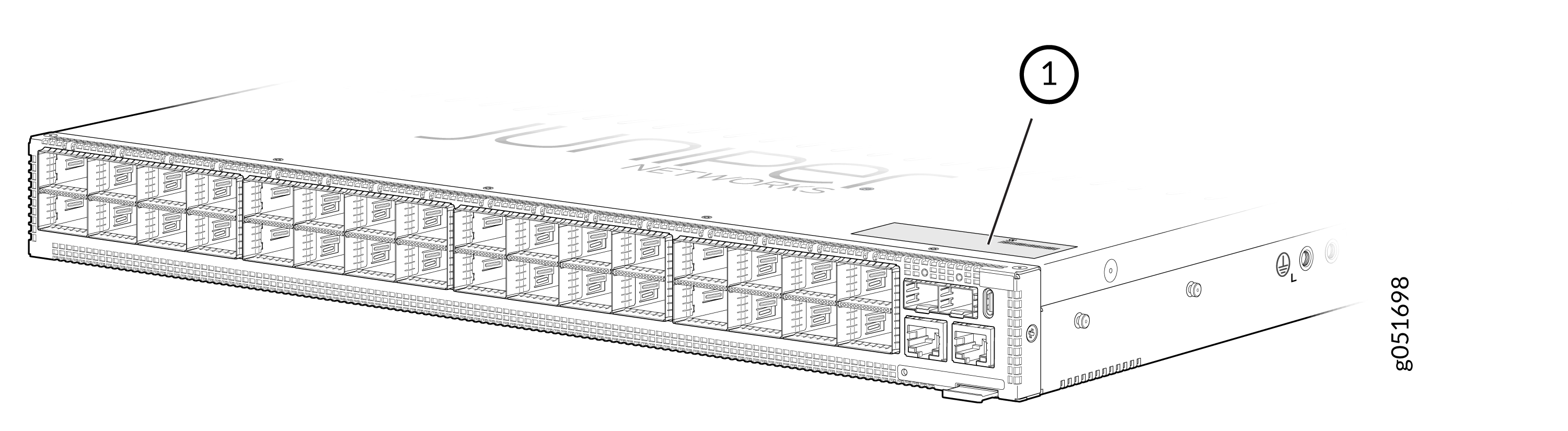
1 — Serial number ID label |
Locate the Serial Number ID Labels on FRUs in a QFX5241-32OD Switch
The QFX5241-32OD switch contains Field Replaceable Units (FRUs) such as Power Supply Units (PSUs) and fan modules. To identify the serial number on these components, you must remove them from the switch chassis.
-
AC PSU—The serial number ID label is on the top of the AC PSU.
Figure 2: Serial Number ID Label on QFX5241-32OD AC PSU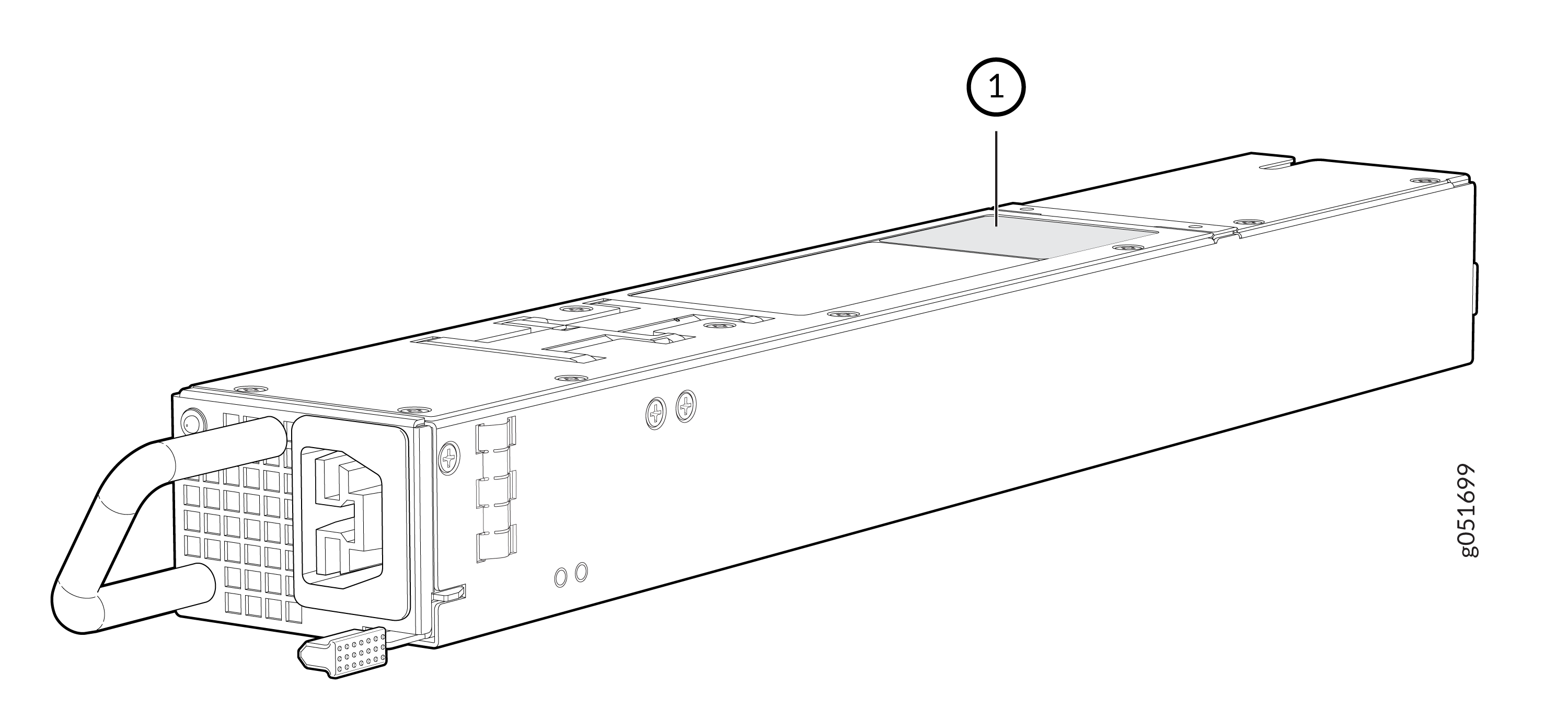 1—
1—Serial number ID label
-
DC PSU—The serial number ID label is on the top of the DC PSU.
Figure 3: Serial Number ID Label on QFX5241-32OD DC PSU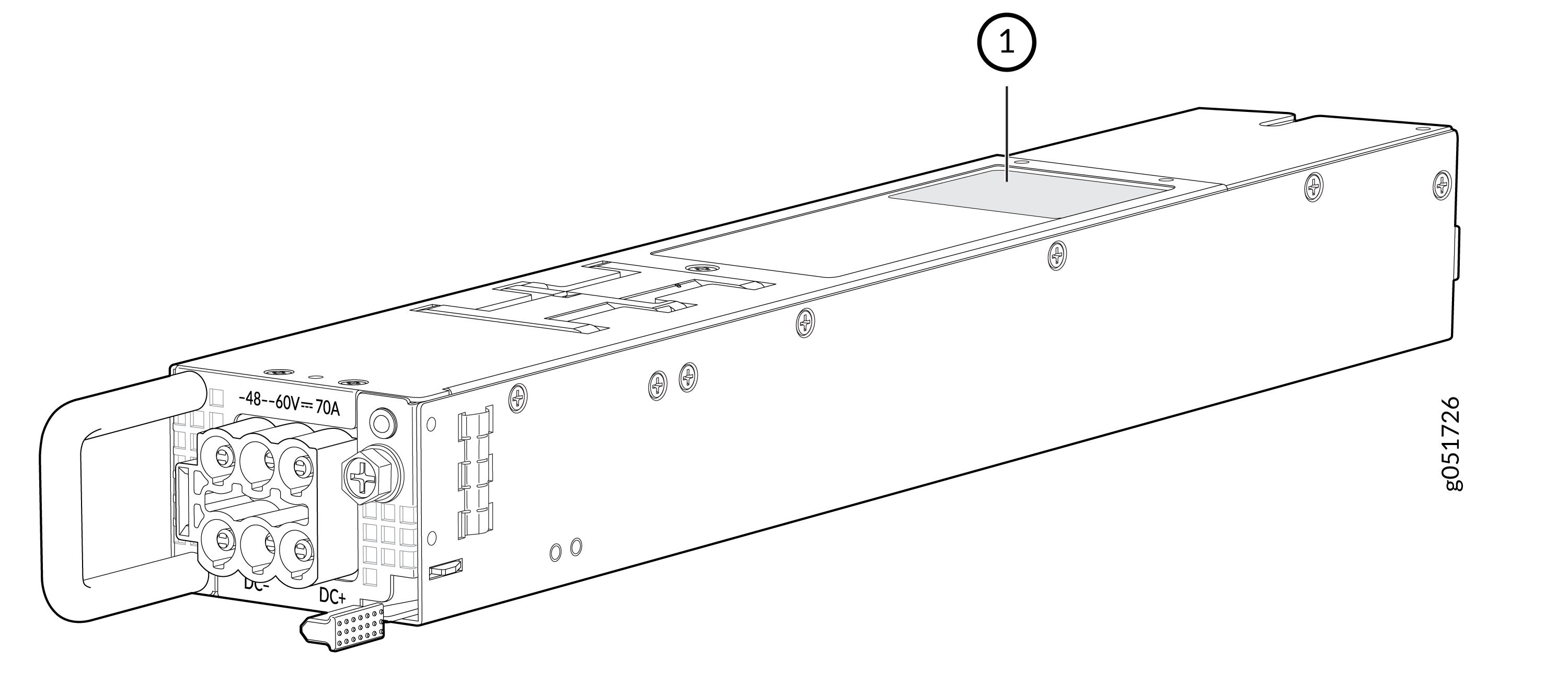 1—
1—Serial number ID label
-
Fan module—The serial number ID label is on the top of the fan module for a QFX5241-32OD switch.
Figure 4: Serial Number ID Label on QFX5241-32OD Fan Module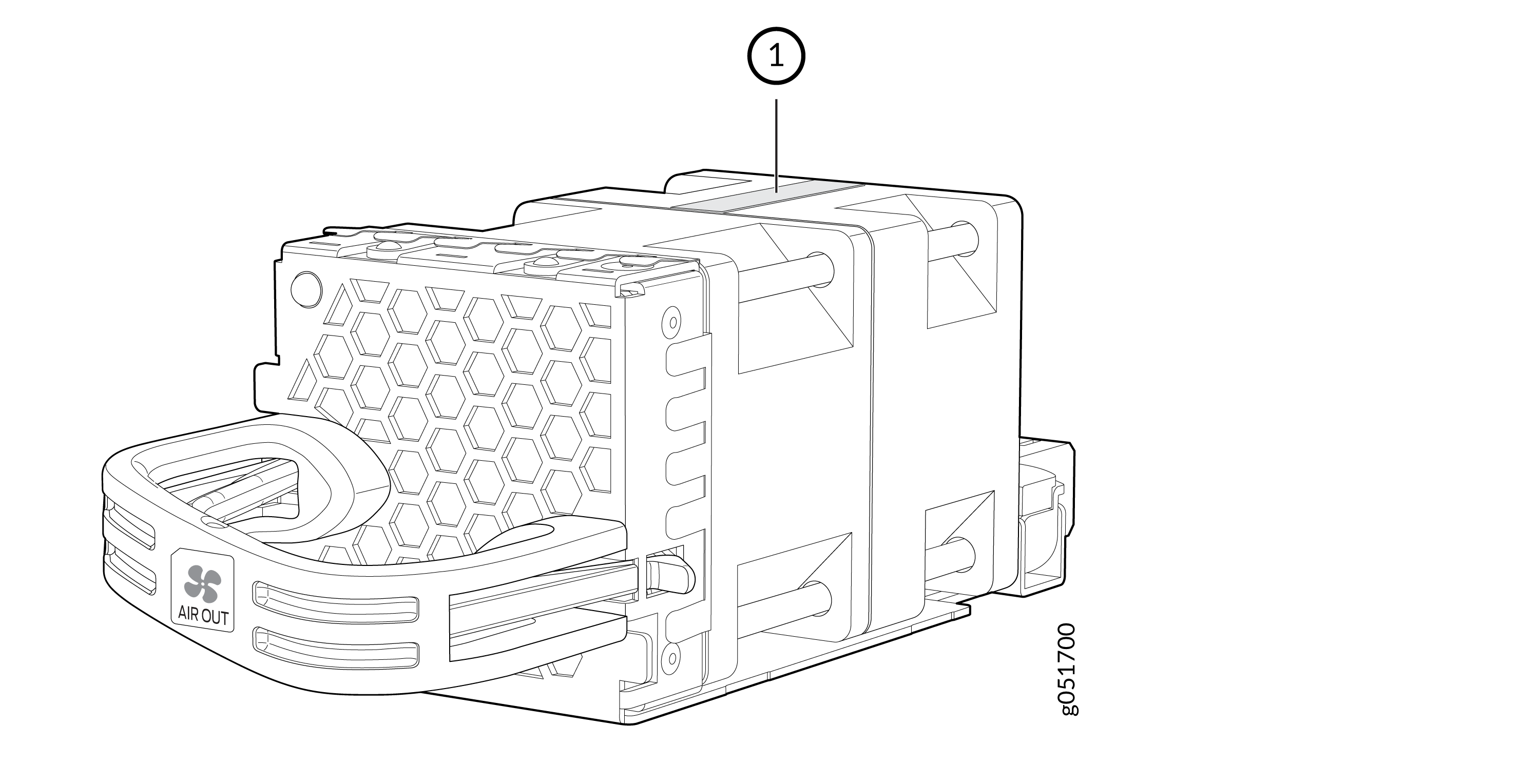 1—
1—Serial number ID label
Remove the Solid-State Drives for RMA on a QFX5241-32OD Switch
The QFX5241-32OD switch has two SSDs that store the software images, system logs, and the configuration files. Before returning a chassis to Juniper Networks as part of a Return Material Authorization (RMA), you have the option to remove the SSDs and to dispose the SSDs according to your own company’s security procedures. Before you begin this procedure, ensure you have the following tools:
-
ESD grounding strip (not provided)
-
Phillips screwdriver, number 2
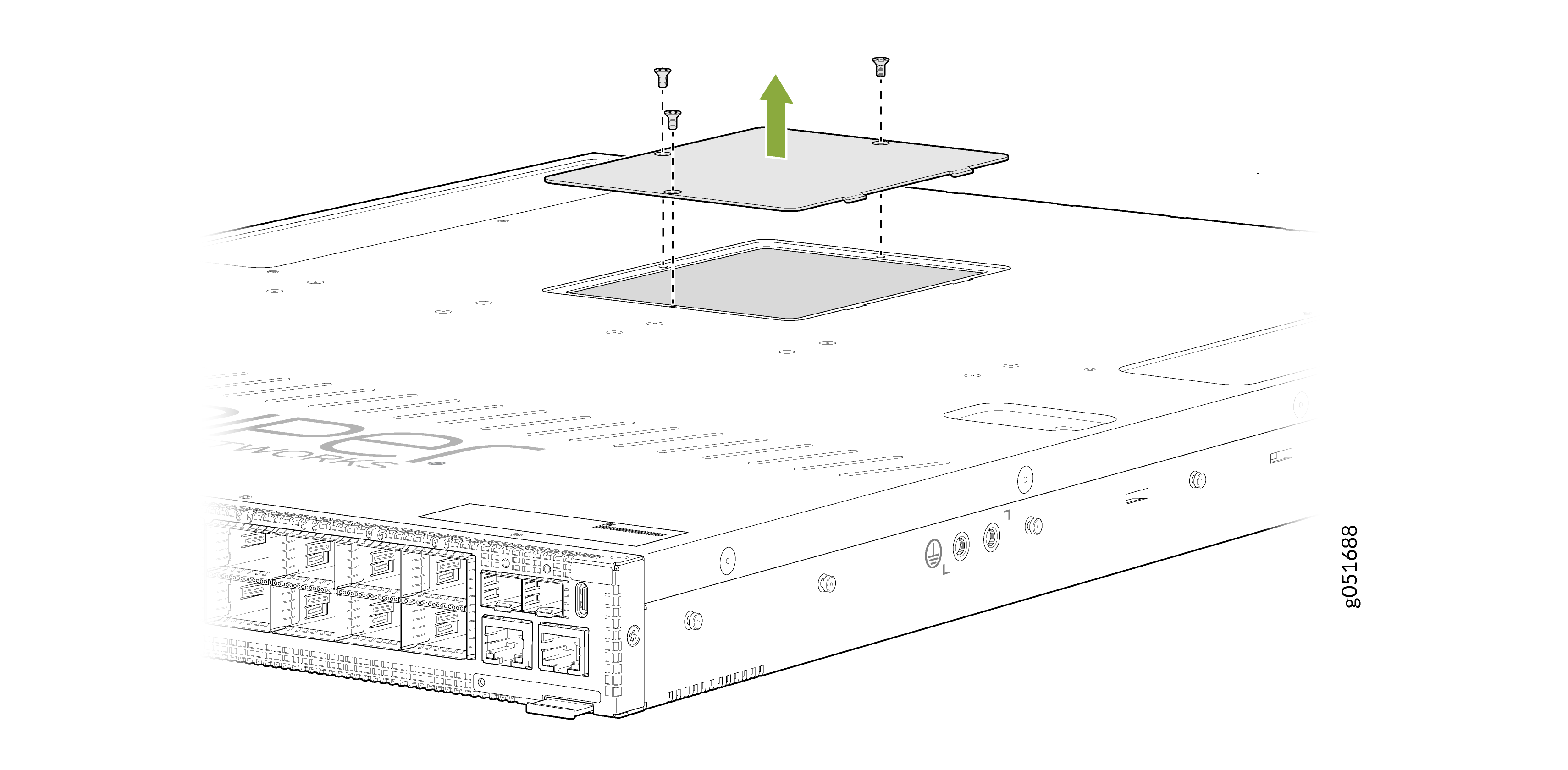
Use this optional procedure to remove the drives from the QFX5241-32OD switch after the device has shut down and you’ve removed it from the rack or cabinet. The SSD doors are located on the top of the QFX5241-32OD switch.
-
Use the Phillips screwdriver to remove the three flat-head screws from each
door on the top of the device.
Figure 5: Remove Screws on SSD Doors in QFX5241-32OD Switch
-
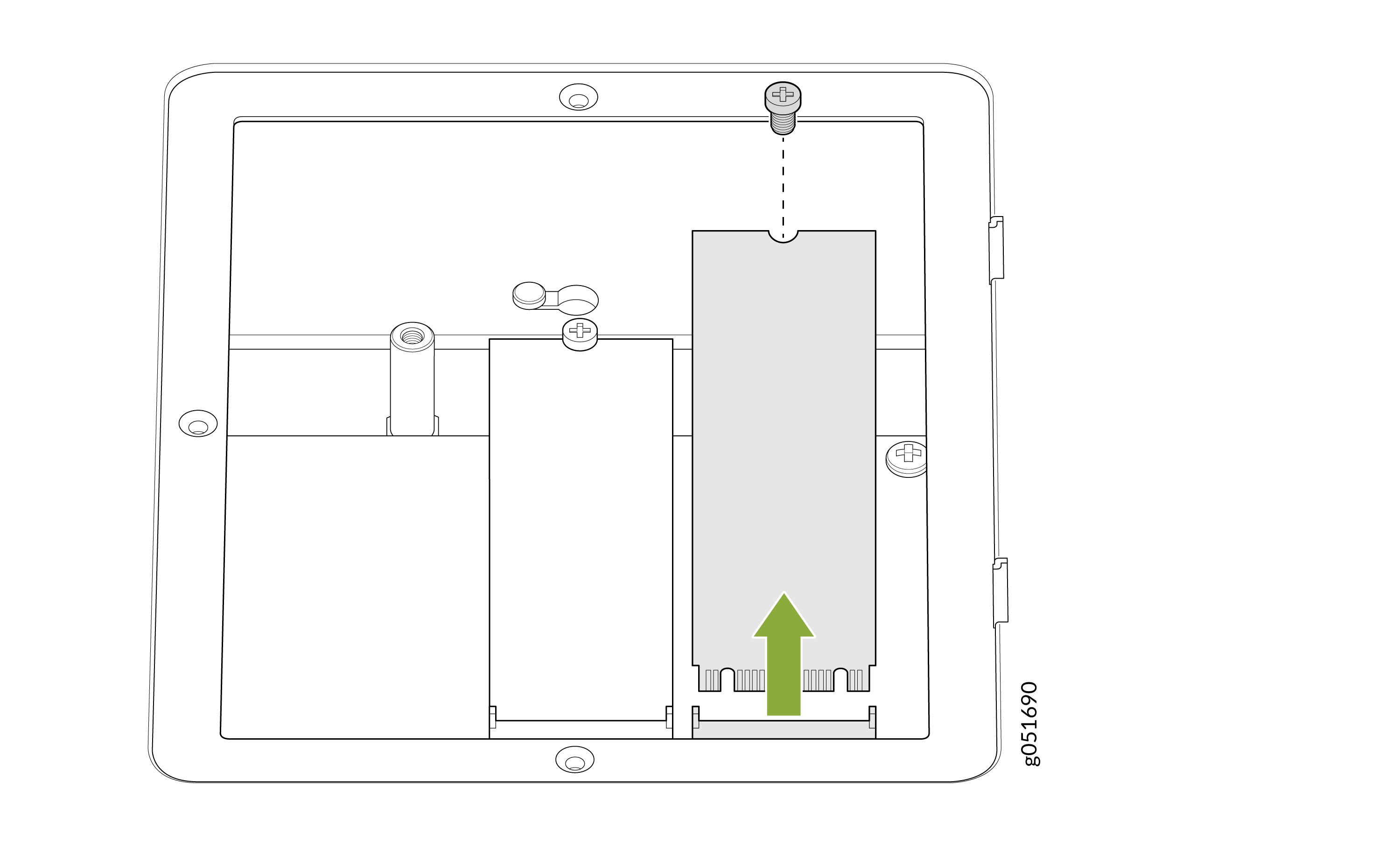
Use the Phillips screwdriver to remove the screw on one of the SSDs and set
it aside.
Figure 6: Remove the Screw and Lift the SDD Out
-
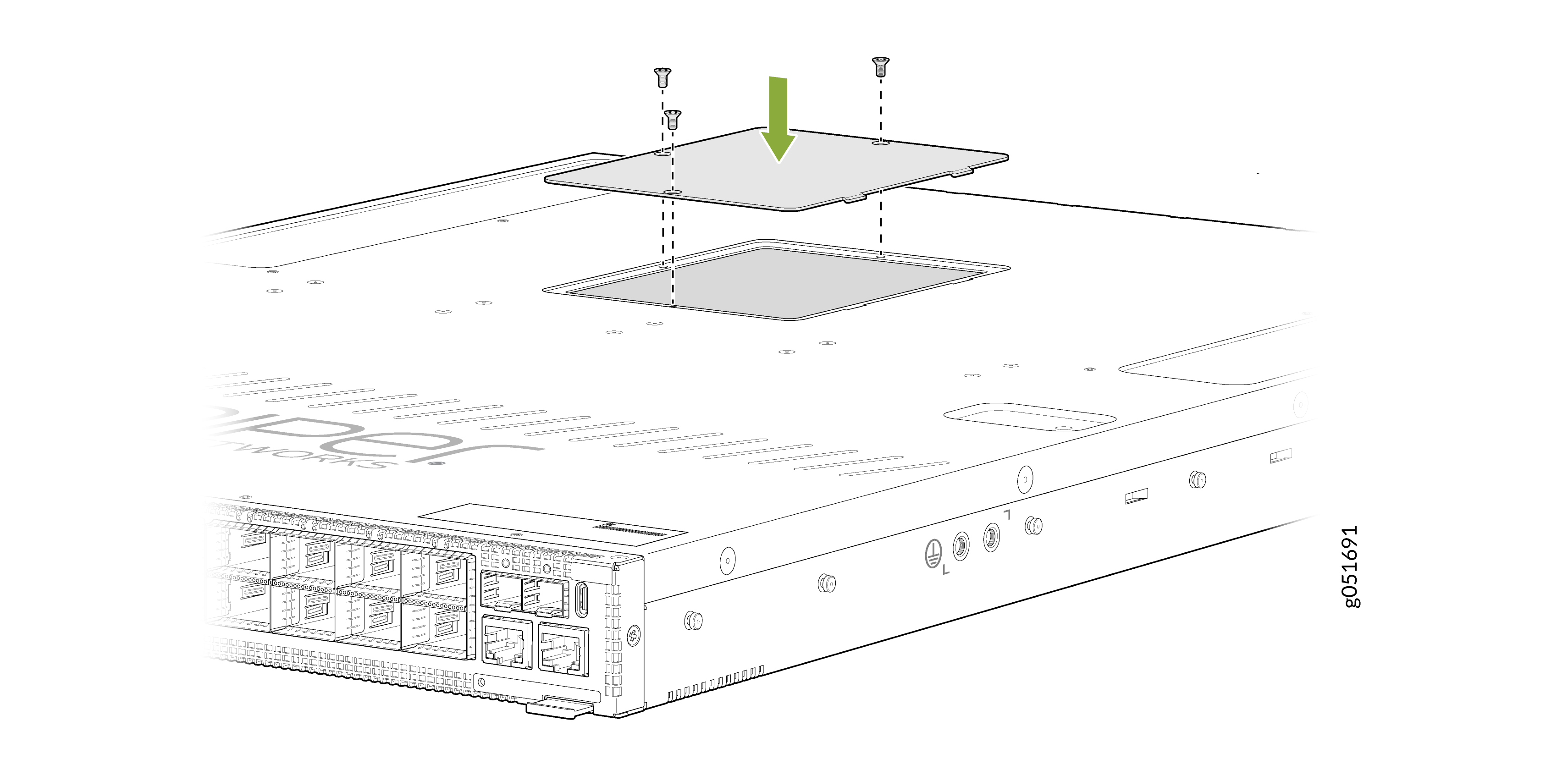
Replace the SSD doors and the six flat-head screws.
Figure 7: Replace the SSD Doors
How to Return a Hardware Component to Juniper Networks, Inc.
If a hardware component fails, you need to contact Juniper Networks, Inc. to obtain a Return Material Authorization (RMA) number. This number is used to track the returned material at the factory and to return repaired or new components to the customer as needed.
Do not return any component to Juniper Networks, Inc. unless you have first obtained an RMA number. Juniper Networks, Inc. reserves the right to refuse shipments that do not have an RMA. Refused shipments are returned to the customer by collect freight.
For more information about return and repair policies, see the customer support webpage at https://support.juniper.net/support/.
For product problems or technical support issues, contact the Juniper Networks Technical Assistance Center (JTAC) by using the Service Request Manager link at https://support.juniper.net/support/ or at 1-888-314-JTAC (within the United States) or 1-408-745-9500 (from outside the United States).
To return a defective hardware component:
Guidelines for Packing Hardware Components for Shipment
To pack and ship individual components:
When you return components, make sure that they are adequately protected with packing materials and packed so that the pieces are prevented from moving around inside the carton.
Use the original shipping materials if they are available.
Place individual components in antistatic bags.
Write the RMA number on the exterior of the box to ensure proper tracking.
Do not stack any of the hardware components.
Pack QFX5241-32OD Switch or Component for Shipping
If you are returning a QFX5241-32OD switch or one of its components to Juniper Networks for repair or replacement, pack the item as described in this topic.
Before you pack a QFX5241-32OD switch or its components:
-
Ensure that you have taken the necessary precautions to prevent electrostatic discharge (ESD) damage.
-
Retrieve the original shipping carton and packing materials. Contact your JTAC representative if you do not have these materials, to learn about approved packing materials. See Contact Customer Support to Obtain a Return Material Authorization .
Ensure that you have the following parts and tools available:
-
ESD grounding strap.
-
Antistatic bag, one for each component.
-
If you are returning the chassis, an appropriate screwdriver for the mounting screws used on your rack or cabinet.
Pack a QFX5241-32OD Switch for Shipping
To pack a QFX5241-32OD switch for shipping:
- Power off the switch and remove the power cables. See Power Off a QFX5241-32OD Switch.
- Remove the cables that connect the QFX5241-32OD switch to all external devices.
- Remove all field-replaceable units (FRUs) from the switch.
- Have one person support the weight of the switch while another person unscrews and removes the mounting screws.
- Remove the switch from the rack and place the switch in a large antistatic bag.
- Place the switch in the shipping carton.
- Place the packing foam on top of and around the switch.
- If you are returning accessories or FRUs with the switch, pack them as instructed in Pack QFX5241-32OD Components for Shipping.
- Replace the accessory box on top of the packing foam.
- Close the top of the cardboard shipping box and seal it with packing tape.
- Write the RMA number on the exterior of the box to ensure proper tracking.
Pack QFX5241-32OD Components for Shipping
Do not stack switch components. Return individual components in separate boxes if they do not fit together on one level in the shipping box.
To pack and ship QFX5241-32OD components:
-
Place individual FRUs in antistatic bags.
-
Ensure that the components are adequately protected with packing materials and packed so that the pieces are prevented from moving around inside the carton.
-
Close the top of the cardboard shipping box and seal it with packing tape.
-
Write the RMA number on the exterior of the box to ensure proper tracking.