
PTX12008 Switch Interface Board
Learn about the PTX12008 Switch Interface Board and its status LEDs.
Switch Interface Boards (SIBs) create the switch fabric for the PTX12008. SIBs are hot-removable and hot-insertable field-replaceable units (FRUs). The SIBs are not visible from the outside of the router chassis. You must remove the fan trays on the rear panel of the chassis to see the SIBs. You can install up to nine SIBs.
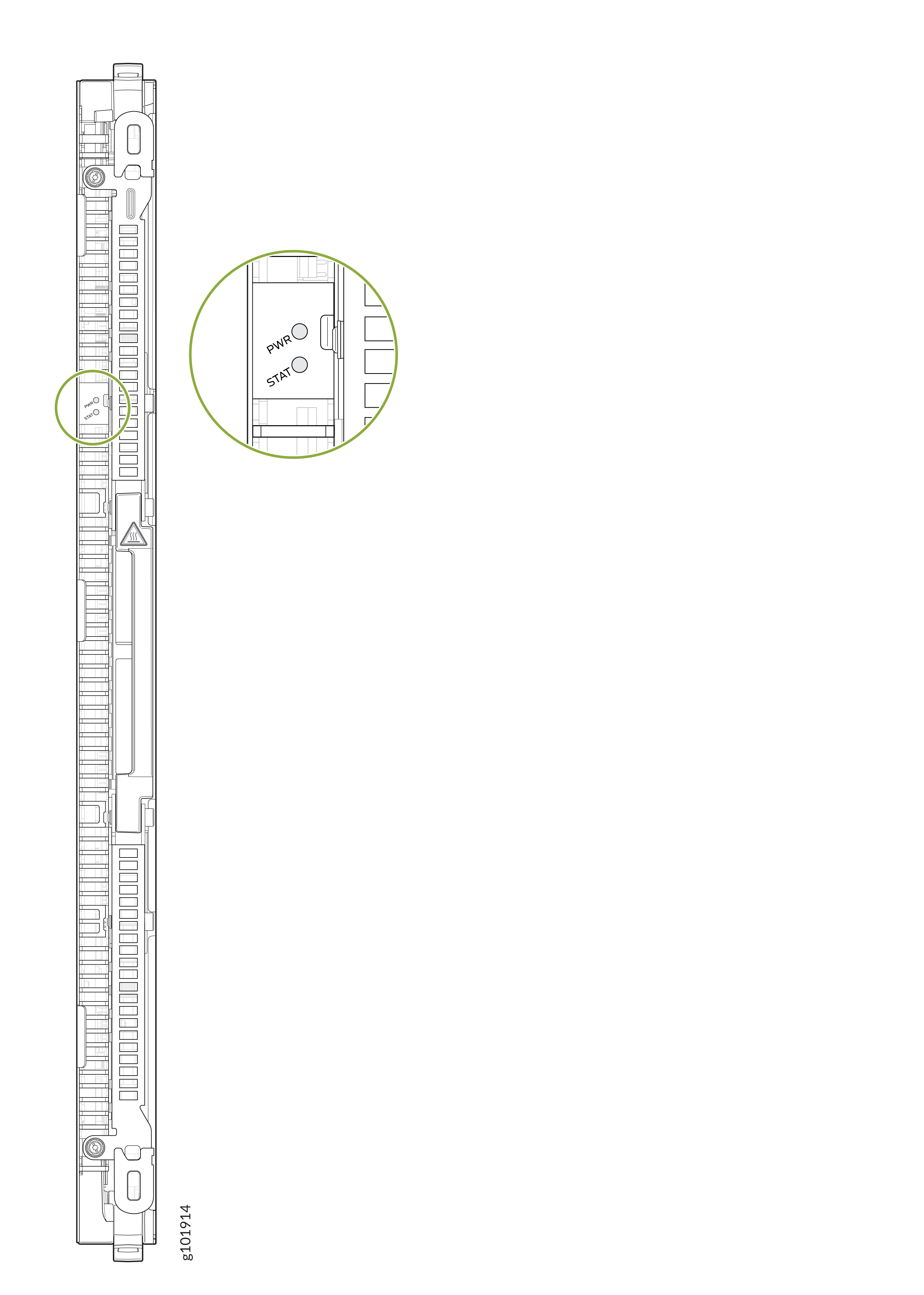
Each SIB has two LEDs labeled PWR and STAT. Table 1 describes the functions of these LEDs.
| LED | Color | State | Description |
|---|---|---|---|
|
PWR (Power) |
Green |
On steadily |
The SIB is receiving power. |
|
Yellow |
Blinking |
There is a fault in the power. |
|
|
Unlit |
Off |
The SIB is either offline or not receiving power. |
|
|
STAT (Status) |
Green |
On steadily |
The SIB is online. |
|
Green |
Blinking |
The SIB is powering up. |
|
|
Yellow |
Blinking |
The SIB has a failure or a fault. |
|
|
Unlit |
Off |
The SIB is offline. |
| Height | Width | Depth | Weight |
|---|---|---|---|
|
24.6 in. (62.5 cm) |
1.62 in. (4.2 cm) |
83.57 in. (32.9 cm) |
25 lb (11.34 kg) |
The boot time for the SIB is approximately 235 seconds.
SIB Status LEDs
Each fan tray has one LED labeled FAN TRAY that represent the status of the fans in the fan tray and three LEDs collectively labled SIB STATUS that represent the status of the Switch Interface Boards (SIBs) installed behind the fan tray. The LEDs are located in the top left corner of the fan trays.
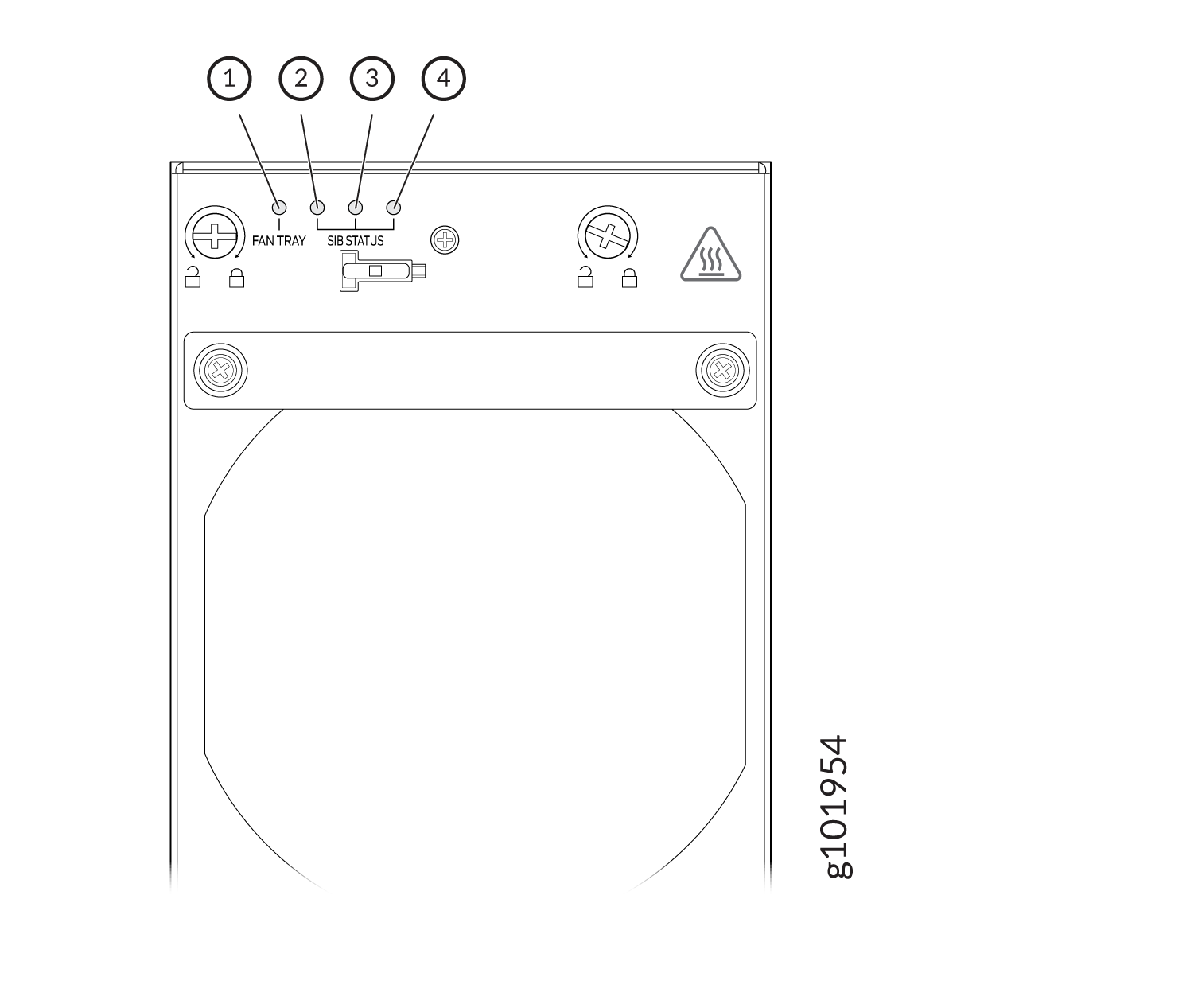
1 — Fan status LED | 3 — SIB status LED for SIBs installed in slots SIB 1, SIB 4, and SIB 7 |
2 — SIB status LED for SIBs installed in slots SIB 0, SIB 3, and SIB 6 | 4 — SIB status LED for SIBs installed in slots SIB 2, SIB 5, and SIB 8 |
|
Name |
Color |
State |
Description |
|---|---|---|---|
|
SIB Status (SIB 0 status) |
Green |
On steadily |
The SIB installed in slot SIB 0 behind the fan tray installed in slot FAN TRAY 0 is online. |
|
Green |
Blinking |
The SIB installed in slot SIB 0 behind the fan tray installed in slot FAN TRAY 0is powering up. |
|
|
Yellow |
Blinking |
An error is detected in the SIB installed in slot SIB 0 behind the fan tray installed in slot FAN TRAY 0. Replace the SIB as soon as possible. The SIB is on the left in the group of three SIBs installed behind the fan tray installed in slot FAN TRAY 0. To maintain proper airflow through the chassis, leave the fan tray installed in the chassis until you are ready to replace the SIB. |
|
|
None |
Off |
The SIB installed in slot SIB 0 behind the fan tray installed in slot FAN TRAY 0 is offline. |
|
|
SIB Status (SIB 1 status) |
Green |
On steadily |
The SIB installed in slot SIB 1 behind the fan tray installed in slot FAN TRAY 0 is online. |
|
Green |
Blinking |
The SIB installed in slot SIB 1 behind the fan tray installed in slot FAN TRAY 0 is powering up. |
|
|
Yellow |
Blinking |
An error is detected in the SIB installed in slot SIB 1 behind the fan tray installed in slot FAN TRAY 0. Replace the SIB as soon as possible. The SIB is in the middle in the group of three SIBs installed behind the fan tray installed in slot FAN TRAY 0. To maintain proper airflow through the chassis, leave the fan tray installed in the chassis until you are ready to replace the SIB. |
|
|
None |
Off |
The SIB installed in slot SIB 1 behind the fan tray installed in slot FAN TRAY 0 is offline. |
|
|
SIB Status (SIB 2 status) |
Green |
On steadily |
The SIB installed in slot SIB 2 behind the fan tray installed in slot FAN TRAY 0 is online. |
|
Green |
Blinking |
The SIB installed in slot SIB 2 behind the fan tray installed in slot FAN TRAY 0 is powering up. |
|
|
Yellow |
Blinking |
An error is detected in the SIB installed in slot SIB 2 behind the fan tray installed in slot FAN TRAY 0. Replace the SIB as soon as possible. The SIB is on the right in the group of three SIBs installed behind the fan tray installed in slot FAN TRAY 0. To maintain proper airflow through the chassis, leave the fan tray installed in the chassis until you are ready to replace the SIB. |
|
|
None |
Off |
The SIB installed in slot SIB 2 behind the fan tray installed in slot FAN TRAY 0 is offline. |
|
|
SIB Status (SIB 3 status) |
Green |
On steadily |
The SIB installed in slot SIB 3 behind the fan tray installed in slot FAN TRAY 1 is online. |
|
Green |
Blinking |
The SIB installed in slot SIB 3 behind the fan tray installed in slot FAN TRAY 1 is powering up. |
|
|
Yellow |
Blinking |
An error is detected in the SIB installed in slot SIB 3 behind the fan tray installed in slot FAN TRAY 1. Replace the SIB as soon as possible. The SIB is on the left in the group of three SIBs installed behind the fan tray installed in slot FAN TRAY 1. To maintain proper airflow through the chassis, leave the fan tray installed in the chassis until you are ready to replace the SIB. |
|
|
None |
Off |
The SIB installed in slot SIB 3 behind the fan tray installed in slot FAN TRAY 1 is offline. |
|
|
SIB Status (SIB 4 status) |
Green |
On steadily |
The SIB installed in slot SIB 4 behind the fan tray installed in slot FAN TRAY 1 is online. |
|
Green |
Blinking |
The SIB installed in slot SIB 4 behind the fan tray installed in slot FAN TRAY 1 is powering up. |
|
|
Yellow |
Blinking |
An error is detected in the SIB installed in slot SIB 4 behind the fan tray installed in slot FAN TRAY 1. Replace the SIB as soon as possible. The SIB is in the middle in the group of three SIBs installed behind the fan tray installed in slot FAN TRAY 1. To maintain proper airflow through the chassis, leave the fan tray installed in the chassis until you are ready to replace the SIB. |
|
|
None |
Off |
The SIB installed in slot SIB 4 behind the fan tray installed in slot FAN TRAY 1 is offline. |
|
|
SIB Status (SIB 5 status) |
Green |
On steadily |
The SIB installed in slot SIB 5 behind the fan tray installed in slot FAN TRAY 1 is online. |
|
Green |
Blinking |
The SIB installed in slot SIB 5 behind the fan tray installed in slot FAN TRAY 1 is powering up. |
|
|
Yellow |
Blinking |
An error is detected in the SIB installed in slot SIB 5 behind the fan tray installed in slot FAN TRAY 1. Replace the SIB as soon as possible. The SIB is on the right in the group of three SIBs installed behind the fan tray installed in slot FAN TRAY 1. To maintain proper airflow through the chassis, leave the fan tray installed in the chassis until you are ready to replace the SIB. |
|
|
None |
Off |
The SIB installed in slot SIB 5 behind the fan tray installed in slot FAN TRAY 1 is offline. |
|
|
SIB Status (SIB 6 status) |
Green |
On steadily |
The SIB installed in slot SIB 6 behind the fan tray installed in slot FAN TRAY 2 is online. |
|
Green |
Blinking |
The SIB installed in slot SIB 6 behind the fan tray installed in slot FAN TRAY 2 is powering up. |
|
|
Yellow |
Blinking |
An error is detected in the SIB installed in slot SIB 6 behind the fan tray installed in slot FAN TRAY 2. Replace the SIB as soon as possible. The SIB is on the left in the group of three SIBs installed behind the fan tray installed in slot FAN TRAY 2. To maintain proper airflow through the chassis, leave the fan tray installed in the chassis until you are ready to replace the SIB. |
|
|
None |
Off |
The SIB installed in slot SIB 6 behind the fan tray installed in slot FAN TRAY 2 is offline. |
|
|
SIB Status (SIB 7 status) |
Green |
On steadily |
The SIB installed in slot SIB 7 behind the fan tray installed in slot FAN TRAY 2 is online. |
|
Green |
Blinking |
The SIB installed in slot SIB 7 behind the fan tray installed in slot FAN TRAY 2 is powering up. |
|
|
Yellow |
Blinking |
An error is detected in the SIB installed in slot SIB 7 behind the fan tray installed in slot FAN TRAY 2. Replace the SIB as soon as possible. The SIB is in the middle in the group of three SIBs installed behind the fan tray installed in slot FAN TRAY 2. To maintain proper airflow through the chassis, leave the fan tray installed in the chassis until you are ready to replace the SIB. |
|
|
None |
Off |
The SIB installed in slot SIB 7 behind the fan tray installed in slot FAN TRAY 2 is offline. |
|
|
SIB Status (SIB 8 status) |
Green |
On steadily |
TheSIB installed in slot SIB 8 behind the fan tray installed in slot FAN TRAY 2 is online. |
|
Green |
Blinking |
The SIB installed in slot SIB 8 behind the fan tray installed in slot FAN TRAY 2 is powering up. |
|
|
Yellow |
Blinking |
An error is detected in the SIB installed in slot SIB 8 behind the fan tray installed in slot FAN TRAY 2. Replace the SIB as soon as possible. The SIB is on the right in the group of three SIBs installed behind the fan tray installed in slot FAN TRAY 2. To maintain proper airflow through the chassis, leave the fan tray installed in the chassis until you are ready to replace the SIB. |
|
|
None |
Off |
The SIB installed in slot SIB 8 behind the fan tray installed in slot FAN TRAY 2 is offline. |
The fan tray LEDs are described in Fan Tray LEDs.