이 페이지의 내용
온디바이스 Avira 바이러스 차단
이 주제를 읽고 Avira 바이러스 차단을 사용하여 애플리케이션 트래픽을 검사하고 바이러스가 네트워크에 침입하지 못하도록 방지하는 방법에 대해 알아보세요.
또한 SRX 시리즈 방화벽에 대한 Avira 바이러스 백신 솔루션 비디오를 시청하여 보안 장치에 Avira 바이러스 백신을 설치하고 사용하는 방법에 대해 이해할 수 있습니다.
Avira 바이러스 차단 개요
Junos OS 콘텐츠 보안은 Avira의 바이러스 차단 기능과 통합되어 완전한 파일 기반 검사 엔진을 제공합니다. 이 바이러스 차단 기능은 애플리케이션 레이어 트래픽을 검사하여 장치를 보호하고 감염된 파일, 트로이 목마, 웜, 스파이웨어 및 기타 악성 데이터와 같은 유해한 콘텐츠를 차단합니다.
Avira Antivirus는 바이러스 패턴 데이터베이스에 액세스하여 네트워크 트래픽을 검사하고 바이러스를 식별합니다. Avira Antivirus는 감염된 파일을 삭제하고 사용자에게 알립니다.
표 1에는 Avira Antivirus의 구성 요소와 라이선스 세부 정보가 나와 있습니다.
구성 요소 |
상세 정보 |
|---|---|
바이러스 패턴 데이터베이스 |
Avira 바이러스 차단은 바이러스 서명 데이터베이스를 확인하여 서명을 식별한 다음 제거합니다. 기본적으로 디바이스는 패턴 데이터베이스에 대한 업데이트를 다운로드합니다. 자동 다운로드 옵션을 예약하려면 Avira 바이러스 차단 검사 옵션 구성을 참조하십시오. |
Avira 바이러스 차단 검사 엔진 |
Avira Antivirus는 파일에서 알려진 바이러스를 실시간으로 검사하는 검사 엔진을 제공합니다. 장치에 Avira 바이러스 백신 검사 엔진을 설치하고 활성화해야 합니다. Avira 바이러스 차단 검사 엔진을 설치하고 활성화하는 단계는 예: Avira 바이러스 차단 구성을 참조하십시오. Avira 바이러스 백신 검사 엔진은 바이러스 탐지를 검사하기 전에 파일의 압축을 풉니다. 자세한 내용은 decompress-layer-limit를 참조하십시오. 다음 시나리오에서 디바이스의 Avira 바이러스 차단 검사 엔진은 애플리케이션 트래픽을 검사하지 않습니다.
|
라이선스 세부 정보 |
Avira 바이러스 차단 검사 엔진은 라이선스가 부여된 구독 서비스입니다. 이 라이선스를 사용하면 전체 파일 기반 실시간 Avira 바이러스 차단 검사 기능을 사용할 수 있습니다. 바이러스 백신 기능은 업데이트된 최신 바이러스 서명 데이터베이스를 사용합니다. 라이선스가 만료되면, 업데이트 없이 로컬에 저장된 바이러스 백신 서명을 계속 사용할 수 있습니다. 로컬 데이터베이스를 삭제하면 바이러스 백신 검사를 실행할 수 없습니다. 라이선스에 대한 자세한 내용은 SRX 시리즈 라이선스를 참조하십시오. |
이점
장치를 보호하고 바이러스, 트로이 목마, 루트킷 및 기타 유형의 악성 코드로부터 네트워크를 보호합니다.
바이러스 서명 데이터베이스 및 Avira 바이러스 차단 검색 엔진이 디바이스에 로컬로 상주하므로 향상된 검색 성능을 제공합니다.
또한보십시오
추가 플랫폼 정보
기능 탐색기를 사용하여 특정 기능에 대한 플랫폼 및 릴리스 지원을 확인하십시오. 추가 플랫폼도 지원될 수 있습니다.
| 플랫폼 | 바이러스 패턴 데이터베이스 |
|---|---|
| 기본 바이러스 패턴 데이터베이스 |
|
| SRX4100, SRX4200, SRX4600 시리즈 방화벽 |
|
| SRX5K-SPC3 방화벽 |
|
| vSRX 가상 방화벽 |
예: Avira 바이러스 차단 구성
이 예에서는 보안 디바이스에서 Avira 바이러스 백신을 구성하는 방법을 배웁니다. 이 항목에서는 기본 바이러스 백신 프로필 및 사용자 지정된 바이러스 백신 프로필을 사용하여 감염된 파일, 트로이 목마, 웜, 스파이웨어 및 기타 악성 데이터와 같은 유해한 콘텐츠로부터 장치를 보호하는 방법에 대해 자세히 설명합니다.
요구 사항
시작하기 전에:
Avira 바이러스 백신 라이선스가 있는지 확인합니다. 디바이스에서 라이선스를 확인하는 방법에 대한 자세한 내용은 SRX 시리즈 방화벽 라이선스 이해를 참조하십시오.
Junos OS 릴리스 18.4R1 이상이 설치된 디바이스.
-
vSRX 가상 방화벽의 경우 최소 요구 사항은 CPU 코어 4개와 메모리 4GB입니다.
이 예는 Junos OS 릴리스 18.4R1이 설치된 SRX1500 디바이스를 사용하여 테스트했습니다.
개요
일반적인 엔터프라이즈 네트워크를 살펴보겠습니다. 최종 사용자가 자신도 모르게 손상된 웹사이트를 방문하여 악성 콘텐츠를 다운로드합니다. 이 작업으로 인해 엔드포인트가 손상됩니다. 엔드포인트의 유해 콘텐츠는 네트워크 내의 다른 호스트에게도 위협이 됩니다. 악성 콘텐츠의 다운로드를 방지하는 것이 중요합니다.
Avira 바이러스 백신이 설치된 장치를 사용하여 바이러스 공격으로부터 사용자를 보호하고 시스템에서 바이러스가 확산되는 것을 방지할 수 있습니다. Avira 바이러스 백신은 네트워크 트래픽에서 바이러스, 트로이 목마, 루트킷 및 기타 유형의 악성 코드를 검사하고 탐지 시 즉시 악성 콘텐츠를 차단합니다.
그림 1 은 Avira 바이러스 백신 사용 예를 보여줍니다.
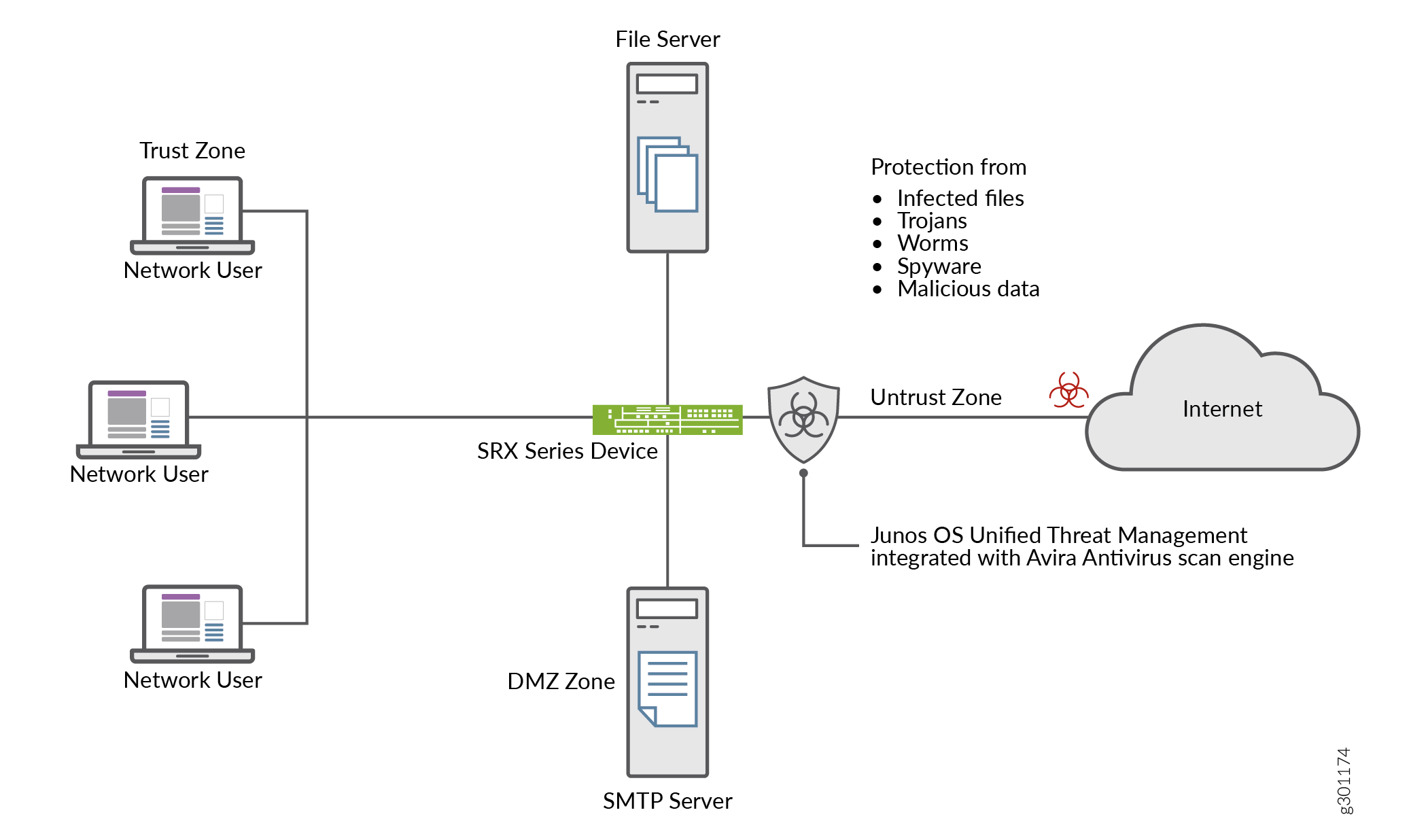 의 Avira 바이러스 백신
이 예에서는 보안 디바이스에서 Avira 바이러스 백신을 구성하는 방법을 배웁니다. 다음과 같은 옵션이 있습니다.
기본 Avira 바이러스 백신 옵션을 사용하여 시작하려면 기본 바이러스 백신 프로필을 사용하여 바이러스 백신 검색 시작을 참조하십시오.
요구 사항에 따라 바이러스 백신 옵션을 사용자 지정하려면 Avira 바이러스 백신 검사 옵션 구성을 참조하십시오.
바이러스 백신 검사 옵션을 설정하려면 사용자 지정 프로필을 사용하여 Avira 바이러스 백신 검사 구성을 참조하십시오.
구성
주니퍼 네트웍스에서 사전 구성된 바이러스 차단 프로필을 활성화할 수 있습니다. 기본 바이러스 백신 기능 프로필 옵션을 사용하는 경우 추가 매개 변수를 구성할 필요가 없습니다. 이 절차에서는 모든 프로토콜에 대한 기본 바이러스 백신 프로필을 사용하여 콘텐츠 보안 정책을 만들고 허용된 트래픽에 대한 보안 정책에 콘텐츠 보안 정책을 적용합니다.
기본 바이러스 백신 프로필을 사용하여 바이러스 백신 검색 시작
단계별 절차
기본 바이러스 백신 프로필을 사용하려면 다음 단계를 완료하십시오.
-
보안 장치에서 Avira 바이러스 백신 검사를 활성화합니다.
user@host#set security utm default-configuration anti-virus type avira-engineAvira를 바이러스 백신 유형으로 구성한 후 디바이스를 재부팅하여 새 검색 엔진을 적용합니다.
-
HTTP, FTP, SMTP, POP3 및 IMAP 프로토콜에 대한 기본 바이러스 차단 프로필을 선택합니다.
[edit]user@host#set security utm default-configuration anti-virus type avirauser@host#set security utm utm-policy P1 anti-virus http-profile junos-av-defaultsuser@host#set security utm utm-policy P1 anti-virus ftp upload-profile junos-av-defaultsuser@host#set security utm utm-policy P1 anti-virus ftp download-profile junos-av-defaultsuser@host#set security utm utm-policy P1 anti-virus smtp-profile junos-av-defaultsuser@host#set security utm utm-policy P1 anti-virus pop3-profile junos-av-defaultsuser@host#set security utm utm-policy P1 anti-virus imap-profile junos-av-defaults -
보안 정책에 콘텐츠 보안 정책을 적용합니다.
[edit]user@host#set security policies from-zone trust to-zone untrust policy POLICY-1 match source-address anyuser@host#set security policies from-zone trust to-zone untrust policy POLICY-1 match destination-address anyuser@host#set security policies from-zone trust to-zone untrust policy POLICY-1 match application anyuser@host#set security policies from-zone trust to-zone untrust policy POLICY-1 then permit application-services utm-policy P1 -
구성을 커밋합니다.
[edit]user@host#commit
또한 SRX 시리즈 방화벽에 대한 Avira 바이러스 백신 솔루션 비디오를 시청하여 보안 장치에 Avira 바이러스 백신을 설치하고 사용하는 방법에 대해 이해할 수 있습니다.
Avira 바이러스 차단 검사 옵션 구성
단계별 절차
이 절차에서는 Avira 바이러스 백신을 사용하도록 보안 장치를 준비하는 선택적 단계를 수행합니다.
-
바이러스 서명 데이터베이스를 수동으로 업데이트하고 데이터베이스 서버의 URL을 지정합니다. URL을 지정하지 않으면 기본 URL https://update.juniper-updates.net/avira 가 제공됩니다. 기본적으로 보안 디바이스는 https://update.juniper-updates.net/avira 에서 패턴 업데이트를 다운로드합니다. 바이러스 패턴 데이터베이스의 위치는 디바이스 모드에 따라 다릅니다. 자세한 내용은 표 1을 참조하십시오.
[edit]user@host#set security utm default-configuration anti-virus avira-engine pattern-update url http://www.example.net/이 단계에서는 지정된 URL에서 패턴 및 엔진 파일을 다운로드합니다.
-
바이러스 백신 패턴 업데이트를 정기적으로 다운로드하는 간격을 설정합니다.
[edit]user@host#set security utm default-configuration anti-virus avira-engine pattern-update interval 2880이 단계에서는 기본값을 24시간마다에서 48시간마다로 변경합니다. 기본 바이러스 백신 패턴 업데이트 간격은 1440분(24시간마다)입니다.
-
패턴 업데이트가 완료되면 이메일 알림을 보냅니다.
[edit]user@host#set security utm default-configuration anti-virus avira-engine pattern-update email-notify admin-email admin@email.net custom-message “Avira antivirus data file was updated” custom-message-subject “AV data file updated” -
(선택 사항) 프록시 프로필에서 패턴 업데이트를 구성합니다.
프록시 호스트 IP 주소와 포트 번호를 다음과 같이 입력하여 프록시 프로필을 구성합니다.
user@host# set services proxy profile proxy-profile protocol http host x.x.x.x port xxxx
사용자 이름과 비밀번호를 설정하여 프록시 프로필 내에서 프록시 인증을 구성합니다.
[edit]
user@host# set services proxy profile proxy-profile protocol http username <username>
user@host# set services proxy profile proxy-profile protocol http password <password>
패턴 업데이트 프로세스에 프록시 프로필을 사용합니다.
[edit]user@host# set security utm default-configuration anti-virus avira-engine pattern-update proxy-profile <proxy-profile>
-
(선택 사항) 온박스 바이러스 차단을 heavy 모드로 구성합니다.
[edit]user@host# set chassis onbox-av-load-flavor heavy이 단계에서는 성능 향상을 위해 추가 리소스를 할당합니다.
라이트 모드에서 바이러스 백신 검사를 사용하려면 다음 delete chassis onbox-av-load-flavor heavy 명령을 사용합니다. 모드를 변경한 후 디바이스를 재부팅하십시오.
-
(선택 사항) 작동 모드를 기본 CDF(연속 전송 기능)에서 홀드 모드로 변경합니다. 보류 모드로 변경하면 시스템은 최종 결과를 얻을 때까지 모든 패킷을 보류합니다.
[edit]user@host# set security utm default-configuration anti-virus forwarding-mode holdCDF 모드 및 인라인 탭 모드에 대한 자세한 내용은 forwarding-mode를 참조하십시오.
사용자 지정 프로필로 Avira 바이러스 차단 검사 구성
보안 디바이스에서 사용자 지정 옵션으로 Avira 바이러스 차단을 구성하려면 표 2 와 같은 단계를 완료해야 합니다.
| 단계 |
세부 정보 |
|---|---|
| 1단계: 사용자 정의 객체 정의 |
이 단계에서는 바이러스 백신 검사 옵션을 정의합니다.
또는 기본 목록 junos-default-bypass-mime을 사용할 수 있습니다. |
| 2단계: 바이러스 백신 기능 프로필 만들기 |
|
| 3단계: 콘텐츠 보안 정책 만들기 |
FTP, HTTP, POP3, SMTP 및 IMAP 트래픽에 대해 2단계에서 만든 바이러스 차단 프로필을 연결합니다. 콘텐츠 보안 정책은 바이러스 차단 검사 엔진으로 전송되는 프로토콜 트래픽을 제어합니다. |
| 4단계: 보안 정책에 콘텐츠 보안 정책 적용 |
보안 정책에서 콘텐츠 보안 정책을 애플리케이션 서비스로 지정합니다. 콘텐츠 보안 바이러스 차단 설정은 보안 정책 규칙과 일치하는 트래픽에 적용됩니다. |
바이러스 차단 기능에 사용할 수 있는 검사 구성 매개 변수에 대해 이해하려면 scan-options 및 trickling 을 참조하십시오.
CLI 빠른 구성
예의 이 섹션을 빠르게 구성하려면, 아래 명령을 복사하여 텍스트 파일에 붙여 넣은 다음 모든 라인브레이크를 제거하고, 네트워크 구성과 일치시키는 데 필요한 세부 사항을 변경하고, 계층 수준에서 [edit] 명령을 복사하여 CLI에 붙여 넣은 다음, 구성 모드에서 들어갑니다 commit .
set security utm default-configuration anti-virus type avira-engine
set security utm custom-objects mime-pattern Mime_1 value video/
set security utm custom-objects mime-pattern Mime_exception value video/x-shockwave-flash
set security utm custom-objects url-pattern Pattern_List_1 value www.juniper.net
set security utm custom-objects custom-url-category Cust_URL_Cat value Pattern_List_1
set security utm feature-profile anti-virus profile Avira-AV-Profile fallback-options default log-and-permit
set security utm feature-profile anti-virus profile Avira-AV-Profile fallback-options content-size block
set security utm feature-profile anti-virus profile Avira-AV-Profile fallback-options engine-not-ready log-and-permit
set security utm feature-profile anti-virus profile Avira-AV-Profile fallback-options timeout log-and-permit
set security utm feature-profile anti-virus profile Avira-AV-Profile fallback-options out-of-resources log-and-permit
set security utm feature-profile anti-virus profile Avira-AV-Profile fallback-options too-many-requests log-and-permit
set security utm feature-profile anti-virus profile Avira-AV-Profile notification-options fallback-block type protocol-only
set security utm feature-profile anti-virus profile Avira-AV-Profile notification-options fallback-block notify-mail-sender
set security utm feature-profile anti-virus profile Avira-AV-Profile notification-options fallback-block custom-message " fallback block action occured “
set security utm feature-profile anti-virus profile Avira-AV-Profile notification-options fallback-block custom-message-subject " Antivirus Fallback Alert "
set security utm feature-profile anti-virus profile Avira-AV-Profile mime-whitelist list Mime_1
set security utm feature-profile anti-virus profile Avira-AV-Profile url-whitelist Cust_URL_Cat
set security utm feature-profile anti-virus profile Avira-AV-Profile mime-whitelist list Mime_exception
set security utm utm-policy UTM-AV-Policy anti-virus http-profile Avira-AV-Profile
set security utm utm-policy UTM-AV-Policy anti-virus ftp upload-profile Avira-AV-Profile
set security utm utm-policy UTM-AV-Policy anti-virus ftp download-profile Avira-AV-Profile
set security utm utm-policy UTM-AV-Policy anti-virus smtp-profile Avira-AV-Profile
set security utm utm-policy UTM-AV-Policy anti-virus pop3-profile Avira-AV-Profile
set security utm utm-policy UTM-AV-Policy anti-virus imap-profile Avira-AV-Profile
set security policies from-zone trust to-zone untrust policy POLICY-1 match source-address any
set security policies from-zone trust to-zone untrust policy POLICY-1 match destination-address any
set security policies from-zone trust to-zone untrust policy POLICY-1 match application any
set security policies from-zone trust to-zone untrust policy POLICY-1 then permit application-services utm-policy UTM-AV-Policy
계층 수준은 [edit security utm feature-profile] Junos OS 릴리스 18.2R1에서 더 이상 사용되지 않습니다. 자세한 내용은 컨텐츠 보안 개요를 참조하십시오.
단계별 절차
CLI를 사용하여 온디바이스 바이러스 백신 기능 프로필을 구성하려면 다음을 수행합니다.
-
아직 활성화하지 않은 경우 보안 장치에서 Avira 바이러스 백신 검사를 활성화합니다..
[edit]user@host#set security utm default-configuration anti-virus type avira-engineAvira를 바이러스 백신 유형으로 구성한 후 디바이스를 재부팅하여 새 검색 엔진을 적용합니다.
-
사용자 정의 개체를 만듭니다.
[edit]user@host#set security utm custom-objects mime-pattern Mime_1 value video/user@host#set security utm custom-objects mime-pattern Mime_exception value video/x-shockwave-flashuser@host#set security utm custom-objects url-pattern Pattern_List_1 value www.juniper.netuser@host#set security utm custom-objects custom-url-category Cust_URL_Cat value Pattern_List_1 -
바이러스 백신 프로필을 만듭니다.
[edit]user@host#set security utm feature-profile anti-virus profile Avira-AV-Profile -
대체 옵션 목록을 구성합니다.
[edit]user@host#set security utm feature-profile anti-virus profile Avira-AV-Profile fallback-options default log-and-permituser@host#set security utm feature-profile anti-virus profile Avira-AV-Profile fallback-options content-size blockuser@host#set security utm feature-profile anti-virus profile Avira-AV-Profile fallback-options engine-not-ready log-and-permituser@host#set security utm feature-profile anti-virus profile Avira-AV-Profile fallback-options timeout log-and-permituser@host#set security utm feature-profile anti-virus profile Avira-AV-Profile fallback-options out-of-resources log-and-permituser@host#set security utm feature-profile anti-virus profile Avira-AV-Profile fallback-options too-many-requests log-and-permit대체 옵션은 트래픽을 스캔할 수 없을 때 수행할 작업을 지정합니다.
-
폴백 차단 작업에 대한 알림 옵션을 구성합니다.
[edit]user@host#set security utm feature-profile anti-virus profile Avira-AV-Profile notification-options fallback-block type protocol-onlyuser@host#set security utm feature-profile anti-virus profile Avira-AV-Profile notification-options fallback-block notify-mail-senderuser@host#set security utm feature-profile anti-virus profile Avira-AV-Profile notification-options fallback-block custom-message " fallback block action occured “user@host#set security utm feature-profile anti-virus profile Avira-AV-Profile notification-options fallback-block custom-message-subject " Antivirus Fallback Alert " -
MIME 바이패스 목록 및 예외 목록을 사용하도록 바이러스 백신 모듈을 구성합니다.
[edit]user@host#set security utm feature-profile anti-virus profile Avira-AV-Profile mime-whitelist list Mime_exception -
URL 바이패스 목록을 사용하도록 바이러스 백신 모듈을 구성합니다. URL 허용 목록은 HTTP 트래픽에만 유효합니다. 이 예에서는 이전에 설정한 목록을 사용합니다.
[edit]user@host#set security utm feature-profile anti-virus profile Avira-AV-Profile mime-whitelist list Mime_1user@host#set security utm feature-profile anti-virus profile Avira-AV-Profile url-whitelist Cust_URL_Cat -
콘텐츠 보안 정책을 구성하고 바이러스 백신 기능 프로필 Avira-AV-Profile을 첨부합니다.
[edit]user@host#set security utm utm-policy UTM-AV-Policy anti-virus http-profile Avira-AV-Profileuser@host#set security utm utm-policy UTM-AV-Policy anti-virus ftp upload-profile Avira-AV-Profileuser@host#set security utm utm-policy UTM-AV-Policy anti-virus ftp download-profile Avira-AV-Profileuser@host#set security utm utm-policy UTM-AV-Policy anti-virus smtp-profile Avira-AV-Profileuser@host#set security utm utm-policy UTM-AV-Policy anti-virus pop3-profile Avira-AV-Profileuser@host#set security utm utm-policy UTM-AV-Policy anti-virus imap-profile Avira-AV-Profile -
보안 정책을 구성하고 허용된 트래픽에 대한 애플리케이션 서비스로 콘텐츠 보안 정책을
UTM-AV-Policy적용합니다.[edit]user@host#set security policies from-zone trust to-zone untrust policy POLICY-1 match source-address anyuser@host#set security policies from-zone trust to-zone untrust policy POLICY-1 match destination-address anyuser@host#set security policies from-zone trust to-zone untrust policy POLICY-1 match application anyuser@host#set security policies from-zone trust to-zone untrust policy POLICY-1 then permit application-services utm-policy UTM-AV-Policy
결과
구성 모드에서 , show services및 show security policies 명령을 show security utm입력하여 구성을 확인합니다. 출력에 의도한 구성이 표시되지 않으면 이 예의 구성 지침을 반복하여 수정합니다.
user@host# show security utm
custom-objects {
    mime-pattern {
        Mime_1 {
            value video/;
        }
        Mime_exception {
            value video/x-shockwave-flash;
        }
    }
    url-pattern {
        Pattern_List_1 {
            value www.juniper.net;
        }
    }
    custom-url-category {
        Cust_URL_Cat {
            value Pattern_List_1;
        }
    }
}
feature-profile {
    anti-virus {
        profile Avira-AV-Profile {
            fallback-options {
                default log-and-permit;
                content-size block;
                engine-not-ready log-and-permit;
                timeout log-and-permit;
                out-of-resources log-and-permit;
                too-many-requests log-and-permit;
            }
            notification-options {
                fallback-block {
                    type protocol-only;
                    notify-mail-sender;
                    custom-message " fallback block action occured ";
                    custom-message-subject " Antivirus Fallback Alert ";
                }
            }
            mime-whitelist {
                list Mime_1;
            }
            url-whitelist Cust_URL_Cat;
        }
    }
}
utm-policy P1 {
    anti-virus {
        http-profile junos-av-defaults;
        ftp {
            upload-profile junos-av-defaults;
            download-profile junos-av-defaults;
        }
        smtp-profile junos-av-defaults;
        pop3-profile junos-av-defaults;
        imap-profile junos-av-defaults;
    }
}
utm-policy UTM-AV-Policy {
    anti-virus {
        http-profile Avira-AV-Profile;
        ftp {
            upload-profile Avira-AV-Profile;
            download-profile Avira-AV-Profile;
        }
        smtp-profile Avira-AV-Profile;
        pop3-profile Avira-AV-Profile;
        imap-profile Avira-AV-Profile;
    }
}
[edit]
user@host# show security policies
    from-zone untrust to-zone trust {
        policy  POLICY-1 {
            match {
                source-address any;
                destination-address any;
                application any;
            }
            then {
                permit {
                    application-services {
                        utm-policy UTM-AV-Policy;
                    }
                }
            }
        }
    }
디바이스 구성이 완료되면 구성 모드에서 들어갑니다 commit .
검증
구성이 제대로 작동하는지 확인하려면 다음 단계를 사용하십시오.
현재 바이러스 백신 상태에 대한 정보 얻기
목적
작업
운영 모드에서 명령을 입력하여 show security utm anti-virus status 바이러스 백신 상태를 확인합니다.
샘플 출력
명령 이름
user@host>show security utm anti-virus status
UTM anti-virus status:
  Update server: https://update.example-juniper.net/avira
           Interval: 360 minutes
           Pattern update status: next update in 236 minutes
           Last result: Downloading certs failed
    Scan engine type: avira-engine
    Scan engine information: 8.3.52.102
    Anti-virus signature version: 8.15.11.42
    Onbox AV load flavor: running heavy, configure heavy
의미
바이러스 백신 키 만료일 - 라이선스 키 만료 날짜입니다.
Update server—데이터 파일 업데이트 서버의 URL입니다.
간격 - 디바이스가 업데이트 서버에서 데이터 파일을 업데이트하는 시간(분)입니다.
패턴 업데이트 상태 - 데이터 파일이 다음에 업데이트될 시기는 분 단위로 표시됩니다.
Last result—마지막 업데이트의 결과입니다.
바이러스 백신 서명 버전 - 현재 데이터 파일의 버전입니다.
검사 엔진 유형 - 현재 실행 중인 바이러스 백신 엔진 유형입니다.
스캔 엔진 정보 - 스캔 엔진의 버전입니다.