
예: 논리적 시스템에서 IS-IS 기본 경로 정책 구성
이 예는 단일 물리적 라우터에 구성된 논리적 시스템을 보여주고 하나의 논리적 시스템에서 기본 경로를 구성하는 방법을 설명합니다.
요구 사항
이 예를 구성하기 전에 디바이스 초기화를 제외한 특별한 구성은 필요하지 않습니다.
개요
이 예는 기본 경로를 다른 논리적 시스템에 재배포하는 논리적 시스템을 보여줍니다. 모든 논리적 시스템은 IS-IS를 실행하고 있습니다. 기본 경로를 사용하는 일반적인 이유는 IS-IS 도메인 외부로 트래픽을 전송하기 위한 경로를 제공하기 위해서입니다.
이 예에서 기본 경로는 트래픽 포워딩에 사용되지 않습니다. 명령문은 no-install 논리적 시스템 LS3의 포워딩 테이블에 경로가 설치되는 것을 방지합니다. 포워딩 테이블에 설치되지 않도록 경로를 구성하는 경우, 해당 경로는 여전히 라우팅 테이블에서 다른 프로토콜로 내보낼 수 있습니다. 명령문은 discard 예고 없이 패킷을 자동으로 삭제합니다.
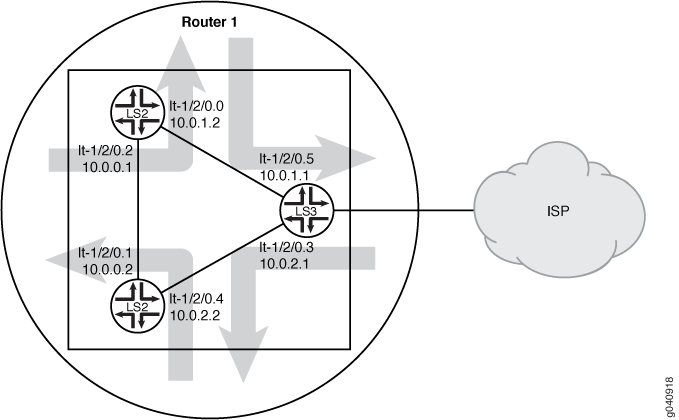
구성
CLI 빠른 구성
이 예를 빠르게 구성하려면, 아래 명령을 복사하여 텍스트 파일로 붙여 넣은 다음 모든 라인브레이크를 제거하고, 네트워크 구성을 일치하는 데 필요한 세부 사항을 바꾸고 계층 수준에서 명령을 CLI [edit] 로 복사해 붙여 넣은 다음, 구성 모드에서 commit을 입력합니다.
set logical-systems LS3 interfaces lt-1/2/0 unit 3 description LS3->LS2
set logical-systems LS3 interfaces lt-1/2/0 unit 3 encapsulation ethernet
set logical-systems LS3 interfaces lt-1/2/0 unit 3 peer-unit 4
set logical-systems LS3 interfaces lt-1/2/0 unit 3 family inet address 10.0.2.1/30
set logical-systems LS3 interfaces lt-1/2/0 unit 3 family iso
set logical-systems LS3 interfaces lt-1/2/0 unit 5 description LS3->LS1
set logical-systems LS3 interfaces lt-1/2/0 unit 5 encapsulation ethernet
set logical-systems LS3 interfaces lt-1/2/0 unit 5 peer-unit 0
set logical-systems LS3 interfaces lt-1/2/0 unit 5 family inet address 10.0.1.1/30
set logical-systems LS3 interfaces lt-1/2/0 unit 5 family iso
set logical-systems LS3 interfaces lo0 unit 3 family iso address 49.0001.1234.1600.2231.00
set logical-systems LS3 protocols isis export isis-default
set logical-systems LS3 protocols isis interface lt-1/2/0.3
set logical-systems LS3 protocols isis interface lt-1/2/0.5
set logical-systems LS3 protocols isis interface lo0.3 passive
set logical-systems LS3 routing-options static route 0.0.0.0/0 discard
set logical-systems LS3 routing-options static route 0.0.0.0/0 no-install
set logical-systems LS3 policy-options policy-statement isis-default from protocol static
set logical-systems LS3 policy-options policy-statement isis-default from route-filter 0.0.0.0/0 exact
set logical-systems LS3 policy-options policy-statement isis-default then accept
절차
단계별 절차
다음 예제에서는 구성 계층에서 다양한 수준의 탐색이 필요합니다. CLI 탐색에 관한 정보는 CLI 사용자 가이드에서 구성 모드에서 CLI 편집기 사용을 참조하십시오.
논리적 시스템에서 IS-IS 기본 경로 정책을 구성하려면 다음을 수행합니다.
논리적 터널 인터페이스를 구성합니다.
[edit logical-systems LS3 interfaces lt-1/2/0]
user@R1# set unit 3 description LS3->LS2
user@R1# set unit 3 encapsulation ethernet
user@R1# set unit 3 peer-unit 4
user@R1# set unit 3 family inet address 10.0.2.1/30
user@R1# set unit 3 family iso
user@R1# set unit 5 description LS3->LS1
user@R1# set unit 5 encapsulation ethernet
user@R1# set unit 5 peer-unit 0
user@R1# set unit 5 family inet address 10.0.1.1/30
user@R1# set unit 5 family iso
[edit logical-systems LS3 interfaces lo0 unit 3]
user@R1# set family iso address 49.0001.1234.1600.2231.00
인터페이스에서 IS-IS(Intermediate System to Intermediate System)를 활성화합니다.
[edit logical-systems LS3 protocols isis]
user@R1# set interface lt-1/2/0.3
user@R1# set interface lt-1/2/0.5
user@R1# set interface lo0.3 passive
논리적 시스템 LS3에서 기본 경로를 구성합니다.
[edit logical-systems LS3 routing-options]
user@R1# set static route 0.0.0.0/0 discard
user@R1# set static route 0.0.0.0/0 no-install
논리적 시스템 LS3에서 기본 경로 정책을 구성합니다.
[edit logical-systems LS3 policy-options]
user@R1# set policy-statement isis-default from protocol static
user@R1# set policy-statement isis-default from route-filter 0.0.0.0/0 exact
user@R1# set policy-statement isis-default then accept
내보내기 정책을 논리적 시스템 LS3의 IS-IS(Intermediate System to Intermediate System)에 적용합니다.
[edit logical-systems LS3 protocols isis]
user@R1# set export isis-default
디바이스 구성을 완료하면 해당 구성을 커밋합니다.
[edit]
user@R1# commit
결과
구성 모드에서 명령을 실행하여 show logical-systems LS3 구성을 확인합니다. 출력 결과가 의도한 구성대로 표시되지 않으면 이 예의 지침을 반복하여 구성을 수정하십시오.
user@R1# show logical-systems LS3
interfaces {
    lt-1/2/0 {
        unit 3 {
            description LS3->LS2;
            encapsulation ethernet;
            peer-unit 4;
            family inet {
                address 10.0.2.1/30;
            }
            family iso;
        }
        unit 5 {
            description LS3->LS1;
            encapsulation ethernet;
            peer-unit 0;
            family inet {
                address 10.0.1.1/30;
            }
            family iso;
        }
    }
    lo0 {
        unit 3 {
            family iso {
                address 49.0001.1234.1600.2231.00;
            }
        }
    }
    }
    protocols {
        isis {
            export isis-default;
            interface lt-1/2/0.3;
            interface lt-1/2/0.5;
            interface lo0.3 {
                passive;
            }
        }
    }
    policy-options {
        policy-statement isis-default {
            from {
                protocol static;
                route-filter 0.0.0.0/0 exact;
            }
            then accept;
        }
    }
    routing-options {
        static {
            route 0.0.0.0/0 {
                discard;
                no-install;
            }
        }
    }
}
확인
구성이 올바르게 작동하고 있는지 확인합니다.
고정 경로가 재배포되는지 확인
목적
라우팅 테이블을 확인하여 IS-IS 정책이 작동하는지 확인합니다.
행동
user@R1> show route logical-system LS3
inet.0: 6 destinations, 6 routes (6 active, 0 holddown, 0 hidden)
+ = Active Route, - = Last Active, * = Both

0.0.0.0/0          *[Static/5] 00:00:45
                      Discard
10.0.0.0/30        *[IS-IS/15] 1w0d 10:14:14, metric 20
                      to 10.0.2.2 via lt-1/2/0.3
                    > to 10.0.1.2 via lt-1/2/0.5
10.0.1.0/30        *[Direct/0] 1w0d 10:15:18
                    > via lt-1/2/0.5
10.0.1.1/32        *[Local/0] 1w0d 10:15:18
                      Local via lt-1/2/0.5
10.0.2.0/30        *[Direct/0] 1w0d 10:15:18
                    > via lt-1/2/0.3
10.0.2.1/32        *[Local/0] 1w0d 10:15:18
                      Local via lt-1/2/0.3

iso.0: 1 destinations, 1 routes (1 active, 0 holddown, 0 hidden)
+ = Active Route, - = Last Active, * = Both

49.0001.1234.1600.2231/72
                   *[Direct/0] 1w0d 10:17:19
                    > via lo0.3
user@R1> show route logical-system LS2
inet.0: 6 destinations, 6 routes (6 active, 0 holddown, 0 hidden)
+ = Active Route, - = Last Active, * = Both

0.0.0.0/0          *[IS-IS/160] 00:01:38, metric 10
                    > to 10.0.2.1 via lt-1/2/0.4
10.0.0.0/30        *[Direct/0] 1w0d 10:16:11
                    > via lt-1/2/0.1
10.0.0.2/32        *[Local/0] 1w0d 10:16:11
                      Local via lt-1/2/0.1
10.0.1.0/30        *[IS-IS/15] 1w0d 10:15:07, metric 20
                    > to 10.0.0.1 via lt-1/2/0.1
                      to 10.0.2.1 via lt-1/2/0.4
10.0.2.0/30        *[Direct/0] 1w0d 10:16:11
                    > via lt-1/2/0.4
10.0.2.2/32        *[Local/0] 1w0d 10:16:11
                      Local via lt-1/2/0.4

iso.0: 1 destinations, 1 routes (1 active, 0 holddown, 0 hidden)
+ = Active Route, - = Last Active, * = Both

49.0001.1720.1600.2002/72
                   *[Direct/0] 1w0d 10:18:12
                    > via lo0.2
user@R1> show route logical-system LS1
inet.0: 6 destinations, 6 routes (6 active, 0 holddown, 0 hidden)
+ = Active Route, - = Last Active, * = Both

0.0.0.0/0          *[IS-IS/160] 00:02:01, metric 10
                    > to 10.0.1.1 via lt-1/2/0.0
10.0.0.0/30        *[Direct/0] 1w0d 10:16:34
                    > via lt-1/2/0.2
10.0.0.1/32        *[Local/0] 1w0d 10:16:34
                      Local via lt-1/2/0.2
10.0.1.0/30        *[Direct/0] 1w0d 10:16:34
                    > via lt-1/2/0.0
10.0.1.2/32        *[Local/0] 1w0d 10:16:34
                      Local via lt-1/2/0.0
10.0.2.0/30        *[IS-IS/15] 1w0d 10:15:55, metric 20
                      to 10.0.1.1 via lt-1/2/0.0
                    > to 10.0.0.2 via lt-1/2/0.2

iso.0: 1 destinations, 1 routes (1 active, 0 holddown, 0 hidden)
+ = Active Route, - = Last Active, * = Both

49.0001.1720.1600.1001/72
                   *[Direct/0] 1w0d 10:18:35
                    > via lo0.1
의미
논리적 시스템 LS3의 라우팅 테이블에는 프로토콜 Static의 기본 0.0.0.0/0 경로가 포함되어 있습니다. 논리적 시스템 LS1 및 논리적 시스템 LS2의 라우팅 테이블에는 프로토콜 IS-IS의 기본 0.0.0.0/0 경로가 포함되어 있습니다. 논리적 시스템 LS1 및 논리적 시스템 LS2가 라우팅 테이블에 지정되지 않은 네트워크로 향하는 패킷을 수신하면 해당 패킷은 추가 처리를 위해 논리적 시스템 LS3으로 전송됩니다. 이 구성은 논리적 시스템 LS3이 ISP 또는 다른 외부 네트워크에 연결되어 있다고 가정합니다.