
예: IS-IS(Intermediate System to Intermediate System)에 대한 BFD 인증 구성
이 예는 IS-IS(Intermediate System to Intermediate System)에 대한 BFD 인증을 구성하는 방법을 보여줍니다.
요구 사항
시작하기 전에 두 라우터에서 IS-IS를 구성하십시오. 필요한 IS-IS 구성에 대한 정보는 예제: IS-IS(Intermediate System to Intermediate System)를 참조하십시오.
개요
이 예에서 BFD 인증 키체인은 세심한 키 MD5 인증으로 구성됩니다.
그림 1 은 이 예에서 사용되는 토폴로지입니다.
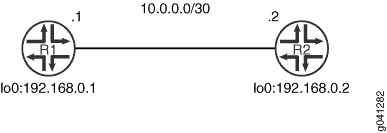
CLI 빠른 구성 그림 1에 두 디바이스 모두에 대한 구성을 보여줍니다. #configuration228__isis-bfd-auth-step-by-step 섹션에서는 디바이스 R1의 단계를 설명합니다.
구성
절차
CLI 빠른 구성
이 예를 빠르게 구성하려면, 아래 명령을 복사하여 텍스트 파일로 붙여 넣은 다음 모든 라인브레이크를 제거하고, 네트워크 구성을 일치하는 데 필요한 세부 사항을 바꾸고 계층 수준에서 명령을 CLI [edit] 로 복사해 붙여 넣습니다.
디바이스 R1
set security authentication-key-chains key-chain secret123 description for-isis-bfd
set security authentication-key-chains key-chain secret123 key 1 secret $ABC123
set security authentication-key-chains key-chain secret123 key 1 start-time "2012-5-31.13:00:00 -0700"
set security authentication-key-chains key-chain secret123 key 2 secret $ABC123
set security authentication-key-chains key-chain secret123 key 2 start-time "2013-5-31.13:00:00 -0700"
set security authentication-key-chains key-chain secret123 key 3 secret $ABC123
set security authentication-key-chains key-chain secret123 key 3 start-time "2014-5-31.13:00:00 -0700"
set protocols isis interface ge-1/2/0.0 bfd-liveness-detection minimum-interval 100
set protocols isis interface ge-1/2/0.0 bfd-liveness-detection authentication key-chain secret123
set protocols isis interface ge-1/2/0.0 bfd-liveness-detection authentication algorithm meticulous-keyed-md5
디바이스 R2
set security authentication-key-chains key-chain secret123 description for-isis-bfd
set security authentication-key-chains key-chain secret123 key 1 secret $ABC123
set security authentication-key-chains key-chain secret123 key 1 start-time "2012-5-31.13:00:00 -0700"
set security authentication-key-chains key-chain secret123 key 2 secret $ABC123
set security authentication-key-chains key-chain secret123 key 2 start-time "2013-5-31.13:00:00 -0700"
set security authentication-key-chains key-chain secret123 key 3 secret $ABC123
set security authentication-key-chains key-chain secret123 key 3 start-time "2014-5-31.13:00:00 -0700"
set protocols isis interface ge-1/2/0.0 bfd-liveness-detection minimum-interval 100
set protocols isis interface ge-1/2/0.0 bfd-liveness-detection authentication key-chain secret123
set protocols isis interface ge-1/2/0.0 bfd-liveness-detection authentication algorithm meticulous-keyed-md5
단계별 절차
다음 예제에서는 구성 계층에서 다양한 수준의 탐색이 필요합니다. CLI 탐색에 관한 정보는 CLI 사용자 가이드에서 구성 모드에서 CLI 편집기 사용을 참조하십시오.
IS-IS BFD 인증 구성을 위해 다음을 수행합니다.
인증 키체인을 구성합니다.
[edit security authentication-key-chains key-chain secret123]
user@R1# set description for-isis-bfd
user@R1# set key 1 secret “$ABC123”
user@R1# set key 1 start-time "2012-5-31.13:00:00 -0700"
user@R1# set key 2 secret “$ABC123”
user@R1# set key 2 start-time "2013-5-31.13:00:00 -0700"
user@R1# set key 3 secret “$ABC123”
user@R1# set key 3 start-time "2014-5-31.13:00:00 -0700"
BFD를 활성화합니다.
[edit protocols isis interface ge-1/2/0.0 bfd-liveness-detection]
user@R1# set minimum-interval 100
인증 키체인을 적용합니다.
[edit protocols isis interface ge-1/2/0.0 bfd-liveness-detection]
user@R1# set authentication key-chain secret123
인증 유형을 설정합니다.
[edit protocols isis interface ge-1/2/0.0 bfd-liveness-detection]
user@R1# set authentication algorithm meticulous-keyed-md5
결과
구성 모드에서 및 show security 명령을 입력하여 show protocols 구성을 확인합니다. 출력 결과가 의도한 구성대로 표시되지 않으면 이 예의 지침을 반복하여 구성을 수정하십시오.
user@R1# show protocols
isis {
    interface ge-1/2/0.0 {
        bfd-liveness-detection {
            minimum-interval 100;
            authentication {
                key-chain secret123;
                algorithm meticulous-keyed-md5;
            }
        }
    }
}
user@R1# show security
authentication-key-chains {
    key-chain secret123 {
        description for-isis-bfd;
        key 1 {
            secret “$ABC123”’;
            start-time "2012-5-31.13:00:00 -0700";
        }
        key 2 {
            secret “$ABC123”’;
            start-time "2013-5-31.13:00:00 -0700";
        }
        key 3 {
            secret “$ABC123”;
            start-time "2014-5-31.13:00:00 -0700";
        }
    }
}
디바이스 구성을 마쳤으면 구성 모드에서 commit 을 입력합니다.
확인
구성이 올바르게 작동하고 있는지 확인합니다.
IS-IS BFD 인증 확인
목적
IS-IS BFD 인증 상태를 확인합니다.
행동
운영 모드에서 명령을 입력합니다 show bfd session extensive .
user@R1> show bfd session extensive
                                                  Detect   Transmit
Address                  State     Interface      Time     Interval  Multiplier
10.0.0.2                 Down      ge-1/2/0.0     0.300     1.000        3
 Client ISIS L1, TX interval 0.100, RX interval 0.100, Authenticate
        keychain secret123, algo meticulous-keyed-md5, mode strict
 Client ISIS L2, TX interval 0.100, RX interval 0.100, Authenticate
        keychain secret123, algo meticulous-keyed-md5, mode strict
 Session down time 00:35:13, previous up time 00:12:17
 Local diagnostic None, remote diagnostic None
 Remote state Up, version 1
 Logical system 2, routing table index 85
 Min async interval 0.100, min slow interval 1.000
 Adaptive async TX interval 0.100, RX interval 0.100
 Local min TX interval 1.000, minimum RX interval 0.100, multiplier 3
 Remote min TX interval 0.100, min RX interval 0.100, multiplier 3
 Local discriminator 2, remote discriminator 1
 Echo mode disabled/inactive, no-absorb, no-refresh
 Authentication enabled/active, keychain secret123, algo meticulous-keyed-md5, mode strict
  Session ID: 0x100101

1 sessions, 2 clients
Cumulative transmit rate 1.0 pps, cumulative receive rate 10.0 pps
의미
출력 결과, IS-IS(Intermediate System to Intermediate System) 레벨 1 및 레벨 2에서 BFD 인증이 활성화되었음을 보여줍니다.