
예: IS-IS에 대한 세그먼트 라우팅을 사용하여 토폴로지 독립 루프 프리 대체 구성
이 예는 더 깊은 레이블 스택을 사용하여 백업 경로를 구성함으로써 주어진 장애에 대한 포스트 컨버전스 경로에 해당하는 MPLS Fast Reroute(FRR) 백업 경로를 제공하기 위해 IS-IS 프로토콜에 대한 세그먼트 라우팅이 있는 TI-LFA(topology-independent loop-free alternate)를 보여줍니다. TI-LFA는 링크 장애, 노드 장애 및 운명 공유 장애에 대한 보호 기능을 제공합니다. 링크 장애 모드에서는 링크가 실패하면 대상이 보호됩니다. 노드 보호 모드에서는 기본 링크에 연결된 이웃이 실패하면 대상이 보호됩니다. 노드 보호 포스트 컨버전스 경로를 결정하기 위해 이웃을 떠나는 모든 링크의 비용이 구성 가능한 양만큼 증가한다고 가정합니다. 운명 공유 보호를 사용하면 각 운명 공유 그룹의 링크가 해당 IP 주소로 식별되는 각 PLR에서 운명 공유 그룹 목록이 구성됩니다.
당사의 콘텐츠 테스트 팀은 이 예제를 검증하고 업데이트했습니다.
요구 사항
이 예에서 사용되는 하드웨어 및 소프트웨어 구성 요소는 다음과 같습니다.
9개의 MX 시리즈 라우터
모든 디바이스에서 실행되는 Junos OS 릴리스 17.4 이상
-
Junos OS 릴리스 21.1R1에서 vMX를 사용하여 업데이트 및 재검증되었습니다.
-
IS-IS용 SPRING을 사용하여 TI-LFA 경로를 구성하기 전에 SPRING 또는 세그먼트 라우팅을 구성해야 합니다.
이 기능에 대한 실제 경험을 쌓는 데 관심이 있습니까?
주니퍼 vLabs를 방문하여 사전 구성된 vLab Sandbox: 세그먼트 라우팅 - 기본 을 예약하고 무료로 사용해 보십시오!
개요
Junos OS를 사용하면 계층 수준에서 [edit protocols isis backup-spf-options] 문을 구성 use-post-convergence-lfa 하여 IS-IS에 대한 TI-LFA를 활성화할 수 있습니다. 계층 수준에서 [edit protocols isis interface interface-name level level] post-컨버전스-lfa 문을 구성하여 주어진 인터페이스에 대한 컨버전스 후 백업 경로를 생성할 수 있습니다.
TI-LFA는 링크 장애, 노드 장애 및 페이트 공유 그룹의 장애에 대한 보호를 제공합니다. 문을 사용하여 링크 보호 모드를 활성화할 수 있습니다post-convergence-lfa. 계층 수준에서 주어진 인터페이스에 대해 모드, fate-sharing-protection 모드 또는 두 모드를 모두 활성화 node-protection 할 수 있습니다[edit protocols isis interface interface-name level level post-convergence-lfa]. 주어진 운명 공유 그룹에 대해 운명 공유 보호가 활성화되도록 하려면 계층 수준에서 [edit routing-options fate-sharing group group-name] 문을 구성 use-for-post-convergence-lfa 해야 합니다.
TI-LFA는 IPv4 및 IPv6 접두사 모두에 대한 경로 보호를 지원합니다. 이 예는 IPv4 접두사에 대한 경로 보호를 보여줍니다.
토폴로지
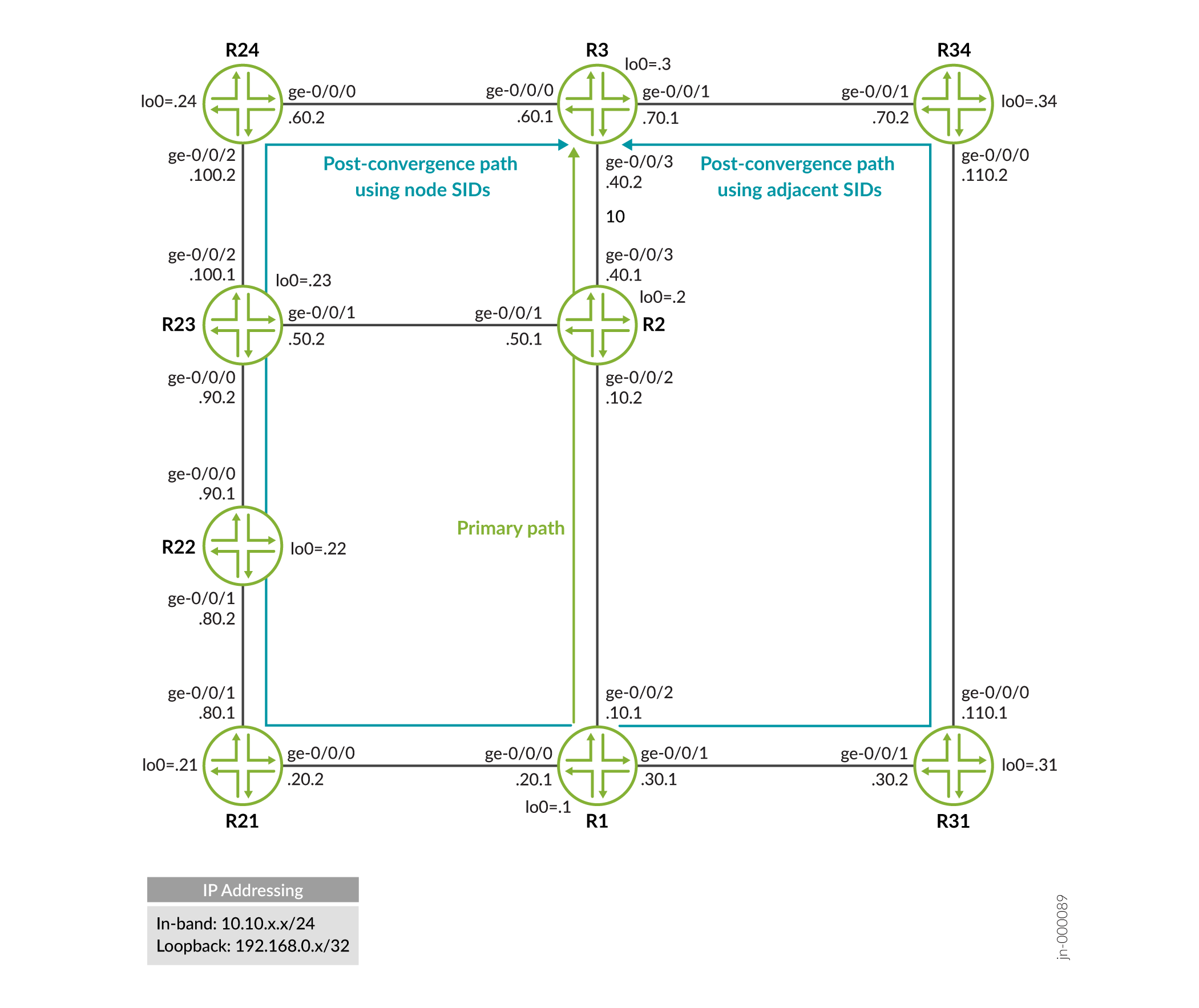
구성
CLI 빠른 구성
이 예에서 링크 보호를 빠르게 구성하려면 다음 명령을 복사하여 텍스트 파일에 붙여 넣은 다음 줄 바꿈을 제거하고, 네트워크 구성과 일치하는 데 필요한 세부 정보를 변경하고, 명령을 복사하여 [edit] 계층 수준의 CLI에 붙여넣은 다음, 구성 모드에서 commit을 입력합니다.
R1
set interfaces ge-0/0/0 unit 0 description r1-to-r21
set interfaces ge-0/0/0 unit 0 family inet address 10.10.20.1/24
set interfaces ge-0/0/0 unit 0 family iso
set interfaces ge-0/0/0 unit 0 family mpls
set interfaces ge-0/0/1 unit 0 description r1-to-r31
set interfaces ge-0/0/1 unit 0 family inet address 10.10.30.1/24
set interfaces ge-0/0/1 unit 0 family iso
set interfaces ge-0/0/1 unit 0 family mpls
set interfaces ge-0/0/2 unit 0 description r1-to-r2
set interfaces ge-0/0/2 unit 0 family inet address 10.10.10.1/24
set interfaces ge-0/0/2 unit 0 family iso
set interfaces ge-0/0/2 unit 0 family mpls
set interfaces lo0 unit 0 family inet address 198.168.0.1/32
set interfaces lo0 unit 0 family iso address 49.0000.2222.0001.00
set interfaces lo0 unit 0 family mpls
set protocols isis interface ge-0/0/0.0 level 2 disable
set protocols isis interface ge-0/0/0.0 point-to-point
set protocols isis interface ge-0/0/1.0 level 2 disable
set protocols isis interface ge-0/0/1.0 point-to-point
set protocols isis interface ge-0/0/2.0 level 2 disable
set protocols isis interface ge-0/0/2.0 level 1 post-convergence-lfa
set protocols isis interface ge-0/0/2.0 point-to-point
set protocols isis interface fxp0.0 disable
set protocols isis interface lo0.0 passive
set protocols isis source-packet-routing node-segment ipv4-index 1001
set protocols isis backup-spf-options use-post-convergence-lfa maximum-labels 8
set protocols mpls interface ge-0/0/0.0
set protocols mpls interface ge-0/0/1.0
set protocols mpls interface ge-0/0/2.0
set policy-options policy-statement pplb then load-balance per-packet
set routing-options forwarding-table export pplb
set routing-options router-id 198.168.0.1
R2
set interfaces ge-0/0/1 unit 0 description r2-to-r23
set interfaces ge-0/0/1 unit 0 family inet address 10.10.50.1/24
set interfaces ge-0/0/1 unit 0 family iso
set interfaces ge-0/0/1 unit 0 family mpls
set interfaces ge-0/0/2 unit 0 description r2-to-r1
set interfaces ge-0/0/2 unit 0 family inet address 10.10.10.2/24
set interfaces ge-0/0/2 unit 0 family iso
set interfaces ge-0/0/2 unit 0 family mpls
set interfaces ge-0/0/3 unit 0 description r2-to-r3
set interfaces ge-0/0/3 unit 0 family inet address 10.10.40.1/24
set interfaces ge-0/0/3 unit 0 family iso
set interfaces ge-0/0/3 unit 0 family mpls
set interfaces lo0 unit 0 family inet address 192.168.0.2/32
set interfaces lo0 unit 0 family iso address 49.0000.2222.0002.00
set interfaces lo0 unit 0 family mpls
set protocols isis interface ge-0/0/1.0 level 2 disable
set protocols isis interface ge-0/0/1.0 point-to-point
set protocols isis interface ge-0/0/2.0 level 2 disable
set protocols isis interface ge-0/0/2.0 point-to-point
set protocols isis interface ge-0/0/3.0 level 2 disable
set protocols isis interface ge-0/0/3.0 point-to-point
set protocols isis interface fxp0.0 disable
set protocols isis interface lo0.0 passive
set protocols isis source-packet-routing node-segment ipv4-index 1002
set protocols mpls interface ge-0/0/1.0
set protocols mpls interface ge-0/0/2.0
set protocols mpls interface ge-0/0/3.0
set routing-options router-id 192.168.0.2
R3
set interfaces ge-0/0/0 unit 0 description r3-to-r24
set interfaces ge-0/0/0 unit 0 family inet address 10.10.60.1/24
set interfaces ge-0/0/0 unit 0 family iso
set interfaces ge-0/0/0 unit 0 family mpls
set interfaces ge-0/0/1 unit 0 description r3-to-r34
set interfaces ge-0/0/1 unit 0 family inet address 10.10.70.1/24
set interfaces ge-0/0/1 unit 0 family iso
set interfaces ge-0/0/1 unit 0 family mpls
set interfaces ge-0/0/3 unit 0 description r3-to-r2
set interfaces ge-0/0/3 unit 0 family inet address 10.10.40.2/24
set interfaces ge-0/0/3 unit 0 family iso
set interfaces ge-0/0/3 unit 0 family mpls
set interfaces lo0 unit 0 family inet address 192.168.0.3/32
set interfaces lo0 unit 0 family iso address 49.0000.2222.0003.00
set interfaces lo0 unit 0 family mpls
set protocols isis interface ge-0/0/0.0 level 2 disable
set protocols isis interface ge-0/0/0.0 point-to-point
set protocols isis interface ge-0/0/1.0 level 2 disable
set protocols isis interface ge-0/0/1.0 point-to-point
set protocols isis interface ge-0/0/3.0 level 2 disable
set protocols isis interface ge-0/0/3.0 point-to-point
set protocols isis interface fxp0.0 disable
set protocols isis interface lo0.0 passive
set protocols isis source-packet-routing node-segment ipv4-index 1003
set protocols mpls interface ge-0/0/0.0
set protocols mpls interface ge-0/0/1.0
set protocols mpls interface ge-0/0/3.0
set routing-options router-id 192.168.0.3
R21
set interfaces ge-0/0/0 unit 0 description r21-to-r1
set interfaces ge-0/0/0 unit 0 family inet address 10.10.20.2/24
set interfaces ge-0/0/0 unit 0 family iso
set interfaces ge-0/0/0 unit 0 family mpls
set interfaces ge-0/0/1 unit 0 description r21-to-r22
set interfaces ge-0/0/1 unit 0 family inet address 10.10.80.1/24
set interfaces ge-0/0/1 unit 0 family iso
set interfaces ge-0/0/1 unit 0 family mpls
set interfaces lo0 unit 0 family inet address 192.168.0.21/32
set interfaces lo0 unit 0 family iso address 49.0000.2222.0021.00
set interfaces lo0 unit 0 family mpls
set protocols isis interface ge-0/0/0.0 level 2 disable
set protocols isis interface ge-0/0/0.0 point-to-point
set protocols isis interface ge-0/0/1.0 level 2 disable
set protocols isis interface ge-0/0/1.0 point-to-point
set protocols isis interface fxp0.0 disable
set protocols isis interface lo0.0 passive
set protocols isis source-packet-routing node-segment ipv4-index 1021
set protocols mpls interface ge-0/0/0.0
set protocols mpls interface ge-0/0/1.0
set routing-options router-id 192.168.0.21
R22
set interfaces ge-0/0/0 unit 0 description r22-to-r23
set interfaces ge-0/0/0 unit 0 family inet address 10.10.90.1/24
set interfaces ge-0/0/0 unit 0 family iso
set interfaces ge-0/0/0 unit 0 family mpls
set interfaces ge-0/0/1 unit 0 description r22-to-r21
set interfaces ge-0/0/1 unit 0 family inet address 10.10.80.2/24
set interfaces ge-0/0/1 unit 0 family iso
set interfaces ge-0/0/1 unit 0 family mpls
set interfaces lo0 unit 0 family inet address 192.168.0.22/32
set interfaces lo0 unit 0 family iso address 49.0000.2222.0022.00
set interfaces lo0 unit 0 family mpls
set protocols isis interface ge-0/0/0.0 level 2 disable
set protocols isis interface ge-0/0/0.0 point-to-point
set protocols isis interface ge-0/0/1.0 level 2 disable
set protocols isis interface ge-0/0/1.0 point-to-point
set protocols isis interface fxp0.0 disable
set protocols isis interface lo0.0 passive
set protocols isis source-packet-routing node-segment ipv4-index 1022
set protocols mpls interface ge-0/0/0.0
set protocols mpls interface ge-0/0/1.0
set routing-options router-id 192.168.0.22
R23
set interfaces ge-0/0/0 unit 0 description r23-to-r22
set interfaces ge-0/0/0 unit 0 family inet address 10.10.90.2/24
set interfaces ge-0/0/0 unit 0 family iso
set interfaces ge-0/0/0 unit 0 family mpls
set interfaces ge-0/0/1 unit 0 description r23-to-r2
set interfaces ge-0/0/1 unit 0 family inet address 10.10.50.2/24
set interfaces ge-0/0/1 unit 0 family iso
set interfaces ge-0/0/1 unit 0 family mpls
set interfaces ge-0/0/2 unit 0 description r23-to-r24
set interfaces ge-0/0/2 unit 0 family inet address 10.10.100.1/24
set interfaces ge-0/0/2 unit 0 family iso
set interfaces ge-0/0/2 unit 0 family mpls
set interfaces lo0 unit 0 family inet address 192.168.0.23/32
set interfaces lo0 unit 0 family iso address 49.0000.2222.0023.00
set interfaces lo0 unit 0 family mpls
set protocols isis interface ge-0/0/0.0 level 2 disable
set protocols isis interface ge-0/0/0.0 point-to-point
set protocols isis interface ge-0/0/1.0 level 2 disable
set protocols isis interface ge-0/0/1.0 point-to-point
set protocols isis interface ge-0/0/2.0 level 2 disable
set protocols isis interface ge-0/0/2.0 point-to-point
set protocols isis interface fxp0.0 disable
set protocols isis interface lo0.0 passive
set protocols isis source-packet-routing node-segment ipv4-index 1023
set protocols mpls interface ge-0/0/0.0
set protocols mpls interface ge-0/0/1.0
set protocols mpls interface ge-0/0/2.0
set routing-options router-id 192.168.0.23
R24
set interfaces ge-0/0/0 unit 0 description r24-to-r3
set interfaces ge-0/0/0 unit 0 family inet address 10.10.60.2/24
set interfaces ge-0/0/0 unit 0 family iso
set interfaces ge-0/0/0 unit 0 family mpls
set interfaces ge-0/0/2 unit 0 description r24-to-r23
set interfaces ge-0/0/2 unit 0 family inet address 10.10.100.2/24
set interfaces ge-0/0/2 unit 0 family iso
set interfaces ge-0/0/2 unit 0 family mpls
set interfaces lo0 unit 0 family inet address 192.168.0.24/32
set interfaces lo0 unit 0 family iso address 49.0000.2222.0024.00
set interfaces lo0 unit 0 family mpls
set protocols isis interface ge-0/0/0.0 level 2 disable
set protocols isis interface ge-0/0/0.0 point-to-point
set protocols isis interface ge-0/0/2.0 level 2 disable
set protocols isis interface ge-0/0/2.0 point-to-point
set protocols isis interface fxp0.0 disable
set protocols isis interface lo0.0 passive
set protocols isis source-packet-routing node-segment ipv4-index 1024
set protocols mpls interface ge-0/0/0.0
set protocols mpls interface ge-0/0/2.0
set routing-options router-id 192.168.0.24
R31
set interfaces ge-0/0/0 unit 0 description r31-to-r34
set interfaces ge-0/0/0 unit 0 family inet address 10.10.110.1/24
set interfaces ge-0/0/0 unit 0 family iso
set interfaces ge-0/0/0 unit 0 family mpls
set interfaces ge-0/0/1 unit 0 description r31-to-r1
set interfaces ge-0/0/1 unit 0 family inet address 10.10.30.2/24
set interfaces ge-0/0/1 unit 0 family iso
set interfaces ge-0/0/1 unit 0 family mpls
set interfaces lo0 unit 0 family inet address 198.162.0.31/32
set interfaces lo0 unit 0 family iso address 49.0000.2222.0031.00
set interfaces lo0 unit 0 family mpls
set protocols isis interface ge-0/0/0.0 level 1 metric 500
set protocols isis interface ge-0/0/0.0 level 2 disable
set protocols isis interface ge-0/0/0.0 point-to-point
set protocols isis interface ge-0/0/1.0 level 1 metric 10
set protocols isis interface ge-0/0/1.0 level 2 disable
set protocols isis interface ge-0/0/1.0 point-to-point
set protocols isis interface fxp0.0 disable
set protocols isis interface lo0.0 passive
set protocols isis source-packet-routing node-segment ipv4-index 1031
set protocols mpls interface ge-0/0/1.0
set protocols mpls interface ge-0/0/0.0
set routing-options router-id 198.162.0.31
R34
set interfaces ge-0/0/0 unit 0 description r34-to-r31
set interfaces ge-0/0/0 unit 0 family inet address 10.10.110.2/24
set interfaces ge-0/0/0 unit 0 family iso
set interfaces ge-0/0/0 unit 0 family mpls
set interfaces ge-0/0/1 unit 0 description r34-to-r3
set interfaces ge-0/0/1 unit 0 family inet address 10.10.70.2/24
set interfaces ge-0/0/1 unit 0 family iso
set interfaces ge-0/0/1 unit 0 family mpls
set interfaces lo0 unit 0 family inet address 192.168.0.34/32
set interfaces lo0 unit 0 family iso address 49.0000.2222.0034.00
set interfaces lo0 unit 0 family mpls
set protocols isis interface ge-0/0/0.0 level 1 metric 500
set protocols isis interface ge-0/0/0.0 level 2 disable
set protocols isis interface ge-0/0/0.0 point-to-point
set protocols isis interface ge-0/0/1.0 level 1 metric 10
set protocols isis interface ge-0/0/1.0 level 2 disable
set protocols isis interface ge-0/0/1.0 point-to-point
set protocols isis interface fxp0.0 disable
set protocols isis interface lo0.0 passive
set protocols isis source-packet-routing node-segment ipv4-index 1034
set protocols mpls interface ge-0/0/0.0
set protocols mpls interface ge-0/0/1.0
set routing-options router-id 192.168.0.34
R1 구성
단계별 절차
다음 예에서는 구성 계층에서 다양한 수준의 탐색이 필요합니다. CLI 탐색에 대한 정보는 Junos OS CLI 사용자 가이드의 구성 모드에서 CLI 편집기 사용을 참조하십시오.
디바이스 R1 구성:
-
인터페이스를 구성합니다.
[edit interfaces]
user@R1# set ge-0/0/0 unit 0 description r1-to-r21
user@R1# set ge-0/0/0 unit 0 family inet address 10.10.20.1/24
user@R1# set ge-0/0/0 unit 0 family iso
user@R1# set ge-0/0/0 unit 0 family mpls

user@R1# set ge-0/0/1 unit 0 description r1-to-r31
user@R1# set ge-0/0/1 unit 0 family inet address 10.10.30.1/24
user@R1# set ge-0/0/1 unit 0 family iso
user@R1# set ge-0/0/1 unit 0 family mpls

user@R1# set ge-0/0/2 unit 0 description r1-to-r2
user@R1# set ge-0/0/2 unit 0 family inet address 10.10.10.1/24
user@R1# set ge-0/0/2 unit 0 family iso
user@R1# set ge-0/0/2 unit 0 family mpls

user@R1# set lo0 unit 0 family inet address 198.168.0.1/32
user@R1# set lo0 unit 0 family iso address 49.0000.2222.0001.00
user@R1# set lo0 unit 0 family mpls
-
라우터 ID를 구성합니다.
[edit routing-options]
user@R1# set router-id 198.168.0.1
-
MPLS를 구성합니다.
[edit protocols]
user@R1# set mpls interface ge-0/0/0.0
user@R1# set mpls interface ge-0/0/1.0
user@R1# set mpls interface ge-0/0/2.0
-
IS-IS를 구성합니다.
[edit protocols]
user@R1# set isis interface ge-0/0/0.0 level 2 disable
user@R1# set isis interface ge-0/0/0.0 point-to-point

user@R1# set isis interface ge-0/0/1.0 level 2 disable
user@R1# set isis interface ge-0/0/1.0 point-to-point

user@R1# set isis interface ge-0/0/2.0 level 2 disable
user@R1# set isis interface ge-0/0/2.0 point-to-point

user@R1# set isis interface lo0.0 passive

user@R1# set isis interface fxp0.0 disable
-
인터페이스 ge-0/0/2에서 링크 보호 사후 컨버전스 경로를 따라 백업 경로를 설치하도록 구성합니다.
[edit protocols]
user@R1# set isis interface ge-0/0/2.0 level 1 post-convergence-lfa
-
백업 최단 경로 우선 속성을 보호하기 위해 세그먼트 라우팅 라우팅 경로에 대한 최대 레이블 수를 구성합니다.
[edit protocols]
user@R1# set isis backup-spf-options use-post-convergence-lfa maximum-labels 8
-
IS-IS 프로토콜의 세그먼트 라우팅에서 노드 세그먼트에 대한 IPv4 인덱스 및 인덱스 범위를 구성합니다.
[edit protocols]
user@R1# set isis source-packet-routing node-segment ipv4-index 1001
-
(선택 사항) 인터페이스 ge-0/0/2에서 노드 보호를 활성화합니다.
[edit protocols]
user@R1# set isis interface ge-0/0/2 level 2 post-convergence-lfa node-protection cost 2000
-
(선택 사항) 운명 공유 그룹 비용을 구성합니다.
[edit routing-options]
user@R1# set fate-sharing group fs-group-1 cost 3000
-
(선택 사항) 디바이스 R1에서 디바이스 R2로의 링크와 디바이스 R21에서 디바이스 R22로의 링크가 운명을 공유하고 포스트 컨버전스-lfa에 사용될 수 있도록 운명 공유 그룹을 구성합니다.
[edit routing-options]
user@R1# set fate-sharing group fs-group-1 from 10.10.10.1 to 10.10.10.2
user@R1# set fate-sharing group fs-group-1 from 10.10.80.1 to 10.10.80.2
user@R1# set fate-sharing group fs-group-1 use-for-post-convergence-lfa
-
(선택 사항) 디바이스 R1에서 ge-0/0/2에 대한 페이트 공유 보호를 활성화합니다.
[edit protocols]
user@R1# set isis interface ge-0/0/2 level 2 post-convergence-lfa fate-sharing-protection
-
TI-LFA가 작동하고 더 빠른 컨버전스를 보장하도록 패킷당 로드 밸런싱 정책을 구성합니다.
[edit]
user@R1# set policy-options policy-statement pplb then load-balance per-packet
-
정책을 적용하여 경로를 포워딩 테이블로 내보냅니다.
[edit]
user@R1# set routing-options forwarding-table export pplb
결과
구성 모드에서 , 및 show protocols show routing-options 명령을 show interfaces입력하여 구성을 확인합니다. 출력에 의도한 구성이 표시되지 않으면 이 예의 지침을 반복하여 구성을 수정합니다.
user@R1# show interfaces
ge-0/0/0 {
    unit 0 {
        description r1-to-r21;
        family inet {
            address 10.10.20.1/24;
        }
        family iso;
        family mpls;
    }
}
ge-0/0/1 {
    unit 0 {
        description r1-to-r31;
        family inet {
            address 10.10.30.1/24;
        }
        family iso;
        family mpls;
    }
}
ge-0/0/2 {
    unit 0 {
        description r1-to-r2;
        family inet {
            address 10.10.10.1/24;
        }
        family iso;
        family mpls;
    }
}
lo0 {
    unit 0 {
        family inet {
            address 198.168.0.1/32;
        }
        family iso {
            address 49.0000.2222.0001.00;
        }
        family mpls;
    }
}
user@R1# show routing-options
router-id 198.168.0.1;
forwarding-table {
    export pplb;
}
user@R1# show policy-options
policy-statement pplb {
    then {
        load-balance per-packet;
    }
}
user@R1# show protocols
isis {
    interface ge-0/0/0.0 {
        level 2 disable;
        point-to-point;
    }
    interface ge-0/0/1.0 {
        level 2 disable;
        point-to-point;
    }
    interface ge-0/0/2.0 {
        level 2 disable;
        level 1 {
            post-convergence-lfa;
        }
        point-to-point;
    }
    interface fxp0.0 {
        disable;
    }
    interface lo0.0 {
        passive;
    }
    source-packet-routing {
        node-segment ipv4-index 1001;
    }
    backup-spf-options {
        use-post-convergence-lfa maximum-labels 8;
    }
}
mpls {
    interface ge-0/0/0.0;
    interface ge-0/0/1.0;
    interface ge-0/0/2.0;
}
디바이스 구성이 완료되면 구성 모드에서 들어갑니다 commit .
검증
구성이 제대로 작동하고 있는지 확인합니다.
노드 SID를 사용하여 TI-LFA 경로 확인
목적
디바이스 R1의 인터페이스 ge-0/0/2에서 기본 다음 홉에 대한 링크 보호 백업 경로를 확인하고 192.168.0.3/32에 도달하는 백업 경로가 생성되었고 올바른 레이블 스택을 가지고 있는지 확인합니다.
작업
운영 모드에서 명령을 실행 show route 192.168.0.3 하여 라우팅 테이블 정보를 표시합니다.
user@R1> show route 192.168.0.3

inet.0: 38 destinations, 38 routes (38 active, 0 holddown, 0 hidden)
+ = Active Route, - = Last Active, * = Both

192.168.0.3/32     *[IS-IS/15] 09:52:56, metric 20
                    >  to 10.10.10.2 via ge-0/0/2.0

inet.3: 8 destinations, 8 routes (8 active, 0 holddown, 0 hidden)
+ = Active Route, - = Last Active, * = Both

192.168.0.3/32     *[L-ISIS/14] 05:45:40, metric 20
                    >  to 10.10.10.2 via ge-0/0/2.0, Push 801003
                       to 10.10.20.2 via ge-0/0/0.0, Push 801003, Push 801024(top)
의미
198.168.0.3/32(디바이스 R3에 해당)에 도달하는 기본 경로는 디바이스 R3의 노드-SID에 해당하는 레이블이 801003인 인터페이스 ge-0/0/2를 통과하는 것입니다. 인터페이스 ge-0/0/2가 실패하면 레이블 스택 [801024, 801003]를 사용하여 인터페이스 ge-0/0/0을 사용하는 백업 경로가 활성화됩니다. 링크 보호 사후 컨버전스 경로는 R1-R21-R22-R23-R24-R3입니다. 레이블 스택의 맨 위 레이블은 801024이며 R24에 도달하는 노드 SID에 해당합니다. 801003 레이블은 최단 경로 R23-R2-R3에서 R3에 도달하기 위해 R23의 노드 SID에 해당합니다.
인접성 SID 확인
디바이스 R1과 IS-IS 인접성이 있는 디바이스의 인접 SID를 확인합니다.
SID 값은 구성 설정에서 다를 수 있습니다.
작업
운영 모드에서 명령을 실행 show isis adjacency detail 하여 디바이스 R1에 인접 정보를 표시합니다.
user@R1> show isis adjacency detail
R21
  Interface: ge-0/0/0.0, Level: 1, State: Up, Expires in 19 secs
  Priority: 0, Up/Down transitions: 3, Last transition: 07:06:07 ago
  Circuit type: 1, Speaks: IP, IPv6
  Topologies: Unicast
  Restart capable: Yes, Adjacency advertisement: Advertise
  IP addresses: 10.10.20.2
  Level 1 IPv4 Adj-SID: 299840

R31
  Interface: ge-0/0/1.0, Level: 1, State: Up, Expires in 22 secs
  Priority: 0, Up/Down transitions: 3, Last transition: 07:06:07 ago
  Circuit type: 1, Speaks: IP, IPv6
  Topologies: Unicast
  Restart capable: Yes, Adjacency advertisement: Advertise
  IP addresses: 10.10.30.2
  Level 1 IPv4 Adj-SID: 299808

R2
  Interface: ge-0/0/2.0, Level: 1, State: Up, Expires in 24 secs
  Priority: 0, Up/Down transitions: 3, Last transition: 07:06:07 ago
  Circuit type: 1, Speaks: IP, IPv6
  Topologies: Unicast
  Restart capable: Yes, Adjacency advertisement: Advertise
  IP addresses: 10.10.10.2
  Level 1 IPv4 Adj-SID: 299776
의미
인접 SID는 세그먼트 라우팅 도메인에서 디바이스 R1의 각 인접에 할당됩니다.
- 디바이스 R21 - 299840
- 디바이스 R31 - 299808
- 디바이스 R2 - 299776
인접 SID는 로컬에서 중요하며 특정 발신 인터페이스를 따라 트래픽을 조정하는 데 사용할 수 있습니다. 인접 SID를 구성하지 않으면 기본(또는 구성된) SRGB 범위를 벗어난 값으로 동적으로 할당됩니다.
인접 SID를 사용하여 TI-LFA 경로 확인
목적
R1에서 R3으로 컨버전스 후 경로의 비용을 늘리고 인접 SID를 사용하여 TI-LFA 경로를 확인하여 대상인 디바이스 R3에 도달하는 기본 경로를 피합니다.
작업
구성 모드에서 디바이스 R22와 R23, ge-0/0/0을 연결하는 인터페이스 비용을 늘립니다.
[edit protocols]
user@R22# set protocols isis interface ge-0/0/0.0 level 1 metric 1000
user@R22# commit
운영 모드에서 명령을 다시 실행합니다 show route 192.168.0.3 .
user@R1> show route 192.168.0.3

inet.0: 38 destinations, 38 routes (38 active, 0 holddown, 0 hidden)
+ = Active Route, - = Last Active, * = Both

192.168.0.3/32     *[IS-IS/15] 10:44:56, metric 20
                    >  to 10.10.10.2 via ge-0/0/2.0

inet.3: 8 destinations, 8 routes (8 active, 0 holddown, 0 hidden)
+ = Active Route, - = Last Active, * = Both

192.168.0.3/32     *[L-ISIS/14] 00:00:31, metric 20
                    >  to 10.10.10.2 via ge-0/0/2.0, Push 801003
                       to 10.10.30.2 via ge-0/0/1.0, Push 801003, Push 299808(top)
의미
TI-LFA 백업 경로는 이제 디바이스 R3에 도달하기 위해 노드 SID(801003) 대신 인접 SID(이 경우 299808)를 사용하고 있습니다. 이는 노드 SID가 항상 두 노드 사이의 최단 경로를 사용하기 때문이며, R22-R23 링크 비용이 상승하면 R1에 대한 최단 경로가 기본 경로와 겹치기 때문입니다. TI-LFA는 목적지에 도달하기 위한 기본 경로를 취할 수 없기 때문에 인접 SID는 디바이스 R3에 도달하기 위한 새로운 사후 컨버전스 경로로 R31-R34를 사용하는 데 사용됩니다.