
이 페이지 내용
예: 샘플링 인스턴스 구성
샘플링 인스턴스를 사용하여 활성 샘플링을 구성하고 해당 샘플링 인스턴스를 특정 FPC(Flexible Port Concentrator), MPC(Modular Port Concentrator) 또는 DPC(Dense Port Concentrator)에 연결할 수 있습니다. 또한 샘플링 인스턴스 대상당 여러 대상 및 프로토콜 체계와 연결된 여러 샘플링 인스턴스를 정의할 수 있습니다.
네트워크 세부 정보 예
다음 예제는 Junos OS 릴리스 9.6을 실행하는 MX480 라우터에서 두 개의 샘플링 인스턴스 구성을 보여줍니다.
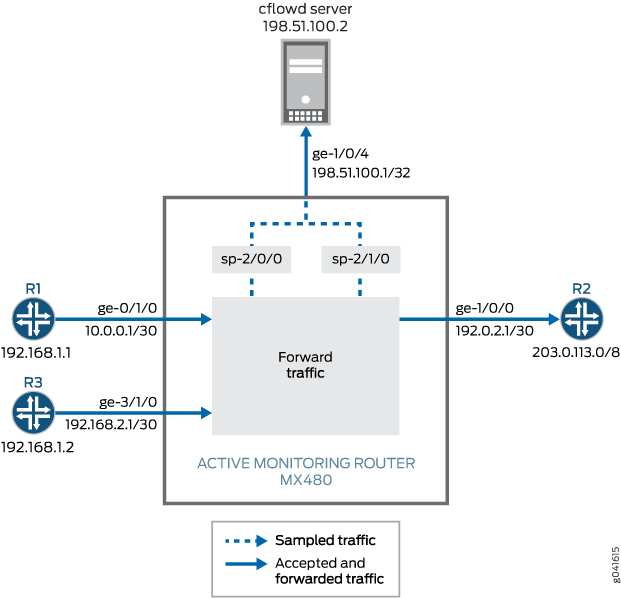
그림 1에서 라우터 1의 패킷은 모니터링 라우터의 기가비트 이더넷 ge-0/1/0 인터페이스에 도착하고, 패킷은 서비스 인터페이스 sp-2/0/0 에 의해 샘플링된 후 내보내기 인터페이스ge-1/0/4에 의해 cflowd 서버로 전송됩니다. Router 3의 패킷이 모니터링 라우터의 기가비트 이더넷 ge-3/1/0 인터페이스에 도착하면 패킷은 서비스 인터페이스 sp-2/1/0 에 의해 샘플링되고 내보내기 인터페이스ge-1/0/4에 의해 cflowd 서버로 전송됩니다. 라우터 2를 오 ge-0/1/0 ge-3/1/0 가는 ge-1/0/0 정상적인 트래픽 플로우는 샘플링 프로세스 동안 방해받지 않고 계속됩니다. 액티브 플로우 모니터링에서 입력 인터페이스와 종료 인터페이스 모두 모든 인터페이스 유형(예: SONET/SDH, 기가비트 이더넷 등)이 될 수 있습니다.
한 개의 샘플링 인스턴스만 FPC, MPC 또는 DPC(Dense Port Concentrator)에 연결할 수 있습니다. 샘플링 인스턴스에서 여러 패밀리를 구성할 수 있습니다. 각 패밀리는 자체 컬렉터 주소를 가질 수 있습니다. 샘플링 인스턴스를 정의하고 각 인스턴스를 서로 다른 FPC에 연결하거나 단일 샘플링 인스턴스를 모든 FPC에 연결할 수 있습니다.
이 예의 샘플링 구성에는 다음이 포함됩니다.
-
두 개의 샘플링 인스턴스
s0및s1은(는[edit forwarding-options]) 계층 수준에서 샘플링 데이터를 수집하도록 구성됩니다. 문에는flow-server플로우 서버의 IP 주소, 포트 및 템플릿이 포함됩니다. 문에는interface서비스 인터페이스sp-2/0/0, 또는sp-2/1/0플로우 레코드 처리를 위한 , 샘플링된 인터페이스에서 수신 라우터의 소스 주소가 포함됩니다. -
FPC 0 및 3에 대한 두 샘플링 인스턴스의 연결. 이는 계층 수준에서 문
[edit chassis fpc slot]으로sampling-instance구성됩니다. -
입력 인터페이스
ge-0/1/0에서 활성화되고ge-3/1/0계층 수준에서[edit interfaces interface-name unit unit-number family family]문을 사용하는sampling샘플링.
이 예에서는 ping MX480 라우터를 통해 라우터 1에서 라우터 2로 명령을 실행하여 트래픽을 생성합니다. 패킷이 생성된 후, show 샘플링 구성이 예상대로 작동하는지 확인하기 위해 명령이 실행됩니다.
라우터 구성 예
다음 출력은 두 개의 샘플링 인스턴스가 있는 MX480 라우터의 구성을 보여줍니다.
user@MX480–router> show configuration
[...Output Truncated...]
}
chassis {
    fpc 0 { # The fpc number is associated with the interface on which sampling is enabled, ge-0/1/0 in this statement.
        sampling-instance s0;
    }
    fpc 3 { # The fpc number is associated with the interface on which sampling is enabled, ge-3/1/0 in this statement.
        sampling-instance s1;
    }
}
interfaces {
    ge-0/1/0 { # This interface has sampling activated.
        unit 0 {
            family inet {
                sampling { # Here sampling is activated.
                    input;
                }
                address 10.0.0.1/30;
            }
        }
    }
    ge-1/0/0 { # The interface on which packets are exiting the router.
        unit 0 {
            family inet {
                address 192.0.2.1/30;
            }
        }
    }
    ge-1/0/4 { # The interface connected to the cflowd server.
        unit 0 {
            family inet {
                address 198.51.100.1/32;
            }
        }
    }
    sp-2/0/0 { # The service interface that samples the packets from Router 1.
        unit 0 {
            family inet;
        }
    }
    sp-2/1/0 { # The service interface that samples the packets from Router 3.
        unit 0 {
            family inet;
        }
    }
    ge-3/1/0 { # This interface has sampling activated.
        unit 0 {
            family inet {
                sampling { # Here sampling is activated.
                    input;
                }
                address 192.168.2.1/30;
            }
        }
    }
}
forwarding-options {
    sampling {
        instance {
            s0 {
                input {
                    rate 1;
                    run-length 0;
                }
                family inet {
                    output {
                        flow-server 198.51.100.2 { # The address of the external server.
                            port 2055;
                            version9 {
                                template {
                                    v4
                                }
                            }
                        }
                        interface sp-2/0/0 {
                            source-address 192.168.1.1; # Source address of the sampled packets
                        }
                    }
                }
            }
            s1 {
                input {
                    rate 1;
                    run-length 0;
                }
                family inet {
                    output {
                        flow-server 198.51.100.2 { # The address of the external server.
                            port 2055;
                            version9 {
                                template {
                                    v4
                                }
                            }
                        }
                        interface sp-2/1/0 {
                            source-address 192.168.1.2; # Source address of the sampled packets
                        }
                    }
                }
            }
        }
    }
}

routing-options {
    static {
        route 203.0.113.0/8 next-hop 192.0.2.2;
    }
}
services {
    flow-monitoring {
        version9 {
            template v4 {
                flow-active-timeout 30;
                flow-inactive-timeout 30;
                ipv4-template;
            }
        }
    }
}
구성 예제에 사용되는 구성 명령
다음 set 명령은 이 예에서 샘플링 인스턴스의 구성에 사용됩니다. 이 명령의 값을 자신의 네트워크와 관련된 값으로 바꾸십시오.
-
set chassis fpc 0 sampling-instance s0 -
set chassis fpc 3 sampling-instance s1 -
set interfaces ge-0/1/0 unit 0 family inet sampling input -
set interfaces ge-0/1/0 unit 0 family inet address -
set interfaces ge-1/0/0 unit 0 family inet address -
set interfaces sp-2/0/0 unit 0 family inet -
set interfaces sp-2/1/0 unit 0 family inet -
set interfaces ge-3/1/0 unit 0 family inet sampling input -
set interfaces ge-3/1/0 unit 0 family inet address -
set forwarding-options sampling instance s0 input rate 1 -
set forwarding-options sampling instance s0 input run-length 0 -
set forwarding-options sampling instance s0 family inet output flow-server 198.51.100.2 port 2055 -
set forwarding-options sampling instance s0 family inet output flow-server 198.51.100.2 version9 template v4; -
set forwarding-options sampling instance s0 family inet output interface sp-2/0/0 source-address 192.168.1.1 -
set forwarding-options sampling instance s1 input rate 1 -
set forwarding-options sampling instance s1 input run-length 0 -
set forwarding-options sampling instance s1 family inet output flow-server 198.51.100.2 port 2055 -
set forwarding-options sampling instance s1 family inet output flow-server 198.51.100.2 version9 template v4; -
set forwarding-options sampling instance s1 family inet output interface sp-2/1/0 source-address 192.168.1.2 -
set routing-options static route 203.0.113.0/8 next-hop 192.0.2.2 -
set services flow-monitoring version9 template v4 flow-active-timeout 30 -
set services flow-monitoring version9 template v4 flow-inactive-timeout 30 -
set services flow-monitoring version9 template v4 ipv4-template
상태 확인
구성이 예상대로 작동하는지 확인하려면 샘플링 인스턴스로 구성된 라우터에서 다음 명령을 사용합니다.
-
show services accounting aggregation template template-name template-name -
show services accounting flow
다음은 이 구성 예에서 사용된 MX480 라우터에서 실행된 명령의 show 출력입니다.
user@MX480–router> show services accounting aggregation template template-name v4
                                  Src   Dst
                                Port/ Port/
Source          Destination      ICMP  ICMP                          Packet
Address         Address          Type  Code  Proto TOS                Count
10.0.0.6        203.0.113.3       100  1000     17   8                   14
10.0.0.5        203.0.113.2       100  1000     17   8                   15
10.0.0.3        203.0.113.3       100  1000     17   8                   15
10.0.0.2        203.0.113.3       100  1000     17   8                   15
10.0.0.4        203.0.113.2       100  1000     17   8                   15
10.0.0.6        203.0.113.2       100  1000     17   8                   15
10.0.0.4        203.0.113.3       100  1000     17   8                   15
10.0.0.2        203.0.113.2       100  1000     17   8                   16
10.0.0.3        203.0.113.2       100  1000     17   8                   15
10.0.0.5        203.0.113.3       100  1000     17   8                   15

user@MX480–router> show services accounting aggregation template template-name v4
                                  Src   Dst
                                Port/ Port/
Source          Destination      ICMP  ICMP                          Packet
Address         Address          Type  Code  Proto TOS                Count
10.0.0.6        203.0.113.3      100  1000     17   8                   16
10.0.0.5        203.0.113.2      100  1000     17   8                   17
10.0.0.3        203.0.113.3      100  1000     17   8                   16
10.0.0.2        203.0.113.3      100  1000     17   8                   16
10.0.0.4        203.0.113.2      100  1000     17   8                   17
10.0.0.6        203.0.113.2      100  1000     17   8                   17
10.0.0.4        203.0.113.3      100  1000     17   8                   16
10.0.0.2        203.0.113.2      100  1000     17   8                   17
10.0.0.3        203.0.113.2      100  1000     17   8                   17
10.0.0.5        203.0.113.3      100  1000     17   8                   16

user@MX480–router> show services accounting flow
  Flow information
    Interface name: sp-2/0/0, Local interface index: 152
    Flow packets: 884, Flow bytes: 56576
    Flow packets 10-second rate: 0, Flow bytes 10-second rate: 628
    Active flows: 10, Total flows: 35
    Flows exported: 75, Flows packets exported: 14
    Flows inactive timed out: 25, Flows active timed out: 75

user@MX480–router> show services accounting flow
  Flow information
    Interface name: sp-2/0/0, Local interface index: 152
    Flow packets: 898, Flow bytes: 57472
    Flow packets 10-second rate: 0, Flow bytes 10-second rate: 628
    Active flows: 10, Total flows: 35
    Flows exported: 75, Flows packets exported: 14
    Flows inactive timed out: 25, Flows active timed out: 75