
IPsec 보안 서비스
주니퍼 클라우드 네이티브 라우터(JCNR)는 클라우드 기반 및 온프레미스 5G 환경 모두에 컨테이너화된 라우팅 기능을 제공합니다. JCNR과 보안 서비스를 통합하려는 요구가 증가하고 있습니다. 이 기능은 호스트 기반 서비스 체이닝을 사용하여 구현할 수 있습니다. 이 클라우드 네이티브 라우터는 주니퍼의 컨테이너화된 SRX(cSRX) 플랫폼과 통합되어 IPsec과 같은 보안 서비스를 제공합니다.
개요
JCNR을 사용한 IPsec 보안 서비스 사용 사례를 살펴보겠습니다. 아래 그림에서 클라우드 네이티브 라우터는 서비스 프로바이더 네트워크의 프로바이더 에지(PE) 라우터를 연결합니다. 소스 네트워크의 고객 에지(CE) 라우터 또는 디바이스는 IPsec 터널을 통해 대상 CE로 데이터를 안전하게 전송합니다. 주어진 시나리오에서 IPsec 터널은 클라우드 네이티브 라우터의 보안 서비스(cSRX)에서 시작되어 대상 CE에서 종료됩니다. 클라우드 네이티브 라우터와 해당 피어 PE는 IPsec 터널에 대한 언더레이 연결을 제공합니다.
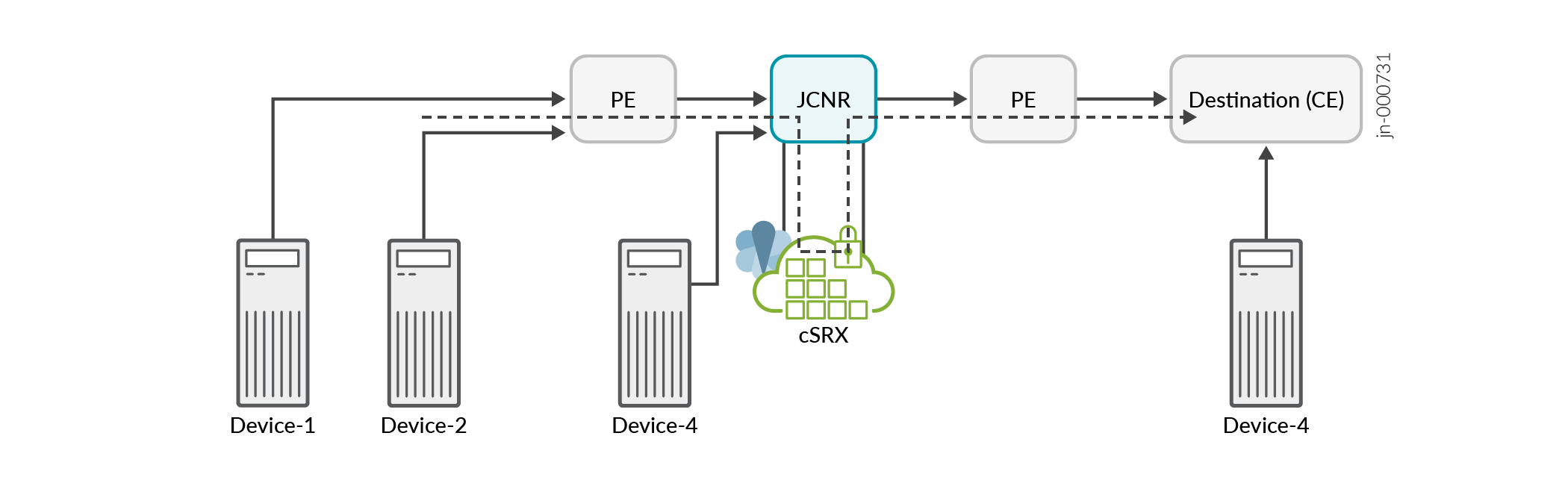
클라우드 네이티브 라우터는 동일한 Kubernetes 클러스터에 있는 보안 서비스 인스턴스(cSRX)와 연결됩니다. cSRX 인스턴스는 L3 모드에서 포드 서비스로 실행됩니다.
클라우드 네이티브 라우터 인스턴스는 단 하나의 cSRX 인스턴스로 서비스 체인됩니다. 여러 IPSec 터널을 지원할 수 있습니다.
구성
클라우드 네이티브 라우터는 IPsec 서비스를 통해 선택적 트래픽을 조정할 수 있습니다. 이는 cSRX 인터페이스를 통해 대상에 대한 정적 경로를 정의함으로써 달성됩니다. JCNR에서 선택적 트래픽이 수신되면 cSRX로 전달됩니다. cSRX는 구성에 따라 패킷에 IPsec 암호화를 적용하고 JCNR로 전달합니다. 클라우드 네이티브 라우터는 신뢰할 수 없는 VRF에서 경로 조회를 수행하고 구성된 패브릭 인터페이스를 통해 트래픽을 전달합니다. 원격 엔드에서 IPsec 패킷이 수신되면 클라우드 네이티브 라우터는 이를 보안 서비스로 보냅니다. cSRX는 패킷을 복호화하여 트러스트 인터페이스의 클라우드 네이티브 라우터로 전달합니다. 그런 다음 클라우드 네이티브 라우터는 패킷을 포드로 전달합니다. 터널 엔드포인트의 IP 주소는 클라우드 네이티브 라우터에서 정적 경로로 구성되고 IGP를 통해 원격 엔드로 보급됩니다.
cSRX에 대한 helm 차트(values.yaml)에서 구성 매개 변수 범위를 지정하여 cSRX 구축을 사용자 지정할 수 있습니다. 주요 구성 옵션은 다음과 같습니다.
-
interfaceType: JCNR에 연결하는 cSRX의 인터페이스 유형입니다. 전용으로 설정해야 합니다.vhost -
interfaceConfigs: 인터페이스 IP 주소, 게이트웨이 주소 및 선택적으로 경로를 정의하는 배열입니다. 인터페이스 IP 중 하나는 배열의 요소와localAddress일치해야 합니다ipSecTunnelConfigs. 이것은 신뢰할 수 없는 영역의 인터페이스가 됩니다. 경로에는 복호화된 트래픽을 클라우드 네이티브 라우터로 조정하기 위한 접두사와 IPSec 게이트웨이에 대한 연결성 경로가 포함되어야 합니다. -
ipSecTunnelConfigs: ike-phase1, proposal, policy, gateway configuration과 같은 IPsec 구성 세부 정보를 정의하는 배열입니다. 트래픽 선택기는 암호화될 것으로 예상되는 트래픽을 포함해야 합니다. 하나 이상의 터널 구성을 정의할 수 있습니다. 설치 헬름 차트를 사용하여 터널 구성을 정의하거나 구성 요소(configlet)를 사용하여 배포 후에 구성할 수 있습니다. -
jcnr_config: 클라우드 네이티브 라우터에서 cSRX로 트래픽을 조정하고 보안 서비스 체인을 적용하기 위해 원격 IPsec 게이트웨이에서 cSRX로 IPsec 트래픽을 조정하기 위해 클라우드 네이티브 라우터에 구성할 경로를 정의하는 배열입니다.
Helm 차트를 통한 cSRX 구성
cSRX 구성은 설치 시 컨테이너와 포드를 불러오는 데 필요합니다. IPSec 터널 구성은 설치 시 또는 나중에 구성 요소를 사용하여 정의할 수 있습니다. enableUserConfig cSRX 헬름 차트의 플래그는 true로 설정되면 구성 요소(configlet)를 통해 IPSec 터널 구성을 활성화합니다.
기본적으로 enableUserConfig 플래그는 false values.yaml ipSecTunnelConfigs 로 설정되므로 설치 시 구성해야 합니다. 다중 터널에 대한 샘플 인터페이스 및 터널 구성은 다음과 같습니다.
enableUserConfig: false  # enable /disable user configuration

interfaceType: "vhost"

interfaceConfigs:
    - name: ge-0/0/0
      ip: 172.16.10.1/30          # should match ipSecTunnelConfigs localAddress if configured
      gateway: 172.16.10.2        # gateway configuration
      ip6: 2001:db8:172:16:10::1/64        # optional
      ip6Gateway: 2001:db8:172:16:10::2    # optional
      routes:                   # this field is optional
      - "172.17.10.0/24"
      - "172.18.10.0/24"
      instance_parameters:
        name: "untrust"
        type: "vrf"        # options include virtual-router or vrf
        vrfTarget: 10:10
    - name: ge-0/0/1
      ip: 192.168.1.1/30           # should match ipSecTunnelConfigs localAddress if configured
      gateway: 192.168.1.2         # gateway configuration
      ip6: 2001:db8:192:168:1::1/64                     # optional
      ip6Gateway: 2001:db8:192:168:1::2               # optional
      routes:                   # this field is optional
      - "10.111.1.0/24"
      - "10.112.1.0/24"
      instance_parameters:
        name: "trust"
        type: "vrf"        # options include virtual-router or vrf
        vrfTarget: 11:11

  ipSecTunnelConfigs:        # untrust
    - interface: ge-0/0/0       ## section ike-phase1, proposal, policy, gateway
      gateway: 172.17.10.2
      localAddress: 172.16.10.1
      authenticationAlgorithm: sha-256
      encryptionAlgorithm: aes-256-cbc
      preSharedKey: "$9$zt3l3AuIRhev8FnNVsYoaApu0RcSyev8XO1NVYoDj.P5F9AyrKv8X"
      trafficSelector:
      - name: ts1
        localIP: 10.111.1.0/24 ## IP cannot be 0.0.0.0/0
        remoteIP: 10.221.1.0/24 ## IP cannot be 0.0.0.0/0
    - interface: ge-0/0/1       ## section ike-phase1, proposal, policy, gateway
      gateway: 172.18.10.2
      localAddress: 172.16.10.1
      authenticationAlgorithm: sha-256
      encryptionAlgorithm: aes-256-cbc
      preSharedKey: "$9$zt3l3AuIRhev8FnNVsYoaApu0RcSyev8XO1NVYoDj.P5F9AyrKv8X"
      trafficSelector:
      - name: ts2
        localIP: 10.112.1.0/24 ## IP cannot be 0.0.0.0/0
        remoteIP: 10.222.1.0/24 ## IP cannot be 0.0.0.0/0

  jcnr_config:
    - name: ge-0/0/0
      routes:
        - "10.221.1.0/24"
        - "10.222.1.0/24"
구성(Configlet)을 통한 cSRX IPSec 터널 구성
구성 요소(Configlet)를 사용하여 cSRX를 구축한 후 IPSec 터널을 구성할 수 있습니다. 설치 Helm 차트의 enableUserConfig 플래그 값은 true로 설정되어야 합니다. 구성 코드 조각을 ipSecTunnelConfigs 정의해서는 안 됩니다. 샘플 헬름 차트는 설치 프로그램 번들에 포함되어 있으며, /csrx_examples/values-user-config-csrx.yaml cSRX 전용 설치와 /charts/junos-csrx/csrx_examples/values-user-config-unified.yaml 통합 JCNR 및 cSRX 설치를 위해 제공됩니다. Helm 차트의 예는 다음과 같습니다.
enableUserConfig: true  # enable /disable user configuration

interfaceType: "vhost"

interfaceConfigs:
    - name: ge-0/0/0
      ip: 172.16.10.1/30          # should match ipSecTunnelConfigs localAddress if configured
      gateway: 172.16.10.2        # gateway configuration
      ip6: 2001:db8:172:16:10::1/64        # optional
      ip6Gateway: 2001:db8:172:16:10::2    # optional
      routes:                   # this field is optional
      - "172.17.10.0/24"
      - "172.18.10.0/24"
      instance_parameters:
        name: "untrust"
        type: "vrf"        # options include virtual-router or vrf
        vrfTarget: 10:10
    - name: ge-0/0/1
      ip: 192.168.1.1/30           # should match ipSecTunnelConfigs localAddress if configured
      gateway: 192.168.1.2         # gateway configuration
      ip6: 2001:db8:192:168:1::1/64                     # optional
      ip6Gateway: 2001:db8:192:168:1::2               # optional
      routes:                   # this field is optional
      - "10.111.1.0/24"
      - "10.112.1.0/24"
      instance_parameters:
        name: "trust"
        type: "vrf"        # options include virtual-router or vrf
        vrfTarget: 11:11

  jcnr_config:
    - name: ge-0/0/0
      routes:
        - "10.221.1.0/24"
        - "10.222.1.0/24"
구성 요소(configlet)를 사용하여 배포 후 IPSec 터널을 생성하거나 터널 구성을 수정할 수 있습니다. 샘플 구성은 설치 프로그램 번들/csrx_examples/ipsec-tunnel-config-cr.yaml 에 제공되어 cSRX 전용 설치와 /charts/junos-csrx/csrx_examples/ipsec-tunnel-config-cr.yaml 통합 JCNR 및 cSRX 설치를 위한 것입니다. 구성 요소의 예는 다음과 같습니다.
# Example configlet CR to configure an IPsec tunnel on a CSRX
apiVersion: configplane.juniper.net/v1
kind: Configlet
metadata:
  name: example-csrx-cr
  namespace: jcnr
  labels:
    app: csrx
  annotations:
    juniper.net/device: csrx
spec:
  config: |-
    set security ike proposal ike-phase-171-1-1-1-0-proposal dh-group group5
    set security ike proposal ike-phase-171-1-1-1-0-proposal encryption-algorithm aes-256-cbc
    set security ike proposal ike-phase-171-1-1-1-0-proposal authentication-algorithm sha-256
    set security ike proposal ike-phase-171-1-1-1-0-proposal authentication-method pre-shared-keys
    set security ike proposal ike-phase-171-1-1-1-0-proposal lifetime-seconds 3600
    set security ike policy ike-phase-171-1-1-1-0-policy proposals ike-phase-171-1-1-1-0-proposal
    set security ike policy ike-phase-171-1-1-1-0-policy pre-shared-key ascii-text "$9$zt3l3AuIRhev8FnNVsYoaApu0RcSyev8XO1NVYoDj.P5F9AyrKv8X"
    set security ike gateway remote-171-1-1-1-0 ike-policy ike-phase-171-1-1-1-0-policy
    set security ike gateway remote-171-1-1-1-0 address 181.1.1.1
    set security ike gateway remote-171-1-1-1-0 external-interface ge-0/0/0.0
    set security ike gateway remote-171-1-1-1-0 local-address 171.1.1.1
    set security ike gateway remote-171-1-1-1-0 version v2-only
    set security ipsec proposal ipsec-171-1-1-1-0-proposal protocol esp
    set security ipsec proposal ipsec-171-1-1-1-0-proposal encryption-algorithm aes-256-cbc
    set security ipsec proposal ipsec-171-1-1-1-0-proposal authentication-algorithm hmac-sha-256-128
    set security ipsec proposal ipsec-171-1-1-1-0-proposal lifetime-seconds 18000
    set security ipsec policy ipsec-171-1-1-1-0-policy perfect-forward-secrecy keys group5
    set security ipsec policy ipsec-171-1-1-1-0-policy proposals ipsec-171-1-1-1-0-proposal
    set security ipsec vpn ipsec-remote-171-1-1-1-0 bind-interface st0.0
    set security ipsec vpn ipsec-remote-171-1-1-1-0 ike gateway remote-171-1-1-1-0
    set security ipsec vpn ipsec-remote-171-1-1-1-0 ike ipsec-policy ipsec-171-1-1-1-0-policy
    set security ipsec vpn ipsec-remote-171-1-1-1-0 establish-tunnels immediately
    set security ipsec vpn ipsec-remote-171-1-1-1-0 traffic-selector ts1 local-ip 100.1.1.0/24
    set security ipsec vpn ipsec-remote-171-1-1-1-0 traffic-selector ts1 remote-ip 200.1.1.0/24
    set security zones security-zone untrust host-inbound-traffic system-services all
    set security zones security-zone untrust host-inbound-traffic protocols all
구성 예
보안 서비스가 포함된 클라우드 네이티브 라우터의 구성 예를 살펴보겠습니다. 다음 네트워크 토폴로지를 고려하십시오.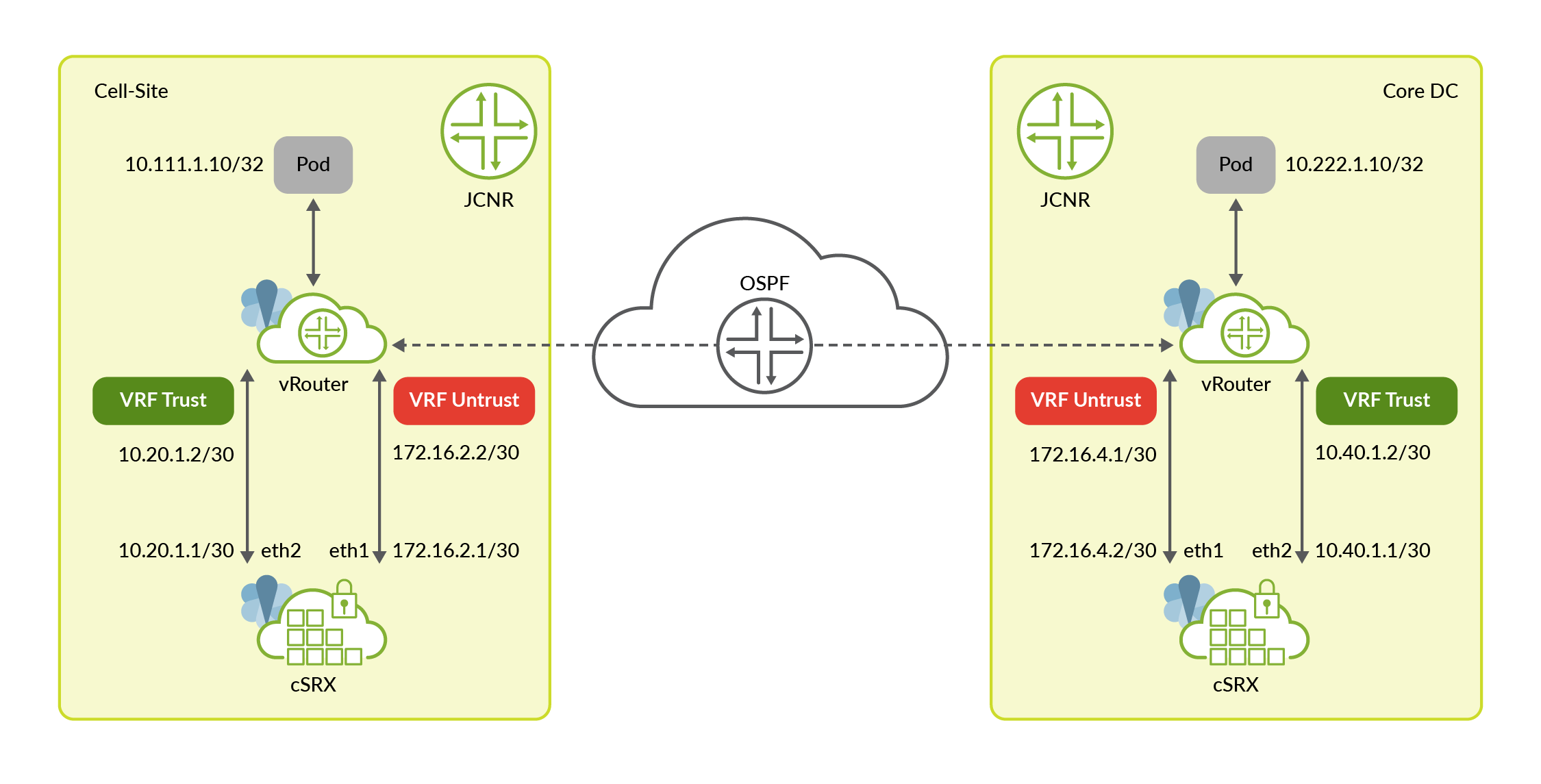
토폴로지는 셀 사이트의 클라우드 네이티브 라우터와 코어 데이터센터의 클라우드 네이티브 라우터로 구성됩니다. 두 JCNR은 모두 cSRX와 서비스 체인됩니다. 코어 데이터센터는 다른 물리적 또는 가상 방화벽 기능을 터널 엔드포인트로 가질 수도 있습니다. Pod 10.111.1.10 10.222.1.10 간의 트래픽은 IPsec 터널을 통해 암호화되어야 합니다. cSRX-클라우드 네이티브 라우터 인터페이스의 IP 주소와 게이트웨이 주소도 나와 있습니다.
cSRX는 두 가지 인터페이스를 사용하여 JCNR의 포워딩 플레인(vRouter)과 연결됩니다.
- ge-0/0/1 인터페이스는 IPsec 암호화를 위해 클라우드 네이티브 라우터에서 보안 서비스로, IPsec 복호화 후 보안 서비스에서 클라우드 네이티브 라우터로 트래픽을 전송하는 데 사용됩니다. 이 인터페이스는 cSRX의 신뢰 영역과 JCNR의 신뢰 VRF의 일부입니다.
- ge-0/0/0 인터페이스는 IPsec 암호화 후 보안 서비스에서 클라우드 네이티브 라우터로, IPsec 복호화를 위해 클라우드 네이티브 라우터에서 보안 서비스로 트래픽을 전송하는 데 사용됩니다. 이 인터페이스는 cSRX의 신뢰할 수 없는 영역과 JCNR의 신뢰할 수 없는 VRF의 일부입니다.
구성 단계를 살펴보겠습니다.
- 토폴로지에 대한 올바른
interfaceConfigs로ipSecTunnelConfigsjcnr_configcSRX helm 차트를 구성합니다.- 셀 사이트 JCNR에 대한 Helm 차트 구성:
junos-csrx: # Default values for cSRX. # This is a YAML-formatted file. # Declare variables to be passed into your templates. common: registry: enterprise-hub.juniper.net/ repository: jcnr-container-prod/ csrxInit: repository: image: csrx-init tag: R25.1-25 imagePullPolicy: IfNotPresent resources: #limits: # memory: 1Gi # cpu: 1 #requests: # memory: 1Gi # cpu: 1 csrx: repository: image: csrx tag: 25.1R1.8 imagePullPolicy: IfNotPresent resources: limits: hugepages-1Gi: 6Gi memory: 4Gi requests: hugepages-1Gi: 6Gi memory: 4Gi csrxTelemetry: repository: image: contrail-telemetry-exporter tag: 25.1.0.25 imagePullPolicy: IfNotPresent resources: # kubeconfigpath: path to the kubeconfig file (to override the default path /etc/kubernetes/kubelet.conf) # kubeConfigPath: /path/to/kubeconfig # nodeAffinity: Can be used to inject nodeAffinity for cSRX # you may label the nodes where we wish to deploy cSRX and inject affinity accordingly nodeAffinity: #- key: node-role.kubernetes.io/worker # operator: Exists #- key: node-role.kubernetes.io/master # operator: DoesNotExist - key: kubernetes.io/hostname operator: In values: - node2 replicas: 1 interfaceType: "vhost" interfaceConfigs: - name: ge-0/0/0 ip: 172.16.2.1/30 # --> Interface IP in Untrust VRF, should match ipSecTunnelConfigs localAddress if configured gateway: 172.16.2.2 # --> gateway configuration ip6: 2001:172:16:2::1/126 # optional ip6Gateway: 2001:172.16.2::2 # optional routes: # --> Route to remote tunnel endpoint - "172.16.4.0/24" instance_parameters: name: "untrust" type: "vrf" # options include virtual-router or vrf vrfTarget: 10:10 - name: ge-0/0/1 ip: 10.20.1.1/30 # --> Interface IP in the Trust VRF gateway: 10.20.1.2 # --> gateway configuration ip6: 2001:10:20:1::1/126 # optional ip6Gateway: 2001:10:20:1::2 # optional routes: # --> Route to local application subnet - "10.111.1.0/24" instance_parameters: name: "trust" type: "vrf" # options include virtual-router or vrf vrfTarget: 11:11 ipSecTunnelConfigs: # untrust - interface: ge-0/0/0 ## section ike-phase1, proposal, policy, gateway gateway: 172.16.4.1 # --> Remote tunnel endpoint localAddress: 172.16.2.1 # --> Local Untrust Interface IP authenticationAlgorithm: sha-256 encryptionAlgorithm: aes-256-cbc preSharedKey: "$9$zt3l3AuIRhev8FnNVsYoaApu0RcSyev8XO1NVYoDj.P5F9AyrKv8X" trafficSelector: - name: ts1 localIP: 10.111.1.0/24 # --> Traffic selector based on local application subnet remoteIP: 10.222.1.0/24 # --> Traffic selector based on remote application subnet jcnr_config: - name: ge-0/0/1 routes: - "10.222.1.0/24" # --> cRPD route to remote application subnet via trust interface #csrx_flavor: specify the csrx deployment model. Corresponding values for csrx control and data cpus #must be provided based on the flavor mentioned below. Following are possible options: # CSRX-2CPU-4G # CSRX-4CPU-8G # CSRX-6CPU-12G # CSRX-8CPU-16G # CSRX-16CPU-32G # CSRX-20CPU-48G csrx_flavor: CSRX-2CPU-4G csrx_ctrl_cpu: "0x01" csrx_data_cpu: "0x02" -
원격 JCNR에 대한 Helm 차트 구성:
# Default values for cSRX.
# This is a YAML-formatted file.
# Declare variables to be passed into your templates.

common:
  registry: enterprise-hub.juniper.net/
  repository: jcnr-container-prod/

  csrxInit:
    image: csrx-init
    tag: f4tgt33
    imagePullPolicy: IfNotPresent
    resources:
      #limits:
      #  memory: 1Gi
      #  cpu: 1
      #requests:
      #  memory: 1Gi
      #  cpu: 1

  csrx:
    image: csrx
    tag: 24.2R1.14
    imagePullPolicy: IfNotPresent
    resources:
      limits:
        hugepages-1Gi: 4Gi
        memory: 4Gi
      requests:
        hugepages-1Gi: 4Gi
        memory: 4Gi

# uncomment below if you are using a private registry that needs authentication
# registryCredentials - Base64 representation of your Docker registry credentials
# secretName - Name of the Secret object that will be created
#imagePullSecret:
  #registryCredentials:  <base64-encoded-credential>
  #secretName: regcred

# nodeAffinity: Can be used to inject nodeAffinity for cSRX
# you may label the nodes where we wish to deploy cSRX and inject affinity accordingly
# nodeAffinity:
#- key: node-role.kubernetes.io/worker
#  operator: Exists
#- key: node-role.kubernetes.io/master
#  operator: DoesNotExist

replicas: 1

interfaceType: "vhost"

interfaceConfigs:
  - name: ge-0/0/0
    ip: 172.16.4.1/30          # --> Interface IP in Untrust VRF, should match ipSecTunnelConfigs localAddress if configured
    gateway: 172.16.4.2        # --> gateway configuration
    ip6: 2001:172:16:4::1/126        # optional
    ip6Gateway: 2001:172.16.4::2    # optional
    routes:                   # --> Route to remote tunnel endpoint
    - "172.16.2.0/24"
    instance_parameters:
        name: "untrust"
        type: "vrf"        # options include virtual-router or vrf
        vrfTarget: 10:10
  - name: ge-0/0/1
    ip: 10.40.1.1/30           # --> Interface IP in the Trust VRF
    gateway: 10.40.1.2         # --> gateway configuration
    ip6: 2001:10:40:1::1/126           # optional
    ip6Gateway: 2001:10:40:1::2        # optional
    routes:                   # --> Route to local application subnet
    - "10.222.1.0/24"
    instance_parameters:
       name: "trust"
       type: "vrf"        # options include virtual-router or vrf
       vrfTarget: 11:11

ipSecTunnelConfigs:       # untrust
  - interface: ge-0/0/0       ## section ike-phase1, proposal, policy, gateway
    gateway: 172.16.2.1   # --> Remote tunnel endpoint
    localAddress: 172.16.4.1  # --> Local Untrust Interface IP
    authenticationAlgorithm: sha-256
    encryptionAlgorithm: aes-256-cbc
    preSharedKey: "$9$zt3l3AuIRhev8FnNVsYoaApu0RcSyev8XO1NVYoDj.P5F9AyrKv8X"
    trafficSelector:
    - name: ts1
      localIP: 10.222.1.0/24  # --> Traffic selector based on local application subnet
      remoteIP: 10.111.1.0/24 # --> Traffic selector based on remote application subnet

jcnr_config:
  - name: ge-0/0/0
    routes:
      - "10.222.1.0/24"      # --> cRPD route to local application subnet via untrust interface
  - name: ge-0/0/1
    routes:
      - "10.111.1.0/24"     # --> cRPD route to remote application subnet via trust interface

#csrx_flavor: specify the csrx deployment model. Corresponding values for csrx control and data cpus
#must be provided based on the flavor mentioned below. Following are possible options:
# CSRX-2CPU-4G
# CSRX-4CPU-8G
# CSRX-6CPU-12G
# CSRX-8CPU-16G
# CSRX-16CPU-32G
# CSRX-20CPU-48G
csrx_flavor: CSRX-2CPU-4G

csrx_ctrl_cpu: "0x01"

csrx_data_cpu: "0x02"
Helm 차트를 구성했으면 cSRX를 구축해야 합니다.
JCNR을 사용하여 서비스 체이닝을 위해 cSRX를 구축하는 방법에 대한 자세한 내용은 JCNR을 사용하여 서비스 체인(cSRX) 배포 주제를 검토하십시오.
- 셀 사이트 JCNR에 대한 Helm 차트 구성:
-
코어에서 실행되는 IGP에 참여하도록 클라우드 네이티브 라우터 패브릭 인터페이스(
ens192)를 구성합니다. 구성은 신뢰할 수 없는 VRF에서 수행됩니다.-
셀 사이트 JCNR의 OSPF에 대한 구성 요소 예:
apiVersion: configplane.juniper.net/v1
kind: Configlet
metadata:
  name: configlet-ipsec-ospf             # <-- Configlet resource name
  namespace: jcnr
spec:
  config: |-
    set policy-options policy-statement export_static_ospf from protocol local
    set policy-options policy-statement export_static_ospf from protocol static
    set policy-options policy-statement export_static_ospf then accept
    set routing-instances untrust protocols ospf export export_static_ospf
    set routing-instances untrust protocols ospf area 0 interface ens192
    set interfaces ens192 unit 0 family inet address 172.16.0.11/24
    set routing-instances untrust interface ens192
  crpdSelector:
    matchLabels:
        node: worker
-
원격 JCNR에서 OSPF에 대한 구성 요소 예:
apiVersion: configplane.juniper.net/v1
kind: Configlet
metadata:
  name: configlet-ipsec-ospf             # <-- Configlet resource name
  namespace: jcnr
spec:
  config: |-
    set policy-options policy-statement export_static_ospf from protocol local
    set policy-options policy-statement export_static_ospf from protocol static
    set policy-options policy-statement export_static_ospf then accept
    set routing-instances untrust protocols ospf export export_static_ospf
    set routing-instances untrust protocols ospf area 0 interface ens192
    set interfaces ens192 unit 0 family inet address 172.16.0.12/24
    set routing-instances untrust interface ens192
  crpdSelector:
    matchLabels:
        node: worker
-
-
JCNR의 트러스트 VRF에 연결된 인터페이스를 사용하여 애플리케이션 Pod를 배포합니다.
-
셀 사이트의 애플리케이션 포드:
apiVersion: "k8s.cni.cncf.io/v1" kind: NetworkAttachmentDefinition metadata: name: net-trust spec: config: '{ "cniVersion":"0.4.0", "name": "net-trust", "plugins": [ { "type": "jcnr", # --> CNI plugin is jcnr "args": { "vrfName": "trust", # --> VRF name is trust "vrfTarget": "10:10" }, "kubeConfig":"/etc/kubernetes/kubelet.conf" } ] }' --- apiVersion: v1 kind: Pod metadata: name: pktgen-ce1 labels: app: pktgen-odu annotations: k8s.v1.cni.cncf.io/networks: | [ { "name": "net-trust", "interface":"net1", "cni-args": { "interfaceType":"veth", "mac":"aa:bb:cc:dd:50:11", "ipConfig":{ "ipv4":{ "address":"10.111.1.10/24", # --> IP address of the pod "gateway":"10.111.1.1", "routes":[ "10.222.1.0/24"] }, "ipv6":{ "address":"2001:0db8:10:111:1::10/126", "gateway":"2001:0db8:10:111:1::10", "routes":["2001:0db8:10:222:1::0/126"] } } } } ] spec: affinity: <trimmed...> -
원격 사이트의 애플리케이션 Pod:
apiVersion: "k8s.cni.cncf.io/v1"
kind: NetworkAttachmentDefinition
metadata:
  name: net-trust
spec:
  config: '{
    "cniVersion":"0.4.0",
    "name": "net-trust",
    "plugins": [
      {
        "type": "jcnr",               # --> CNI plugin is jcnr
        "args": {
          "vrfName": "trust",         # --> VRF name is trust
          "vrfTarget": "10:10"
        },
        "kubeConfig":"/etc/kubernetes/kubelet.conf"
      }
    ]
  }'
---
apiVersion: v1
kind: Pod
metadata:
  name: pktgen-ce1
  labels:
     app: pktgen-odu
  annotations:
    k8s.v1.cni.cncf.io/networks: |
      [
        {
          "name": "net-trust",
          "interface":"net1",
          "cni-args": {
            "interfaceType":"veth",
            "mac":"aa:bb:cc:dd:50:22",
            "ipConfig":{
              "ipv4":{
                "address":"10.222.1.10/24",      # --> IP address of the pod
                "gateway":"10.222.1.1",
                "routes":[ "10.111.1.0/24"]
              },
              "ipv6":{
                      "address":"2001:0db8:10:222:1::10/126",
                      "gateway":"2001:0db8:10:222:1::10",
                      "routes":["2001:0db8:10:111:1::0/126"]
              }
            }
          }
        }
      ]
spec:
  affinity:
<trimmed...>
-
구성 확인
cRPD, cSRX, vRouter에서 구성 및 트래픽 플로우를 확인할 수 있습니다.
-
cRPD 셸을 통해 신뢰 및 신뢰할 수 없는 VRF에 대한 cRPD 구성을 cRPD 확인합니다. 구성은 cni 구성 그룹에서 사용할 수 있습니다.
user@host > show configuration groups cni | display set
set groups cni apply-flags omit
set groups cni apply-macro ht jcnr
set groups cni routing-instances untrust instance-type vrf
set groups cni routing-instances untrust routing-options rib untrust.inet6.0 static route 2001:db8:172:16:10::1/128 qualified-next-hop 2001:db8:172:16:10::1 interface vhostge-0_0_0-90aca656-8b86-4d1d-a8
set groups cni routing-instances untrust routing-options static route 172.16.10.1/32 qualified-next-hop 172.16.10.1 interface vhostge-0_0_0-90aca656-8b86-4d1d-a8
set groups cni routing-instances untrust interface vhostge-0_0_0-90aca656-8b86-4d1d-a8
set groups cni routing-instances untrust route-distinguisher 10:10
set groups cni routing-instances untrust vrf-target target:10:10
set groups cni routing-instances trust instance-type vrf
set groups cni routing-instances trust routing-options rib trust.inet6.0 static route 2001:db8:10:20:1::1/128 qualified-next-hop 2001:db8:10:20:1::1 interface vhostge-0_0_1-90aca656-8b86-4d1d-a8
set groups cni routing-instances trust routing-options static route 10:20:1.1/32 qualified-next-hop 10:20:1.1 interface vhostge-0_0_1-90aca656-8b86-4d1d-a8
set groups cni routing-instances trust routing-options static route 10.222.1.0/24 qualified-next-hop 10.20.1.1 interface vhostge-0_0_1-90aca656-8b86-4d1d-a8
set groups cni routing-instances trust interface vhostge-0_0_1-90aca656-8b86-4d1d-a8
set groups cni routing-instances trust route-distinguisher 11:11
set groups cni routing-instances trust vrf-target target:11:11
-
cRPD 라우팅 테이블을 확인합니다.
user@host > show route table trust.inet.0
trust.inet.0: 5 destinations, 5 routes (5 active, 0 holddown, 0 hidden)
+ = Active Route, - = Last Active, * = Both

10.20.1.1/32       *[Static/5] 03:59:00
                    >  via vhostge-0_0_1-a6c764da-a46d-4832-b5
10.20.1.2/32       *[Local/0] 03:59:00
                       Local via vhostge-0_0_1-a6c764da-a46d-4832-b5
10.111.1.1/32      *[Local/0] 03:59:00
                       Local via jvknet1-88e1126
10.111.1.10/32     *[Static/5] 03:59:00
                    >  via jvknet1-88e1126
10.222.1.0/24      *[Static/5] 03:59:00
                    >  via vhostge-0_0_1-a6c764da-a46d-4832-b5
user@host > show route table untrust.inet.0
untrust.inet.0: 9 destinations, 9 routes (9 active, 0 holddown, 0 hidden)
+ = Active Route, - = Last Active, * = Both

10.111.1.0/24      *[Static/5] 04:00:31
                    >  via vhostge-0_0_0-a6c764da-a46d-4832-b5
10.222.1.0/24      *[OSPF/150] 03:56:03, metric 0, tag 0
                    >  to 172.16.0.12 via ens192
172.16.0.0/24      *[Direct/0] 04:00:31
                    >  via ens192
172.16.0.11/32     *[Local/0] 04:00:31
                       Local via ens192
172.16.1.0/24      *[OSPF/10] 03:56:03, metric 2
                    >  to 172.16.0.12 via ens192
172.16.2.1/32      *[Static/5] 04:00:31
                    >  via vhostge-0_0_0-a6c764da-a46d-4832-b5
172.16.2.2/32      *[Local/0] 04:00:31
                       Local via vhostge-0_0_0-a6c764da-a46d-4832-b5
172.16.4.1/32      *[OSPF/150] 03:56:03, metric 0, tag 0
                    >  to 172.16.0.12 via ens192
-
명령을 사용하여 cSRX 셸에 로그인합니다.
kubectl exec -it csrx_pod_name -n jcnr -- bashCLI 모드로 이동하려면 입력합니다cli. cSRX 구성, 보안 연결 및 플로우를 확인합니다.user@host> show configuration ## Last commit: 2024-10-01 10:25:50 UTC by root version 20240621.103832_builder.r1429411; system { root-authentication { encrypted-password *disabled*; ## SECRET-DATA } services { ssh { root-login allow; } } } interfaces { ge-0/0/0 { unit 0 { family inet { address 172.16.2.1/30; } } } ge-0/0/1 { unit 0 { family inet { address 10.20.1.1/30; } } } st0 { unit 0 { family inet; } } } routing-options { static { route 172.16.4.0/24 next-hop 172.16.2.2/32; route 10.111.1.0/24 next-hop 10.20.1.2/32; } } security { ike { proposal ike-phase-172-16-2-1-proposal { authentication-method pre-shared-keys; dh-group group5; authentication-algorithm sha-256; encryption-algorithm aes-256-cbc; lifetime-seconds 3600; } policy ike-phase-172-16-2-1-policy { proposals ike-phase-172-16-2-1-proposal; pre-shared-key ascii-text "$9$zt3l3AuIRhev8FnNVsYoaApu0RcSyev8XO1NVYoDj.P5F9AyrKv8X"; ## SECRET-DATA } gateway remote-172-16-2-1 { ike-policy ike-phase-172-16-2-1-policy; address 172.16.4.1; external-interface ge-0/0/0.0; local-address 172.16.2.1; version v2-only; } } ipsec { proposal ipsec-172-16-2-1-proposal { protocol esp; } policy ipsec-172-16-2-1-policy { perfect-forward-secrecy { keys group5; } proposals ipsec-172-16-2-1-proposal; } vpn ipsec-remote-172-16-2-1 { bind-interface st0.0; ike { gateway remote-172-16-2-1; ipsec-policy ipsec-172-16-2-1-policy; } traffic-selector ts1 { local-ip 10.111.1.0/24; remote-ip 10.222.1.0/24; } establish-tunnels immediately; } } policies { default-policy { permit-all; } } zones { security-zone untrust { host-inbound-traffic { system-services { all; } protocols { all; } } interfaces { ge-0/0/0.0; st0.0; } } security-zone trust { host-inbound-traffic { system-services { all; } protocols { all; } } interfaces { ge-0/0/1.0; } } } }user@host> show security ike security-associations Index State Initiator cookie Responder cookie Mode Remote Address 73 UP 6895337b7ae4b449 2bdca7788a896e50 IKEv2 172.16.4.1
user@host> show security ipsec security-associations
  Total active tunnels: 1     Total IPsec sas: 1
  ID      Algorithm       SPI      Life:sec/kb  Mon lsys Port  Gateway
  <500002 ESP:3des/sha1   0x0283e69b 2132/ unlim -  root 500   172.16.4.1
  >500002 ESP:3des/sha1   0xbdd5cc1e 2132/ unlim -  root 500   172.16.4.1
user@host> show security ipsec statistics
ESP Statistics:
  Encrypted bytes:          2878576
  Decrypted bytes:          1739472
  Encrypted packets:          21166
  Decrypted packets:          20708
AH Statistics:
  Input bytes:                    0
  Output bytes:                   0
  Input packets:                  0
  Output packets:                 0
Errors:
  AH authentication failures: 0, Replay errors: 0
  ESP authentication failures: 0, ESP decryption failures: 0
  Bad headers: 0, Bad trailers: 0
  Invalid SPI: 0, TS check fail: 0
  Exceeds tunnel MTU: 0
  Discarded: 0
user@host> show security flow session
Session ID: 2, Policy name: N/A, Timeout: N/A, Session State: Valid
  In: 172.16.4.1/0 --> 172.16.2.1/0;esp, Conn Tag: 0x0, If: ge-0/0/0.0, Pkts: 0, Bytes: 0,

Session ID: 2696, Policy name: N/A, Timeout: N/A, Session State: Valid
  In: 172.16.4.1/20915 --> 172.16.2.1/10740;esp, Conn Tag: 0x0, If: ge-0/0/0.0, Pkts: 7, Bytes: 952,
Total sessions: 2
-
또한 vRouter CLI에서 플로우를 확인할 수 있습니다.
# flow -l
Flow table(size 161218560, entries 629760)
…
    Index                Source:Port/Destination:Port                      Proto(V)
-----------------------------------------------------------------------------------
    58256<=>206532       172.16.4.1:0                                       50 (1)
                         172.16.2.1:0
(Gen: 53, K(nh):1, Action:F, Flags:, QOS:-1, S(nh):26,  Stats:14479/1969144,
 SPort 63031, TTL 0, Sinfo 0.0.0.0)

   202824<=>382336       10.111.1.10:67                                      1 (2)
                         10.222.1.10:0
(Gen: 5, K(nh):2, Action:F, Flags:, QOS:-1, S(nh):18,  Stats:14754/1445892,
 SPort 51876, TTL 0, Sinfo 8.0.0.0)

   206532<=>58256        172.16.2.1:0                                       50 (1)
                         172.16.4.1:0
(Gen: 53, K(nh):1, Action:F, Flags:, QOS:-1, S(nh):27,  Stats:14494/2174100,
 SPort 55303, TTL 0, Sinfo 6.0.0.0)

   382336<=>202824       10.222.1.10:67                                      1 (2)
                         10.111.1.10:0
(Gen: 5, K(nh):2, Action:F, Flags:, QOS:-1, S(nh):14,  Stats:14479/1418942,
 …