
SAML認証を設定する(CLI手順)
この設定では、Juniper Secure Connectでセキュリティアサーションマークアップ言語(SAML)ベースのユーザー認証を設定する方法を学習します。
Juniper Secure Connectは、SAML v2(SAML 2.0)を使用したリモートユーザー認証をサポートします。この設定例では、SRXシリーズファイアウォールサーバーがSAMLサービスプロバイダとして、SAML IdPを使用してJuniper Secure Connectユーザーを認証します。
| 読書時間 |
1時間未満 |
| 設定時間 |
1時間未満 |
前提条件の例
以下の前提条件を満たしていることを確認します。
-
この例では、次の主要コンポーネントを理解します。
-
アクティブなIDプロバイダ(IdP)ユーザーアカウント。IdPの例として、OktaとMicrosoft Azureがあります。
この例では、IdPとしてOktaを使用しています。IdP設定については、「 機能の概要」を参照してください。SAML 2.0 IdPの設定のステップバイステップは、このドキュメントの範囲外です。設定は、IdPとの契約によって異なります。
-
サービスプロバイダ(SP)として機能するSRXシリーズファイアウォール。
このトピックでは、SAMLベースのユーザー認証向けのSRXシリーズファイアウォールの設定手順を説明します。vSRXの機能概要とステップバイステップの設定を確認する
-
SAMLベースのユーザー認証をサポートするWindows用のJuniper Secure Connectアプリケーション。
「 Juniper Secure Connect for Windows」を参照してください。
-
-
サポートされる機能は、使用しているプラットフォームとリリースによって決まります。 機能エクスプローラー を使用して、機能がお使いのプラットフォームでサポートされているかどうかを確認します。
-
サービスプロバイダを設定する前に、IdPのアカウントがあることを確認してください。IdPアプリケーションで必要な設定をすべて構成していることを確認します。IdPアカウントの以下の項目をメモします。
-
IdP上のAssertion Consumer Service(ACS)URLが、IdPからサービスプロバイダにSAMLアサーションを送信する
https://<domain-name>/saml2/acsの形式であることを確認します。ACS URLは、Oktaでは シングルサインオン(SSO)URL であり、Microsoft Azureでは 応答URL です。 -
Microsoft Azure IdP設定でユーザー定義属性の名前 空間 を設定しないでください。
-
IdPエンティティIDをメモします。
-
SSO URLをメモします。
-
単一のログアウトURLに注意してください。
-
IdPから署名証明書をダウンロードし、ファイアウォールにロードします。
user@vsrx> request security pki ca-certificate load filename /<local-directory-path>/<idp-cert-filename> ca-profile <ca-profile-name>
この例では、 ca-profile-nameとしてEXAMPLE-CAが含まれています。
-
IdPアプリケーションでユーザーを作成していることを確認します。
-
-
サービスプロバイダであるファイアウォールが、インターネットに接続したインターフェイスを使用してIdP SSOとシングルログアウトURLに到達できることを確認します。
-
Web管理用のファイアウォール(サーバー側)自己署名証明書とSSLプロファイルが作成されていることを確認します。CA署名証明書を使用することもできます。
-
IKE の CA 署名証明書があることを確認します。
| ハードウェア要件 |
|
| ソフトウェア要件 |
|
始める前に
| Juniper Secure ConnectのSAMLを理解する |
|
| 詳細はこちら |
SAML用のJunos設定ステートメントとCLIコマンドについて説明します。 saml、認証順序(access-profile)、saml(アクセスプロファイル)、saml-options、show network-access aaa saml assertion-cache、show network-access aaa statistics、request network-access aaa saml load-idp-metadata、request network-access aaa saml export-sp-metadata、clear network-access aaa saml assertion-cache、clear network-access aaa saml idp-metadata、およびを参照してください。ネットワークアクセスAAA統計情報のクリア |
機能の概要
| 機能コンポーネント |
詳細 |
|---|---|
| 証明書 |
|
| Web管理用の自己署名証明書またはCA署名証明書 |
|
| SSLプロファイル用の自己署名証明書またはCA署名証明書 |
|
| IKEのCA署名証明書 |
|
| IdPからの署名済み証明書 |
SAML IdP証明書、 |
| IKE |
|
| IKEの提案 |
|
| IKEポリシー |
|
| IKEゲートウェイ |
|
| IPsec |
|
| IPsecのプロポーザル |
|
| IPsecポリシー |
|
| SAMLアクセスプロファイル |
|
| SAML認証順序 |
アクセスプロファイル |
| SAML IdP |
|
| SAML IdP名 |
|
| SAML IdPエンティティID |
|
| SAMLログインURL |
|
| SAMLログアウトURL |
|
| SAML IdP証明書 |
|
| SAMLユーザー属性 |
user1プリンシパルであるが、アクセスを要求します。SAMLユーザー属性は、IdP属性である名前と値のペアです。これらの属性には、IdPで設定された名、姓、メールアドレスなどのユーザー情報が含まれます。IdPは、SAMLアサーションを介してこの情報をサービスプロバイダに送信します。 ファイアウォールの設定時に、プリンシパルに関連する属性が必須かオプションかを指定します。 |
| SAMLサービスプロバイダ |
|
| SAMLサービスプロバイダ名 |
|
| SAMLサービスプロバイダエンティティID |
ヒント:SAMLドメイン名では大文字と小文字が区別されます。
Example.netはSAMLの
example.netとは異なります。
|
| リモートアクセス |
|
| プロフィール |
|
| SSL |
|
| 終端プロファイル |
|
| セキュリティゾーン |
|
| 信頼 |
サーバーなどの企業リソースに面するネットワークセグメント。 |
| 信頼できない |
インターネットに面したネットワークセグメント。IdPはこのセグメントから到達可能であることに注意してください。 |
| VPN |
セキュアトンネルインターフェイスst0.0を使用したネットワークセグメント。 |
| セキュリティポリシー |
データトラフィックのタイプを選択できます。
|
| ソースNAT |
VPN クライアントからのトラフィックが内部サーバーに到達できるようにするための送信元 NAT。 |
トポロジーの概要
この例では、Juniper Secure Connectクライアントがファイアウォール(vSRX)とのリモートアクセスVPN接続確立を開始します。ファイアウォールはSAML認証リクエストをJuniper Secure Connectに送信し、ユーザー認証についてIdPで確認します。認証が完了すると、ファイアウォールはSAMLアサーションを確認し、リモートアクセスVPNトンネルを確立します。
| ホスト名 |
役割 |
機能 |
|---|---|---|
| vSRX |
|
|
| クライアント |
リモートアクセスVPNクライアント |
Juniper Secure Connectでは、Juniper Secure Connectアプリケーションを使用するラップトップまたはコンピューターがファイアウォールとのVPN接続を開始します。 |
| IdP |
SAML IdP |
Juniper Secure Connectでは、IdPがユーザーを認証し、サービスプロバイダにIDアサーションを提供します。IdPは、ユーザーの認証を確認するために認証アサーションを生成します。この例では、OktaがIdPとして機能します。 |
| サーバー |
trustゾーン内のサーバー |
Juniper Secure Connectクライアントは、社内サーバーへのアクセスを試みます。 |
トポロジー図
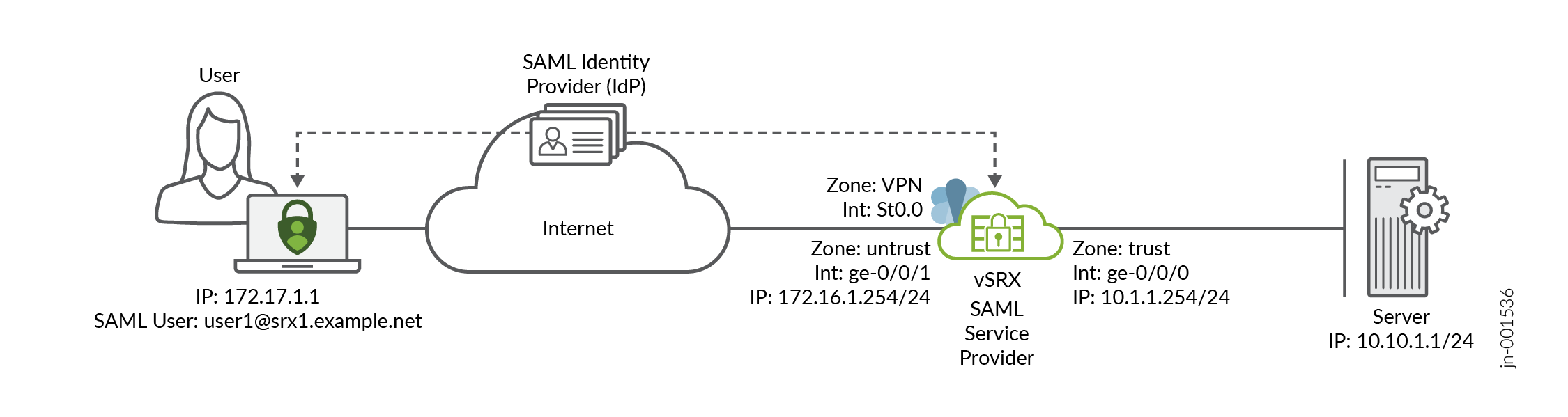 でのSAMLベースのユーザー認証
vSRXの設定手順
DUTの設定例については、以下を参照してください。
この設定は、vSRXにのみ適用されます。デバイス固有の構成を適切に変更する必要があります。
検証
このセクションでは、この例の機能を検証するために使用できるshowコマンドのリストを示します。.
- Juniper Secure ConnectアプリケーションでSAMLベースのユーザー認証を確認
- SAMLアサーションキャッシュエントリの検証
- 加入者固有の AAA 統計情報の検証
- SAML認証統計の検証
- IKE SAの検証
- IPsec SAの検証
- IKEアクティブピアの確認
Juniper Secure ConnectアプリケーションでSAMLベースのユーザー認証を確認
目的
SAMLベースのユーザー認証を使用して、リモートアクセスVPN用にJuniper Secure Connectアプリケーションを接続します。
アクション
クライアントで以下の手順を実行します。
CA証明書をクライアントラップトップの
C:\ProgramData\Juniper\SecureConnect\cacertsに配置します。接続プロファイルに
https://172.16.1.254/jsc-samlまたはhttps://srx1.juniper.net/jsc-samlとして入力します。次に、[接続] トグル ボタンをクリックして VPN 接続を確立します。システムが設定をダウンロードすると、 SAMLユーザーIDの入力を求めるウィンドウが表示されます認証。SAMLユーザーIDを ユーザーID フィールドに
user1@srx1.example.netとして入力します。システムは、デフォルトブラウザのIdP SSO URLにリダイレクトします。正しいパスワードとともに、ユーザー名
user1@srx1.example.netを入力します。ユーザー認証が正常に完了したら、ブラウザのポップアップを受け入れて、Juniper Secure Connectアプリケーションを起動します。
IKE接続がバックグラウンドで実行されている間、ブラウザを閉じてください。
Juniper Secure ConnectアプリケーションがリモートアクセスVPN接続を確立することを確認します。
意味
ユーザーは、SAMLベースのユーザー認証方法で認証され user1@srx1.example.net リモートアクセスVPN接続が確立されます。ユーザー名は、IdPの必須属性マッピングで定義された電子メール形式であることに注意してください。
SAMLアサーションキャッシュエントリの検証
user@vsrx> show network-access aaa saml assertion-cache
  Username            Remaining Validity
  user1@srx1.example.net 6h 52m 40s
目的
コマンドを実行して、SAMLアサーションキャッシュエントリを表示します。
アクション
動作モードから、コマンド show network-access aaa saml assertion-cache on vSRX を実行します。
意味
SAML認証アサーション、アクセスプロファイル、IdP設定で設定されたドメイン名、SAML認証済みユーザー名を含むキャッシュ情報を表示します。
加入者固有の AAA 統計情報の検証
user@vsrx> show network-access aaa subscribers
Username                 Logical system/Routing instance   Client type    Session-ID
user1@srx1.example.net   default:default                   xauth          6
目的
コマンドを実行して、加入者のユーザー名を表示します。
アクション
動作モードから、コマンド show network-access aaa subscribers on vSRX を実行します。
意味
アクティブな加入者セッションに関する情報を表示します。
SAML認証統計の検証
user@vsrx> show network-access aaa statistics saml
SAML Authentication statistics
    Authentication request received        21
    Authentication response sent           21
    Request hit cache                      0
    Request sent to IdP                    6
    Assertion received                     5
    Assertion timeout                      1
    Assertion parse fail                   0
    Assertion sanity fail                  0
    Assertion signature verify fail        0
    Assertion decryption fail              0
    Assertion node missing                 0
    Assertion attributes missing           0
    Assertion username mismatch            0
    Logout request received                0
    Logout response sent                   0
    Logout parse fail                      0
    Logout sanity fail                     0
    Logout signature verify fail           0
    Memory allocation fail                 0
目的
コマンドを実行して、SAML認証の統計情報を表示します。
アクション
動作モードから、コマンド show network-access aaa statistics saml on vSRX を実行します。
意味
SAML認証統計情報を表示します。
IKE SAの検証
user@vsrx> show security ike security-associations
Index   State  Initiator cookie  Responder cookie  Mode           Remote Address
1       UP     a5872b7d9c649c0b  3264d25485c6827a  IKEv2          172.17.1.1
目的
コマンドを実行して、IKEセキュリティアソシエーション(SA)に関する情報を表示します。
アクション
動作モードから、コマンド show security ike security-associations on vSRX を実行します。
意味
ファイアウォールのIKEモードをIKEv2として表示し、Juniper Secure Connectクライアントである172.17.1.1とのSAを持っています。
IPsec SAの検証
user@vsrx> show security ipsec security-associations
  Total active tunnels: 1     Total IPsec sas: 1
  ID      Algorithm       SPI      Life:sec/kb  Mon lsys Port  Gateway
  <500001 ESP:aes-gcm-256/aes256-gcm 0xdb912536 3429/ unlim - root 10954 172.17.1.1
  >500001 ESP:aes-gcm-256/aes256-gcm 0x52a3f7de 3429/ unlim - root 10954 172.17.1.1
目的
コマンドを実行して、IPsec SAに関する情報を表示します。
アクション
動作モードから、コマンド show security ipsec security-associations on vSRX を実行します。
意味
ファイアウォールに、172.17.1.1 を持つアクティブな IPsec トンネル SA(Juniper Secure Connect クライアント)が 1 つあることを示します。
IKEアクティブピアの確認
user@vsrx> show security ike active-peer
Remote Address                      Port     Peer IKE-ID                         AAA username                        Assigned IP
172.17.1.1                          10954    ra@example.com                     user1@srx1.example.net              10.1.3.10
目的
コマンドを実行して、接続されている IKE ピアを表示します。
アクション
動作モードから、コマンド show security ike active-peer on vSRX を実行します。
意味
ファイアウォールに、Juniper Secure ConnectクライアントであるアクティブなIKEピア172.17.1.1が1つあることを示します。ファイアウォールには、ユーザーに割り当てられているピア IKE ID と認証済みリモート ユーザー名と IP アドレスも表示されます。
付録1:Juniper Secure Connectのトラブルシューティング
SAMLベースのユーザー認証で問題が発生した場合は、次の手順に従って問題のトラブルシューティングを行います。
- この機能はikedプロセスで動作します。コマンド
request system software add optional://junos-ike.tgzを使用して、必ず junos-ike パッケージをインストールしてください。 - PKI、IKE、IPsec、リモートアクセスオプションのtraceoptionsを有効にします。たとえば、コマンド
set security pki traceoptions file pki.logを実行して、PKI で traceoptions を有効にします。syslogとトレースログを確認します。 - SAMLアサーションキャッシュが無効になっているかどうかを確認します。SAMLアサーションキャッシュが無効になっている場合は、IDPからSAMLアサーションをキャッシュできるようにすることをお勧めします。saml-optionsを参照してください。
- アサーションキャッシュに、ユーザーに対して有効なエントリが含まれていることを確認します。SAMLベースのユーザー認証をサポートするには、アサーションキャッシュに有効なユーザーエントリが含まれている必要があります。キャッシュに有効なエントリーがない場合は、Juniper Secure ConnectアプリケーションでVPN接続の切断と再接続を手動で実行します。このアクションにより、アプリケーションはユーザーを再度認証し、アサーションキャッシュを再入力するように求められます。show network-access aaa saml assertion-cacheを参照してください。
- アサーション待機タイムアウトによりsyslogが
AUTHD_SAML_AUTH_FAILEDを報告する場合は、コマンドset access saml service-provider yoursaml assertion-waittime waittimeを使用してアサーションタイムアウトを延長します。 - IdPメタデータをリロードするには、ネットワークアクセスのリクエストaaa saml load-idp-metadataを参照してください。
- サービスプロバイダのメタデータをエクスポートするには、ネットワークアクセスのリクエストaaa saml export-sp-metadataを参照してください。
- IKEセッションがタイムアウトしていることに気付いた場合は、コマンド
set security ike session half-open timeout timeoutを使用してセッションを延長します。
付録2:vSRXでコマンドを設定する
vSRXでコマンド出力を設定します。
set interfaces ge-0/0/0 unit 0 family inet address 10.1.1.254/24
set interfaces st0 unit 0 family inet
set interfaces ge-0/0/1 unit 0 family inet address 172.16.1.254/24

set security zones security-zone trust host-inbound-traffic system-services all
set security zones security-zone trust host-inbound-traffic protocols all
set security zones security-zone trust interfaces ge-0/0/0.0
set security zones security-zone untrust host-inbound-traffic system-services all
set security zones security-zone untrust host-inbound-traffic protocols all
set security zones security-zone untrust interfaces ge-0/0/1.0
set security zones security-zone VPN interfaces st0.0

set security policies from-zone trust to-zone trust policy default-permit match source-address any
set security policies from-zone trust to-zone trust policy default-permit match destination-address any
set security policies from-zone trust to-zone trust policy default-permit match application any
set security policies from-zone trust to-zone trust policy default-permit then permit
set security policies from-zone trust to-zone untrust policy default-permit match source-address any
set security policies from-zone trust to-zone untrust policy default-permit match destination-address any
set security policies from-zone trust to-zone untrust policy default-permit match application any
set security policies from-zone trust to-zone untrust policy default-permit then permit
set security policies from-zone trust to-zone VPN policy JSC-ALLOW-OUT match source-address any
set security policies from-zone trust to-zone VPN policy JSC-ALLOW-OUT match destination-address any
set security policies from-zone trust to-zone VPN policy JSC-ALLOW-OUT match application any
set security policies from-zone trust to-zone VPN policy JSC-ALLOW-OUT then permit
set security policies from-zone VPN to-zone trust policy JSC-ALLOW-IN match source-address any
set security policies from-zone VPN to-zone trust policy JSC-ALLOW-IN match destination-address any
set security policies from-zone VPN to-zone trust policy JSC-ALLOW-IN match application any
set security policies from-zone VPN to-zone trust policy JSC-ALLOW-IN then permit

set security nat source rule-set jsc from zone VPN
set security nat source rule-set jsc to zone trust
set security nat source rule-set jsc rule 1 match source-address 0.0.0.0/0
set security nat source rule-set jsc rule 1 then source-nat interface

set security ike proposal JSC-IKE-PRO authentication-method rsa-signatures
set security ike proposal JSC-IKE-PRO dh-group group19
set security ike proposal JSC-IKE-PRO authentication-algorithm sha-256
set security ike proposal JSC-IKE-PRO encryption-algorithm aes-256-cbc

set security ike policy JSC-IKE-POL proposals JSC-IKE-PRO
set security ike policy JSC-IKE-POL certificate local-certificate IKE-KEY

set security ike gateway JSC-GW dynamic user-at-hostname "ra@example.com"
set security ike gateway JSC-GW dynamic ike-user-type shared-ike-id
set security ike gateway JSC-GW ike-policy JSC-IKE-POL
user@vsrx# set security ike gateway JSC-GW version v2-only

set security ike gateway JSC-GW external-interface ge-0/0/1
set security ike gateway JSC-GW local-address 172.16.1.254

set security ike gateway JSC-GW dead-peer-detection optimized
set security ike gateway JSC-GW dead-peer-detection interval 10
set security ike gateway JSC-GW dead-peer-detection threshold 5

set security ike gateway JSC-GW aaa access-profile JSC-ACCESS
set security ike gateway JSC-GW tcp-encap-profile JSC-ENCAP

set security ipsec proposal JSC-IPSEC-PRO protocol esp
set security ipsec proposal JSC-IPSEC-PRO encryption-algorithm aes-256-gcm

set security ipsec policy JSC-IPSEC-POL proposals JSC-IPSEC-PRO
set security ipsec policy JSC-IPSEC-POL perfect-forward-secrecy keys group19

set security ipsec vpn JSC-VPN bind-interface st0.0
set security ipsec vpn JSC-VPN df-bit clear
set security ipsec vpn JSC-VPN ike gateway JSC-GW
set security ipsec vpn JSC-VPN ike ipsec-policy JSC-IPSEC-POL
set security ipsec vpn JSC-VPN traffic-selector ts-1 local-ip 10.1.1.1/32
set security ipsec vpn JSC-VPN traffic-selector ts-1 remote-ip 0.0.0.0/0

set security remote-access profile jsc-saml ipsec-vpn JSC-VPN
set security remote-access profile jsc-saml access-profile JSC-ACCESS
set security remote-access profile jsc-saml client-config JSC-CLIENT

set security remote-access client-config JSC-CLIENT connection-mode manual
set security remote-access client-config JSC-CLIENT dead-peer-detection interval 60
set security remote-access client-config JSC-CLIENT dead-peer-detection threshold 5
set security remote-access client-config JSC-CLIENT no-eap-tls

set access profile JSC-ACCESS authentication-order saml
set access profile JSC-ACCESS saml service-provider vsrx-jsc
set access profile JSC-ACCESS saml identity-provider srx1.example.net idp-name example-idp
set access profile JSC-ACCESS saml identity-provider any idp-name example-idp
set access profile JSC-ACCESS address-assignment pool JSC-POOL

set access address-assignment pool JSC-POOL family inet network 10.1.3.0/24
set access address-assignment pool JSC-POOL family inet range JSC-RANGE low 10.1.3.10
set access address-assignment pool JSC-POOL inet range JSC-RANGE high 10.1.3.20
set access address-assignment pool JSC-POOL family inet xauth-attributes primary-dns 8.8.8.8/32

set access firewall-authentication web-authentication default-profile JSC-ACCESS

set services ssl termination profile JSC-SSL-PRO server-certificate jsc

set security tcp-encap profile JSC-ENCAP ssl-profile JSC-SSL-PRO
set security tcp-encap profile JSC-ENCAP log

set access saml service-provider vsrx-jsc entity-id https://srx1.example.net
set access saml service-provider vsrx-jsc assertion-waittime 60
set access saml identity-provider example-idp settings entity-id http://www.example.org/abcd1234
set access saml identity-provider example-idp settings single-signon-url https://5075942.example.org/app/5075942_srx1examplenet_1/abcd1234/sso/saml
set access saml identity-provider example-idp settings single-logout-url https://5075942.example.org
set access saml identity-provider example-idp settings idp-certificate EXAMPLE-CA
set access saml identity-provider example-idp attribute-mapping username mail mandatory
付録3:vSRXでの設定出力を表示
vSRXでコマンド出力を表示。
設定モードから、以下のコマンドを入力して設定を確認します。出力に意図した設定が表示されない場合は、この例の設定手順を繰り返して修正します。
[edit]
user@vsrx# show interfaces
ge-0/0/0 {
    unit 0 {
        family inet {
            address 10.1.1.254/24;
        }
    }
}
ge-0/0/1 {
    unit 0 {
        family inet {
            address 172.16.1.254/24;
        }
    }
}
st0 {
    unit 0 {
        family inet;
    }
}
[edit]
user@vsrx# show security zones
security-zone trust {
    host-inbound-traffic {
        system-services {
            all;
        }
        protocols {
            all;
        }
    }
    interfaces {
        ge-0/0/0.0;
    }
}
security-zone untrust {
    host-inbound-traffic {
        system-services {
            all;
        }
        protocols {
            all;
        }
    }
    interfaces {
        ge-0/0/1.0;
    }
}
security-zone VPN {
    interfaces {
        st0.0;
    }
}
[edit]
user@vsrx# show security policies
from-zone trust to-zone trust {
    policy default-permit {
        match {
            source-address any;
            destination-address any;
            application any;
        }
        then {
            permit;
        }
    }
}
from-zone trust to-zone untrust {
    policy default-permit {
        match {
            source-address any;
            destination-address any;
            application any;
        }
        then {
            permit;
        }
    }
}
from-zone trust to-zone VPN {
    policy JSC-ALLOW-OUT {
        match {
            source-address any;
            destination-address any;
            application any;
        }
        then {
            permit;
        }
    }
}
from-zone VPN to-zone trust {
    policy JSC-ALLOW-IN {
        match {
            source-address any;
            destination-address any;
            application any;
        }
        then {
            permit;
        }
    }
}
[edit]
user@vsrx# show security nat
source {
    rule-set JSC-NAT {
        from zone VPN;
        to zone trust;
        rule 1 {
            match {
                source-address 0.0.0.0/0;
            }
            then {
                source-nat {
                    interface;
                }
            }
        }
    }
}
[edit]
user@vsrx# show system services
…
web-management {
    https {
        pki-local-certificate jsc-web;
    }
}
[edit]
user@vsrx# show security pki
ca-profile EXAMPLE-CA {
    ca-identity EXAMPLE-CA;
    revocation-check {
        disable;
    }
}
ca-profile CERTAUTH {
    ca-identity CERTAUTH;
    revocation-check {
        disable;
    }
}
[edit]
user@vsrx# show security ike
proposal JSC-IKE-PRO {
    authentication-method rsa-signatures;
    dh-group group19;
    authentication-algorithm sha-256;
    encryption-algorithm aes-256-cbc;
}
policy JSC-IKE-POL {
    proposals JSC-IKE-PRO;
    certificate {
        local-certificate IKE-CERT;
    }
}
gateway JSC-GW {
    ike-policy JSC-IKE-POL;
    dynamic {
        user-at-hostname "ra@example.com";
        ike-user-type shared-ike-id;
    }
    dead-peer-detection {
        optimized;
        interval 10;
        threshold 5;
    }
    external-interface ge-0/0/1;
    local-address 172.16.1.254;
    aaa {
        access-profile JSC-ACCESS;
    }
    version v2-only;
    tcp-encap-profile JSC-ENCAP;
}
[edit]
user@vsrx# show security ipsec
proposal JSC-IPSEC-PRO {
    protocol esp;
    encryption-algorithm aes-256-gcm;
}
policy JSC-IPSEC-POL {
    perfect-forward-secrecy {
        keys group19;
    }
    proposals JSC-IPSEC-PRO;
}
vpn JSC-VPN {
    bind-interface st0.0;
    df-bit clear;
    ike {
        gateway JSC-GW;
        ipsec-policy JSC-IPSEC-POL;
    }
    traffic-selector ts-1 {
        local-ip 10.1.1.1/32;
        remote-ip 0.0.0.0/0;
    }
}
[edit]
user@vsrx# show security tcp-encap
profile JSC-ENCAP {
    ssl-profile JSC-SSL-PRO;
    log;
}
[edit]
user@vsrx# show services
ssl {
    termination {
        profile JSC-SSL-PRO {
            server-certificate jsc;
        }
    }
}
[edit]
user@vsrx# show security remote-access
profile jsc-saml {
    ipsec-vpn JSC-VPN;
    access-profile JSC-ACCESS;
    client-config JSC-CLIENT;
}
client-config JSC-CLIENT {
    connection-mode manual;
    dead-peer-detection {
        interval 60;
        threshold 5;
    }
    no-eap-tls;
}
[edit]
user@vsrx# show access
profile JSC-ACCESS {
    authentication-order saml;
    address-assignment {
        pool JSC-POOL;
    }
    saml {
        service-provider vsrx-jsc;
        identity-provider srx1.example.net {
            idp-name example-idp;
        }
        identity-provider any {
            idp-name example-idp;
        }
    }
}
address-assignment {
    pool JSC-POOL {
        family inet {
            network 10.1.3.0/24;
            range jsc-range {
                low 10.1.3.10;
                high 10.1.3.20;
            }
            xauth-attributes {
                primary-dns 8.8.8.8/32;
            }
        }
    }
}
saml {
    service-provider vsrx-jsc {
        entity-id https://srx1.example.net;
        assertion-waittime 60;
    }
    identity-provider example-idp {
        settings {
            entity-id http://www.example.org/abcd1234;
            single-signon-url https://5075942.example.org/app/5075942_srx1examplenet_1/abcd1234/sso/saml;
            single-logout-url https://5075942.example.org;
            idp-certificate EXAMPLE-CA;
        }
        attribute-mapping {
            username mail mandatory;
        }
    }
}
firewall-authentication {
    web-authentication {
        default-profile JSC-ACCESS;
    }
}