
例:マルチホーミングを使用したマルチキャスト向け次世代VPLS
この例では、マルチホーミングを使用してマルチキャスト用に次世代VPLSを設定する方法を示しています。以下のセクションで構成されています。
要件
次の表は、この設定のハードウェアとソフトウェアの要件を示しています。
機器 |
コンポーネント |
ソフトウェア |
|---|---|---|
4つのMXシリーズ5Gユニバーサルルーティングプラットフォーム |
DPC40X-1GE-X、DPC 4X-10GE-X、DPC40x-1GE-R、DPC 4X-10GE-R |
Junos OS リリース 9.3 以降 |
M320 マルチサービス エッジ ルーター 2 台と T シリーズ コア ルーター |
FPC 3、10GE Xenpak |
Junos OS リリース 9.3 以降 |
EX シリーズ イーサネット スイッチ 5 台 |
EX4200、EX3200 |
Junos OS リリース 9.4 以降 |
概要とトポロジー
図 1 は、この次世代 VPLS マルチホーミングの例で使用される物理トポロジーを示しています。
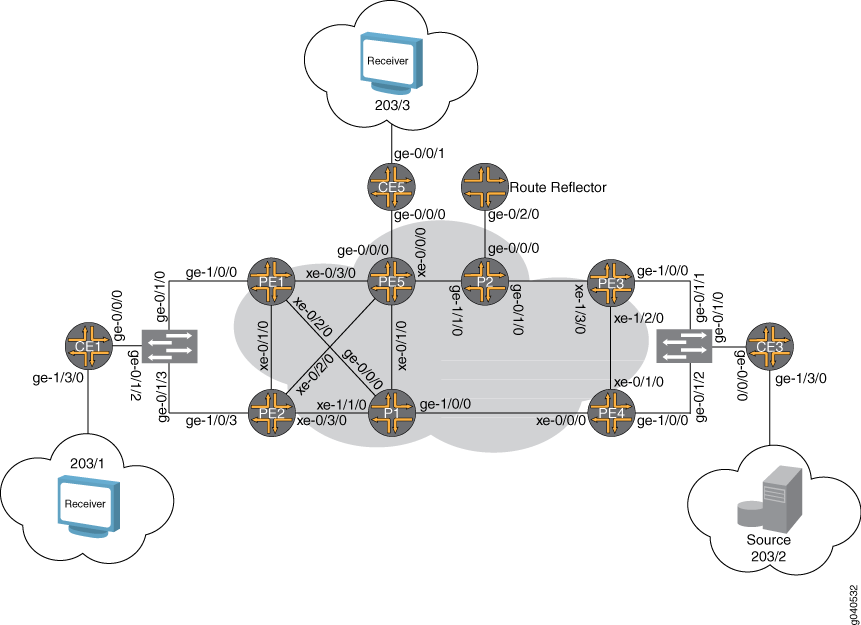
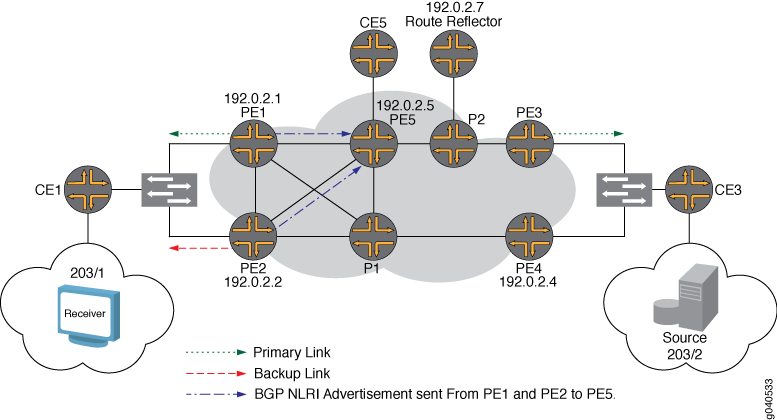
図 2 は、次世代 VPLS マルチホーミングの例の論理トポロジーを示しています。
実装前のネットワークの状態と設定は次のとおりです。
GOLD という名前の次世代 VPLS ドメインに参加している 5 台の PE ルーター。
OSPF、BGP、および RSVP は、MPLS コア インターフェースで設定されています。
ステートメントは
no-tunnel-services、VPLSルーティングインスタンスに含まれています。このステートメントは、VPLSのラベルスイッチインターフェイス(LSI)トンネルインターフェイスの使用をサポートしています。ルーターPE1とルーターPE2は、テンプレートを使用して、動的ポイントツーマルチポイントLSPで
vpls-GOLD-p2mp-template設定されます。ルーターPE3とルーターPE4は、静的ポイントツーマルチポイントLSPを使用するように設定されています。
メモ:シングルホップポイントツーマルチポイントLSPはサポートされていないので、シングルホップポイントツーマルチポイントLSPはダウンしています。
ルーターCE1は、EX4200レイヤー2スイッチを介してルーターPE1およびルーターPE2にマルチホームされます。
ルーターCE3は、EX4200レイヤー2スイッチを介して、ルーターPE3とルーターPE4にマルチホームされています。
ルーターCE5は、ルーターPE5にシングルホームされています。
オフパスルートリフレクタはBGP向けに設定されています。ステートメントは
family l2vpn、ルートリフレクタ設定に含まれています。ルーターCE3は、ポート203/2を介してテスト機器に接続されています。テスト装置は、グループ 203.0.113.1~203.0.113.10 に対して、10,000 pps の速度でマルチキャスト トラフィックを生成します。
ルーターCE1とルーターCE5は、静的なIGMP(インターネットグループ管理プロトコル)ジョインで設定されているため、ルーターCE3からマルチキャストトラフィックを受信できます。
レイヤー 2 スイッチには、PE ルーターへのトラック ポートとテスト機器へのアクセス ポートが設定されています。
以下に、設定を正常に完了するために必要な手順を示します。
ルーターPE1、ルーターPE2、ルーターPE3、およびルーターPE4で GOLD という名前のVPLSルーティングインスタンスに固有のルート識別を設定します。
マルチホーム PE ルーターに同じサイト ID を設定します。ルーターPE1とルーターPE2の両方をサイトID値1で設定します。サイトID値を3にして、ルーターPE3とルーターPE4の両方を設定します。
CE1 サイトの設定でマルチホーミングを設定します。
ルーターPE1でサイトプリファレンス
Primaryを設定し、ルーターPE2でサイトプリファレンスBackupを設定します。この場合、ルーターPE1にはルーターCE1へのプライマリリンクがあり、ルーターPE2にはルーターCE1へのバックアップリンクがあります。ルーターPE3とルーターPE4のサイトプリファレンスを設定します。ルーターPE3をプライマリとして、ルーターPE4をバックアップとして設定します。
構成
このセクションでは、マルチホーミングを使用してマルチキャスト用の次世代 VPLS を設定する手順を順を追って説明します。
どの設定セッションでも、 コマンドを使用して commit check 設定をコミットできることを定期的に確認することをお勧めします。
この例は、以下のセクションで構成されています。
次世代VPLSマルチホーミングの設定
手順
BGP ベースの VPLS マルチホーミングでは、各マルチホーム ルーターに異なるルート識別を設定することをお勧めします。ルート識別を個別に設定することで、プライマリ ルーターへの接続がダウンした場合のコンバージェンスにかかる時間を短縮できます。また、他のバックアップPEルーターは、より迅速なコンバージェンスのために、追加の状態情報を維持する必要があります。
パス選択には2つのレベルがあります。
1 つ目は BGP です。BGP は、BGP パス選択にルート識別、サイト ID、VE ブロック オフセットを組み合わせて使用します。
2つ目はVPLSにあります。VPLSは、VPLSのパス選択にサイトIDを使用します。
一意のルート識別を設定することで、BGPパス選択のプレフィックスはすべて一意になります。そのため、BGP パス選択はスキップされ、VPLS パス選択は使用され、サイト ID のみを表示します。
ルーターPE1、ルーターPE2、ルーターPE3、およびルーターPE4では、ルーティングインスタンスに固有のルーター識別を
GOLD設定します。user@PE1# set routing-instance GOLD route-distinguisher 192.0.2.1:1 user@PE2# set routing-instance GOLD route-distinguisher 192.0.2.2:10 user@PE3# set routing-instance GOLD route-distinguisher 192.0.2.3:1 user@PE4# set routing-instance GOLD route-distinguisher 192.0.2.4:10
ルーターCE1のルーターPE1およびPE2でサイトID
1を設定します。ルーターCE3のルーターPE3およびPE4でサイトID3を設定します。user@PE1# set routing-instance GOLD protocols vpls site CE1 site-identifier 1 user@PE2# set routing-instance GOLD protocols vpls site CE1 site-identifier 1 user@PE3# set routing-instance GOLD protocols vpls site CE3 site-identifier 3 user@PE4# set routing-instance GOLD protocols vpls site CE3 site-identifier 3
ルーターPE1、ルーターPE2、ルーターPE3、およびルーターPE4のマルチホームサイト設定の下に ステートメントを含
multi-homingめることで、マルチホーミングを有効にします。user@PE1# set routing-instance GOLD protocols vpls site CE1 multi-homing user@PE2# set routing-instance GOLD protocols vpls site CE1 multi-homing user@PE3# set routing-instance GOLD protocols vpls site CE3 multi-homing user@PE4# set routing-instance GOLD protocols vpls site CE3 multi-homing
site-preference primaryルーターPE1とルーターPE3に ステートメントを含め、ルーターPE2とルーターPE4に ステートメントを含site-preference backupめます。ステートメントはsite-preference primary、ローカルプリファレンスを最高値(65535)に設定し、ステートメントはsite-preference backupBGPローカルプリファレンスを1に設定します。サイトIDは同じであるため、ルーターは指定されたフォワーダとして最も高いローカルプリファレンス値を選択します。user@PE1# set routing-instance GOLD protocols vpls site CE1 site-preference primary user@PE2# set routing-instance GOLD protocols vpls site CE1 site-preference backup user@PE3# set routing-instance GOLD protocols vpls site CE3 site-preference primary user@PE4# set routing-instance GOLD protocols vpls site CE3 site-preference backup
VPLSコントロールプレーンの検証
手順
このセクションでは、設定例の動作を検証するために使用できる show コマンドを示します。
この例では、トラフィック パターンは次のとおりです。
送信元はルーターCE3に接続され、グループ203.0.113.1から203.0.113.10に10,000 ppsを送信します。ルーターCE3は、ランデブーポイントとして設定されています。
マルチキャストレシーバは、ルーターCE1とルーターCE5の両方に接続されています。プロトコル独立マルチキャスト(PIM)ジョインメント メッセージは、テスト装置によって生成されます。
ルーターPE3とルーターCE3間のリンクと、ルーターPE1とルーターCE1間のリンクは、VPLSマルチホーミングの主として設定されています。
すべてのPEルーターには、ルートリフレクタとのBGPセッションがあります。
すべてのPEルーターには、ルートリフレクタに作成されるラベルスイッチパス(LSP)があり、PEルーターはルート解決のためにテーブル内のルートリフレクタへのルートを
inet.3持っています。
ルーターPE1では、 コマンドを
show vpls connections使用して、VPLS接続がUpルーターPE1とルーターPE3間、およびルーターPE1とPE5間であることを確認します。ルーターPE1は、VPLSマルチホーミング設定によって選択されたプライマリリンクです。user@PE1# show vpls connections Layer-2 VPN connections: Legend for connection status (St) EI -- encapsulation invalid NC -- interface encapsulation not CCC/TCC/VPLS EM -- encapsulation mismatch WE -- interface and instance encaps not same VC-Dn -- Virtual circuit down NP -- interface hardware not present CM -- control-word mismatch -> -- only outbound connection is up CN -- circuit not provisioned <- -- only inbound connection is up OR -- out of range Up -- operational OL -- no outgoing label Dn -- down LD -- local site signaled down CF -- call admission control failure RD -- remote site signaled down SC -- local and remote site ID collision LN -- local site not designated LM -- local site ID not minimum designated RN -- remote site not designated RM -- remote site ID not minimum designated XX -- unknown connection status IL -- no incoming label MM -- MTU mismatch MI -- Mesh-Group ID not availble BK -- Backup connection ST -- Standby connection Legend for interface status Up -- operational Dn -- down Instance: GOLD Local site: CE1 (1) connection-site Type St Time last up # Up trans 1 rmt RN 3 rmt Up Nov 16 11:22:44 2009 1 Remote PE: 192.0.2.3, Negotiated control-word: No Incoming label: 262147, Outgoing label: 262145 Local interface: lsi.1048835, Status: Up, Encapsulation: VPLS Description: Intf - vpls GOLD local site 1 remote site 3 5 rmt Up Nov 16 11:22:46 2009 1 Remote PE: 192.0.2.5, Negotiated control-word: No Incoming label: 262149, Outgoing label: 262161 Local interface: lsi.1048836, Status: Up, Encapsulation: VPLS Description: Intf - vpls GOLD local site 1 remote site 5ルーターPE2では、 コマンドを
show vpls connections使用して、ルーターPE3およびルーターPE5へのVPLS接続がLN状態であることを確認します。これは、ローカルルーターが指定されたフォワーダではないことを意味します。ルーターPE2は、ルーターCE1のバックアップリンクとして設定されています。user@PE2# show vpls connections ... Instance: GOLD Local site: CE1 (1) connection-site Type St Time last up # Up trans 1 rmt LN 3 rmt LN 5 rmt LNルーターPE3では、 コマンドを
show vpls connections使用して、ルーターPE1およびルーターPE5へのVPLS接続が であることをUp確認します。ルーターPE3は、ルーターCE3のプライマリリンクとして設定されています。user@PE3# show vpls connections ... Instance: GOLD Local site: CE3 (3) connection-site Type St Time last up # Up trans 1 rmt Up Nov 16 11:22:01 2009 1 Remote PE: 192.0.2.1, Negotiated control-word: No Incoming label: 262145, Outgoing label: 262147 Local interface: lsi.1048832, Status: Up, Encapsulation: VPLS Description: Intf - vpls GOLD local site 3 remote site 1 3 rmt RN 5 rmt Up Nov 16 11:22:56 2009 1 Remote PE: 192.0.2.5, Negotiated control-word: No Incoming label: 262149, Outgoing label: 262163 Local interface: lsi.1048834, Status: Up, Encapsulation: VPLS Description: Intf - vpls GOLD local site 3 remote site 5ルーターPE4では、 コマンドを
show vpls connections使用して、VPLS接続が状態であることをLN確認します。つまり、ローカルサイトは指定されていません。ルーターPE4は、ルーターCE3のバックアップリンクとして設定されています。user@PE4# show vpls connections ... Instance: GOLD Local site: CE3 (3) connection-site Type St Time last up # Up trans 1 rmt LN 3 rmt SC 5 rmt LNルーターPE1では、 コマンドを
show route advertising-protocol使用して、ルーターPE1(マルチホーミングプライマリルーター)が、 のローカルプリファレンス値65535を持つBGPレイヤー2 VPNルートアドバタイズメントをルートリフレクタに送信していることを確認します。ローカルプリファレンスは、 のローカル1プリファレンスを持つルーターPE2を選択するのではなく、ルーターPE1を指定フォワーダとして選択するためにルーターPE3によって使用されます。user@PE1# show route advertising-protocol bgp 192.0.2.7 extensive GOLD.l2vpn.0: 5 destinations, 5 routes (5 active, 0 holddown, 0 hidden) * 192.0.2.1:1:1:1/96 (1 entry, 1 announced) BGP group to-RR type Internal Route Distinguisher: 192.0.2.1:1 Label-base: 262145, range: 8 Nexthop: Self Flags: Nexthop Change Localpref: 65535 AS path: [65000] I Communities: target:65000:1 Layer2-info: encaps:VPLS, control flags:, mtu: 0, site preference: 65535 PMSI: Flags 0:RSVP-TE:label[0:0:0]:Session_13[192.0.2.1:0:9519:192.0.2.1]ルーターPE2では、 コマンドを
show route advertising-protocol使用して、ルーターPE2が、 のローカルプリファレンス1を持つマルチホーミングバックアップとして設定されていることを確認します。user@PE2# show route advertising-protocol bgp 192.0.2.7 extensive GOLD.l2vpn.0: 5 destinations, 5 routes (5 active, 0 holddown, 0 hidden) * 192.0.2.2:10:1:1/96 (1 entry, 1 announced) BGP group to-RR type Internal Route Distinguisher: 192.0.2.2:10 Label-base: 262145, range: 8 Nexthop: Self Flags: Nexthop Change Localpref: 1 AS path: [65000] I Communities: target:65000:1 Layer2-info: encaps:VPLS, control flags:, mtu: 0, site preference: 1ルーターPE3では、 コマンドを
show route receive-protocol使用して、ルーターPE3が異なるローカルプリファレンス値を持つルーターPE1およびルーターPE2のルートリフレクタからレイヤー2 VPNルートを受信することを確認します。BGP ルート選択は、マルチホーム PE ルーターに接続された
l2vpnVPLS サイトの受信ルートに基づいています。ルーターPE1とルーターPE2ではルートの識別が異なっているため、ルーターPE3とルーターPE4は、ルーターPE1とルーターPE2から受信したルートを異なるルートと見なします。ルーターPE3とルーターPE4は、BGPパス選択アルゴリズムを実行し、ルーターPE1を選択します。ルーターは、指定されたフォワーダとして、より高いローカルプリファレンス値でルートをアドバタイズします。user@PE3# show route receive-protocol bgp 192.0.2.7 bgp.l2vpn.0: 4 destinations, 4 routes (4 active, 0 holddown, 0 hidden) Prefix Nexthop MED Lclpref AS path 192.0.2.1:1:1:1/96 * 192.0.2.1 65535 I 192.0.2.2:10:1:1/96 * 192.0.2.2 1 I 192.0.2.4:10:3:1/96 * 192.0.2.4 1 I 192.0.2.5:10:5:1/96 * 192.0.2.5 100 I GOLD.l2vpn.0: 5 destinations, 5 routes (5 active, 0 holddown, 0 hidden) Prefix Nexthop MED Lclpref AS path 192.0.2.1:1:1:1/96 * 192.0.2.1 65535 I 192.0.2.2:10:1:1/96 * 192.0.2.2 1 I 192.0.2.4:10:3:1/96 * 192.0.2.4 1 I 192.0.2.5:10:5:1/96 * 192.0.2.5 100 I
ルーターPE3では、 コマンドを
show route table使用して、ルーターPE3が転送のためにルーターPE3からルーターPE1への静的ポイントツーマルチポイントLSPを選択したことを確認します。PMSI属性がアタッチされていないため、ルーターPE2にはプロバイダーマルチキャストサービスインターフェイス(PMSI)フラグはないことがわかります。
user@PE3# show route table GOLD.l2vpn.0 extensive
GOLD.l2vpn.0: 5 destinations, 5 routes (5 active, 0 holddown, 0 hidden)
192.0.2.1:1:1:1/96 (1 entry, 1 announced)
        *BGP    Preference: 170/-65536
                Route Distinguisher: 192.0.2.1:1
                PMSI: Flags 0:RSVP-TE:label[0:0:0]:Session_13[192.0.2.1:0:9519:192.0.2.1]
                Next hop type: Indirect
                Next-hop reference count: 4
                Source: 192.0.2.7
                Protocol next hop: 192.0.2.1
                Indirect next hop: 2 no-forward
                State: <Secondary Active Int Ext>
                Local AS: 65000 Peer AS: 65000
                Age: 2:30:44    Metric2: 1
                Task: BGP_65000.192.0.2.7+179
                Announcement bits (1): 0-GOLD-l2vpn
                AS path: I (Originator) Cluster list:  192.0.2.7
                AS path:  Originator ID: 192.0.2.1
                Communities: target:65000:1 Layer2-info: encaps:VPLS, control flags:, mtu: 0, site preference: 65535
                Import Accepted
                Label-base: 262145, range: 8
                Localpref: 65535
                Router ID: 192.0.2.7
                Primary Routing Table bgp.l2vpn.0
                Indirect next hops: 1
                        Protocol next hop: 192.0.2.1 Metric: 3
                        Indirect next hop: 2 no-forward
                        Indirect path forwarding next hops: 1
                                Next hop type: Router
                                Next hop: 10.10.8.2 via xe-0/1/0.0 weight 0x1
                        192.0.2.1/32 Originating RIB: inet.3
                          Metric: 3                       Node path count: 1
                          Forwarding nexthops: 1
                                Nexthop: 10.10.8.2 via xe-0/1/0.0

192.0.2.2:10:1:1/96 (1 entry, 1 announced)
        *BGP    Preference: 170/-2
                Route Distinguisher: 192.0.2.2:10
                Next hop type: Indirect
                Next-hop reference count: 3
                Source: 192.0.2.7
                Protocol next hop: 192.0.2.2
                Indirect next hop: 2 no-forward
                State: <Secondary Active Int Ext>
                Local AS: 65000 Peer AS: 65000
                Age: 2:30:44    Metric2: 1
                Task: BGP_65000.192.0.2.7+179
                Announcement bits (1): 0-GOLD-l2vpn
                AS path: I (Originator) Cluster list:  192.0.2.7
                AS path:  Originator ID: 192.0.2.2
                Communities: target:65000:1 Layer2-info: encaps:VPLS, control flags:, mtu: 0, site preference: 1
                Import Accepted
                Label-base: 262145, range: 8
                Localpref: 1
                Router ID: 192.0.2.7
                Primary Routing Table bgp.l2vpn.0
                Indirect next hops: 1
                        Protocol next hop: 192.0.2.2 Metric: 3
                        Indirect next hop: 2 no-forward
                        Indirect path forwarding next hops: 1
                                Next hop type: Router
                                Next hop: 10.10.8.2 via xe-0/1/0.0 weight 0x1
                        192.0.2.2/32 Originating RIB: inet.3
                          Metric: 3                       Node path count: 1
                          Forwarding nexthops: 1
                                Nexthop: 10.10.8.2 via xe-0/1/0.0
ルーターPE3では、 コマンドを
show vpls connections使用して、VPLS接続がUp状態であることを確認します。表示には、ローカル インターフェイスと、使用された受信および送信ラベル値も表示されます。
user@PE3# show vpls connections extensive
...

Instance: GOLD
  Local site: CE3 (3)
    Number of local interfaces: 1
    Number of local interfaces up: 1
    IRB interface present: no
    ge-1/0/0.1
    lsi.1048832         1         Intf - vpls GOLD local site 3 remote site 1
    lsi.1048833         2         Intf - vpls GOLD local site 3 remote site 2
        Interface flags: VC-Down
    lsi.1048834         5         Intf - vpls GOLD local site 3 remote site 5
        Interface flags: VC-Down
    Label-base        Offset     Range     Preference
    262145            1          8         65535
    connection-site           Type  St     Time last up          # Up trans
    1                         rmt   Up     Nov 16 11:22:01 2009           1
      Remote PE: 192.0.2.1, Negotiated control-word: No
      Incoming label: 262145, Outgoing label: 262147
      Local interface: lsi.1048832, Status: Up, Encapsulation: VPLS
        Description: Intf - vpls GOLD local site 3 remote site 1
      RSVP-TE P2MP lsp:
        Egress branch LSP:  192.0.2.3:192.0.2.1:1:vpls:GOLD, State: Up
    Connection History:
        Nov 16 11:22:54 2009  PE route changed
        Nov 16 11:22:01 2009  status update timer
        Nov 16 11:22:01 2009  PE route changed
        Nov 16 11:22:01 2009  Out lbl Update                    262147
        Nov 16 11:22:01 2009  In lbl Update                     262145
        Nov 16 11:22:01 2009  loc intf up                  lsi.1048832
    3                         rmt   RN
    5                         rmt   RD
  Ingress RSVP-TE P2MP LSP: vpls-GOLD, Flood next-hop ID: 616
VPLSデータプレーンの検証
手順
前の手順を使用してコントロール プレーンを検証した後、データ プレーンを検証できます。VPLSマルチホーミングシナリオでのデータプレーン操作は、通常の次世代VPLS操作と同じです。このセクションでは、データ プレーンの show 検証に使用できるコマンド出力について説明します。
ルーターPE3では、 コマンドを
show mpls lsp使用して、静的LSPとサブLSPの状態を検証します。ルーターPE2は、リンク保護を備えた静的ポイントツーマルチポイントLSPとサブLSPで設定されています。ポイントツーマルチポイント LSP は、シングルホップ LSP ではサポートされていません。以下の出力では、ルーターPE3からルーターPE4へのシングルホップポイントツーマルチポイントLSPが です
down。user@PE3# show mpls lsp p2mp ingress Ingress LSP: 1 sessions P2MP name: vpls-GOLD, P2MP branch count: 4 To From State Rt P ActivePath LSPname 192.0.2.5 192.0.2.3 Up 0 * to-pe5 192.0.2.1 192.0.2.3 Up 0 * to-pe1 192.0.2.4 192.0.2.3 Dn 0 * to-pe4 192.0.2.2 192.0.2.3 Up 0 * to-pe2 Total 4 displayed, Up 3, Down 1
ルーターPE1では、 コマンドを
show mpls lsp使用して動的LSPの状態を検証します。ルーターPE1は、リンク保護で設定された動的ポイントツーマルチポイントLSPテンプレートを使用しています。LSP の状態が で、リンク保護が
Updesired.user@PE1# show mpls lsp p2mp ingress extensive Ingress LSP: 1 sessions P2MP name: 192.0.2.1:1:vpls:GOLD, P2MP branch count: 1 192.0.2.3 From: 192.0.2.1, State: Up, ActiveRoute: 0, LSPname: 192.0.2.3:192.0.2.1:1:vpls:GOLD ActivePath: (primary) P2MP name: 192.0.2.1:1:vpls:GOLD Link protection desired LoadBalance: Random Encoding type: Packet, Switching type: Packet, GPID: IPv4 *Primary State: Up Priorities: 7 0 OptimizeTimer: 50 SmartOptimizeTimer: 180 Reoptimization in 45 second(s). Computed ERO (S [L] denotes strict [loose] hops): (CSPF metric: 3) 10.10.3.2 S 10.10.9.2 S 10.10.8.1 S Received RRO (ProtectionFlag 1=Available 2=InUse 4=B/W 8=Node 10=SoftPreempt): 10.10.3.2(Label=488645) 192.0.2.4(flag=0x21) 10.10.9.2(flag=1 Label=299936) 10.10.8.1(Label=262145) 12 Nov 16 15:38:08.116 CSPF: computation result ignored[314 times] 11 Nov 16 11:23:44.856 Link-protection Up 10 Nov 16 11:23:32.696 CSPF: computation result ignored[3 times] 9 Nov 16 11:22:47.859 Record Route: 10.10.3.2(Label=488645) 192.0.2.4(flag=0x21) 10.10.9.2(flag=1 Label=299936) 10.10.8.1(Label=262145) 8 Nov 16 11:22:44.910 Record Route: 10.10.3.2(Label=488645) 192.0.2.4(flag=0x20) 10.10.9.2(Label=299936) 10.10.8.1(Label=262145) 7 Nov 16 11:22:44.910 Up 6 Nov 16 11:22:44.910 10.10.3.1: Down 5 Nov 16 11:22:44.866 Selected as active path 4 Nov 16 11:22:44.864 Record Route: 10.10.3.2(Label=488629) 192.0.2.4(flag=0x20) 10.10.9.2(Label=299920) 10.10.8.1(Label=3) 3 Nov 16 11:22:44.864 Up 2 Nov 16 11:22:44.852 Originate Call 1 Nov 16 11:22:44.852 CSPF: computation result accepted 10.10.3.2 10.10.9.2 10.10.8.1 Created: Mon Nov 16 11:22:45 2009 Total 1 displayed, Up 1, Down 0ルーターPE3では、 コマンドを
monitor interface traffic使用して、指定されたフォワーダルーターPE3上のポイントツーマルチポイントLSPのマルチキャスト複製動作を検証します。出力は、ルーターCE3からのインターフェイス
ge-1/0/0でppsが受信されていることを10,000示しています。トラフィックは、それぞれxe-0/0/0とxe-0/1/0を介してプロバイダー(P)ルーターP2とルーターPE4に転送されています。出力に基づいて、パケットの単一のコピーがルーターP2とルーターPE4に送信されていると判断できます。user@PE3> monitor interface traffic PE3 Seconds: 8 Time: 11:58:40 Interface Link Input packets (pps) Output packets (pps) lc-0/0/0 Up 0 0 xe-0/0/0 Up 13570505 (0) 4507338866 (10000) lc-0/1/0 Up 0 0 xe-0/1/0 Up 292843 (1) 628972219 (10000) lc-0/2/0 Up 0 0 xe-0/2/0 Up 343292 (0) 206808 (1) lc-0/3/0 Up 0 0 xe-0/3/0 Down 0 (0) 0 (0) ge-1/0/0 Up 2703709733 (9999) 13203544 (1) lc-1/0/0 Up 0 0 ge-1/0/1 Down 50380341937 (0) 60024542111 (0) ge-1/0/2 Down 60652323068 (0) 84480825838 (0) ge-1/0/3 Down 81219536264 (0) 84614255165 (0) ge-1/0/4 Down 54379241112 (0) 83656815208 (0)
ルーターP2では、 コマンドを
monitor interface traffic使用して、レシーバに接続されたPEルーターの近くでマルチキャストパケットの複製が行われることを確認します。ルーターPE1とルーターPE5は、このマルチキャストグループに参加している受信者に接続されています。インターフェイス上
ge-0/1/0のルーター PE3 からの受信マルチキャスト パケットが 2 回複製され、インターフェイス上で送信されていることにge-1/1/0注意してください。user@P2> monitor interface traffic P2 Seconds: 6 Time: 12:07:58 Interface Link Input packets (pps) Output packets (pps) ge-0/1/0 Up 661459806 (10000) 116236 (0) ge-1/1/0 Up 115956 (0) 1322690473 (20000) gr-2/1/0 Up 0 (0) 0 (0) ip-2/1/0 Up 0 (0) 0 (0)
ルーターPE3では、 コマンドを
show vpls flood使用して、フラッドのネクストホップルートに関する情報を検証します。Junos OS リリース 9.0 以降では、フラッドのネクストホップ ルートが複合ネクストホップとして識別されます。インターフェイスが 、 ネクストホップタイプ が
ge-1/0/0.1、 でcomposite、フラッド構成がflood-to-allであることがわかります。これは、トラフィックがすべてのPEルーターにフラッディングしていることを意味します。user@PE3# show vpls flood extensive Name: GOLD CEs: 1 VEs: 1 Flood route prefix: 0x30002/51 Flood route type: FLOOD_GRP_COMP_NH Flood route owner: __ves__ Flood group name: __ves__ Flood group index: 0 Nexthop type: comp Nexthop index: 606 Flooding to: Name Type NhType Index __all_ces__ Group comp 603 Composition: split-horizon Flooding to: Name Type NhType Index ge-1/0/0.1 CE ucst 578 Flood route prefix: 0x30003/51 Flood route type: FLOOD_GRP_COMP_NH Flood route owner: __all_ces__ Flood group name: __all_ces__ Flood group index: 1 Nexthop type: comp Nexthop index: 611 Flooding to: Name Type NhType Index __ves__ Group comp 594 Composition: flood-to-all Component p2mp NH (for all core facing interfaces): Index 616 Flooding to: Name Type NhType Index __all_ces__ Group comp 603 Composition: split-horizon Flooding to: Name Type NhType Index ge-1/0/0.1 CE ucst 578 Flood route prefix: 0x30001/51 Flood route type: FLOOD_GRP_COMP_NH Flood route owner: __re_flood__ Flood group name: __re_flood__ Flood group index: 65534 Nexthop type: comp Nexthop index: 598 Flooding to: Name Type NhType Index __ves__ Group comp 594 Composition: flood-to-all Component p2mp NH (for all core facing interfaces): Index 616 Flooding to: Name Type NhType Index __all_ces__ Group comp 603 Composition: split-horizon Flooding to: Name Type NhType Index ge-1/0/0.1 CE ucst 578 Name: __juniper_private1__ CEs: 0 VEs: 0ルーターPE3では、 コマンドを
show vpls mac-table使用して、VPLSのリモートエンドにあるPEルーターのMACアドレスが学習され、MACアドレステーブルに追加されていることを確認します。MAC アドレスがインターフェイスで学習されていることに
ge-1/0/0.1注意してください。user@PE3# show vpls mac-table MAC flags (S -static MAC, D -dynamic MAC, SE -Statistics enabled, NM -Non configured MAC) Routing instance : GOLD Bridging domain : __GOLD__, VLAN : NA MAC MAC Logical address flags interface 00:14:f6:75:78:00 D ge-1/0/0.1ルーターPE3では、 コマンドを
show route forwarding-table使用して、VPLSサービス用とネクストホップインターフェイス用の2つのラベルで、転送テーブルに必要なエントリーがあることを確認します。user@PE3> show route forwarding-table family vpls vpn GOLD Routing table: GOLD.vpls VPLS: Destination Type RtRef Next hop Type Index NhRef Netif default perm 0 dscd 574 1 lsi.1048832 intf 0 indr 1048575 4 10.10.7.1 Push 262147, Push 309680(top) 596 2 xe-0/0/0.0 lsi.1048836 intf 0 indr 1048574 4 10.10.7.1 Push 262179, Push 299856(top) 589 2 xe-0/0/0.0 00:10:db:e9:4e:b6/48 user 0 indr 1048574 4 10.10.7.1 Push 262179, Push 299856(top) 589 2 xe-0/0/0.0 00:12:1e:c6:98:00/48 user 0 indr 1048575 4 10.10.7.1 Push 262147, Push 309680(top) 596 2 xe-0/0/0.0 00:14:f6:75:78:00/48 user 0 ucst 578 4 ge-1/0/0.1 0x30002/51 user 0 comp 606 2 ge-1/0/0.1 intf 0 ucst 578 4 ge-1/0/0.1 0x30003/51 user 0 comp 611 2 0x30001/51 user 0 comp 598 2
結果
この例の構成と検証の部分は完了しています。以下のセクションを参考にしてください。
ルーターPE1の関連するサンプル設定を以下に示します。
ルーターPE1
chassis {
    dump-on-panic;
    fpc 1 {
        pic 3 {
            tunnel-services {
                bandwidth 1g;
            }
        }
    }
    network-services ethernet;
}
interfaces {
    xe-0/1/0 {
        unit 0 {
            family inet {
                address 10.10.2.1/30;
            }
            family mpls;
        }
    }
    xe-0/2/0 {
        unit 0 {
            family inet {
                address 10.10.3.1/30;
            }
            family mpls;
        }
    }
    xe-0/3/0 {
        unit 0 {
            family inet {
                address 10.10.1.1/30;
            }
            family mpls;
        }
    }
    ge-1/0/0 {
        vlan-tagging;
        encapsulation vlan-vpls;
        unit 1 {
            encapsulation vlan-vpls;
            vlan-id 1000;
            family vpls;
        }
    }
    lo0 {
        unit 0 {
            family inet {
                address 192.0.2.1/32;
            }
        }
    }
}
routing-options {
    static {
        route 172.0.0.0/8 next-hop 172.19.59.1;
    }
    autonomous-system 65000;
}
protocols {
    rsvp {
        interface all;
        interface fxp0.0 {
            disable;
        }
        interface xe-0/3/0.0 {
            link-protection;
        }
        interface xe-0/2/0.0 {
            link-protection;
        }
        interface xe-0/1/0.0 {
            link-protection;
        }
    }
    mpls {
        label-switched-path to-RR {
            to 192.0.2.7;
        }
        label-switched-path vpls-GOLD-p2mp-template {
            template;
            optimize-timer 50;
            link-protection;
            p2mp;
        }
        label-switched-path to-PE2 {
            to 192.0.2.2;
        }
        label-switched-path to-PE3 {
            to 192.0.2.3;
        }
        label-switched-path to-PE4 {
            to 192.0.2.4;
        }
        label-switched-path to-PE5 {
            to 192.0.2.5;
        }
        interface all;
        interface fxp0.0 {
            disable;
        }
    }
    bgp {
        group to-RR {
            type internal;
            local-address 192.0.2.1;
            family l2vpn {
                signaling;
            }
            neighbor 192.0.2.7;
        }
    }
    ospf {
        traffic-engineering;
        area 0.0.0.0 {
            interface all;
            interface fxp0.0 {
                disable;
            }
        }
    }
}
routing-instances {
    GOLD {
        instance-type vpls;
        interface ge-1/0/0.1;
        route-distinguisher 192.0.2.1:1;
        provider-tunnel {
            rsvp-te {
                label-switched-path-template {
                    vpls-GOLD-p2mp-template;
                }
            }
        }
        vrf-target target:65000:1;
        protocols {
            vpls {
                site-range 8;
                no-tunnel-services;
                site CE1 {
                    site-identifier 1;
                    multi-homing;
                    site-preference primary;
                    interface ge-1/0/0.1;
                }
            }
        }
    }
}
ルーターPE2の関連するサンプル設定を次に示します。
PE2 ルーター
chassis {
    dump-on-panic;
    fpc 1 {
        pic 3 {
            tunnel-services {
                bandwidth 1g;
            }
        }
    }
    network-services ethernet;
}
interfaces {
    xe-0/1/0 {
        unit 0 {
            family inet {
                address 10.10.2.2/30;
            }
            family mpls;
        }
    }
    xe-0/2/0 {
        unit 0 {
            family inet {
                address 10.10.5.1/30;
            }
            family mpls;
        }
    }
    xe-0/3/0 {
        unit 0 {
            family inet {
                address 10.10.4.1/30;
            }
            family mpls;
        }
    }
    ge-1/0/3 {
        vlan-tagging;
        encapsulation vlan-vpls;
        unit 1 {
            encapsulation vlan-vpls;
            vlan-id 1000;
            family vpls;
        }
    }
    fxp0 {
        apply-groups [ re0 re1 ];
    }
    lo0 {
        unit 0 {
            family inet {
                address 192.0.2.2/32;
            }
        }
    }
}
routing-options {
    static {
        route 172.0.0.0/8 next-hop 172.19.59.1;
    }
    autonomous-system 65000;
}
protocols {
    rsvp {
        interface all;
        interface fxp0.0 {
            disable;
        }
    }
    mpls {
        label-switched-path to-RR {
            to 192.0.2.7;
        }
        label-switched-path vpls-GOLD-p2mp-template {
            template;
            optimize-timer 50;
            link-protection;
            p2mp;
        }
        label-switched-path to-PE1 {
            to 192.0.2.1;
        }
        label-switched-path to-PE3 {
            to 192.0.2.3;
        }
        label-switched-path to-PE4 {
            to 192.0.2.4;
        }
        label-switched-path to-PE5 {
            to 192.0.2.5;
        }
        interface all;
        interface fxp0.0 {
            disable;
        }
    }
    bgp {
        group to-RR {
            type internal;
            local-address 192.0.2.2;
            family l2vpn {
                signaling;
            }
            neighbor 192.0.2.7;
        }
    }
    ospf {
        traffic-engineering;
        area 0.0.0.0 {
            interface all;
            interface fxp0.0 {
                disable;
            }
        }
    }
}
routing-instances {
    GOLD {
        instance-type vpls;
        interface ge-1/0/3.1;
        route-distinguisher 192.0.2.2:10;
        provider-tunnel {
            rsvp-te {
                label-switched-path-template {
                    vpls-GOLD-p2mp-template;
                }
            }
        }
        vrf-target target:65000:1;
        protocols {
            vpls {
                site-range 8;
                no-tunnel-services;
                site CE1 {
                    site-identifier 1;
                    multi-homing;
                    site-preference backup;
                    interface ge-1/0/3.1;
                }
            }
        }
    }