
例:MBGP MVPN を使用した IP マルチキャストのイングレス レプリケーションの設定
要件
この例で使用されているルーターは、ジュニパーネットワークス M Series マルチサービス エッジ ルーター、T Series コア ルーター、または MXシリーズ 5G ユニバーサルルーティングプラットフォームです。IPマルチキャストにイングレスレプリケーションを使用する場合、参加する各ルーターには、コントロールプレーン手順にはBGP、データプロバイダトンネルにはイングレスレプリケーションを設定する必要があります。これにより、MPLSポイントツーポイントLSPのフルメッシュが形成されます。イングレスレプリケーショントンネルは、ルーティングインスタンス内のプロバイダトンネルの設定に応じて、選択的または包括的トンネルにすることができます。
概要
ingress-replicationプロバイダトンネルタイプでは、ルーター間でユニキャストトンネルを使用してマルチキャストディストリビューションツリーを作成します。
mpls-internet-multicastルーティングインスタンスタイプは、イングレスレプリケーションプロバイダトンネルを使用して、MBGP(または次世代)MVPNを使用して、MPLSクラウドを介してルーター間でIPマルチキャストデータを伝送します。イングレスレプリケーションは、MVPNを使用してPEルーター間でマルチキャストデータを伝送する場合にも設定できます。
mpls-internet-multicastルーティングインスタンスは、コントロールプレーンの手順にのみ使用される非転送インスタンスです。インターフェイス設定はサポートしていません。論理システムに対して定義できるmpls-internet-multicastルーティングインスタンスは1つだけです。IPマルチキャストに使用されるすべてのマルチキャストおよびユニキャストルートは、設定されたルーティングインスタンスではなく、デフォルトのルーティングインスタンス(inet.0)にのみ関連付けられます。mpls-internet-multicastルーティングインスタンスタイプは、各ルーターのデフォルトマスターインスタンスに設定され、デフォルトインスタンスの[edit protocols pim]階層レベルでも含まれます。
各 mpls-internet-multicast ルーティングインスタンスに対して、 ingress-replication ステートメントは provider-tunnel ステートメント下と [edit routing-instances routing-instance-name provider-tunnel selective group source] 階層レベル下で必要です。
新しい宛先をイングレスレプリケーションプロバイダトンネルに追加する必要がある場合、結果の動作はイングレスレプリケーションプロバイダトンネルの設定方法によって異なります。
create-new-ucast-tunnel—このステートメントを設定すると、宛先への新しいユニキャストトンネルが作成され、宛先が不要になると削除されます。このモードは、イングレスレプリケーションを使用するRSVP LSPに使用します。label-switched-path-template (Multicast)—このステートメントが設定されている場合、イングレスレプリケーション用のポイントツーマルチポイントLSPに対してLSPテンプレートがに使用されます。
トポロジー
IPトポロジーは、IPマルチキャストドメインのエッジにあるルーターで構成されています。各ルーターには、MPLS クラウドに向けて設定された一連の IP インターフェイスと、IP ルーターに向けて設定された一連のインターフェイスがあります。 図1をご覧ください。インターネットマルチキャストトラフィックは、データプレーン用のイングレスレプリケーショントンネルとコントロールプレーン用のフルメッシュIBGPセッションを使用して、MPLSクラウドを介してIPルーター間で伝送されます。
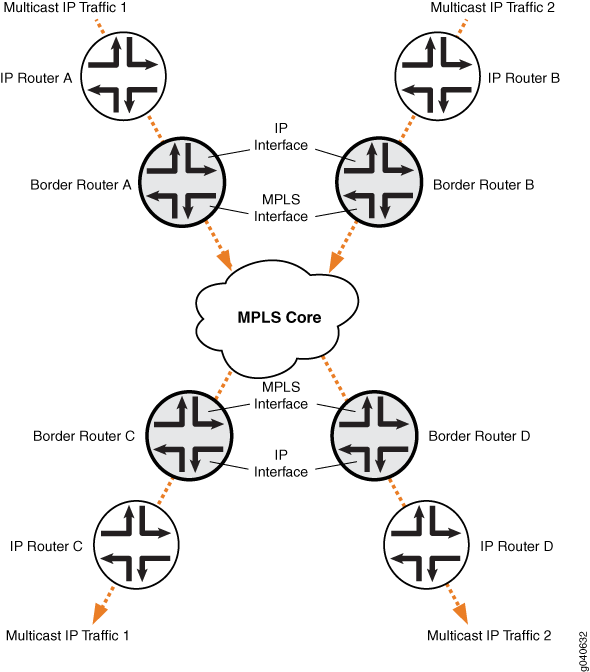
設定
手順
CLIクイックコンフィグレーション
この例を簡単に設定するには、以下のコマンドをコピーしてテキストファイルに貼り付け、改行を削除して、ネットワーク構成に合わせて必要な詳細を変更し、コマンドを [edit] 階層レベルのCLIにコピー&ペーストしてください。
ボーダールーターC
set protocols mpls ipv6-tunneling
set protocols mpls interface all
set protocols bgp group ibgp type internal
set protocols bgp group ibgp local-address 10.255.10.61
set protocols bgp group ibgp family inet unicast
set protocols bgp group ibgp family inet-vpn any
set protocols bgp group ibgp family inet6 unicast
set protocols bgp group ibgp family inet6-vpn any
set protocols bgp group ibgp family inet-mvpn signaling
set protocols bgp group ibgp family inet6-mvpn signaling
set protocols bgp group ibgp export to-bgp
set protocols bgp group ibgp neighbor 10.255.10.97
set protocols bgp group ibgp neighbor 10.255.10.55
set protocols bgp group ibgp neighbor 10.255.10.57
set protocols bgp group ibgp neighbor 10.255.10.59
set protocols ospf traffic-engineering
set protocols ospf area 0.0.0.0 interface fxp0.0 disable
set protocols ospf area 0.0.0.0 interface lo0.0
set protocols ospf area 0.0.0.0 interface so-1/3/1.0
set protocols ospf area 0.0.0.0 interface so-0/3/0.0
set protocols ospf3 area 0.0.0.0 interface lo0.0
set protocols ospf3 area 0.0.0.0 interface so-1/3/1.0
set protocols ospf3 area 0.0.0.0 interface so-0/3/0.0
set protocols ldp interface all
set protocols pim rp static address 192.0.2.2
set protocols pim rp static address 2::192.0.2.2
set protocols pim interface fe-0/1/0.0
set protocols pim mpls-internet-multicast
set routing-instances test instance-type mpls-internet-multicast
set routing-instances test provider-tunnel ingress-replication label-switched-path
set routing-instances test protocols mvpn
ステップバイステップの手順
次の例では、設定階層のさまざまなレベルに移動する必要があります。CLIのナビゲーションについては、『CLIユーザーガイド』の「設定モードでのCLIエディターの使用」を参照してください。
以下の例は、ルーティングインスタンスタイプ mpls-internet-multicastのIPマルチキャストインスタンスでイングレスレプリケーションを設定する方法を示しています。さらに、この例では、新しい宛先をマルチキャスト配布ツリーに追加する必要があるたびに新しいユニキャストトンネルを選択する選択プロバイダトンネルを設定する方法を示しています。
この例では、ボーダールーターCがPIMジョインメッセージを受信するボーダールーターCとエッジIPルーターCの間のリンクの設定を示しています。
MPLSを有効にします。
[edit protocols mpls]
user@Border_Router_C# set ipv6-tunneling
user@Border_Router_C# set interface all
RSVPやLDPなどのシグナリングプロトコルを設定します。
[edit protocols ldp]
user@Border_Router_C# set interface all
IBGP ピアリング セッションのフルメッシュを設定します。
[edit protocols bgp group ibgp]
user@Border_Router_C# set type internal
user@Border_Router_C# set local-address 10.255.10.61
user@Border_Router_C# set neighbor 10.255.10.97
user@Border_Router_C# set neighbor 10.255.10.55
user@Border_Router_C# set neighbor 10.255.10.57
user@Border_Router_C# set neighbor 10.255.10.59
user@Border_Router_C# set export to-bgp
BGPセッションで必要なBGPがNLRIを伝送するように、マルチプロトコルBGP関連の設定を構成します。
[edit protocols bgp group ibgp]
user@Border_Router_C# set family inet unicast
user@Border_Router_C# set family inet-vpn any
user@Border_Router_C# set family inet6 unicast
user@Border_Router_C# set family inet6-vpn any
user@Border_Router_C# set family inet-mvpn signaling
user@Border_Router_C# set family inet6-mvpn signaling
内部ゲートウェイプロトコル(IGP)を設定します。
この例では、インターフェイスに OSPF および OSPF バージョン 3 を設定したデュアルスタッキング設定を示しています。
[edit protocols ospf3]
user@Border_Router_C# set area 0.0.0.0 interface lo0.0
user@Border_Router_C# set area 0.0.0.0 interface so-1/3/1.0
user@Border_Router_C# set area 0.0.0.0 interface so-0/3/0.0
[edit protocols ospf]
user@Border_Router_C# set traffic-engineering
user@Border_Router_C# set area 0.0.0.0 interface fxp0.0 disable
user@Border_Router_C# set area 0.0.0.0 interface lo0.0
user@Border_Router_C# set area 0.0.0.0 interface so-1/3/1.0
user@Border_Router_C# set area 0.0.0.0 interface so-0/3/0.0
エッジデバイスに面したインターフェイスでグローバルPIMインスタンスを設定します。
PIM はコアで設定されていません。
[edit protocols pim]
user@Border_Router_C# set rp static address 192.0.2.2
user@Border_Router_C# set rp static address 2::192.0.2.2
user@Border_Router_C# set interface fe-0/1/0.0
user@Border_Router_C# set mpls-internet-multicast
マルチキャストディストリビューションツリーに宛先を追加する必要があるたびに新しいユニキャストトンネルを作成するようにイングレスレプリケーションプロバイダトンネルを設定します。
[edit routing-instances test]
user@Border_Router_C# set instance-type mpls-internet-multicast
user@Border_Router_C# set provider-tunnel ingress-replication label-switched-path
user@Border_Router_C# set protocols mvpn
注:または、 label-switched-path-template ステートメントを使用して、イングレストンネルにポイントツーポイントLSPを設定します。
デフォルトのテンプレート設定を使用するようにポイントツーポイントLSPを設定します(これはRSVPトンネルを使用する場合のみ必要です)。例えば:
[edit routing-instances test provider-tunnel]
user@Border_Router_C# set ingress-replication label-switched-path label-switched-path-template default-template
user@Border_Router_C# set selective group 203.0.113.0/24 source 192.168.195.145/32 ingress-replication label-switched-path
設定をコミットします。
user@Border_Router_C# commit
結果
設定モードから、 show protocols and show routing-instances コマンドを発行して設定を確認します。出力に意図した設定が表示されない場合は、この例の手順を繰り返して設定を修正します。
user@Border_Router_C# show protocols
mpls {
    ipv6-tunneling;
    interface all;
}
bgp {
    group ibgp {
        type internal;
        local-address 10.255.10.61;
        family inet {
            unicast;
        }
        family inet-vpn {
            any;
        }
        family inet6 {
            unicast;
        }
        family inet6-vpn {
            any;
        }
        family inet-mvpn {
            signaling;
        }
        family inet6-mvpn {
            signaling;
        }
        export to-bgp; ## 'to-bgp' is not defined
        neighbor 10.255.10.97;
        neighbor 10.255.10.55;
        neighbor 10.255.10.57;
        neighbor 10.255.10.59;
    }
}
ospf {
    traffic-engineering;
    area 0.0.0.0 {
        interface fxp0.0 {
            disable;
        }
        interface lo0.0;
        interface so-1/3/1.0;
        interface so-0/3/0.0;
    }
}
ospf3 {
    area 0.0.0.0 {
        interface lo0.0;
        interface so-1/3/1.0;
        interface so-0/3/0.0;
    }
}
ldp {
    interface all;
}
pim {
    rp {
        static {
            address 192.0.2.2;
            address 2::192.0.2.2;
        }
    }
    interface fe-0/1/0.0;
    mpls-internet-multicast;
}
user@Border_Router_C# show routing-instances
test {
    instance-type mpls-internet-multicast;
    provider-tunnel {
        ingress-replication {
            label-switched-path;
        }
    }
    protocols {
        mvpn;
    }
}
検証
設定が正常に機能していることを確認します。以下の操作出力は、LDP ingress replication SPT onlyモードのものです。IPルーターBの背後にあるマルチキャストソースマルチキャスト レシーバーは IP ルーター C の背後にあります。
- ボーダールーターCのイングレスレプリケーションステータスの確認
- ボーダールーターCでのMVPNルーティングインスタンスのルーティングテーブルの確認
- ボーダールーターCでのMVPNネイバーの確認
- ボーダールーターCでのPIM参加ステータスの確認
- ボーダールーターCでのマルチキャストルートステータスの確認
- ボーダールーターBのイングレスレプリケーションステータスの確認
- ボーダールーターBでのMVPNルーティングインスタンスのルーティングテーブルの確認
- ボーダールーターBでのMVPNネイバーの確認
- ボーダー ルーター B での PIM 参加ステータスの確認
- ボーダールーターBでのマルチキャストルートステータスの確認
ボーダールーターCのイングレスレプリケーションステータスの確認
目的
show ingress-replication mvpnコマンドを使用して、イングレスレプリケーションステータスを確認します。
アクション
user@Border_Router_C> show ingress-replication mvpn

Ingress Tunnel: mvpn:1
  Application: MVPN
  Unicast tunnels
    Leaf Address       Tunnel-type      Mode         State
    10.255.10.61       P2P LSP          Existing     Up
意味
イングレスレプリケーションはポイントツーポイントLSPを使用しており、Up状態です。
ボーダールーターCでのMVPNルーティングインスタンスのルーティングテーブルの確認
目的
show route tableコマンドを使用して、ルートステータスを確認します。
アクション
user@Border_Router_C> show route table test.mvpn

test.mvpn.0: 5 destinations, 7 routes (5 active, 1 holddown, 0 hidden)
+ = Active Route, - = Last Active, * = Both

1:0:0:10.255.10.61/240
                   *[BGP/170] 00:45:55, localpref 100, from 10.255.10.61
                      AS path: I, validation-state: unverified
                    > via so-2/0/1.0
1:0:0:10.255.10.97/240
                   *[MVPN/70] 00:47:19, metric2 1
                      Indirect
5:0:0:32:192.168.195.106:32:198.51.100.1/240
                   *[PIM/105] 00:06:35
                      Multicast (IPv4) Composite
                    [BGP/170] 00:06:35, localpref 100, from 10.255.10.61
                      AS path: I, validation-state: unverified
                    > via so-2/0/1.0
6:0:0:1000:32:192.0.2.2:32:198.51.100.1/240
                   *[PIM/105] 00:07:03
                      Multicast (IPv4) Composite
7:0:0:1000:32:192.168.195.106:32:198.51.100.1/240
                   *[MVPN/70] 00:06:35, metric2 1
                      Multicast (IPv4) Composite
                    [PIM/105] 00:05:35
                      Multicast (IPv4) Composite

test.mvpn-inet6.0: 2 destinations, 2 routes (2 active, 0 holddown, 0 hidden)
+ = Active Route, - = Last Active, * = Both

1:0:0:10.255.10.61/432
                   *[BGP/170] 00:45:55, localpref 100, from 10.255.10.61
                      AS path: I, validation-state: unverified
                    > via so-2/0/1.0
1:0:0:10.255.10.97/432
                   *[MVPN/70] 00:47:19, metric2 1
                      Indirect
意味
期待されるルートがtest.mvpnルーティングテーブルに入力されています。
ボーダールーターCでのMVPNネイバーの確認
目的
show mvpn neighborコマンドを使用して、ネイバーステータスを確認します。
アクション
user@Border_Router_C> show mvpn neighbor

MVPN instance:
Legend for provider tunnel
S-    Selective provider tunnel

Legend for c-multicast routes properties (Pr)
DS -- derived from (*, c-g)          RM -- remote VPN route
Family : INET

Instance : test
  MVPN Mode : SPT-ONLY
  Neighbor                              Inclusive Provider Tunnel
  10.255.10.61                          INGRESS-REPLICATION:MPLS Label 16:10.255.10.61

MVPN instance:
Legend for provider tunnel
S-    Selective provider tunnel

Legend for c-multicast routes properties (Pr)
DS -- derived from (*, c-g)          RM -- remote VPN route
Family : INET6

Instance : test
  MVPN Mode : SPT-ONLY
  Neighbor                              Inclusive Provider Tunnel
  10.255.10.61                          INGRESS-REPLICATION:MPLS Label 16:10.255.10.61
ボーダールーターCでのPIM参加ステータスの確認
目的
show pim join extensiveコマンドを使用して、PIM の参加ステータスを確認します。
アクション
user@Border_Router_C> show pim join extensive
Instance: PIM.master Family: INET
R = Rendezvous Point Tree, S = Sparse, W = Wildcard

Group: 198.51.100.1
    Source: *
    RP: 192.0.2.2
    Flags: sparse,rptree,wildcard
    Upstream interface: Local
    Upstream neighbor: Local
    Upstream state: Local RP
    Uptime: 00:07:49
    Downstream neighbors:
        Interface: ge-3/0/6.0
            192.0.2.2 State: Join Flags: SRW  Timeout: Infinity
            Uptime: 00:07:49 Time since last Join: 00:07:49
    Number of downstream interfaces: 1

Group: 198.51.100.1
    Source: 192.168.195.106
    Flags: sparse
    Upstream protocol: BGP
    Upstream interface: Through BGP
    Upstream neighbor: Through MVPN
    Upstream state: Local RP, Join to Source, No Prune to RP
    Keepalive timeout: 69
    Uptime: 00:06:21
    Number of downstream interfaces: 0

Instance: PIM.master Family: INET6
R = Rendezvous Point Tree, S = Sparse, W = Wildcard
ボーダールーターCでのマルチキャストルートステータスの確認
目的
show multicast route extensiveコマンドを使用して、マルチキャストルートステータスを確認します。
アクション
user@Border_Router_C> show multicast route extensive
Instance: master Family: INET

Group: 198.51.100.1
    Source: 192.168.195.106/32
    Upstream interface: lsi.0
    Downstream interface list:
        ge-3/0/6.0
    Number of outgoing interfaces: 1
    Session description: NOB Cross media facilities
    Statistics: 18 kBps, 200 pps, 88907 packets
    Next-hop ID: 1048577
    Upstream protocol: MVPN
    Route state: Active
    Forwarding state: Forwarding
    Cache lifetime/timeout: forever
    Wrong incoming interface notifications: 0
    Uptime: 00:07:25

Instance: master Family: INET6
ボーダールーターBのイングレスレプリケーションステータスの確認
目的
show ingress-replication mvpnコマンドを使用して、イングレスレプリケーションステータスを確認します。
アクション
user@Border_Router_B> show ingress-replication mvpn

Ingress Tunnel: mvpn:1
  Application: MVPN
  Unicast tunnels
    Leaf Address       Tunnel-type      Mode         State
    10.255.10.97       P2P LSP          Existing     Up
意味
イングレスレプリケーションはポイントツーポイントLSPを使用しており、Up状態です。
ボーダールーターBでのMVPNルーティングインスタンスのルーティングテーブルの確認
目的
show route tableコマンドを使用して、ルートステータスを確認します。
アクション
user@Border_Router_B> show route table test.mvpn

test.mvpn.0: 5 destinations, 7 routes (5 active, 0 holddown, 0 hidden)
+ = Active Route, - = Last Active, * = Both

1:0:0:10.255.10.61/240
                   *[MVPN/70] 00:49:26, metric2 1
                      Indirect
1:0:0:10.255.10.97/240
                   *[BGP/170] 00:48:22, localpref 100, from 10.255.10.97
                      AS path: I, validation-state: unverified
                    > via so-1/3/1.0
5:0:0:32:192.168.195.106:32:198.51.100.1/240
                   *[PIM/105] 00:09:02
                      Multicast (IPv4) Composite
                    [BGP/170] 00:09:02, localpref 100, from 10.255.10.97
                      AS path: I, validation-state: unverified
                    > via so-1/3/1.0
7:0:0:1000:32:192.168.195.106:32:198.51.100.1/240
                   *[PIM/105] 00:09:02
                      Multicast (IPv4) Composite
                    [BGP/170] 00:09:02, localpref 100, from 10.255.10.97
                      AS path: I, validation-state: unverified
                    > via so-1/3/1.0

test.mvpn-inet6.0: 2 destinations, 2 routes (2 active, 0 holddown, 0 hidden)
+ = Active Route, - = Last Active, * = Both

1:0:0:10.255.10.61/432
                   *[MVPN/70] 00:49:26, metric2 1
                      Indirect
1:0:0:10.255.10.97/432
                   *[BGP/170] 00:48:22, localpref 100, from 10.255.10.97
                      AS path: I, validation-state: unverified
                    > via so-1/3/1.0
意味
期待されるルートがtest.mvpnルーティングテーブルに入力されています。
ボーダールーターBでのMVPNネイバーの確認
目的
show mvpn neighborコマンドを使用して、ネイバーステータスを確認します。
アクション
user@Border_Router_B> show mvpn neighbor

MVPN instance:
Legend for provider tunnel
S-    Selective provider tunnel

Legend for c-multicast routes properties (Pr)
DS -- derived from (*, c-g)          RM -- remote VPN route
Family : INET

Instance : test
  MVPN Mode : SPT-ONLY
  Neighbor                              Inclusive Provider Tunnel
  10.255.10.97                          INGRESS-REPLICATION:MPLS Label 16:10.255.10.97

MVPN instance:
Legend for provider tunnel
S-    Selective provider tunnel

Legend for c-multicast routes properties (Pr)
DS -- derived from (*, c-g)          RM -- remote VPN route
Family : INET6

Instance : test
  MVPN Mode : SPT-ONLY
  Neighbor                              Inclusive Provider Tunnel
  10.255.10.97                          INGRESS-REPLICATION:MPLS Label 16:10.255.10.97
ボーダー ルーター B での PIM 参加ステータスの確認
目的
show pim join extensiveコマンドを使用して、PIM の参加ステータスを確認します。
アクション
user@Border_Router_B> show pim join extensive
Instance: PIM.master Family: INET
R = Rendezvous Point Tree, S = Sparse, W = Wildcard

Group: 198.51.100.1
    Source: 192.168.195.106
    Flags: sparse,spt
    Upstream interface: fe-0/1/0.0
    Upstream neighbor: Direct
    Upstream state: Local Source
    Keepalive timeout: 0
    Uptime: 00:09:39
    Downstream neighbors:
        Interface: Pseudo-MVPN
            Uptime: 00:09:39 Time since last Join: 00:09:39
    Number of downstream interfaces: 1


Instance: PIM.master Family: INET6
R = Rendezvous Point Tree, S = Sparse, W = Wildcard
ボーダールーターBでのマルチキャストルートステータスの確認
目的
show multicast route extensiveコマンドを使用して、マルチキャストルートステータスを確認します。
アクション
user@Border_Router_B> show multicast route extensive
Instance: master Family: INET

Group: 198.51.100.1
    Source: 192.168.195.106/32
    Upstream interface: fe-0/1/0.0
    Downstream interface list:
        so-1/3/1.0
    Number of outgoing interfaces: 1
    Session description: NOB Cross media facilities
    Statistics: 18 kBps, 200 pps, 116531 packets
    Next-hop ID: 1048580
    Upstream protocol: MVPN
    Route state: Active
    Forwarding state: Forwarding
    Cache lifetime/timeout: forever
    Wrong incoming interface notifications: 0
    Uptime: 00:09:43