
例:集合型イーサネットリンク上でのマルチキャストロードバランシングの設定
この例では、ポイントツーマルチポイント LSP を設定して、集約されたイーサネット リンク間でロード バランシングする方法を示します。ロードバランシングは、マルチキャストを含むすべてのトラフィックタイプに適用されます。.
要件
始める前に:
-
ルーター インターフェイスを設定します。
-
内部ゲートウェイプロトコルまたはスタティックルーティングを設定します。 ルーティングデバイス用 Junos OSルーティングプロトコルライブラリを参照してください。
概要
この例では、以下のタスクを実行するためのトポロジーと設定の例を示しています。
-
リンクアグリゲーションを介したVPLSマルチキャストトラフィックのロードバランシング
-
リンクアグリゲーションによるポイントツーマルチポイントマルチキャストトラフィックのロードバランシング
-
ネクストホップトポロジー変更後の再ロードバランシング
ネクストホップトポロジーの変更には、以下が含まれますが、これらに限定されません。
-
リンクアグリゲーションにおけるレイヤー2メンバーシップの変更
-
間接ネクストホップ変更
-
複合ネクストホップ変更
-
ロードバランシングはハッシュベースであるため、フロー数が多いほど良いです。ユニキャストと同様に、ハッシュキーがレイヤー3およびレイヤー4の情報に基づいて設定されるように設定することで、ロードバランシングの結果を向上させることもできます。マルチキャスト トラフィックに特有の例外がいくつかあり、不均一なロードバランシングにつながる可能性があります。たとえば、発信インターフェイスのリストに、子リンクの数が等しくない複数の集約インターフェイスが含まれる場合などです。
ドラフトローゼンマルチキャストVPN(MVPN)では、LAGがすべてコアインターフェイスである場合、集合型イーサネットインターフェイス上のロードバランシングは不均一になります。次世代MBGP MPVNの場合、マルチキャストトラフィックはポイントツーマルチポイントおよびRSVPを介して送信され、ハッシュはIPヘッダーまで計算されます。ドラフトローゼンのケースでは、マルチキャストトラフィックはGREトンネルを介してトンネリングされ、ハッシュはGREトンネルヘッダーでのみ使用されます。LAGがすべてコアインターフェイスである場合、Draft Rosenに対してもロードバランシングが行われないのはこのためです。
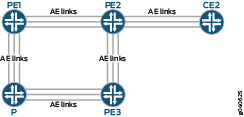
設定
手順
CLIクイックコンフィグレーション
この例をすばやく設定するには、以下のコマンドをコピーしてテキストファイルに貼り付け、改行を削除して、ネットワーク構成に合わせて必要な詳細を変更してから、コマンドを [edit] 階層レベルのCLIにコピー&ペーストします。
デバイスPE1
[edit]
set forwarding-options hash-key family multiservice source-mac
set forwarding-options hash-key family multiservice destination-mac
set forwarding-options hash-key family multiservice payload ip layer-3
set interfaces ge-0/0/6 gigether-options 802.3ad ae0
set interfaces ge-0/1/6 gigether-options 802.3ad ae0
set interfaces ge-0/2/2 encapsulation ethernet-vpls
set interfaces ge-0/2/2 unit 0 family vpls
set interfaces ge-0/2/3 gigether-options 802.3ad ae0
set interfaces ge-0/2/6 gigether-options 802.3ad ae0
set interfaces ge-0/3/0 gigether-options 802.3ad ae0
set interfaces ge-0/3/1 gigether-options 802.3ad ae0
set interfaces ge-0/3/6 gigether-options 802.3ad ae0
set interfaces ge-1/0/6 gigether-options 802.3ad ae0
set interfaces ge-1/2/6 unit 0 family inet address 10.13.1.2/30
set interfaces ae0 unit 0 family inet address 10.11.11.1/30
set interfaces ae0 unit 0 family iso
set interfaces ae0 unit 0 family mpls
set policy-options policy-statement exp-to-fwd term a from community grn-com
set policy-options policy-statement exp-to-fwd term a then install-nexthop lsp PE1-to-PE2
set policy-options policy-statement exp-to-fwd term a then accept
set policy-options community grn-com members target:65000:1
set protocols rsvp interface all
set protocols rsvp interface fxp0.0 disable
set protocols mpls label-switched-path PE1-to-PE2 to 10.255.19.77
set protocols mpls label-switched-path PE1-to-PE3 to 10.255.19.79
set protocols mpls interface all
set protocols mpls interface fxp0.0 disable
set protocols bgp group int type internal
set protocols bgp group int local-address 10.255.71.214
set protocols bgp group int family inet any
set protocols bgp group int family l2vpn signaling
set protocols bgp group int neighbor 10.255.19.77
set protocols bgp group int neighbor 10.255.19.79
set protocols ospf traffic-engineering
set protocols ospf area 0.0.0.0 interface all
set protocols ospf area 0.0.0.0 interface fxp0.0 disable
set routing-instances vpls instance-type vpls
set routing-instances vpls interface ge-0/2/2.0
set routing-instances vpls route-distinguisher 65000:1
set routing-instances vpls vrf-target target:65000:1
set routing-instances vpls protocols vpls site-range 3
set routing-instances vpls protocols vpls no-tunnel-services
set routing-instances vpls protocols vpls site asia site-identifier 1
set routing-instances vpls protocols vpls site asia interface ge-0/2/2.0
set routing-instances vpls protocols vpls vpls-id 100
set routing-instances vpls protocols vpls bum-hashing
デバイスPE2
set interfaces ge-0/0/7 gigether-options 802.3ad ae0
set interfaces ge-0/1/7 gigether-options 802.3ad ae0
set interfaces ge-0/2/3 gigether-options 802.3ad ae0
set interfaces ge-0/2/7 gigether-options 802.3ad ae0
set interfaces ge-2/0/0 gigether-options 802.3ad ae1
set interfaces ge-2/0/1 gigether-options 802.3ad ae1
set interfaces ge-2/0/2 gigether-options 802.3ad ae1
set interfaces ge-2/0/4 encapsulation ethernet-vpls
set interfaces ge-2/0/4 unit 0 family vpls
set interfaces ge-2/0/7 gigether-options 802.3ad ae0
set interfaces ge-2/0/9 unit 0 family inet address 10.10.1.1/30
set interfaces ge-2/0/9 unit 0 family mpls
set interfaces ge-2/1/7 gigether-options 802.3ad ae0
set interfaces ge-2/2/7 gigether-options 802.3ad ae0
set interfaces ge-2/3/7 gigether-options 802.3ad ae0
set interfaces ae0 unit 0 family inet address 10.11.11.2/30
set interfaces ae0 unit 0 family iso
set interfaces ae0 unit 0 family mpls
set interfaces ae1 unit 0 family inet address 10.1.1.1/30
set interfaces ae1 unit 0 family mpls
set protocols rsvp interface all
set protocols rsvp interface fxp0.0 disable
set protocols mpls label-switched-path PE2-to-PE3 from 10.255.19.77
set protocols mpls label-switched-path PE2-to-PE3 to 10.255.19.79
set protocols mpls label-switched-path PE2-to-PE1 to 10.255.71.214
set protocols mpls interface all
set protocols mpls interface fxp0.0 disable
set protocols bgp group int type internal
set protocols bgp group int local-address 10.255.19.77
set protocols bgp group int family inet any
set protocols bgp group int family l2vpn signaling
set protocols bgp group int neighbor 10.255.71.214
set protocols bgp group int neighbor 10.255.19.79
set protocols ospf traffic-engineering
set protocols ospf area 0.0.0.0 interface lo0.0
set protocols ospf area 0.0.0.0 interface ge-2/0/0.0
set protocols ospf area 0.0.0.0 interface ge-2/0/1.0
set protocols ospf area 0.0.0.0 interface ge-2/0/2.0
set protocols ospf area 0.0.0.0 interface ae0.0
set protocols ospf area 0.0.0.0 interface ae1.0
set protocols ospf area 0.0.0.0 interface all
set protocols ospf area 0.0.0.0 interface fxp0.0 disable
set protocols ldp interface all
set protocols ldp interface fxp0.0 disable
set routing-instances vpls instance-type vpls
set routing-instances vpls interface ge-2/0/4.0
set routing-instances vpls route-distinguisher 65000:1
set routing-instances vpls vrf-target target:65000:1
set routing-instances vpls protocols vpls site-range 3
set routing-instances vpls protocols vpls no-tunnel-services
set routing-instances vpls protocols vpls site 2 site-identifier 2
set routing-instances vpls protocols vpls site 2 interface ge-2/0/4.0
set routing-instances vpls protocols vpls vpls-id 100
set routing-instances vpls protocols vpls bum-hashing
ステップバイステップの手順
デバイスPE1を設定するには:
-
デバイスPE1インターフェイスを設定します。
[edit interfaces]
user@PE1# set ge-0/0/6 gigether-options 802.3ad ae0
user@PE1# set ge-0/1/6 gigether-options 802.3ad ae0
user@PE1# set ge-0/2/2 encapsulation ethernet-vpls
user@PE1# set ge-0/2/2 unit 0 family vpls
user@PE1# set ge-0/2/3 gigether-options 802.3ad ae0
user@PE1# set ge-0/2/6 gigether-options 802.3ad ae0
user@PE1# set ge-0/3/0 gigether-options 802.3ad ae0
user@PE1# set ge-0/3/1 gigether-options 802.3ad ae0
user@PE1# set ge-0/3/6 gigether-options 802.3ad ae0
user@PE1# set ge-1/0/6 gigether-options 802.3ad ae0
user@PE1# set ge-1/2/6 unit 0 family inet address 10.1.1.2/30
user@PE1# set ae0 unit 0 family inet address 10.11.11.1/30
user@PE1# set ae0 unit 0 family iso
user@PE1# set ae0 unit 0 family mpls
-
デバイス PE1 で、フローごとのロードバランシングに使用するパケット ヘッダー データを設定します。
[edit forwarding-options hash-key family multiservice]
user@PE1# set source-mac
user@PE1# set destination-mac
user@PE1# set payload ip layer-3
-
デバイスPE1でルーティングポリシーを設定します。
[edit policy-options]
user@PE1# set policy-statement exp-to-fwd term a from community grn-com
user@PE1# set policy-statement exp-to-fwd term a then install-nexthop lsp PE1-to-PE2
user@PE1# set policy-statement exp-to-fwd term a then accept
user@PE1# set policy-options community grn-com members target:65000:1
-
デバイスPE1のルーティングプロトコルとMPLSを設定します。
[edit protocols]
user@PE1# set rsvp interface all
user@PE1# set rsvp interface fxp0.0 disable
user@PE1# set mpls label-switched-path PE1-to-PE2 to 10.255.19.77
user@PE1# set mpls label-switched-path PE1-to-PE3 to 10.255.19.79
user@PE1# set mpls interface all
user@PE1# set mpls interface fxp0.0 disable
user@PE1# set bgp group int type internal
user@PE1# set bgp group int local-address 10.255.71.214
user@PE1# set bgp group int family inet any
user@PE1# set bgp group int family l2vpn signaling
user@PE1# set bgp group int neighbor 10.255.19.77
user@PE1# set bgp group int neighbor 10.255.19.79
user@PE1# set ospf traffic-engineering
user@PE1# set ospf area 0.0.0.0 interface all
user@PE1# set ospf area 0.0.0.0 interface fxp0.0 disable
-
デバイスPE1でVPLSを設定します。
[edit routing-instances vpls]
user@PE1# set instance-type vpls
user@PE1# set interface ge-0/2/2.0
user@PE1# set route-distinguisher 65000:1
user@PE1# set vrf-target target:65000:1
user@PE1# set protocols vpls site-range 3
user@PE1# set protocols vpls no-tunnel-services
user@PE1# set protocols vpls site asia site-identifier 1
user@PE1# set protocols vpls site asia interface ge-0/2/2.0
user@PE1# set protocols vpls vpls-id 100
user@PE1# set protocols vpls bum-hashing
ステップバイステップの手順
デバイスPE2を設定するには:
-
デバイスPE2インターフェイスを設定します。
[edit interfaces]
user@PE2# set ge-0/0/7 gigether-options 802.3ad ae0
user@PE2# set ge-0/1/7 gigether-options 802.3ad ae0
user@PE2# set ge-0/2/3 gigether-options 802.3ad ae0
user@PE2# set ge-0/2/7 gigether-options 802.3ad ae0
user@PE2# set ge-2/0/0 gigether-options 802.3ad ae1
user@PE2# set ge-2/0/1 gigether-options 802.3ad ae1
user@PE2# set ge-2/0/2 gigether-options 802.3ad ae1
user@PE2# set ge-2/0/4 encapsulation ethernet-vpls
user@PE2# set ge-2/0/4 unit 0 family vpls
user@PE2# set ge-2/0/7 gigether-options 802.3ad ae0
user@PE2# set ge-2/0/9 unit 0 family inet address 10.10.1.1/30
user@PE2# set ge-2/0/9 unit 0 family mpls
user@PE2# set ge-2/1/7 gigether-options 802.3ad ae0
user@PE2# set ge-2/2/7 gigether-options 802.3ad ae0
user@PE2# set ge-2/3/7 gigether-options 802.3ad ae0
user@PE2# set ae0 unit 0 family inet address 10.11.11.2/30
user@PE2# set ae0 unit 0 family iso
user@PE2# set ae0 unit 0 family mpls
user@PE2# set ae1 unit 0 family inet address 10.1.1.1/30
user@PE2# set ae1 unit 0 family mpls
-
デバイスPE2ルーティングプロトコルとMPLSを設定します。
[edit protocols]
user@PE2# set rsvp interface all
user@PE2# set rsvp interface fxp0.0 disable
user@PE2# set mpls label-switched-path PE2-to-PE3 from 10.255.19.77
user@PE2# set mpls label-switched-path PE2-to-PE3 to 10.255.19.79
user@PE2# set mpls label-switched-path PE2-to-PE1 to 10.255.71.214
user@PE2# set mpls interface all
user@PE2# set mpls interface fxp0.0 disable
user@PE2# set bgp group int type internal
user@PE2# set bgp group int local-address 10.255.19.77
user@PE2# set bgp group int family inet any
user@PE2# set bgp group int family l2vpn signaling
user@PE2# set bgp group int neighbor 10.255.71.214
user@PE2# set bgp group int neighbor 10.255.19.79
user@PE2# set ospf traffic-engineering
user@PE2# set ospf area 0.0.0.0 interface lo0.0
user@PE2# set ospf area 0.0.0.0 interface ge-2/0/0.0
user@PE2# set ospf area 0.0.0.0 interface ge-2/0/1.0
user@PE2# set ospf area 0.0.0.0 interface ge-2/0/2.0
user@PE2# set ospf area 0.0.0.0 interface ae0.0
user@PE2# set ospf area 0.0.0.0 interface ae1.0
user@PE2# set ospf area 0.0.0.0 interface all
user@PE2# set ospf area 0.0.0.0 interface fxp0.0 disable
user@PE2# set ldp interface all
user@PE2# set ldp interface fxp0.0 disable
-
デバイスPE2でVPLSを設定します。
[edit routing-instances vpls]
user@PE2# set instance-type vpls
user@PE2# set interface ge-2/0/4.0
user@PE2# set route-distinguisher 65000:1
user@PE2# set vrf-target target:65000:1
user@PE2# set protocols vpls site-range 3
user@PE2# set protocols vpls no-tunnel-services
user@PE2# set protocols vpls site 2 site-identifier 2
user@PE2# set protocols vpls site 2 interface ge-2/0/4.0
user@PE2# set protocols vpls vpls-id 100
user@PE2# set protocols vpls bum-hashing
結果
設定モードから、 show forwarding-options、 show interfaces、 show protocols、 show policy-options、 show routing-options コマンドを発行して設定を確認します。出力に意図した設定が表示されない場合は、この例の手順を繰り返して設定を修正します。
デバイスPE1
user@PE1# show forwarding-options
hash-key {
    family multiservice {
        source-mac;
        destination-mac;
        payload {
            ip {
                layer-3;
            }
        }
    }
}
user@PE1# show interfaces
ge-0/0/6 {
    gigether-options {
        802.3ad ae0;
    }
}
ge-0/1/6 {
    gigether-options {
        802.3ad ae0;
    }
}
ge-0/2/2 {
    encapsulation ethernet-vpls;
    unit 0 {
        family vpls;
    }
}
ge-0/2/3 {
    gigether-options {
        802.3ad ae0;
    }
}
ge-0/2/6 {
    gigether-options {
        802.3ad ae0;
    }
}
ge-0/3/0 {
    gigether-options {
        802.3ad ae0;
    }
}
ge-0/3/1 {
    gigether-options {
        802.3ad ae0;
    }
}
ge-0/3/6 {
    gigether-options {
        802.3ad ae0;
    }
}
ge-1/0/6 {
    gigether-options {
        802.3ad ae0;
    }
}
ge-1/2/6 {
    unit 0 {
        family inet {
            address 10.1.1.2/30;
        }
    }
}
ae0 {
    unit 0 {
        family inet {
            address 10.11.11.1/30;
        }
        family iso;
        family mpls;
    }
}
user@PE1# show protocols
mpls {
    interface all;
    interface fxp0.0 {
        disable;
    }
    label-switched-path PE1-to-PE2 {
        to 10.255.19.77;
    }
    label-switched-path PE1-to-PE3 {
        to 10.255.19.79;
    }
}
rsvp {
    interface all;
    interface fxp0.0 {
        disable;
    }
}
bgp {
    group int {
        type internal;
        local-address 10.255.71.214;
        family inet {
            any;
        }
        family l2vpn {
            signaling;
        }
        neighbor 10.255.19.77;
        neighbor 10.255.19.79;
    }
}
ospf {
    traffic-engineering;
    area 0.0.0.0 {
        interface all;
        interface fxp0.0 {
            disable;
        }
    }
}
user@PE1# show policy-options
policy-statement exp-to-fwd {
    term a {
        from community grn-com;
        then {
            install-nexthop lsp PE1-to-PE2;
            accept;
        }
    }
}
community grn-com members target:65000:1;
user@PE1# show routing-instances
vpls {
    instance-type vpls;
    interface ge-0/2/2.0;
    route-distinguisher 65000:1;
    vrf-target target:65000:1;
    protocols {
        vpls {
            site-range 3;
            no-tunnel-services;
            site asia {
                site-identifier 1;
                interface ge-0/2/2.0;
            }
            vpls-id 100;
            bum-hashing;
        }
    }
}
デバイスPE2
user@PE2# show interfaces
ge-0/0/7 {
    gigether-options {
        802.3ad ae0;
    }
}
ge-0/1/7 {
    gigether-options {
        802.3ad ae0;
    }
}
ge-0/2/3 {
    gigether-options {
        802.3ad ae0;
    }
}
ge-0/2/7 {
    gigether-options {
        802.3ad ae0;
    }
}
ge-2/0/0 {
    gigether-options {
        802.3ad ae1;
    }
}
ge-2/0/1 {
    gigether-options {
        802.3ad ae1;
    }
}
ge-2/0/2 {
    gigether-options {
        802.3ad ae1;
    }
}
ge-2/0/4 {
    encapsulation ethernet-vpls;
    unit 0 {
        family vpls;
    }
}
ge-2/0/7 {
    gigether-options {
        802.3ad ae0;
    }
}
ge-2/0/9 {
    unit 0 {
        family inet {
            address 10.10.1.1/30;
        }
        family mpls;
    }
}
ge-2/1/7 {
    gigether-options {
        802.3ad ae0;
    }
}
ge-2/2/7 {
    gigether-options {
        802.3ad ae0;
    }
}
ge-2/3/7 {
    gigether-options {
        802.3ad ae0;
    }
}
ae0 {
    unit 0 {
        family inet {
            address 10.11.11.2/30;
        }
        family iso;
        family mpls;
    }
}
ae1 {
    unit 0 {
        family inet {
            address 10.1.1.1/30;
        }
        family mpls;
    }
}
user@PE2# show protocols
rsvp {
    interface all;
    interface fxp0.0 {
        disable;
    }
}
mpls {
    label-switched-path PE2-to-PE3 {
        from 10.255.19.77;
        to 10.255.19.79;
    }
    label-switched-path PE2-to-PE1 {
        to 10.255.71.214;
    }
    interface all;
    interface fxp0.0 {
        disable;
    }
}
bgp {
    group int {
        type internal;
        local-address 10.255.19.77;
        family inet {
            any;
        }
        family l2vpn {
            signaling;
        }
        neighbor 10.255.71.214;
        neighbor 10.255.19.79;
    }
}
ospf {
    traffic-engineering;
    area 0.0.0.0 {
        interface lo0.0;
        interface ge-2/0/0.0;
        interface ge-2/0/1.0;
        interface ge-2/0/2.0;
        interface ae0.0;
        interface ae1.0;
        interface all;
        interface fxp0.0 {
            disable;
        }
    }
}
ldp {
    interface all;
    interface fxp0.0 {
        disable;
    }
}
user@PE2# show routing-instances
vpls {
    instance-type vpls;
    interface ge-2/0/4.0;
    route-distinguisher 65000:1;
    vrf-target target:65000:1;
    protocols {
        vpls {
            site-range 3;
            no-tunnel-services;
            site 2 {
                site-identifier 2;
                interface ge-2/0/4.0;
            }
            vpls-id 100;
            bum-hashing;
        }
    }
}
検証
show interfaces ae1.0 extensiveおよびmonitor interface trafficコマンドを実行することで、ルーティングインスタンスの動作を監視できます。
トラブルシューティングのために、すべてのプロトコルのトレース操作を設定できます。