
例:IS-IS インターフェイスでの CSNP パケットの送信頻度の設定
この例では、IS-IS インターフェイスの完全なシーケンス番号 PDU(CSNP)間隔を変更する方法を示しています。
必要条件
開始する前に、IS-IS を設定します。IS-IS 設定例については、 例:IS-IS の設定 を参照してください。
概要
CSNP には、IS-IS データベース内のすべてのリンクステート PDU の完全なリストが含まれています。CSNP はすべてのリンクで定期的に送信され、受信側システムは CSNP の情報を使用してリンク状態 PDU データベースを更新および同期します。指定ルーターは、各リンク状態 PDU に対して明示的な確認応答を送信する代わりに、ブロードキャスト リンク上で CSNP をマルチキャストします。
ルーティング デバイスが LAN 上の指定ルーターである場合、IS-IS は 10 秒ごとに CSNP を送信します。CSNP フラッディングから保護するために、デフォルトの間隔を変更することができます。
csnp-intervalステートメントは、LANインターフェイスで設定されている場合にのみ有効です。
CSNP 間隔を変更するには、 csnp-interval ステートメントを含めます。
csnp-interval seconds;
時間の範囲は 1 秒から 65,535 秒です。
CSNP を送信しないようにインターフェイスを設定するには、 disable オプションを指定します。
csnp-interval disable;
この例では、LAN セグメント上の IS-IS ルーティング デバイスは、30 秒ごとに CSNP を送信するように設定されています。
図 1 は、この例で使用されているトポロジーを示しています。
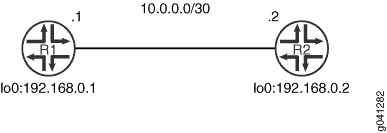
この例では、デバイス R1 の手順を説明します。
構成
プロシージャ
CLIクイック構成
この例をすばやく設定するには、次のコマンドをコピーしてテキストファイルに貼り付け、改行を削除して、ネットワーク構成に合わせて必要な詳細を変更し、 [edit] 階層レベルのCLIにコマンドをコピー&ペーストしてください。
デバイスR1
set interfaces fe-1/2/0 unit 0 description to-R2
set interfaces fe-1/2/0 unit 0 family inet address 10.0.0.1/30
set interfaces fe-1/2/0 unit 0 family iso
set interfaces lo0 unit 0 family inet address 192.168.0.1/32
set interfaces lo0 unit 0 family iso address 49.0002.0192.0168.0001.00
set protocols isis traceoptions file isis-trace
set protocols isis traceoptions flag csn
set protocols isis interface fe-1/2/0.0 csnp-interval 30
set protocols isis interface lo0.0
手順
次の例では、設定階層のいくつかのレベルに移動する必要があります。CLIのナビゲーションについては、CLIユーザー・ガイド の コンフィギュレーション・モードでのCLIエディタの使用を参照してください。
CSNP 間隔を設定するには、次の手順に従います。
インターフェイスを設定します。
[edit interfaces]
user@R1# set fe-1/2/0 unit 0 description to-R2
user@R1# set fe-1/2/0 unit 0 family inet address 10.0.0.1/30
user@R1# set fe-1/2/0 unit 0 family iso
user@R1# set lo0 unit 0 family inet address 192.168.0.1/32
user@R1# set lo0 unit 0 family iso address 49.0002.0192.0168.0001.00
インターフェイスで IS-IS を有効にします。
[edit protocols isis]
user@R1# set interface fe-1/2/0.0
user@R1# set interface lo0.0
CSNP 間隔を変更します。
[edit protocols isis interface fe-1/2/0.0]
user@R1# set csnp-interval 30
(オプション)CSNP 操作を追跡するためのトレースを有効にします。
[edit protocols isis traceoptions]
user@R1# set file isis-trace
user@R1# set flag csn
業績
設定モードから、 show interfaces コマンドと show protocols コマンドを入力して設定を確認します。出力結果に意図した設定内容が表示されない場合は、この例の手順を繰り返して設定を修正します。
user@R1# show interfaces
fe-1/2/0 {
    unit 0 {
        description to-R2;
        family inet {
            address 10.0.0.1/30;
        }
        family iso;
    }
}
lo0 {
    unit 0 {
        family inet {
            address 192.168.0.1/32;
        }
        family iso {
            address 49.0002.0192.0168.0001.00;
        }
    }
}
user@R1# show protocols
isis {
    traceoptions {
        file isis-trace;
        flag csn;
    }
    interface fe-1/2/0.0 {
        csnp-interval 30;
    }
    interface lo0.0;
}
デバイスの設定が完了したら、設定モードから commit を入力します。デバイスR2で設定を繰り返します。
検証
設定が正常に機能していることを確認します。
CSNP 間隔の検証
目的
IS-IS インターフェイスの CSNP 間隔設定を確認します。
アクション
動作モードから、 show isis interface extensive コマンドを入力します。
user@R1> show isis interface extensive
IS-IS interface database:
fe-1/2/0.0
  Index: 70, State: 0x6, Circuit id: 0x1, Circuit type: 3
  LSP interval: 100 ms, CSNP interval: 30 s, Loose Hello padding
  Adjacency advertisement: Advertise
  Level 1
    Adjacencies: 1, Priority: 64, Metric: 10
    Hello Interval: 9.000 s, Hold Time: 27 s
    Designated Router: R2.02 (not us)
  Level 2
    Adjacencies: 1, Priority: 64, Metric: 10
    Hello Interval: 9.000 s, Hold Time: 27 s
    Designated Router: R2.02 (not us)
意味
この出力は、CSNP 間隔が 30 秒に設定されていることを示しています。
CSNP 統計の確認
目的
送受信された CSNP の数を確認します。
アクション
動作モードから、 show isis statistics コマンドを入力します。
user@R1> show isis statistics

IS-IS statistics for R1:
PDU type       Received    Processed        Drops         Sent       Rexmit
LSP                   5            5            0            3            0
IIH                  94           20            0           43            0
CSNP                  6            6            0            0            0
PSNP                  0            0            0            0            0
Unknown               0            0            0            0            0
Totals              105           31            0           46            0

Total packets received: 105 Sent: 46

SNP queue length: 0 Drops: 0
LSP queue length: 0 Drops: 0
SPF runs: 5
Fragments rebuilt: 5
LSP regenerations: 0
Purges initiated: 0
-----
user@R2> show isis statistics
IS-IS statistics for R2:
PDU type       Received    Processed        Drops         Sent       Rexmit
LSP                   3            3            0            5            0
IIH                  35           11            0           86            0
CSNP                  0            0            0            6            0
PSNP                  0            0            0            0            0
Unknown               0            0            0            0            0
Totals               38           14            0           97            0

Total packets received: 38 Sent: 97

SNP queue length: 0 Drops: 0
LSP queue length: 0 Drops: 0
SPF runs: 7
Fragments rebuilt: 7
LSP regenerations: 0
Purges initiated: 0
意味
出力は、デバイスR1とデバイスR2で送受信されたCSNPの数を示しています。
ブロードキャスト リンクでは、指定された中間システム(DIS)のみが CSNP を送信します。
IS-IS ログの確認
目的
IS-IS トレース ログをチェックして、パケット間の間隔を確認します。
アクション
動作モードから、 show log isis-trace | match csn コマンドを入力します。
user@R1> show log isis-trace | match csn

Jun 18 14:36:19.504064 Received L1 CSN, source R2, interface fe-1/2/0.0
Jun 18 14:36:19.523065 Received L2 CSN, source R2, interface fe-1/2/0.0
Jun 18 14:36:48.904120 Received L1 CSN, source R2, interface fe-1/2/0.0
Jun 18 14:36:48.916425 Received L2 CSN, source R2, interface fe-1/2/0.0
Jun 18 14:37:14.954447 Received L1 CSN, source R2, interface fe-1/2/0.0
Jun 18 14:37:14.971329 Received L2 CSN, source R2, interface fe-1/2/0.0
Jun 18 14:37:44.227106 Received L1 CSN, source R2, interface fe-1/2/0.0
Jun 18 14:37:44.244181 Received L2 CSN, source R2, interface fe-1/2/0.0
意味
この出力は、レベル1とレベル2のCSNPが約30秒ごとに受信されていることを示しています。