
VDSL2 インターフェイス
VDSL2 インターフェイスの詳細と、セキュリティ デバイスのインターフェイスを構成する方法について説明します。
VDSL2 インターフェイスの概要
超高ビットレートデジタル加入者線(VDSL)テクノロジーは、モデムテクノロジーのxDSLファミリーの一部であり、撚りのない銅線またはツイストペアの1本の平らな銅線を介して高速データ伝送を提供します。 表 1 は、VDSL2 インターフェイスの主な詳細を示しています。
| インターフェイスの詳細 |
形容 |
|---|---|
| インターフェース名 |
SRX-MP-1VDSL2-R |
| サポート |
プラットフォームのサポートについては、 ハードウェア互換性ツール(HCT)をご覧ください。 |
| インターフェイスタイプ |
|
| ユースケース |
|
VDSL2 ハードウェアの仕様については、「 1 ポート VDSL2 Annex A ミニ物理インターフェイス モジュール(SRX-MP-1VDSL2-R)」を参照してください。
VDSL2 インターフェイスでサポートされる機能
表 2 では、VDSL2 インターフェイスでサポートされる主な機能について説明します。
| 特徴 |
形容 |
|---|---|
| パケット転送モード(PTM) |
|
| ディスクリートマルチトーン(DMT)変調 |
|
| 後方互換性 |
|
| 偏向 |
|
| IPv6 サポート |
|
VDSL2インターフェイスでサポートされている機能とプロファイルの詳細については、1ポートVDSL2 Annex Aミニ物理インターフェイスモジュール(SRX-MP-1VDSL2-R)を参照してください。
VDSL2 ネットワーク展開トポロジ
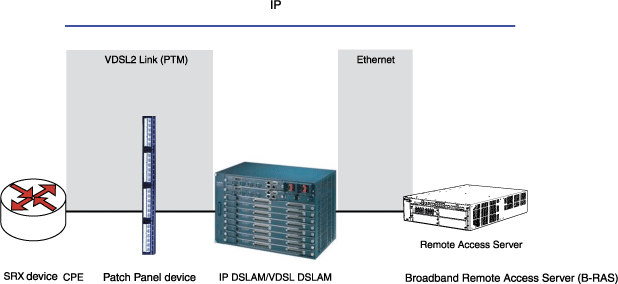
VDSL2インターフェイスは、ギガビットイーサネットまたはファイバーをセカンドマイルとして使用して、ブロードバンドリモートアクセスサーバー(B-RAS)に接続します。 図 1 は、一般的な VDSL2 ネットワーク トポロジを示しています。
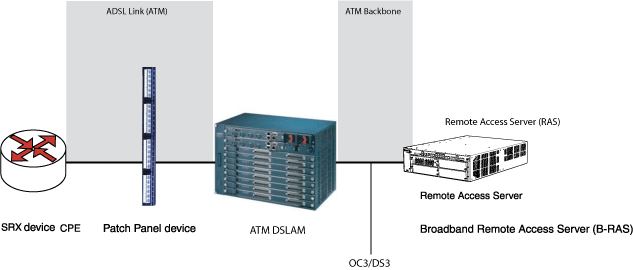
ADSLインターフェイスは、ギガビットイーサネットまたはOC3/DS3 ATMをセカンドマイルとして使用してB-RASに接続します。 図 2 は、ATM DSLAM を使用した下位互換性のある ADSL トポロジを示しています。
例:VDSL2 インターフェイスの設定
この例では、VDSL2 Mini-PIM で VDSL2 インターフェイスと VDSL2 インターフェイスを構成します。VDSL2 Mini-PIM では、pt-1/0/0 インターフェイスがデフォルトで作成されます。at-1/0/0を設定することで、ADSLモードに切り替えることができます。at-1/0/0を作成する前にpt-1/0/0を非アクティブ化するか、at-1/0/0を非アクティブ化してpt-1/0/0を作成できます。pt-1/0/0とpp0で以前の設定を削除したことを確認してください。
この例では、次のようになります。
-
VDSL2 Mini-PIM で新しい構成を開始します。
-
以前のインターフェイスを非アクティブ化し、古い設定を削除します。
-
エンドツーエンドのデータパス用に、VDSLプロファイルとレイヤー3設定を使用してインターフェイスを設定します。
-
静的 IP アドレスまたは UNNUMBERED IP アドレスによる CHAP 認証(PAP 認証または CHAP 認証)を使用して、
pt-1/0/0インターフェイス上の PPPoE を設定します。 -
ネゴシエートされたIPアドレス(PAP認証またはCHAP認証)を使用して、
pt-1/0/0インターフェイスでPPPoEを設定します。
ADSL モードで VDSL2 インターフェイスを構成するには:
-
エンドツーエンドのデータパス用にADSLインターフェイスを設定します。
-
ネゴシエートされたIPアドレスと、PAP認証またはCHAP認証のいずれかを使用して、
at-1/0/0インターフェイスでPPPoAを設定します。 -
at-1/0/0インターフェイスで PPPoA の静的 IP アドレスと番号なし IP アドレス(および PAP 認証または CHAP 認証)を設定します。 -
ネゴシエートされたIPアドレスとPAP認証またはCHAP認証のいずれかを使用して、
at-1/0/0インターフェイスでPPPoEを設定します。
表 3 は、VDSL2 インターフェイスの設定に使用される CLI クイック構成コマンドを示しています。
| 設定のステップ |
CLIクイック構成コマンド |
|---|---|
| VDSL2 インターフェイスを構成し、VLAN タグ付けを有効にします |
                        set interfaces pt-1/0/0 vdsl-options vdsl-profile auto

                        set interfaces pt-1/0/0 vlan-tagging

                        set interfaces pt-1/0/0 unit 0 vlan-id 100
|
| VDSL2 Mini-PIM で新しい構成を開始します |
[edit]
deactivate interface pt-1/0/0

                        deactivate interface at-1/0/0

                        delete interface pt-1/0/0

                        delete interface pp0
|
| エンドツーエンド データ パス用に VDSL2 Mini-PIM を構成する |
                        set interfaces pt-1/0/0 vdsl-options vdsl-profile 17a

                        set interfaces pt-1/0/0 unit 0 family inet address 11.11.11.1/24
|
| スタティックIP アドレスで |
user@host# set interfaces pt-1/0/0 vdsl-options vdsl-profile 17a
user@host# set interfaces pt-1/0/0 unit 0 encapsulation ppp-over-ether
user@host# set interfaces pp0 unit 0 ppp-options pap access-profile pap_prof local-name locky local-password india passive
user@host# set interfaces pp0 unit 0 pppoe-options underlying-interface pt-1/0/0.0 auto-reconnect 120 client
user@host# set interfaces pp0 unit 0 family inet address 10.1.1.6/24
user@host# set access profile pap_prof authentication-order password client cuttack pap-password india
|
| 静的 IP アドレスを使用した pt- インターフェイスでの PPPoE の設定(CHAP 認証) |
user@host# set interfaces pt-1/0/0 vdsl-options vdsl-profile 17a
user@host# set interfaces pt-1/0/0 unit 0 encapsulation ppp-over-ether
user@host# set interfaces pp0 unit 0 ppp-options chap default-chap-secret india local-name locky passive
user@host# set interfaces pp0 unit 0 pppoe-options underlying-interface pt-1/0/0.0 auto-reconnect 120 client
user@host# set interfaces pp0 unit 0 family inet address 10.1.1.6/24
|
| 番号なしIPを使用した |
user@host# set interfaces pt-1/0/0 vdsl-options vdsl-profile 17a
user@host# set interfaces pt-1/0/0 unit 0 encapsulation ppp-over-ether
user@host# set interfaces lo0 unit 0 family inet address 10.1.1.24/32
user@host# set interfaces pp0 unit 0 ppp-options pap access-profile pap_prof local-name locky local-password india passive
user@host# set interfaces pp0 unit 0 pppoe-options underlying-interface pt-1/0/0.0 auto-reconnect 120 client
user@host# set interfaces pp0 unit 0 family inet unnumbered-address lo0.0 destination 10.1.1.1
user@host# set access profile pap_prof authentication-order password client cuttack pap-password india
|
| 番号なしIPを使用した |
user@host# set interfaces pt-1/0/0 vdsl-options vdsl-profile 17a
user@host# set interfaces pt-1/0/0 unit 0 encapsulation ppp-over-ether
user@host# set interfaces lo0 unit 0 family inet address 10.1.1.24/32
user@host# set interfaces pp0 unit 0 ppp-options chap default-chap-secret india local-name locky passive
user@host# set interfaces pp0 unit 0 pppoe-options underlying-interface pt-1/0/0.0 auto-reconnect 120 client
user@host# set interfaces pp0 unit 0 family inet unnumbered-address lo0.0 destination 10.1.1.1
|
| ネゴシエートされたIP(PAP認証)を使用して |
user@host# set interfaces pt-1/0/0 vdsl-options vdsl-profile 17a
user@host# set interfaces pt-1/0/0 unit 0 encapsulation ppp-over-ether
user@host# set interfaces pp0 unit 0 ppp-options pap access-profile my_prf local-name purple local-password <password> passive
user@host# set interfaces pp0 unit 0 pppoe-options underlying-interface pt-1/0/0.0 auto-reconnect 120 client
user@host# set interfaces pp0 unit 0 family inet negotiate-address
user@host# set access profile my_prf authentication-order password
user@host# set access profile my_prf
|
| ネゴシエートされたIP(CHAP認証)を使用して |
user@host# set interfaces pt-1/0/0 vdsl-options vdsl-profile 17a
user@host# set interfaces pt-1/0/0 unit 0 encapsulation ppp-over-ether
user@host# set interfaces pp0 unit 0 ppp-options chap default-chap-secret <password> local-name purple passive
user@host# set interfaces pp0 unit 0 pppoe-options underlying-interface pt-1/0/0.0 auto-reconnect 120 client
user@host# set interfaces pp0 unit 0 family inet negotiate-address
|
VDSL2 インターフェイスの設定と VLAN タグ付けの有効化
この例では、 pt-1/0/0 という VDSL2 インターフェイスを作成し、VDSL2 プロファイルを auto に設定します。基本的な接続の詳細については、 クイックスタートガイド を参照し、ネットワークインターフェイスを設定するには、 例:イーサネットインターフェイスを設定するを参照してください。VDSL2 インターフェイスを構成し、VLAN タグ付けを有効にするには、次の手順を実行します。
同様に、Annex B (ADSL 下位互換モードの統合 VDSL2 インターフェイス) で VDSL2 インターフェイスを設定できます。構成が正常に完了したら、 show interfaces pt-1/0/0 コマンドを使用してパラメーターを表示します。
VDSL2 Mini-PIM を使用した VDSL2 インターフェイスの構成
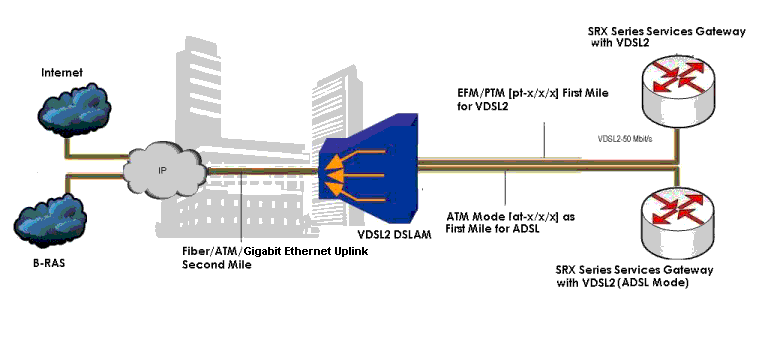
この例では、VDSL2 Mini-PIM を使用します。 図3 は、VDSL2 Mini-PIMネットワーク接続を備えた典型的なSRXシリーズファイアウォールを示しています。
CLI クイック構成コマンドを表示するには、 表 3 を参照してください。
VDSL2 Mini-PIM で新しい構成を開始するには、次の手順を実行します。
設定の出力を表示するには、 show chassis fpc コマンドを使用します。
エンドツーエンド データ パス用に VDSL2 Mini-PIM を構成する
エンドツーエンド データ パス用に VDSL2 Mini-PIM を構成するには、次のようにします。
-
エンドツーエンドのデータパス用に、VDSLプロファイルとレイヤー3設定でインターフェイスを設定します。
[edit] user@host# set interfaces pt-1/0/0 vdsl-options vdsl-profile 17a user@host# set interfaces pt-1/0/0 unit 0 family inet address 11.11.11.1/24 -
設定をコミットします。
設定の出力を表示するには、 show interfaces pt-1/0/0 コマンドを使用します。
静的 IP アドレスを使用して pt-1/0/0 インターフェイスで PPPoE を設定します。
静的 IP アドレスを使用して pt-1/0/0 インターフェイスで PPPoE を設定するには:
-
インターフェイスの VDSL オプションとカプセル化を設定します。
[edit] user@host# set interfaces pt-1/0/0 vdsl-options vdsl-profile 17a user@host# set interfaces pt-1/0/0 unit 0 encapsulation ppp-over-ether -
インターフェイスのPPPオプションを設定します。
[edit] user@host# set interfaces pp0 unit 0 ppp-options pap access-profile pap_prof user@host# set interfaces pp0 unit 0 ppp-options pap local-name locky user@host# set interfaces pp0 unit 0 ppp-options pap local-password india user@host# set interfaces pp0 unit 0 ppp-options pap passive -
インターフェイスのPPPoEオプションを設定します。
[edit] user@host# set interfaces pp0 unit 0 pppoe-options underlying-interface pt-1/0/0.0 user@host# set interfaces pp0 unit 0 pppoe-options auto-reconnect 120 user@host# set interfaces pp0 unit 0 pppoe-options client -
インターフェイスのIPアドレスを設定します。
[edit] user@host# set interfaces pp0 unit 0 family inet address 10.1.1.6/24 -
インターフェイスのアクセスプロファイルを設定します。
[edit] user@host# set access profile pap_prof authentication-order password user@host# set access profile pap_prof client cuttack pap-password india -
設定をコミットします。
設定の出力を表示するには、 show interfaces pp0、 show interfaces pt-1/0/0 、および show access profile pap_prof コマンドを使用します。
静的 IP アドレスを使用して pt-1/0/0 インターフェイスで PPPoE を設定します(CHAP 認証)
静的 IP アドレス(CHAP 認証)を使用して pt-1/0/0 インターフェイスで PPPoE を設定するには:
-
インターフェイスの VDSL オプションとカプセル化を設定します。
[edit] user@host# set interfaces pt-1/0/0 vdsl-options vdsl-profile 17a user@host# set interfaces pt-1/0/0 unit 0 encapsulation ppp-over-ether -
インターフェイスのPPPオプションを設定します。
[edit] user@host# set interfaces pp0 unit 0 ppp-options chap default-chap-secret india user@host# set interfaces pp0 unit 0 ppp-options chap local-name locky user@host# set interfaces pp0 unit 0 ppp-options chap passive -
インターフェイスのPPPoEオプションを設定します。
[edit] user@host# set interfaces pp0 unit 0 pppoe-options underlying-interface pt-1/0/0.0 user@host# set interfaces pp0 unit 0 pppoe-options auto-reconnect 120 user@host# set interfaces pp0 unit 0 pppoe-options client -
インターフェイスのIPアドレスを設定します。
[edit] user@host# set interfaces pp0 unit 0 family inet address 10.1.1.6/24 -
設定をコミットします。
show interfaces pt-1/0/0 コマンドと show interfaces pp0 コマンドを使用して、設定の出力を確認します。
番号なしIPを使用したpt-x/x/xインターフェイスでのPPPoEの設定(PAP認証)
番号なしIP(PAP認証)を使用してpt-1/0/0インターフェイスでPPPoEを設定するには:
-
インターフェイスの VDSL オプションとカプセル化を設定します。
[edit] user@host# set interfaces pt-1/0/0 vdsl-options vdsl-profile 17a user@host# set interfaces pt-1/0/0 unit 0 encapsulation ppp-over-ether -
インターフェイスのIPアドレスを設定します。
[edit] user@host# set interfaces lo0 unit 0 family inet address 10.1.1.24/32 -
インターフェイスのPPPオプションを設定します。
[edit] user@host# set interfaces pp0 unit 0 ppp-options pap access-profile pap_prof user@host# set interfaces pp0 unit 0 ppp-options pap local-name locky user@host# set interfaces pp0 unit 0 ppp-options pap local-password india user@host# set interfaces pp0 unit 0 ppp-options pap passive -
インターフェイスのPPPoEオプションを設定します。
[edit] user@host# set interfaces pp0 unit 0 pppoe-options underlying-interface pt-1/0/0.0 user@host# set interfaces pp0 unit 0 pppoe-options auto-reconnect 120 user@host# set interfaces pp0 unit 0 pppoe-options client -
インターフェイスの番号なしアドレスと宛先を設定します。
[edit] user@host# set interfaces pp0 unit 0 family inet unnumbered-address lo0.0 user@host# set interfaces pp0 unit 0 family inet unnumbered-address destination 10.1.1.1 -
インターフェイスのアクセスプロファイルを設定します。
[edit] user@host# set access profile pap_prof authentication-order password user@host# set access profile pap_prof client cuttack pap-password india -
設定をコミットします。
設定の出力を表示するには、 show interfaces lo0、 show interfaces pt-1/0/0、および show interfaces pp0 コマンドを使用します。
番号なしIPを使用したpt-1/0/0インターフェイスでのPPPoEの設定(CHAP認証)
番号なしIP(CHAP認証)を使用してpt-1/0/0インターフェイスでPPPoEを設定するには:
-
インターフェイスの VDSL オプションとカプセル化を設定します。
[edit] user@host# set interfaces pt-1/0/0 vdsl-options vdsl-profile 17a user@host# set interfaces pt-1/0/0 unit 0 encapsulation ppp-over-ether -
インターフェイスのIPアドレスを設定します。
[edit] user@host# set interfaces lo0 unit 0 family inet address 10.1.1.24/32 -
インターフェイスのPPPオプションを設定します。
[edit] user@host# set interfaces pp0 unit 0 ppp-options chap default-chap-secret india user@host# set interfaces pp0 unit 0 ppp-options chap local-name locky user@host# set interfaces pp0 unit 0 ppp-options chap passive -
インターフェイスのPPPoEオプションを設定します。
[edit] user@host# set interfaces pp0 unit 0 pppoe-options underlying-interface pt-1/0/0.0 user@host# set interfaces pp0 unit 0 pppoe-options auto-reconnect 120 user@host# set interfaces pp0 unit 0 pppoe-options client -
インターフェイスの番号なしアドレスと宛先を設定します。
[edit] user@host# set interfaces pp0 unit 0 family inet unnumbered-address lo0.0 user@host# set interfaces pp0 unit 0 family inet unnumbered-address destination 10.1.1.1 -
設定をコミットします。
設定の出力を表示するには、 show interfaces pp0、 show interfaces pt-1/0/0、および show interfaces lo0 コマンドを使用します。
ネゴシエートされたIP(PAP認証)を使用してpt-1/0/0インターフェイスでPPPoEを設定します
ネゴシエートされたIP(PAP認証)を使用してpt-1/0/0インターフェイスでPPPoEを設定するには:
-
インターフェイスの VDSL オプションとカプセル化を設定します。
[edit] user@host# set interfaces pt-1/0/0 vdsl-options vdsl-profile 17a user@host# set interfaces pt-1/0/0 unit 0 encapsulation ppp-over-ether -
インターフェイスのPPPオプションを設定します。
[edit] user@host# set interfaces pp0 unit 0 ppp-options pap access-profile my_prf user@host# set interfaces pp0 unit 0 ppp-options pap local-name purple user@host# set interfaces pp0 unit 0 ppp-options pap local-password <password> user@host# set interfaces pp0 unit 0 ppp-options pap passive -
インターフェイスのPPPoEオプションを設定します。
[edit] user@host# set interfaces pp0 unit 0 pppoe-options underlying-interface pt-1/0/0.0 user@host# set interfaces pp0 unit 0 pppoe-options auto-reconnect 120 user@host# set interfaces pp0 unit 0 pppoe-options client -
インターフェイスのネゴシエートされたIPアドレスを設定します。
[edit] user@host# set interfaces pp0 unit 0 family inet negotiate-address -
インターフェイスのアクセスプロファイルを設定します。
[edit] user@host# set access profile my_prf authentication-order password user@host# set access profile my_prf -
設定をコミットします。
設定の出力を表示するには、 show interfaces pt-1/0/0、 show interfaces pp0、および show access profile my_prf コマンドを使用します。
ネゴシエートされたIPを使用したpt-1/0/0インターフェイスでのPPPoEの設定(CHAP認証)
ネゴシエートされたIP(CHAP認証)を使用してpt-1/0/0インターフェイスでPPPoEを設定するには:
-
インターフェイスの VDSL オプションとカプセル化を設定します。
[edit] user@host# set interfaces pt-1/0/0 vdsl-options vdsl-profile 17a user@host# set interfaces pt-1/0/0 unit 0 encapsulation ppp-over-ether -
インターフェイスのPPPオプションを設定します。
[edit] user@host# set interfaces pp0 unit 0 ppp-options chap default-chap-secret <password> user@host# set interfaces pp0 unit 0 ppp-options chap local-name purple user@host# set interfaces pp0 unit 0 ppp-options chap passive -
インターフェイスのPPPoEオプションを設定します。
[edit] user@host# set interfaces pp0 unit 0 pppoe-options underlying-interface pt-1/0/0.0 user@host# set interfaces pp0 unit 0 pppoe-options auto-reconnect 120 user@host# set interfaces pp0 unit 0 pppoe-options client -
インターフェイスのネゴシエートされたIPアドレスを設定します。
[edit] user@host# set interfaces pp0 unit 0 family inet negotiate-address -
設定をコミットします。
show interfaces pp0 コマンドと show interfaces pt-1/0/0 コマンドを使用して、設定の出力を確認します。同様に、show interfaces pt-1/0/0 コマンドを使用して、統合された VDSL2 インターフェイス(Annex B)を ADSL 下位互換モードで設定できます。
検証
目的
VDSL2 インターフェイスで構成されたパラメーターに関する情報を表示します。
アクション
-
附属書 A で動作している DSLAM に接続された VDSL2 インターフェイスで構成されたパラメーターに関する情報を表示し、VLAN タグ付けの詳細を表示するには:
user@host> show interfaces pt-1/0/0Physical interface: pt-1/0/0, Enabled, Physical link is Up Interface index: 146, SNMP ifIndex: 524, Generation: 149 Type: PTM, Link-level type: Ethernet, MTU: 1496, VDSL mode, Speed: 45440kbps Speed: VDSL2 Device flags : Present Running Link flags : None CoS queues : 8 supported, 8 maximum usable queues Hold-times : Up 0 ms, Down 0 ms Current address: 00:b1:7e:85:84:ff Last flapped : 2009-10-18 11:56:50 PDT (12:32:49 ago) Statistics last cleared: 2009-10-19 00:29:37 PDT (00:00:02 ago) Traffic statistics: Input bytes : 22438962 97070256 bps Output bytes : 10866024 43334088 bps Input packets: 15141 8187 pps Output packets: 7332 3655 pps Input errors: Errors: 0, Drops: 0, Policed discards: 0, L3 incompletes: 0, L2 channel errors: 0, L2 mismatch timeouts: 0, Resource errors: 0 Output errors: Carrier transitions: 0, Errors: 0, Drops: 0, Aged packets: 0, MTU errors: 0, Resource errors: 0 Egress queues: 8 supported, 4 in use Queue counters: Queued packets Transmitted packets Dropped packets 0 best-effort 6759 6760 0 1 expedited-fo 0 0 0 2 assured-forw 0 0 0 3 network-cont 0 0 0 VDSL alarms : None VDSL defects : None VDSL media: Seconds Count State LOF 0 0 OK LOS 0 0 OK LOM 0 0 OK LOP 0 0 OK LOCDI 0 0 OK LOCDNI 0 0 OK VDSL status: Modem status : Showtime (Profile-17a) VDSL profile : Profile-17a Annex A Last fail code: None Subfunction : 0x00 Seconds in showtime : 45171 continue....................................................... .......................................................同様に、
show interfaces pt-1/0/0コマンドを使用して、Annex B モードの VDSL2 インターフェイスを確認できます。user@host> show interfaces pt-1/0/0vlan-tagging; vdsl-options { vdsl-profile auto; } unit 0 { vlan-id 100; Family inet { address 100.100.100.1/24; } -
show chassis fpcコマンドを入力して、FPCステータスを確認します。VDSL2 Mini-PIM は、SRX320 デバイス シャーシの最初のスロットにインストールされます。したがって、fpc 1を使用してください。SRX340デバイスでは、FPCfpc 1、fpc 2、fpc 3、またはfpc 4を使用します。user@host> show chassis fpcTemp CPU Utilization (%) Memory Utilization (%) Slot State (C) Total Interrupt DRAM (MB) Heap Buffer 0 Online -------------------- CPU less FPC -------------------- 1 Online -------------------- CPU less FPC --------------------
-
run show interface pt-1/0/0を使用して、DSLAMのインターフェイス、モデムステータス、秒単位の時間、およびVDSLプロファイルのステータスを確認します。user@host> show interface pt-1/0/0Physical interface: pt-1/0/0, Enabled, Physical link is Up Interface index: 146, SNMP ifIndex: 524, Generation: 149 Type: PTM, Link-level type: Ethernet, MTU: 1496, VDSL mode, Speed: 45440kbps Speed: VDSL2 Device flags : Present Running Link flags : None CoS queues : 8 supported, 8 maximum usable queues Hold-times : Up 0 ms, Down 0 ms Current address: 00:b1:7e:85:84:ff Last flapped : 2009-10-18 11:56:50 PDT (12:32:49 ago) Statistics last cleared: 2009-10-19 00:29:37 PDT (00:00:02 ago) Traffic statistics: Input bytes : 22438962 97070256 bps Output bytes : 10866024 43334088 bps Input packets: 15141 8187 pps Output packets: 7332 3655 pps Input errors: Errors: 0, Drops: 0, Policed discards: 0, L3 incompletes: 0, L2 channel errors: 0, L2 mismatch timeouts: 0, Resource errors: 0 Output errors: Carrier transitions: 0, Errors: 0, Drops: 0, Aged packets: 0, MTU errors: 0, Resource errors: 0 Egress queues: 8 supported, 4 in use Queue counters: Queued packets Transmitted packets Dropped packets 0 best-effort 6759 6760 0 1 expedited-fo 0 0 0 2 assured-forw 0 0 0 3 network-cont 0 0 0 VDSL alarms : None VDSL defects : None VDSL media: Seconds Count State LOF 0 0 OK LOS 0 0 OK LOM 0 0 OK LOP 0 0 OK LOCDI 0 0 OK LOCDNI 0 0 OK VDSL status: Modem status : Showtime (Profile-17a) VDSL profile : Profile-17a Annex A Last fail code: None Subfunction : 0x00 Seconds in showtime : 45171 continue................................................ ................................................. -
エンドツーエンド データ パスの VDSL2 Mini-PIM で構成されたすべてのパラメーターを表示するには
user@host> show interfaces pt-1/0/0 terseInterface Admin Link Proto Local Remote pt-1/0/0 up up pt-1/0/0.0 up up inet 11.11.11.1/24 [edit] user@host# run ping 11.11.11.2 count 1000 rapid PING 11.11.11.2 (11.11.11.2): 56 data bytes !!!!!!!!!!!!!!!!!!!!!!!!!!!!!!!!!!!!!!!!!!!!!!!!!!!!!!!!!!!!!!!!!!!!!!!!!!!!!!!!!!!!!!!!!!!!!!!!!!!! - 11.11.11.2 ping statistics --- 1000 packets transmitted, 1000 packets received, 0% packet loss round-trip min/avg/max/stddev = 16.109/17.711/28.591/2.026 ms
user@host> show interfaces pt-1/0/0 extensivePhysical interface: pt-1/0/0, Enabled, Physical link is Up Interface index: 146, SNMP ifIndex: 524, Generation: 197 Type: PTM, Link-level type: Ethernet, MTU: 1496, VDSL mode, Speed: 45440kbps Speed: VDSL2 Device flags : Present Running Link flags : None CoS queues : 8 supported, 8 maximum usable queues Hold-times : Up 0 ms, Down 0 ms Current address: 00:b1:7e:85:84:ff Last flapped : 2009-10-28 00:36:29 PDT (00:12:03 ago) Statistics last cleared: 2009-10-28 00:47:56 PDT (00:00:36 ago) Traffic statistics: Input bytes : 84000 0 bps Output bytes : 138000 0 bps Input packets: 1000 0 pps Output packets: 1000 0 pps Input errors: Errors: 0, Drops: 0, Policed discards: 0, L3 incompletes: 0, L2 channel errors: 0, L2 mismatch timeouts: 0, Resource errors: 0 Output errors: Carrier transitions: 0, Errors: 0, Drops: 0, Aged packets: 0, MTU errors: 0, Resource errors: 0 Egress queues: 8 supported, 4 in use Queue counters: Queued packets Transmitted packets Dropped packets 0 best-effort 1000 1000 0 1 expedited-fo 0 0 0 2 assured-forw 0 0 0 3 network-cont 0 0 0 VDSL alarms : None VDSL defects : None VDSL media: Seconds Count State LOF 0 0 OK LOS 0 0 OK LOM 0 0 OK LOP 0 0 OK LOCDI 0 0 OK LOCDNI 0 0 OK VDSL status: Modem status : Showtime (Profile-17a) VDSL profile : Profile-17a Annex A Last fail code: None -
静的 IP アドレスを持つ pt-1/0/0 インターフェイスで PPPoE を表示します。
user@host> show interfaces pp0Physical interface: pp0, Enabled, Physical link is Up Interface index: 128, SNMP ifIndex: 510 Type: PPPoE, Link-level type: PPPoE, MTU: 1532 Device flags : Present Running Interface flags: Point-To-Point SNMP-Traps Link type : Full-Duplex Link flags : None Input packets : 0 Output packets: 0 Logical interface pp0.0 (Index 71) (SNMP ifIndex 522) Flags: Hardware-Down Point-To-Point SNMP-Traps 0x0 Encapsulation: PPPoE PPPoE: State: SessionDown, Session ID: None, Configured AC name: None, Service name: None, Auto-reconnect timeout: 120 seconds, Idle timeout: Never, Underlying interface: pt-1/0/0.0 (Index 69) Input packets : 57 Output packets: 56 Keepalive settings: Interval 10 seconds, Up-count 1, Down-count 3 Keepalive: Input: 22 (00:00:40 ago), Output: 25 (00:00:04 ago) LCP state: Downuser@host> show interfaces pt-1/0/0 terseInterface Admin Link Proto Local Remote pt-1/0/0 up up pt-1/0/0.0 up up [edit] user@host# run show interfaces pp0 terse Interface Admin Link Proto Local Remote pp0 up up pp0.0 up up inet 10.1.1.6/24 [edit] user@host# run ping 10.1.1.1 count 100 rapid PING 10.1.1.1 (10.1.1.1): 56 data bytes !!!!!!!!!!!!!!!!!!!!!!!!!!!!!!!!!!!!!!!!!!!!!!!!!!!!!!!!!!!!!!!!!!!!!!!!!!!!!!!!!!!!!!!!!!!!!!!!!!!! - 10.1.1.1 ping statistics --- 100 packets transmitted, 100 packets received, 0% packet loss round-trip min/avg/max/stddev = 14.669/15.649/21.655/1.740 ms
-
PT-1/0/0 で PPPoE を表示するには、静的 IP アドレスを使用するインターフェイス(CHAP 認証)
user@host> show interfaces pp0Physical interface: pp0, Enabled, Physical link is Up Interface index: 128, SNMP ifIndex: 510 Type: PPPoE, Link-level type: PPPoE, MTU: 1532 Device flags : Present Running Interface flags: Point-To-Point SNMP-Traps Link type : Full-Duplex Link flags : None Input packets : 0 Output packets: 0 Logical interface pp0.0 (Index 70) (SNMP ifIndex 522) Flags: Point-To-Point SNMP-Traps 0x0 Encapsulation: PPPoE PPPoE: State: SessionUp, Session ID: 31, Session AC name: cuttack, Remote MAC address: 00:03:6c:c8:8c:55, Configured AC name: None, Service name: None, Auto-reconnect timeout: 120 seconds, Idle timeout: Never, Underlying interface: pt-1/0/0.0 (Index 69) Input packets : 12 Output packets: 10 Keepalive settings: Interval 10 seconds, Up-count 1, Down-count 3 Keepalive: Input: 1 (00:00:08 ago), Output: 0 (never) LCP state: Opened NCP state: inet: Opened, inet6: Not-configured, iso: Not-configured, mpls: Not-configured CHAP state: Success PAP state: Closed Security: Zone: Null Protocol inet, MTU: 1492 Flags: None Addresses, Flags: Is-Preferred Is-Primary Destination: 10.1.1/24, Local: 10.1.1.6user@host> show interfaces pt-1/0/0 terseInterface Admin Link Proto Local Remote pt-1/0/0 up up pt-1/0/0.0 up up
user@host> show interfaces pp0 terseInterface Admin Link Proto Local Remote pp0 up up pp0.0 up up inet 10.1.1.6/24
user@host> ping 10.1.1.1 count 100 rapidPING 10.1.1.1 (10.1.1.1): 56 data bytes !!!!!!!!!!!!!!!!!!!!!!!!!!!!!!!!!!!!!!!!!!!!!!!!!!!!!!!!!!!!!!!!!!!!!!!!!!!!!!!!!!!!!!!!!!!!!!!!!! --- 10.1.1.1 ping statistics --- 100 packets transmitted, 100 packets received, 0% packet loss round-trip min/avg/max/stddev = 14.608/15.466/25.939/1.779 ms
-
番号なしIPを使用したpt-1/0/0インターフェイス(PAP認証)でPPPoEを表示するには
user@host> show interfaces pp0Physical interface: pp0, Enabled, Physical link is Up Interface index: 128, SNMP ifIndex: 510 Type: PPPoE, Link-level type: PPPoE, MTU: 1532 Device flags : Present Running Interface flags: Point-To-Point SNMP-Traps Link type : Full-Duplex Link flags : None Input packets : 0 Output packets: 0 Logical interface pp0.0 (Index 72) (SNMP ifIndex 522) Flags: Point-To-Point SNMP-Traps 0x0 Encapsulation: PPPoE PPPoE: State: SessionUp, Session ID: 33, Session AC name: cuttack, Remote MAC address: 00:03:6c:c8:8c:55, Configured AC name: None, Service name: None, Auto-reconnect timeout: 120 seconds, Idle timeout: Never, Underlying interface: pt-1/0/0.0 (Index 69) Input packets : 22 Output packets: 20 Keepalive settings: Interval 10 seconds, Up-count 1, Down-count 3 Keepalive: Input: 1 (00:00:08 ago), Output: 0 (never) LCP state: Opened NCP state: inet: Opened, inet6: Not-configured, iso: Not-configured, mpls: Not-configured CHAP state: Closed PAP state: Success Security: Zone: Null Protocol inet, MTU: 1492 Flags: None Addresses, Flags: Is-Preferred Is-Primary Destination: 10.1.1.1, Local: 10.1.1.24user@host> show interfaces pt-1/0/0 terseInterface Admin Link Proto Local Remote pt-1/0/0 up up pt-1/0/0.0 up up
user@host> show interfaces pp0 terseInterface Admin Link Proto Local Remote pp0 up up pp0.0 up up inet 10.1.1.24 --> 10.1.1.1
user@host> ping 10.1.1.1 count 100 rapidPING 10.1.1.1 (10.1.1.1): 56 data bytes !!!!!!!!!!!!!!!!!!!!!!!!!!!!!!!!!!!!!!!!!!!!!!!!!!!!!!!!!!!!!!!!!!!!!!!!!!!!!!!!!!!!!!!!!!!!!!!!!!! --- 10.1.1.1 ping statistics --- 100 packets transmitted, 100 packets received, 0% packet loss round-trip min/avg/max/stddev = 14.584/15.503/21.204/1.528 ms
-
番号無しIPのpt-1/0/0インターフェイスでPPPoEを表示するには(CHAP認証)
user@host> show interfaces pp0Physical interface: pp0, Enabled, Physical link is Up Interface index: 128, SNMP ifIndex: 510 Type: PPPoE, Link-level type: PPPoE, MTU: 1532 Device flags : Present Running Interface flags: Point-To-Point SNMP-Traps Link type : Full-Duplex Link flags : None Input packets : 0 Output packets: 0 Logical interface pp0.0 (Index 70) (SNMP ifIndex 522) Flags: Point-To-Point SNMP-Traps 0x0 Encapsulation: PPPoE PPPoE: State: SessionUp, Session ID: 35, Session AC name: cuttack, Remote MAC address: 00:03:6c:c8:8c:55, Configured AC name: None, Service name: None, Auto-reconnect timeout: 120 seconds, Idle timeout: Never, Underlying interface: pt-1/0/0.0 (Index 69) Input packets : 25 Output packets: 22 Keepalive settings: Interval 10 seconds, Up-count 1, Down-count 3 Keepalive: Input: 2 (00:00:10 ago), Output: 2 (00:00:02 ago) LCP state: Opened NCP state: inet: Opened, inet6: Not-configured, iso: Not-configured, mpls: Not-configured CHAP state: Success PAP state: Closed Security: Zone: Null Protocol inet, MTU: 1492 Flags: None Addresses, Flags: Is-Preferred Is-Primary Destination: 10.1.1.1, Local: 10.1.1.24user@host> show interfaces pt-1/0/0 terseInterface Admin Link Proto Local Remote pt-1/0/0 up up pt-1/0/0.0 up up
user@host> show interfaces pp0 terseInterface Admin Link Proto Local Remote pp0 up up pp0.0 up up inet 10.1.1.24 --> 10.1.1.1
user@host> ping 10.1.1.1 count 100 rapidPING 10.1.1.1 (10.1.1.1): 56 data bytes !!!!!!!!!!!!!!!!!!!!!!!!!!!!!!!!!!!!!!!!!!!!!!!!!!!!!!!!!!!!!!!!!!!!!!!!!!!!!!!!!!!!!!!!!!!!!!!!!!! -- 10.1.1.1 ping statistics --- 100 packets transmitted, 100 packets received, 0% packet loss round-trip min/avg/max/stddev = 14.585/16.025/22.354/2.019 ms
-
ネゴシエートされたIP(PAP認証)を使用してpt-1/0/0インターフェイスにPPPoEを表示するには
user@host> show interfaces pp0Physical interface: pp0, Enabled, Physical link is Up Interface index: 128, SNMP ifIndex: 510 Type: PPPoE, Link-level type: PPPoE, MTU: 1532 Device flags : Present Running Interface flags: Point-To-Point SNMP-Traps Link type : Full-Duplex Link flags : None Input packets : 0 Output packets: 0 Logical interface pp0.0 (Index 72) (SNMP ifIndex 522) Flags: Point-To-Point SNMP-Traps 0x0 Encapsulation: PPPoE PPPoE: State: SessionUp, Session ID: 4, Session AC name: belur, Remote MAC address: 00:90:1a:43:18:d1, Configured AC name: None, Service name: None, Auto-reconnect timeout: 120 seconds, Idle timeout: Never, Underlying interface: pt-1/0/0.0 (Index 69) Input packets : 18 Output packets: 18 Keepalive settings: Interval 10 seconds, Up-count 1, Down-count 3 Keepalive: Input: 0 (never), Output: 11 (00:00:01 ago) LCP state: Opened NCP state: inet: Opened, inet6: Not-configured, iso: Not-configured, mpls: Not-configured CHAP state: Closed PAP state: Success Security: Zone: Null Protocol inet, MTU: 1474 Flags: Negotiate-Address Addresses, Flags: Kernel Is-Preferred Is-Primary Destination: 12.12.12.1, Local: 12.12.12.11user@host> show interfaces pt-1/0/0 terseInterface Admin Link Proto Local Remote pt-1/0/0 up up pt-1/0/0.0 up up
user@host> show interfaces pp0 terseInterface Admin Link Proto Local Remote pp0 up up pp0.0 up up inet 12.12.12.11 --> 12.12.12.1
user@host> ping 12.12.12.1 count 100 rapidPING 12.12.12.1 (12.12.12.1): 56 data bytes !!!!!!!!!!!!!!!!!!!!!!!!!!!!!!!!!!!!!!!!!!!!!!!!!!!!!!!!!!!!!!!!!!!!!!!!!!!!!!!!!!!!!!!!!!!!!!!!!!!! --- 12.12.12.1 ping statistics --- 100 packets transmitted, 100 packets received, 0% packet loss round-trip min/avg/max/stddev = 16.223/17.692/24.359/2.292 ms
-
ネゴシエートされたIP(CHAP認証)を使用してpt-1/0/0インターフェイスでPPPoEを表示するには
user@host> show interfaces pp0Physical interface: pp0, Enabled, Physical link is Up Interface index: 128, SNMP ifIndex: 510 Type: PPPoE, Link-level type: PPPoE, MTU: 1532 Device flags : Present Running Interface flags: Point-To-Point SNMP-Traps Link type : Full-Duplex Link flags : None Input packets : 0 Output packets: 0 Logical interface pp0.0 (Index 70) (SNMP ifIndex 522) Flags: Point-To-Point SNMP-Traps 0x0 Encapsulation: PPPoE PPPoE: State: SessionUp, Session ID: 8, Session AC name: belur, Remote MAC address: 00:90:1a:43:18:d1, Configured AC name: None, Service name: None, Auto-reconnect timeout: 120 seconds, Idle timeout: Never, Underlying interface: pt-1/0/0.0 (Index 69) Input packets : 12 Output packets: 11 Keepalive settings: Interval 10 seconds, Up-count 1, Down-count 3 Keepalive: Input: 0 (never), Output: 4 (00:00:03 ago) LCP state: Opened NCP state: inet: Opened, inet6: Not-configured, iso: Not-configured, mpls: Not-configured CHAP state: Success PAP state: Closed Security: Zone: Null Protocol inet, MTU: 1474 Flags: Negotiate-Address Addresses, Flags: Kernel Is-Preferred Is-Primary Destination: 12.12.12.1, Local: 12.12.12.12user@host> show interfaces pt-1/0/0 terseInterface Admin Link Proto Local Remote pt-1/0/0 up up pt-1/0/0.0 up up
user@host> show interfaces pp0 terseInterface Admin Link Proto Local Remote pp0 up up pp0.0 up up inet 12.12.12.12 --> 12.12.12.1
user@host> ping 12.12.12.1 count 100 rapidPING 12.12.12.1 (12.12.12.1): 56 data bytes !!!!!!!!!!!!!!!!!!!!!!!!!!!!!!!!!!!!!!!!!!!!!!!!!!!!!!!!!!!!!!!!!!!!!!!!!!!!!!!!!!!!!!!!!!!!!!!!!!!! --- 12.12.12.1 ping statistics --- 100 packets transmitted, 100 packets received, 0% packet loss round-trip min/avg/max/stddev = 16.168/17.452/23.299/2.016 ms