
例:レイヤー 3 IPv4 サービスの RFC 2544 ベースのベンチマーク テストの設定
この例では、レイヤー3 IPv4サービスのベンチマークテストを設定する方法を示しています。
この例は、ACX5448、ACX5048、ACX5096 ルーターには適用されません。
必要条件
この例では、以下のハードウェアとソフトウェアのコンポーネントを使用しています。
ACXシリーズルーター
Junos OS リリース 12.3X53 以降
概要
ルーター(ルーターA)が、RFC 2544ベースのベンチマークテストのテストフレームのイニシエータおよびターミネーターとして機能するサンプルトポロジーを考えてみましょう。ルーター A は、レイヤー 3 ネットワークを介して別のルーター(ルーター B)に接続されており、ルーター B はルーター A から受信したテスト フレームを反射するリフレクタとして機能します。IPv4 は、レイヤー 3 ネットワークを介したテスト フレームの送信に使用されます。このベンチマークテストは、ルーターAとルーターB間のIPv4サービスパラメーターを計算するために使用されます。両方のルーターの論理インターフェイスは、IPv4サービス用のネットワークデバイスのスループット、レイテンシ、フレーム損失、バースト性フレームなどのパフォーマンス属性を測定するために、IPv4アドレスで構成されています。
図 1 は、レイヤー 3 IPv4 サービスの RFC 2544 テストを実行するためのサンプル トポロジーを示しています。
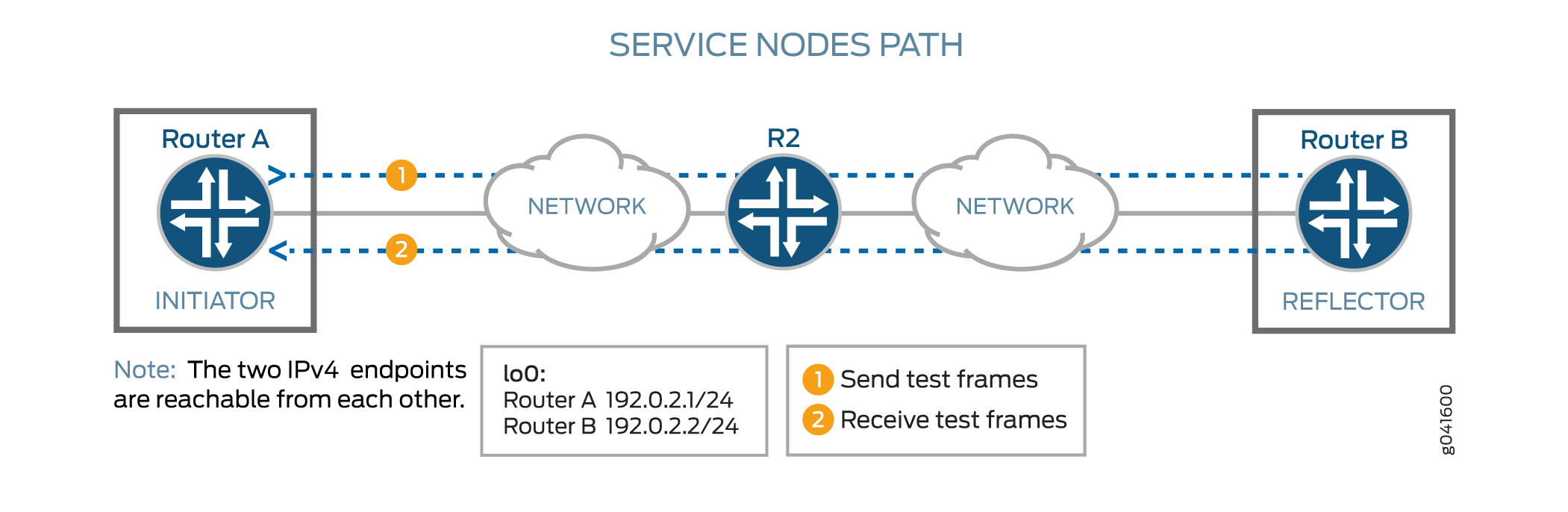 に対するRFC 2544ベースのベンチマークテスト
構成
この例では、ルーターAのインターフェイスge-0/0/0とルーターBのインターフェイスge-0/0/4の間にあるレイヤー3 IPv4サービスのベンチマークテストを設定し、相互接続ルーターのパフォーマンスを検出および分析します。ルーター B はリフレクタとして動作するため、テスト プロファイルは設定しません。イニシエータでテストを開始する前に、リフレクタが設定済みで、テストが実行されている必要があるため、イニシエータ(ルーターA)を設定する前に、リフレクタ(ルーターB)を設定する必要があります。最初にイニシエータでテストを開始すると、リフレクタでテストを開始するまで、送信されたすべてのパケットが失われます。
CLIクイック構成
この例をすばやく設定するには、次のコマンドをコピーしてテキスト ファイルに貼り付け、改行を削除して、ネットワーク構成に合わせて必要な詳細を変更し、コマンドを [edit] 階層レベルの CLI にコピー アンド ペーストしてください。
ルーターBでのベンチマークテストパラメータの設定
set interfaces ge-0/0/4 unit 0 family inet address 192.0.2.2/24
set services rpm rfc2544-benchmarking tests test-name test1 test-interface ge-0/0/4.0
set services rpm rfc2544-benchmarking tests test-name test1 mode reflect
set services rpm rfc2544-benchmarking tests test-name test1 family inet
set services rpm rfc2544-benchmarking tests test-name test1 destination-ipv4-address 192.0.2.2
set services rpm rfc2544-benchmarking tests test-name test1 destination-udp-port 4001
set rfc2544-benchmarking tests test-name test1 source-ipv4-address 192.0.2.1
ルーターAでのベンチマークテストパラメータの設定
set interfaces ge-0/0/0 unit 0 family inet address 192.0.2.1/24
set rfc2544-benchmarking profiles test-profile throughput test-type throughput
set rfc2544-benchmarking profiles test-profile throughput packet-size 64
set rfc2544-benchmarking profiles test-profile throughput bandwidth-kbps 1000
set rfc2544-benchmarking tests test-name test1 test-profile throughput
set rfc2544-benchmarking tests test-name test1 test-interface ge-0/0/0.0
set rfc2544-benchmarking tests test-name test1 mode initiate-and-terminate
set rfc2544-benchmarking tests test-name test1 family inet
set rfc2544-benchmarking tests test-name test1 destination-ipv4-address 192.0.2.2
set rfc2544-benchmarking tests test-name test1 destination-udp-port 4001
set rfc2544-benchmarking tests test-name test1 source-ipv4-address 192.0.2.1
ルーターBでのベンチマークテストパラメータの設定
手順
次の例では、設定階層のいくつかのレベルに移動する必要があります。CLIのナビゲーションについては、「 1 コンフィグレーション・モードでのCLIエディタの使用」を参照してください。
ルーターBでテストパラメータを設定するには:
-
設定モードで、
[edit interfaces]階層レベルに移動します。[edit] user@RouterB# edit interfaces
-
テストを実行するインターフェイスを設定します。
[edit interfaces]
user@RouterB# edit ge-0/0/4
-
論理ユニットを設定し、プロトコルファミリーを
inetに指定します。[edit interfaces ge-0/0/4] user@RouterB# edit unit 0 family inet
-
論理インターフェイスのアドレスを指定します。
[edit interfaces ge-0/0/4 unit 0 family inet]
user@RouterB# set address 192.0.2.2/24
-
upコマンドを入力して、設定階層の前のレベルに移動します。[edit interfaces ge-0/0/4 unit 0 family inet] user@RouterB# up
-
設定モードの最上位に移動します。
[edit interfaces ge-0/0/4 unit 0]
user@RouterB# top
-
設定モードで、
[edit services]階層レベルに移動します。[edit] user@RouterB# edit services
-
リアルタイム パフォーマンス監視サービス (RPM) インスタンスを構成します。
[edit services]
user@RouterB# edit rpm
-
RPM インスタンスの RFC 2544 ベースのベンチマークテストを設定します。
[edit services rpm]
user@RouterB# edit rfc2544-benchmarking
-
テストの名前を定義します (例: test1)。テスト名識別子の長さは最大 32 文字です。
[edit services rpm rfc2544-benchmarking]
user@RouterB# edit tests test-name test1
-
RFC 2544ベースのベンチマークテストを実行する論理インターフェイスge-0/0/4.0を指定します。
[edit services rpm rfc2544-benchmarking tests test-name test1]
user@RouterB# set test-interface ge-0/0/4.0
-
ベンチマークテスト中に送信されるパケットのテストモードとして
reflectを指定します。[edit services rpm rfc2544-benchmarking tests test-name test1] user@RouterB# set mode reflect
-
ベンチマークテスト用にアドレスタイプファミリー
inetを設定します。[edit services rpm rfc2544-benchmarking tests test-name test1] user@RouterB# set family inet
-
テスト パケットの宛先 IPv4 アドレスを 192.0.2.2 として設定します。リフレクタで設定された宛先IPv4アドレスは、イニシエータで設定された宛先IPv4アドレスと一致する必要があります。代わりに 192.0.2.1 を設定すると、次のエラー メッセージが表示されます。
error: test test1 - Could not determine local interface for address 192.0.2.1.[edit services rpm rfc2544-benchmarking tests test-name test1] user@RouterB# set destination-ipv4-address 192.0.2.2
-
生成されたフレームの UDP ヘッダーで使用される宛先の UDP ポートを 4001 に指定します。
[edit services rpm rfc2544-benchmarking tests test-name test1]
user@RouterB# set destination-udp-port 4001
-
テスト パケットの送信元 IPv4 アドレスを設定します。
[edit services rpm rfc2544-benchmarking tests test-name test1]
user@RouterB# set source-ipv4-address 192.0.2.1
-
設定モードの最上位に移動します。
[edit services rpm rfc2544-benchmarking tests test-name test1]
user@RouterB# top
-
設定をコミットします。
[edit]
user@RouterB# commit
-
設定を確認します。出力に以下の設定が含まれていない場合は、この例の設定手順を繰り返して修正します。
[edit interfaces] ge-0/0/4 { unit 0 { family inet { address 192.0.2.2/24; } } } [edit services rpm] rfc2544-benchmarking { # Note, When in reflector mode, test profile is not needed tests { test-name test1 { test-interface ge-0/0/4.0; mode reflect; family inet; destination-ipv4-address 192.0.2.2; destination-udp-port 4001; source-ipv4-address 192.0.2.1 } } } -
操作モードに戻ります。
[edit]
user@RouterB# exit
user@RouterB>
-
リフレクタのベンチマークテストを開始します。
user@RouterB> test services rpm rfc2544-benchmarking test test1 start
イニシエータ(ルーターA)を設定したら、イニシエータでテストを開始でき、イニシエータはリフレクタへのパケットの送信を開始します。イニシエータでのテストが正常に完了したら、動作モードで
test services rpm rfc2544-benchmarking test test1 stopコマンドを入力することで、リフレクタでテストを停止できます。
ルーターAでのベンチマークテストパラメータの設定
手順
次の例では、設定階層のいくつかのレベルに移動する必要があります。CLIのナビゲーションについては、「 1 コンフィグレーション・モードでのCLIエディタの使用」を参照してください。
ルーターAでテストパラメータを設定するには、次のようにします。
-
設定モードで、
[edit interfaces]階層レベルに移動します。[edit] user@RouterA# edit interfaces
-
テストを実行するインターフェイスを設定します。
[edit interfaces]
user@RouterA# edit ge-0/0/0
-
論理ユニットを設定し、プロトコルファミリーを指定します。
[edit interfaces ge-0/0/0]
 user@RouterA# edit unit 0 family inet
-
論理インターフェイスのアドレスを指定します。
[edit interfaces ge-0/0/0 unit 0 family inet]
user@RouterA# set address 192.0.2.1/24
-
upコマンドを入力して、設定階層の前のレベルに移動します。[edit interfaces ge-0/0/0 unit 0 family inet] user@RouterA# up
-
設定コマンド モードの最上位レベルに移動します。
[edit interfaces ge-0/0/0 unit 0]
user@RouterA# top
-
設定モードで、
[edit services]階層レベルに移動します。[edit] user@RouterA# edit services
-
リアルタイム パフォーマンス監視サービス (RPM) インスタンスを構成します。
[edit services]
user@RouterA# edit rpm
-
RPM インスタンスの RFC 2544 ベースのベンチマークテストを設定します。
[edit services rpm]
user@RouterA# edit rfc2544-benchmarking
-
テストプロファイルの名前を定義します(例:スループット)。
[edit services rpm rfc2544-benchmarking]
user@RouterA# edit profiles test-profile throughput
-
実行するテストのタイプをスループットとして構成します。
[edit services rpm rfc2544-benchmarking profiles test-profile throughput]
user@RouterA# set test-type throughput
-
テストパケットのサイズを64バイトに指定します。
[edit services rpm rfc2544-benchmarking profiles test-profile throughput]
user@RouterA# set test-type packet-size 64
-
1,000 Kbps から 1,000,000 Kbps までの値を使用して、テストの理論上の最大帯域幅をキロビット/秒で定義します。
[edit services rpm rfc2544-benchmarking profiles test-profile throughput]
user@RouterA# set test-type bandwidth-kbps 1000
-
upコマンドを入力して、設定階層の前のレベルに移動します。[edit services rpm rfc2544-benchmarking profiles test-profile throughput] user@RouterA# up
-
upコマンドを入力して、設定階層の前のレベルに移動します。[edit services rpm rfc2544-benchmarking profiles] user@RouterA# up
-
テストの名前を定義します (例: test1)。テスト名識別子の長さは最大 32 文字です。
[edit services rpm rfc2544-benchmarking]
user@RouterA# edit tests test-name test1
-
特定のテスト名に関連付けるテストプロファイルの名前(スループットなど)を指定します。
[edit services rpm rfc2544-benchmarking tests test-name test1]
user@RouterA# set test-profile throughput
-
RFC 2544ベースのベンチマークテストを実行する論理インターフェイスge-0/0/0.0を指定します。
[edit services rpm rfc2544-benchmarking tests test-name test1]
user@RouterA# set test-interface ge-0/0/0.0
-
ベンチマークテスト中に送信されるパケットのテストモードを、開始と終了に指定します。
[edit services rpm rfc2544-benchmarking tests test-name test1]
user@RouterA# set mode initiate-and-terminate
-
ベンチマークテスト用のアドレスタイプファミリー(
inet)を設定します。[edit services rpm rfc2544-benchmarking tests test-name test1] user@RouterA# set family inet
-
テスト パケットの宛先 IPv4 アドレスを設定します。
[edit services rpm rfc2544-benchmarking tests test-name test1]
user@RouterA# set destination-ipv4-address 192.0.2.2
-
生成されたフレームの UDP ヘッダーで使用される宛先の UDP ポートを 4001 に指定します。
[edit services rpm rfc2544-benchmarking tests test-name test1]
user@RouterA# set destination-udp-port 4001
-
テスト パケットの送信元 IPv4 アドレスを設定します。
[edit services rpm rfc2544-benchmarking tests test-name test1]
user@RouterA# set source-ipv4-address 192.0.2.1
-
設定モードの最上位に移動します。
[edit services rpm rfc2544-benchmarking tests test-name test1]
user@RouterA# top
-
設定をコミットします。
[edit]
user@RouterA# commit
-
設定を確認します。出力に以下の設定が含まれていない場合は、この例の設定手順を繰り返して修正します。
[edit] user@RouterA# show [edit interfaces] ge-0/0/0 { unit 0 { family inet { address 192.0.2.1/24; } } } [edit services rpm] rfc2544-benchmarking { profiles { test-profile throughput { test-type throughput packet-size 64; bandwidth-kbps 1000; } } tests { test-name test1 { test-profile throughput; interface ge-0/0/0.0; mode initiate-and-terminate; family inet; destination-ipv4-address 192.0.2.2 destination-udp-port 4001; source-ipv4-address 192.0.2.1 } } } -
操作モードに戻ります。
[edit]
user@RouterA# exit
user@RouterA>
-
イニシエーターでベンチマーキングテストを開始します。
user@RouterA> test services rpm rfc2544-benchmarking test test1 start
テストが正常に完了すると、イニシエーターで自動的に停止します。イニシエータでのテストが正常に完了したら、運用モードでルーターBで
test services rpm rfc2544-benchmarking test test1 stopコマンドを入力することで、リフレクタでテストを停止できます。
業績
まだ行っていない場合は、設定モードで [edit interfaces] および [edit services rpm] 階層レベルで show コマンドを入力して、ルーター A とルーター B で設定を確認します。出力結果に意図した設定内容が表示されない場合は、この例の設定手順を繰り返して設定を修正します。
ルーターAのベンチマークテストパラメータの設定:
[edit interfaces]
  ge-0/0/0 {
      unit 0 {
          family inet {
              address 192.0.2.1/24;
          }
       }
  }

  [edit services rpm]
  rfc2544-benchmarking {
      profiles {
          test-profile throughput {
              test-type throughput
              packet-size 64;
              bandwidth-kbps 1000;
          }
      }

      tests {
          test-name test1 {
              test-profile throughput;
              interface ge-0/0/0.0;
              mode initiate-and-terminate;
              family inet;
              destination-ipv4-address 192.0.2.2
              destination-udp-port 4001;
              source-ipv4-address 192.0.2.1
          }
      }
  }
ルーターBのベンチマークテストパラメータの設定:
[edit interfaces]
  ge-0/0/4 {
      unit 0 {
          family inet {
              address 192.0.2.2/24;
          }
       }
  }

  [edit services rpm]
  rfc2544-benchmarking {
      # Note, When in reflector mode, test profile is not needed
      tests {
          test-name test1 {
              test-interface ge-0/0/4.0;
              mode reflect;
              family inet;
              destination-ipv4-address 192.0.2.2;
              destination-udp-port 4001;
              source-ipv4-address 192.0.2.1
          }
      }
  }
レイヤー 3 IPv4 サービスのベンチマーク テストの結果の検証
ルーターAとルーターBの間で設定されたサービスで実行されたベンチマークテストの結果を調べます。
ベンチマーキングテスト結果の検証
目的
ルーターAとルーターBの間に設定されたサービスで実行されるベンチマークテストに必要な統計値が表示されていることを確認します。
アクション
動作モードで、イニシエータまたはリフレクタのいずれかで show services rpm rfc2544-benchmarking (aborted-tests | active-tests | completed-tests | summary) コマンドを入力すると、RPM(リアルタイムパフォーマンスモニタリング)インスタンスごとに、RFC 2544ベースのベンチマークテストの各カテゴリまたは状態(終了したテスト、アクティブテスト、完了したテストなど)の結果に関する情報が表示されます。
意味
出力には、実行したベンチマーキングテストの詳細が表示されます。