このページの内容
AP45アクセスポイントのマウント
このトピックでは、AP45のさまざまな取り付けオプションについて説明します。APは壁、天井、ジャンクションボックスに取り付けることができます。APにはユニバーサル取り付けブラケットが付属しており、すべての取り付けオプションに使用できます。AP を天井に取り付けるには、天井の種類に応じて追加のアダプターを注文する必要があります。
マウントする前にAPをクレームすることをお勧めします。請求コードはAPの背面にあり、APを取り付けた後は請求コードへのアクセスが困難になる場合があります。APの申請については、ジュ ニパーアクセスポイントの申請を参照してください。
AP45でサポートされている取り付けブラケット
表1は 、AP45で使用可能なブラケットの一覧です。
| 部品番号 | の説明 |
|---|---|
| APBR-U | Tバーおよび乾式壁取り付け用のユニバーサルブラケット |
| APBR-T58 | 5/8インチにAPを取り付けるためのブラケット。ねじロッド |
| APBR-M16 | APを16mmネジ付きロッドに取り付けるためのブラケット |
| APBR-ADP-CR9 | 凹型9/16インチにAPを取り付けるためのブラケットアダプター。Tバーまたはチャネルレール |
| APBR-ADP-RT15 | 凹型15/16インチにAPを取り付けるためのブラケットアダプター。Tバー |
| APBR-ADP-WS15 | 凹型1.5インチにAPを取り付けるためのブラケットアダプター。Tバー |
ジュニパーのAPには、ユニバーサルブラケットAPBR-Uが同梱されています。他のブラケットが必要な場合は、別途注文する必要があります。
ジュニパーアクセスポイント用ユニバーサル取り付けブラケット(APBR-U)
ユニバーサル取り付けブラケットAPBR-Uは、壁、天井、ジャンクションボックスなど、あらゆるタイプの取り付けオプションに使用できます。 図1 はAPBR-Uを示しています。APをジャンクションボックスに取り付けるときは、番号の付いた穴を使用してネジを挿入する必要があります。使用する番号付き穴は、ジャンクション ボックスのタイプによって異なります。
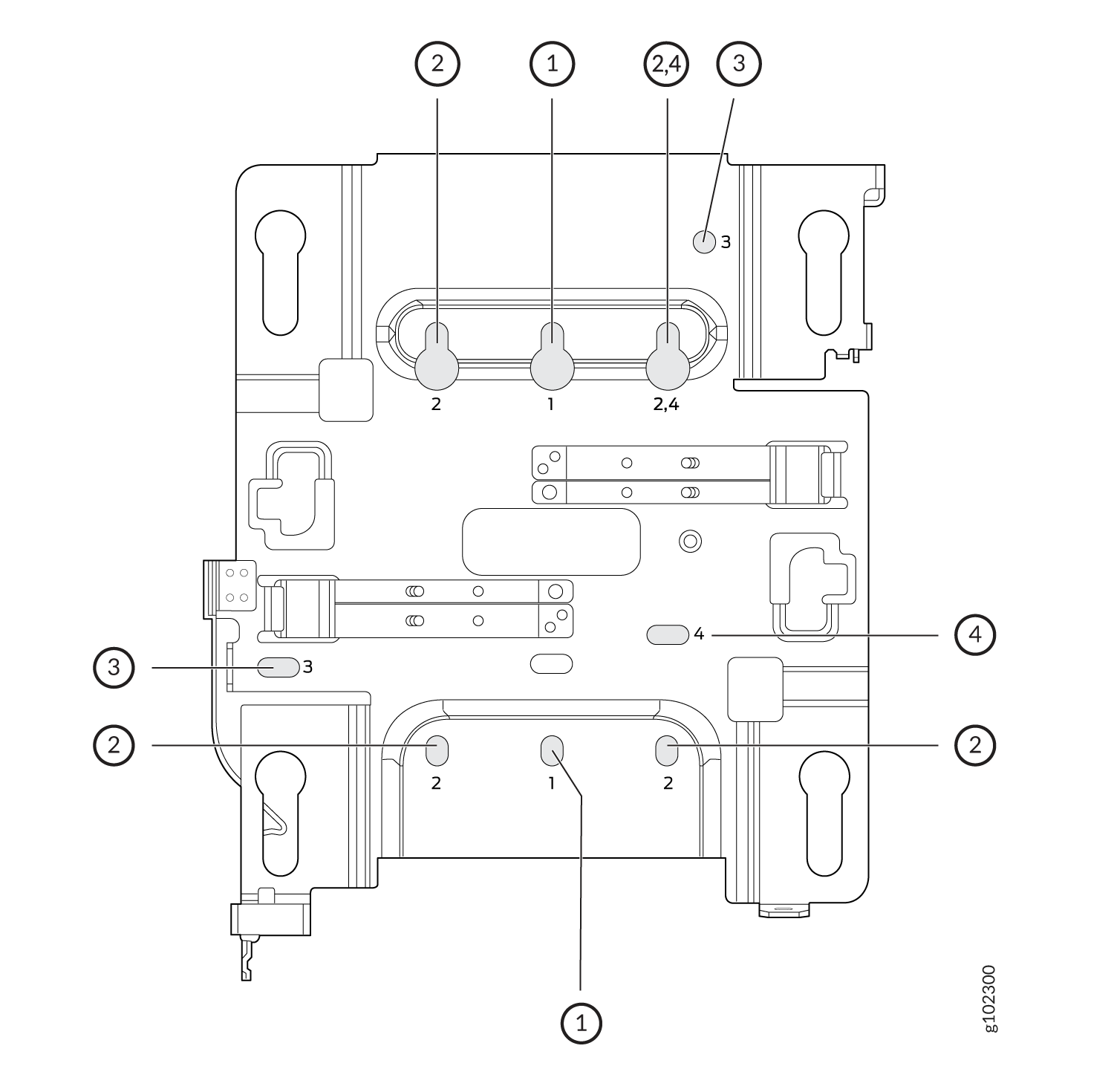 用ユニバーサル取り付けブラケット(APBR-U)
APを壁に取り付ける場合は、以下の仕様のネジを使用してください。
-
ネジ頭の直径: 1/4 インチ(6.3 mm)
-
長さ:少なくとも2インチ(50.8 mm)
以下の表は、特定の取り付けオプションに使用する必要があるブラケット穴を示しています。
| 穴番号 | 取り付けオプション |
|---|---|
| 1 |
|
| 2 |
|
| 3 |
|
| 4 |
|
This is the new Mist BR-U bracket that works for all our indoor APs. We'll ship with the shoulder screws already installed, so attached to the BR-U bracket as follows. You will note a strong click when the locking lever engages. To remove, you need to gently push the lever out of the way and slide the AP back out.
シングルギャングまたは3.5インチまたは4インチの丸型ジャンクションボックスにアクセスポイントを取り付けます
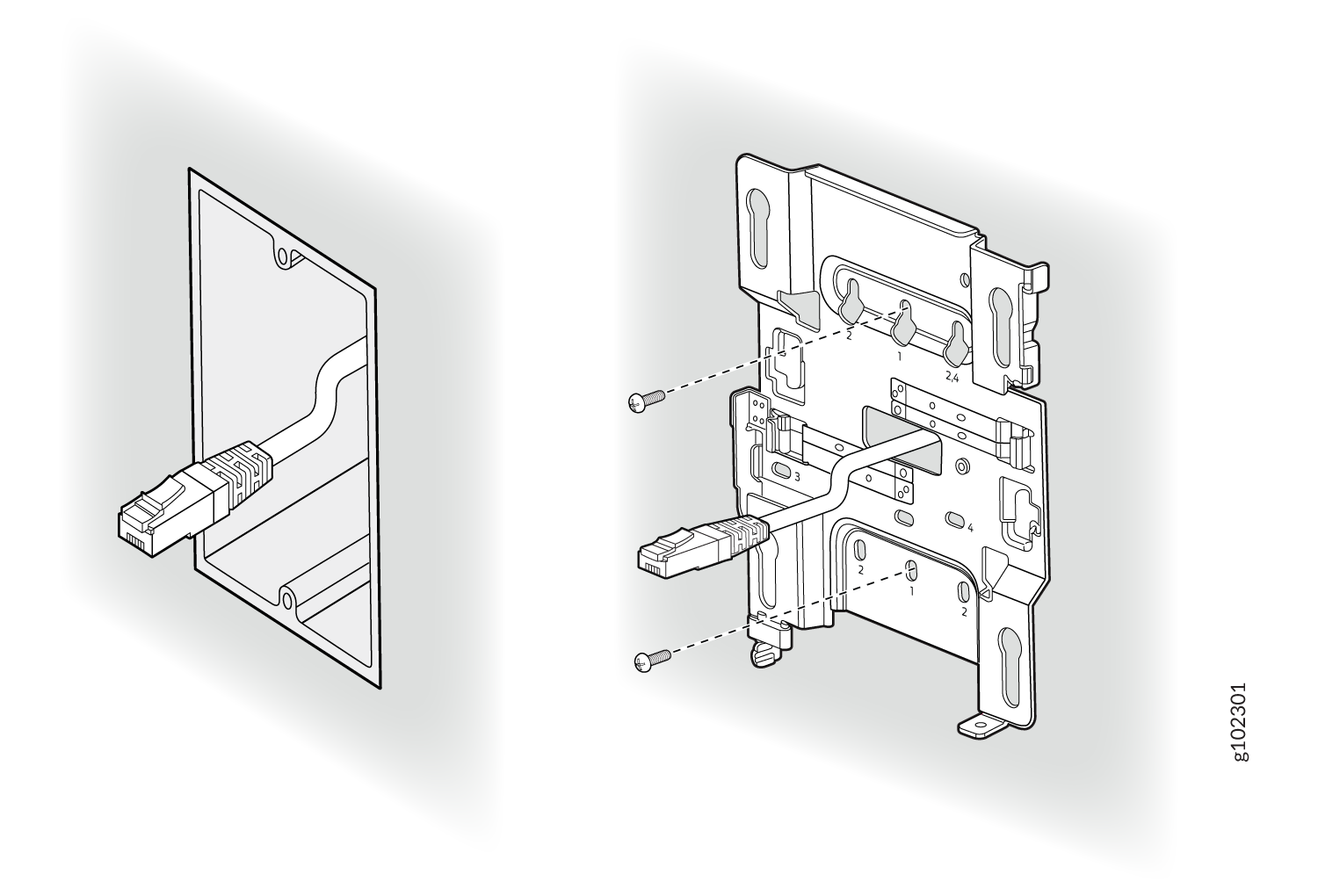
- 取り付けブラケットを 2 本のネジを使用してシングル ギャング ジャンクション ボックスに取り付けます。図 2 に示すように、1 のマークの付いた穴にネジが挿入されていることを確認します。
図2:APBR-U取り付けブラケットをシングルギャングジャンクションボックスに取り付けます
- APの肩付きネジが取り付けブラケットの鍵穴にかみ合うようにAPを配置します。APをスライドさせて所定の位置にロックします。
図3:シングルギャングジャンクションボックス
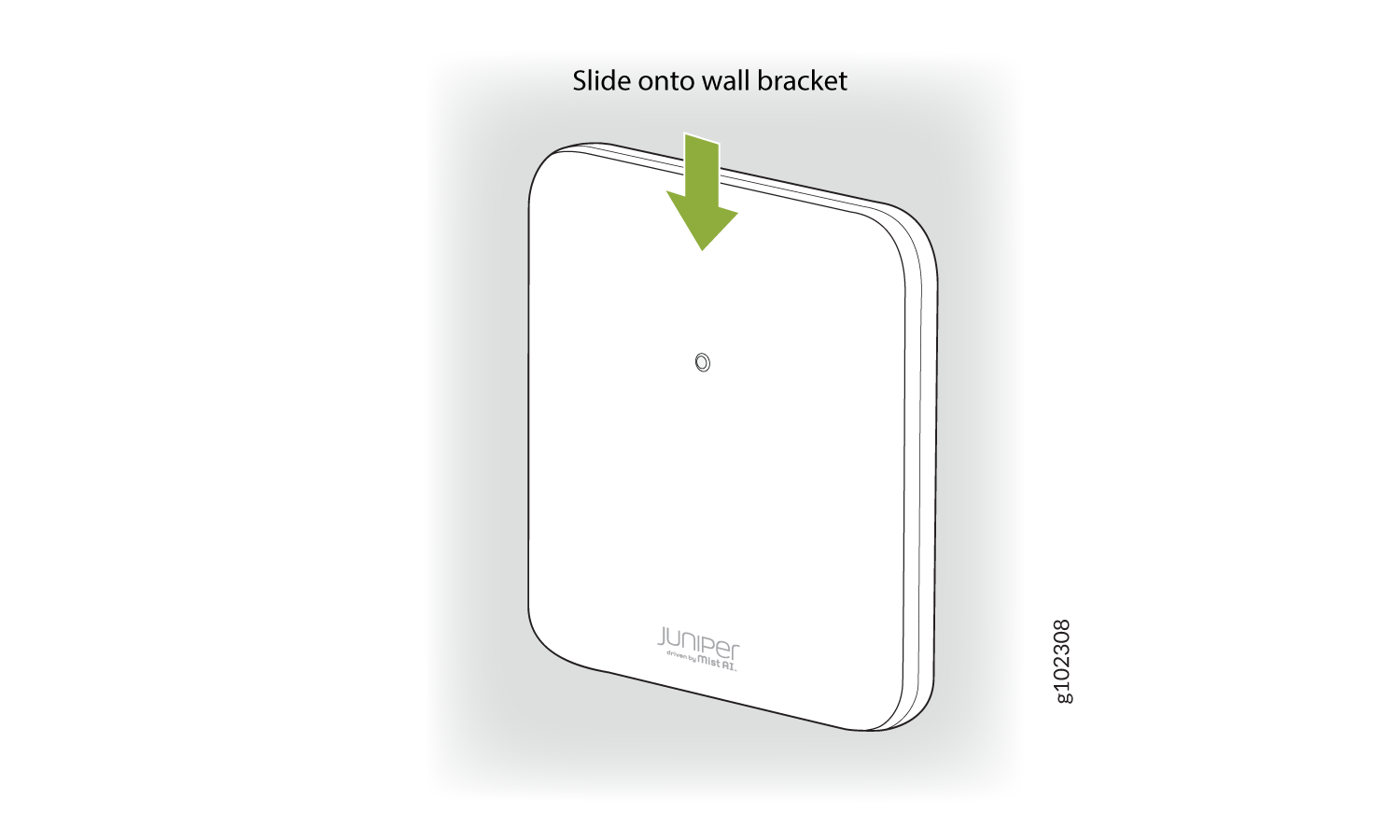 にAPを取り付ける
This is a US single gang box and it attaches as shown here. And the AP would be installed normally.
This is a US 3 and 1/2 inch round and the BR-U attaches as shown here. And the AP would be installed normally. This is a US 4-inch round and the BR-U attaches as shown here. And the AP would be installed normally.
ダブルギャングジャンクションボックスにアクセスポイントを取り付けます
- 4本のネジを使用して、取り付けブラケットをダブルギャングジャンクションボックスに取り付けます。図4に示すように、2とマークされた穴にネジが挿入されていることを確認します。
図4:APBR-U取り付けブラケットをダブルギャングジャンクションボックスに取り付けます
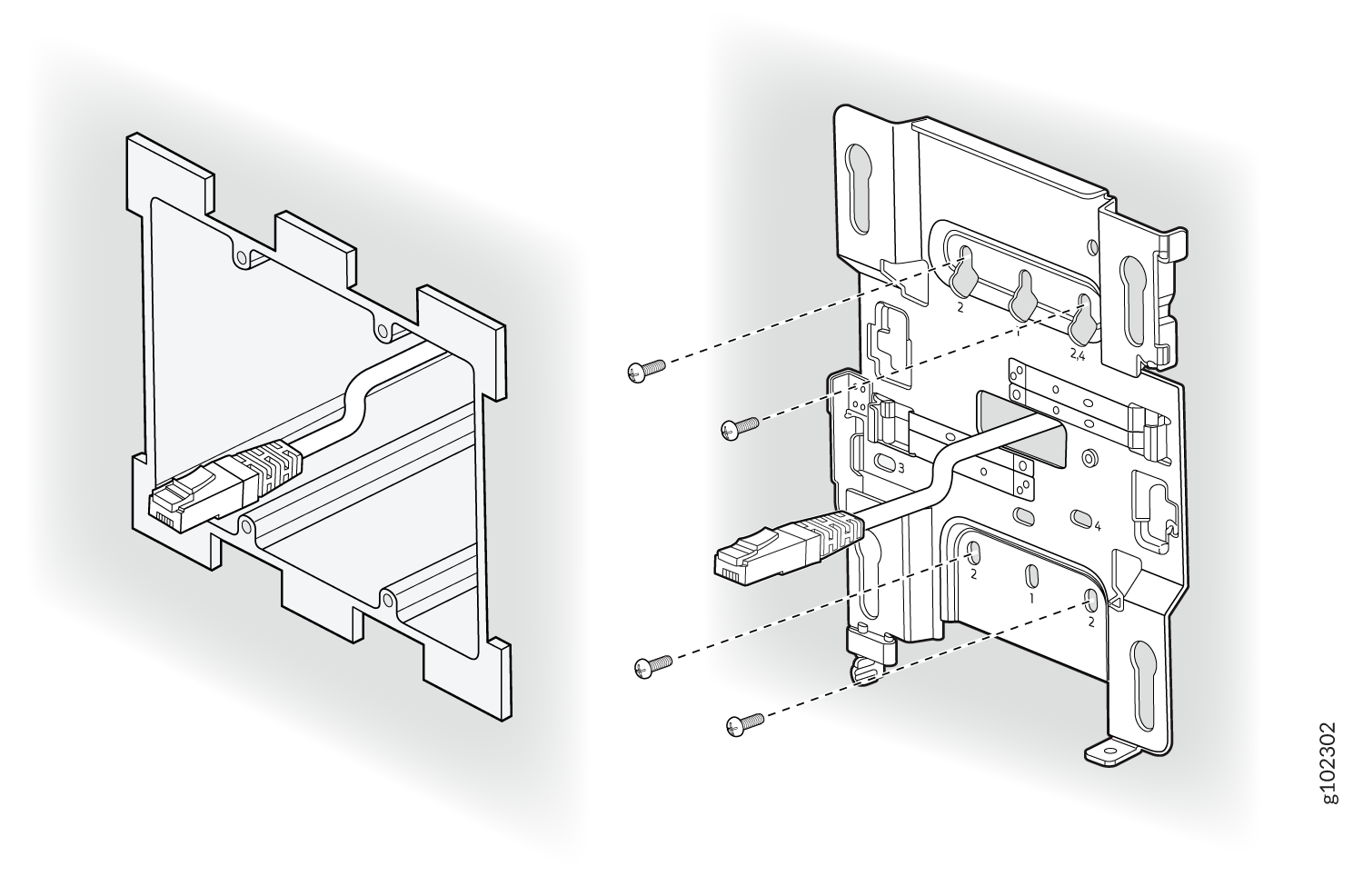
- APの肩付きネジが取り付けブラケットの鍵穴にかみ合うようにAPを配置します。APをスライドさせて所定の位置にロックします。
図5:ダブルギャングジャンクションボックスにAPを取り付ける
This is a US double gang box, and it attaches as shown here. And the AP would be installed normally
EUジャンクションボックスにアクセスポイントを取り付ける
- 2本のネジを使用して、取り付けブラケットをEUジャンクションボックスに取り付けます。図 6 に示すように、4 のマークの穴にネジが挿入されていることを確認します。
図6:APBR-U取り付けブラケットをEUジャンクションボックス
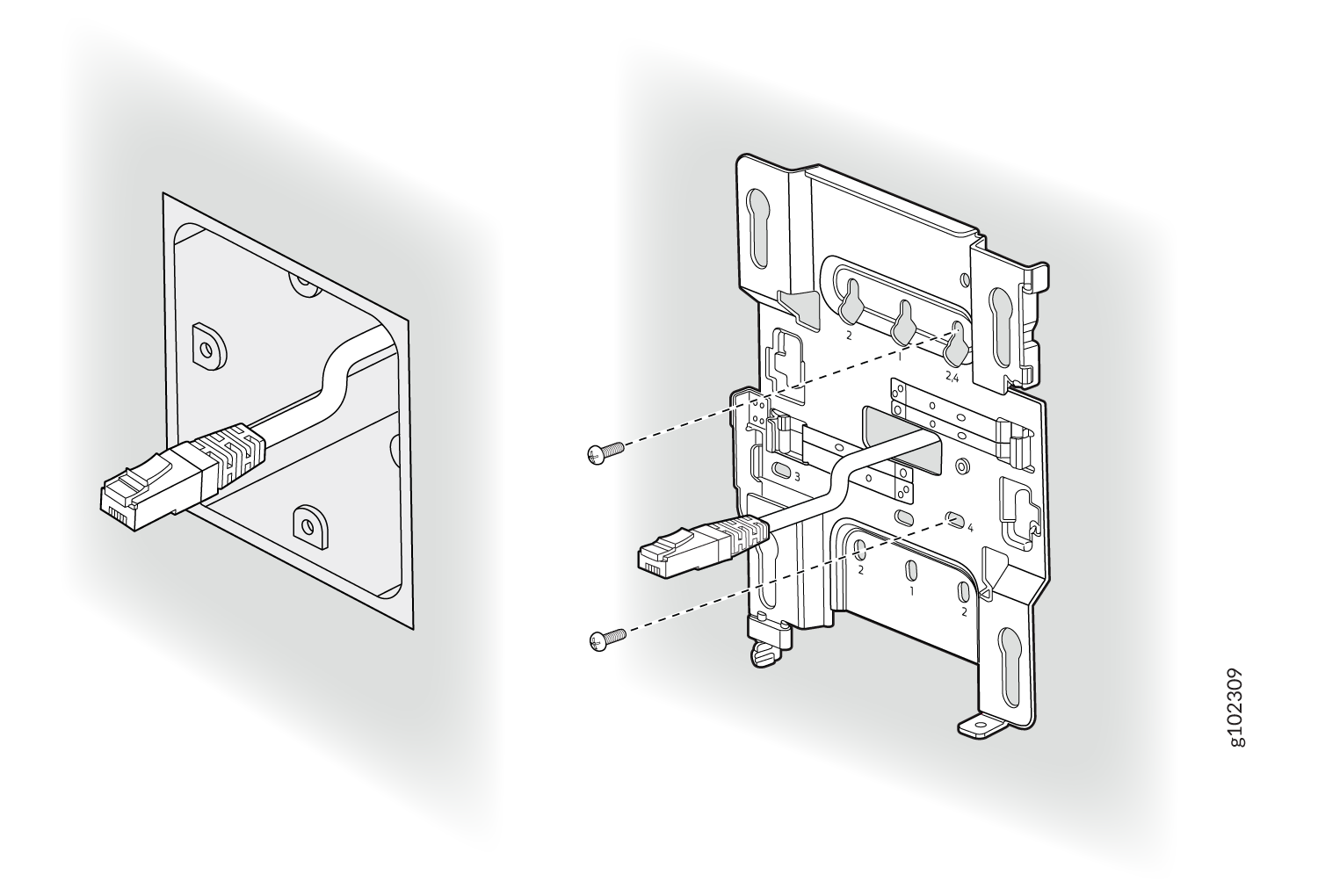 に取り付ける
- APの肩付きネジが取り付けブラケットの鍵穴にかみ合うようにAPを配置します。APをスライドさせて所定の位置にロックします。
図7:EUジャンクションボックスへのアクセスポイントの取り付け
米国の4インチ角ジャンクションボックスにアクセスポイントを取り付けます
- 取り付けブラケットを 4 インチ角ジャンクション ボックスに 2 本のネジで取り付けます。図8に示すように、3のマークされた穴にネジが挿入されていることを確認します。
図8:取り付けブラケット(APBR-U)を米国の4インチ角ジャンクションボックス
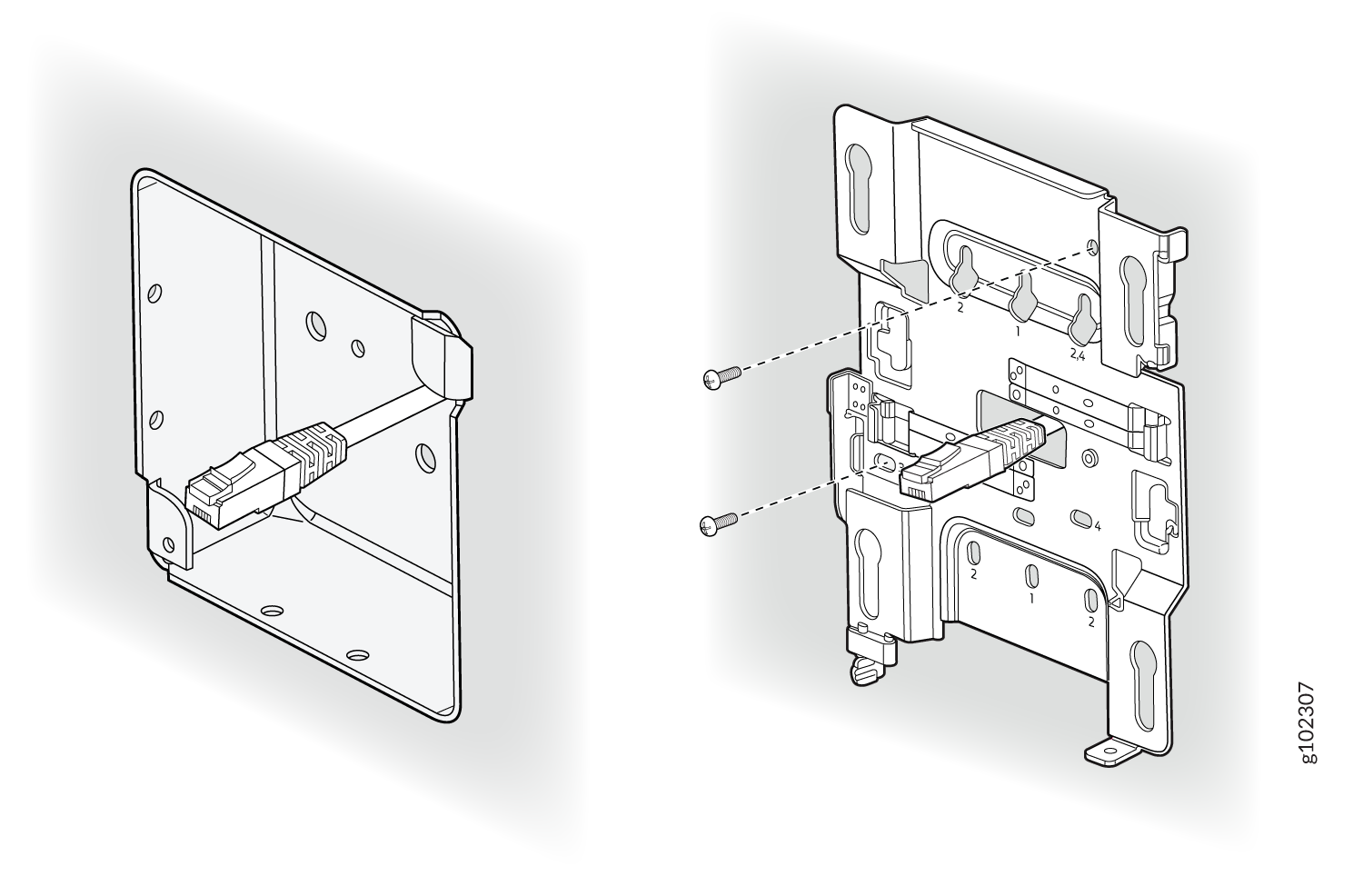 に取り付けます
- APの肩付きネジが取り付けブラケットの鍵穴にかみ合うようにAPを配置します。APをスライドさせて所定の位置にロックします。
図9:米国の4インチ角ジャンクションボックスにAPを取り付ける
This is a US 4 inch square mount and attaches as shown here. And the AP would be installed normally.
アクセスポイントを9/16インチまたは15/16インチのTバーに取り付けます
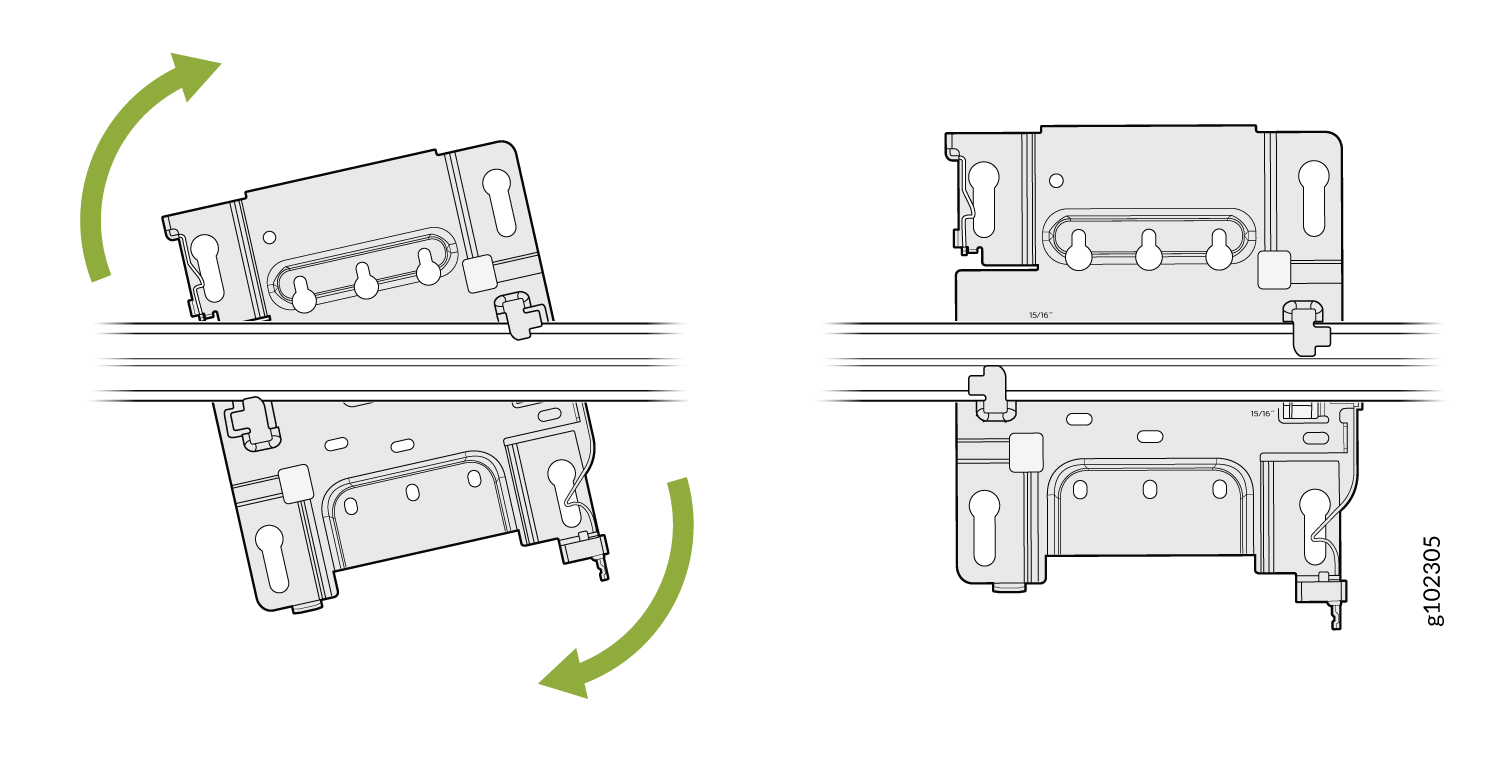
- ユニバーサル取り付けブラケット(APBR-U)をTバーに取り付けます。
図10:取り付けブラケット(APBR-U)を9/16インチまたは15/16インチに取り付けます。Tバー
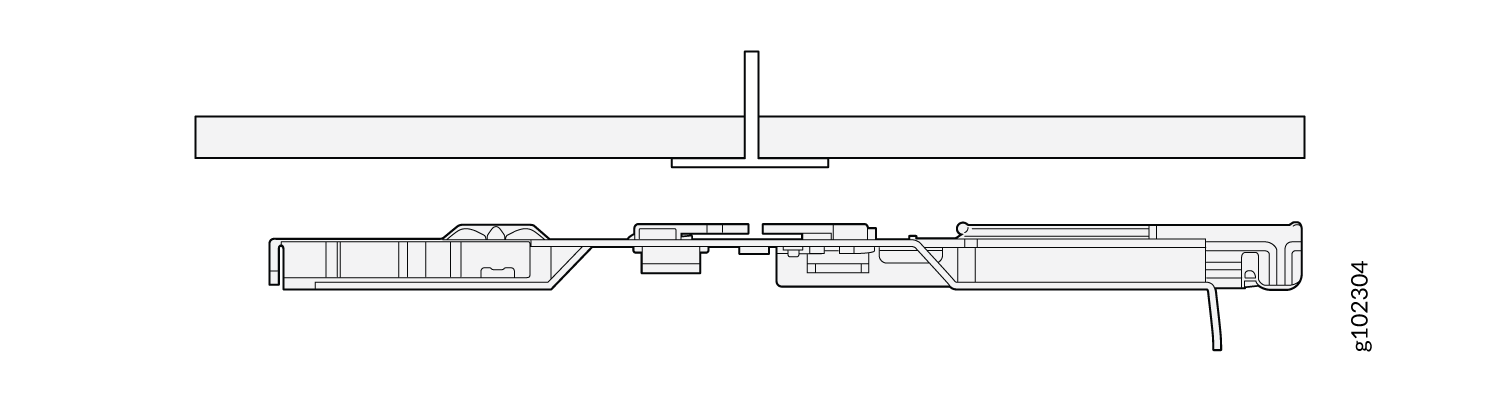
- ブラケット が所定の位置にロックされていることを示す明確なカチッという音がするまでブラケットを回転させます。
図11:取り付けブラケット(APBR-U)を9/16インチまたは15/16インチにロックします。Tバー
- 取り付け用ブラケットの鍵穴がAPの肩付きネジにかみ合うようにAPを配置します。APをスライドさせて所定の位置にロックします。
図12:APを9/16インチまたは15/16インチに取り付けます。Tバー
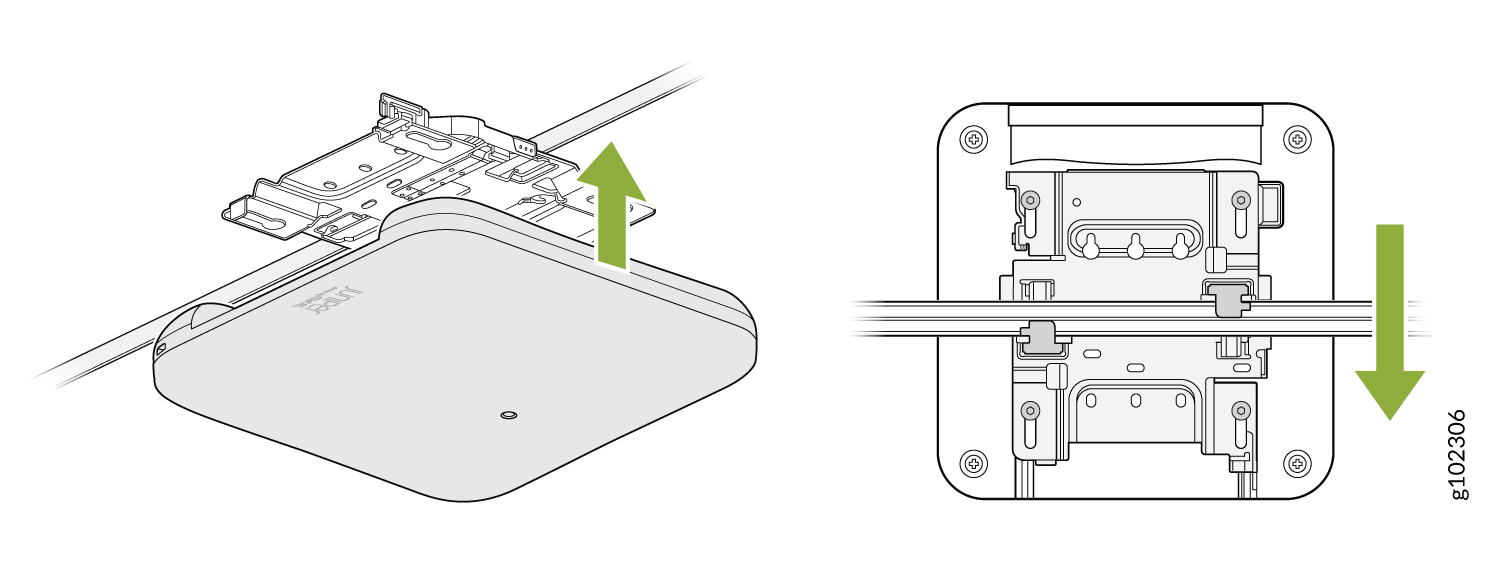
You can directly connect to 9/16ths or 15/16ths T-bar by using these flanges and inserting the bracket as shown. You will hear a click when properly installed. To disconnect, please press the clips as shown and remove the AP. The AP would then be hung as shown. Again, to remove the AP, you must gently press the security lever while you slide it out.
凹型15/16インチTバーにアクセスポイントを取り付けます
- ADPR-ADP-RT15アダプターをTバーに取り付けます。
図13:ADPR-ADP-RT15アダプタをTバー
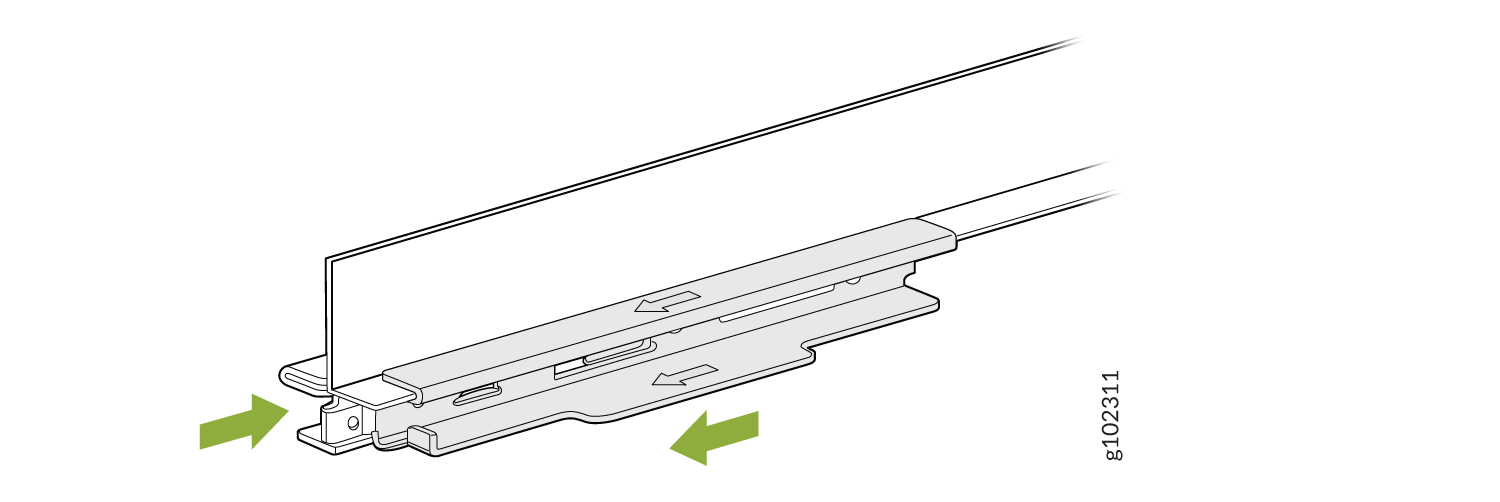 に取り付けます
- ユニバーサル取り付けブラケット(APBR-U)をアダプターに取り付けます。ブラケットが所定の位置にロックされていることを示す明確なカチッという音がするまでブラケットを回転させます。
図14:取り付けブラケット(APBR-U)をADPR-ADP-RT15アダプター
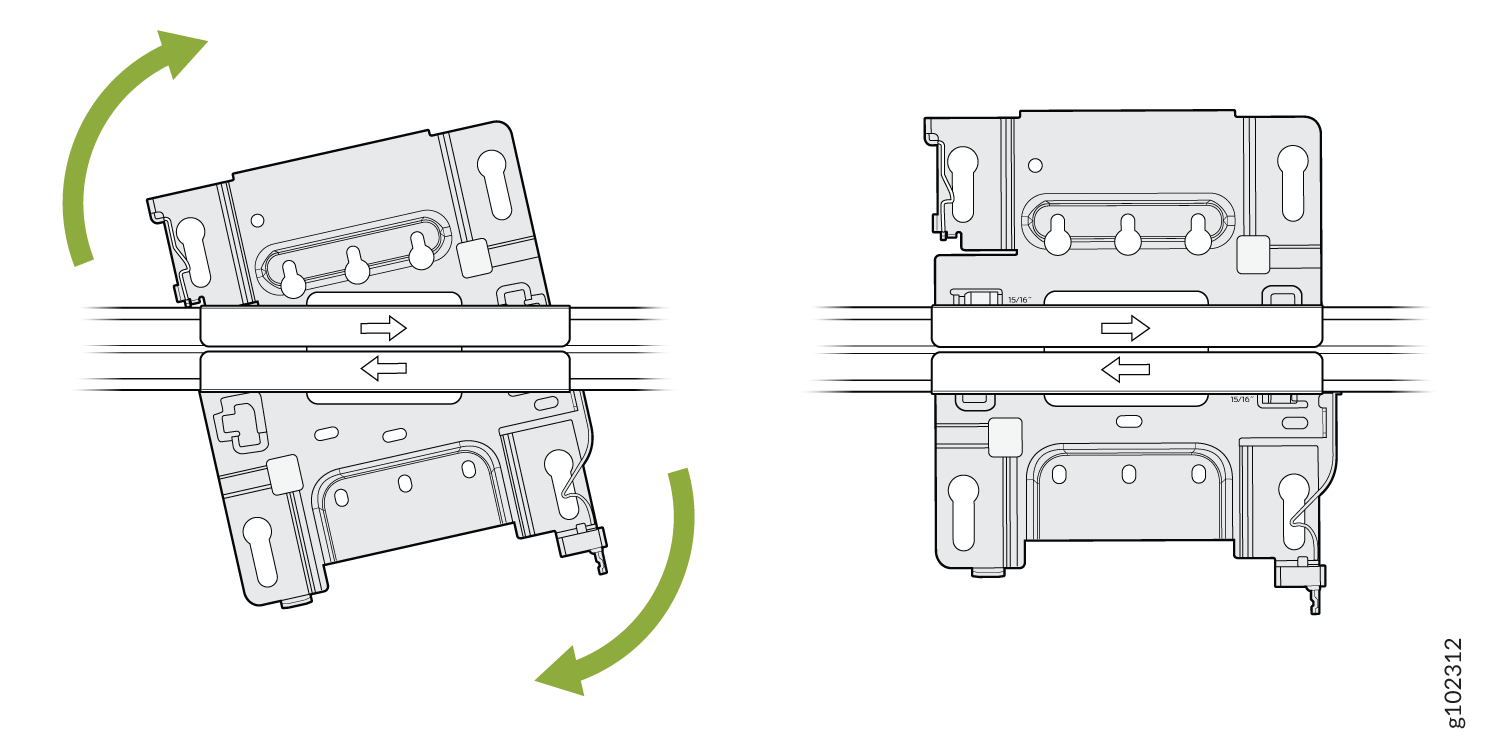 に取り付けます
- 取り付け用ブラケットの鍵穴がAPの肩付きネジにかみ合うようにAPを配置します。APをスライドさせて所定の位置にロックします。
図15:凹型15/16インチTバー
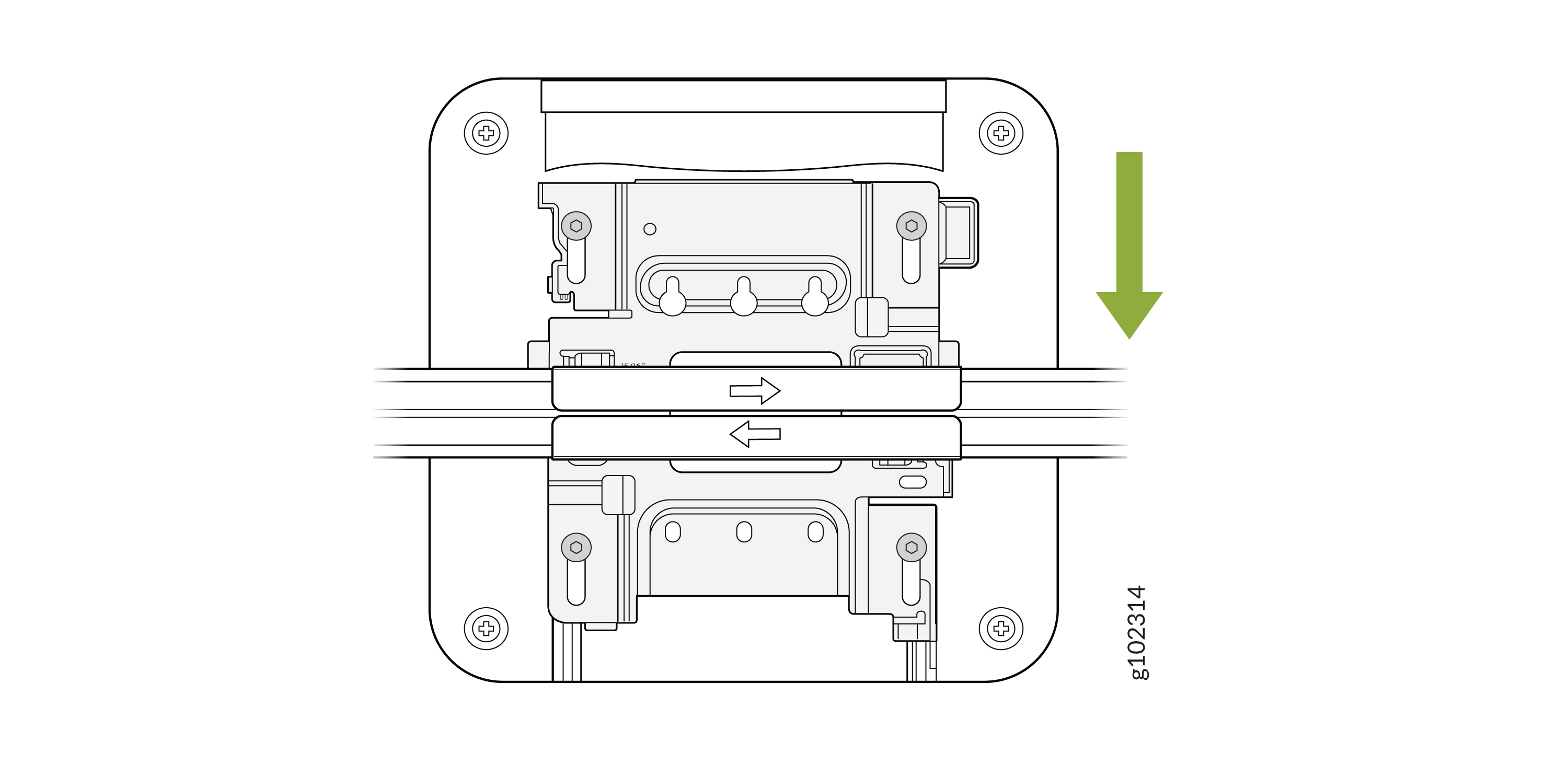 にAPを取り付けます
埋め込み型の9/16インチTバーまたはチャネルレールにアクセスポイントを取り付けます
- ADPR-ADP-CR9アダプタをTバーまたはチャンネルレールに取り付けます。
図16:ADPR-ADP-CR9アダプタを凹型9/16インチTバー
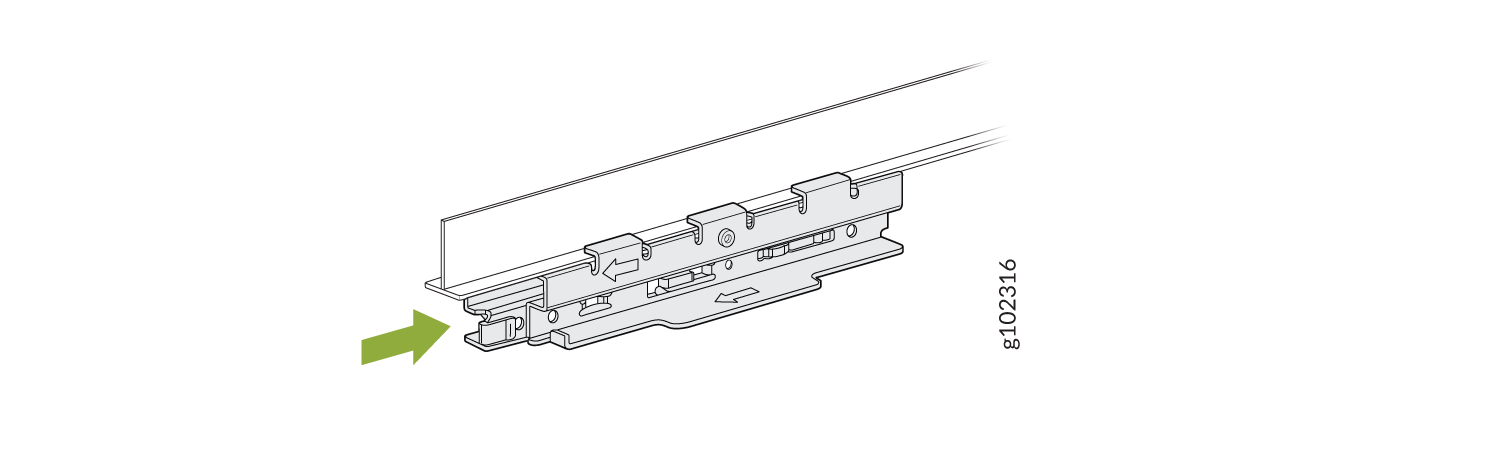 に取り付け ます
図17:ADPR-ADP-CR9アダプタを凹型9/16インチチャネルレール
に取り付け ます
図17:ADPR-ADP-CR9アダプタを凹型9/16インチチャネルレール に取り付けます
- ユニバーサル取り付けブラケット(APBR-U)をアダプターに取り付けます。ブラケットが所定の位置にロックされていることを示す明確なカチッという音がするまでブラケットを回転させます。
図18:APBR-U取り付けブラケットをADPR-ADP-CR9アダプター
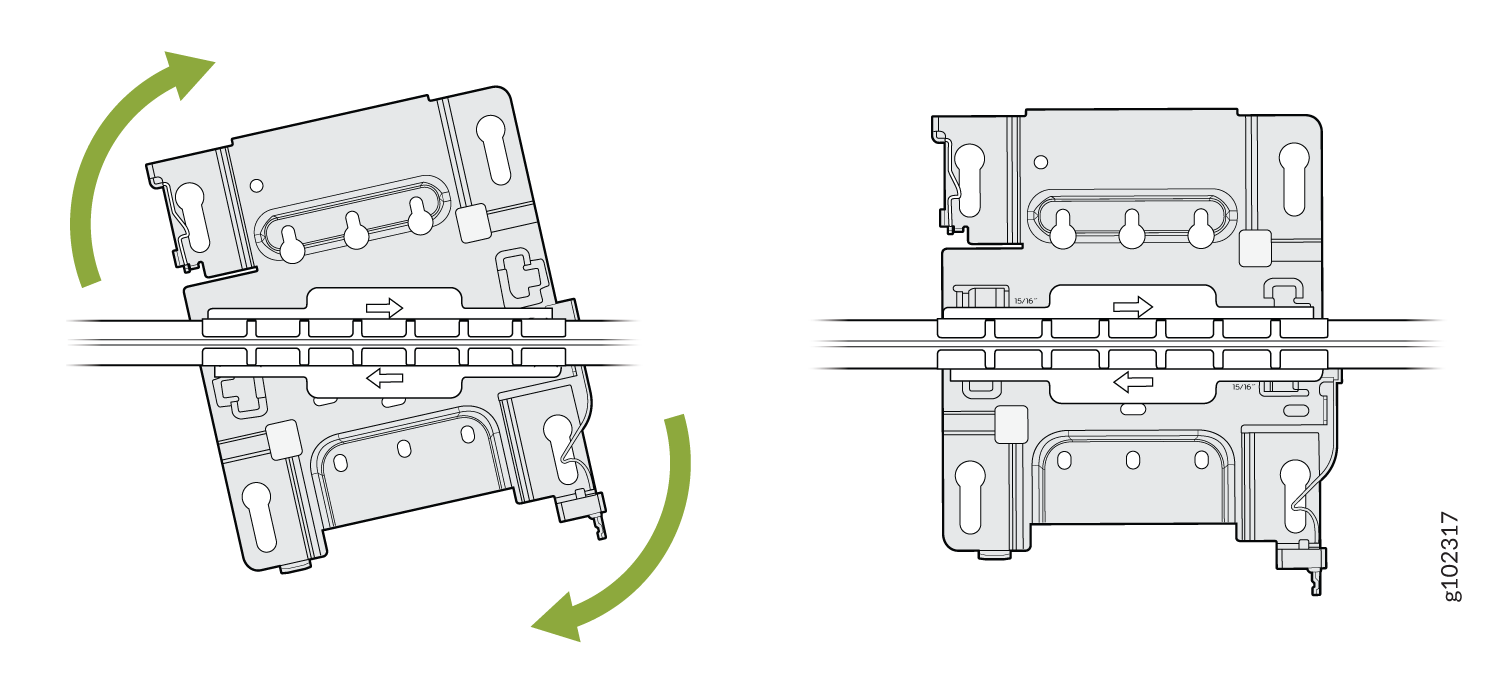 に取り付けます
- 取り付け用ブラケットの鍵穴がAPの肩付きネジにかみ合うようにAPを配置します。APをスライドさせて所定の位置にロックします。
図19:APを凹型9/16インチに取り付けます。Tバーまたはチャネルレール
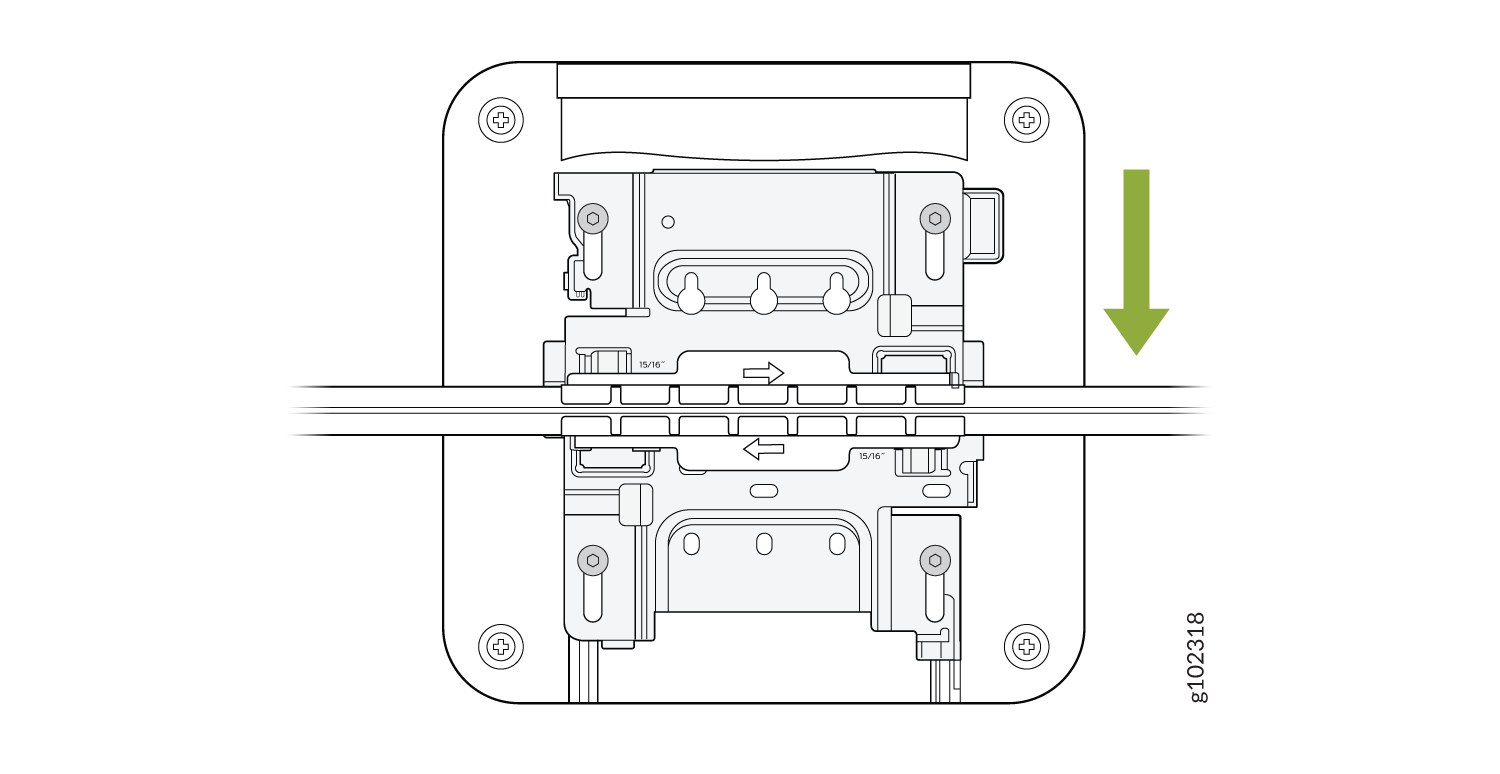
For recessed channel ceilings, we use this mount as shown to clip onto the channel. You could then attach the BRU just like you did with the T-bar install shown earlier. To remove it, it's the same process. Sometimes you need to mount to a recessed T-bar and this is the adapter for that, the same theory as the channel adapter.
1.5インチTバーにアクセスポイントを取り付けます
- ADPR-ADP-WS15アダプターをTバーに取り付けます。
図20:ADPR-ADP-WS15アダプタを1.5インチTバー
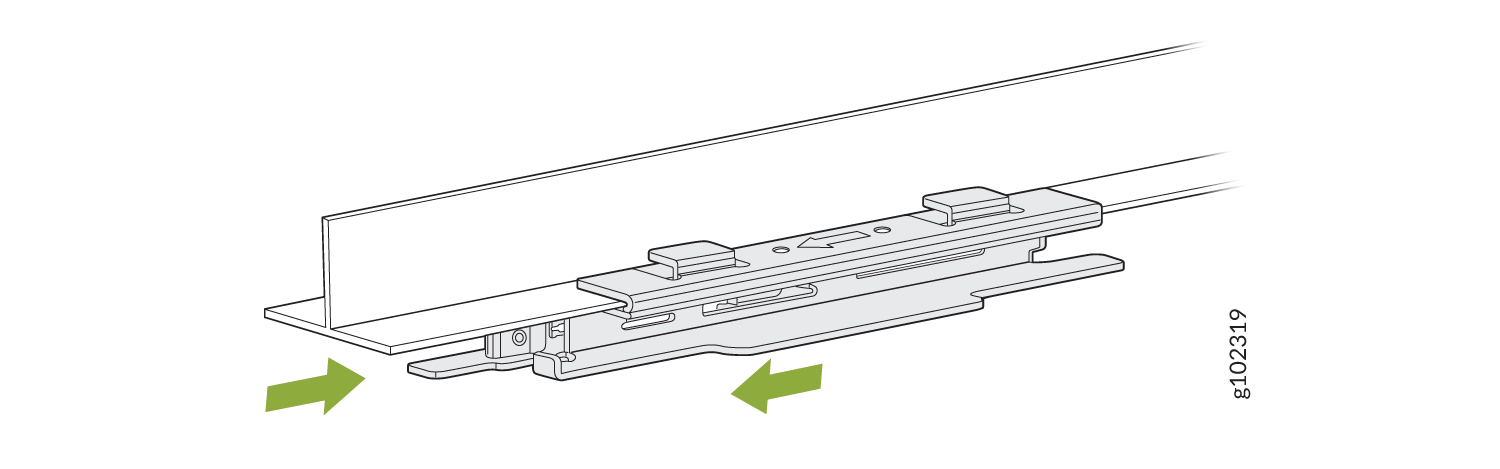 に取り付けます
- ユニバーサル取り付けブラケット(APBR-U)をアダプターに取り付けます。ブラケットが所定の位置にロックされていることを示す明確なカチッという音がするまでブラケットを回転させます。
図21:APBR-U取り付けブラケットをADPR-ADP-WS15アダプター
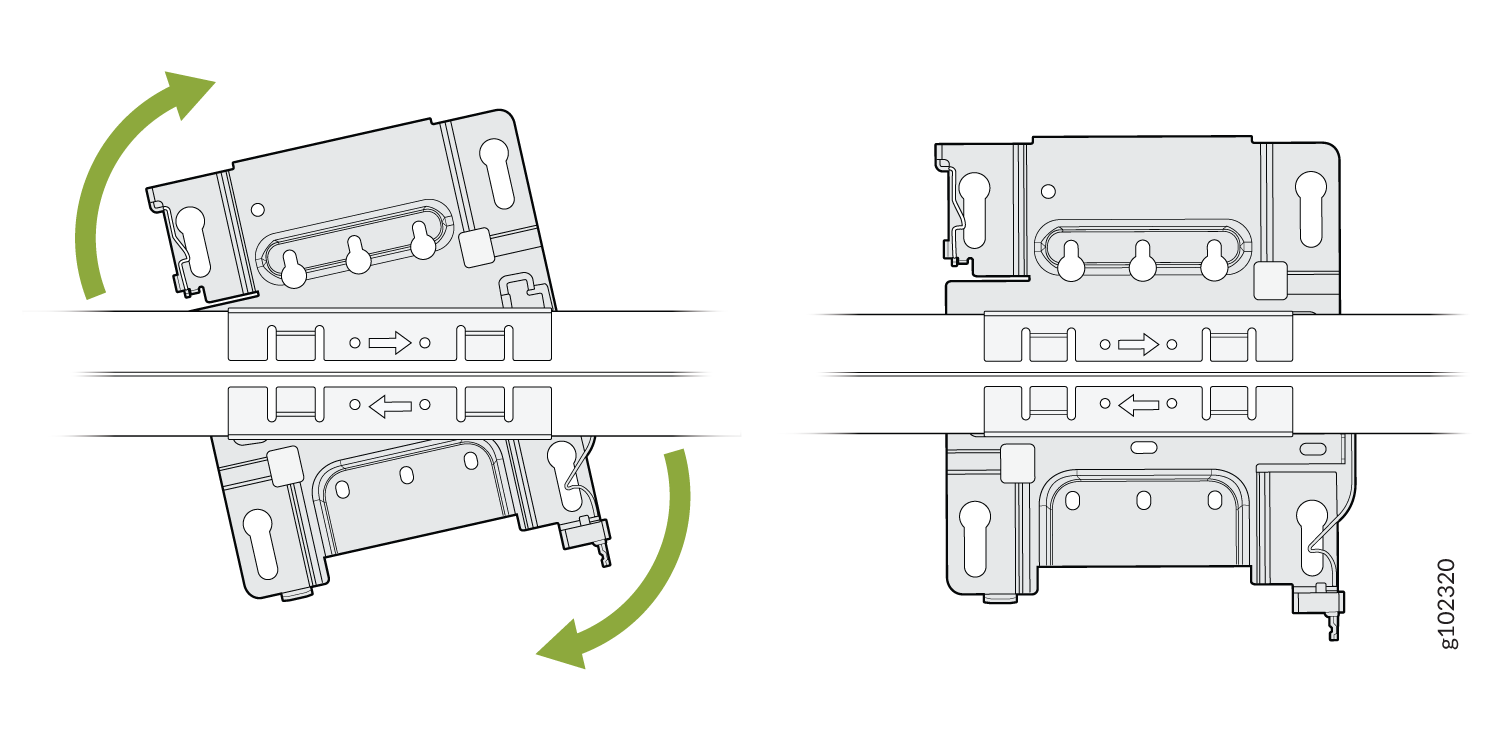 に取り付け ます
- 取り付け用ブラケットの鍵穴がAPの肩付きネジにかみ合うようにAPを配置します。APをスライドさせて所定の位置にロックします。
図22:APを1.5インチTバー
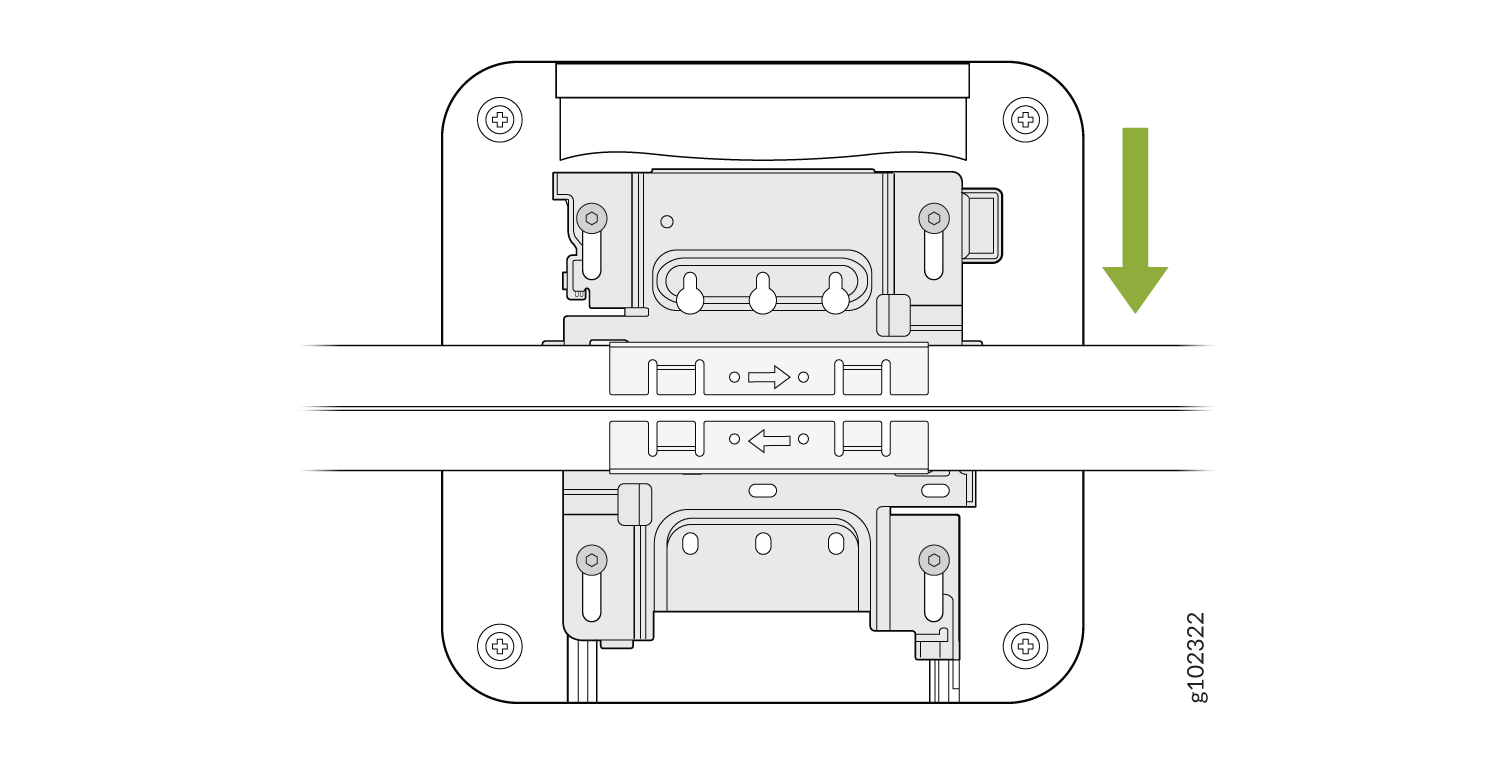 に取り付けます
AP21、AP45、またはBT11を5/8インチネジ付きロッドに取り付けます
- 付属のロックワッシャーとナットを使用して、APBR-T58ブラケットをネジ付きロッドに取り付けます。
図23:APBR-T58ブラケットを5/8インチに取り付けます。ネジ付きロッド
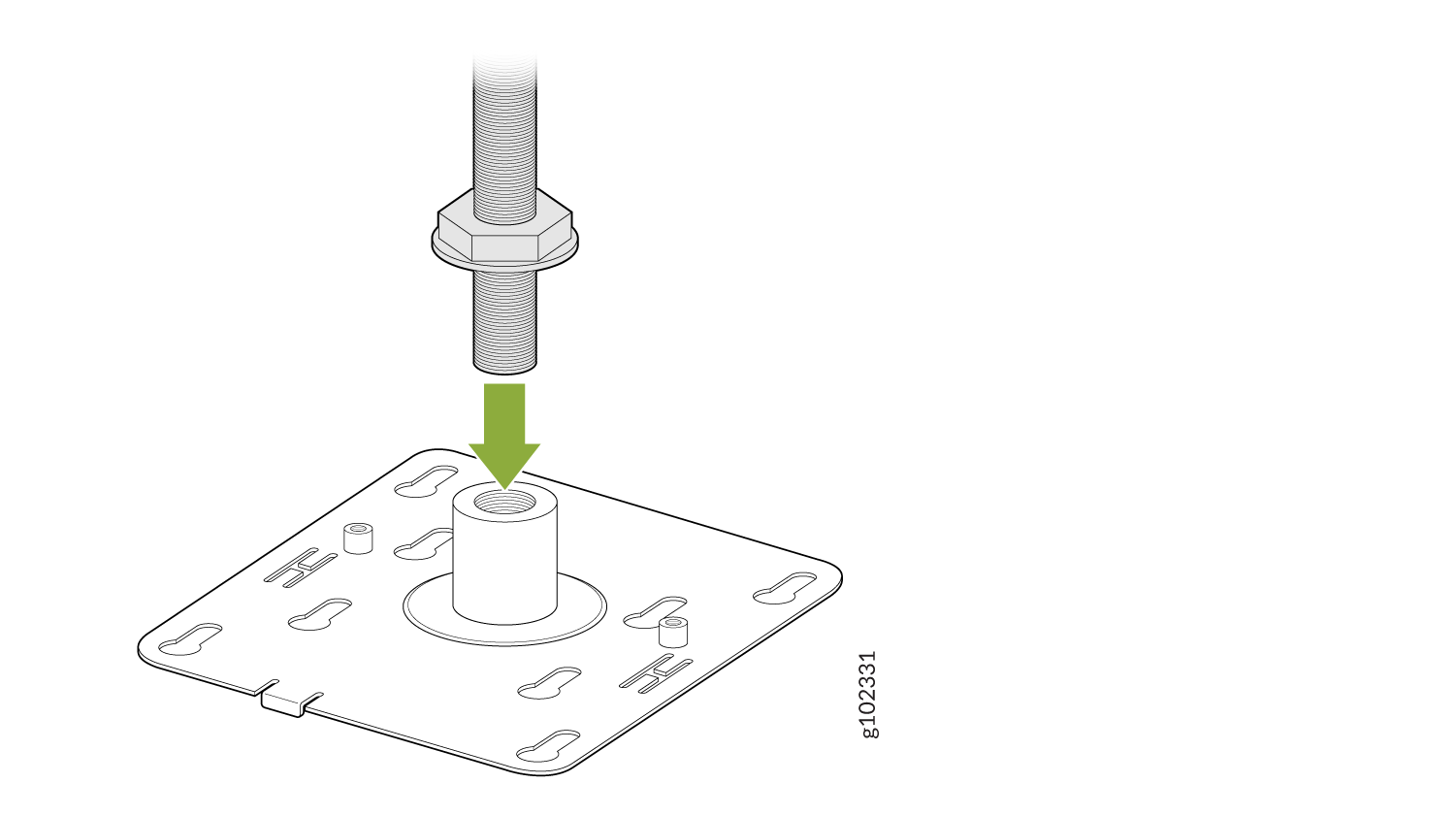
- 2本のネジ(APに付属)を使用して、APBR-SW1ブラケットアダプターをAPBR-T58取り付けブラケットにAPに取り付けます。
図24:APBR-SW1ブラケットアダプターをAPBR-T58取り付けブラケット
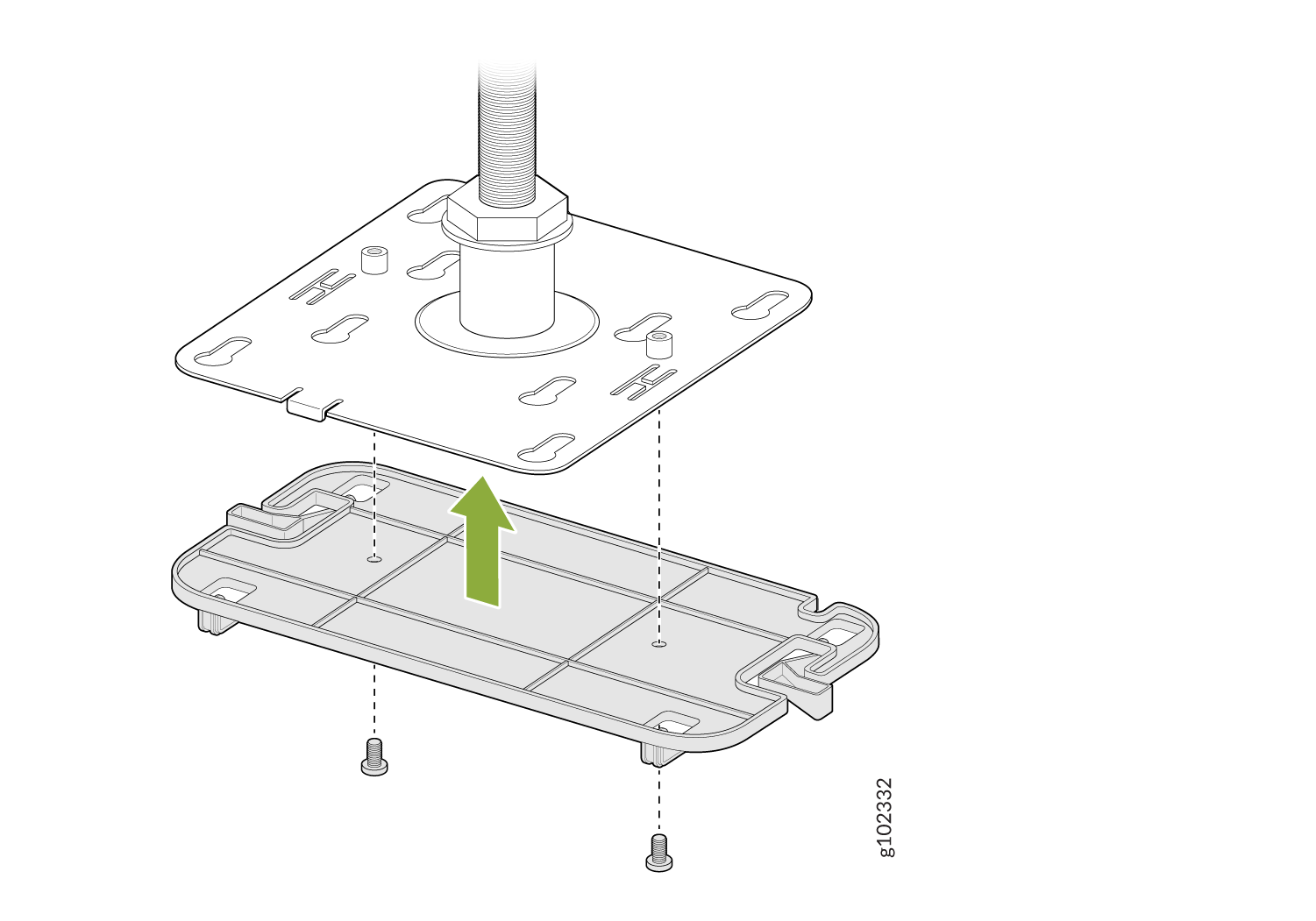 に取り付けます
- APの肩付きネジが取り付けブラケットの鍵穴にかみ合うようにAPを配置します。APをスライドさせて所定の位置にロックします。
図25:5/8インチにAPを取り付けます。ネジ付きロッド
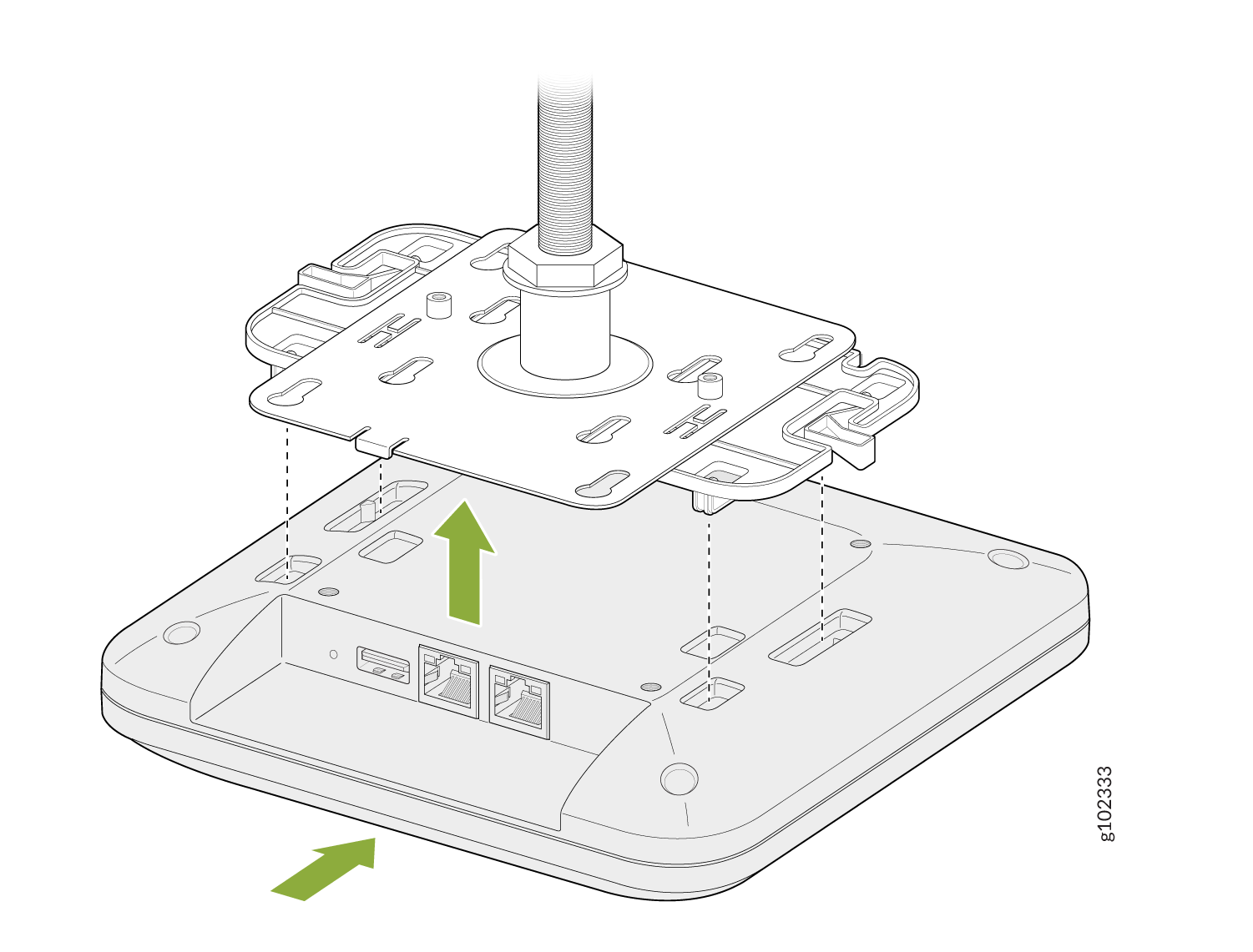
Now if you need to mount a BT11 which is our Bluetooth-only unit to this threaded rod mount, there's a special adapter provided as shown. There are two special screw holes provided and those screws are shipped with the bracket. The bracket to a BT11 there are four indentations as shown which the bracket will clip into. To remove, depress the latches as shown and it will slide back out. Now you use the 2 screws to connect both brackets and attach the BT11.
AP21、AP45、またはBT11を16mmネジ付きロッドに取り付けます
- 付属のロックワッシャーとナットを使用して、APBR-M16ブラケットをネジ付きロッドに取り付けます。
図26:APBR-T58ブラケットを16mmネジ付きロッド
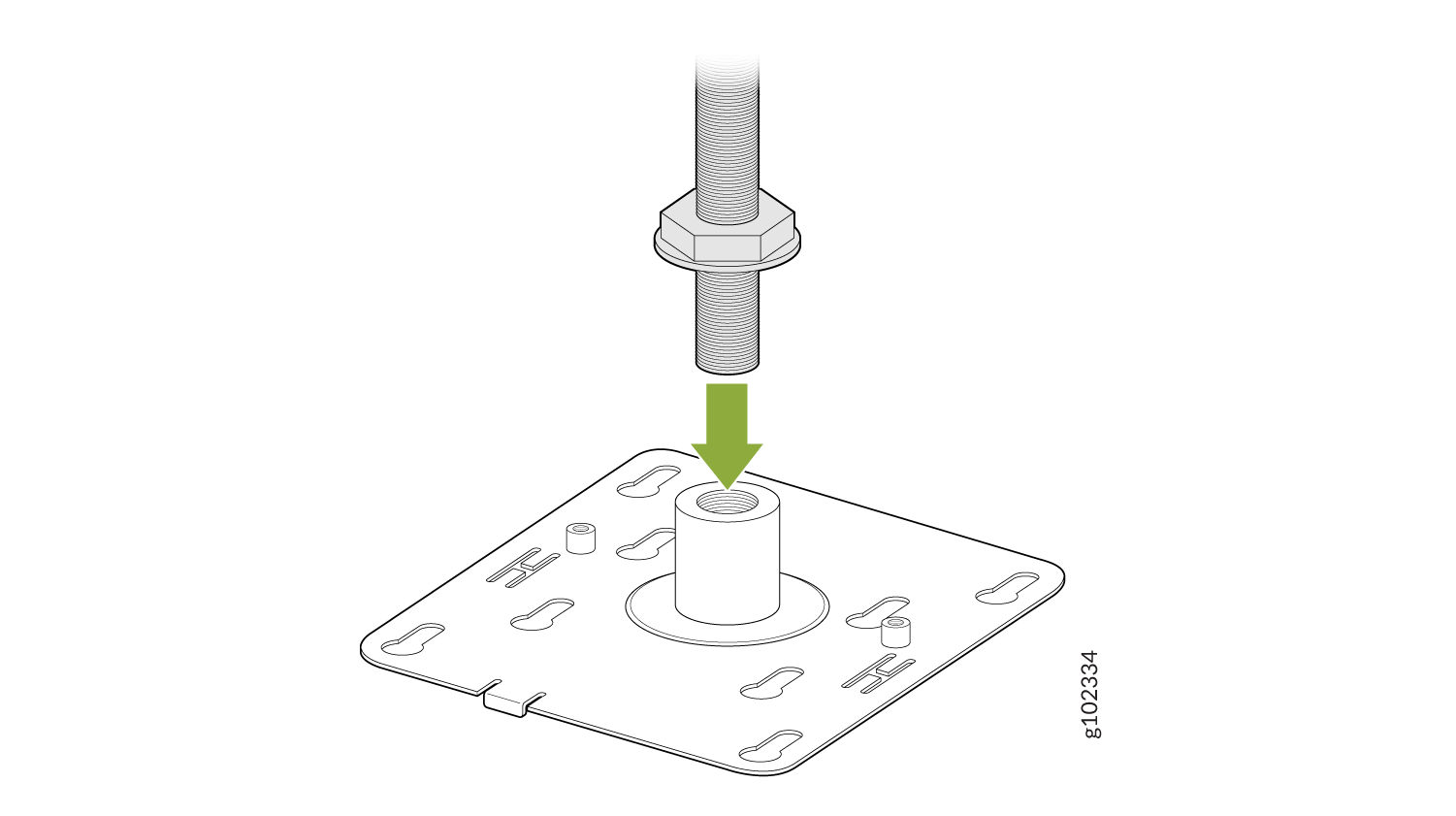 に取り付け ます
- 2本のネジ(APに付属)を使用して、APBR-SW1ブラケットアダプターをAPBR-M16取り付けブラケットにAPに取り付けます。
図27:APBR-SW1ブラケットアダプターをAPBR-M16取り付けブラケット
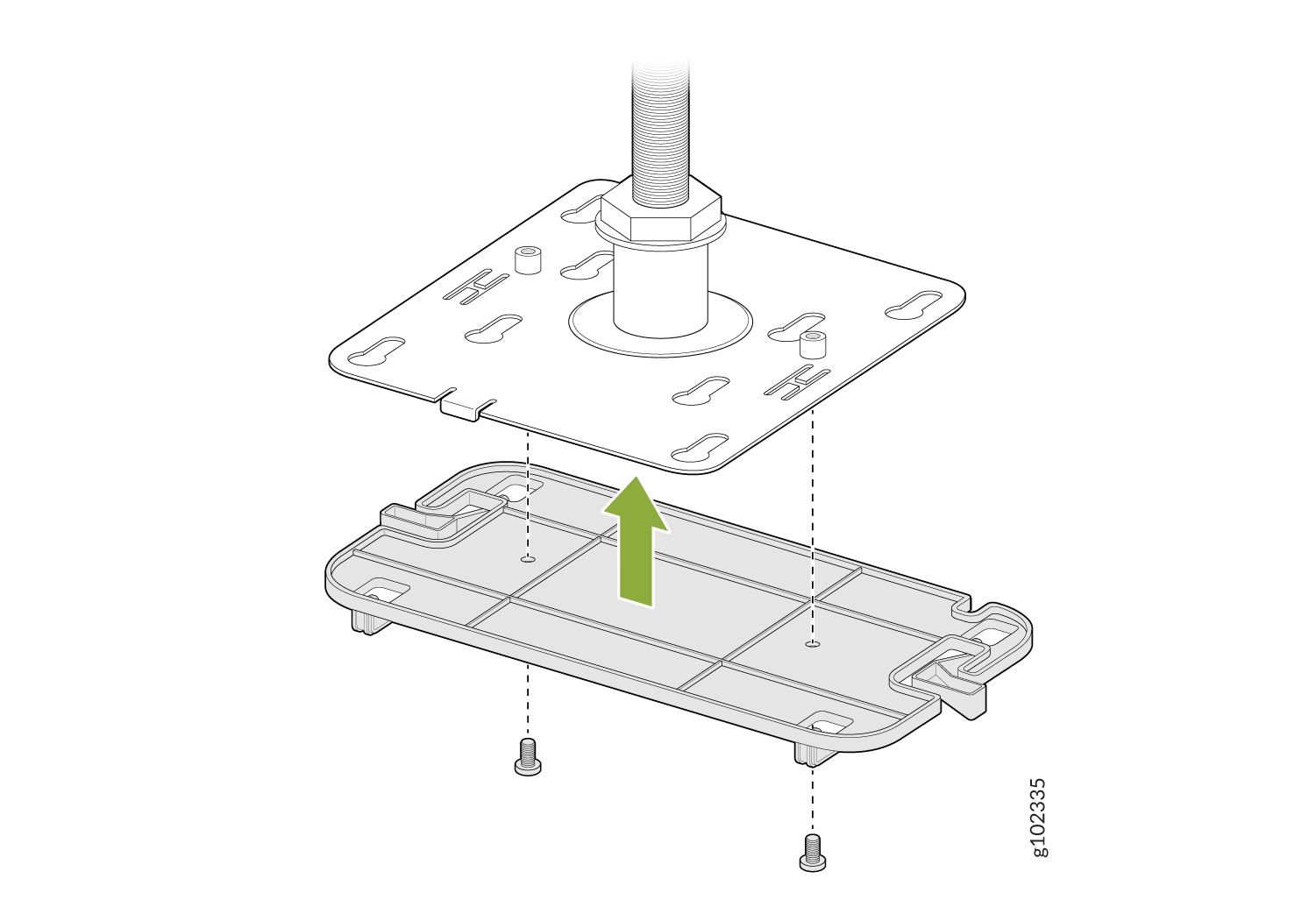 に取り付けます
- APの肩付きネジが取り付けブラケットの鍵穴にかみ合うようにAPを配置します。APをスライドさせて所定の位置にロックします。
図28:AP21またはBT11を16mmネジ付きロッド
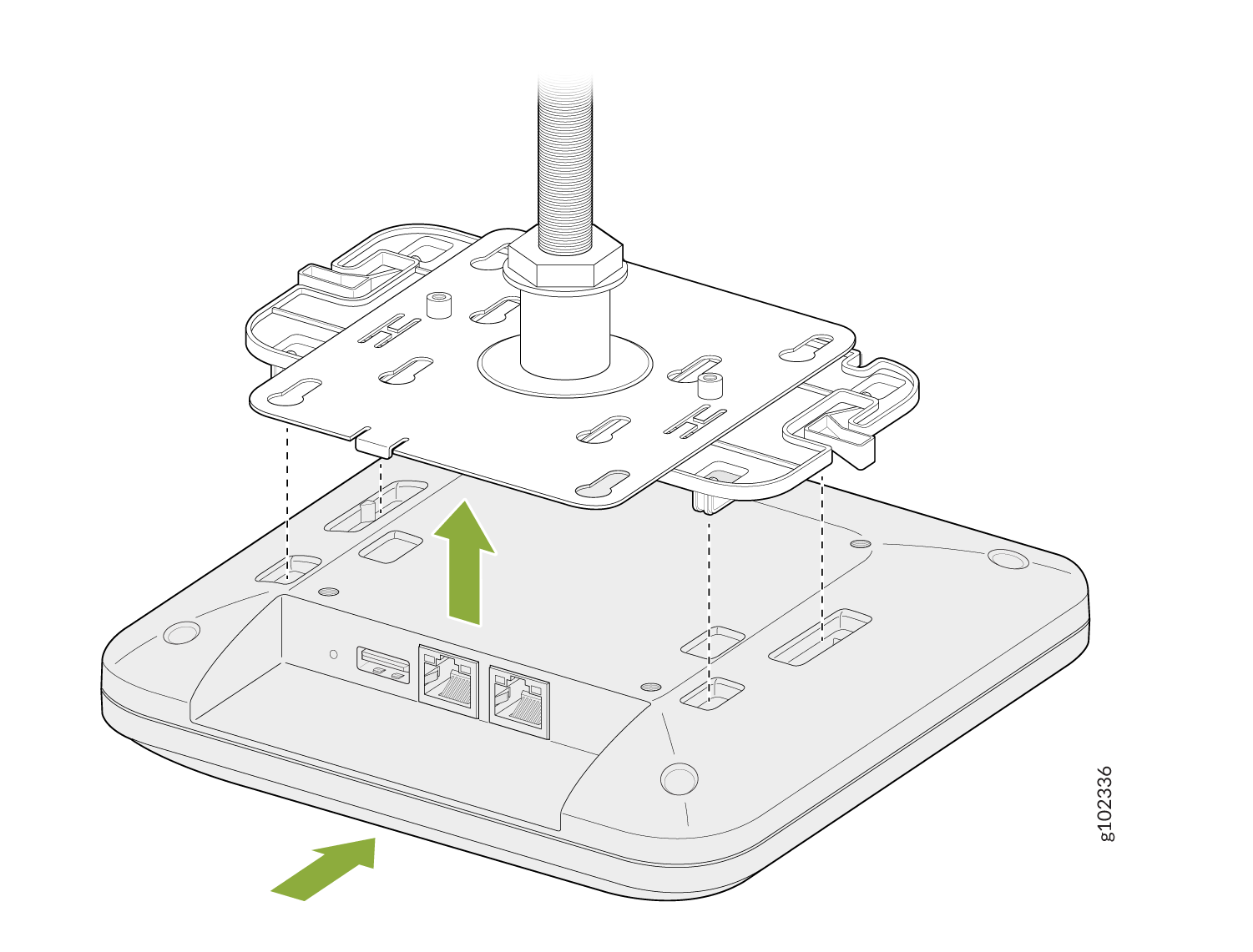 に取り付けます
アクセスポイントを1/2インチのネジ付きロッドに取り付けます
- APBR-ADP-T12ブラケットアダプターをAPBR-U取り付けブラケットに取り付けます。ブラケットが所定の位置にロックされていることを示す明確なカチッという音がするまでブラケットを回転させます。
図29:APBR-ADP-T12ブラケットアダプターをAPBR-U取り付けブラケット
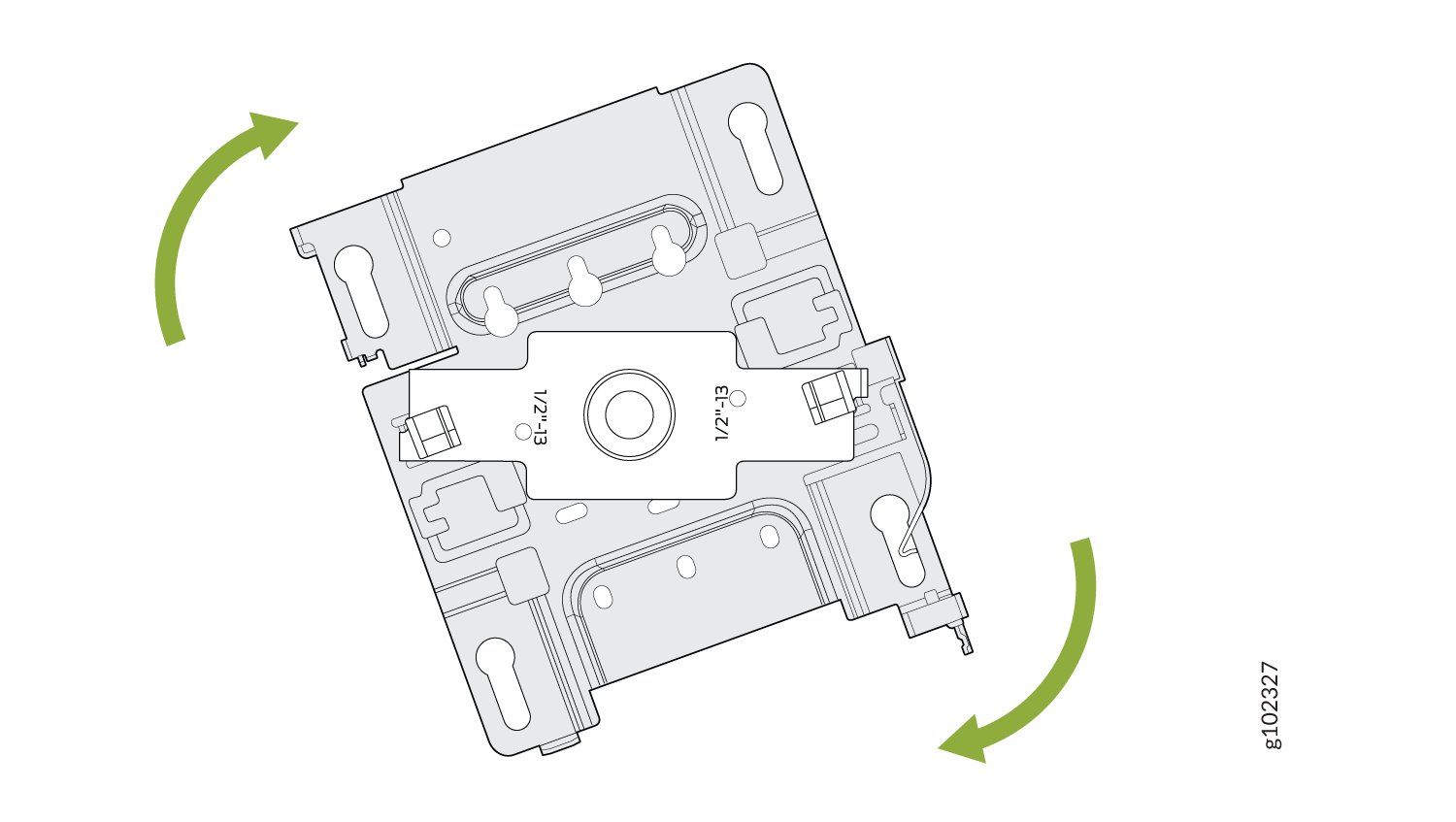 に取り付けます
- ネジを使用してアダプターをブラケットに固定します。
図30:APBR-ADP-T12ブラケットアダプターをAPBR-U取り付けブラケット
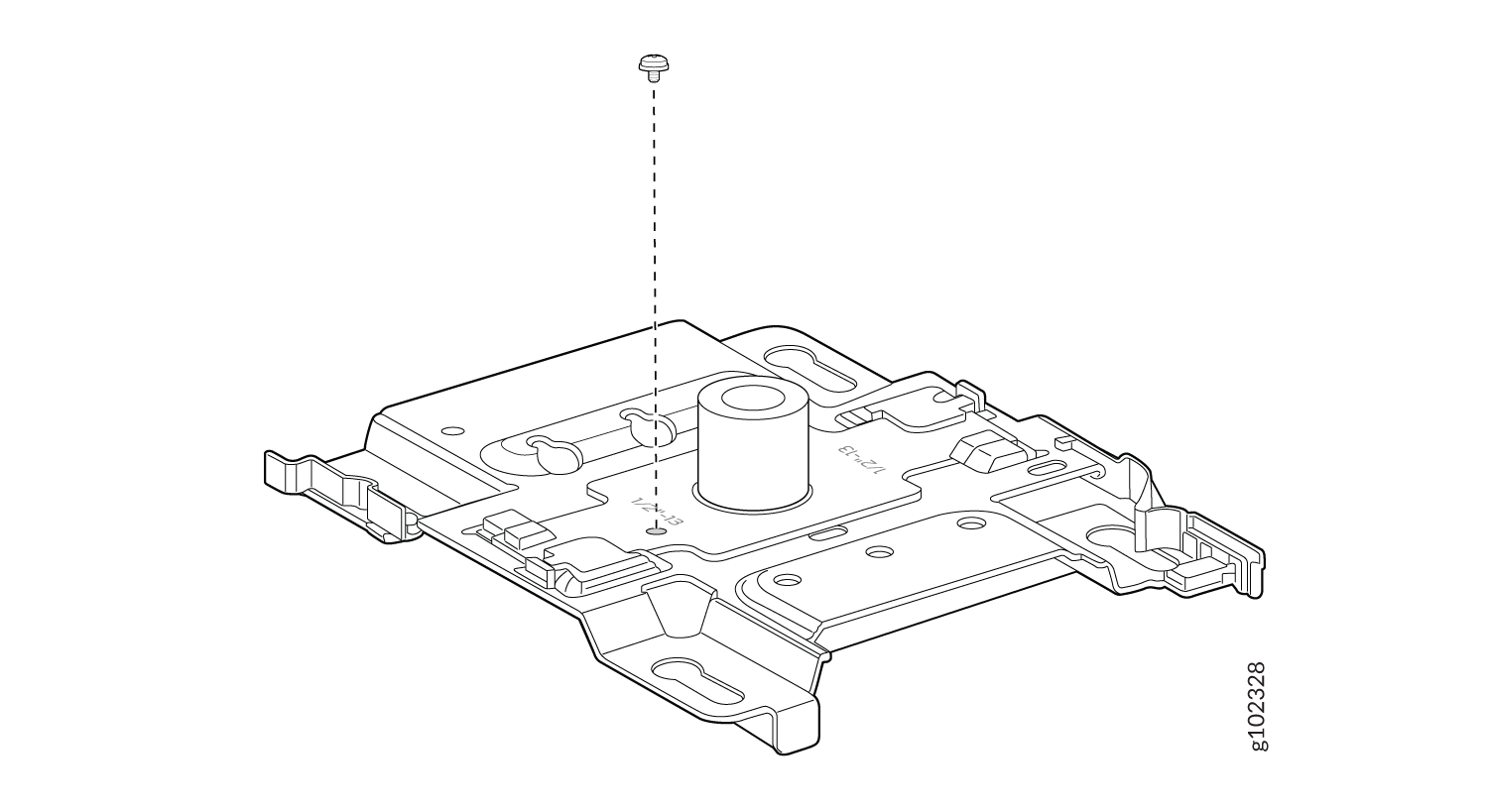 に固定します
- 付属のロックワッシャーとナットを使用して、ブラケットアセンブリ(ブラケットとアダプター)を1/2インチのネジ付きロッドに取り付けます
図31:APBR-ADP-T12およびAPBR-Uブラケットアセンブリを1/2インチネジ付きロッド
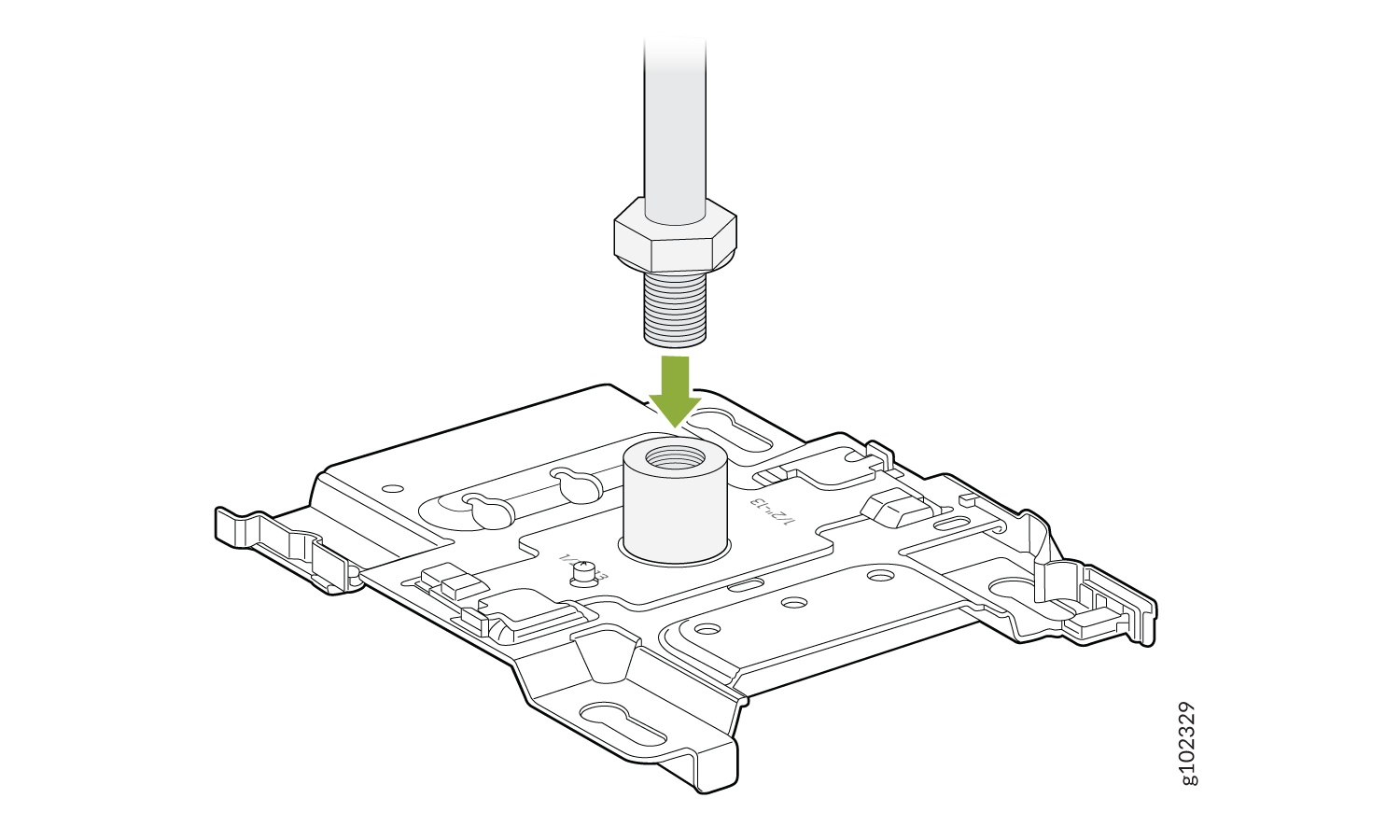 に取り付けます
- APの肩付きネジが取り付けブラケットの鍵穴にかみ合うようにAPを配置します。APをスライドさせて所定の位置にロックします。
図32:APを1/2インチに取り付けます。ネジ付きロッド