Help us improve your experience.

Let us know what you think.

Do you have time for a two-minute survey?


End-to-End BERT for CESoPSN Bundles Overview


This topic provides an overview of how to set up end-to-end BERT for CESoPSN bundles.

Figure 1 shows the normal data flow through the network. BERT is disabled.
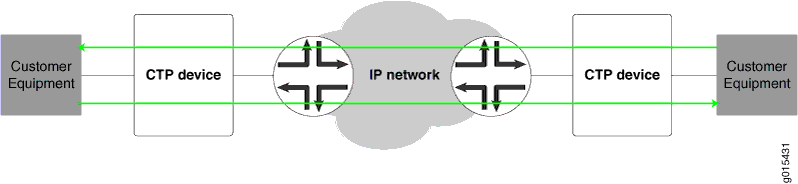
Figure 1: Normal Data Flow
Network diagram showing data flow from customer equipment through Circuit-to-Packet devices via an IP network using green arrows.

To set up end-to-end BERTS for CESoPSN bundles:

  1. To send BERT transmissions to the network, start BERT injection on each CESoPSN bundle toward the IP network as shown in Figure 2.
    Figure 2: BERT Transmission to the Network
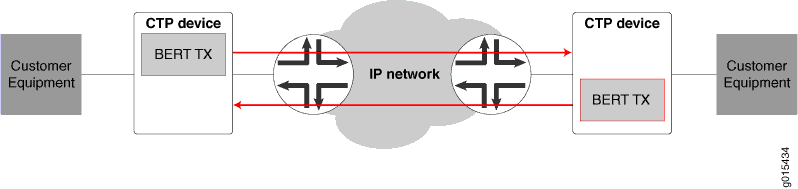
    Network setup for Bit Error Rate Testing over IP network with CTP devices labeled BERT TX and red arrows indicating data flow between customer equipment across central IP network with routers.
  2. To receive BERT reception from the network, start BERT reception on each bundle from the IP network as shown in Figure 3.
    Figure 3: End-to-End BERT Reception
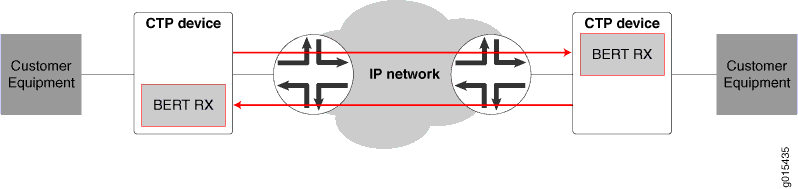
    Network diagram showing customer equipment connected to CTP devices with BERT RX modules, linked through an IP network. Red arrows indicate data flow direction.

The result is that end-to-end BERT transmission and reception are running as shown in Figure 4.
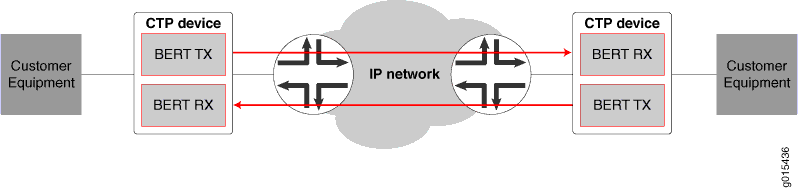
Figure 4: End-to-End BERT Transmission and Reception
Network setup for Bit Error Rate Testing over IP network showing customer equipment, CTP devices with BERT TX and RX, and data flow with red arrows.