
瞻博网络 RDMA 感知负载平衡 (LB) 和 BGP-DPF – GPU 后端交换矩阵实施
本节概述了实施瞻博网络 RDMA 感知负载平衡 (LB) 和 BGP-DPF 的配置详细信息。本部分中的所有配置和验证示例均基于以下示例:
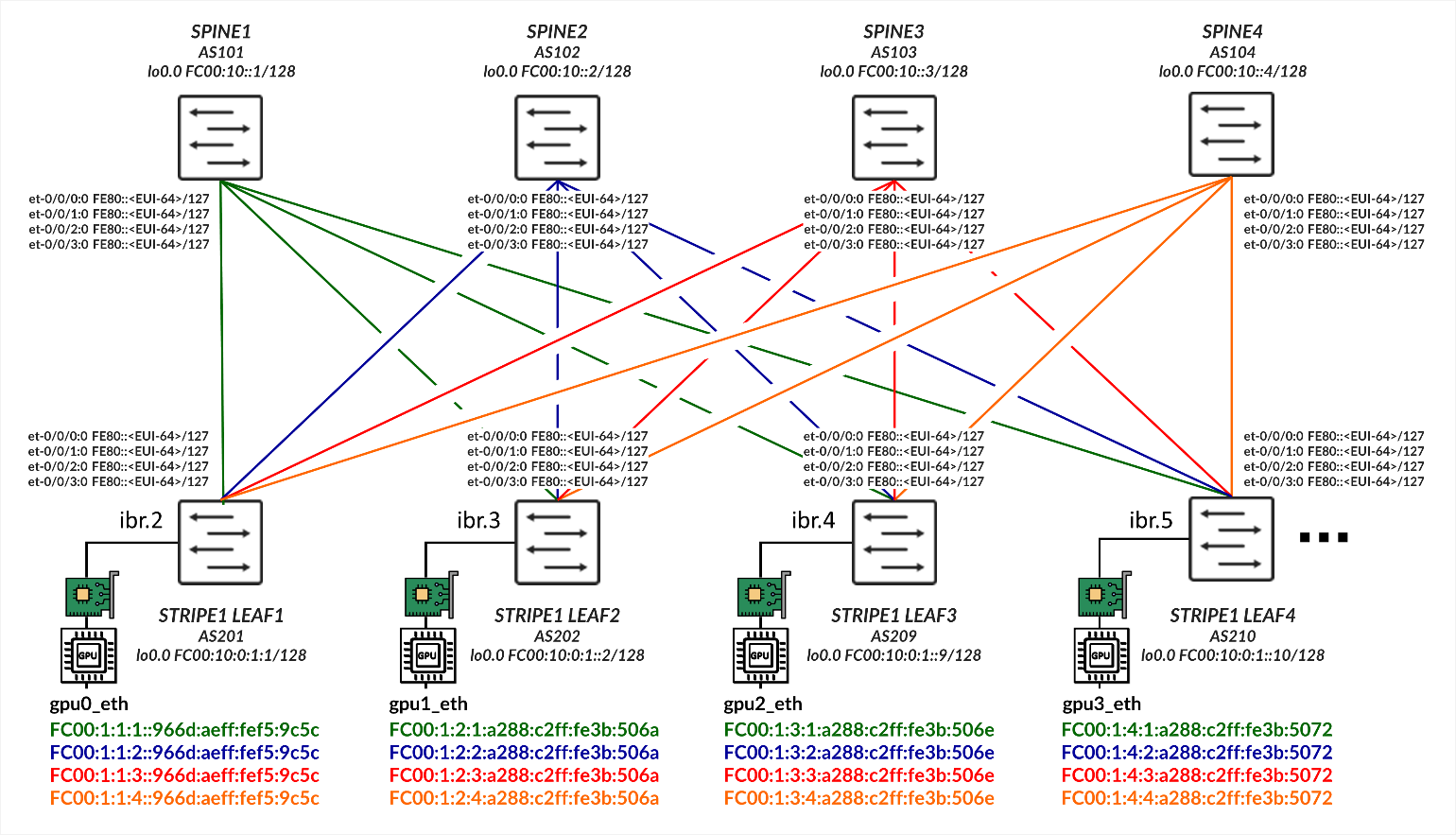
使用 IPv6 SLAAC(无状态地址自动配置)的 GPU 服务器到叶节点连接
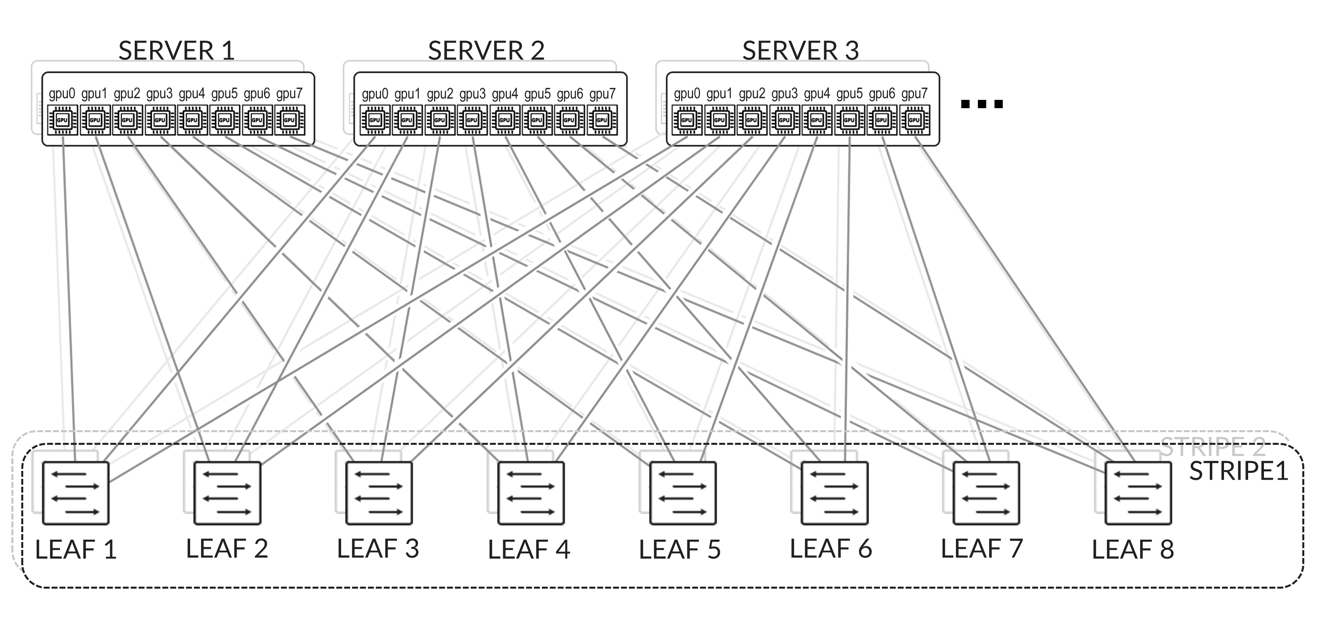
GPU 服务器按照轨道对齐架构进行连接,如后 端 GPU 轨道优化条带架构 部分所述,其中所有服务器上的 GPU 0 连接到第一个叶节点,所有服务器上的 GPU 1 连接到第二个叶节点,依此类推。这如 图 2 所示。
服务器和叶节点之间的连接基于 L2 VLAN,叶节点上的 IRB 充当服务器的默认网关。
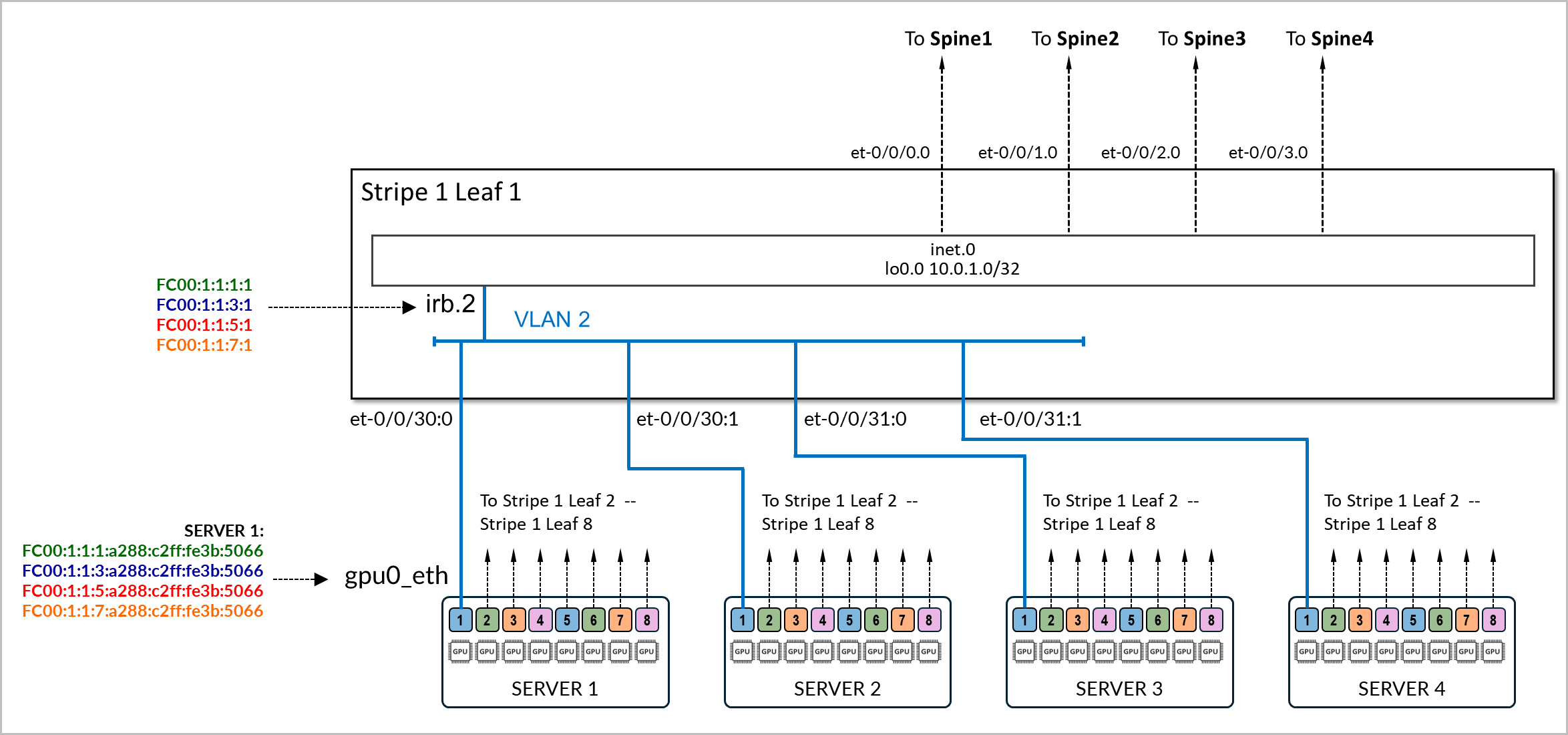
连接服务器和叶节点的物理接口配置了家族以太网交换,并映射到 VLAN,其关联的 IRB 作为 L3 接口。
示例:
以下示例显示了 stripe1-leaf1 与 服务器 1 和 服务器 2 上的 gpu0_eth 接口之间的连接配置。交换机上的 irb.2 接口配置了四个 /64 IPv6 地址:
- fd00:1:1:1::1/64,
- fd00:1:1:2::1/64,
- fd00:1:1:3::1/64 和
- fd00:1:1:4::1/64。
这些前缀将播发给服务器 1 和服务器 2。
[edit interfaces et-0/0/16:0]
jnpr@stripe1-leaf1# show
description to.h100-01:gpu0_eth;
native-vlan-id 2;
mtu 9216;
unit 0 {
    family ethernet-switching {
        interface-mode trunk;
        vlan {
            members vn2;
        }
}

[edit interfaces et-0/0/16:1]
jnpr@stripe1-leaf1# show
description to.h100-02:gpu0_eth;
native-vlan-id 2;
mtu 9216;
unit 0 {
    family ethernet-switching {
        interface-mode trunk;
        vlan {
            members vn2;
        }
}

[edit vlans vn2]
jnpr@stripe1-leaf1# show
description "Virtual network for rail 0 on leaf stripe1-leaf1";
vlan-id 2;
l3-interface irb.2;

[edit interfaces irb]
jnpr@stripe1-leaf1# show | display inheritance | except #
mtu 9216;
unit 2 {
    family inet6 {
        address fd00:1:1:1::1/64;
        address fd00:1:1:2::1/64;
        address fd00:1:1:3::1/64;
        address fd00:1:1:4::1/64;
    }

}
您可以使用以下命令验证 IPv6 地址是否已正确分配给 irb.2 接口,以及该接口是否与正确的 VLAN 相关联:
jnpr@stripe1-leaf1> show interfaces irb.2 terse
Interface               Admin Link Proto    Local                 Remote
irb.2                   up    up   inet6        fd00:1:1:1::1/64
                                                fd00:1:1:2::1/64
                                                fd00:1:1:3::1/64
                                                fd001:1:4::1/64
        fe80::9e5a:8000:2c1:b306/64
                                   multiservice
jnpr@stripe1-leaf1> show vlans vn2 detail
Routing instance: default-switch
VLAN Name: vn2                            State: Active
Tag: 2
Internal index: 4, Generation Index: 4, Origin: Static
Mac aging: Enabled
MAC aging time: 300 seconds
Layer 3 interface: irb.2
VXLAN Enabled : No
Interfaces:
    et-0/0/16:0.0*,untagged,trunk
    et-0/0/16:1.0*,untagged,trunk
Number of interfaces: Tagged 0    , Untagged 2
Total MAC count: 2
服务器 SLAAC 配置:
要配置 NVIDIA GPU 服务器上的接口,请按照 NVIDIA 配置中的步骤作 |瞻博网络您需要确保网络计划包含禁用 DHCPv6 的语句。
服务器上的接口无需配置任何 IPv6 地址,也无需显式启用 IPv6。禁用 DHCPv6 就足够了。
示例:
gpu0_eth:
      match:
        macaddress: a0:88:c2:3b:50:66
      dhcp6: false
      mtu: 9000
      set-name: gpu0_eth
以下是网络计划示例。您可以使用这些示例创建模板以配置所有服务器上的地址。
jnpr@H100-01:/etc/netplan$ sudo cat 00-installer-config-type5_vrf.yaml
# This is the network config written by 'subiquity'
network:
  version: 2
  ethernets:
    mgmt_eth:
      match:
        macaddress: 6c:fe:54:48:2e:48
      dhcp4: false
      addresses:
        - 10.10.1.16/31
      nameservers:
        addresses:
        - 8.8.8.8
      routes:
        - to: default
          via: 10.10.1.17
      set-name: mgmt_eth
    gpu0_eth:
      match:
        macaddress: a0:88:c2:3b:50:66
      dhcp6: false
      mtu: 9000
      set-name: gpu0_eth
    gpu1_eth:
      match:
        macaddress: a0:88:c2:3b:50:6a
      dhcp6: false
      mtu: 9000
      set-name: gpu1_eth
    gpu2_eth:
      match:
        macaddress: a0:88:c2:3b:50:6e
      dhcp6: false
      mtu: 9000
      set-name: gpu2_eth
    gpu3_eth:
      match:
        macaddress: a0:88:c2:3b:50:72
      dhcp6: false
      mtu: 9000
      set-name: gpu3_eth
    gpu4_eth:
      match:
        macaddress: a0:88:c2:0a:79:48
      dhcp6: false
      mtu: 9000
      set-name: gpu4_eth
    gpu5_eth:
      match:
        macaddress: a0:88:c2:0a:79:4c
      dhcp6: false
      mtu: 9000
      set-name: gpu5_eth
    gpu6_eth:
      match:
        macaddress: a0:88:c2:0a:79:40
      dhcp6: false
      mtu: 9000
      set-name: gpu6_eth
    gpu7_eth:
      match:
        macaddress: a0:88:c2:0a:79:44
      dhcp6: false
      mtu: 9000
      set-name: gpu7_eth
    stor0_eth:
      match:
        macaddress: b8:3f:d2:63:e5:44
      dhcp6: false
      mtu: 9000
      routes:
        - to: 10.100.0.0/21
          via: 10.100.1.12
      set-name: stor0_eth
确保 gpu#_eth 接口上未启用 IPv4。
还必须将服务器配置为接受和处理注册机关消息,以便通过路由器通告 (RA) 自动配置 IPv6 地址注册机关才能正常工作。在大多数情况下,默认情况下会启用此功能,但配置步骤如下所述:
该配置有两层:
- Netplan 或 systemd 中的接口级注册机关策略
- 内核级 sysctl 参数(accept_ra、autoconf)
两者必须对齐以确保正确的注册机关行为。
- 如果系统将 Netplan 与 systemd-networkd(在 Ubuntu Server 上常见):
在 Netplan YAML 文件(例如 /etc/netplan/01-netcfg.yaml)中,在每个接口下添加以下内容:
accept-ra: true
ipv6-privacy: false
然后应用更改:
sudo netplan generate
sudo netplan apply
这可以确保 Netplan 使用 IPv6AcceptRA=yes 为 systemd-networkd 呈现 .network 文件,从而启用基于注册机关的自动配置。
然而,仅此还不够。如果内核仍配置为忽略 RA。还必须验证内核是否设置为在运行时接受 RA。您可以使用以下方法进行检查:
sudo sysctl net.ipv6.conf.<interface>.accept_ra
如果该值为0,则无论Netplan设置如何,RA都将被忽略。这可以通过以下方法暂时纠正:
sudo sysctl -w net.ipv6.conf.<interface>.accept_ra=1
要使其在重新启动后持续存在,请将以下内容添加到 sysctl 配置文件(例如 /etc/sysctl.d/99-accept-ra.conf):
net.ipv6.conf.<interface>.accept_ra = 1
并将其应用于:
sudo sysctl --system
accept-ra 等参数可以全局启用或禁用,也可以基于每个接口启用或禁用。
| SYSCTL | 作用域 | 效果 |
|---|---|---|
| net.ipv6.conf.all.accept_ra | 全局(所有当前接口) | 立即应用于 所有现有 接口,但是...如果 转发 = 1,则只读 |
| net.ipv6.conf.default.accept_ra | 全局(用于将来的接口) | 设置新接口启动时使用的默认值(例如,插入接口或稍后创建接口) |
| net.ipv6.conf.gpu0_eth.accept_ra | 按接口 | 控制特定活动接口的注册机关处理 |
- 如果接口由内核直接管理(不使用 Netplan/systemd):
通过设置启用注册机关接受和自动配置:
sudo sysctl -w net.ipv6.conf.<interface>.accept_ra=1
sudo sysctl -w net.ipv6.conf.<interface>.autoconf=1
sudo tee /etc/sysctl.d/99-ipv6-ra.conf > /dev/null <<EOF
net.ipv6.conf.<interface>.accept_ra = 1
net.ipv6.conf.<interface>.autoconf = 1
EOF
sudo sysctl --system
叶节点 SLAAC 配置
要启用 SLAAC,必须在面向 GPU 服务器的接口上为叶节点配置 IPv6 地址。
示例:
jnpr@stripe1-leaf1# show interface irb
description "H100-01 GPU0 Server 1";
unit 2 {
    family inet6 {
        address FC00:1:1:1::1/64;
        address FC00:1:1:2::1/64;
        address FC00:1:1:3::1/64;
        address FC00:1:1:4::1/64;
    }
}
配置 IPv6 地址后,您必须在协议 路由器通告 下启用所有前缀的播发,如示例中所示:
[edit protocols router-advertisement]
jnpr@stripe1-leaf1# show
	interface irb.2 {
	  prefix FC00:1:1:1::1/64;
  	prefix FC00:1:1:2::1/64;
  	prefix FC00:1:1:3::1/64;
	  prefix FC00:1:1:4::1/64;
}
为给定前缀配置路由器播发时,需要在配置路由器播发的接口上配置同一前缀内的 IPv6 地址。如果接口下未配置在路由器通告下配置的前缀,则提交配置时将返回错误。
示例:
[edit interfaces irb.2]
jnpr@stripe1-leaf1# show
unit 0 {
    family inet6 {
        address FC00:2:1:1::1/64;
    }
}
[edit protocols router-advertisement]
jnpr@stripe1-leaf1# show interface irb.2
 {
    prefix FC00:1:1:1::/64;
}
[edit protocols router-advertisement interface irb.2]
jnpr@stripe1-leaf1# commit
[edit protocols router-advertisement interface]
  'irb.2'
    Family inet6 should be configured on this interface
error: commit failed: (statements constraint check failed
下表汇总了每个叶节点上每个 IRB 接口上的前缀和 IP 地址:
| IRB | VLAN | 子网 1 | IRB IP 地址 1 | 子网 2 | IRB IP 地址 2 | 子网 3 | IRB IP 地址 3 | 子网 4 | IRB IP 地址 4 | GPU 接口 | |
|---|---|---|---|---|---|---|---|---|---|---|---|
| 条纹 1,叶 1 | 1 | 2 | fc00:1:1:1:/64 | fc00:1:1:1::1 | fc00:1:1:2::/64 | fc00:1:1:2::1 | fc00:1:1:3::/64 | fc00:1:1:3::1 | fc00:1:1:4::/64 | fc00:1:1:4::1 | gpu0_eth |
| 条纹 1,叶 2 | 2 | 3 | fc00:1:2:1::/64 | fc00:1:2:1::1 | fc00:1:2:2::/64 | fc00:1:2:2::1 | fc00:1:2:3::/64 | fc00:1:2:3::1 | fc00:1:2:4::/64 | fc00:1:2:4::1 | gpu1_eth |
| 条纹 1,叶 3 | 3 | 4 | fc00:1:3:1::/64 | fc00:1:3:1::1 | fc00:1:3:2::/64 | fc00:1:3:2::1 | fc00:1:3:3::/64 | fc00:1:3:3::1 | fc00:1:3:4::/64 | fc00:1:3:4::1 | gpu2_eth |
| 条纹 1,叶 4 | 4 | 5 | fc00:1:4:1::/64 | fc00:1:4:1::1 | fc00:1:4:2::/64 | fc00:1:4:2::1 | fc00:1:4:3::/64 | fc00:1:4:3::1 | fc00:1:4:4::/64 | fc00:1:4:4::1 | gpu3_eth |
| 条带 1,叶 5 | 5 | 6 | fc00:1:5:1::/64 | fc00:1:5:1::1 | fc00:1:5:2::/64 | fc00:1:5:2::1 | fc00:1:5:3::/64 | fc00:1:5:3::1 | fc00:1:5:4::/64 | fc00:1:5:4::1 | gpu4_eth |
| 条纹 1,叶 6 | 6 | 7 | fc00:1:6:1::/64 | fc00:1:6:1::1 | fc00:1:6:2::/64 | fc00:1:6:2::1 | fc00:1:6:3::/64 | fc00:1:6:3::1 | fc00:1:6:4::/64 | fc00:1:6:4::1 | gpu5_eth |
| 条带 1 叶 7 | 7 | 8 | fc00:1:7:1::/64 | fc00:1:7:1::1 | fc00:1:7:2::/64 | fc00:1:7:2::1 | fc00:1:7:3::/64 | fc00:1:7:3::1 | fc00:1:7:4::/64 | fc00:1:7:4::1 | gpu6_eth |
| 条纹 1,叶 8 | 8 | 9 | fc00:1:8:1::/64 | fc00:1:8:1::1 | fc00:1:8:2::/64 | fc00:1:8:2::1 | fc00:1:8:3::/64 | fc00:1:8:3::1 | fc00:1:8:4::/64 | fc00:1:8:4::1 | gpu7_eth |
| 条纹 2,枝叶 1 | 9 | 10 | fc00:2:1:1::/64 | fc00:2:1:1::1 | fc00:2:1:2::/64 | fc00:2:1:2::1 | fc00:2:1:3::/64 | fc00:2:1:3::1 | fc00:2:1:4::/64 | fc00:2:1:4::1 | gpu0_eth |
| 条纹 2,枝叶 2 | 10 | 11 | fc00:2:2:1::/64 | fc00:2:2:1::1 | fc00:2:2:2::/64 | fc00:2:2:2::1 | fc00:2:2:3::/64 | fc00:2:2:3::1 | fc00:2:2:4::/64 | fc00:2:2:4::1 | gpu1_eth |
| 条纹 2,叶 3 | 11 | 12 | fc00:2:3:1::/64 | fc00:2:3:1::1 | fc00:2:3:2::/64 | fc00:2:3:2:::1 | fc00:2:3:3::/64 | fc00:2:3:3:1 | fc00:2:3:4::/64 | fc00:2:3:4::1 | gpu2_eth |
| 条带 2、叶 4 | 12 | 13 | fc00:2:4:1::/64 | fc00:2:4:1::1 | fc00:2:4:2::/64 | fc00:2:4:2::1 | fc00:2:4:3::/64 | fc00:2:4:3::1 | fc00:2:4:4::/64 | fc00:2:4:4::1 | gpu3_eth |
| 条带 2,叶 5 | 13 | 14 | fc00:2:5:1::/64 | fc00:2:5:1::1 | fc00:2:5:2::/64 | fc00:2:5:2::1 | fc00:2:5:3::/64 | fc00:2:5:3::1 | fc00:2:5:4::/64 | fc00:2:5:4::1 | gpu4_eth |
| 条带 2,叶 6 | 14 | 15 | fc00:2:6:1::/64 | fc00:2:6:1::1 | fc00:2:6:2::/64 | fc00:2:6:2::1 | fc00:2:6:3::/64 | fc00:2:6:3::1 | fc00:2:6:4::/64 | fc00:2:6:4::1 | gpu5_eth |
| 条带 2 叶 7 | 15 | 16 | fc00:2:7:1::/64 | fc00:2:7:1::1 | fc00:2:7:2::/64 | fc00:2:7:2::1 | fc00:2:7:3::/64 | fc00:2:7:3::1 | fc00:2:7:4::/64 | fc00:2:7:4::1 | gpu6_eth |
| 条带 2 叶 8 | 16 | 17 | fc00:2:8:1::/64 | fc00:2:8:1::1 | fc00:2:8:2::/64 | fc00:2:8:2::1 | fc00:2:8:3::/64 | fc00:2:8:3::1 | fc00:2:8:4::/64 | fc00:2:8:4::1 | gpu7_eth |
SLAAC 验证:
要验证基于注册机关的配置是否有效,以及 GPU 接口是否已自动配置其 IPv6 地址并安装相应的路由,请使用以下命令:
ip -6 addr show dev <interface>
ip -6 route
您应该会看到一个 SLAAC 格式(前缀::EUI-64)标记为动态或 mngtmpaddr 的全局 inet6 地址。您还将输入接口的链路本地地址 (FE80::EUI-64)
示例:
jnpr@H100-01:~$ ip -6 addr show dev gpu0_eth

17: gpu0_eth: <BROADCAST,MULTICAST,UP,LOWER_UP> mtu 9000 qdisc mq state UP group default qlen 1000
    inet6 fc00:1:1:1:a288:c2ff:fe3b:5066/64 scope global dynamic mngtmpaddr noprefixroute
       valid_lft 2591997sec preferred_lft 604797sec
    inet6 fc00:1:1:2:a288:c2ff:fe3b:5066/64 scope global dynamic mngtmpaddr noprefixroute
       valid_lft 2591997sec preferred_lft 604797sec
    inet6 fc00:1:1:3:a288:c2ff:fe3b:5066/64 scope global dynamic mngtmpaddr noprefixroute
       valid_lft 2591997sec preferred_lft 604797sec
    inet6 fc00:1:1:4:a288:c2ff:fe3b:5066/64 scope global dynamic mngtmpaddr noprefixroute
       valid_lft 2591997sec preferred_lft 604797sec
    inet6 fe80::a288:c2ff:fe3b:5066/64 scope link
       valid_lft forever preferred_lft forever

jnpr@H100-01:~$ ip -6 route
::1 dev lo proto kernel metric 256 pref medium
fc00:1:1:1::/64 dev gpu0_eth proto ra metric 100 expires 2591960sec pref medium
fc00:1:1:2::/64 dev gpu0_eth proto ra metric 100 expires 2591960sec pref medium
fc00:1:1:3::/64 dev gpu0_eth proto ra metric 100 expires 2591960sec pref medium
fc00:1:1:4::/64 dev gpu0_eth proto ra metric 100 expires 2591960sec pref medium
fe80::/64 dev stor0_eth proto kernel metric 256 pref medium
fe80::/64 dev mgmt_eth proto kernel metric 256 pref medium
fe80::/64 dev eno3 proto kernel metric 256 pref medium
fe80::/64 dev gpu0_eth proto kernel metric 256 pref medium
fe80::/64 dev gpu1_eth proto kernel metric 256 pref medium
fe80::/64 dev gpu2_eth proto kernel metric 256 pref medium
fe80::/64 dev gpu3_eth proto kernel metric 256 pref medium
fe80::/64 dev gpu4_eth proto kernel metric 256 pref medium
fe80::/64 dev gpu5_eth proto kernel metric 256 pref medium
fe80::/64 dev gpu6_eth proto kernel metric 256 pref medium
fe80::/64 dev gpu7_eth proto kernel metric 256 pref medium
default via fe80::9e5a:80ff:fec1:ae60 dev gpu0_eth proto ra metric 100 expires 1760sec pref medium

jnpr@stripe1-leaf1> show interfaces irb1 terse
Interface               Admin Link Proto    Local                 Remote
irb.1                   up    up
irb.1                   up    up   inet6    fc00:1:1:1::1/64
                                            fc00:1:1:2::1/64
                                            fc00:1:1:3::1/64
                                            fc00:1:1:4::1/64
                                            fe80::9e5a:80ff:fec1:ae60/64
                                   multiservice
您还可以通过以下方式观察传入的注册机关消息:
sudo tcpdump -i <interface> -vv icmp6 and 'ip6[40] == 134'
示例:
jnpr@H100-01:~$ sudo tcpdump -i gpu0_eth -vv icmp6 and 'ip6[40] == 134'
tcpdump: listening on gpu0_eth, link-type EN10MB (Ethernet), snapshot length 262144 bytes
18:34:50.515554 IP6 (flowlabel 0x9b92d, hlim 255, next-header ICMPv6 (58) payload length: 152) fe80::9e5a:80ff:fec1:ae60 > ip6-allnodes: [icmp6 sum ok] ICMP6, router advertisement, length 152
   hop limit 64, Flags [none], pref medium, router lifetime 1800s, reachable time 0ms, retrans timer 0ms
      source link-address option (1), length 8 (1): 9c:5a:80:c1:ae:60
        0x0000:  9c5a 80c1 ae60
      prefix info option (3), length 32 (4): fc00:1:1:1::/64, Flags [onlink, auto], valid time 2592000s, pref. time 604800s
        0x0000:  40c0 0027 8d00 0009 3a80 0000 0000 fc00
        0x0010:  0001 0004 0001 0000 0000 0000 0000
      prefix info option (3), length 32 (4): fc00:1:1:2::/64, Flags [onlink, auto], valid time 2592000s, pref. time 604800s
        0x0000:  40c0 0027 8d00 0009 3a80 0000 0000 fc00
        0x0010:  0001 0003 0001 0000 0000 0000 0000
      prefix info option (3), length 32 (4): fc00:1:1:3::/64, Flags [onlink, auto], valid time 2592000s, pref. time 604800s
        0x0000:  40c0 0027 8d00 0009 3a80 0000 0000 fc00
        0x0010:  0001 0002 0001 0000 0000 0000 0000
      prefix info option (3), length 32 (4): fc00:1:1:4::/64, Flags [onlink, auto], valid time 2592000s, pref. time 604800s
        0x0000:  40c0 0027 8d00 0009 3a80 0000 0000 fc00
        0x0010:  0001 0001 0001 0000 0000 0000 0000
在某些情况下,尤其是在更改注册机关设置或在静态和动态配置之间切换之后,可能需要重置接口才能触发地址重新分配:
sudo ip addr flush dev <interface>
sudo ip link set <interface> down && sleep 1 && sudo ip link set <interface> up
重新启用接口后,等待几秒钟,然后使用以下命令重新检查 IPv6 地址:
ip -6 addr show dev <interface>
这可以确保删除过时的地址并处理新的 RA。
所有 IPv6 设置都可以在以下位置找到: /proc/sys/net/ipv6/conf 。
要验证是否正在发送路由器播发,可以使用以下命令:show ipv6 router-advertisement interface <interface>
示例:
jnpr@stripe1-leaf1> show ipv6 router-advertisement interface et-0/0/16:0
Interface: et-0/0/16:0.0
  Advertisements sent: 2, last sent 00:02:17 ago
  Solicits sent: 1, last sent 00:02:46 ago
  Solicits received: 0
  Advertisements received: 0
  Solicited router advertisement unicast: Disable
  IPv6 RA Preference: DEFAULT/MEDIUM
  Passive mode: Disable
  Upstream mode: Disable
  Downstream mode: Disable
  Proxy blackout timer: Not Running
您还可以使用以下方法在接口上捕获路由器通告数据包:
monitor traffic interface et-0/0/16:0.0 extensive matching "icmp6 and ip6[40] == 134"
示例:
jnpr@stripe1-leaf1> monitor traffic interface et-0/0/16:0.0 extensive matching "icmp6 and ip6[40] == 134"
NOTE: MAC Addresses 00:00:00:00:00:00 are used when L2 header information in not available. For such packets, L2 headers are added by PFE when transmit and removed before being punted to RE
Local vib interface has IP 128.0.0.4.
reading from file -, link-type EN10MB (Ethernet)
18:37:24.682098 9c:5a:80:c1:ae:60 > 33:33:00:00:00:01, ethertype IPv6 (0x86dd), length 284: (flowlabel 0x9b92d, hlim 255, next-header ICMPv6 (58) payload length: 152) fe80::9e5a:80ff:fec1:ae60 > ff02::1: [icmp6 sum ok] ICMP6, router advertisement, length 152
  hop limit 64, Flags [none], pref medium, router lifetime 1800s, reachable time 0ms, retrans timer 0ms
    source link-address option (1), length 8 (1): 9c:5a:80:c1:ae:60
      0x0000:  9c5a 80c1 ae60
    prefix info option (3), length 32 (4): fc00:1:1:4::/64, Flags [onlink, auto], valid time 2592000s, pref. time 604800s
      0x0000:  40c0 0027 8d00 0009 3a80 0000 0000 fc00
      0x0010:  0001 0004 0001 0000 0000 0000 0000
    prefix info option (3), length 32 (4): fc00:1:1:3::/64, Flags [onlink, auto], valid time 2592000s, pref. time 604800s
      0x0000:  40c0 0027 8d00 0009 3a80 0000 0000 fc00
      0x0010:  0001 0003 0001 0000 0000 0000 0000
    prefix info option (3), length 32 (4): fc00:1:1:2::/64, Flags [onlink, auto], valid time 2592000s, pref. time 604800s
      0x0000:  40c0 0027 8d00 0009 3a80 0000 0000 fc00
      0x0010:  0001 0002 0001 0000 0000 0000 0000
    prefix info option (3), length 32 (4): fc00:1:1:1::/64, Flags [onlink, auto], valid time 2592000s, pref. time 604800s
      0x0000:  40c0 0027 8d00 0009 3a80 0000 0000 fc00
      0x0010:  0001 0001 0001 0000 0000 0000 0000
请注意,发送路由器通告时将使用叶节点接口的链路本地地址作为源、IPv6 全节点组播地址 (FF02::1)、下一个报头 ICMPv6 (58)。以下是与这些最相关的属性:
| 参数 | 值 | 说明 |
|---|---|---|
| 标志 | 链路,自动 | 主机可以假定此前缀中的地址位于本地链路上。 此前缀可用于 SLAAC (无状态地址自动配置)。 |
| 有效终身 | 2592000 | 前缀的有效期为 30 天(用于可访问性)。 |
| 优选终身 | 604800 | 首选生存期为 7 天(之后对于新连接将弃用)。 |
| 路由器寿命 | 1800年代 | 路由器被视为默认网关 1800 秒 |
收到路由器播发后,服务器的 NIC 接口将通过将叶节点播发的前缀与使用 EUI-64 地址格式 (基于接口的 MAC 地址)计算的地址的主机部分连接起来,从而自动配置其 MAC 地址,如 表 4 所示。
| 叶节点接口 | 叶节点 IPv6 地址 |
GPU NIC | GPU NIC MAC 地址 |
GPU NIC IPv6 地址 |
||
|---|---|---|---|---|---|---|
| 条带 1 叶 1 - et-0/0/16:0 | fc00:1:1:1::1 fc00:1:1:2::1 fc00:1:1:3::1 fc00:1:1:4::1 |
服务器 1 - gpu0_eth | A0:88:C2:3B:50:66 | fc00:1:1:1:a288:c2ff:fe3b:5066 fc00:1:1:2:a288:c2ff:fe3b:5066 fc00:1:1:3:a288:c2ff:fe3b:5066 fc00:1:1:4:a288:c2ff:fe3b:5066 |
||
| 条带 1 分叶 1 - et-0/0/16:1 | fc00:1:1:2::1 fc00:1:2:2::1 fc00:1:3:2::1 fc00:1:4:2::1 |
服务器 2 - gpu0_eth | 58:a2:e1:46:c6:ca | fc00:1:1:2:a288:c2ff:fe3b:506a fc00:1:2:2:a288:c2ff:fe3b:506a fc00:1:3:2:a288:c2ff:fe3b:506a fc00:1:4:2:a288:c2ff:fe3b:506a |
||
| 条带 1 叶 1 - et-0/0/17:0 | fc00:1:1:3::1 fc00:1:2:3::1 fc00:1:3:3::1 fc00:1:4:3::1 |
服务器 3 - gpu0_eth | A0:88:C2:3B:50:6E | fc00:1:1:3:a288:c2ff:fe3b:506e fc00:1:2:3:a288:c2ff:fe3b:506e fc00:1:3:3:a288:c2ff:fe3b:506e fc00:1:4:3:a288:c2ff:fe3b:506e |
||
| . . . |
||||||
使用链路本地地址和 IPv6 邻接方发现的叶脊式连接
叶节点和主干节点之间的接口不需要显式配置的 IP 地址,而是配置为仅具有家族 inet6 的未标记接口,以便能够处理 IPv6 流量。接口使用 EUI-64 格式自动生成其链路本地地址,如 图 4 所示。
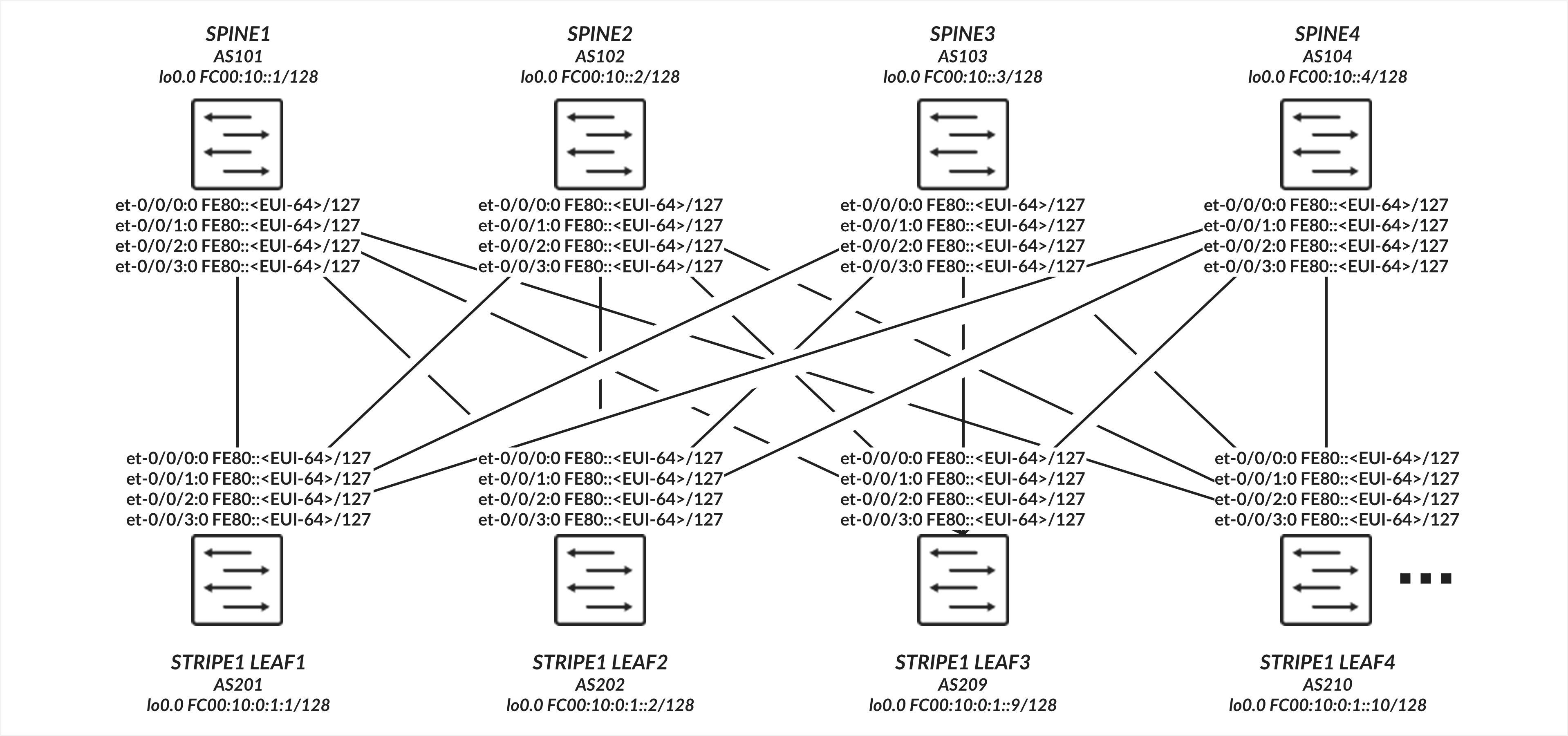
叶脊式连接 配置
表:叶脊式接口配置示例
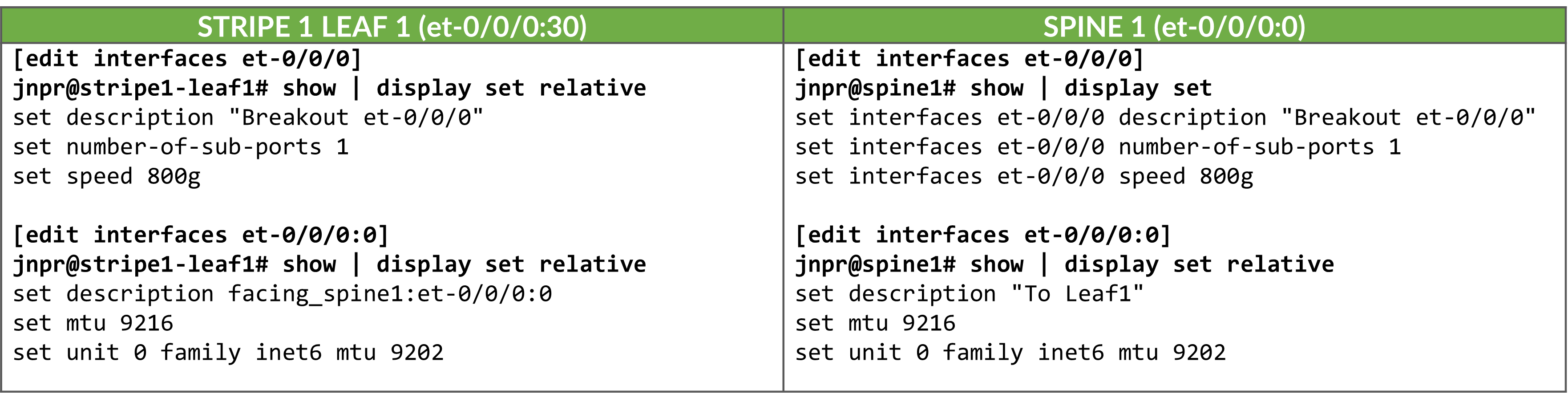
在接口上启用 IPv6 会自动分配链路本地 IPv6 地址。交换机使用 EUI-64 地址格式 (基于接口的 MAC 地址)为每个接口自动生成链路本地地址,如 表 5 所示。
| 叶节点接口 | 叶节点 IPv6 地址 | 主干节点接口 | 主干 IPv6 地址 |
|---|---|---|---|
| 条带 1 叶 1 - et-0/0/0:0 | FE80::9E5A:80FF:FEC1:AE00/64 | 主干 1 – et-0/0/0:0 | FE80::9e5a:80ff:feef:a28f/64 |
| 条带 1 叶 1 - et-0/0/1:0 | FE80::9E5A:80FF:FEC1:AE08/64 | 主干 2 – et-0/0/1:0 | FE80::5A86:70FF:FE7B:CED5/64 |
| 条带 1 叶 1 - et-0/0/2:0 | FE80::9E5A:80FF:FEC1:AF00/64 | 主干 3 – et-0/0/2:0 | fe80::5a86:70ff:fe78:e0d5/64 |
| 条带 1 叶 1 - et-0/0/3:0 | FE80::9E5A:80FF:FEC1:AF08/64 | 主干 4 – et-0/0/3:0 | fe80::5a86:70ff:fe79:3d5/64 |
| 条带 1 分叶 2 - et-0/0/0:0 | fe80::5a86:70ff:fe79:dad5/64 | 主干 1 – et-0/0/0:0 | FE80::9e5a:80ff:feef:A297/64 |
| 条带 1 叶 2 - et-0/0/1:0 | fe80::5a86:70ff:fe79:dadd/64 | 主干 2 – et-0/0/1:0 | FE80::5A86:70FF:FE7B:CEDD/64 |
| 条带 1 叶 2 - et-0/0/2:0 | FE80::5A86:70FF:FE79:DBD5/64 | 主干 3 – et-0/0/2:0 | FE80::5A86:70FF:FE78:E0DD/64 |
| 条带 1 叶 2 - et-0/0/3:0 | FE80::5A86:70FF:FE79:DBDD/64 | 主干 4 – et-0/0/3:0 | FE80::5A86:70FF:FE79:3DD/64 |
| . . . |
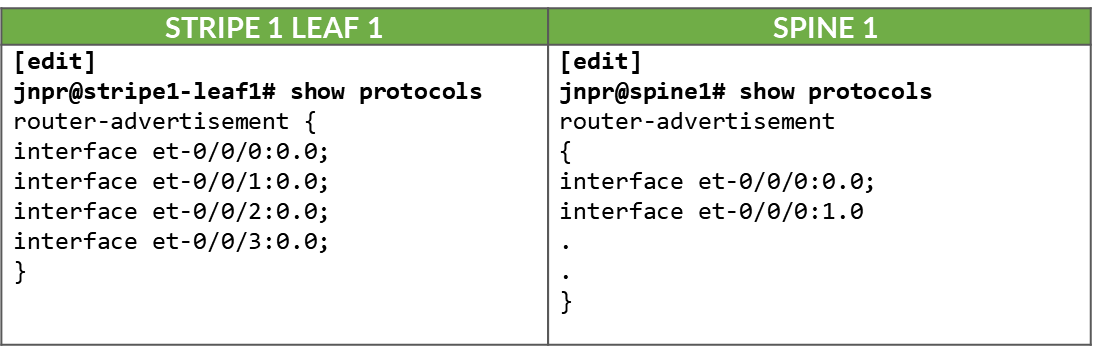
在叶节点和主干节点之间的所有接口上启用路由器播发后,作为 IPv6 邻接方发现过程的一部分,这些地址将通过标准路由器播发进行播发,如下所示:
表:。叶式和主干接口上的 IPv6 路由器通告
枝叶到主干连接验证
要验证是否正在发送路由器播发,您可以使用 show ipv6 router-advertisement interface <interface> 和 show ipv6 neighbors:
jnpr@stripe1-leaf1> show ipv6 router-advertisement interface et-0/0/0:0
Interface: et-0/0/0:0.0
  Advertisements sent: 4, last sent 00:02:28 ago
  Solicits sent: 1, last sent 00:08:06 ago
  Solicits received: 0
  Advertisements received: 3
  Solicited router advertisement unicast: Disable
  IPv6 RA Preference: DEFAULT/MEDIUM
  Passive mode: Disable
  Upstream mode: Disable
  Downstream mode: Disable
  Proxy blackout timer: Not Running
  Advertisement from fe80::9e5a:80ff:feef:a28f, heard 00:01:57 ago
    Managed: 0
    Other configuration: 0
    Reachable time: 0 ms
    Default lifetime: 1800 sec
    Retransmit timer: 0 ms
    Current hop limit: 64

jnpr@stripe1-leaf1> show ipv6 neighbors
IPv6 Address 	Linklayer Address  State       Exp   Rtr  Secure  Interface
fe80::5a86:70ff:fe78:e0d5	58:86:70:78:e0:d5  reachable   11    yes  no      et-0/0/30:0.0
fe80::5a86:70ff:fe79:3d5	58:86:70:79:03:d5  reachable   23    yes  no      et-0/0/3:0.0
fe80::5a86:70ff:fe7b:ced5 	58:86:70:7b:ce:d5  reachable   13    yes  no      et-0/0/2:0.0
fe80::9e5a:80ff:feef:a28f	9c:5a:80:ef:a2:8f  reachable   25    yes  no      et-0/0/31:0.0
Total entries: 4
使用 IPv6 邻接方发现的 BGP DPF(确定性路径转发)
本节介绍如何配置 BGP 以使用 IPv6 邻接方发现自动在叶节点和主干节点之间建立对等会话,以及如何启用确定性补丁转发。它包括其他 BGP 配置参数。
BGP 自动发现
由于叶节点和主干节点之间的每个连接都必须映射到不同的交换矩阵颜色,并且 BGP 配置为自动发现,因此需要为每个邻接方使用单独的 BGP 组。这可确保动态发现的每个对等方都与正确的颜色相关联。
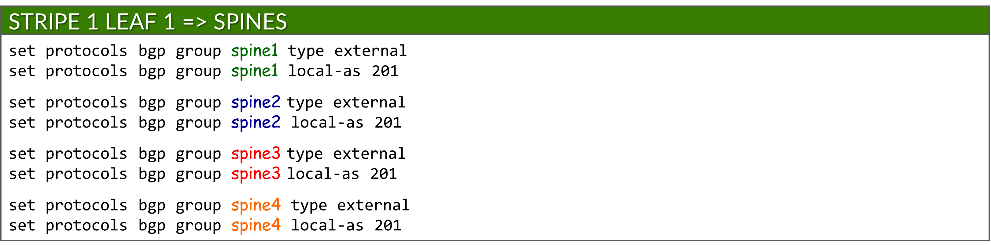
每个 BGP 组都配置为一个外部 BGP 会话,并分配一个本地 AS 编号:
set protocols bgp group <group-name> type external
set protocols bgp group <group-name> local-as <local-as#>
示例:
要启用 BGP 对等体自动发现,每个组都包含一个动态邻接方模板,用于指定允许发现的接口。这取代了用于静态对等方的传统邻接方 a.b.c.d 配置。使用对等自动发现和 ipv6-nd 选项启用自动发现:
set protocols bgp group <group-name> dynamic-neighbor <template-name> peer-auto-discovery interface <interface-name>
set protocols bgp group <group-name> dynamic-neighbor <template-name> peer-auto-discovery family inet6 ipv6-nd
示例:
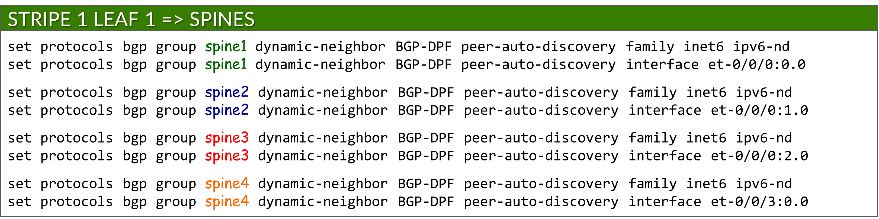
这使得 Junos 可以使用 IPv6 邻接方发现动态确定邻接方地址。
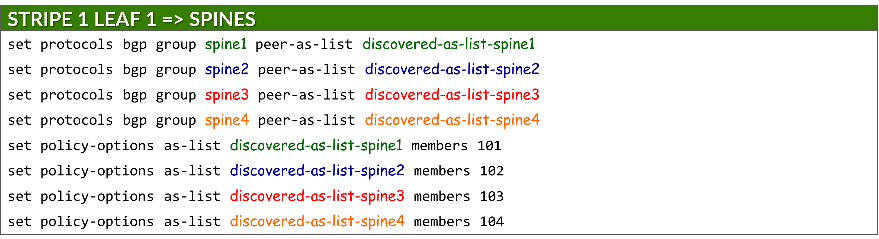
为了保护对等方形成,每个组都使用 peer-as-list 语句引用定义的 AS 范围。这可以确保只有具有匹配 AS 编号的邻接方才能建立 BGP 会话。列表本身在 policy-options 下定义:
set protocols bgp group <group-name> peer-as-list <as-list-name>
set policy-options as-list <aslist-name> members <value> | <value1-valueN> | [value1,value2,…]
必须在叶节点和主干节点上启用自动发现。
示例:
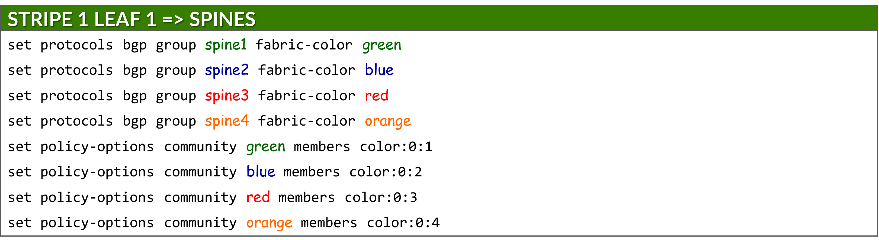
每个组还会分配一种交换矩阵颜色,该颜色在策略选项下定义为 BGP 社区:
set protocols bgp group <group-name> fabric-color <color>
set policy-options community <community-name> members color:0:<#>
其中:<community-name> = <color>
IPv6 NLRI 支持
必须使用以下方法在叶节点和主干节点上启用 IPv6 路由播发:
set protocols bgp family inet6 unicast
ECMP 多路径
必须将 BGP 多路径配置为允许通过受保护路径进行等价多路径 (ECMP) 路由,从而确保跨多个主干上行链路的负载平衡和故障切换。这是通过以下方法实现的:
set protocols bgp group multipath allow-protection
必须在叶节点和主干节点上配置 BGP 多路径。
BFD(双向转发检测)
BFD 的配置可使用以下功能缩短故障检测时间:
set protocols bgp group <group-name> bfd-liveness-detection minimum-interval <interval>
set protocols bgp group <group-name> bfd-liveness-detection multiplier <multiplier>
| 选项 | 说明 |
|---|---|
| 最小间隔 (必填) |
本地设备发送的 BFD hello 数据包与来自邻接方的预期数据包之间的最短时间(以毫秒为单位)。 范围:1-255,000 推荐值:1000 |
| 乘数 (选答) |
邻接方未收到的导致始发接口声明关闭的 hello 数据包数。 范围:1-255 建议:3(默认) |
必须在叶节点和主干节点上配置 BFD。
DPF(确定性路径转发)
必须将叶节点配置为通过路由器通告 (RA) 播发给 GPU 服务器的相同单个 /64 IPv6 前缀,如使用 IPv6 SLAAC 的 GPU 服务器到叶节点连接部分中所述。
使用 fabric-advertise 语句播发前缀:
set protocols bgp fabric-advertise route <ipv6-prefix> color <color>
set protocols bgp fabric-advertise route <ipv6-prefix> backup-color <backup-color>
fabric-advertise 命令仅在叶节点上才需要。
color 选项指定应将前缀播发给匹配 <color> 的BGP对等方。播发前缀时,会使用与 <color> 关联的社区值进行标记,并将 AIGP 属性设置为 0。backup-color 选项指定应将前缀播发至与 <backup-color> 匹配的BGP对等方。播发的前缀使用与对等方关联的社区值进行标记,但没有 AIGP 属性。
示例:
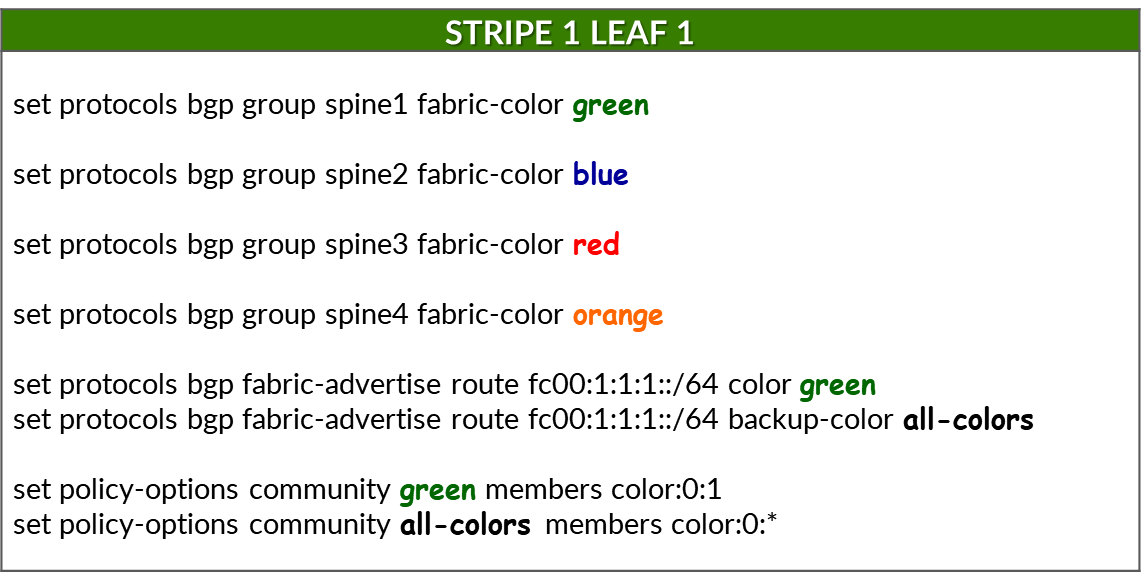
以下命令为每个 BGP 对等体(即,在叶节点上配置时的每个主干节点)分配交换矩阵颜色:


要通过首选路径播发前缀 (fc00:1:1:1:/64) 以到达该前缀,并为前缀分配绿色,请使用以下命令:
确保配置了正确的前缀。不会生成提交错误,但不会播发前缀。
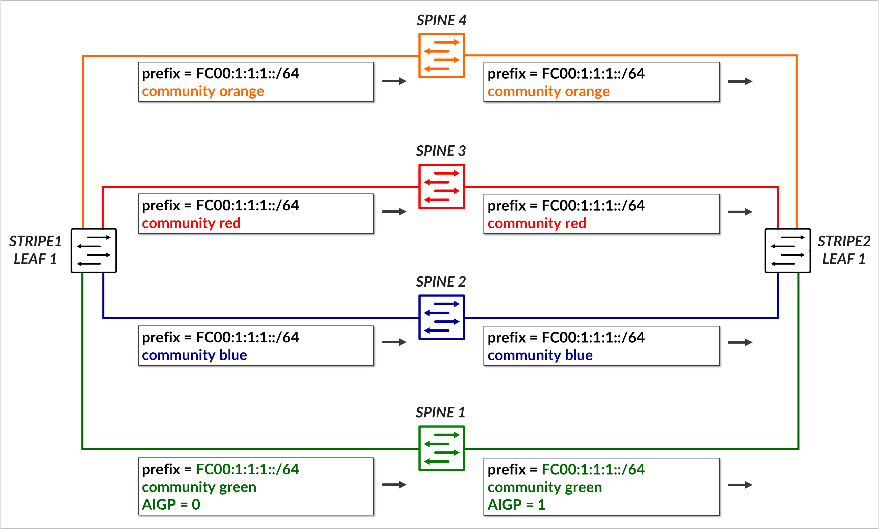
这会导致前缀 fc00:1:1:1::/64 播发至 主干 1。由于分配给前缀的颜色(绿色)与对等方(主干 1)的颜色匹配,因此路由将使用 社区颜色:0:1 (绿色)进行播发,并包含 AIGP 属性,将其标记为首选路径。
要在所有其他路径(备份路径)上播发同一前缀,请使用以下命令:

这会导致将前缀播发到 所有剩余的主干,每个主干都使用其相应的颜色社区(蓝色、红色、橙色)进行标记。由于分配给前缀的颜色(绿色)与对等方(主干 2、3 和 4)的颜色不匹配,因此这些播发不 包含 AIGP 属性,从而确保其偏好程度较低。
下表总结了前缀 fc00:1:1:1::/64 的路由通告:
表:前缀 fc00:1:1:1::/64 的社区和 AIGP
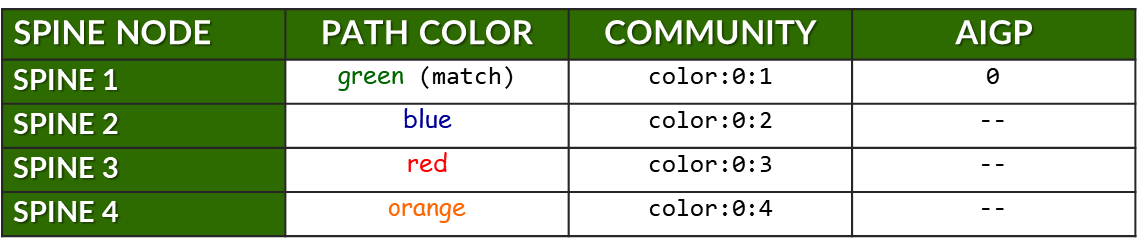
前面的示例展示了如何将单个前缀播发到所有主干节点,其中只有一个主干接收带有 AIGP 属性的路由,以指示首选路径。
下表通过汇总 stripe1-leaf1 (4) 向所有主干节点播发的所有前缀来扩展这一点。对于每个前缀,它显示:
- 为预期路径分配的颜色。
- 用于标记的 BGP 社区 (color:0:X)。
- 是否包含 AIGP 属性(仅适用于首选路径)。
表:每个主干、每个前缀的社区和 AIGP 示例

示例:
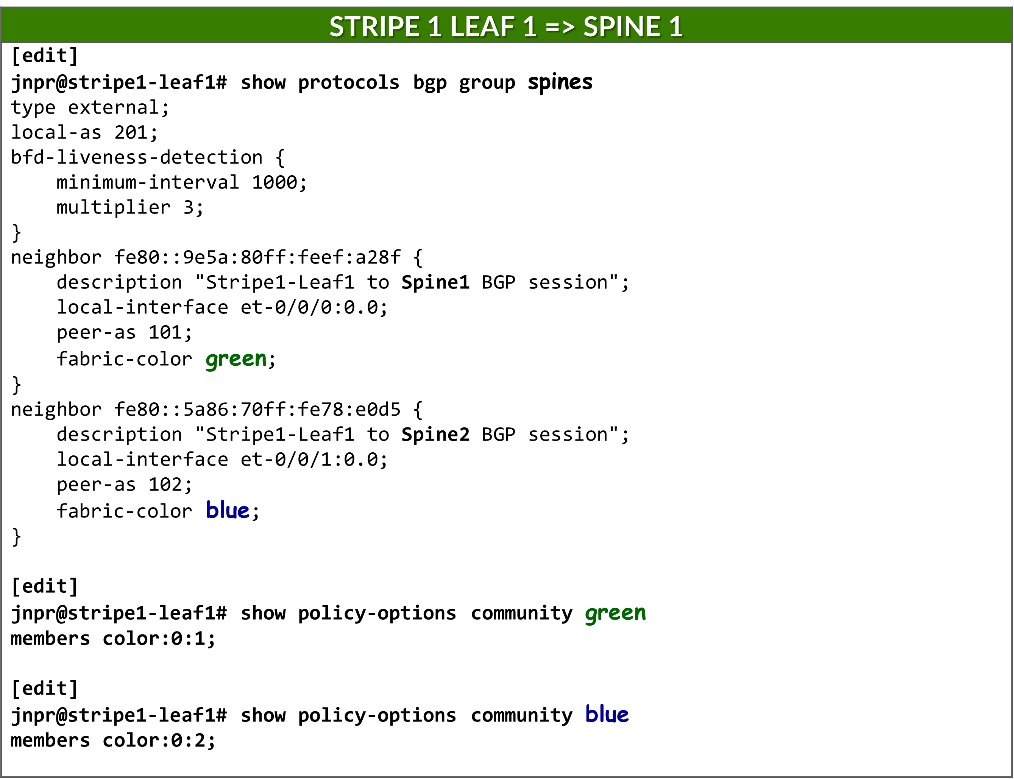
静态配置邻接方时,可以直接在 neighbor 语句下配置 fabric-color,因此可以有一个 BGP 组。
防止路由重新播发到主干
要将叶节点配置为仅播发与 IRB 接口关联的前缀,并防止 从一个主干获知 的路由播发到 另一个主干对等方,导出 策略 将应用于所有 BGP 组。这可确保叶设备充当主干到主干流量的 非中转节点 ,并在交换矩阵中保持正确的路由。
set policy-options policy-statement local term 1 from protocol direct
set policy-options policy-statement local term 1 from prefix-list-filter local orlonger
set policy-options policy-statement local term 1 then community add local
set policy-options policy-statement local term 1 then accept
set policy-options policy-statement local term 2 then reject
set policy-options prefix-list local fc00::/16
set policy-options prefix-list local fd00::/16
set policy-options community local members 201:201
此策略匹配前缀长度为 16 位或更长的任何路由匹配前缀 fc00::/16 和 fd00::16,并在导出期间拒绝它。要播发的任何其他 IPv6 地址都可以添加到 本地前缀列表中。
如果不使用此策略,叶节点会将从一个主干节点获知的前缀重新播发给所有其他节点,这可能会导致不必要的路由行为,以及不同路径之间的流量分配效率低下。
jnpr@stripe1-leaf1> show route advertising-protocol bgp fe80::5a86:70ff:fe78:e0d5%et-0/0/1:0.0
inet6.0: 49 destinations, 85 routes (49 active, 0 holddown, 0 hidden)
Restart Complete
  Prefix                  Nexthop              MED     Lclpref    AS path
* fc00:1:1:1::/64         Self                                    I
* fc00:1:1:2::/64         Self                                    I
* fc00:1:1:3::/64         Self                                    I
* fc00:1:1:4::/64         Self                                    I
* fc00:1:2:1::/64         Self                                    101 202 I
* fc00:1:2:3::/64         Self                                    103 202 I
* fc00:1:2:4::/64         Self                                    104 202 I
* fc00:1:3:1::/64         Self                                    101 203 I
* fc00:1:3:3::/64         Self                                    103 203 I
* fc00:1:3:4::/64         Self                                    104 203 I
* fc00:1:4:1::/64         Self                                    101 204 I
* fc00:1:4:3::/64         Self                                    103 204 I
* fc00:1:4:4::/64         Self                                    104 204 I

[edit]
jnpr@stripe1-leaf1# set protocols bgp export local

[edit]
jnpr@stripe1-leaf1# commit
commit complete

jnpr@stripe1-leaf1> show route advertising-protocol bgp fe80::5a86:70ff:fe78:e0d5%et-0/0/1:0.0
inet6.0: 49 destinations, 85 routes (49 active, 0 holddown, 0 hidden)
Restart Complete
  Prefix                  Nexthop              MED     Lclpref    AS path
* fc00:1:1:1::/64         Self                                    I
* fc00:1:1:2::/64         Self                                    I
* fc00:1:1:3::/64         Self                                    I
* fc00:1:1:4::/64         Self                                    I
Additionally, routes are tagged with community local, which the spine nodes use to prevent
此外,路由使用社区本地标记,主干节点使用该社区来防止将广告前缀传回叶节点。
[edit]
jnpr@spine1# show policy-options policy-statement leaf1 | display set
set policy-options policy-statement leaf1 term 1 from community leaf1
set policy-options policy-statement leaf1 term 1 then reject

jnpr@spine1# show policy-options community leaf1 | display set
set policy-options community leaf1 members 201:201
BGP 会话自动发现和 DPF 验证
您可以使用以下 show bgp summary 命令检查是否已建立会话:
jnpr@stripe1-leaf1> show bgp summary
fe80::5a86:70ff:fe78:e0d5%et-0/0/1:0.0  	102         57         50       0       1       21:21 	Establ
  inet6.0: 0/0/0/0
fe80::5a86:70ff:fe79:3d5%et-0/0/2:0.0 	104         56         50       0       1       21:21 	Establ
  inet6.0: 0/0/0/0
fe80::5a86:70ff:fe7b:ced5%et-0/0/3:0.0 	103         56         50       0       1       21:21 	Establ
  inet6.0: 0/0/0/0
fe80::9e5a:80ff:feef:a28f%et-0/0/0:0.0    	101         24         18       0       2        6:55 	Establ
  inet6.0: 0/0/0/0
请注意,当使用链路本地地址建立 BGP 会话时,Junos 会显示邻接方地址以及接口范围(例如 fe80::5a86:70ff:fe78:e0d5%et-0/0/1:0.0)。范围标识符(% 后面的部分)是必需的,因为多个接口上可能存在相同的链路本地地址 (fe80::/10)。设备必须知道使用 哪个接口 向该邻接方发送数据包。因此,在对等方发现完成后,输出将 show bgp summary 使用以下格式列出邻接方: IPv6_link-local_address%interface-name
您可以使用show bgp summary autodiscovered 快速检查已发现邻接方的状态,如以下示例所示:
jnpr@stripe1-leaf1> show bgp summary autodiscovered
Threading mode: BGP I/O
Default eBGP mode: advertise - accept, receive - accept
Groups: 4 Peers: 4 Down peers: 0
Auto-discovered peers: 4
Table          Tot Paths  Act Paths Suppressed    History Damp State    Pending
inet6.0
                      32          8          0          0          0          0
Peer                     AS      InPkt     OutPkt    OutQ   Flaps Last Up/Dwn State|#Active/Received/Accepted/Damped...
fe80::5a86:70ff:fe78:e0d5%et-0/0/1:0.0         102        176        179       0       0     1:17:12 Establ
  inet6.0: 3/12/12/0
fe80::5a86:70ff:fe79:3d5%et-0/0/3:0.0         104        528        528       0       2     3:55:54 Establ
  inet6.0: 3/12/12/0
fe80::5a86:70ff:fe7b:ced5%et-0/0/2:0.0         103        528        528       0       2     3:55:54 Establ
  inet6.0: 3/12/12/0
fe80::9e5a:80ff:feef:a28f%et-0/0/0:0.0         101        536        536       0       0     4:00:02 Establ
  inet6.0: 3/12/12/0
您可以根据特定邻接方的交换矩阵颜色验证其状态:
jnpr@stripe1-leaf1> show bgp summary fabric-color green
Threading mode: BGP I/O
Default eBGP mode: advertise - accept, receive - accept
Groups: 4 Peers: 3 Down peers: 0
Auto-discovered peers: 3
Table          Tot Paths  Act Paths Suppressed    History Damp State    Pending
inet6.0
                       0          0          0          0          0          0
Peer                     AS      InPkt     OutPkt    OutQ   Flaps Last Up/Dwn State|#Active/Received/Accepted/Damped...
fe80::9e5a:80ff:feef:a28f%et-0/0/0:0.0 101  301        300       0       0     2:14:08 Establ
  inet6.0: 3/12/12/0

jnpr@stripe1-leaf1> show bgp summary fabric-color blue
Threading mode: BGP I/O
Default eBGP mode: advertise - accept, receive - accept
Groups: 4 Peers: 4 Down peers: 0
Auto-discovered peers: 4
Table          Tot Paths  Act Paths Suppressed    History Damp State    Pending
inet6.0
                      32          8          0          0          0          0
Peer                     AS      InPkt     OutPkt    OutQ   Flaps Last Up/Dwn State|#Active/Received/Accepted/Damped...
fe80::5a86:70ff:fe78:e0d5%et-0/0/1:0.0         102        174        177       0       0     1:16:45 Establ
  inet6.0: 3/12/12/0

jnpr@stripe1-leaf1> show bgp summary fabric-color red
Threading mode: BGP I/O
Default eBGP mode: advertise - accept, receive - accept
Groups: 4 Peers: 3 Down peers: 0
Auto-discovered peers: 3
Table          Tot Paths  Act Paths Suppressed    History Damp State    Pending
inet6.0
                       0          0          0          0          0          0
Peer                     AS      InPkt     OutPkt    OutQ   Flaps Last Up/Dwn State|#Active/Received/Accepted/Damped...
fe80::5a86:70ff:fe7b:ced5%et-0/0/2:0.0 103  292        291       0       2     2:10:08 Establ
  inet6.0: 3/12/12/0

jnpr@stripe1-leaf1> show bgp summary fabric-color orange
Threading mode: BGP I/O
Default eBGP mode: advertise - accept, receive - accept
Groups: 4 Peers: 3 Down peers: 0
Auto-discovered peers: 3
Table          Tot Paths  Act Paths Suppressed    History Damp State    Pending
inet6.0
                       0          0          0          0          0          0
Peer                     AS      InPkt     OutPkt    OutQ   Flaps Last Up/Dwn State|#Active/Received/Accepted/Damped...
fe80::5a86:70ff:fe79:3d5%et-0/0/3:0.0 104  292        291       0       2     2:10:11 Establ
  inet6.0: 3/12/12/0

jnpr@stripe1-leaf1> show bgp neighbor auto-discovered
Peer: fe80::5a86:70ff:fe78:e0d5%et-0/0/1:0.0+179 AS 102 Local: fe80::9e5a:80ff:fec1:ae08%et-0/0/1:0.0+38208 AS 201
  Group: spine2                Routing-Instance: master
  Forwarding routing-instance: master
  Type: External    State: Established    Flags: <Sync PeerAsList AutoDiscoveredNdp>
  Last State: OpenConfirm   Last Event: RecvKeepAlive
  Last Error: None
  Export: [ local ]
  Options: <GracefulRestart AddressFamily Multipath LocalAS Refresh>
  Options: <BfdEnabled>
  Options: <GracefulShutdownRcv MultipathAllowProtection>
  Address families configured: inet6-unicast
  Holdtime: 90 Preference: 170
  Graceful Shutdown Receiver local-preference: 0
  Local AS: 201 Local System AS: 201
  Number of flaps: 0
  Receive eBGP Origin Validation community: Reject
  Peer ID: 10.0.0.2        Local ID: 10.0.1.1          Active Holdtime: 90
  Keepalive Interval: 30         Group index: 5    Peer index: 0    SNMP index: 33
  I/O Session Thread: bgpio-0 State: Enabled
  BFD: enabled, up
  Local Interface: et-0/0/1:0.0
  Fabric color: blue [color:0:2 ]
  NLRI for restart configured on peer: inet6-unicast
  NLRI advertised by peer: inet6-unicast
  NLRI for this session: inet6-unicast
  Peer supports Refresh capability (2)
  Restart time configured on the peer: 120
  Stale routes from peer are kept for: 300
  Restart time requested by this peer: 120
  Restart flag received from the peer: Notification
  NLRI that peer supports restart for: inet6-unicast
  NLRI peer can save forwarding state: inet6-unicast
  NLRI that peer saved forwarding for: inet6-unicast
  NLRI that restart is negotiated for: inet6-unicast
  NLRI of received end-of-rib markers: inet6-unicast
  NLRI of all end-of-rib markers sent: inet6-unicast
  Peer does not support LLGR Restarter functionality
  Peer supports 4 byte AS extension (peer-as 102)
  Peer does not support Addpath
  NLRI(s) enabled for color nexthop resolution: inet6-unicast
  Table inet6.0 Bit: 30003
    RIB State: BGP restart is complete
    Send state: in sync
    Active prefixes:              3
    Received prefixes:            12
    Accepted prefixes:            12
    Suppressed due to damping:    0
    Advertised prefixes:          4
  Last traffic (seconds): Received 1    Sent 3    Checked 10485
  Input messages:  Total 394    Updates 11      Refreshes 0     Octets 8605
  Output messages: Total 398    Updates 14      Refreshes 0     Octets 8874
  Output Queue[2]: 0            (inet6.0, inet6-unicast)
---more---

jnpr@stripe1-leaf1> show bgp neighbor fabric-color green
Peer: fe80::9e5a:80ff:feef:a28f%et-0/0/0:0.0+179 AS 101 Local: fe80::9e5a:80ff:fec1:ae00%et-0/0/0:0.0+49626 AS 201
  Group: spine1                Routing-Instance: master
  Forwarding routing-instance: master
  Type: External    State: Established    Flags: <Sync PeerAsList AutoDiscoveredNdp>
  Last State: OpenConfirm   Last Event: RecvKeepAlive
  Last Error: None
  Options: <GracefulRestart AddressFamily Multipath LocalAS Refresh>
  Options: <BfdEnabled>
  Options: <GracefulShutdownRcv MultipathAllowProtection>
  Address families configured: inet6-unicast
  Holdtime: 90 Preference: 170
  Graceful Shutdown Receiver local-preference: 0
  Local AS: 201 Local System AS: 201
  Number of flaps: 0
  Receive eBGP Origin Validation community: Reject
  Peer ID: 10.0.0.1        Local ID: 10.0.1.1          Active Holdtime: 90
  Keepalive Interval: 30         Group index: 4    Peer index: 0    SNMP index: 30
  I/O Session Thread: bgpio-0 State: Enabled
  BFD: enabled, up
  Local Interface: et-0/0/0:0.0
  Fabric color: green [color:0:1 ]
  NLRI for restart configured on peer: inet6-unicast
  NLRI advertised by peer: inet6-unicast
  NLRI for this session: inet6-unicast
  Peer supports Refresh capability (2)
  Restart time configured on the peer: 120
  Stale routes from peer are kept for: 300
  Restart time requested by this peer: 120
  Restart flag received from the peer: Notification
  NLRI that peer supports restart for: inet6-unicast
  NLRI peer can save forwarding state: inet6-unicast
  NLRI that peer saved forwarding for: inet6-unicast
  NLRI that restart is negotiated for: inet6-unicast
  NLRI of received end-of-rib markers: inet6-unicast
  NLRI of all end-of-rib markers sent: inet6-unicast
  Peer does not support LLGR Restarter functionality
  Peer supports 4 byte AS extension (peer-as 101)
  Peer does not support Addpath
  NLRI(s) enabled for color nexthop resolution: inet6-unicast
  Table inet6.0 Bit: 30001
    RIB State: BGP restart is complete
    Send state: in sync
    Active prefixes:              0
    Received prefixes:            0
    Accepted prefixes:            0
    Suppressed due to damping:    0
    Advertised prefixes:          4
  Last traffic (seconds): Received 14   Sent 2    Checked 7803
  Input messages:  Total 292    Updates 1       Refreshes 0     Octets 5607
  Output messages: Total 291    Updates 3       Refreshes 0     Octets 5797
  Output Queue[2]: 0            (inet6.0, inet6-unicast)

jnpr@stripe1-leaf1> show bfd session
                                                  Detect   Transmit
Address                  State     Interface      Time     Interval  Multiplier
fe80::9e5a:80ff:feef:a28f Up       et-0/0/0:0.0   3.000     1.000        3

1 sessions, 1 clients
Cumulative transmit rate 1.0 pps, cumulative receive rate 1.0 pps
要验证前缀是否正确播发给所有对等方,请使用 show route advertising-protocol bgp <peer-address>。
jnpr@stripe1-leaf1> show route advertising-protocol bgp fe80::9e5a:80ff:feef:a28f%et-0/0/0:0.0 extensive
在本例中,fe80::9e5a:80ff:feef:a28f%et-0/0/0:0.0 是主干 1 的地址。
因此,所有前缀都使用社区颜色:0:1(绿色)进行播发。fc00:1:1:1::/64 也使用 AIGP 属性进行播发,因为它也配置了相同的颜色。同一前缀也会播发至其他主干,但没有 AIGP 值。fe80::5a86:70ff:fe78:e0d5%et-0/0/1:0.0 是主干 2 的地址。
fe80::5a86:70ff:fe7b:ced5%et-0/0/2:0.0 是主干 3 的地址。
fe80::5a86:70ff:fe79:3d5%et-0/0/3:0.0 是主干 4 的地址。
jnpr@stripe1-leaf1> show route fc00:1:1:1::/64 extensive advertising-protocol bgp fe80::9e5a:80ff:feef:a28f%et-0/0/0:0.0
inet6.0: 49 destinations, 85 routes (49 active, 0 holddown, 0 hidden)
Restart Complete
* fc00:1:1:1::/64 (1 entry, 1 announced)
 BGP group spine1 type External
     Nexthop: Self
     AS path: [201] I
     Communities: color:0:1
     AIGP: 0

jnpr@stripe1-leaf1> show route fc00:1:1:1::/64 extensive advertising-protocol bgp fe80::5a86:70ff:fe78:e0d5%et-0/0/1:0.0
inet6.0: 49 destinations, 85 routes (49 active, 0 holddown, 0 hidden)
Restart Complete
* fc00:1:1:1::/64 (1 entry, 1 announced)
 BGP group spine2 type External
     Nexthop: Self
     AS path: [201] I
     Communities: color:0:2

jnpr@stripe1-leaf1> show route fc00:1:1:1::/64 extensive advertising-protocol bgp fe80::5a86:70ff:fe7b:ced5%et-0/0/2:0.0
inet6.0: 49 destinations, 85 routes (49 active, 0 holddown, 0 hidden)
Restart Complete
* fc00:1:1:1::/64 (1 entry, 1 announced)
 BGP group spine3 type External
     Nexthop: Self
     AS path: [201] I
     Communities: color:0:3

jnpr@stripe1-leaf1> show route fc00:1:1:1::/64 extensive advertising-protocol bgp fe80::5a86:70ff:fe79:3d5%et-0/0/3:0.0
inet6.0: 49 destinations, 85 routes (49 active, 0 holddown, 0 hidden)
Restart Complete
* fc00:1:1:1::/64 (1 entry, 1 announced)
 BGP group spine4 type External
     Nexthop: Self
     AS path: [201] I
     Communities: color:0:4
瞻博网络 NCCL 插件
瞻博网络 NCCL 网络插件为每个 RDMA 接口上的每个队列对 (QP) 分配一个唯一的 IPv6 地址。这使得 QP 流能够使用不同的源地址和目标地址,从而允许交换矩阵沿不同的路径进行转发。为了支持此行为,必须安装插件及其支持库,并且必须为服务器配置额外的路由信息,以确保每个 IPv6 地址从服务器到叶节点的正确转发,反之亦然。
在服务器上安装插件
瞻博网络 NCCL 网络插件以压缩焦油球 (juniper-ib_2.23.4-1.tar.gz) 的形式分发,可以在...
要安装,请将 tar-ball 解压到根目录:
$ tar -xzvf juniper-ib_0.0.5.tar.gz -C /
| 组件 | 描述/用法 |
|---|---|
| /usr/local/lib/libnccl-net-juniper-ib.so | NCCL 网络插件共享对象 |
| /usr/local/bin/jnpr-fabric-topo-gen | 用于生成交换矩阵拓扑 json 文件的脚本 |
| /usr/local/bin/jnpr-AI-LB-dpf-config-gen | 用于生成 AI-LB DPF 配置的脚本 |
| /usr/local/bin/jnpr-nccl-net-setup | 用于配置 GPU 服务器网络设置的工具 |
| /usr/local/bin/gids.py | 用于查找 GID 的辅助模块 |
| /usr/local/bin/jnpr-rdma-ping | RDMA 连接测试工具 |
| /usr/local/bin/jnpr-find-gids | 用于查找 GID 的工具。 |
在 GPU 服务器上配置路由参数
在 GPU 服务器上,分配给接口的每个 IPv6 地址都必须与 单独的路由表相关联,其中包含通过正确的默认网关转发流量的相应 路由 。相反,必须创建 IP 规则 ,以便将发往每个特定 IPv6 地址的传入流量引导至其相应的路由表。
因此,在配置服务器以使用用于 RDMA 负载平衡 (RLB) 的 NCCL 插件正常运行时,您必须创建多个路由表,这些路由表数等于为每个接口分配的 IPv6 地址数(基于上行链路数,如前所述)乘以 NIC 数。
在 图 6 所示的示例中,为每个接口分配了四个 IPv6 地址,因此总共有 32 个路由表。每个路由表都必须包含默认路由和相应的前缀路由。此外,还必须为每个路由表添加一个 IP 规则。
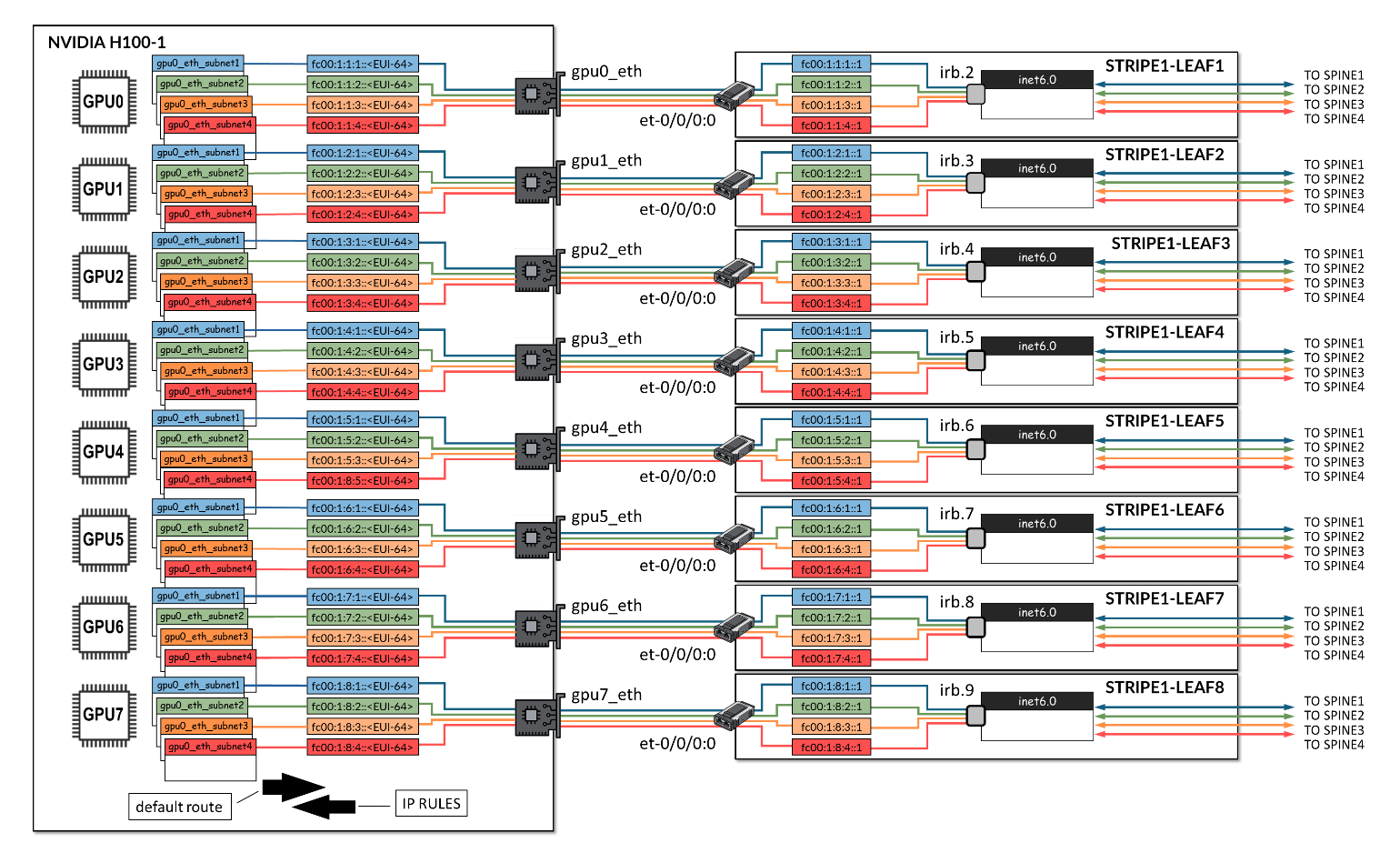 的示例
的示例
jnpr-nccl-net-setup 实用程序实时运行选项可用于在每台服务器上自动创建必要的表、路由和 IP 规则。
jnpr@H100-01:/home/ijohnson/2.23.4-1/usr/local/bin$ jnpr-nccl-net-setup -h

Usage: jnpr-nccl-net-setup <subcommand> [--live-run] [--help | -h]

Subcommands:
    dual-stack    Enable dual stack (ipv4/ipv6) and accept router advertisements
    clos          Configure routes and rules for CLOS network
    rail          Configure routes and rules for Rail optimized network
    auto          Automatically configure routes and rules based on current interface IPs

Options:
    --live-run    Forces the script to do changes in the host, script defaults to dry-run
    --help, -h    Show this help message and exit

Examples:
    export NCCL_SOCKET_IFNAME="gpu0_eth,gpu1_eth,gpu2_eth,gpu3_eth,gpu4_eth,gpu5_eth,gpu6_eth,gpu7_eth"
    python jnpr-nccl-net-setup dual-stack

    export NCCL_SOCKET_IFNAME="gpu0_eth,gpu1_eth,gpu2_eth,gpu3_eth,gpu4_eth,gpu5_eth,gpu6_eth,gpu7_eth"
    export SUBNETS_ALL="fd00:1:1::/64,fd00:1:2::/64,fd00:1:3::/64,fd00:1:4::/64,fd00:1:5::/64,fd00:1:6::/64,fd00:1:7::/64,fd00:1:8::/64"
    python jnpr-nccl-net-setup clos

    export NCCL_SOCKET_IFNAME="eth0,eth1"
    export SUBNETS_ETH0="192.168.1.0/24,192.168.2.0/24"
    export SUBNETS_ETH1="10.0.0.0/24,10.0.1.0/24"
    python jnpr-nccl-net-setup rail

    export NCCL_SOCKET_IFNAME="gpu0_eth,gpu1_eth,gpu2_eth,gpu3_eth,gpu4_eth,gpu5_eth,gpu6_eth,gpu7_eth"
    export NCCL_IB_ADDR_FAMILY="AF_INET"  # or export NCCL_IB_ADDR_FAMILY="AF_INET6"
    python jnpr-nccl-net-setup auto
该命令需要导出NCCL套接字接口和地址族,如下例所示:
sudo
NCCL_SOCKET_IFNAME="gpu0_eth,gpu1_eth,gpu2_eth,gpu3_eth,gpu4_eth,
gpu5_eth,gpu6_eth,gpu7_eth"
NCCL_IB_ADDR_FAMILY="AF_INET6"jnpr-nccl-net-setup auto
--live-run
如果您需要手动创建路由表、路由和规则,请按照以下步骤手动配置所有 GPU 服务器上的表、路由和规则(如果需要):
- 创建路由表
在每台服务器上的 /etc/iproute2/rt_tables.d 下创建文件 jnpr_nccl_net.conf ,并按行添加每个表 ID 和名称,如示例所示。
示例:
表 8:路由表示例 条纹 1 / 条纹 2 接口 ID 表 gpu0_eth 10000 gpu0_subnet1 10001 gpu0_subnet2 10002 gpu0_subnet3 10003 gpu0_subnet4 gpu1_eth 10004 gpu1_subnet1 10005 gpu1_subnet2 10006 gpu1_subnet3 10007 gpu1_subnet4 gpu2_eth 10008 gpu2_subnet1 10009 gpu2_subnet2 10010 gpu2_subnet3 10011 gpu2_subnet4 gpu3_eth 10012 gpu3_subnet1 10013 gpu3_subnet2 10014 gpu3_subnet3 10015 gpu3_subnet4 gpu4_eth 10016 gpu4_subnet1 10017 gpu4_subnet2 10018 gpu4_subnet3 10019 gpu4_subnet4 gpu5_eth 10020 gpu5_subnet1 10021 gpu5_subnet2 10022 gpu5_subnet3 10023 gpu5_subnet4 gpu6_eth 10024 gpu6_subnet1 10025 gpu6_subnet2 10026 gpu6_subnet3 10027 gpu6_subnet4 gpu7_eth 10028 gpu7_subnet1 10029 gpu7_subnet2 10030 gpu7_subnet3 10031 gpu7_subnet4 user@H100-01:/etc/iproute2/rt_tables.d$ more jnpr_nccl_net.conf 10000 gpu0_subnet1 10001 gpu0_subnet2 10002 gpu0_subnet3 10003 gpu0_subnet4 10004 gpu1_subnet1 10005 gpu1_subnet2 10006 gpu1_subnet3 10007 gpu1_subnet4 10008 gpu2_subnet1 10009 gpu2_subnet2 10010 gpu2_subnet3 10011 gpu2_subnet4 10012 gpu3_subnet1 10013 gpu3_subnet2 10014 gpu3_subnet3 10015 gpu3_subnet4 10016 gpu4_subnet1 10017 gpu4_subnet2 10018 gpu4_subnet3 10019 gpu4_subnet4 10020 gpu5_subnet1 10021 gpu5_subnet2 10022 gpu5_subnet3 10023 gpu5_subnet4 10024 gpu6_subnet1 10025 gpu6_subnet2 10026 gpu6_subnet3 10027 gpu6_subnet4 10028 gpu7_subnet1 10029 gpu7_subnet2 10030 gpu7_subnet3 10031 gpu7_subnet4
- 验证是否已创建表。
user@H100-01:/$ cat /etc/iproute2/rt_tables.d/ jnpr_nccl_net.conf
10000 gpu0_subnet1
10001 gpu0_subnet2
10002 gpu0_subnet3
10003 gpu0_subnet4
10004 gpu1_subnet1
10005 gpu1_subnet2
10006 gpu1_subnet3
10007 gpu1_subnet4
10008 gpu2_subnet1
10009 gpu2_subnet2
10010 gpu2_subnet3
10011 gpu2_subnet4
10012 gpu3_subnet1
10013 gpu3_subnet2
10014 gpu3_subnet3
10015 gpu3_subnet4
10016 gpu4_subnet1
10017 gpu4_subnet2
10018 gpu4_subnet3
10019 gpu4_subnet4
10020 gpu5_subnet1
10021 gpu5_subnet2
10022 gpu5_subnet3
10023 gpu5_subnet4
10024 gpu6_subnet1
10025 gpu6_subnet2
10026 gpu6_subnet3
10027 gpu6_subnet4
10028 gpu7_subnet1
10029 gpu7_subnet2
10030 gpu7_subnet3
10031 gpu7_subnet4
- 在每个路由表上添加 IPv6 路由。
使用以下命令在每个路由表上配置默认路由和前缀路由,如示例中所示。
ip -6 route add <PREFIX> dev <INTERFACE> table <TABLE>
ip -6 route add default via <DEFAULT GATEWAY> dev <INTERFACE> table <TABLE>
如果需要在创建所需路由之前删除所有路由,可以运行:
sudo ip -6 rule show | grep -E 'from <prefix-expression>' | sed 's/^[0-9]*: *//' | while read -r rule; do
sudo ip -6 rule del $rule
done
示例:
表 9:每个接口有 4 个 IPv6 地址的路由示例 条纹 条纹 2 <接口 ><表 ><前缀 ><默认网关 ><表 ><前缀 ><默认网关 >gpu0_eth gpu0_subnet1 fc00:1:1:1:/64 fc00:1:1:1::1
(枝叶 1,IRB.2)
gpu0_subnet1 fc00:2:1:1::/64 fc00:2:1:1::1
(叶 1 IRB.10)
gpu0_subnet2 fc00:1:1:2::/64 fc00:1:1:2::1
(枝叶 1,IRB.2)
gpu0_subnet2 fc00:2:1:2::/64 fc00:2:1:2::1
(叶 1 IRB.10)
gpu0_subnet3 fc00:1:1:3::/64 fc00:1:1:3::1
(枝叶 1,IRB.2)
gpu0_subnet3 fc00:2:1:3::/64 fc00:2:1:3::1
(叶 1 IRB.10)
gpu0_subnet4 fc00:1:1:4::/64 fc00:1:1:4::1
(枝叶 1,IRB.2)
gpu0_subnet4 fc00:2:1:4::/64 fc00:2:1:4::1
(叶 1 IRB.10)
gpu1_eth gpu1_subnet1 fc00:1:2:1::/64 fc00:1:2:1::1
(叶 2 IRB.3)
gpu1_subnet1 fc00:2:2:1::/64 fc00:2:2:1::1
(第 2 页 IRB.11)
gpu1_subnet2 fc00:1:2:2::/64 fc00:1:2:2::1
(叶 2 IRB.3)
gpu1_subnet2 fc00:2:2:2::/64 fc00:2:2:2::1
(第 2 页 IRB.11)
gpu1_subnet3 fc00:1:2:3::/64 fc00:1:2:3::1
(叶 2 IRB.3)
gpu1_subnet3 fc00:2:2:3::/64 fc00:2:2:3::1
(第 2 页 IRB.11)
gpu1_subnet4 fc00:1:2:4::/64 fc00:1:2:4::1
(叶 2 IRB.3)
gpu1_subnet4 fc00:2:2:4::/64 fc00:2:2:4::1
(第 2 页 IRB.11)
gpu2_eth gpu2_subnet1 fc00:1:3:1::/64 fc00:1:3:1::1
(第 3 页 IRB.4)
gpu2_subnet1 fc00:2:3:1::/64 fc00:2:3:1::1
(第 3 页 IRB.12)
gpu2_subnet2 fc00:1:3:2::/64 fc00:1:3:2::1
(第 3 页 IRB.4)
gpu2_subnet2 fc00:2:3:2::/64 fc00:2:3:2:::1
(第 3 页 IRB.12)
gpu2_subnet3 fc00:1:3:3::/64 fc00:1:3:3::1
(第 3 页 IRB.4)
gpu2_subnet3 fc00:2:3:3::/64 fc00:2:3:3:1
(第 3 页 IRB.12)
gpu2_subnet4 fc00:1:3:4::/64 fc00:1:3:4::1
(枝叶 3 IRB.4
gpu2_subnet4 fc00:2:3:4::/64 fc00:2:3:4::1
(第 3 页 IRB.12)
gpu3_eth gpu3_subnet1 fc00:1:4:1::/64 fc00:1:4:1::1
(第 4 页 IRB.5)
gpu3_subnet1 fc00:2:4:1::/64 fc00:2:4:1::1
(第 4 页 IRB.13)
gpu3_subnet2 fc00:1:4:2::/64 fc00:1:4:2::1
(第 4 页 IRB.5)
gpu3_subnet2 fc00:2:4:2::/64 fc00:2:4:2::1
(第 4 页 IRB.13)
gpu3_subnet3 fc00:1:4:3::/64 fc00:1:4:3::1
(第 4 页 IRB.5)
gpu3_subnet3 fc00:2:4:3::/64 fc00:2:4:3::1
(第 4 页 IRB.13)
gpu3_subnet4 fc00:1:4:4::/64 fc00:1:4:4::1
(枝叶 5 IRB.5)
gpu3_subnet4 fc00:2:4:4::/64 fc00:2:4:4::1
(第 4 页 IRB.13)
gpu4_eth gpu4_subnet1 fc00:1:5:1::/64 fc00:1:5:1::1
(枝叶 5 IRB.6)
gpu4_subnet1 fc00:2:5:1::/64 fc00:2:5:1::1
(第 5 页 IRB.14)
gpu4_subnet2 fc00:1:5:2::/64 fc00:1:5:2::1
(枝叶 5 IRB.6)
gpu4_subnet2 fc00:2:5:2::/64 fc00:2:5:2::1
(第 5 页 IRB.14)
gpu4_subnet3 fc00:1:5:3::/64 fc00:1:5:3::1
(枝叶 5 IRB.6)
gpu4_subnet3 fc00:2:5:3::/64 fc00:2:5:3::1
(第 5 页 IRB.14)
gpu4_subnet4 fc00:1:5:4::/64 fc00:1:5:4::1
(枝叶 5 IRB.6)
gpu4_subnet4 fc00:2:5:4::/64 fc00:2:5:4::1
(第 5 页 IRB.14)
gpu5_eth gpu5_subnet1 fc00:1:6:1::/64 fc00:1:6:1::1
(第 6 页 IRB.7)
gpu5_subnet1 fc00:2:6:1::/64 fc00:2:6:1::1
(第 6 页 IRB.15)
gpu5_subnet2 fc00:1:6:2::/64 fc00:1:6:2::1
(第 6 页 IRB.7)
gpu5_subnet2 fc00:2:6:2::/64 fc00:2:6:2::1
(第 6 页 IRB.15)
gpu5_subnet3 fc00:1:6:3::/64 fc00:1:6:3::1
(第 6 页 IRB.7)
gpu5_subnet3 fc00:2:6:3::/64 fc00:2:6:3::1
(第 6 页 IRB.15)
gpu5_subnet4 fc00:1:6:4::/64 fc00:1:6:4::1
(第 6 页 IRB.7)
gpu5_subnet4 fc00:2:6:4::/64 fc00:2:6:4::1
(第 6 页 IRB.15)
gpu6_eth gpu6_subnet1 fc00:1:7:1::/64 fc00:1:7:1::1
(第 7 页 IRB.8)
gpu6_subnet1 fc00:2:7:1::/64 fc00:2:7:1::1
(第 7 页 IRB.16)
gpu6_subnet2 fc00:1:7:2::/64 fc00:1:7:2::1
(第 7 页 IRB.8)
gpu6_subnet2 fc00:2:7:2::/64 fc00:2:7:2::1
(第 7 页 IRB.16)
gpu6_subnet3 fc00:1:7:3::/64 fc00:1:7:3::1
(第 7 页 IRB.8)
gpu6_subnet3 fc00:2:7:3::/64 fc00:2:7:3::1
(第 7 页 IRB.16)
gpu6_subnet4 fc00:1:7:4::/64 fc00:1:7:4::1
(第 7 页 IRB.8)
gpu6_subnet4 fc00:2:7:4::/64 fc00:2:7:4::1
(第 7 页 IRB.16)
gpu7_eth gpu7_subnet1 fc00:1:8:1::/64 fc00:1:8:1::1
(叶 8 IRB.9)
gpu7_subnet1 fc00:2:8:1::/64 fc00:2:8:1::1
(第 8 页 IRB.17)
gpu7_subnet2 fc00:1:8:2::/64 fc00:1:8:2::1
(叶 8 IRB.9)
gpu7_subnet2 fc00:2:8:2::/64 fc00:2:8:2::1
(第 8 页 IRB.17)
gpu7_subnet3 fc00:1:8:3::/64 fc00:1:8:3::1
(叶 8 IRB.9)
gpu7_subnet3 fc00:2:8:3::/64 fc00:2:8:3::1
(第 8 页 IRB.17)
gpu7_subnet4 fc00:1:8:4::/64 fc00:1:8:4::1
(叶 8 IRB.9)
gpu7_subnet4 fc00:2:8:4::/64 fc00:2:8:4::1
(第 8 页 IRB.17)
Stripe1: user@H100-01:/$ sudo ip -6 route add fc00:1:1:1:::/64 dev gpu0_eth表gpu0_subnet1
user@H100-01:/$ sudo ip -6 route add default via fc00:1:1:1::1 dev gpu0_eth table gpu0_subnet1
user@H100-01:/$ sudo ip -6 route add fc00:1:1:2::/64 dev gpu0_eth table gpu0_subnet2
user@H100-01:/$ sudo ip -6 route add default via fc00:1:1:2::1 dev gpu0_eth table gpu0_subnet2
.
.
.
条带 2:
user@H100-03:/$ sudo ip -6 route add fc00:2:1:1::/64 dev gpu0_eth table gpu0_subnet1
user@H100-03:/$ sudo ip -6 route add default via fc00:2:1:1::1 dev gpu0_eth table gpu0_subnet1
user@H100-03:/$ sudo ip -6 route add fc00:2:1:2::/64 dev gpu0_eth table gpu0_subnet2
user@H100-03:/$ sudo ip -6 route add default via fc00:2:1:2::1 dev gpu0_eth table gpu0_subnet2
  .
  .
  .
- 验证路由创建
user@H100-01:/$ sudo ip -6 route show table 10000
fc00:1:1:1::/64 dev gpu0_eth metric 1024 pref medium
default via fc00:1:1:1::1 dev gpu0_eth metric 1024 pref medium

user@H100-01:/$ sudo ip -6 route show table 10001
fc00:1:1:2::/64 dev gpu0_eth metric 1024 pref medium
default via fc00:1:1:2::1 dev gpu0_eth metric 1024 pref medium

user@H100-01:/$ sudo ip -6 route show table 10002
fc00:1:1:3::/64 dev gpu0_eth metric 1024 pref medium
default via fc00:1:1:3::1 dev gpu0_eth metric 1024 pref medium

user@H100-01:/$ sudo ip -6 route show table 10003
fc00:1:1:4::/64 dev gpu0_eth metric 1024 pref medium
default via fc00:1:1:4::1 dev gpu0_eth metric 1024 pref medium

user@H100-01:/$ sudo ip -6 route show table 10004
fc00:1:2:1::/64 dev gpu1_eth metric 1024 pref medium
default via fc00:1:2:1::1 dev gpu1_eth metric 1024 pref medium

user@H100-01:/$ sudo ip -6 route show table 10005
fc00:1:2:2::/64 dev gpu1_eth metric 1024 pref medium
default via fc00:1:2:2::1 dev gpu1_eth metric 1024 pref medium
.
.
.
user@H100-01:~$ sudo ip -6 route show table 10031
fc00:1:8:4::/64 dev gpu7_eth metric 1024 pref medium
default via fc00:1:8:4::1 dev gpu7_eth metric 1024 pref medium
如果需要移除所有路由,可以运行:
for table in $(seq <first table#> <last-table#); do
  sudo ip -6 route flush table $table
done
示例:
jnpr@H100-03:/etc/iproute2/rt_tables.d$ cat jnpr_nccl_net.conf
1001 gpu0_eth_subnet1
1002 gpu0_eth_subnet2
1003 gpu0_eth_subnet3
---more---
1090 gpu7_eth_subnet10
1091 gpu7_eth_subnet11
1092 gpu7_eth_subnet12

jnpr@H100-03:/etc/iproute2/rt_tables.d$ ip -6 route show table 1010
fc00:2:2:2::/64 dev gpu1_eth metric 1024 pref medium
default via fc00:2:2:2::1 dev gpu1_eth metric 1024 pref medium

jnpr@H100-03:/etc/iproute2/rt_tables.d$ ip -6 route show table 1020
fc00:2:3:4::/64 dev gpu2_eth metric 1024 pref medium
default via fc00:2:3:4::1 dev gpu2_eth metric 1024 pref medium

jnpr@H100-03:/etc/iproute2/rt_tables.d
for table in $(seq <first table#> <last-table#); do
  sudo ip -6 route flush table $table
done
Flush terminated

jnpr@H100-03:/etc/iproute2/rt_tables.d$ ip -6 route show table 1010
jnpr@H100-03:/etc/iproute2/rt_tables.d$ ip -6 route show table 1020
jnpr@H100-03:/etc/iproute2/rt_tables.d$
- 添加路由策略规则。
使用以下命令为每个路由表配置路由策略规则,如示例所示。
sudo ip -6 rule add from <PREFIX> lookup gpu0_<TABLE>
表 10:每个策略规则的表和前缀 条纹 1 、条纹 2 接口 表 前缀 、表 前缀 gpu0_eth gpu0_subnet1 fc00:1:1:1:/64 gpu0_subnet1 fc00:2:1:1::/64 gpu0_subnet2 fc00:1:1:2::/64 gpu0_subnet2 fc00:2:1:2::/64 gpu0_subnet3 fc00:1:1:3::/64 gpu0_subnet3 fc00:2:1:3::/64 gpu0_subnet4 fc00:1:1:4::/64 gpu0_subnet4 fc00:2:1:4::/64 gpu1_eth gpu1_subnet1 fc00:1:2:1::/64 gpu1_subnet1 fc00:2:2:1::/64 gpu1_subnet2 fc00:1:2:2::/64 gpu1_subnet2 fc00:2:2:2::/64 gpu1_subnet3 fc00:1:2:3::/64 gpu1_subnet3 fc00:2:2:3::/64 gpu1_subnet4 fc00:1:2:4::/64 gpu1_subnet4 fc00:2:2:4::/64 gpu2_eth gpu2_subnet1 fc00:1:3:1::/64 gpu2_subnet1 fc00:2:3:1::/64 gpu2_subnet2 fc00:1:3:2::/64 gpu2_subnet2 fc00:2:3:2::/64 gpu2_subnet3 fc00:1:3:3::/64 gpu2_subnet3 fc00:2:3:3::/64 gpu2_subnet4 fc00:1:3:4::/64 gpu2_subnet4 fc00:2:3:4::/64 gpu3_eth gpu3_subnet1 fc00:1:4:1::/64 gpu3_subnet1 fc00:2:4:1::/64 gpu3_subnet2 fc00:1:4:2::/64 gpu3_subnet2 fc00:2:4:2::/64 gpu3_subnet3 fc00:1:4:3::/64 gpu3_subnet3 fc00:2:4:3::/64 gpu3_subnet4 fc00:1:4:4::/64 gpu3_subnet4 fc00:2:4:4::/64 gpu4_eth gpu4_subnet1 fc00:1:5:1::/64 gpu4_subnet1 fc00:2:5:1::/64 gpu4_subnet2 fc00:1:5:2::/64 gpu4_subnet2 fc00:2:5:2::/64 gpu4_subnet3 fc00:1:5:3::/64 gpu4_subnet3 fc00:2:5:3::/64 gpu4_subnet4 fc00:1:5:4::/64 gpu4_subnet4 fc00:2:5:4::/64 gpu5_eth gpu5_subnet1 fc00:1:6:1::/64 gpu5_subnet1 fc00:2:6:1::/64 gpu5_subnet2 fc00:1:6:2::/64 gpu5_subnet2 fc00:2:6:2::/64 gpu5_subnet3 fc00:1:6:3::/64 gpu5_subnet3 fc00:2:6:3::/64 gpu5_subnet4 fc00:1:6:4::/64 gpu5_subnet4 fc00:2:6:4::/64 gpu6_eth gpu6_subnet1 fc00:1:7:1::/64 gpu6_subnet1 fc00:2:7:1::/64 gpu6_subnet2 fc00:1:7:2::/64 gpu6_subnet2 fc00:2:7:2::/64 gpu6_subnet3 fc00:1:7:3::/64 gpu6_subnet3 fc00:2:7:3::/64 gpu6_subnet4 fc00:1:7:4::/64 gpu6_subnet4 fc00:2:7:4::/64 gpu7_eth gpu7_subnet1 fc00:1:8:1::/64 gpu7_subnet1 fc00:2:8:1::/64 gpu7_subnet2 fc00:1:8:2::/64 gpu7_subnet2 fc00:2:8:2::/64 gpu7_subnet3 fc00:1:8:3::/64 gpu7_subnet3 fc00:2:8:3::/64 gpu7_subnet4 fc00:1:8:4::/64 gpu7_subnet4 fc00:2:8:4::/64 示例:
user@H100-01:/$
sudo ip -6 rule add from fc00:1:1:1::/64 lookup gpu0_subnet1
sudo ip -6 rule add from fc00:1:1:2::/64 lookup gpu0_subnet2
sudo ip -6 rule add from fc00:1:1:3::/64 lookup gpu0_subnet3
sudo ip -6 rule add from fc00:1:1:4::/64 lookup gpu0_subnet4

sudo ip -6 rule add from fc00:1:2:1::/64 lookup gpu1_subnet1
sudo ip -6 rule add from fc00:1:2:2::/64 lookup gpu1_subnet2
sudo ip -6 rule add from fc00:1:2:3::/64 lookup gpu1_subnet3
sudo ip -6 rule add from fc00:1:2:4::/64 lookup gpu1_subnet4

sudo ip -6 rule add from fc00:1:3:1::/64 lookup gpu2_subnet1
sudo ip -6 rule add from fc00:1:3:2::/64 lookup gpu2_subnet2
sudo ip -6 rule add from fc00:1:3:3::/64 lookup gpu2_subnet3
sudo ip -6 rule add from fc00:1:3:4::/64 lookup gpu2_subnet4

sudo ip -6 rule add from fc00:1:4:1::/64 lookup gpu3_subnet1
sudo ip -6 rule add from fc00:1:4:2::/64 lookup gpu3_subnet2
sudo ip -6 rule add from fc00:1:4:3::/64 lookup gpu3_subnet3
sudo ip -6 rule add from fc00:1:4:4::/64 lookup gpu3_subnet4

sudo ip -6 rule add from fc00:1:5:1::/64 lookup gpu4_subnet1
sudo ip -6 rule add from fc00:1:5:2::/64 lookup gpu4_subnet2
sudo ip -6 rule add from fc00:1:5:3::/64 lookup gpu4_subnet3
sudo ip -6 rule add from fc00:1:5:4::/64 lookup gpu4_subnet4

sudo ip -6 rule add from fc00:1:6:1::/64 lookup gpu5_subnet1
sudo ip -6 rule add from fc00:1:6:2::/64 lookup gpu5_subnet2
sudo ip -6 rule add from fc00:1:6:3::/64 lookup gpu5_subnet3
sudo ip -6 rule add from fc00:1:6:4::/64 lookup gpu5_subnet4

sudo ip -6 rule add from fc00:1:7:1::/64 lookup gpu6_subnet1
sudo ip -6 rule add from fc00:1:7:2::/64 lookup gpu6_subnet2
sudo ip -6 rule add from fc00:1:7:3::/64 lookup gpu6_subnet3
sudo ip -6 rule add from fc00:1:7:4::/64 lookup gpu6_subnet4

sudo ip -6 rule add from fc00:1:8:1::/64 lookup gpu7_subnet1
sudo ip -6 rule add from fc00:1:8:2::/64 lookup gpu7_subnet2
sudo ip -6 rule add from fc00:1:8:3::/64 lookup gpu7_subnet3
sudo ip -6 rule add from fc00:1:8:4::/64 lookup gpu7_subnet4

user@H100-03:/$
sudo ip -6 rule add from fc00:2:1:1::/64 lookup gpu0_subnet1
sudo ip -6 rule add from fc00:2:1:2::/64 lookup gpu0_subnet2
sudo ip -6 rule add from fc00:2:1:3::/64 lookup gpu0_subnet3
sudo ip -6 rule add from fc00:2:1:4::/64 lookup gpu0_subnet4

sudo ip -6 rule add from fc00:2:2:1::/64 lookup gpu1_subnet1
sudo ip -6 rule add from fc00:2:2:2::/64 lookup gpu1_subnet2
sudo ip -6 rule add from fc00:2:2:3::/64 lookup gpu1_subnet3
sudo ip -6 rule add from fc00:2:2:4::/64 lookup gpu1_subnet4

sudo ip -6 rule add from fc00:2:3:1::/64 lookup gpu2_subnet1
sudo ip -6 rule add from fc00:2:3:2::/64 lookup gpu2_subnet2
sudo ip -6 rule add from fc00:2:3:3::/64 lookup gpu2_subnet3
sudo ip -6 rule add from fc00:2:3:4::/64 lookup gpu2_subnet4

sudo ip -6 rule add from fc00:2:4:1::/64 lookup gpu3_subnet1
sudo ip -6 rule add from fc00:2:4:2::/64 lookup gpu3_subnet2
sudo ip -6 rule add from fc00:2:4:3::/64 lookup gpu3_subnet3
sudo ip -6 rule add from fc00:2:4:4::/64 lookup gpu3_subnet4

sudo ip -6 rule add from fc00:2:5:1::/64 lookup gpu4_subnet1
sudo ip -6 rule add from fc00:2:5:2::/64 lookup gpu4_subnet2
sudo ip -6 rule add from fc00:2:5:3::/64 lookup gpu4_subnet3
sudo ip -6 rule add from fc00:2:5:4::/64 lookup gpu4_subnet4

sudo ip -6 rule add from fc00:2:6:1::/64 lookup gpu5_subnet1
sudo ip -6 rule add from fc00:2:6:2::/64 lookup gpu5_subnet2
sudo ip -6 rule add from fc00:2:6:3::/64 lookup gpu5_subnet3
sudo ip -6 rule add from fc00:2:6:4::/64 lookup gpu5_subnet4

sudo ip -6 rule add from fc00:2:7:1::/64 lookup gpu6_subnet1
sudo ip -6 rule add from fc00:2:7:2::/64 lookup gpu6_subnet2
sudo ip -6 rule add from fc00:2:7:3::/64 lookup gpu6_subnet3
sudo ip -6 rule add from fc00:2:7:4::/64 lookup gpu6_subnet4

sudo ip -6 rule add from fc00:2:8:1::/64 lookup gpu7_subnet1
sudo ip -6 rule add from fc00:2:8:2::/64 lookup gpu7_subnet2
sudo ip -6 rule add from fc00:2:8:3::/64 lookup gpu7_subnet3
sudo ip -6 rule add from fc00:2:8:4::/64 lookup gpu7_subnet4
- 验证规则创建:
user@H100-01:/$ ip -6 rule show
0:      from all lookup local
0:      from fc00:1:1:1::/64 lookup gpu0_subnet1
0:      from fc00:1:1:2::/64 lookup gpu0_subnet2
0:      from fc00:1:1:3::/64 lookup gpu0_subnet3
0:      from fc00:1:1:4::/64 lookup gpu0_subnet4
0:      from fc00:1:2:1::/64 lookup gpu1_subnet1
0:      from fc00:1:2:2::/64 lookup gpu1_subnet2
0:      from fc00:1:2:3::/64 lookup gpu1_subnet3
0:      from fc00:1:2:4::/64 lookup gpu1_subnet4
0:      from fc00:1:3:1::/64 lookup gpu2_subnet1
0:      from fc00:1:3:2::/64 lookup gpu2_subnet2
0:      from fc00:1:3:3::/64 lookup gpu2_subnet3
0:      from fc00:1:3:4::/64 lookup gpu2_subnet4
0:      from fc00:1:4:1::/64 lookup gpu3_subnet1
0:      from fc00:1:4:2::/64 lookup gpu3_subnet2
0:      from fc00:1:4:3::/64 lookup gpu3_subnet3
0:      from fc00:1:4:4::/64 lookup gpu3_subnet4
0:      from fc00:1:5:1::/64 lookup gpu4_subnet1
0:      from fc00:1:5:2::/64 lookup gpu4_subnet2
0:      from fc00:1:5:3::/64 lookup gpu4_subnet3
0:      from fc00:1:5:4::/64 lookup gpu4_subnet4
0:      from fc00:1:6:1::/64 lookup gpu5_subnet1
0:      from fc00:1:6:2::/64 lookup gpu5_subnet2
0:      from fc00:1:6:3::/64 lookup gpu5_subnet3
0:      from fc00:1:6:4::/64 lookup gpu5_subnet4
0:      from fc00:1:7:1::/64 lookup gpu6_subnet1
0:      from fc00:1:7:2::/64 lookup gpu6_subnet2
0:      from fc00:1:7:3::/64 lookup gpu6_subnet3
0:      from fc00:1:7:4::/64 lookup gpu6_subnet4
0:      from fc00:1:8:1::/64 lookup gpu7_subnet1
0:      from fc00:1:8:2::/64 lookup gpu7_subnet2
0:      from fc00:1:8:3::/64 lookup gpu7_subnet3
0:      from fc00:1:8:4::/64 lookup gpu7_subnet4
如果需要删除所有规则,可以运行:
sudo ip -6 rule show | grep -E 'from <prefix-expression>' | sed 's/^[0-9]*: *//' | while read -r rule; do
sudo ip -6 rule del $rule
示例:
jnpr@H100-03:~$ sudo ip -6 rule
0:      from all lookup local
32738:  from fc00:2:8:4::/64 lookup gpu7_eth_subnet4
32739:  from fc00:2:8:3::/64 lookup gpu7_eth_subnet3
32740:  from fc00:2:8:2::/64 lookup gpu7_eth_subnet2
32741:  from fc00:2:8:1::/64 lookup gpu7_eth_subnet1
32742:  from fc00:2:6:4::/64 lookup gpu5_eth_subnet4
32743:  from fc00:2:6:3::/64 lookup gpu5_eth_subnet3
32744:  from fc00:2:6:2::/64 lookup gpu5_eth_subnet2
32745:  from fc00:2:6:1::/64 lookup gpu5_eth_subnet1
32746:  from fc00:2:5:4::/64 lookup gpu4_eth_subnet4
32747:  from fc00:2:5:3::/64 lookup gpu4_eth_subnet3
32748:  from fc00:2:5:2::/64 lookup gpu4_eth_subnet2
32749:  from fc00:2:5:1::/64 lookup gpu4_eth_subnet1
32750:  from fc00:2:4:4::/64 lookup gpu3_eth_subnet4
32751:  from fc00:2:4:3::/64 lookup gpu3_eth_subnet3
32752:  from fc00:2:4:2::/64 lookup gpu3_eth_subnet2
32753:  from fc00:2:4:1::/64 lookup gpu3_eth_subnet1
32754:  from fc00:2:3:4::/64 lookup gpu2_eth_subnet4
32755:  from fc00:2:3:3::/64 lookup gpu2_eth_subnet3
32756:  from fc00:2:3:2::/64 lookup gpu2_eth_subnet2
32757:  from fc00:2:3:1::/64 lookup gpu2_eth_subnet1
32758:  from fc00:2:2:4::/64 lookup gpu1_eth_subnet4
32759:  from fc00:2:2:3::/64 lookup gpu1_eth_subnet3
32760:  from fc00:2:2:2::/64 lookup gpu1_eth_subnet2
32761:  from fc00:2:2:1::/64 lookup gpu1_eth_subnet1
32762:  from fc00:2:1:4::/64 lookup gpu0_eth_subnet4
32763:  from fc00:2:1:3::/64 lookup gpu0_eth_subnet3
32764:  from fc00:2:1:2::/64 lookup gpu0_eth_subnet2
32765:  from fc00:2:1:1::/64 lookup gpu0_eth_subnet1
32766:  from all lookup main
jnpr@H100-03:~$ sudo ip -6 rule show | grep -E 'from fd00:|from fc00:' | sed 's/^[0-9]*: *//' | while read -r rule; do
  sudo ip -6 rule del $rule
done
jnpr@H100-03:~$ sudo ip -6 rule
0:      from all lookup local
32766:  from all lookup main
运行 NCCL 作业
在映射 QP 和 IPv6 地址时,运行 NCCL 测试需要以下 NCCL 变量:
| NCCL_NET_PLUGIN=juniper-ib |
| LD_LIBRARY_PATH=$LD_LIBRARY_PATH:/usr/local/lib/ |
| NCCL_IB_QPS_PER_CONNECTION=4 |
| NCCL_IB_SPLIT_DATA_ON_QPS=1 |
| NCCL_IB_ADDR_FAMILY=AF_INET6 |
| NCCL_SOCKET_FAMILY=AF_INET6 |
| NCCL_SOCKET_NTHREADS=8 |
| UCX_IB_GID_INDEX=3 |
| UCX_NET_DEVICES=mlx5_0:1,mlx5_3:1,mlx5_4:1,mlx5_5:1,mlx5_6:1,mlx5_9:1,mlx5_10:1,mlx5_11:1 |
| 变量 | 描述 | 值 | 接受的默认值 |
|---|---|---|---|
| NCCL_NET_PLUGIN (自 2.11 以来) |
将其设置为后缀字符串或库名称,以便在多个 NCCL 网络插件中进行选择。此设置将导致 NCCL 使用以下策略查找网络插件库:
例如,设置 NCCL_NET_PLUGIN=foo 将导致 NCCL 尝试加载 foo,如果找不到 foo,则 libnccl-net-foo.so(前提是系统上存在它)。 |
插件后缀、插件文件名或“无”。 | |
| LD_LIBRARY_PATH | 指向包含瞻博网络 NCCL 网络插件共享对象的目录 | ||
| NCCL_IB_QPS_PER_CONNECTION (自 2.10 起) |
用于两个等级之间的每个连接的 IB 队列对数。这在需要多个队列对以具有良好路由熵的多级交换矩阵上很有用。 有关在多个 QP 上拆分数据的不同方法,请参阅NCCL_IB_SPLIT_DATA_ON_QPS,因为它会影响性能。 |
1 - 128 | 1 |
| NCCL_IB_SPLIT_DATA_ON_QPS (自 2.18 起) |
此参数控制我们在创建多个队列对时如何使用队列对。设置为 1(拆分模式),每条消息将在每个队列对上平均拆分。如果使用许多 QP,这可能会导致明显的延迟下降。设置为 0(轮询模式),队列对将在轮询模式下用于我们发送的每条消息。不发送多条消息的作不会使用所有 QP。 | 0 或 1。 | 0 1(适用于 2.18 和 2.19) |
| NCCL_IB_ADDR_FAMILY | 指定用于 InfiniBand 的地址族。 | AF_INET (IPv4) 或 AF_INET6 (IPv6) | AF_INET |
| NCCL_SOCKET_FAMILY | 指定用于套接字的地址族。应与交换矩阵的地址类型匹配。 | AF_INET或AF_INET6 | AF_UNSPEC(回退逻辑) |
| NCCL_SOCKET_NTHREADS | NCCL 使用的每个套接字的线程数。可通过多个网络接口提高性能。 | 整数(通常设置在 1-16 之间,具体取决于 CPU/网络负载) | 1 |
| UCX_IB_GID_INDEX | 指定 InfiniBand 设备的 GID 索引。需要选择正确的 GID(例如,全局 IPv6 GID)。 | 整数,通常为 3,用于 IPv6 上的 RoCEv2(但取决于 NIC 配置) | 依赖 NIC |
| UCX_NET_DEVICES | 指定要使用的启用 UCX 的网络设备列表。需要将流量固定到选定的 NIC 端口。 | 逗号分隔的列表,如 mlx5_0:1,mlx5_3:1,... | 所有可用设备 |
检查 附录 A – 如何使用自动配置的 IPv6 地址运行 NCCL 测试 以确定UCX_IB_GID_INDEX值。确保所选地址不是链路本地 IPv6 地址。
建议的队列对数
增加 QP 的数量可以提高工作绩效,但只能在一定程度上。除此之外,由于 GPU 服务器内的内部处理限制(NIC 缓存限制、调度开销、缓存争用以及完成队列的管理方式),性能保持不变甚至开始下降,并且不是由流量平衡机制的网络结构引起的。
根据经验,将每个连接的队列对数配置为等于上行链路(叶式到主干式链路)的数量,以获得最佳性能。将队列对的数量增加到超过此范围通常不会提供任何好处。
例如,考虑 表 12 中所示具有不同数量的队列对的 NCCL 测试的性能结果。所有缩减测试的平均总线带宽随着QP数量的增加而提高,当上行链路和队列对数量相同时达到最高值。将数量增加到超过该点不会带来任何好处,甚至会导致性能急剧下降。
| 上行链路数 | 、QP 数 | 、平均总线带宽 [Gbps] | |
|---|---|---|---|
| all-reduce | all-to-all | ||
| 4 | 1 | 189.067 | 17.785 |
| 4 | 2 | 379.499 | 31.666 |
| 4 | 4 | 386.753 | 43.552 |
| 4 | 8 | 386.734 | 28.130 |
| 4 | 16 | 383.412 | 13.537 |
| 4 | 32 | 381.354 | 6.294 |
| 8 | 1 | 66.488 | 15.835 |
| 8 | 2 | 201.376 | 26.355 |
| 8 | 4 | 364.614 | 43.284 |
| 8 | 8 | 386.739 | 28.404 |
| 8 | 16 | 383.396 | 13.662 |
| 8 | 32 | 381.060 | 6.338 |
这些测试使用 4 个节点、 每个节点 8 个 GPU、带有 Connect X7 NIC 的 NVIDIA H100-01 服务器和 NCCL 版本 2.23.4+cuda12.6 完成。