
示例:为 VPN 的 BGP 路由目标过滤配置导出策略
此示例说明如何为 BGP 路由目标过滤(也称为路由目标约束或 RTC)配置导出路由策略。
要求
此示例使用以下硬件和软件组件:
四台支持 BGP 路由目标过滤的瞻博网络设备。
配置了代理 BGP 路由过滤的一台或多台设备上的 Junos OS 12.2 或更高版本。在此示例中,您将在路由反射器上显式配置代理 BGP 路由过滤。
在为 BGP 路由目标过滤配置导出策略之前,请确保您熟悉并理解以下概念:
概述
BGP路由目标过滤允许您通过在全网范围内分发路由目标成员(RT成员)通告来减少网络资源消耗。BGP 使用 RT 成员资格信息仅将 VPN 路由发送到网络中需要它们的设备。与其他类型的 BGP 可达性类似,您可以应用路由策略来路由目标过滤路由,以影响网络。配置路由目标过滤后,限制路由目标过滤路由的流也会限制此 RT 成员资格可能吸引的 VPN 路由。配置此策略涉及:
创建定义路由目标前缀列表的过滤器。
创建策略以选择要用于 BGP 路由目标过滤的路由目标过滤器子集。
要定义路由目标前缀列表,请执行以下操作:
您可以在层次结构级别配置
[edit policy-options]该rtf-prefix-list语句,以指定路由目标前缀列表的名称以及要使用的一个或多个路由目标前缀。通过此配置,您可以指定设备将使用的传入路由目标过滤路由,然后在整个网络中进行分布。
要配置路由策略并将路由目标前缀列表应用于该策略,可以指定以下策略选项:
-
family route-target—(可选)路由目标家族匹配条件指定匹配的 BGP 路由目标过滤路由。您可以在语句中from定义此条件。此示例说明如何使用匹配条件创建导出策略family route-target。注意:配置后,瞻博网络使用 inet.3 表来解析下一跳地址
family route-target。 protocol route-target—(可选)路由目标协议匹配条件定义传入路由必须匹配的条件。您可以在语句中from定义此条件。此语句主要用于将策略限制为本地生成的路由目标过滤路由。注意:当您使用命令
show route table bgp.rtarget.0查看代理 BGP 路由目标过滤路由时,您将看到接收路由的 BGP 协议和本地路由目标过滤路由的路由目标协议路由。rtf-prefix-list name— rtf-prefix-list 语句将已配置的路由目标前缀列表应用于策略。您可以在语句中from定义此条件。
拓扑图
图 1 显示了此示例中使用的拓扑。
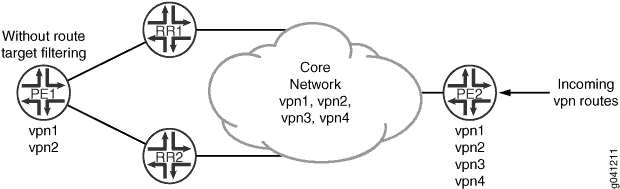
在此示例中,在路由反射器(设备 RR1 和设备 RR2)和提供商边缘 (PE) 设备 PE2 上配置了 BGP 路由目标过滤。另一个 PE(设备 PE1)不支持 BGP 路由目标过滤。路由反射器与设备 PE1 之间的对等会话上还配置了代理 BGP 路由目标过滤,以最大程度减少设备 PE1 处理的 VPN 路由更新次数。设备 PE2 配置了四个 VPN(vpn1、vpn2、vpn3 和 vpn4),设备 PE1 配置了两个 VPN(vpn1 和 vpn2)。在示例拓扑中,所有设备都加入自治系统 (AS) 203,OSPF 是配置的内部网关协议 (IGP),LDP 是 VPN 使用的信令协议。在此示例中,我们在 VPN 路由和转发 (VRF) 实例中使用静态路由来生成 VPN 路由。这样做可代替使用 PE 到客户边缘 (客户边缘) 协议,例如 OSPF 或 BGP。
在此示例中,您可以通过在设备 PE2 上配置导出策略来进一步控制从设备 PE2 播发到设备 PE1 的路由,以防止将 vpn3 路由播发至设备 RR1。您可以创建一个策略,用于指定 family route-target 匹配条件,定义路由目标前缀列表,并通过定义 rtf-prefix-list 条件来应用路由目标前缀列表。
配置
CLI 快速配置
要快速配置此示例,请复制以下命令,将其粘贴到文本文件中,删除所有换行符,更改详细信息,以便与网络配置匹配,然后将命令复制并粘贴到层次结构级别的 [edit] CLI 中。
设备 PE1
set interfaces ge-1/0/0 unit 0 description PE1-to-RR1
set interfaces ge-1/0/0 unit 0 family inet address 10.49.0.1/30
set interfaces ge-1/0/0 unit 0 family mpls
set interfaces ge-1/0/1 unit 0 description PE1-to-RR2
set interfaces ge-1/0/1 unit 0 family inet address 10.49.10.1/30
set interfaces ge-1/0/1 unit 0 family mpls
set protocols ldp interface ge-1/0/0
set protocols ldp interface ge-1/0/1
set protocols bgp group internal type internal
set protocols bgp group internal local-address 10.255.163.58
set protocols bgp group internal neighbor 10.255.165.220 family inet-vpn unicast
set protocols bgp group internal neighbor 10.255.165.28 family inet-vpn unicast
set protocols ospf area 0.0.0.0 interface ge-1/0/0
set protocols ospf area 0.0.0.0 interface ge-1/0/1
set protocols ospf area 0.0.0.0 interface lo0.0 passive
set routing-options route-distinguisher-id 10.255.163.58
set routing-options autonomous-system 203
set routing-instances vpn1 instance-type vrf
set routing-instances vpn1 vrf-target target:203:100
set routing-instances vpn1 routing-options static route 203.0.113.1/24 discard
set routing-instances vpn2 instance-type vrf
set routing-instances vpn2 vrf-target target:203:101
set routing-instances vpn2 routing-options static route 203.0.113.2/24 discard
设备 RR1
set interfaces ge-1/0/0 unit 0 description RR1-to-PE1
set interfaces ge-1/0/0 unit 0 family inet address 10.49.0.2/30
set interfaces ge-1/0/0 unit 0 family mpls
set interfaces ge-1/0/1 unit 0 description RR1-to-PE2
set interfaces ge-1/0/1 unit 0 family inet address 10.50.0.2/30
set interfaces ge-1/0/1 unit 0 family mpls
set protocols ldp interface ge-1/0/0
set protocols ldp interface ge-1/0/1
set protocols bgp group internal type internal
set protocols bgp group internal local-address 198.51.100.0
set protocols bgp group internal cluster 198.51.100.1
set protocols bgp group internal neighbor 10.255.163.58 description vpn1-to-pe1 family inet-vpn unicast
set protocols bgp group internal neighbor 10.255.163.58 family route-target proxy-generate
set protocols bgp group internal neighbor 10.255.168.42 description vpn1-to-pe2 family inet-vpn unicast
set protocols ospf area 0.0.0.0 interface ge-1/0/0
set protocols ospf area 0.0.0.0 interface ge-1/0/1
set protocols ospf area 0.0.0.0 interface lo0.0 passive
set routing-options route-distinguisher-id 10.255.165.220
set routing-options autonomous-system 203
设备 RR2
set interfaces ge-1/0/0 unit 0 description RR2-to-PE1
set interfaces ge-1/0/0 unit 0 family inet address 10.49.10.2/30
set interfaces ge-1/0/0 unit 0 family mpls
set interfaces ge-1/0/1 unit 0 description RR2-to-PE2
set interfaces ge-1/0/1 unit 0 family inet address 10.50.10.2/30
set interfaces ge-1/0/1 unit 0 family mpls
set protocols ldp interface ge-1/0/0
set protocols ldp interface ge-1/0/1
set protocols bgp group internal type internal
set protocols bgp group internal local-address 10.255.165.28
set protocols bgp group internal cluster 198.51.100.1
set protocols bgp group internal neighbor 10.255.163.58 description vpn2-to-pe1 family inet-vpn unicast
set protocols bgp group internal neighbor 10.255.163.58 family route-target proxy-generate
set protocols bgp group internal neighbor 10.255.168.42 description vpn2-to-pe2 family inet-vpn unicast
set protocols bgp group internal neighbor 10.255.163.58 family route-target
set protocols ospf area 0.0.0.0 interface ge-1/0/0
set protocols ospf area 0.0.0.0 interface ge-1/0/1
set protocols ospf area 0.0.0.0 interface lo0.0 passive
set routing-options route-distinguisher-id 10.255.165.28
set routing-options autonomous-system 203
设备 PE2
set interfaces ge-1/0/0 unit 0 description PE2-to-RR1
set interfaces ge-1/0/0 unit 0 family inet address 10.50.0.1/30
set interfaces ge-1/0/0 unit 0 family mpls
set interfaces ge-1/0/1 unit 0 description PE2-to-RR2
set interfaces ge-1/0/1 unit 0 family inet address 10.50.10.2/30
set interfaces ge-1/0/1 unit 0 family mpls
set protocols ldp interface ge-1/0/0
set protocols ldp interface ge-1/0/1
set protocols bgp group internal type internal
set protocols bgp group internal local-address 10.255.168.42
set protocols bgp group internal family inet-vpn unicast
set protocols bgp group internal family route-target
set protocols bgp group internal neighbor 10.255.165.220 export filter-rtc
set protocols bgp group internal neighbor 10.255.165.28
set protocols ospf area 0.0.0.0 interface ge-1/0/0
set protocols ospf area 0.0.0.0 interface ge-1/0/1
set protocols ospf area 0.0.0.0 interface lo0.0 passive
set policy-options rtf-prefix-list exclude-103 203:203:103/96
set policy-options policy-statement filter-rtc from family route-target
set policy-options policy-statement filter-rtc from rtf-prefix-list exclude-103
set policy-options policy-statement filter-rtc then reject
set routing-options route-distinguisher-id 10.255.168.42
set routing-options autonomous-system 203
set routing-instances vpn1 instance-type vrf
set routing-instances vpn1 vrf-target target:203:100
set routing-instances vpn1 routing-options static route 203.0.113.1/24 discard
set routing-instances vpn2 instance-type vrf
set routing-instances vpn2 vrf-target target:203:101
set routing-instances vpn2 routing-options static route 203.0.113.2/24 discard
set routing-instances vpn3 instance-type vrf
set routing-instances vpn3 vrf-target target:203:103
set routing-instances vpn3 routing-options static route 203.0.113.3/24 discard
set routing-instances vpn4 instance-type vrf
set routing-instances vpn4 vrf-target target:203:104
set routing-instances vpn4 routing-options static route 203.0.113.4/24 discard
配置设备 PE1
分步程序
下面的示例要求您在各个配置层级中进行导航。有关导航 CLI 的信息,请参阅在 配置模式下使用 CLI 编辑器。
要配置设备 PE1:
配置接口。
[edit interfaces]
user@PE1# set ge-1/0/0 unit 0 description PE1-to-RR1
user@PE1# set ge-1/0/0 unit 0 family inet address 10.49.0.1/30
user@PE1# set ge-1/0/0 unit 0 family mpls
user@PE1#set ge-1/0/1 unit 0 description PE1-to-RR2
user@PE1#set ge-1/0/1 unit 0 family inet address 10.49.10.1/30
user@PE1# set ge-1/0/1 unit 0 family mpls
配置路由识别符和 AS 编号。
[edit routing-options]
user@PE1# set route-distinguisher-id 10.255.163.58
user@PE1# set autonomous-system 203
将 LDP 配置为 VPN 使用的信令协议。
[edit protocols ldp]
user@PE1# set interface ge-1/0/0
user@PE1# set interface ge-1/0/1
配置 BGP。
[edit protocols bgp group internal]
user@PE1# set type internal
user@PE1# set local-address 10.255.163.58
user@PE1# set neighbor 10.255.165.220 family inet-vpn unicast
user@PE1# set neighbor 10.255.165.28 family inet-vpn unicast
配置 OSPF。
[edit protocols ospf area 0.0.0.0]
user@PE1# set interface ge-1/0/0
user@PE1# set interface ge-1/0/1
user@PE1# set interface lo0.0 passive
配置 VPN 路由实例。
[edit routing-instances vpn1]
user@PE1# set instance-type vrf
user@PE1# set vrf-target target:203:100
user@PE1# set routing-options static route 203.0.113.1/24 discard
[edit routing-instances vpn2]
user@PE1# set instance-type vrf
user@PE1# set vrf-target target:203:101
user@PE1# set routing-options static route 203.0.113.2/24 discard
如果完成设备配置,请提交配置。
[edit]
user@PE1# commit
结果
在配置模式下,输入 show interfaces、 show protocols、 show routing-options和 show routing-instances 命令以确认您的配置。如果输出未显示预期的配置,请重复此示例中的说明以更正配置。
user@PE1# show interfaces
ge-1/0/0 {
    unit 0 {
        description PE1-to-RR1;
        family inet {
            address 10.49.0.1/30;
        }
        family mpls;
    }
}
ge-1/0/1 {
    unit 0 {
        description PE1-to-RR2;
        family inet {
            address 10.49.10.1/30;
        }
        family mpls;
    }
}
user@PE1# show protocols
bgp {
    group internal {
        type internal;
        local-address 10.255.163.58;
        neighbor 10.255.165.220 {
            family inet-vpn {
                unicast;
            }
        }
        neighbor 10.255.165.28 {
            family inet-vpn {
                unicast;
            }
        }
    }
}
ospf {
    area 0.0.0.0 {
        interface ge-1/0/0.0;
        interface ge-1/0/1.0;
        interface lo0.0 {
            passive;
        }
    }
}
ldp {
    interface ge-1/0/0.0;
    interface ge-1/0/1.0;
}
user@PE1# show routing-options
route-distinguisher-id 10.255.14.182;
autonomous-system 203;
user@PE1# show routing-instances
vpn1 {
    instance-type vrf;
    vrf-target target:203:100;
    routing-options {
        static {
            route 203.0.113.1/24 discard;
        }
    }
}
vpn2 {
    instance-type vrf;
    vrf-target target:203:101;
    routing-options {
        static {
            route 203.0.113.2/24 discard;
        }
    }
}
配置设备 RR1
分步程序
下面的示例要求您在各个配置层级中进行导航。有关导航 CLI 的信息,请参阅在 配置模式下使用 CLI 编辑器。
要配置设备 RR1:
配置接口。
[edit interfaces]
user@RR1# set ge-1/0/0 unit 0 description RR1-to-PE1
user@RR1# set ge-1/0/0 unit 0 family inet address 10.49.0.2/30
user@RR1# set ge-1/0/0 unit 0 family mpls
user@RR1# set ge-1/0/1 unit 0 description RR1-to-PE2
user@RR1# set ge-1/0/1 unit 0 family inet address 10.50.0.2/30
user@RR1# set ge-1/0/1 unit 0 family mpls
配置路由识别符和 AS 编号。
[edit routing-options]
user@RR1# set route-distinguisher-id 10.255.165.220
user@RR1# set autonomous-system 203
将 LDP 配置为 VPN 使用的信令协议。
[edit protocols ldp]
user@RR1# set interface ge-1/0/0
user@RR1# set interface ge-1/0/1
配置 BGP。
[edit protocols bgp group internal]
user@RR1# set type internal
user@RR1# set local-address 10.255.165.220
user@RR1# set cluster 198.51.100.1
user@RR1# set neighbor 10.255.163.58 description vpn1-to-pe1 family inet-vpn unicast
user@RR1# set neighbor 10.255.168.42 description vpn1-to-pe2 family inet-vpn unicast
在与设备 PE2 的对等会话上配置 BGP 路由目标过滤。
[edit protocols bgp group internal]
user@RR1# set neighbor 10.255.168.42 family route-target
在与设备 PE1 的对等会话上配置代理 BGP 路由目标过滤。
[edit protocols bgp group internal]
user@RR1# set neighbor 10.255.163.58 family route-target proxy-generate
配置 OSPF。
[edit protocols ospf area 0.0.0.0]
user@RR1# set interface ge-1/0/0
user@RR1# set interface ge-1/0/1
user@RR1# set interface lo0.0 passive
如果完成设备配置,请提交配置。
[edit]
user@RR1# commit
结果
在配置模式下,输入 show interfaces、 show protocols和 show routing-options 命令以确认您的配置。如果输出未显示预期的配置,请重复此示例中的说明以更正配置。
user@RR1# show interfaces
ge-1/0/0 {
    unit 0 {
        description RR1-to-PE1;
        family inet {
            address 10.49.0.2/30;
        }
        family mpls;
    }
}
ge-1/0/1 {
    unit 0 {
        description RR1-to-PE2;
        family inet {
            address 10.50.0.2/30;
        }
        family mpls;
    }
}
user@RR1# show protocols
bgp {
    group internal {
        type internal;
        local-address 198.51.100.0;
        cluster 198.51.100.1;
        neighbor 10.255.163.58 {
            description vpn1-to-pe1;
            family inet-vpn {
                unicast;
            }
            family route-target {
                proxy-generate;
            }
        }
        neighbor 10.255.168.42 {
            description vpn1-to-pe2;
            family inet-vpn {
                unicast;
            }
            family route-target;
        }
    }
}
ospf {
    area 0.0.0.0 {
        interface ge-1/0/0.0;
        interface ge-1/0/1.0;
        interface lo0.0 {
            passive;
        }
    }
}
ldp {
    interface ge-1/0/0.0;
    interface ge-1/0/1.0;
}
ospf {
    area 0.0.0.0 {
        interface ge-1/0/0.0;
        interface ge-1/0/1.0;
        interface lo0.0 {
            passive;
        }
    }
}
ldp {
    interface ge-1/0/0.0;
    interface ge-1/0/1.0;
}
user@RR1# show routing-options
route-distinguisher-id 10.255.165.220;
autonomous-system 203;
配置设备 RR2
分步程序
下面的示例要求您在各个配置层级中进行导航。有关导航 CLI 的信息,请参阅在 配置模式下使用 CLI 编辑器。
要配置设备 RR2:
配置接口。
[edit interfaces]
user@RR2# set ge-1/0/0 unit 0 description RR2-to-PE1
user@RR2# set ge-1/0/0 unit 0 family inet address 10.49.10.2/30
user@RR2# set ge-1/0/0 unit 0 family mpls
user@RR2# set ge-1/0/1 unit 0 description RR2-to-PE2
user@RR2# set ge-1/0/1 unit 0 family inet address 10.50.10.2/30
user@RR2# set ge-1/0/1 unit 0 family mpls
配置路由识别符和 AS 编号。
[edit routing-options]
user@RR2# set route-distinguisher-id 10.255.165.28
user@RR2# set autonomous-system 203
将 LDP 配置为 VPN 使用的信令协议。
[edit protocols ldp]
user@RR2# set interface ge-1/0/0
user@RR2# set interface ge-1/0/1
配置 BGP。
[edit protocols bgp group internal]
user@RR2# set type internal
user@RR2# set local-address 10.255.165.28
user@RR2# set cluster 198.51.100.1
user@RR2# set neighbor 10.255.163.58 description vpn2-to-pe1 family inet-vpn unicast
user@RR2# set neighbor 10.255.168.42 description vpn2-to-pe2 family inet-vpn unicast
在与设备 PE2 的对等会话上配置 BGP 路由目标过滤。
[edit protocols bgp group internal]
user@RR2# set neighbor 10.255.168.42 family route-target
在与设备 PE1 的对等会话上配置代理 BGP 路由目标过滤。
[edit protocols bgp group internal]
user@RR2# set neighbor 10.255.163.58 family route-target proxy-generate
配置 OSPF。
[edit protocols ospf area 0.0.0.0]
user@RR2# set interface ge-1/0/0
user@RR2# set interface ge-1/0/1
user@RR2# set interface lo0.0 passive
如果完成设备配置,请提交配置。
[edit]
user@RR2# commit
结果
在配置模式下,输入 show interfaces、 show protocols和 show routing-options 命令以确认您的配置。如果输出未显示预期的配置,请重复此示例中的说明以更正配置。
user@RR2# show interfaces
ge-1/0/0 {
    unit 0 {
        description RR2-to-PE1;
        family inet {
            address 10.49.10.2/30;
        }
        family mpls;
    }
}
ge-1/0/1 {
    unit 0 {
        description RR2-to-PE2;
        family inet {
            address 10.50.10.2/30;
        }
        family mpls;
    }
}
user@RR2# show protocols
bgp {
    group internal {
        local-address 10.255.165.28;
        cluster 198.51.100.1;
        neighbor 10.255.163.58 {
            description vpn2-to-pe1;
            family inet-vpn {
                unicast;
            }
            family route-target {
                proxy-generate;
            }
        }
        neighbor 10.255.168.42 {
            description vpn2-to-pe2;
            family inet-vpn {
                unicast;
            }
            family route-target;
        }
    }
}
ospf {
    area 0.0.0.0 {
        interface ge-1/0/0.0;
        interface ge-1/0/1.0;
        interface lo0.0 {
            passive;
        }
    }
}
ldp {
    interface ge-1/0/0.0;
    interface ge-1/0/1.0;
}
user@RR2# show routing-options
route-distinguisher-id 10.255.165.28;
autonomous-system 203;
配置设备 PE2
分步程序
下面的示例要求您在各个配置层级中进行导航。有关导航 CLI 的信息,请参阅在 配置模式下使用 CLI 编辑器。
要配置设备 PE2:
配置接口。
[edit interfaces]
user@PE2# set ge-1/0/0 unit 0 description PE2-to-RR1
user@PE2# set ge-1/0/0 unit 0 family inet address 10.50.0.1/30
user@PE2# set ge-1/0/0 unit 0 family mpls
user@PE2#set ge-1/0/1 unit 0 description PE2-to-RR2
user@PE2#set ge-1/0/1 unit 0 family inet address 10.50.10.2/30
user@PE2# set ge-1/0/1 unit 0 family mpls
配置路由识别符和 AS 编号。
[edit routing-options]
user@PE2# set route-distinguisher-id 10.255.168.42
user@PE2# set autonomous-system 203
将 LDP 配置为 VPN 使用的信令协议。
[edit protocols ldp]
user@PE2# set interface ge-1/0/0
user@PE2# set interface ge-1/0/1
配置 BGP。
[edit protocols bgp group internal]
user@PE2# set type internal
user@PE2# set local-address 10.255.168.42
user@PE2# set family inet-vpn unicast
user@PE2# set family route-target
user@PE2# set neighbor 10.255.165.220
user@PE2# set neighbor 10.255.165.28
配置 OSPF。
[edit protocols ospf area 0.0.0.0]
user@PE2# set interface ge-1/0/0
user@PE2# set interface ge-1/0/1
user@PE2# set interface lo0.0 passive
配置 VPN 路由实例。
[edit routing-instances vpn1]
user@PE2# set instance-type vrf
user@PE2# set vrf-target target:203:100
user@PE2# set routing-options static route 203.0.113.1/24 discard
[edit routing-instances vpn2]
user@PE2# set instance-type vrf
user@PE2# set vrf-target target:203:101
user@PE2# set routing-options static route 203.0.113.2/24 discard
[edit routing-instances vpn3]
user@PE2# set instance-type vrf
user@PE2# set vrf-target target:203:103
user@PE2# set routing-options static route 203.0.113.3/24 discard
[edit routing-instances vpn4]
user@PE2# set instance-type vrf
user@PE2# set vrf-target target:203:104
user@PE2# set routing-options static route 203.0.113.4/24 discard
配置并应用导出路由策略。
[edit policy-options]
user@PE2# set rtf-prefix-list exclude-103 203:203:103/96
[edit policy-options policy-statement filter-rtc]
user@PE2# set from family route-target
user@PE2# set from rtf-prefix-list exclude-103
user@PE2# set then reject
[edit protocols bgp group internal]
user@PE2# set neighbor 10.255.165.220 export filter-rtc
如果完成设备配置,请提交配置。
[edit]
user@PE2# commit
结果
在配置模式下,输入 show interfaces、 show protocols、 show routing-optionsshow policy-options和show routing-instances命令以确认您的配置。如果输出未显示预期的配置,请重复此示例中的说明以更正配置。
user@PE2# show interfaces
ge-1/0/0 {
    unit 0 {
        description PE2-to-RR1;
        family inet {
            address 10.50.0.1/30;
        }
        family mpls;
    }
}
ge-1/0/1 {
    unit 0 {
        description PE2-to-RR2;
        family inet {
            address 10.50.10.2/30;
        }
        family mpls;
    }
}
user@PE2# show protocols
    bgp {
        group internal {
            type internal;
            local-address 10.255.168.42;
            family inet-vpn {
                unicast;
            }
            family route-target;
            neighbor 10.255.165.220 {
                export filter-rtc;
            }
            neighbor 10.255.165.28;
        }
    }
ospf {
    area 0.0.0.0 {
        interface ge-1/0/0.0;
        interface ge-1/0/1.0;
        interface lo0.0 {
            passive;
        }
    }
}
ldp {
    interface ge-1/0/0.0;
    interface ge-1/0/1.0;
}
user@PE2# show routing-options
route-distinguisher-id 10.255.168.42;
autonomous-system 203;
user@PE2# show policy-options
policy-statement filter-rtc {
    from {
        family route-target;
        rtf-prefix-list exclude-103;
    }
    then reject;
}
rtf-prefix-list exclude-103 {
    203:203:103/96;
}
user@PE2# show routing-instances
vpn1 {
    instance-type vrf;
    vrf-target target:203:100;
    routing-options {
        static {
            route 203.0.113.1/24 discard;
        }
    }
}
vpn2 {
    instance-type vrf;
    vrf-target target:203:101;
    routing-options {
        static {
            route 203.0.113.2/24 discard;
        }
    }
}
vpn3 {
    instance-type vrf;
    vrf-target target:203:103;
    routing-options {
        static {
            route 203.0.113.3/24 discard;
        }
    }
}
vpn4 {
    instance-type vrf;
    vrf-target target:203:104;
    routing-options {
        static {
            route 203.0.113.4/24 discard;
        }
    }
}
验证
确认配置工作正常。
验证设备 RR1 的 bgp.rtarget.0 路由表中的路由目标过滤路由
目的
验证 vpn3 的路由前缀是否不在设备 RR1 的 bgp.rtarget.0 表中。由于设备 PE2 上应用了导出策略来防止将 vpn3 路由播发至设备 RR1,因此设备 RR1 不应接收这些播发。
行动
在操作模式下,输入命令 show route advertising-protocol bgp 10.255.165.220 table bgp.rtarget.0 。
user@PE2# show route advertising-protocol bgp 10.255.165.220 table bgp.rtarget.0
bgp.rtarget.0: 4 destinations, 11 routes
(4 active, 0 holddown, 0 hidden)
  Prefix                  Nexthop              MED     Lclpref    AS path
  203:203:100/96          *                    Self      100        I
  203:203:101/96          *                    Self      100        I
  203:203:104/96          *                    Self      100        I
意义
bgp.rtartget.0 表未显示 203:203:103/96,这是 vpn3 的路由前缀。这意味着导出策略已正确应用。
验证路由目标 在设备 RR2 的 bgp.rtarget.0 路由表中过滤路由
目的
验证 vpn3 的路由前缀是否在设备 RR2 的 bgp.rtarget.0 表中。由于设备 PE2 上未应用导出策略来防止将 vpn3 路由播发至设备 RR2,因此设备 RR2 应从所有 VPN 接收播发。
行动
在操作模式下,输入命令 show route advertising-protocol bgp 10.255.165.28 table bgp.rtarget.0 。
user@PE2# show route advertising-protocol bgp 10.255.165.28 table bgp.rtarget.0
bgp.rtarget.0: 4 destinations, 11 routes (4 active, 0 holddown, 0 hidden)
(4 active, 0 holddown, 0 hidden)
  Prefix                  Nexthop              MED     Lclpref    AS path
  203:203:100/96          *                    Self      100        I
  203:203:101/96          *                    Self      100        I
  203:203:103/96          *                    Self      100        I
  203:203:104/96          *                    Self      100        I
意义
bgp.rtartget.0 表显示所有 VPN 的路由前缀。