
示例:使用点对多点 LSP 的 NG-VPLS
要求
表 1 列出了此示例使用的硬件和所需的软件:
| 设备 | 部件 | 软件 |
|---|---|---|
六个 MX 系列 5G 通用路由平台 |
DPC-4 10GE-X、DPC-40 1GE-X |
Junos OS 9.3R4 或更高版本 |
单个 T Series 核心路由器 |
FPC3、10GE-Xenpak |
Junos OS 9.3R4 或更高版本 |
八台 EX4200 以太网交换机 |
EX4200 虚拟交换机 |
Junos OS 9.3R4 或更高版本 |
一台 M7i 多业务边缘路由器 |
千兆以太网接口 |
Junos OS 9.3R4 或更高版本 |
概述和拓扑
NG-VPLS 示例的逻辑拓扑如 图 1 所示。
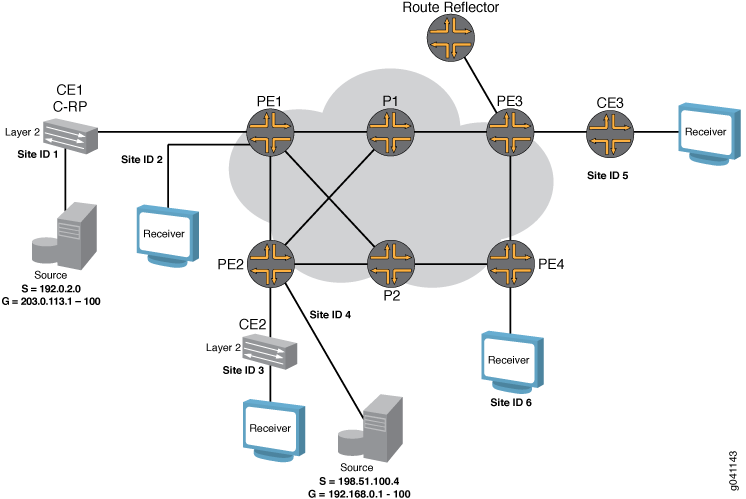 的 NG-VPLS 逻辑拓扑
此示例中的路由器预配置了以下内容:
OSPF 区域 0 配置在所有启用了流量工程的 PE 路由器和 P 路由器上。
所有面向核心的接口均配置了
mpls协议地址族。RSVP 和 MPLS 协议均已为所有面向核心的接口启用。
所有 MX 系列路由器的网络服务模式均设置为以太网。网络服务模式的配置方法是包含
network-services语句并指定ethernet选项。所有 PE 路由器均配置为自治系统
65000。
NG-VPLS 示例的物理拓扑如 图 2 所示。拓扑结构由六台 MX 系列路由器组成,这些路由器通过核心中的冗余链路连接。四台 MX 系列路由器充当 PE 路由器,两台作为核心路由器。
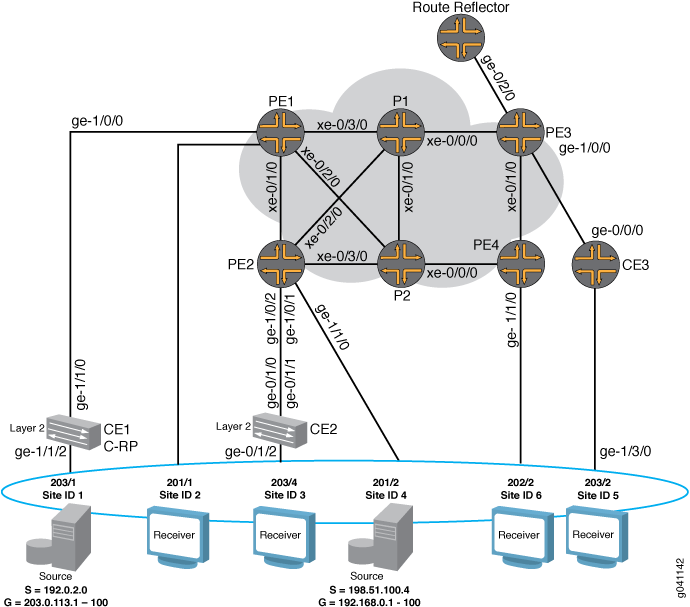 的 NG-VPLS 物理拓扑
请注意以下拓扑详细信息:
拓扑中配置了路由反射器,以反映 BPG-VPLS 的所有 PE 路由器的家族
l2-vpn路由。GOLD VPLS 路由实例在每个 PE 路由器中配置了两个站点。
一个 GOLD 站点连接到客户边缘路由器,另一个站点直接连接到每个 PE 路由器上的测试设备。
该
no-tunnel-services语句包含在 GOLD VPLS 实例中,以便能够将 LSI 接口用于 VPLS 隧道服务。路由器 CE1 和路由器 CE2 是充当客户边缘路由器的 EX 系列虚拟机箱交换机。
路由器 CE3 是充当客户边缘路由器的 M7i 路由器。
配置了两个组播源。一个连接到路由器 CE1(站点 1),另一个连接到路由器 PE2(站点 4),以模拟不同的场景。
路由器 CE1 配置为汇聚点 (RP)。
单播流量将在所有测试设备端口上启用,并发送至 GOLD VPLS 实例中的所有站点。
配置
此示例说明如何使用点对多点 LSP 配置新一代 VPLS。它分为以下部分:
- 配置 PE 路由器接口
- 为基于 BGP 的 VPLS 为所有 PE 路由器配置路由反射器
- 通过路由反射器建立基于 BGP 的 VPLS
- 在 PE 路由器之间配置点对点 LSP
- 在 PE 路由器之间配置动态和静态点对多点 LSP
- 配置点对多点链路保护
- 为 NG-VPLS 配置基于 BGP 的 VPLS 路由实例
- 为 VPLS 配置隧道服务
- 验证控制平面
- 验证数据平面
- 结果
配置 PE 路由器接口
分步程序
在面向客户的 PE 接口上,启用 VLAN 标记,配置封装类型并启用 VPLS 地址族。VPLS 路由实例有四种可能的接口封装,您可以根据需要进行选择。
如果您的网络要求将 PE 路由器到 客户边缘的路由器链路上的每个逻辑接口配置为仅接受 VLAN ID
1000数据包,请包含vlan-tagging该语句,包括该encapsulation语句,并指定vlan-vpls为封装类型。还要包含该vlan-id语句并指定1000为 VLAN ID。[edit interfaces] ge-1/1/0 { vlan-tagging; encapsulation vlan-vpls; unit 1 { encapsulation vlan-vpls; vlan-id 1000; family vpls; } }使用此配置,您可以配置多个具有不同 VLAN ID 的逻辑接口,并将每个逻辑接口与不同的路由实例相关联。
如果您的网络要求将 PE 路由器到 客户边缘路由器链路上的每个物理接口配置为将整个以太网端口用作单个 VPLS 实例的一部分,请包含该
encapsulation语句,并指定ethernet-vpls为封装类型。[edit interfaces] ge-1/2/0 { encapsulation ethernet-vpls; unit 0 { family vpls; } }使用此封装模式,您无法创建多个逻辑单元 (VLAN)。
如果您的网络要求将 PE 路由器到 客户边缘路由器链路上单个物理接口的每个逻辑接口配置为混合使用不同的封装,请包含该
encapsulation语句,并指定flexible-ethernet-services为层次结构级别的[edit interfaces interface-name]封装类型。还要包括该encapsulation语句,并将 orvlan-ccc指定vlan-vpls为层次结构级别的[edit interfaces interface-name unit logical-unit-number]封装类型。[edit interfaces] ge-1/2/0 { vlan-tagging; encapsulation flexible-ethernet-services; unit 1 { encapsulation vlan-vpls; } unit 2 { encapsulation vlan-ccc; } }如果您的网络需要支持在单个物理接口上的不同逻辑接口中混合使用单标记 VLAN 和双标记 VLAN,请包含该
encapsulation语句并指定flexible-vlan-tagging为封装类型。配置面向核心的客户边缘路由器接口。客户边缘路由器和 PE 路由器逻辑接口配置必须匹配封装类型和 VLAN ID。通常,如果 客户边缘 设备是 路由器 并将第 2 层域终止到第 3 层网络,则 IP 地址配置在面向核心的客户边缘路由器接口上。在此示例中,接口配置为单个标记,其 VLAN ID 为
1000。[edit interfaces] ge-1/1/0 { vlan-tagging; unit 1 { vlan-id 1000; family inet { address 198.51.100.4/24; } } }
为基于 BGP 的 VPLS 为所有 PE 路由器配置路由反射器
分步程序
配置路由反射器是启用任何基于 BGP 的服务产品的首选方法。配置路由反射器避免了对全网状 BGP 对等体会话的需求,并且扩展性很好。在单个群集中使用多个路由反射器可以实现 BGP 冗余。
要使 BGP 能够传输第 2 层 VPN 和 VPLS NLRI 消息,请创建对等方组,包含该语句,指定
familyl2vpn该选项,然后包含该signaling语句。要配置路由反射器群集并完成 BGP 对等体会话,请包含cluster该语句并指定群集 ID 的 IP 地址。然后包含该neighbor语句,并指定群集中作为 BGP 客户端对等方的 PE 路由器的 IP 地址。[edit protocols] bgp { group RR { type internal; local-address 192.0.2.7; family l2vpn { signaling; } cluster 192.0.2.7; neighbor 192.0.2.1; # To PE1 neighbor 192.0.2.2; # To PE2 neighbor 192.0.2.3; # To PE3 neighbor 192.0.2.4; # To PE4 } }在路由反射器上配置 OSPF 并启用流量工程,以便为从 PE 路由器终止的出口 LSP 创建受限最短路径优先 (CSPF) 数据库。
[edit protocols]
ospf {
    traffic-engineering;
    area 0.0.0.0 {
        interface all;
        interface fxp0.0 {
            disable;
        }
    }
}
在连接到 MPLS 核心的所有接口上启用 MPLS 和 RSVP 协议。这会终止来自 PE 路由器的 RSVP 出口 LSP。
[edit protocols]
rsvp {
    interface all;
    interface fxp0.0 {
        disable;
    }
}
mpls {
    interface all;
    interface fxp0.0 {
        disable;
    }
}
通过路由反射器建立基于 BGP 的 VPLS
分步程序
对于基于 BGP 的 VPLS,所有 PE 路由器彼此之间需要有一个完整的 BGP 对等体会话网状结构,或者需要有一个与路由反射器的对等方。路由反射器反映从其他 PE 路由器接收的路由。在此示例中,PE 路由器配置为与路由反射器建立对等关系。
要让所有 PE 路由器与路由反射器建立 BGP 客户端对等会话,请创建内部对等组,包含
local-address该语句,并指定 PE 路由器的 IP 地址。还要包含该neighbor语句,并指定路由反射器的 IP 地址。要使 BGP 能够传输第 2 层 VPN 和 VPLS NLRI 消息,请包含family该语句,指定l2vpn该选项,然后包含该signaling语句。[edit protocols] bgp { group to-RR { type internal; local-address 192.0.2.1; family l2vpn { signaling; } neighbor 192.0.2.7; # To the route reflector } }配置从 PE 路由器到路由反射器的点对点 RSVP LSP。要创建 LSP,请包含
label-switched-path该语句,为 LSP 指定一个有意义的名称,包含该to语句,并将路由反射器的 IP 地址指定为 LSP 端点。需要此 LSP 来解析从路由反射器接收的路由的路由表中的inet.3BGP 下一跃点。[edit protocols] mpls { label-switched-path to-RR { to 192.0.2.7; } interface all; interface fxp0.0 { disable; } }
在 PE 路由器之间配置点对点 LSP
分步程序
在新一代 VPLS 中,点对多点 LSP 仅用于传输广播、组播和未知单播帧。所有其他帧仍使用点对点 RSVP LSP 进行传输。这是对带宽的更有效利用,特别是在未知帧、广播帧和组播帧源附近。权衡是网络中的状态更多,因为每个 PE 路由器都是一个点对多点 LSP 的入口,该 LSP 会接触所有其他 PE 路由器,并且 n 需要点对点 LSP,一个指向其他每个 PE 路由器。
要创建点对点 LSP,请包含
label-switched-path该语句,为 LSP 指定一个有意义的名称,包含该to语句,并将其他 PE 路由器的 IP 地址指定为 LSP 端点。示例显示了从路由器 PE1 到路由器 PE2、PE3 和 PE4 的 LSP 配置。[edit protocols] mpls { label-switched-path to-PE2 { to 192.0.2.2; } label-switched-path to-PE3 { to 192.0.2.3; } label-switched-path to-PE4 { to 192.0.2.4; } }
在 PE 路由器之间配置动态和静态点对多点 LSP
分步程序
此过程介绍如何启用动态点对多点 LSP 的创建,以及如何配置静态点对多点 LSP。在配置了静态点对多点 LSP 的路由器上,LSP 会立即启动。在配置了动态点对多点 LSP 的路由器上,只有在从路由反射器或参与 VPLS 域的其他 PE 路由器接收到 BGP 邻接方信息后,LSP 才会启动。
对于每个 VPLS 实例,启用了动态点对多点 LSP 的 PE 路由器可基于点对多点模板创建专用点对多点 LSP。每当 VPLS 通过 BGP 发现新的邻接方时,该邻接方的子 LSP 就会添加到点对多点 LSP 中。
如果 VPLS 实例中有 PE 路由器,则 n 路由器会在网络中创建 n 点对多点 LSP,其中每个 PE 路由器都是树的根,并将其余 n-1 PE 路由器包括为通过源到叶子 LSP 连接的叶节点。
在此步骤中,您将路由器 PE1 和路由器 PE2 配置为使用动态点对多点 LSP 模板创建 LSP。当这些路由器收到来自新邻接方的路由反射器播发的新 BGP 路由时,它们会向该邻接方创建点对多点子 LSP。要创建动态点对多点 LSP 模板,请包含
label-switched-path该语句,为 LSP 模板指定一个有意义的名称,包含template该语句并包含该p2mp语句。此外,启用链路保护并配置优化计时器以定期重新优化 LSP 路径。[edit protocols] mpls { label-switched-path vpls-GOLD-p2mp-template { template; # identify as a template optimize-timer 50; link-protection; # link protection is enabled on point-to-multipoint LSPs p2mp; } }在此步骤中,您将配置静态点对多点 LSP。创建静态点对多点 LSP 与创建点对点 LSP 类似,不同之处在于您还可以在每个点对多点 LSP 下配置其他 RSVP 参数。
要创建静态点对多点 LSP,请包含
label-switched-path该语句,为 LSP 指定一个有意义的名称,包含该to语句,并指定作为 LSP 端点的 PE 路由器的 IP 地址。还要包含该p2mp语句并指定路径名。[edit protocols] mpls { label-switched-path to-pe2 { to 192.0.2.2; p2mp vpls-GOLD; } label-switched-path to-pe3 { to 192.0.2.3; p2mp vpls-GOLD; } label-switched-path to-pe1 { to 192.0.2.1; p2mp vpls-GOLD; } }
配置点对多点链路保护
分步程序
点对多点 LSP 仅支持流量工程的 RSVP 链路保护。不支持节点保护。链路保护是可选的,但对于大多数网络而言,这是推荐的配置。
要在面向核心的接口上启用链路保护,请在层次结构级别包含
link-protection[edit protocols rsvp interface interface-name]该语句。[edit protocols] rsvp { interface all; interface fxp0.0 { disable; } interface xe-0/3/0.0 { link-protection; } interface xe-0/2/0.0 { link-protection; } interface xe-0/1/0.0 { link-protection; } }启用点对多点 LSP 以使用 RSVP 链路保护功能。可以为使用模板的静态点到多点和动态点对多点 LSP 配置链路保护。
对于静态点对多点 LSP,请配置每个分支子 LSP。要启用链路保护,请在层次结构级别包含
[edit protocols mpls label-switched-path label-switched-path-name]该link-protection语句。[edit protocols mpls label-switched-path] label-switched-path to-pe2 { to 192.0.2.2; link-protection; p2mp vpls-GOLD; } label-switched-path to-pe3 { to 192.0.2.3; link-protection; p2mp vpls-GOLD; } label-switched-path to-pe1 { to 192.0.2.1; link-protection; p2mp vpls-GOLD; }对于使用模板的动态点对多点 LSP,仅模板需要配置链路保护。使用该模板的所有点对多点分支 LSP 都将继承此配置。
要为动态点对多点 LSP 启用链路保护,请在层次结构级别包含
[edit protocols mpls label-switched-path label-switched-path-name]该link-protection语句。[edit protocols mpls label-switched-path] label-switched-path vpls-GOLD-p2mp-template { template; optimize-timer 50; link-protection; p2mp; }
为 NG-VPLS 配置基于 BGP 的 VPLS 路由实例
分步程序
对于 NG-VPLS,路由实例配置与常规 VPLS 路由实例的配置类似。路由实例定义 VPLS 站点并创建 VPLS 连接。配置了以下参数。
实例类型 – VPLS。
接口 – 连接到客户边缘路由器的接口。
路由识别符 – 您在 PE 路由器上配置的每个路由实例都必须具有唯一的路由识别符。BGP 使用路由识别符来区分从不同 VPN 接收的可能相同的网络可达性信息 (NLRI) 消息。建议为每个 PE 上的每个路由实例使用唯一的路由识别符,以便确定哪个 PE 发起了路由。
VRF 目标 – 使用语
vrf-target句配置 VRF 目标社区将生成默认 VRF 导入和导出策略,以接受导入的路由,并使用指定的目标社区标记导出的路由。协议 – 按照以下过程的说明配置 VPLS 协议。
要配置 NG-VPLS 路由实例,请包含该
routing-instances语句并指定实例名称。还要包括该instance-type语句并指定vpls为类型。包括该route-distinguisher语句,并指定一个在路由器上配置的所有 VPN 中唯一的路由识别符。通过包含vrf-target语句来配置 VRF 路由目标,并指定路由目标。一台路由器导出的路由目标必须与另一台路由器为同一 VPLS 导入的路由目标匹配。[edit] routing-instances { GOLD { instance-type vpls; interface ge-1/0/0.1; interface ge-1/1/0.1; route-distinguisher 192.0.2.1:1; vrf-target target:65000:1; } }要将点对多点 LSP 用于 VPLS 泛洪,请在 VPLS 路由实例下配置 LSP。
要为 VPLS 泛洪配置点对多点 LSP,请包含该
label-switched-path-template语句并在层次结构级别指定[edit routing-instances routing-instances-name provider-tunnel rsvp-te]LSP 模板的名称。[edit] routing-instances { GOLD { instance-type vpls; interface ge-1/0/0.1; interface ge-1/1/0.1; route-distinguisher 192.0.2.1:1; provider-tunnel { rsvp-te { label-switched-path-template { vpls-GOLD-p2mp-template; } } } vrf-target target:65000:1; } }配置 VPLS 协议可在 VPLS 域中的不同站点之间启用 VPLS。可以在单个 VPLS 路由实例下配置多个站点,但请注意,最低站点 ID 用于构建与其他 PE 路由器的 VPLS 伪线,并会播发与最低站点 ID 关联的标签块。为 VPLS 协议配置以下参数:
站点 — VPLS 站点的名称。
站点范围 — VPLS 中允许的最大站点 ID。站点范围指定 VPLS 中允许的最高值站点 ID,而不是 VPLS 中的站点数量。
站点标识符 - 1 到 65,534 之间的任何数字,用于唯一标识 VPLS 站点。在相关 RFC 中,这也称为 VE-ID。
PE-客户边缘接口 – 参与此站点的接口。
VPLS 隧道服务 – 如果未在层次结构中
[edit protocol vpls tunnel-services]配置任何隧道接口,则路由器将使用路由器上可用的任何 VPLS 隧道接口。无隧道服务 — 如果包含该
no-tunnel-services语句,则路由器将使用标签交换接口 (LSI) 来提供该 VPLS 实例的隧道服务。MAC 表大小 - VPLS 媒体访问控制 (MAC) 地址表的大小。默认值为 512 个地址,最大值为 65,536 个。表已满时,新的 MAC 地址将不再添加到表中。
要配置 VPLS 协议,请在层次结构级别包含
vpls[edit routing-instances routing-instance-name protocols]该语句。要配置站点范围,请包含该site-range语句并指定 VPLS 中允许的最高值站点 ID。要使路由器使用 LSI 接口,请包含该no-tunnel-services语句。要创建 VPLS 站点,请包含该site语句并指定站点名称。还要包含该site-identifier语句并指定站点 ID。然后包含该interface语句,并指定连接到客户边缘设备的接口名称。[edit] routing-instances { GOLD { instance-type vpls; interface ge-1/0/0.1; interface ge-1/1/0.1; route-distinguisher 192.0.2.1:1; provider-tunnel { rsvp-te { label-switched-path-template { vpls-GOLD-p2mp-template; } } } vrf-target target:65000:1; protocols { vpls { site-range 8; no-tunnel-services; site CE1 { site-identifier 1; interface ge-1/0/0.1; } site Direct { site-identifier 2; interface ge-1/1/0.1; } } } } }
为 VPLS 配置隧道服务
分步程序
VPLS 配置需要一个隧道接口来封装始发流量,并对来自远程站点的流量进行解封装。如果未配置隧道接口,则默认情况下,路由器会选择路由器上的一个可用隧道接口。Junos OS 中有三种方法可用于配置此隧道接口。
要指定要用作隧道传输主设备的虚拟隧道接口,请包含
primary该语句,并指定要在层次结构级别使用的[edit routing-instances routing-instance-name protocols vpls tunnel-services]虚拟隧道接口。[edit routing-instances routing-instance-name] protocols { vpls { site-range 8; tunnel-services { primary vt-1/2/10; } } }要将路由器配置为将 LSI 接口用于隧道服务,而非虚拟隧道接口,请在层次结构级别包含
no-tunnel-services[edit routing-instances routing-instance-name protocols vpls]该语句。[edit routing-instances routing-instance-name] protocols { vpls { site-range 8; no-tunnel-services; } }在 MX 系列路由器中,您必须创建用于隧道服务的隧道服务接口。要创建隧道服务接口,请包含
bandwidth该语句,并在层次结构级别指定[edit chassis fpc slot-number pic slot-number tunnel-services]要为隧道服务预留的带宽量(以千兆位/秒为单位)。[edit chassis] fpc 1 { pic 3 { tunnel-services { bandwidth 1g; } } }
验证控制平面
分步程序
本节介绍 show 可用于验证控制平面的命令输出。它还提供了故障排除方法。请注意以下几点:
此示例中有六个站点。路由器 PE1 和路由器 PE2 各有两个站点。路由器 PE3 和路由器 PE4 各有一个站点。所有站点都在 GOLD VPLS 实例中。
在 VPLS 中,如果在单个 VPLS 路由实例下配置了多个站点,则站点 ID 最低站点的标签块将在远程 PE 之间建立伪线。请注意,数据流量仍会发送到连接到处于以下状态之一的客户边缘设备的 PE 路由器接口:
LM – 本地站点 ID 不是指定的最小值。本地站点 ID 不是最低的。因此,本地站点 ID 不会用于建立伪线或分发 VPLS 标签块。
RM – 远程站点 ID 不是指定的最小值。远程站点 ID 不是最低的。因此,远程站点 ID 不会用于建立伪线或分发 VPLS 标签块。
有关如何分配和使用 VPLS 标签块的更多信息,请参阅 了解 VPLS 标签块作。
完成整个配置后,您可以验证 VPLS 连接状态。
在以下输出中,VPLS 连接显示
Up某些站点的状态,其余站点显示 或RMLM状态。这是在多宿主站点上实施 VPLS 时的预期状态。在此示例中,路由器PE1配置了
CE1站点ID,站点Direct配置了站点ID12。站点CE1的标签块将播发至远程 PE 路由器,并用于从远程 PE 路由器接收数据包。在命令输出中show,请注意以下几点:路由器 PE1 使用其最低站点 ID,即站点 ID
1。站点 ID 1 用于设备CE1。路由器 PE2 使用其最低站点 ID,即站点 ID
3。站点 ID 3 用于设备CE2。路由器 PE3 和路由器 PE4 各配置一个站点。
对于站点
CE1,连接站点3处于状态Up,连接站点4处于状态RM。对于站点
Direct,所有连接都处于状态LM。站点
Direct的站点 ID 高于此路由器上的站点1ID。
在路由器 PE1 上,使用命令
show vpls connections验证 VPLS 连接状态。user@PE1> show vpls connections Layer-2 VPN connections: Legend for connection status (St) EI -- encapsulation invalid NC -- interface encapsulation not CCC/TCC/VPLS EM -- encapsulation mismatch WE -- interface and instance encaps not same VC-Dn -- Virtual circuit down NP -- interface hardware not present CM -- control-word mismatch -> -- only outbound connection is up CN -- circuit not provisioned <- -- only inbound connection is up OR -- out of range Up -- operational OL -- no outgoing label Dn -- down LD -- local site signaled down CF -- call admission control failure RD -- remote site signaled down SC -- local and remote site ID collision LN -- local site not designated LM -- local site ID not minimum designated RN -- remote site not designated RM -- remote site ID not minimum designated XX -- unknown connection status IL -- no incoming label MM -- MTU mismatch MI -- Mesh-Group ID not availble BK -- Backup connection ST -- Standby connection Legend for interface status Up -- operational Dn -- down Instance: GOLD Local site: CE1 (1) connection-site Type St Time last up # Up trans 3 rmt Up Oct 6 16:27:23 2009 1 Remote PE: 192.0.2.2, Negotiated control-word: No Incoming label: 262171, Outgoing label: 262145 Local interface: lsi.1049353, Status: Up, Encapsulation: VPLS Description: Intf - vpls GOLD local site 1 remote site 3 4 rmt RM 5 rmt Up Oct 6 16:27:27 2009 1 Remote PE: 192.0.2.3, Negotiated control-word: No Incoming label: 262173, Outgoing label: 262145 Local interface: lsi.1049354, Status: Up, Encapsulation: VPLS Description: Intf - vpls GOLD local site 1 remote site 5 6 rmt Up Oct 6 16:27:31 2009 1 Remote PE: 192.0.2.4, Negotiated control-word: No Incoming label: 262174, Outgoing label: 800000 Local interface: lsi.1049355, Status: Up, Encapsulation: VPLS Description: Intf - vpls GOLD local site 1 remote site 6 Local site: Direct (2) connection-site Type St Time last up # Up trans 3 rmt LM 4 rmt LM 5 rmt LM 6 rmt LM在路由器 PE4 上,使用命令
show vpls connections验证 VPLS 连接状态。验证站点
2和站点4是否处于状态RM。此状态表示,在路由器 PE1 和路由器 PE2 上为站点配置了最高的站点 ID。由于路由器 PE4 仅配置了一个站点,因此各州中LM没有任何站点。user@PE4> show vpls connections ... Instance: GOLD Local site: Direct (6) connection-site Type St Time last up # Up trans 1 rmt Up Oct 6 16:28:35 2009 1 Remote PE: 192.0.2.1, Negotiated control-word: No Incoming label: 800000, Outgoing label: 262174 Local interface: vt-1/2/10.1048576, Status: Up, Encapsulation: VPLS Description: Intf - vpls GOLD local site 6 remote site 1 2 rmt RM 3 rmt Up Oct 6 16:28:35 2009 1 Remote PE: 192.0.2.2, Negotiated control-word: No Incoming label: 800002, Outgoing label: 262150 Local interface: vt-1/2/10.1048577, Status: Up, Encapsulation: VPLS Description: Intf - vpls GOLD local site 6 remote site 3 4 rmt RM 5 rmt Up Oct 6 16:28:35 2009 1 Remote PE: 192.0.2.3, Negotiated control-word: No Incoming label: 800004, Outgoing label: 262150 Local interface: vt-1/2/10.1048578, Status: Up, Encapsulation: VPLS Description: Intf - vpls GOLD local site 6 remote site 5在每个 PE 路由器上,使用命令
show bgp summary验证 PE 路由器之间或 PE 路由器与路由反射器之间的 IBGP 会话是否已建立。在 PE 路由器交换任何第 2 层 VPN 路由之前,会话必须处于运行状态。在以下示例中,还请注意路由器 PE1bgp.l2vpn.0的输出显示已创建 和GOLD.l2vpn.0路由表。user@PE1> show bgp summary Groups: 1 Peers: 1 Down peers: 0 Table Tot Paths Act Paths Suppressed History Damp State Pending bgp.l2vpn.0 4 4 0 0 0 0 Peer AS InPkt OutPkt OutQ Flaps Last Up/Dwn State 192.0.2.7 65000 40 39 0 1 15:45 Establ bgp.l2vpn.0: 4/4/4/0 GOLD.l2vpn.0: 4/4/4/0 admin@PE2# run show bgp summary Groups: 1 Peers: 1 Down peers: 0 Table Tot Paths Act Paths Suppressed History Damp State Pending bgp.l2vpn.0 4 4 0 0 0 0 inet6.0 0 0 0 0 0 0 inet.0 0 0 0 0 0 0 Peer AS InPkt OutPkt OutQ Flaps Last Up/Dwn State 192.0.2.7 65000 43 42 0 0 17:25 Establ bgp.l2vpn.0: 4/4/4/0 GOLD.l2vpn.0: 4/4/4/0
在路由器 PE4 上,使用命令
show route table验证是否有一个到其他每个 PE 路由器的第 2 层 VPN 路由。路由器 PE3 应具有类似show的命令输出。user@PE4> show route table bgp.l2vpn.0 bgp.l2vpn.0: 5 destinations, 5 routes (5 active, 0 holddown, 0 hidden) + = Active Route, - = Last Active, * = Both 192.0.2.1:1:1:1/96 *[BGP/170] 00:23:18, localpref 100, from 192.0.2.7 AS path: I > to 10.10.9.1 via xe-0/0/0.0, label-switched-path to-PE1 192.0.2.1:1:2:1/96 *[BGP/170] 00:23:18, localpref 100, from 192.0.2.7 AS path: I > to 10.10.9.1 via xe-0/0/0.0, label-switched-path to-PE1 192.0.2.2:10:3:1/96 *[BGP/170] 00:23:18, localpref 100, from 192.0.2.7 AS path: I > to 10.10.9.1 via xe-0/0/0.0, label-switched-path to-PE2 192.0.2.2:10:4:1/96 *[BGP/170] 00:23:18, localpref 100, from 192.0.2.7 AS path: I > to 10.10.9.1 via xe-0/0/0.0, label-switched-path to-PE2 192.0.2.3:10:5:1/96 *[BGP/170] 00:23:18, localpref 100, from 192.0.2.7 AS path: I > to 10.10.8.1 via xe-0/1/0.0, label-switched-path to-PE3在路由反射器上,使用命令
show bgp summary验证路由器是否与每台 PE 路由器具有 IBGP 对等会话。user@RR> show bgp summary Groups: 2 Peers: 5 Down peers: 1 Table Tot Paths Act Paths Suppressed History Damp State Pending bgp.l2vpn.0 6 6 0 0 0 0 inet.0 0 0 0 0 0 0 Peer AS InPkt OutPkt OutQ Flaps Last Up/Dwn State 192.0.2.1 65000 44 46 0 0 18:27 Establ bgp.l2vpn.0: 2/2/2/0 192.0.2.2 65000 43 45 0 0 18:22 Establ bgp.l2vpn.0: 2/2/2/0 192.0.2.3 65000 42 45 0 0 18:19 Establ bgp.l2vpn.0: 1/1/1/0 192.0.2.4 65000 43 45 0 0 18:15 Establ bgp.l2vpn.0: 1/1/1/0
在 NG-VPLS 中,点对多点 LSP 仅携带未知的单播、广播和组播数据包。对于 NG-VPLS,PE 路由器之间需要一个完整的点对点 LSP 网格。点对点 LSP 在路由表中
inet.3创建路由。这些条目用于解析从 BGP 对等方接收的第 2 层 VPN 路由。所有其他数据流量通过点对点 LSP 发送。还会为路由反射器创建点对点 LSP。此 LSP 在路由表中
inet.3创建路由,用于 BGP 下一跃点解析。在路由器 PE1 上,使用命令
show mpls lsp验证 、 、to-PE3to-PE4和to-RRLSP 是否to-PE2处于 状态Up。user@PE1> show mpls lsp ingress unidirectional Ingress LSP: 7 sessions To From State Rt P ActivePath LSPname 192.0.2.2 192.0.2.1 Up 0 * to-PE2 192.0.2.3 192.0.2.1 Up 0 * to-PE3 192.0.2.4 192.0.2.1 Up 0 * to-PE4 192.0.2.7 192.0.2.1 Up 0 * to-RR Total 4 displayed, Up 4, Down 0 admin@PE2# run show mpls lsp ingress unidirectional Ingress LSP: 7 sessions To From State Rt P ActivePath LSPname 192.0.2.1 192.0.2.2 Up 0 * to-PE1 192.0.2.3 192.0.2.2 Up 0 * to-PE3 192.0.2.4 192.0.2.2 Up 0 * to-PE4 192.0.2.7 192.0.2.2 Up 0 * to-RR Total 4 displayed, Up 4, Down 0 admin@PE3# run show mpls lsp ingress unidirectional Ingress LSP: 7 sessions To From State Rt P ActivePath LSPname 192.0.2.1 192.0.2.3 Up 0 * to-PE1 192.0.2.2 192.0.2.3 Up 0 * to-PE2 192.0.2.4 192.0.2.3 Up 0 * to-PE4 192.0.2.7 192.0.2.3 Up 0 * to-RR Total 4 displayed, Up 4, Down 0 admin@PE4# run show mpls lsp ingress unidirectional Ingress LSP: 7 sessions To From State Rt P ActivePath LSPname 192.0.2.1 192.0.2.4 Up 0 * to-PE1 192.0.2.2 192.0.2.4 Up 0 * to-PE2 192.0.2.3 192.0.2.4 Up 0 * to-PE3 192.0.2.7 192.0.2.4 Up 0 * to-RR Total 4 displayed, Up 4, Down 0
对于每个 VPLS 实例,PE 路由器会创建一个专用的点对多点 LSP。在此示例中,路由器 PE1 和路由器 PE2 配置为使用点对多点动态模板。
对于动态点对多点 LSP,每当 VPLS 通过 BGP 发现新的第 2 层 VPN 邻接方时,就会在此邻接方 PE 路由器的 VPLS 实例中添加一个源到叶子 LSP。
在路由器 PE1 上,使用此命令验证
show mpls lsp是否创建了三个源到叶子 LSP。user@PE1> show mpls lsp ingress p2mp Ingress LSP: 1 sessions P2MP name: 192.0.2.1:1:vpls:GOLD, P2MP branch count: 3 To From State Rt P ActivePath LSPname 192.0.2.4 192.0.2.1 Up 0 * 192.0.2.4:192.0.2.1:1:vpls:GOLD 192.0.2.3 192.0.2.1 Up 0 * 192.0.2.3:192.0.2.1:1:vpls:GOLD 192.0.2.2 192.0.2.1 Up 0 * 192.0.2.2:192.0.2.1:1:vpls:GOLD Total 3 displayed, Up 3, Down 0
在路由器 PE2 上,使用命令
show mpls lsp验证是否创建了三个源到叶子 LSP。user@PE2> show mpls lsp p2mp ingress Ingress LSP: 1 sessions P2MP name: 192.0.2.2:10:vpls:GOLD, P2MP branch count: 3 To From State Rt P ActivePath LSPname 192.0.2.4 192.0.2.2 Up 0 * 192.0.2.4:192.0.2.2:10:vpls:GOLD 192.0.2.3 192.0.2.2 Up 0 * 192.0.2.3:192.0.2.2:10:vpls:GOLD 192.0.2.1 192.0.2.2 Up 0 * 192.0.2.1:192.0.2.2:10:vpls:GOLD Total 3 displayed, Up 3, Down 0
在此步骤中,路由器 PE3 和路由器 PE4 使用静态点对多点 LSP。对于静态点到多点 LSP,所有 PE 路由器的源到叶子 LSP 都是手动配置的。
在路由器 PE3 上,使用此命令验证
show mpls lsp是否已配置三个源到叶子 LSP。user@PE3> show mpls lsp p2mp ingress Ingress LSP: 1 sessions P2MP name: vpls-GOLD, P2MP branch count: 3 To From State Rt P ActivePath LSPname 192.0.2.1 192.0.2.3 Up 0 * to-pe1 192.0.2.4 192.0.2.3 Up 0 * to-pe4 192.0.2.2 192.0.2.3 Up 0 * to-pe2 Total 3 displayed, Up 3, Down 0
在路由器 PE4 上,使用此
show mpls lsp命令验证是否配置了三个源到叶子 LSP。user@PE4> show mpls lsp ingress p2mp Ingress LSP: 1 sessions P2MP name: vpls-GOLD, P2MP branch count: 3 To From State Rt P ActivePath LSPname 192.0.2.1 192.0.2.4 Up 0 * to-pe1 192.0.2.3 192.0.2.4 Up 0 * to-pe3 192.0.2.2 192.0.2.4 Up 0 * to-pe2 Total 3 displayed, Up 3, Down 0
PE 路由器创建的每个点对多点 LSP 都可以使用 RSVP-流量工程点对多点会话对象进行识别。当会话对象播发 VPLS 路由时,BGP 将作为 PMSI 隧道属性传递。使用此隧道属性,传入源到叶子 LSP 添加请求(RSVP 路径消息)支持标签分配,当流量到达此源到叶子 LSP 时,路由器会终止右侧 VPLS 实例中的消息,并识别始发 PE。这支持源 MAC 地址学习。
在路由器 PE1 上,使用命令
show rsvp session验证动态点对多点 LSP 的 RSVP 会话是否为,Up以及链路保护是否配置为desired。请注意,要在 BGP 中发送的点对多点会话对象是54337。user@PE1> show rsvp session detail p2mp ingress Ingress RSVP: 7 sessions P2MP name: 192.0.2.1:1:vpls:GOLD, P2MP branch count: 3 192.0.2.2 From: 192.0.2.1, LSPstate: Up, ActiveRoute: 0 LSPname: 192.0.2.2:192.0.2.1:1:vpls:GOLD, LSPpath: Primary P2MP LSPname: 192.0.2.1:1:vpls:GOLD Suggested label received: -, Suggested label sent: - Recovery label received: -, Recovery label sent: 262145 Resv style: 1 SE, Label in: -, Label out: 262145 Time left: -, Since: Tue Oct 6 16:27:23 2009 Tspec: rate 0bps size 0bps peak Infbps m 20 M 1500 Port number: sender 2 receiver 54337 protocol 0 Link protection desired Type: Protection down PATH rcvfrom: localclient Adspec: sent MTU 1500 Path MTU: received 1500 PATH sentto: 10.10.2.2 (xe-0/1/0.0) 371 pkts RESV rcvfrom: 10.10.2.2 (xe-0/1/0.0) 370 pkts Explct route: 10.10.2.2 Record route: <self> 10.10.2.2
路由器 PE4 配置为静态点对多点 LSP。 未为这些 LSP 配置链路保护。 使用命令
show rsvp session验证要在 BGP 中发送的点对多点会话对象是否为42873。user@PE4> show rsvp session detail p2mp ingress Ingress RSVP: 7 sessions P2MP name: vpls-GOLD, P2MP branch count: 3 192.0.2.1 From: 192.0.2.4, LSPstate: Up, ActiveRoute: 0 LSPname: to-pe1, LSPpath: Primary P2MP LSPname: vpls-GOLD Suggested label received: -, Suggested label sent: - Recovery label received: -, Recovery label sent: 390416 Resv style: 1 SE, Label in: -, Label out: 390416 Time left: -, Since: Tue Oct 6 15:28:33 2009 Tspec: rate 0bps size 0bps peak Infbps m 20 M 1500 Port number: sender 10 receiver 42873 protocol 0 PATH rcvfrom: localclient Adspec: sent MTU 1500 Path MTU: received 1500 PATH sentto: 10.10.9.1 (xe-0/0/0.0) 524 pkts RESV rcvfrom: 10.10.9.1 (xe-0/0/0.0) 447 pkts Explct route: 10.10.9.1 10.10.3.1 Record route: <self> 10.10.9.1 10.10.3.1
在路由器 PE1 上,使用此
show route table命令验证路由器 PE1 是否从路由器反射器接收到路由器 PE2 的第 2 层 VPN 路由,以及路由是否包含包含 的点对多点隧道标识符 的20361PMSI 对象。user@PE1> show route table GOLD.l2vpn.0 detail GOLD.l2vpn.0: 6 destinations, 6 routes (6 active, 0 holddown, 0 hidden) ! ! 192.0.2.2:10:3:1/96 (1 entry, 1 announced) *BGP Preference: 170/-101 Route Distinguisher: 192.0.2.2:10 PMSI: Flags 0:RSVP-TE:label[0:0:0]:Session_13[192.0.2.2:0:20361:192.0.2.2] Next hop type: Indirect Next-hop reference count: 7 Source: 192.0.2.7 Protocol next hop: 192.0.2.2 Indirect next hop: 2 no-forward State: <Secondary Active Int Ext> Local AS: 65000 Peer AS: 65000 Age: 4:25:25 Metric2: 1 Task: BGP_65000.192.0.2.7+63544 Announcement bits (1): 0-GOLD-l2vpn AS path: I (Originator) Cluster list: 192.0.2.7 AS path: Originator ID: 192.0.2.2 Communities: target:65000:1 Layer2-info: encaps:VPLS, control flags:, mtu: 0, site preference: 100 Import Accepted Label-base: 262145, range: 8 Localpref: 100 Router ID: 192.0.2.7 Primary Routing Table bgp.l2vpn.0 PMSI: Flags 0:RSVP-TE:label[0:0:0]:Session_13[192.0.2.2:0:20361:192.0.2.2]在路由器 PE2 上,使用命令验证
show rsvp session的20361PMSI 隧道标识符对象是否与路由器 PE1 上显示的 PMSI 隧道标识符对象匹配。user@PE2> show rsvp session p2mp detail Ingress RSVP: 7 sessions P2MP name: 192.0.2.2:10:vpls:GOLD, P2MP branch count: 3 192.0.2.1 From: 192.0.2.2, LSPstate: Up, ActiveRoute: 0 LSPname: 192.0.2.1:192.0.2.2:10:vpls:GOLD, LSPpath: Primary P2MP LSPname: 192.0.2.2:10:vpls:GOLD Suggested label received: -, Suggested label sent: - Recovery label received: -, Recovery label sent: 262171 Resv style: 1 SE, Label in: -, Label out: 262171 Time left: -, Since: Tue Oct 6 16:31:47 2009 Tspec: rate 0bps size 0bps peak Infbps m 20 M 1500 Port number: sender 1 receiver 20361 protocol 0 Link protection desired Type: Protection down PATH rcvfrom: localclient Adspec: sent MTU 1500 Path MTU: received 1500 PATH sentto: 10.10.2.1 (xe-0/1/0.0) 379 pkts RESV rcvfrom: 10.10.2.1 (xe-0/1/0.0) 379 pkts Explct route: 10.10.2.1 Record route: <self> 10.10.2.1
验证数据平面
分步程序
使用上述步骤验证控制平面后,即可验证数据平面。本节介绍 show 可用于验证数据平面的命令输出。
在路由器 PE1 上,使用命令
show vpls connections extensive | match Flood验证所有站点的点对多点 LSP 名称和状态。请注意 LSP 的600192.0.2.1:1:vpls:GOLD泛洪下一跃点标识符。user@PE1> show vpls connections extensive | match Flood Ingress RSVP-TE P2MP LSP: 192.0.2.1:1:vpls:GOLD, Flood next-hop ID: 600
在路由器 PE1 上,使用命令
show vpls connections extensive验证所有站点的点对多点 LSP 名称和状态。user@PE1> show vpls connections extensive Instance: GOLD Local site: CE1 (1) Number of local interfaces: 1 Number of local interfaces up: 1 IRB interface present: no ge-1/0/0.1 lsi.1049353 3 Intf - vpls GOLD local site 1 remote site 3 lsi.1049346 4 Intf - vpls GOLD local site 1 remote site 4 Interface flags: VC-Down lsi.1049354 5 Intf - vpls GOLD local site 1 remote site 5 lsi.1049355 6 Intf - vpls GOLD local site 1 remote site 6 Label-base Offset Range Preference 262169 1 8 100 connection-site Type St Time last up # Up trans 3 rmt Up Oct 6 16:27:23 2009 1 Remote PE: 192.0.2.2, Negotiated control-word: No Incoming label: 262171, Outgoing label: 262145 Local interface: lsi.1049353, Status: Up, Encapsulation: VPLS Description: Intf - vpls GOLD local site 1 remote site 3 RSVP-TE P2MP lsp: Ingress branch LSP: 192.0.2.2:192.0.2.1:1:vpls:GOLD, State: Up Egress branch LSP: 192.0.2.1:192.0.2.2:10:vpls:GOLD, State: Up Connection History: Oct 6 16:27:23 2009 status update timer Oct 6 16:27:23 2009 PE route changed Oct 6 16:27:23 2009 Out lbl Update 262145 Oct 6 16:27:23 2009 In lbl Update 262171 Oct 6 16:27:23 2009 loc intf up lsi.1049353 4 rmt RM RSVP-TE P2MP lsp: Ingress branch LSP: 192.0.2.2:192.0.2.1:1:vpls:GOLD, State: Up 5 rmt Up Oct 6 16:27:27 2009 1 Remote PE: 192.0.2.3, Negotiated control-word: No Incoming label: 262173, Outgoing label: 262145 Local interface: lsi.1049354, Status: Up, Encapsulation: VPLS Description: Intf - vpls GOLD local site 1 remote site 5 RSVP-TE P2MP lsp: Ingress branch LSP: 192.0.2.3:192.0.2.1:1:vpls:GOLD, State: Up Egress branch LSP: to-pe1, State: Up Connection History: Oct 6 16:27:27 2009 status update timer Oct 6 16:27:27 2009 PE route changed Oct 6 16:27:27 2009 Out lbl Update 262145 Oct 6 16:27:27 2009 In lbl Update 262173 Oct 6 16:27:27 2009 loc intf up lsi.1049354 6 rmt Up Oct 6 16:27:31 2009 1 Remote PE: 192.0.2.4, Negotiated control-word: No Incoming label: 262174, Outgoing label: 800000 Local interface: lsi.1049355, Status: Up, Encapsulation: VPLS Description: Intf - vpls GOLD local site 1 remote site 6 RSVP-TE P2MP lsp: Ingress branch LSP: 192.0.2.4:192.0.2.1:1:vpls:GOLD, State: Up Egress branch LSP: to-pe1, State: Up Connection History: Oct 6 16:27:31 2009 status update timer Oct 6 16:27:31 2009 PE route changed Oct 6 16:27:31 2009 Out lbl Update 800000 Oct 6 16:27:31 2009 In lbl Update 262174 Oct 6 16:27:31 2009 loc intf up lsi.1049355 Local site: Direct (2) Number of local interfaces: 1 Number of local interfaces up: 1 IRB interface present: no Interface name Remote site ID Description ge-1/1/0.1 lsi.1049347 3 Intf - vpls GOLD local site 2 remote site 3 Interface flags: VC-Down lsi.1049348 4 Intf - vpls GOLD local site 2 remote site 4 Interface flags: VC-Down lsi.1049350 5 Intf - vpls GOLD local site 2 remote site 5 Interface flags: VC-Down lsi.1049352 6 Intf - vpls GOLD local site 2 remote site 6 Interface flags: VC-Down Label-base Offset Range Preference 262177 1 8 100 connection-site Type St Time last up 3 rmt LM RSVP-TE P2MP lsp: Ingress branch LSP: 192.0.2.2:192.0.2.1:1:vpls:GOLD, State: Up 4 rmt LM RSVP-TE P2MP lsp: Ingress branch LSP: 192.0.2.2:192.0.2.1:1:vpls:GOLD, State: Up 5 rmt LM RSVP-TE P2MP lsp: Ingress branch LSP: 192.0.2.3:192.0.2.1:1:vpls:GOLD, State: Up 6 rmt LM RSVP-TE P2MP lsp: Ingress branch LSP: 192.0.2.4:192.0.2.1:1:vpls:GOLD, State: Up Ingress RSVP-TE P2MP LSP: 192.0.2.1:1:vpls:GOLD, Flood next-hop ID: 600Junos OS 9.0 及更高版本将泛洪下一跃点路由标识为复合下一跃点。在路由器 PE1 上,使用此命令验证
show route forwarding-table family vpls vpn GOLD detail数据包转发引擎中是否安装了三个复合泛洪下一跃点路由。user@PE1> show route forwarding-table family vpls vpn GOLD detail Routing table: GOLD.vpls VPLS: Destination Type RtRef Next hop Type Index NhRef Netif default perm 0 dscd 518 1 00:00:28:28:28:02/48 user 0 ucst 617 4 ge-1/1/0.1 00:00:28:28:28:06/48 user 0 indr 1048576 4 10.10.3.2 Push 800000, Push 390384(top) 621 2 xe-0/2/0.0 lsi.1049353 intf 0 indr 1048574 3 10.10.2.2 Push 262145 598 2 xe-0/1/0.0 lsi.1049354 intf 0 indr 1048575 4 10.10.1.2 Push 262145, Push 302272(top) 602 2 xe-0/3/0.0 lsi.1049355 intf 0 indr 1048576 4 10.10.3.2 Push 800000, Push 390384(top) 621 2 xe-0/2/0.0 00:14:f6:75:78:00/48 user 0 indr 1048575 4 10.10.1.2 Push 262145, Push 302272(top) 602 2 xe-0/3/0.0 00:19:e2:57:e7:c0/48 user 0 ucst 604 4 ge-1/0/0.1 0x30003/51 user 0 comp 613 2 0x30002/51 user 0 comp 615 2 0x30001/51 user 0 comp 582 2 ge-1/0/0.1 intf 0 ucst 604 4 ge-1/0/0.1 ge-1/1/0.1 intf 0 ucst 617 4 ge-1/1/0.1您还可以使用 命令
show route forwarding-table family vpls extensive匹配泛洪标识符并记下泛洪标签。要匹配与点对多点 LSP 相对应的标签输出,请使用命令show rsvp session ingress p2mp。在路由器 PE1 上,使用命令
show route forwarding-table family vpls vpn GOLD extensive | find 0x30003/51获取有关复合下一跃点路由和关联点对多点 LSP 标签的更多详细信息。user@PE1> show route forwarding-table family vpls vpn GOLD extensive | find 0x30003/51 Destination: 0x30003/51 Route type: user Route reference: 0 Route interface-index: 0 Flags: sent to PFE Nexthop: Next-hop type: composite Index: 613 Reference: 2 Nexthop: Next-hop type: composite Index: 556 Reference: 4 Next-hop type: unicast Index: 604 Reference: 4 Next-hop interface: ge-1/0/0.1 Next-hop type: unicast Index: 617 Reference: 4 Next-hop interface: ge-1/1/0.1 Destination: 0x30002/51 Route type: user Route reference: 0 Route interface-index: 0 Flags: sent to PFE Nexthop: Next-hop type: composite Index: 615 Reference: 2 Nexthop: Next-hop type: composite Index: 556 Reference: 4 Next-hop type: unicast Index: 604 Reference: 4 Next-hop interface: ge-1/0/0.1 Next-hop type: unicast Index: 617 Reference: 4 Next-hop interface: ge-1/1/0.1 Nexthop: Next-hop type: composite Index: 603 Reference: 3 Next-hop type: flood Index: 600 Reference: 2 Nexthop: 10.10.2.2 Next-hop type: Push 262145 Index: 599 Reference: 1 Next-hop interface: xe-0/1/0.0 Nexthop: 10.10.3.2 Next-hop type: Push 390496 Index: 622 Reference: 1 Next-hop interface: xe-0/2/0.0 Nexthop: 10.10.1.2 Next-hop type: Push 302416 Index: 618 Reference: 1 Next-hop interface: xe-0/3/0.0 Destination: 0x30001/51 Route type: user Route reference: 0 Route interface-index: 0 Flags: sent to PFE Nexthop: Next-hop type: composite Index: 582 Reference: 2 Nexthop: Next-hop type: composite Index: 556 Reference: 4 Next-hop type: unicast Index: 604 Reference: 4 Next-hop interface: ge-1/0/0.1 Next-hop type: unicast Index: 617 Reference: 4 Next-hop interface: ge-1/1/0.1 Nexthop: Next-hop type: composite Index: 603 Reference: 3 Next-hop type: flood Index: 600 Reference: 2 Nexthop: 10.10.2.2 Next-hop type: Push 262145 Index: 599 Reference: 1 Next-hop interface: xe-0/1/0.0 Nexthop: 10.10.3.2 Next-hop type: Push 390496 Index: 622 Reference: 1 Next-hop interface: xe-0/2/0.0 Nexthop: 10.10.1.2 Next-hop type: Push 302416 Index: 618 Reference: 1 Next-hop interface: xe-0/3/0.0 Destination: ge-1/0/0.1 Route type: interface Route reference: 0 Route interface-index: 84 Flags: sent to PFE Next-hop type: unicast Index: 604 Reference: 4 Next-hop interface: ge-1/0/0.1 Destination: ge-1/1/0.1 Route type: interface Route reference: 0 Route interface-index: 86 Flags: sent to PFE Next-hop type: unicast Index: 617 Reference: 4 Next-hop interface: ge-1/1/0.1在路由器 PE1 上,使用命令
show vpls mac-table instance GOLD验证已学习到连接到 VPLS 域的客户边缘路由器的 MAC 地址。user@PE1> show vpls mac-table instance GOLD MAC flags (S -static MAC, D -dynamic MAC, SE -Statistics enabled, NM -Non configured MAC) Routing instance : GOLD Bridging domain : __GOLD__, VLAN : NA MAC MAC Logical address flags interface 00:00:28:28:28:02 D ge-1/1/0.1 00:00:28:28:28:04 D lsi.1049353 00:14:f6:75:78:00 D lsi.1049354 00:19:e2:51:7f:c0 D lsi.1049353 00:19:e2:57:e7:c0 D ge-1/0/0.1在路由器 PE1 上,使用命令
show vpls statistics使用 VPLS 实例的数据包统计信息验证广播、组播和单播流量。user@PE1> show vpls statistics VPLS statistics: Instance: GOLD Local interface: lsi.1049347, Index: 72 Current MAC count: 0 Local interface: lsi.1049348, Index: 73 Current MAC count: 0 Local interface: lsi.1049346, Index: 82 Current MAC count: 0 Local interface: lsi.1049353, Index: 83 Remote PE: 192.0.2.2 Current MAC count: 2 Local interface: ge-1/0/0.1, Index: 84 Broadcast packets: 421 Broadcast bytes : 26944 Multicast packets: 3520 Multicast bytes : 261906 Flooded packets : 509043345 Flooded bytes : 130315095486 Unicast packets : 393836428 Unicast bytes : 100822118854 Current MAC count: 1 (Limit 1024) Local interface: ge-1/1/0.1, Index: 86 Broadcast packets: 0 Broadcast bytes : 0 Multicast packets: 0 Multicast bytes : 0 Flooded packets : 22889544 Flooded bytes : 5859702144 Unicast packets : 472 Unicast bytes : 30838 Current MAC count: 1 (Limit 1024) Local interface: lsi.1049354, Index: 88 Remote PE: 192.0.2.3 Current MAC count: 1 Local interface: lsi.1049350, Index: 89 Current MAC count: 0 Local interface: lsi.1049355, Index: 90 Remote PE: 192.0.2.4 Current MAC count: 0 Local interface: lsi.1049352, Index: 91 Current MAC count: 0
结果
此示例的配置、验证和测试部分已完成。以下部分供您参考。
路由器 PE1 的相关配置示例如下。
PE1 配置
chassis {
    dump-on-panic;
    fpc 1 {
        pic 3 {
            tunnel-services {
                bandwidth 1g;
            }
        }
    }
    network-services ethernet;
}
interfaces {
    xe-0/1/0 {
        unit 0 {
            family inet {
                address 10.10.2.1/30;
            }
            family mpls;
        }
    }
    xe-0/2/0 {
        unit 0 {
            family inet {
                address 10.10.3.1/30;
            }
            family mpls;
        }
    }
    xe-0/3/0 {
        unit 0 {
            family inet {
                address 10.10.1.1/30;
            }
            family mpls;
        }
    }
    ge-1/0/0 {
        vlan-tagging;
        encapsulation vlan-vpls;
        unit 1 {
            encapsulation vlan-vpls;
            vlan-id 1000;
            family vpls;
        }
    }
    ge-1/1/0 {
        vlan-tagging;
        encapsulation vlan-vpls;
        unit 1 {
            encapsulation vlan-vpls;
            vlan-id 1000;
            family vpls;
        }
    }
    lo0 {
        unit 0 {
            family inet {
                address 192.0.2.1/24;
            }
        }
    }
}
routing-options {
    autonomous-system 65000;
}
protocols {
    rsvp {
        interface all;
        interface fxp0.0 {
            disable;
        }
    }
    mpls {
        label-switched-path to-RR {
            to 192.0.2.7;
        }
        label-switched-path vpls-GOLD-p2mp-template {
            template;
            optimize-timer 50;
            link-protection;
            p2mp;
        }
        label-switched-path to-PE2 {
            to 192.0.2.2;
        }
        label-switched-path to-PE3 {
            to 192.0.2.3;
        }
        label-switched-path to-PE4 {
            to 192.0.2.4;
        }
        interface all;
        interface fxp0.0 {
            disable;
        }
    }
    bgp {
        group to-RR {
            type internal;
            local-address 192.0.2.1;
            family l2vpn {
                signaling;
            }
            neighbor 192.0.2.7;
        }
    }
    ospf {
        traffic-engineering;
        area 0.0.0.0 {
            interface all;
            interface fxp0.0 {
                disable;
            }
        }
    }
}
routing-instances {
    GOLD {
        instance-type vpls;
        interface ge-1/0/0.1;
        interface ge-1/1/0.1;
        route-distinguisher 192.0.2.1:1;
        provider-tunnel {
            rsvp-te {
                label-switched-path-template {
                    vpls-GOLD-p2mp-template;
                }
            }
        }
        vrf-target target:65000:1;
        protocols {
            vpls {
                site-range 8;
                no-tunnel-services;
                site CE1 {
                    site-identifier 1;
                    interface ge-1/0/0.1;
                }
                site Direct {
                    site-identifier 2;
                    interface ge-1/1/0.1;
                }
            }
        }
    }
}
路由器 PE2 的相关示例配置如下。
PE2 配置
chassis {
    dump-on-panic;
    aggregated-devices {
        ethernet {
            device-count 1;
        }
    }
    fpc 1 {
        pic 3 {
            tunnel-services {
                bandwidth 1g;
            }
        }
    }
}
interfaces {
    xe-0/1/0 {
        unit 0 {
            family inet {
                address 10.10.2.2/30;
            }
            family mpls;
        }
    }
    xe-0/2/0 {
        unit 0 {
            family inet {
                address 10.10.5.1/30;
            }
            family mpls;
        }
    }
    xe-0/3/0 {
        unit 0 {
            family inet {
                address 10.10.4.1/30;
            }
            family mpls;
        }
    }
    ge-1/0/1 {
        gigether-options {
            802.3ad ae0;
        }
    }
    ge-1/0/2 {
        gigether-options {
            802.3ad ae0;
        }
    }
    ge-1/1/0 {
        vlan-tagging;
        encapsulation vlan-vpls;
        unit 1 {
            encapsulation vlan-vpls;
            vlan-id 1000;
            family vpls;
        }
    }
    ae0 {
        vlan-tagging;
        encapsulation vlan-vpls;
        unit 1 {
            encapsulation vlan-vpls;
            vlan-id 1000;
            family vpls;
        }
    }
    fxp0 {
        apply-groups [ re0 re1 ];
    }
    lo0 {
        unit 0 {
            family inet {
                address 192.0.2.2/24;
            }
        }
    }
}
routing-options {
    autonomous-system 65000;
}
protocols {
    rsvp {
        interface all;
        interface fxp0.0 {
            disable;
        }
    }
    mpls {
        label-switched-path to-RR {
            to 192.0.2.7;
        }
        label-switched-path vpls-GOLD-p2mp-template {
            template;
            optimize-timer 50;
            link-protection;
            p2mp;
        }
        label-switched-path to-PE1 {
            to 192.0.2.1;
        }
        label-switched-path to-PE3 {
            to 192.0.2.3;
        }
        label-switched-path to-PE4 {
            to 192.0.2.4;
        }
        interface all;
        interface fxp0.0 {
            disable;
        }
    }
    bgp {
        group to-RR {
            type internal;
            local-address 192.0.2.2;
            family l2vpn {
                signaling;
            }
            neighbor 192.0.2.7;
        }
    }
    ospf {
        traffic-engineering;
        area 0.0.0.0 {
            interface all;
            interface fxp0.0 {
                disable;
            }
        }
    }
}
routing-instances {
    GOLD {
        instance-type vpls;
        interface ge-1/1/0.1;
        interface ae0.1;
        route-distinguisher 192.0.2.2:10;
        provider-tunnel {
            rsvp-te {
                label-switched-path-template {
                    vpls-GOLD-p2mp-template;
                }
            }
        }
        vrf-target target:65000:1;
        protocols {
            vpls {
                site-range 8;
                site CE1 {
                    site-identifier 3;
                    interface ae0.1;
                }
                site Direct {
                    site-identifier 4;
                    interface ge-1/1/0.1;
                }
            }
        }
    }
}