
示例:为每个分支路由器使用不同的网格组配置基于 BGP 的 H-VPLS
此示例说明如何使用不同的网格组配置分层虚拟专用 LAN 服务 (H-VPLS) 以提供 H-VPLS 功能,并提供验证配置的步骤。这是瞻博网络实施中可能的一种 H-VPLS 配置。有关备用配置类型的信息,请参阅 示例:使用单个网格组配置基于 LDP 的 H-VPLS 以终止第 2 层电路。
使用网格组可以提高基于 LDP 的 VPLS 控制平面可扩展性,并避免对全网状 LDP 会话的需求。此示例使用基于 BGP 的 VPLS。
此示例分为以下部分:
要求
此示例使用以下硬件组件:
四个 MX 系列 5G 通用路由平台,适用于路由器 PE1、路由器 PE2、路由器 PE3 和路由器 PE4
一个用于路由器 CE4 的 M Series 多业务边缘路由器
两台 EX 系列以太网交换机,用于设备 CE1 和设备 CE2
一个用于路由器 CE3 的 J 系列服务路由器
概述和拓扑
图 1 显示了此示例中使用的物理拓扑。
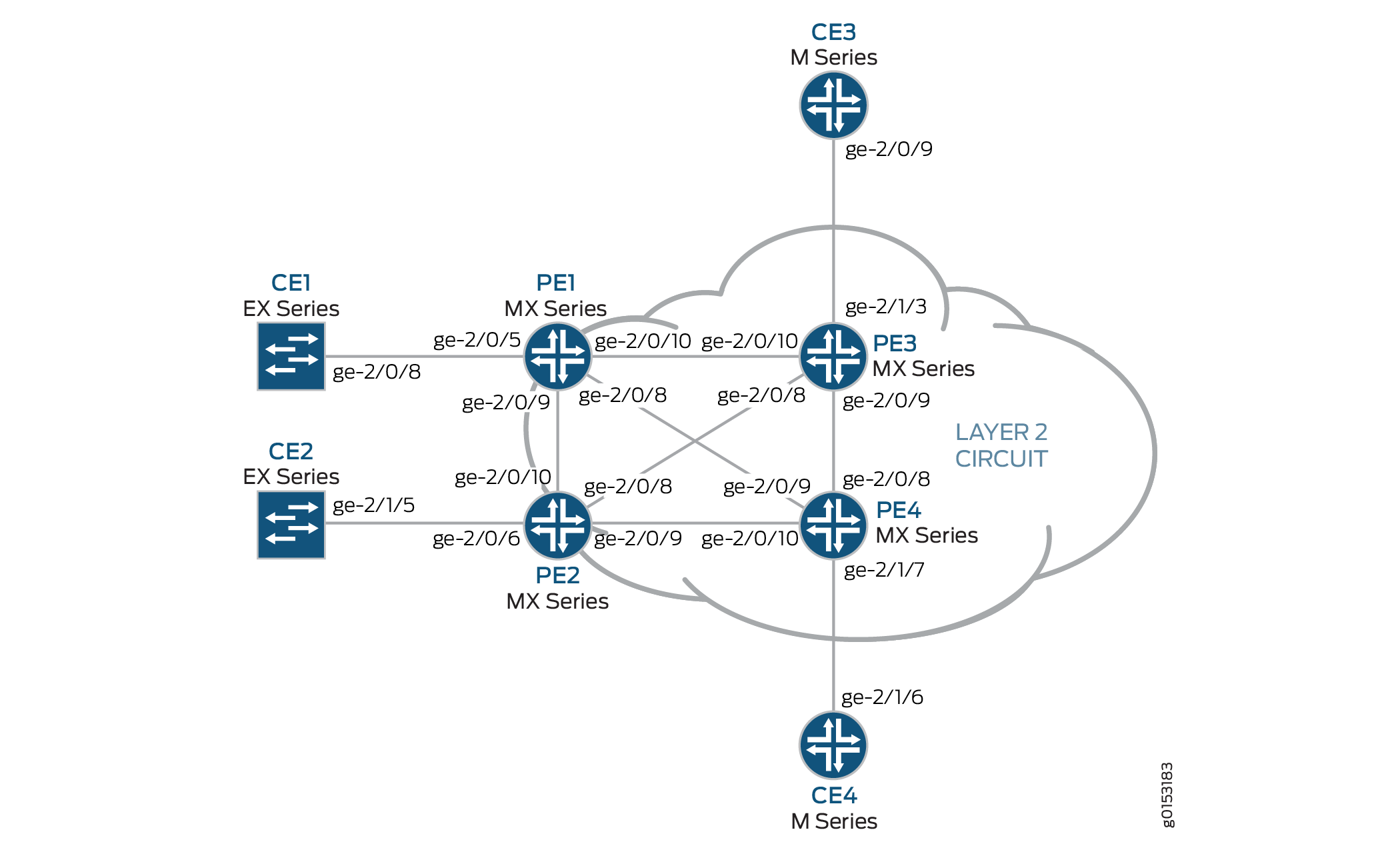 的物理拓扑
的物理拓扑
下面介绍此示例中使用的基本配置:
路由器 PE1 和路由器 PE2 配置为 MTU 设备。
路由器 PE3 和路由器 PE4 配置为 PE-r 路由器,每个路由器使用基于 LDP 的 VPLS 路由实例。
LDP 和 OSPF 协议均配置在所有 MTU 设备和 PE-r 路由器上。
通过 MPLS 地址家族支持面向核心的接口。
或者,可以使用语句在 PE-r 路由器
no-tunnel-interface上配置 VPLS 路由实例。这允许路由器使用标签交换接口 (LSI),如果您的路由器没有隧道服务 PIC 或对隧道服务的内置支持,这将非常有用。所有路由器都配置了环路 IP 地址。
PE-r 路由器上配置了 BGP。或者,您可以配置路由反射。这对于扩展内部 BGP (IBGP) 很有用。BGP 配置在层次结构级别包括
[edit protocols bgp group group-name family l2vpn]该signaling语句,以支持使用 BGP 的第 2 层 VPN 信令。
图 2 显示了此示例中使用的逻辑拓扑。
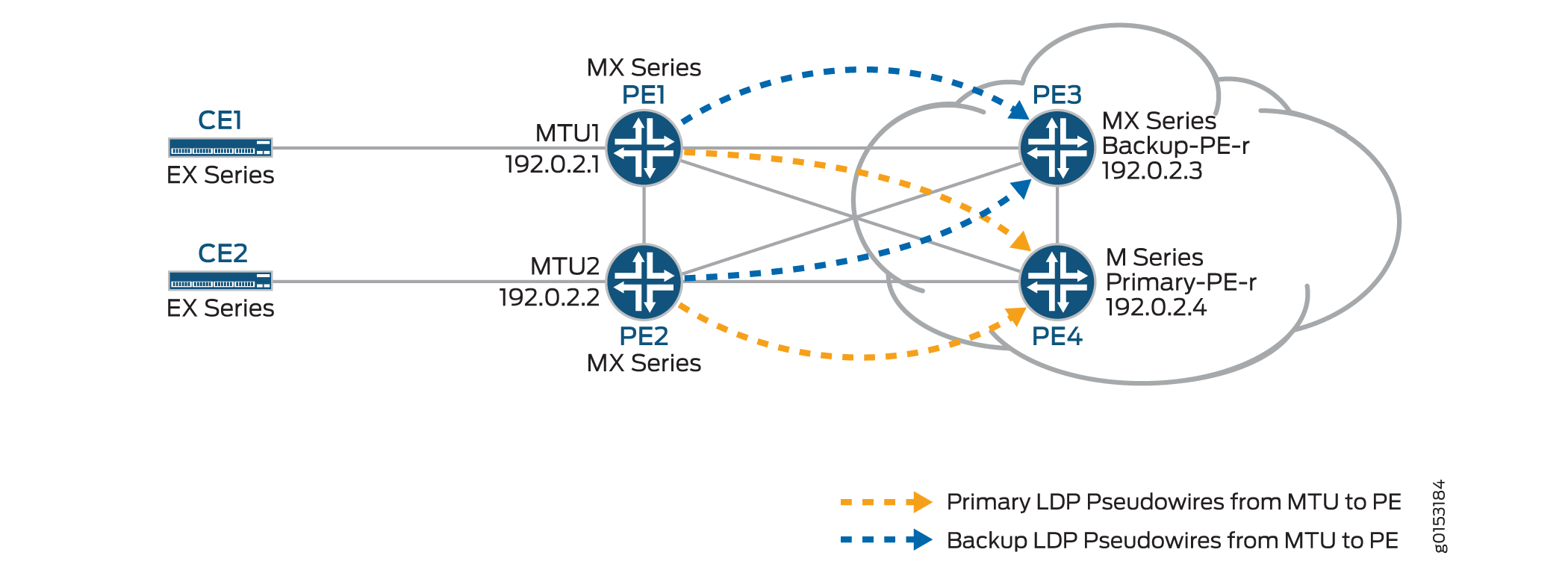 的逻辑拓扑
的逻辑拓扑
在 图 2 中:
MTU 设备(路由器 PE1 和路由器 PE2)与 PE-r 路由器(路由器 PE3 和路由器 PE4)具有第 2 层电路连接。为实现冗余,将为与 PE-r 路由器的第 2 层电路连接配置一个备用邻接方。
l2circuit层次结构中的[edit protocols]语句包含在 MTU 设备上。PE-r 路由器上配置了 VPLS 路由实例。
在 PE-r 路由器上的 VPLS 路由实例中,将创建网状组以终止源自 MTU 设备的第 2 层电路伪线。
每个 MTU 设备都配置了不同的虚拟电路 ID。
每个 PE-r 路由器的网格组配置都包括与 MTU 设备上使用的虚拟电路 ID 匹配的 VPLS ID 值。
配置
要使用基于 BGP 的 VPLS 为每个分支 PE-r 路由器配置具有不同网格组的 H-VPLS,请执行以下作:
配置分支型 MTU PE 路由器
分步程序
在路由器 PE1 上,配置连接到路由器 CE1 的千兆以太网接口。包括
encapsulation该语句并指定该ethernet-ccc选项。此外,还可通过包含family语句并指定ccc选项来配置逻辑接口。[edit interfaces] ge-2/0/5 { encapsulation ethernet-ccc; unit 0 { family ccc; } }在路由器 PE1 上,通过包含
neighbor语句并将路由器 PE3 的 IP 地址指定为邻接方来配置第 2 层电路。通过包含virtual-circuit-id语句并指定100为 ID,配置千兆以太网逻辑接口。此外,还可以为第 2 层电路配置备份邻接方,方法是包含backup-neighbor语句,将路由器 PE4 的环路接口 IP 地址指定为备份邻接方,并包含standby语句。[edit protocols] l2circuit { neighbor 192.0.2.3 { interface ge-2/0/5.0 { virtual-circuit-id 100; backup-neighbor 192.0.2.4 { # Backup H-VPLS PE router standby; } } }在路由器 PE2 上,配置连接到路由器 CE2 的千兆以太网接口。包括
encapsulation该语句并指定该ethernet-ccc选项。此外,还可通过包含family语句并指定ccc选项来配置逻辑接口。[edit interfaces] ge-2/0/6 { encapsulation ethernet-ccc; unit 0 { family ccc; } }在路由器 PE2 上,通过包含
neighbor语句并将路由器 PE3 的 IP 地址指定为邻接方来配置第 2 层电路。通过包含virtual-circuit-id语句并指定200为 ID,配置千兆以太网逻辑接口。通过包含encapsulation-type语句并指定ethernet选项来配置封装。此外,还可以为第 2 层电路配置备份邻接方,方法是包含backup-neighbor语句,将路由器 PE4 的环路接口 IP 地址指定为备份邻接方,并包含standby语句。[edit protocols] l2circuit { neighbor 192.0.2.3 { interface ge-1/0/2.0 { virtual-circuit-id 200; # different VC-ID encapsulation-type ethernet; # default encapsulation backup-neighbor 192.0.2.4 { standby; } } } }
配置中枢 PE (PE-r)
分步程序
在路由器 PE3(主中枢)上,配置连接到路由器 CE3 的千兆以太网接口。包括
encapsulation该语句并指定该ethernet-vpls选项。还要通过包含语句来family vpls配置逻辑接口。[edit interfaces] ge-2/0/0 { encapsulation ethernet-vpls; unit 0 { family vpls; } } lo0 { unit 0 { family inet { address 192.0.2.3/24; } } }在路由器 PE4(备份中枢)上,配置连接到路由器 CE4 的千兆以太网接口。包括
encapsulation该语句并指定该ethernet-vpls选项。还要通过包含语句来family vpls配置逻辑接口。[edit interfaces] ge-2/1/7 { encapsulation ethernet-vpls; unit 0 { description to_CE4; family vpls; } }lo0 { unit 0 { family inet { address 192.0.2.4/24; } } }在 PE-r 路由器 PE3 上,通过在层次结构级别包含
instance-type[edit routing-instances H-VPLS]语句并指定vpls选项来配置基于 BGP 的 VPLS 路由实例。包括该interface语句并指定连接到路由器 CE3 的千兆以太网接口。配置路由识别符,通过包含route-distinguisher语句并指定192.0.2.3:33为值来确保路由播发具有唯一性。此外,还要将 VPN 路由和转发 (VRF) 路由目标配置为包含在向参与 VPLS 的其他路由器的路由播发中。要配置 VRF 路由目标,请包含该vrf-target语句并指定target:64510:2为值。(可选)包含该no-tunnel-services语句以启用 LSI 接口的使用,这在设备没有隧道服务的情况下会很有用。此示例中省略了该no-tunnel-services语句。或者,您可以包含以下site-range语句来指定最大站点标识符的上限,该上限可以接受,以允许建立伪线。此示例中省略了该site-range语句。建议使用默认值 65,534。为每个 MTU PE 设备配置 VPLS 协议和网格组。
要配置 VPLS 协议,请在层次结构级别包含
vpls[edit routing-instances H-VPLS protocols]该语句。包括site该语句并指定站点名称。包括该interface语句并指定连接到设备 CE3 的千兆以太网接口。在 VPLS 实例下配置网格组会终止第 2 层电路到 VPLS 实例中。要配置每个网格组,请包含
mesh-group该语句并指定网格组名称。在此示例中,网格组名称是与每个网格组关联的 MTU 设备的名称。包括该vpls-id语句,并指定与 配置分支型 MTU PE 路由器中配置的虚拟电路 ID 匹配的 ID。还要包含该neighbor语句,并指定与每个网格组关联的分支型 PE 路由器的 IP 地址。或者,如果您未使用全网状 VPLS 连接,请包含local-switching该语句。如果要配置单个网状组并将多个第 2 层电路伪线端接到其中,则该local-switching语句非常有用。此示例中省略了该local-switching语句。routing-instances { H-VPLS { instance-type vpls; interface ge-2/1/3.0; route-distinguisher 192.0.2.3:33; vrf-target target:64510:2; protocols { vpls { site pe3 { site-identifier 3; interface ge-2/1/3.0; } mesh-group pe1 { vpls-id 100; neighbor 192.0.2.1; } mesh-group pe2 { vpls-id 200; neighbor 192.0.2.2; } } } } }在 PE-r 路由器 PE4 上,配置路由实例,类似于路由器 PE3 上的路由实例。
routing-instances { H-VPLS { instance-type vpls; interface ge-2/1/7.0; route-distinguisher 192.0.2.4:44; vrf-target target:64510:2; protocols { vpls { site pe4 { site-identifier 4; interface ge-2/1/7.0; } mesh-group pe1 { vpls-id 100; neighbor 192.0.2.1; } mesh-group pe2 { vpls-id 200; neighbor 192.0.2.2; } } } } }
验证 H-VPLS作
分步程序
本节介绍可用于验证 H-VPLS 是否按预期工作的作命令。
在路由器 PE1 和路由器 PE2 上,使用命令
show l2circuit connections验证到路由器 PE3 的第 2 层电路是否Up处于模式,以及到路由器 PE4 的第 2 层电路是否处于standby模式。输出还显示分配的标签、虚拟电路 ID 和
ETHERNET封装类型。user@PE1> show l2circuit connections Layer-2 Circuit Connections: Legend for connection status (St) EI -- encapsulation invalid NP -- interface h/w not present MM -- mtu mismatch Dn -- down EM -- encapsulation mismatch VC-Dn -- Virtual circuit Down CM -- control-word mismatch Up -- operational VM -- vlan id mismatch CF -- Call admission control failure OL -- no outgoing label IB -- TDM incompatible bitrate NC -- intf encaps not CCC/TCC TM -- TDM misconfiguration BK -- Backup Connection ST -- Standby Connection CB -- rcvd cell-bundle size bad SP -- Static Pseudowire LD -- local site signaled down RS -- remote site standby RD -- remote site signaled down XX -- unknown Legend for interface status Up -- operational Dn -- down Neighbor: 192.0.2.3 Interface Type St Time last up # Up trans ge-2/0/5.0(vc 100) rmt Up Oct 18 15:55:07 2012 1 Remote PE: 192.0.2.3, Negotiated control-word: No Incoming label: 299840, Outgoing label: 800001 Negotiated PW status TLV: No Local interface: ge-2/0/5.0, Status: Up, Encapsulation: ETHERNET Neighbor: 192.0.2.4 Interface Type St Time last up # Up trans ge-2/0/5.0(vc 100) rmt STuser@PE2> show l2circuit connections Layer-2 Circuit Connections: Legend for connection status (St) EI -- encapsulation invalid NP -- interface h/w not present MM -- mtu mismatch Dn -- down EM -- encapsulation mismatch VC-Dn -- Virtual circuit Down CM -- control-word mismatch Up -- operational VM -- vlan id mismatch CF -- Call admission control failure OL -- no outgoing label IB -- TDM incompatible bitrate NC -- intf encaps not CCC/TCC TM -- TDM misconfiguration BK -- Backup Connection ST -- Standby Connection CB -- rcvd cell-bundle size bad SP -- Static Pseudowire LD -- local site signaled down RS -- remote site standby RD -- remote site signaled down XX -- unknown Legend for interface status Up -- operational Dn -- down Neighbor: 192.0.2.3 Interface Type St Time last up # Up trans ge-2/0/6.0(vc 200) rmt Up Oct 18 15:55:07 2012 1 Remote PE: 192.0.2.3, Negotiated control-word: No Incoming label: 299872, Outgoing label: 800002 Negotiated PW status TLV: No Local interface: ge-2/0/6.0, Status: Up, Encapsulation: ETHERNET Neighbor: 192.0.2.4 Interface Type St Time last up # Up trans ge-2/0/6.0(vc 200) rmt ST在路由器 PE1 和路由器 PE2 上,使用此
show ldp neighbor命令验证是否已在主 H-VPLS 中枢邻接方和备份 H-VPLS 中枢邻接方的环路接口之间创建了目标 LDP 会话。user@PE1> show ldp neighbor Address Interface Label space ID Hold time 10.10.3.2 ge-2/0/9.0 192.0.2.2:0 13 10.10.1.2 ge-2/0/10.0 192.0.2.3:0 10 192.0.2.3 lo0.0 192.0.2.3:0 36 192.0.2.4 lo0.0 192.0.2.4:0 39 10.10.9.2 ge-2/0/8.0 192.0.2.4:0 14
user@PE2> show ldp neighbor Address Interface Label space ID Hold time 10.10.3.1 ge-2/0/10.0 192.0.2.1:0 12 10.10.5.2 ge-2/0/9.0 192.0.2.4:0 11 10.10.4.1 ge-2/0/8.0 192.0.2.3:0 11 192.0.2.3 lo0.0 192.0.2.3:0 39 192.0.2.4 lo0.0 192.0.2.4:0 38
在路由器 PE3 和路由器 PE4 上,使用此
show vpls connections命令验证 VPLS 连接状态是否同时适用于Up已终止的基于 LDP 的 VPLS 和基于 BGP 的 VPLS 第 2 层电路。user@PE3> show vpls connections Layer-2 VPN connections: Legend for connection status (St) EI -- encapsulation invalid NC -- interface encapsulation not CCC/TCC/VPLS EM -- encapsulation mismatch WE -- interface and instance encaps not same VC-Dn -- Virtual circuit down NP -- interface hardware not present CM -- control-word mismatch -> -- only outbound connection is up CN -- circuit not provisioned <- -- only inbound connection is up OR -- out of range Up -- operational OL -- no outgoing label Dn -- down LD -- local site signaled down CF -- call admission control failure RD -- remote site signaled down SC -- local and remote site ID collision LN -- local site not designated LM -- local site ID not minimum designated RN -- remote site not designated RM -- remote site ID not minimum designated XX -- unknown connection status IL -- no incoming label MM -- MTU mismatch MI -- Mesh-Group ID not available BK -- Backup connection ST -- Standby connection PF -- Profile parse failure PB -- Profile busy RS -- remote site standby SN -- Static Neighbor LB -- Local site not best-site RB -- Remote site not best-site VM -- VLAN ID mismatch Legend for interface status Up -- operational Dn -- down Instance: H-VPLS BGP-VPLS State Local site: pe3 (3) connection-site Type St Time last up # Up trans 4 rmt Up Oct 18 15:58:39 2012 1 Remote PE: 192.0.2.4, Negotiated control-word: No Incoming label: 800267, Outgoing label: 800266 Local interface: vt-2/0/9.135266562, Status: Up, Encapsulation: VPLS Description: Intf - vpls H-VPLS local site 3 remote site 4 LDP-VPLS State Mesh-group connections: pe1 Neighbor Type St Time last up # Up trans 192.0.2.1(vpls-id 100) rmt Up Oct 18 15:55:07 2012 1 Remote PE: 192.0.2.1, Negotiated control-word: No Incoming label: 800001, Outgoing label: 299840 Negotiated PW status TLV: No Local interface: vt-2/0/10.135266560, Status: Up, Encapsulation: ETHERNET Description: Intf - vpls H-VPLS neighbor 192.0.2.1 vpls-id 100 Mesh-group connections: pe2 Neighbor Type St Time last up # Up trans 192.0.2.2(vpls-id 200) rmt Up Oct 18 15:55:07 2012 1 Remote PE: 192.0.2.2, Negotiated control-word: No Incoming label: 800002, Outgoing label: 299872 Negotiated PW status TLV: No Local interface: vt-2/0/8.135266561, Status: Up, Encapsulation: ETHERNET Description: Intf - vpls H-VPLS neighbor 192.0.2.2 vpls-id 200 user@PE4> show vpls connections Layer-2 VPN connections: Legend for connection status (St) EI -- encapsulation invalid NC -- interface encapsulation not CCC/TCC/VPLS EM -- encapsulation mismatch WE -- interface and instance encaps not same VC-Dn -- Virtual circuit down NP -- interface hardware not present CM -- control-word mismatch -> -- only outbound connection is up CN -- circuit not provisioned <- -- only inbound connection is up OR -- out of range Up -- operational OL -- no outgoing label Dn -- down LD -- local site signaled down CF -- call admission control failure RD -- remote site signaled down SC -- local and remote site ID collision LN -- local site not designated LM -- local site ID not minimum designated RN -- remote site not designated RM -- remote site ID not minimum designated XX -- unknown connection status IL -- no incoming label MM -- MTU mismatch MI -- Mesh-Group ID not available BK -- Backup connection ST -- Standby connection PF -- Profile parse failure PB -- Profile busy RS -- remote site standby SN -- Static Neighbor LB -- Local site not best-site RB -- Remote site not best-site VM -- VLAN ID mismatch Legend for interface status Up -- operational Dn -- down Instance: H-VPLS BGP-VPLS State Local site: pe4 (4) connection-site Type St Time last up # Up trans 3 rmt Up Oct 18 15:58:39 2012 1 Remote PE: 192.0.2.3, Negotiated control-word: No Incoming label: 800266, Outgoing label: 800267 Local interface: vt-2/0/8.17826050, Status: Up, Encapsulation: VPLS Description: Intf - vpls H-VPLS local site 4 remote site 3 LDP-VPLS State Mesh-group connections: pe1 Neighbor Type St Time last up # Up trans 192.0.2.1(vpls-id 100) rmt Up Oct 18 15:58:39 2012 1 Remote PE: 192.0.2.1, Negotiated control-word: No Incoming label: 800002, Outgoing label: 299856 Negotiated PW status TLV: No Local interface: vt-2/0/9.17826048, Status: Up, Encapsulation: ETHERNET Description: Intf - vpls H-VPLS neighbor 192.0.2.1 vpls-id 100 Mesh-group connections: pe2 Neighbor Type St Time last up # Up trans 192.0.2.2(vpls-id 200) rmt Up Oct 18 15:58:39 2012 1 Remote PE: 192.0.2.2, Negotiated control-word: No Incoming label: 800003, Outgoing label: 299888 Negotiated PW status TLV: No Local interface: vt-2/0/10.17826049, Status: Up, Encapsulation: ETHERNET Description: Intf - vpls H-VPLS neighbor 192.0.2.2 vpls-id 200在路由器 PE3 和路由器 PE4 上,使用命令
show vpls flood验证 H-VPLS PE 路由器是否为每个分支 PE 站点创建了泛洪组。user@PE3> show vpls flood Name: H-VPLS CEs: 1 VEs: 3 Flood Routes: Prefix Type Owner NhType NhIndex 0x300cc/51 FLOOD_GRP_COMP_NH __ves__ comp 1376 0x300cf/51 FLOOD_GRP_COMP_NH __all_ces__ comp 744 0x300d5/51 FLOOD_GRP_COMP_NH pe1 comp 1702 0x300d3/51 FLOOD_GRP_COMP_NH pe2 comp 1544 0x30001/51 FLOOD_GRP_COMP_NH __re_flood__ comp 740
user@PE4> show vpls flood Name: H-VPLS CEs: 1 VEs: 3 Flood Routes: Prefix Type Owner NhType NhIndex 0x300d1/51 FLOOD_GRP_COMP_NH __ves__ comp 1534 0x300d0/51 FLOOD_GRP_COMP_NH __all_ces__ comp 753 0x300d6/51 FLOOD_GRP_COMP_NH pe1 comp 1378 0x300d4/51 FLOOD_GRP_COMP_NH pe2 comp 1695 0x30002/51 FLOOD_GRP_COMP_NH __re_flood__ comp 750
在路由器 PE3 和路由器 PE4 上,使用命令
show vpls mac-table验证是否已学习客户边缘设备的 MAC 地址。user@PE3> show vpls mac-table MAC flags (S -static MAC, D -dynamic MAC, L -locally learned, C -Control MAC SE -Statistics enabled, NM -Non configured MAC, R -Remote PE MAC) Routing instance : H-VPLS Bridging domain : __H-VPLS__, VLAN : NA MAC MAC Logical NH RTR address flags interface Index ID 00:21:59:0f:35:32 D vt-2/0/8.135266560 00:21:59:0f:35:33 D ge-2/1/3.0 00:21:59:0f:35:d4 D vt-2/0/9.135266561 00:21:59:0f:35:d5 D vt-2/0/10.135266562user@PE4> show vpls mac-table MAC flags (S -static MAC, D -dynamic MAC, L -locally learned, C -Control MAC SE -Statistics enabled, NM -Non configured MAC, R -Remote PE MAC) Logical system : PE4 Routing instance : H-VPLS Bridging domain : __H-VPLS__, VLAN : NA MAC MAC Logical NH RTR address flags interface Index ID 00:21:59:0f:35:32 D vt-2/0/8.17826050 00:21:59:0f:35:33 D vt-2/0/9.17826050 00:21:59:0f:35:d4 D vt-2/0/10.17826050 00:21:59:0f:35:d5 D ge-2/1/7.0确保客户边缘设备可以相互 ping。
user@CE1> ping 10.255.14.219 # ping sent from CE1 CE4 PING 10.255.14.219 (10.255.14.219): 56 data bytes 64 bytes from 10.255.14.219: icmp_seq=0 ttl=64 time=10.617 ms 64 bytes from 10.255.14.219: icmp_seq=1 ttl=64 time=9.224 ms ^C --- 10.255.14.219 ping statistics --- 2 packets transmitted, 2 packets received, 0% packet loss round-trip min/avg/max/stddev = 9.224/9.921/10.617/0.697 ms
user@CE2> ping 10.255.14.218 # ping sent from CE2 to CE3 PING 10.255.14.218 (10.255.14.218): 56 data bytes 64 bytes from 10.255.14.218: icmp_seq=0 ttl=64 time=1.151 ms 64 bytes from 10.255.14.218: icmp_seq=1 ttl=64 time=0.674 ms ^C --- 10.255.14.218 ping statistics --- 2 packets transmitted, 2 packets received, 0% packet loss round-trip min/avg/max/stddev = 0.674/0.913/1.151/0.238 ms
检查相关的路由表。
user@PE1> show route table l2circuit.0 l2circuit.0: 4 destinations, 4 routes (4 active, 0 holddown, 0 hidden) + = Active Route, - = Last Active, * = Both 192.0.2.3:NoCtrlWord:5:100:Local/96 *[L2CKT/7] 00:12:16, metric2 1 > to 10.10.1.2 via ge-2/0/10.0 192.0.2.3:NoCtrlWord:5:100:Remote/96 *[LDP/9] 00:12:16 Discard 192.0.2.4:NoCtrlWord:5:100:Local/96 *[L2CKT/7] 00:12:10, metric2 1 > to 10.10.9.2 via ge-2/0/8.0 192.0.2.4:NoCtrlWord:5:100:Remote/96 *[LDP/9] 00:12:15 Discarduser@PE2> show route table l2circuit.0 l2circuit.0: 4 destinations, 4 routes (4 active, 0 holddown, 0 hidden) + = Active Route, - = Last Active, * = Both 192.0.2.3:NoCtrlWord:5:200:Local/96 *[L2CKT/7] 00:13:13, metric2 1 > to 10.10.4.1 via ge-2/0/8.0 192.0.2.3:NoCtrlWord:5:200:Remote/96 *[LDP/9] 00:13:13 Discard 192.0.2.4:NoCtrlWord:5:200:Local/96 *[L2CKT/7] 00:13:13, metric2 1 > to 10.10.5.2 via ge-2/0/9.0 192.0.2.4:NoCtrlWord:5:200:Remote/96 *[LDP/9] 00:13:13 Discard user@PE3> show route table H-VPLS.l2vpn.0 H-VPLS.l2vpn.0: 2 destinations, 2 routes (2 active, 0 holddown, 0 hidden) + = Active Route, - = Last Active, * = Both 192.0.2.3:33:3:1/96 *[L2VPN/170/-101] 03:19:26, metric2 1 Indirect 192.0.2.4:44:4:1/96 *[BGP/170] 03:15:45, localpref 100, from 192.0.2.4 AS path: I, validation-state: unverified > to 10.10.6.2 via ge-2/0/9.0 user@PE4> show route table H-VPLS.l2vpn.0 H-VPLS.l2vpn.0: 2 destinations, 2 routes (2 active, 0 holddown, 0 hidden) + = Active Route, - = Last Active, * = Both 192.0.2.3:33:3:1/96 *[BGP/170] 03:21:17, localpref 100, from 192.0.2.3 AS path: I, validation-state: unverified > to 10.10.6.1 via ge-2/0/9.0 192.0.2.4:44:4:1/96 *[L2VPN/170/-101] 03:17:47, metric2 1 Indirect
结果
此示例的配置和验证部分已完成。以下部分供您参考。
路由器 PE1 的相关配置示例如下。
路由器 PE1
interfaces {
ge-2/0/5 {
encapsulation ethernet-ccc;
unit 0 {
description to_CE1;
family ccc;
}
}
ge-2/0/8 {
unit 0 {
description to_PE4;
family inet {
address 10.10.9.1/30;
}
family mpls;
}
}
ge-2/0/9 {
unit 0 {
description to_PE2;
family inet {
address 10.10.3.1/30;
}
family mpls;
}
}
ge-2/0/10 {
unit 0 {
description to_PE3;
family inet {
address 10.10.1.1/30;
}
family mpls;
}
}
lo0 {
unit 0 {
family inet {
address 192.0.2.1/24;
}
}
}
}
protocols {
mpls {
interface ge-2/0/8.0;
interface ge-2/0/9.0;
interface ge-2/0/10.0;
}
ospf {
traffic-engineering;
area 0.0.0.0 {
interface lo0.0 {
passive;
}
interface ge-2/0/8.0;
interface ge-2/0/9.0;
interface ge-2/0/10.0;
}
}
ldp {
interface ge-2/0/8.0;
interface ge-2/0/9.0;
interface ge-2/0/10.0;
interface lo0.0;
}
l2circuit {
neighbor 192.0.2.3 {
interface ge-2/0/5.0 {
virtual-circuit-id 100;
backup-neighbor 192.0.2.4 {
standby;
}
}
}
}
}
路由器 PE2 的相关示例配置如下。
路由器 PE2
interfaces {
ge-2/0/6 {
encapsulation ethernet-ccc;
unit 0 {
description to_CE2;
family ccc;
}
}
ge-2/0/8 {
unit 0 {
description to_PE3;
family inet {
address 10.10.4.2/30;
}
family mpls;
}
}
ge-2/0/9 {
unit 0 {
description to_PE4;
family inet {
address 10.10.5.1/30;
}
family mpls;
}
}
ge-2/0/10 {
unit 0 {
description to_PE1;
family inet {
address 10.10.3.2/30;
}
family mpls;
}
}
lo0 {
unit 0 {
family inet {
address 192.0.2.2/24;
}
}
}
}
protocols {
mpls {
interface ge-2/0/8.0;
interface ge-2/0/9.0;
interface ge-2/0/10.0;
}
ospf {
traffic-engineering;
area 0.0.0.0 {
interface lo0.0 {
passive;
}
interface ge-2/0/8.0;
interface ge-2/0/9.0;
interface ge-2/0/10.0;
}
}
ldp {
interface ge-2/0/8.0;
interface ge-2/0/9.0;
interface ge-2/0/10.0;
interface lo0.0;
}
l2circuit {
neighbor 192.0.2.3 {
interface ge-2/0/6.0 {
virtual-circuit-id 200;
backup-neighbor 192.0.2.4 {
standby;
}
}
}
}
}
路由器 PE3 的相关示例配置如下。
路由器 PE3
interfaces {
ge-2/0/8 {
unit 0 {
description to_PE2;
family inet {
address 10.10.4.1/30;
}
family mpls;
}
}
ge-2/0/9 {
unit 0 {
description to_PE4;
family inet {
address 10.10.6.1/30;
}
family mpls;
}
}
ge-2/0/10 {
unit 0 {
description to_PE1;
family inet {
address 10.10.1.2/30;
}
family mpls;
}
}
ge-2/1/3 {
encapsulation ethernet-vpls;
unit 0 {
description to_CE3;
family vpls;
}
}
lo0 {
unit 0{
family inet {
address 192.0.2.3/24;
}
}
}
}
protocols {
mpls {
interface ge-2/0/8.0;
interface ge-2/0/9.0;
interface ge-2/0/10.0;
}
bgp {
group internal-peers {
type internal;
local-address 192.0.2.3;
family l2vpn {
signaling;
}
neighbor 192.0.2.4;
}
}
ospf {
traffic-engineering;
area 0.0.0.0 {
interface lo0.0 {
passive;
}
interface ge-2/0/8.0;
interface ge-2/0/9.0;
interface ge-2/0/10.0;
}
}
ldp {
interface ge-2/0/8.0;
interface ge-2/0/9.0;
interface ge-2/0/10.0;
interface lo0.0;
}
}
routing-instances {
H-VPLS {
instance-type vpls;
interface ge-2/1/3.0;
route-distinguisher 192.0.2.3:33;
vrf-target target:64510:2;
protocols {
vpls {
site pe3 {
site-identifier 3;
interface ge-2/1/3.0;
}
mesh-group pe1 {
vpls-id 100;
neighbor 192.0.2.1;
}
mesh-group pe2 {
vpls-id 200;
neighbor 192.0.2.2;
}
}
}
}
}
routing-options {
autonomous-system 64510;
}
路由器 PE4 的相关示例配置如下。
路由器 PE4
interfaces {
ge-2/0/8 {
unit 0 {
description to_PE3;
family inet {
address 10.10.6.2/30;
}
family mpls;
}
}
ge-2/0/9 {
unit 0 {
description to_PE1;
family inet {
address 10.10.9.2/30;
}
family mpls;
}
}
ge-2/0/10 {
unit 0 {
description to_PE2;
family inet {
address 10.10.5.2/30;
}
family mpls;
}
}
ge-2/1/7 {
encapsulation ethernet-vpls;
unit 0 {
description to_CE4;
family vpls;
}
}
lo0 {
    unit 0 {
        family inet {
            address 192.0.2.4/24;
        }
    }
}
}
protocols {
mpls {
interface ge-2/0/8.0;
interface ge-2/0/9.0;
interface ge-2/0/10.0;
}
bgp {
group internal-peers {
type internal;
local-address 192.0.2.4;
family l2vpn {
signaling;
}
neighbor 192.0.2.3;
}
}
ospf {
traffic-engineering;
area 0.0.0.0 {
interface lo0.0 {
passive;
}
interface ge-2/0/8.0;
interface ge-2/0/9.0;
interface ge-2/0/10.0;
}
}
ldp {
interface ge-2/0/8.0;
interface ge-2/0/9.0;
interface ge-2/0/10.0;
interface lo0.0;
}
}
routing-instances {
    H-VPLS {
        instance-type vpls;
        interface ge-2/1/7.0;
        route-distinguisher 192.0.2.4:44;
        vrf-target target:64510:2;
        protocols {
            vpls {
                site pe4 {
                    site-identifier 4;
                    interface ge-2/1/7.0;
                }
                mesh-group pe1 {
                    vpls-id 100;
                    neighbor 192.0.2.1;
                }
                mesh-group pe2 {
                    vpls-id 200;
                    neighbor 192.0.2.2;
                }
            }
        }
    }
}
routing-options {
autonomous-system 64510;
}
设备 CE1 的相关示例配置如下。
路由器 CE1
interfaces {
    ge-2/0/8 {
        unit 0 {
            description to_PE1;
            family inet {
                address 172.16.0.1/24;
            }
        }
    }
    lo0 {
        unit 0{
            family inet {
                address 10.255.14.214/32;
            }
        }
    }
}
protocols {
    ospf {
        area 0.0.0.0 {
            interface lo0.0 {
                passive;
            }
            interface ge-2/0/8.0;
        }
    }
}
设备 CE2 的相关示例配置如下。
路由器 CE2
interfaces {
    ge-2/1/5 {
        unit 0 {
            description to_PE2;
            family inet {
                address 172.16.0.2/24;
            }
        }
    }
    lo0 {
        unit 0{
            family inet {
                address 10.255.14.215/32;
            }
        }
    }
}
protocols {
    ospf {
        area 0.0.0.0 {
            interface lo0.0 {
                passive;
            }
            interface ge-2/1/5.0;
        }
    }
}
设备 CE3 的相关示例配置如下。
路由器 CE3
interfaces {
    ge-2/0/9 {
        unit 0 {
            description to_PE3;
            family inet {
                address 172.16.0.3/24;
            }
        }
    }
    lo0 {
        unit 0 {
            family inet {
                address 10.255.14.218/32;
            }
        }
    }
}
protocols {
    ospf {
        area 0.0.0.0 {
            interface lo0.0 {
                passive;
            }
            interface ge-2/0/9.0;
        }
    }
}
设备 CE4 的相关示例配置如下。
路由器 CE4
interfaces {
    ge-2/1/6 {
        unit 0 {
            description to_PE4;
            family inet {
                address 172.16.0.4/24;
            }
        }
    }
    lo0 {
        unit 0{
            family inet {
                address 10.255.14.219/32;
            }
        }
    }
}
protocols {
    ospf {
        area 0.0.0.0 {
            interface lo0.0 {
                passive;
            }
            interface ge-2/1/6.0;
        }
    }
}