
示例:配置动态 PPPoE MLPPP 订阅者
此示例说明了如何配置动态以太网点对点协议 (PPPoE) 多链路 (MLPPP) 订阅者。
要求
此示例使用以下硬件和软件组件:
安装了 MPC2 的 MX 系列
Junos OS 13.3 或更高版本
在配置动态 PPPoE MLPPP 订阅者之前,请确保您已:
如果使用内联服务 (
si) 接口配置隧道组,请为 PPPoE 用户启用内联服务 (si) 接口。请参阅 为 PPPoE 和 LNS 订阅者启用内联服务接口。为 PPPoE 用户配置了内联服务 (
si) 接口。请参阅 为 PPPoE 和 LNS 订阅者配置内联服务接口。如果使用服务接口池配置隧道组,则为 PPPoE 用户配置服务设备池。请参阅 配置服务设备池以平衡 PPPoE 和 LNS 订阅者负载。
概述
MLPPP 用户由两个 IFL(逻辑接口)、一个成员链路和一个捆绑包组成。对于动态 PPPoE MLPPP 订阅者,可以使用动态配置文件配置动态pp0成员链路 IFL。成员链路动态配置文件包括pp0family mlppp包含动态配置文件名称和服务接口 (si) 或服务接口池的语句。然后,此信息用于创建动态捆绑 IFL。
每个动态捆绑包仅接受一个动态成员链路。如果多个动态成员链路尝试加入同一个动态捆绑包,则系统将使新成员会话失败。
图 1 显示了不同类型的流量如何遍历 MX 系列终止 PPPoE 会话的网络。
拓扑结构
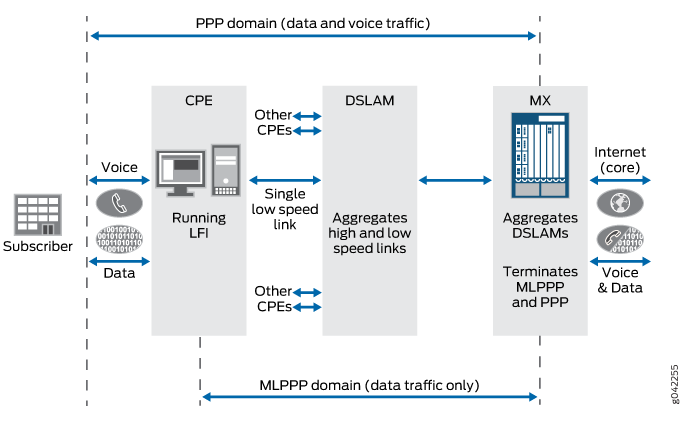
显示了以下两个域,用于终止 MX 系列的流量:
PPP 域 — 包含数据和语音流量
MLPPP 域 — 仅包含数据流量
配置
要配置动态 PPPoE MLPPP 用户,请执行以下作:
CLI 快速配置
要快速配置此示例,请复制以下命令,将其粘贴到文本文件中,删除所有换行符,更改详细信息,以便与网络配置匹配,然后将命令复制并粘贴到层次结构级别的 [edit] CLI 中。
[edit]
set interfaces ge-1/0/0 flexible-vlan-tagging
set interfaces ge-1/0/0 unit 600 encapsulation ppp-over-ether vlan-id 600
set interfaces ge-1/0/0 unit 600 pppoe-underlying-options dynamic-profile ml-pp0-member-prof
set dynamic-profiles ml-pp0-member-prof
set dynamic-profiles ml-pp0-member-prof interfaces “$junos-interface-ifd-name” unit “$junos-interface-unit”
set dynamic-profiles ml-pp0-member-prof interfaces “$junos-interface-ifd-name” unit “$junos-interface-unit” pppoe-options underlying-interface "$junos-underlying-interface" server
set dynamic-profiles ml-pp0-member-prof interfaces “$junos-interface-ifd-name” unit “$junos-interface-unit” ppp-options pap chap lcp-restart-timer 5000
set dynamic-profiles ml-pp0-member-prof interfaces “$junos-interface-ifd-name” unit “$junos-interface-unit” family mlppp bundle “$junos-bundle-interface-name”
set dynamic-profiles ml-pp0-member-profinterfaces “$junos-interface-ifd-name” unit “$junos-interface-unit” family mlppp service-interface si-5/1/0
set dynamic-profiles ml-pp0-member-prof interfaces “$junos-interface-ifd-name” unit “$junos-interface-unit” family mlppp dynamic-profile ml-bundle-prof
set dynamic-profiles ml-pp0-member-prof interfaces “$junos-interface-ifd-name” unit “$junos-interface-unit” family inet

[edit]
set dynamic-profiles ml-bundle-prof
set dynamic-profiles ml-bundle-prof routing-instances "$junos-routing-instance" interface "$junos-interface-name"
set dynamic-profiles ml-bundle-prof routing-instances "$junos-routing-instance" interface "$junos-interface-name" routing-options access route $junos-framed-route-ip-address-prefix
set dynamic-profiles ml-bundle-prof routing-instances "$junos-routing-instance" interface "$junos-interface-name" routing-options access route $junos-framed-route-ip-address-prefix next-hop $junos-framed-route-nexthop
set dynamic-profiles ml-bundle-prof routing-instances "$junos-routing-instance" interface "$junos-interface-name" routing-options access route $junos-framed-route-ip-address-prefix metric $junos-framed-route-cost
set dynamic-profiles ml-bundle-prof routing-instances "$junos-routing-instance" interface "$junos-interface-name" routing-options access route $junos-framed-route-ip-address-prefix preference $junos-framed-route-distance
set dynamic-profiles ml-bundle-prof routing-instances "$junos-routing-instance" interface "$junos-interface-name" access-internal route $junos-subscriber-ip-address
set dynamic-profiles ml-bundle-prof routing-instances "$junos-routing-instance" interface "$junos-interface-name" access-internal route $junos-subscriber-ip-address qualified-next-hop $junos-interface-name
set dynamic-profiles ml-bundle-prof interfaces “$junos-interface-ifd-name” unit “$junos-interface-unit”
set dynamic-profiles ml-bundle-prof interfaces “$junos-interface-ifd-name” unit “$junos-interface-unit” encapsulation multilink-ppp
set dynamic-profiles ml-bundle-prof interfaces “$junos-interface-ifd-name” unit “$junos-interface-unit” mrru 1500
set dynamic-profiles ml-bundle-prof interfaces “$junos-interface-ifd-name” unit “$junos-interface-unit” short-sequence
set dynamic-profiles ml-bundle-prof interfaces “$junos-interface-ifd-name” unit “$junos-interface-unit” fragment-threshold 320
set dynamic-profiles ml-bundle-prof interfaces “$junos-interface-ifd-name” unit “$junos-interface-unit” family inet
set dynamic-profiles ml-bundle-prof class-of-service traffic-control-profiles tcp2
set dynamic-profiles ml-bundle-prof class-of-service traffic-control-profiles tcp2 scheduler-map "$junos-cos-scheduler-map”
set dynamic-profiles ml-bundle-prof class-of-service traffic-control-profiles tcp2 shaping-rate "$junos-cos-shaping-rate"
set dynamic-profiles ml-bundle-prof class-of-service traffic-control-profiles tcp2 guaranteed-rate "$junos-cos-guaranteed-rate"
set dynamic-profiles ml-bundle-prof class-of-service traffic-control-profiles tcp2  delay-buffer-rate “$junos-cos-delay-buffer-rate”
set dynamic-profiles ml-bundle-prof class-of-service interfaces “$junos-interface-ifd-name” unit "$junos-interface-unit"
set dynamic-profiles ml-bundle-prof class-of-service interfaces “$junos-interface-ifd-name” unit "$junos-interface-unit" output-traffic-control-profile tcp2
set dynamic-profiles ml-bundle-prof class-of-service interfaces “$junos-interface-ifd-name” unit "$junos-interface-unit" fragmentation-map fragmap-2
为不支持混合模式的动态 pp0 成员链路 IFL 配置动态配置文件
分步程序
下面的示例要求您在各个配置层级中进行导航。
使用动态配置文件并包含family mlppp语句来配置动态pp0成员链路 IFL。该family mlppp语句包含 dynamic-profile name、 和 service-interface 或 用于service-device-pool创建动态捆绑 IFL。如果配置 service-device-pool,则会从池中选择一个内联服务 (si) 接口,以便使用轮询方法创建动态捆绑 IFL。
您还必须在隧道成员pp0链路动态配置文件中配置该family inet语句。该family inet语句允许安装 L2TP 长路由,并支持查找引擎将控制数据包引导到路由引擎。
或者,您可以将动态配置文件配置为支持混合模式,以便 PPP 订阅者能够使用动态配置文件成功登录。有关所需的其他配置命令,请参阅为支持 混合模式的动态 pp0 成员链路 IFL 配置动态配置文件 。
以下示例说明如何通过灵活 VLAN 配置动态 pp0 成员链路 IFL,以支持 PPPoE MLPPP 用户。
为动态配置文件创建千兆以太网底层接口,
ge-1/0/0并启用灵活的 VLAN 标记。[edit interfaces]user@host#set ge-1/0/0 flexible vlan-tagging对于
ge-1/0/0接口,为 VLAN 600 配置基于以太网的 PPP 封装。[edit interfaces ge-1/0/0]user@host#set unit 600 encapsulation ppp-over-ether vlan-id 600配置 PPPoE 底层接口并设置其动态配置文件。
[edit interfaces ge-1/0/0 unit 600]user@host#set pppoe-underlying-options dynamic-profile ml-pp0-member-prof指定之前设置为 PPPoE 底层接口动态配置文件的动态配置文件。
[edit dynamic-profiles]user@host#set ml-pp0-member-prof通过设置预定义的动态接口变量 $junos-interface-ifd-name来配置动态配置文件的接口,并通过设置预定义的单元号变量 $junos-interface-unit来配置逻辑接口单元。接口和单元号变量将动态替换为连接到 MX 系列时订阅者访问的接口和单元号。
注意:PPPoE 会话的动态配置文件的接口设置可以使用以下任一代码格式:
set interfaces pp0或
set interfaces “$junos-interface-ifd-name”
此示例使用
set interfaces “$junos-interface-ifd-name”.[edit dynamic-profiles ml-pp0-member-prof]user@host#set interfaces “$junos-interface-ifd-name” unit “$junos-interface-unit”对于 $junos-interface-ifd-name 接口,为动态配置文件中的动态 PPPoE 逻辑接口配置 PPPoE 选项和 PPPoE 服务器模式的底层接口。
[edit dynamic-profiles ml-pp0-member-prof interfaces “$junos-interface-ifd-name” unit “$junos-interface-unit”]user@host#set pppoe-options underlying-interface "$junos-underlying-interface" server在动态配置文件中配置特定于 PPP 的接口属性:
pap、chap,并将 设置为lcp-restart-timer5000。[edit dynamic-profiles ml-pp0-member-prof interfaces “$junos-interface-ifd-name” unit “$junos-interface-unit”]user@host#set ppp-options pap chap lcp-restart-timer 5000为动态 PPPoE MLPPP 用户启用 MLPPP 支持,并通过设置预定义的动态捆绑接口变量 $junos-bundle-interface-name来配置动态捆绑接口 (IFL)。
注意:该语句确定
family mlppp从用户接口传入的用户是否支持 MLPPP。[edit dynamic-profiles ml-pp0-member-prof interfaces “$junos-interface-ifd-name” unit “$junos-interface-unit”]user@host#set family mlppp bundle “$junos-bundle-interface-name”为动态 PPPoE MLPPP 订阅者指定服务接口。
[edit dynamic-profiles ml-pp0-member-prof interfaces “$junos-interface-ifd-name” unit “$junos-interface-unit” family mlppp]user@host#set service-interface si-5/1/0指定捆绑包的动态配置文件名称。
[edit dynamic-profiles ml-pp0-member-prof interfaces “$junos-interface-ifd-name” unit “$junos-interface-unit” family mlppp]user@host#set dynamic-profile ml-bundle-prof启用对 PPPoE 隧道式用户和 LAC 长路由的支持。
[edit dynamic-profiles ml-lns-member-prof interfaces “$junos-interface-ifd-name” unit “$junos-interface-unit”]user@host#set family inet如果完成设备配置,请提交配置。
[edit]
user@host# commit
为支持混合模式的动态 pp0 成员链路 IFL 配置动态配置文件
分步程序
下面的示例要求您在各个配置层级中进行导航。
或者,您可以将动态配置文件配置为支持混合模式,以便 PPP 订阅者能够使用动态配置文件成功登录。
以下示例显示了支持动态配置文件的混合模式所需的附加配置。
CLI 快速配置部分未包含以下配置命令。
通过灵活 VLAN 配置动态
pp0成员链路 IFL,以支持 PPPoE MLPPP 订阅者。请参阅 为不支持混合模式的动态 pp0 成员链路 IFL 配置动态配置文件,步骤 1-4。指定用于创建动态 PPPoE MLPPP 成员链路的动态配置文件。
[edit dynamic-profiles]user@host#set ml-pp0-member-prof当客户端设备 (CPE) 用于动态虚拟路由和转发 (VRF) PPP 用户时,您必须配置路由实例及其接口。
[edit dynamic-profiles ml-pp0-member-prof]user@host#set routing-instances "$junos-routing-instance" interface "$junos-interface-name"为路由选项配置访问路由。
[edit dynamic-profiles ml-pp0-member-prof routing-instances "$junos-routing-instance" interface "$junos-interface-name"]user@host#set routing-options access route $junos-framed-route-ip-address-prefix配置路由器的下一跃点、指标和首选项。
[edit dynamic-profiles ml-pp0-member-prof routing-instances "$junos-routing-instance" interface "$junos-interface-name" routing-options access route $junos-framed-route-ip-address-prefix]user@host#set next-hop $junos-framed-route-nexthopset metric $junos-framed-route-costset preference $junos-framed-route-distance为路由选项配置内部访问路由。
[edit dynamic-profiles ml-pp0-member-prof routing-instances "$junos-routing-instance" interface "$junos-interface-name"]user@host#set routing-options access-internal route $junos-subscriber-ip-address为内部路由配置合格下一跃点。
[edit dynamic-profiles ml-pp0-member-prof routing-instances "$junos-routing-instance" interface "$junos-interface-name" routing-options access-internal route $junos-subscriber-ip-address ]user@host#set qualified-next-hop $junos-interface-name配置动态配置文件的基本设置。请参阅 为不支持混合模式的动态 pp0 成员链路 IFL 配置动态配置文件,步骤 5 到 11。
注意:要启用混合模式支持,当 CPE 是 PPP 用户时,还必须向语句添加
family inet未编号地址以及输入和输出过滤器。[edit dynamic-profiles ml-pp0-member-prof interfaces “$junos-interface-ifd-name” unit “$junos-interface-unit”]user@host#set family inet unnumbered-address $junos-loopback-interfaceset family inet filter input "$junos-input-filter" output "$junos-output-filter”当 CPE 是 PPP 用户时,还必须配置服务等级并定义流量控制配置文件。
[edit dynamic-profiles ml-pp0-member-prof class-of-serviceuser@host#set traffic-control-profiles tc-profile对于流量控制配置文件,定义以下设置:调度器图、整形速率、开销核算、保证速率和延迟缓冲速率。
[edit dynamic-profiles ml-pp0-member-prof class-of-service traffic-control-profiles tc-profileuser@host#set scheduler-map "$junos-cos-scheduler-map"set shaping-rate "$junos-cos-shaping-rate"set overhead-accounting "$junos-cos-shaping-mode" bytes "$junos-cos-byte-adjust"set guaranteed-rate "$junos-cos-guaranteed-rate"set delay-buffer-rate "$junos-cos-delay-buffer-rate"通过设置预定义的动态接口变量 $junos-interface-ifd-name来配置动态配置文件的接口,并通过设置预定义的单元号变量 $junos-interface-unit来配置逻辑接口单元。
[edit dynamic-profiles ml-pp0-member-prof class-of-service]user@host#set interfaces “$junos-interface-ifd-name” unit “$junos-interface-unit”对于动态配置文件接口,定义以下设置:输出流量控制配置文件、分类器和重写规则。
[edit dynamic-profiles ml-pp0-member-prof class-of-service interfaces “$junos-interface-ifd-name” unit “$junos-interface-unit”]user@host#set output-traffic-control-profile tc-profileset classifiers dscp GEN-CLASSIFIER-INset rewrite-rules dscp GEN-RW-OUT-DSCP如果完成设备配置,请提交配置。
[edit]
user@host# commit
为动态捆绑 IFL 配置动态配置文件
分步程序
下面的示例要求您在各个配置层级中进行导航。
要为动态捆绑 IFL 配置动态配置文件,请在动态配置文件中指定 encapsulation multilink-ppp 语句。 dynamic profile 对于动态捆绑包,IFL 引用自动态 dynamic profile PPPoE 和 LNS 成员链路 IFL。
您必须 fragmentation-maps 使用并在捆绑包动态配置文件中对 class-of-service 其进行分配,以静态方式配置该语句。您还可以设置以下可选 MLPPP 参数:MRRU、短序列和片段阈值。以下示例说明如何为动态捆绑 IFL 配置动态配置文件:
指定捆绑包的动态配置文件名称。
[edit dynamic-profiles}user@host#set ml-bundle-prof尽管 MLPPP 成员链路会处理身份验证和路由实例分配,但如果分配了非默认路由实例,则必须在分配的路由实例下配置捆绑 IFL。因此,还必须在捆绑包 dynamic-profile 中配置 routing-instances。
[edit dynamic-profiles ml-bundle-prof]user@host#set routing-instances "$junos-routing-instance" interface "$junos-interface-name"为路由选项配置访问路由。
[edit dynamic-profiles ml-bundle-prof routing-instances "$junos-routing-instance" interface "$junos-interface-name"]user@host#set routing-options access route $junos-framed-route-ip-address-prefix配置路由器的下一跃点、指标和首选项。
[edit dynamic-profiles ml-bundle-prof routing-instances "$junos-routing-instance" interface "$junos-interface-name" routing-options access route $junos-framed-route-ip-address-prefix]user@host#set next-hop $junos-framed-route-nexthopset metric $junos-framed-route-costset preference $junos-framed-route-distance为路由选项配置内部访问路由。
[edit dynamic-profiles ml-bundle-prof routing-instances "$junos-routing-instance" interface "$junos-interface-name"]user@host#set routing-options access-internal route $junos-subscriber-ip-address为内部路由配置合格下一跃点。
[edit dynamic-profiles ml-bundle-prof routing-instances "$junos-routing-instance" interface "$junos-interface-name" routing-options access-internal route $junos-subscriber-ip-address]user@host#set qualified-next-hop $junos-interface-name通过设置预定义的动态接口变量 $junos-interface-ifd-name来配置动态配置文件的接口,并通过设置预定义的单元号变量 $junos-interface-unit来配置逻辑接口单元。接口和单元号变量将动态替换为连接到 MX 系列时订阅者访问的接口和单元号。
[edit dynamic-profiles ml-bundle-prof]user@host#set interfaces “$junos-interface-ifd-name” unit “$junos-interface-unit”配置该
encapsulation multilink-ppp语句以为动态配置文件启用 MLPPP 捆绑。[edit dynamic-profiles ml-bundle-prof interfaces “$junos-interface-ifd-name” unit “$junos-interface-unit”]user@host#set encapsulation multilink-ppp为此示例配置以下 MLPPP 选项:
mrru— 指定最大接收重构单位值,范围为 1500 到 4500 字节。fragment-threshold— 适用于所有数据包和转发类,范围从 128 到 16,320 字节。short-sequence- 确定 MLPPP 的报头格式。默认值为long-sequence。
[edit dynamic-profiles ml-bundle-prof interfaces “$junos-interface-ifd-name” unit “$junos-interface-unit”]user@host#set mrru 1500set fragment-threshold 320set short-sequence启用对 MLPP 订阅者的支持。
[edit dynamic-profiles ml-bundle-prof interfaces “$junos-interface-ifd-name” unit “$junos-interface-unit”]user@host#set family inet要启用
fragmentation-maps支持,您必须配置服务等级并定义流量控制配置文件。[edit dynamic-profiles ml-bundle-prof class-of-service]user@host#set traffic-control-profiles tcp2对于流量控制配置文件,定义以下设置:调度器图、整形速率、保证速率和延迟缓冲速率。
[edit dynamic-profiles ml-bundle-prof class-of-service traffic-control-profiles tcp2]user@host#set scheduler-map "$junos-cos-scheduler-map"set shaping-rate "$junos-cos-shaping-rate"set guaranteed-rate "$junos-cos-guaranteed-rate"set delay-buffer-rate "$junos-cos-delay-buffer-rate"通过设置预定义的动态接口变量 $junos-interface-ifd-name来配置动态配置文件的底层接口,并通过设置预定义的单元号变量 $junos-interface-unit来配置底层逻辑接口单元。接口和单元号变量将动态替换为连接到 MX 系列时订阅者访问的接口和单元号。
[edit dynamic-profiles ml-bundle-prof class-of-service]user@host#set interfaces “$junos-interface-ifd-name” unit "$junos-interface-unit"对于动态配置文件接口,定义输出流量控制配置文件。
[edit dynamic-profiles ml-bundle-prof class-of-service interfaces “$junos-interface-ifd-name” unit "$junos-interface-unit"]user@host#set output-traffic-control-profile tcp2定义动态配置文件捆绑包所需的分段映射,用于启用链路分段和交织 (LFI)。
[edit dynamic-profiles ml-bundle-prof class-of-service interfaces “$junos-interface-ifd-name” unit "$junos-interface-unit"]user@host#set fragmentation-map fragmap-2如果完成设备配置,请提交配置。
[edit]
user@host# commit
结果
在配置模式下,输入命令以 show dynamic-profiles 确认您的配置 子层次结构级别 interfaces。如果输出未显示预期的配置,请重复此示例中的说明以更正配置。
user@host# show interfaces ge-1/0/0
interfaces {
    ge-1/0/0 {
        flexible- vlan-tagging;
        unit 600 {
            encapsulation ppp-over-ether;
            vlan-id 600;
            pppoe-underlying-options {
                dynamic-profile ml-pp0-member-prot;
            }
        }
    }
}
动态 PPPoE 成员链路 IFL 的动态配置文件,不带混合模式:
user@host# show dynamic-profiles mlp-pp0-member-profile
dynamic-profile mlp-pp0-member-profile {
     interface $"$junos-interface-ifd-name" {
        unit "$junos-interface-unit" {
            pppoe-options {
                underlying-interface "$junos-underlying-interface";
                server;
            }
            ppp-options {
                pap;
                chap;
                lcp-restart-timer 5000;
            }
            family mlppp {
                bundle $junos-bundle-interface-name;
                service-interface si-5/1/0;
                dynamic-profile ml-bundle-prof;
            }
            family inet
        }
    }
 }
具有混合模式的动态 PPPoE 成员链路 IFL 的动态配置文件:
user@host# show dynamic-profiles mlp-pp0-member-profile
dynamic-profile ml-pp0-member-prof {
    routing-instances {
        "$junos-routing-instance" {
            interface "$junos-interface-name";
                routing-options {
                    access {
                        route $junos-framed-route-ip-address-prefix {
                            next-hop $junos-framed-route-nexthop;
                            metric $junos-framed-route-cost;
                            preference $junos-framed-route-distance;
                        }
                    }
                    access-internal {
                        route $junos-subscriber-ip-address {
                            qualified-next-hop $junos-interface-name;
                        }
                    }
                }
            }
        }
    }
    interfaces $"$junos-interface-ifd-name" {
        unit "$junos-interface-unit" {
            pppoe-options {
                underlying-interface "$junos-underlying-interface";
                server;
            }
            ppp-options {
                pap;
                chap;
                lcp-restart-timer 5000;
            }
            family mlppp {
                bundle $junos-bundle-interface-name;
                service-interface si-5/1/0;
                dynamic-profile ml-bundle-prof;
            }
            family inet {
                unnumbered-address $junos-loopback-interface;
                filter {
                    input "$junos-input-filter";
                    output "$junos-output-filter";
                }
            }
        }
class-of-service {
    traffic-control-profiles {
            tc-profile {
                scheduler-map "$junos-cos-scheduler-map";
                shaping-rate "$junos-cos-shaping-rate";
                overhead-accounting "$junos-cos-shaping-mode" bytes "$junos-cos-byte-adjust";
                guaranteed-rate "$junos-cos-guaranteed-rate";
                delay-buffer-rate "$junos-cos-delay-buffer-rate";
            }
        }
        interfaces {
            "$junos-interface-ifd-name" {
                unit "$junos-interface-unit" {
                    output-traffic-control-profile tc-profile;
                    classifiers {
                        dscp GEN-CLASSIFIER-IN;
                    }
                    rewrite-rules {
                        dscp GEN-RW-OUT-DSCP;
                    }
                }
            }
        }
    }
}
验证
确认配置工作正常。
验证订阅者信息
目的
验证通过 PPPoE 的动态 MLPPP 的用户信息是否正确。
行动
user@host> show subscribers extensive
Type: PPPoE
User Name: dual-stack-v4v6-user@example.com
Logical System: default
Routing Instance: default
Interface: pp0.1073741824
Interface type: Dynamic
Underlying Interface: ge-1/1/0.3000
Dynamic Profile Name: DS-lac-mlppp-link-ipv6
MAC Address: 00:00:5E:00:53:02
State: Active
PPP State: Tunneled
Local IP Address: 198.51.100.21
Remote IP Address: 198.51.100.22
Radius Accounting ID: 5
Session ID: 5
Bundle Session ID: 6
VLAN Id: 3000
Login Time: 2013-03-28 15:42:30 PDT

Type: MLPPP
Logical System: default
Routing Instance: default
Interface: si-1/1/0.1073741825
Interface type: Dynamic
Underlying Interface: si-1/1/0.1073741825
Dynamic Profile Name: DS-mlppp-bundle-ipv6
State: Active
PPP State: Tunneled
Local IP Address: N/A
Remote IP Address: N/A
Radius Accounting ID: 6
Session ID: 6
Underlying Session ID: 5
Login Time: 2013-03-28 15:42:30 PDT
意义
通过隧道传输 PPPoE MLPPP 会话时,将保留捆绑包和成员链路绑定。 PPP State 捆绑包和成员链路的设置都设置为 Tunneled。尽管捆绑包没有 NCP 协商,但捆绑包会话仍处于活动状态。
使用支持 MLPPP 的动态用户验证混合模式支持?
目的
使用支持 MLPPP 的动态用户验证混合模式接口是否为单链路 PPP 正确协商。
行动
user@host> show interfaces extensive pp0.1073741832
Logical interface pp0.1073741832 (Index 489) (SNMP ifIndex 712)
   (Generation 299)
    Flags: Up Point-To-Point SNMP-Traps 0x4000 Encapsulation: PPPoE
    PPPoE:
      State: SessionUp, Session ID: 40,
      Session AC name: haverhill1, Remote MAC address: 00:00:5e:00:53:72,
      Underlying interface: ge-1/0/0.44 (Index 376)
    Traffic statistics:
     Input  bytes  :                 1213
     Output bytes  :                 1672
     Input  packets:                   41
     Output packets:                   49
     IPv6 transit statistics:
      Input  bytes  :                   0
      Output bytes  :                   0
      Input  packets:                   0
      Output packets:                   0
    Local statistics:
     Input  bytes  :                  159
     Output bytes  :                 1424
     Input  packets:                   10
     Output packets:                   18
    Transit statistics:
     Input  bytes  :                 1054                    0 bps
     Output bytes  :                  248                    0 bps
     Input  packets:                   31                    0 pps
     Output packets:                   31                    0 pps
     IPv6 transit statistics:
      Input  bytes  :                   0
      Output bytes  :                   0
      Input  packets:                   0
      Output packets:                   0
  Keepalive settings: Interval 45 seconds, Up-count 1, Down-count 3
  LCP state: Opened
  NCP state: inet: Opened, inet6: Opened, iso: Not-configured, mpls:
  Not-configured
  CHAP state: Closed
  PAP state: Success
    Protocol inet, MTU: 65531, Generation: 384, Route table: 0
      Flags: Sendbcast-pkt-to-re
      Addresses, Flags: Is-Primary
        Destination: Unspecified, Local: 198.51.100.11, Broadcast: Unspecified,
        Generation: 297
    Protocol inet6, MTU: 65531, Generation: 385, Route table: 0
      Addresses, Flags: Is-Primary
        Destination: Unspecified, Local: 2030::1
    Generation: 298
        Destination: Unspecified, Local: fe80::2a0:a50f:fc64:6ef2
    Generation: 299
意义
当支持 MLPPP 的动态用户协商单个链路 PPP 时,结果与非 MLPPP 用户相同;未创建捆绑包 IFL 或 SDB 会话。
验证隧道式 PPPoE MLPPP 接口
目的
验证 PPPoE MLPPP 成员链路 IFL 是否正确。
行动
user@host> show interfaces extensive pp0.1073756921
Logical interface pp0.1073756921 (Index 482) (SNMP ifIndex 706)
   (Generation 15542)
    Flags: Up Point-To-Point SNMP-Traps 0x4000 Encapsulation: PPPoE
    PPPoE:
      State: SessionUp, Session ID: 37,
      Session AC name: haverhill, Remote MAC address: 00:00:5e:00:53:82,
      Underlying interface: ge-1/0/0.2040 (Index 457)
    Traffic statistics:
     Input  bytes  :                  273
     Output bytes  :                  270
     Input  packets:                   13
     Output packets:                   10
    Local statistics:
     Input  bytes  :                  138
     Output bytes  :                  155
     Input  packets:                    6
     Output packets:                    3
    Transit statistics:
     Input  bytes  :                  135                    0 bps
     Output bytes  :                  115                    0 bps
     Input  packets:                    7                    0 pps
     Output packets:                    7                    0 pps
  Keepalive settings: Interval 45 seconds, Up-count 1, Down-count 3
  LCP state: Opened
  NCP state: inet: Not-configured, inet6: Not-configured, iso: Not-configured, mpls:
  Not-configured
  CHAP state: Closed
  PAP state: Closed
    Protocol inet, MTU: 1492, Generation: 15534, Route table: 0
      Flags: Sendbcast-pkt-to-re
    Protocol mlppp, Multilink bundle: si-1/0/0.1073756922
    Service device pool: sipool-1, Dynamic profile: ml-bundle-prof
    MTU: 1526, Generation: 15533, Route table: 0
意义
通过隧道传输 PPPoE MLPPP 会话时,捆绑包和成员链路绑定将保持不变。尽管捆绑包 IFL 不参与控制和转发路径,但它仍保留在用户界面中。