
URL 过滤
URL 过滤概述
您可以使用 URL 过滤来确定用户无法访问哪些 Web 内容。
此功能的组件包括:
-
URL 过滤器数据库文件
-
配置一个或多个模板(每个配置文件最多八个)
-
URL 过滤器插件 (jservices-urlf)
-
URL 过滤守护程序 (url-filterd)
URL 过滤器数据库文件存储在路由引擎上,包含所有不允许的 URL。配置 的模板 定义了要监控的流量、匹配的标准以及要执行的作。您可以在 配置文件中配置 URL 过滤器数据库文件的模板和位置。
从 Junos OS 17.2R2 和 17.4R1 版开始,对于自适应服务,您可以禁用对包含属于 URL 过滤器数据库中不允许的域名的嵌入式 IP 地址(例如 http:/10.1.1.1)的 HTTP 流量的过滤。从 Junos OS 19.3R2 版开始,MX240、MX480 和 MX960 上的新一代服务也支持相同的功能。
要启用 URL 过滤功能,您必须在层次结构级别上[edit chassis fpc slot-number pic pic-number adaptive-services service-package extension-provider]配置jservices-urlf为 。package-name启用后,jservices-urlf 会维护 URL 过滤配置文件,并接收要过滤的所有流量、过滤条件以及要对过滤后的流量执行的作。
MX-SPC3 在层次结构级别上[edit chassis fpc slot-number pic pic-number adaptive-services service-package extension-provider]没有明确要求jservices-urlf。package-name默认情况下支持它。
URL 过滤守护程序 (url-filterd) 也驻留在路由引擎上,它将 URL 过滤数据库中每个 URL 的域名解析为 IPv4 和 IPv6 地址列表。然后,它将 IP 地址列表下载到运行 jservices-urlf 的服务 PIC 中。然后,url-filterd 与动态防火墙进程 (dfwd) 交互,在数据包转发引擎上安装过滤器,以便将所选流量从数据包转发引擎发送到服务 PIC。
当新的 HTTP 和 HTTPS 流量到达路由器时,将根据 URL 过滤器数据库文件中的信息做出决策。过滤规则将被检查,然后路由器接受流量并将其传递或阻止流量。如果流量被阻止,将执行以下配置的作之一:
-
将向用户发送 HTTP 重定向。
-
自定义页面将发送给用户。
-
HTTP 状态代码将发送给用户。
-
将发送 TCP 重置。
接受也是一个选项。在这种情况量不会被阻塞。
图 1 展示了 HTTP 会话的 URL 过滤。
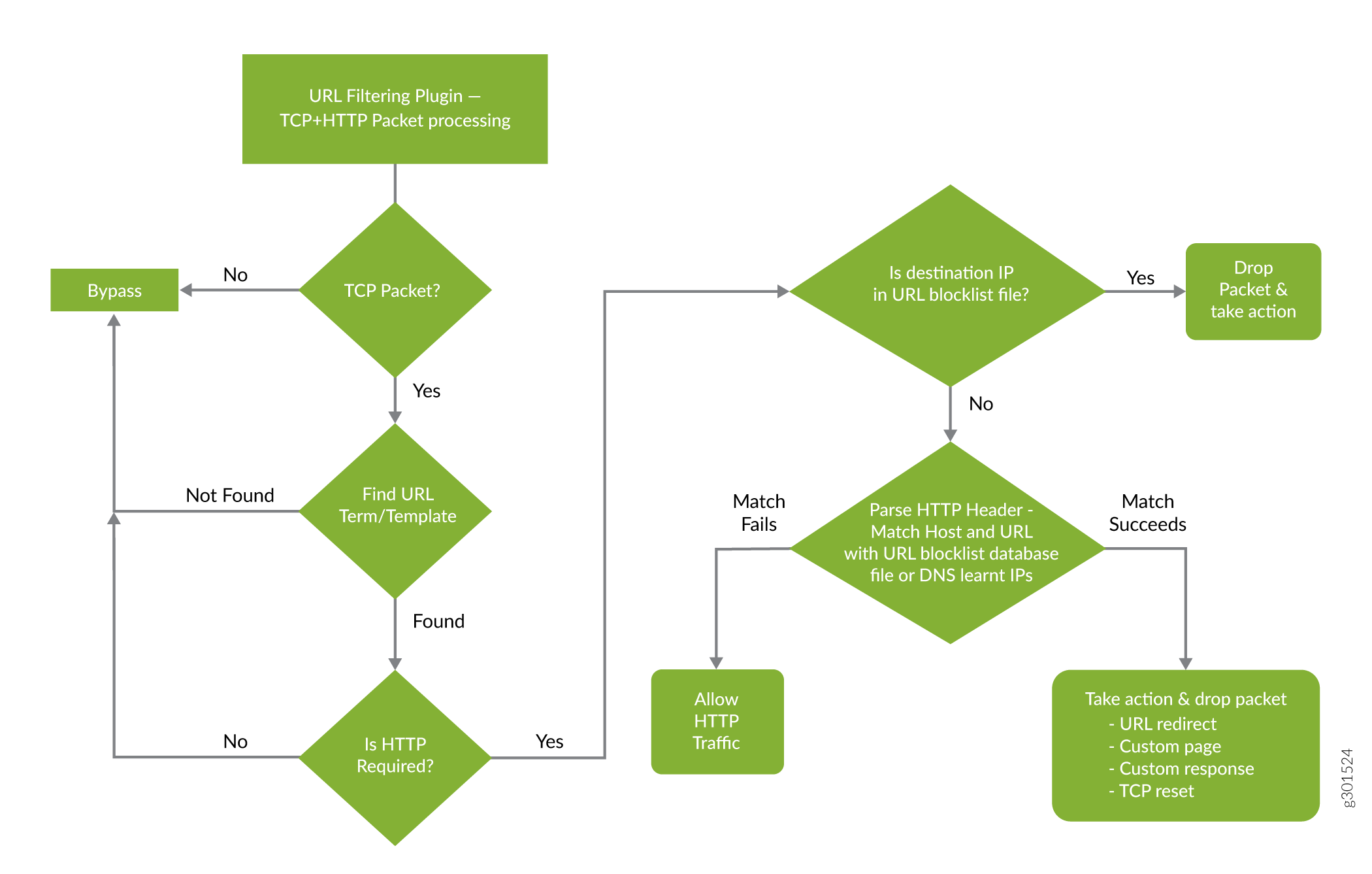 的数据包流 URL 过滤
图 2 展示了 HTTPS 会话的 URL 过滤。
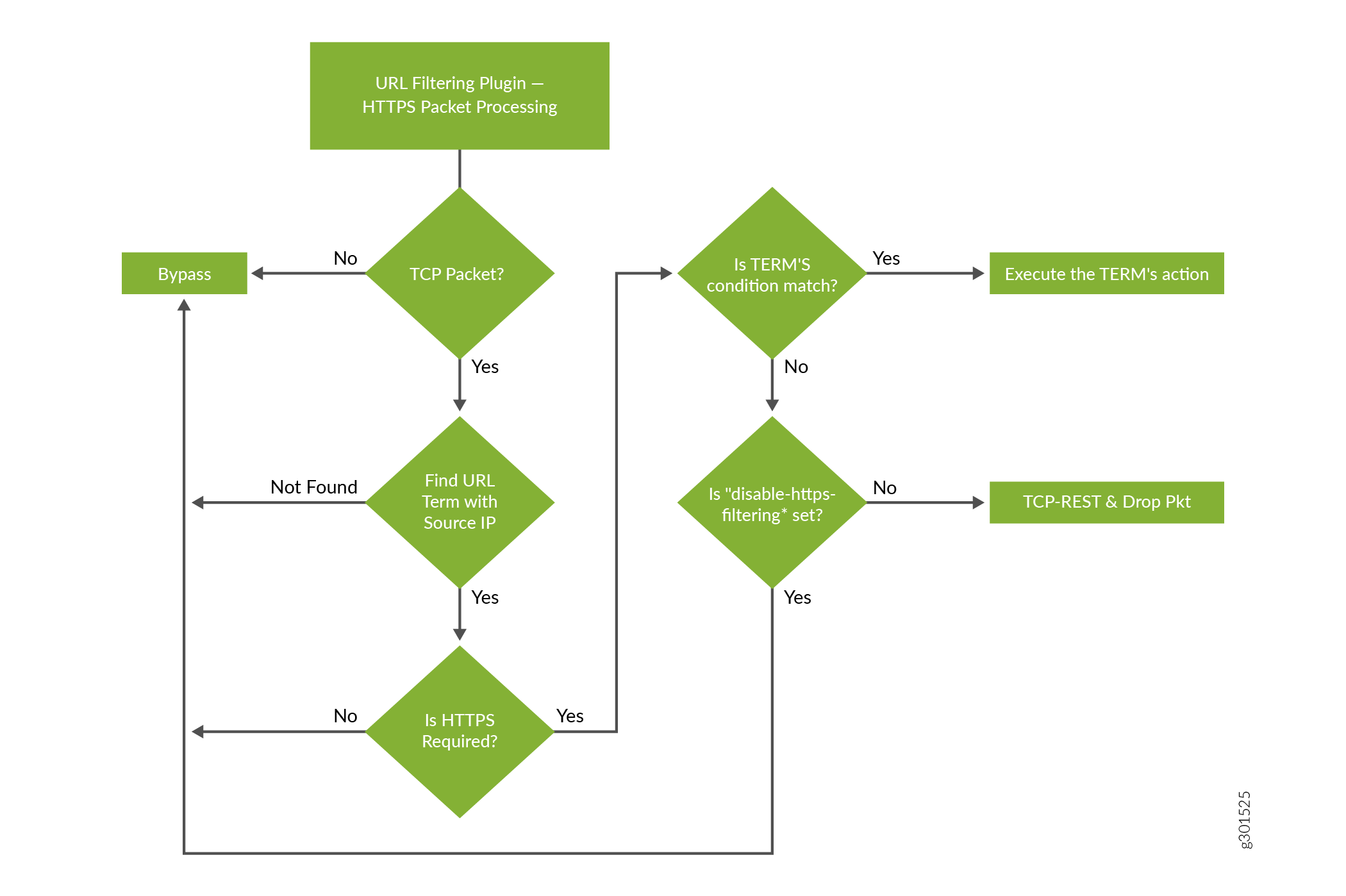 的数据包流 URL 过滤
有关 URL 过滤功能的更多详细信息,请参阅以下部分:
URL 过滤器数据库文件
URL 过滤器数据库文件包含 URL 和 IP 地址的条目。按照 表 1 中指示的格式创建 URL 过滤器数据库文件,并将其放在路由引擎的 /var/db/url-filterd 目录中。
| 入口 |
描述 |
示例 |
|---|---|---|
| FQDN |
全限定域名。 |
www.badword.com/jjj/bad.jpg |
| URL |
不包含第 7 层协议的完整字符串 URL。 |
www.srch.com/*badword*/ www.srch.com www.srch.com/xyz www.srch.com/xyz* |
| IPv4 地址 |
对特定 IPv4 地址的 HTTP 请求。 |
10.1.1.199 |
| IPv6 地址 |
对特定 IPv6 地址的 HTTP 请求。 |
1::1 |
您必须在配置文件中指定自定义 URL 过滤器数据库。如果需要,您还可以使用任何模板分配自定义 URL 过滤器数据库文件,并且该数据库优先于在配置文件级别配置的数据库。
如果更改 URL 过滤器数据库文件的内容,请使用命令 request services (url-filter | web-filter) update 。帮助维护 URL 过滤器数据库文件的其他命令包括:
-
request services (url-filter | web-filter) delete -
request services (url-filter | web-filter) force -
request services (url-filter | web-filter) validate
URL 过滤器配置文件注意事项
URL 过滤器配置文件由一到八个模板组成。每个模板都由一组已配置的逻辑接口组成,在这些接口中,将监控流量的 URL 过滤以及一个或多个术语。
术语是一组匹配标准,如果满足匹配标准,则要执行作。您必须至少配置一个术语来配置 URL 过滤。每个术语都由语from句和语then句组成,其中语from句定义受监控的源 IP 前缀和目标端口。该then语句指定要执行的作。如果省略该from语句,则任何源 IP 前缀和任何目标端口都被视为匹配。但是,每个模板或每个配置文件只能省略一个from语句。
不带 from 语句的多个术语的配置示例
template1 {
    client-interfaces [ xe-4/0/3.35 xe-4/0/3.36 ];
    server-interfaces xe-4/0/0.31;
    dns-source-interface xe-4/0/0.1;
    dns-routing-instance data_vr;
    routing-instance data_vr2;
    dns-server 50.0.0.3;
    dns-retries 3;
    url-filter-database url_database.txt;
    term term1 {
        then {
            tcp-reset;
        }
    }
    term term2 {
        then {
            redirect-url www.google.com;
        }
    }
}
如果每个模板省略多个 from 语句,则在提交时将收到以下错误消息:
URLFD_CONFIG_FAILURE: Configuration not valid:
Cannot have two wild card terms in template template1
error: configuration check-out failed
也可以看看
配置 URL 过滤
要配置 URL 过滤功能,必须先在jservices-urlf层次结构级别配置[edit chassis fpc slot-number pic pic-number adaptive-services service-package extension-provider]为 。package-name有关配置extension-provider package package-name配置语句的详细信息,请参阅 package (Loading on PIC) 语句。
MX-SPC3 在层次结构级别上[edit chassis fpc slot-number pic pic-number adaptive-services service-package extension-provider]没有明确要求jservices-urlf。package-name默认情况下支持它。
在服务 PIC 上配置 URL 过滤。您正在处理的接口是服务接口(使用 ms 前缀)或聚合多服务 (AMS) 接口(使用 ams 前缀)。有关 AMS 接口的详细信息,请参阅《 路由设备自适应服务接口用户指南 》,从 了解聚合多服务接口开始。
URL 过滤 配置文件 是模板的集合。每个模板都包含一组标准,用于定义不允许哪些 URL 以及如何通知收件人。
要配置 URL 配置文件,请执行以下作:
也可以看看
不允许的网站域的 DNS 请求过滤
DNS 请求过滤概述
从 Junos OS 18.3R1 版开始,您可以配置 DNS 过滤来识别对不允许的网站域的 DNS 请求。从 Junos OS 19.3R2 版开始,如果您使用 MX-SPC3 服务卡运行新一代服务,则可以配置 DNS 过滤。MX240、MX480 和 MX960 路由器支持新一代服务。对于 DNS 请求类型 A、AAAA、MX、CNAME、TXT、SRV 和 ANY,您可以配置对不允许的域的 DNS 请求执行的作。您可以:
通过发送包含 DNS 沉洞服务器的 IP 地址或全限定域名 (FQDN) 的 DNS 响应来阻止对网站的访问。这可以确保当客户端尝试将流量发送到不允许的域时,流量会转至沉洞服务器(参见 图 3)。
记录请求并允许访问。
从 Junos OS 21.1R1 版开始,您还可以为不允许的域的 DNS 请求配置以下作:
- 警报
- 接受
- 丢弃
- 丢弃无日志
对于不允许的域的其他 DNS 请求类型,将记录请求并允许访问。
沉洞服务器执行的作不受 DNS 请求过滤功能控制;您负责配置沉洞服务器作。例如,沉洞服务器可以向请求者发送一条消息,说明域无法访问,并阻止访问不允许的域。
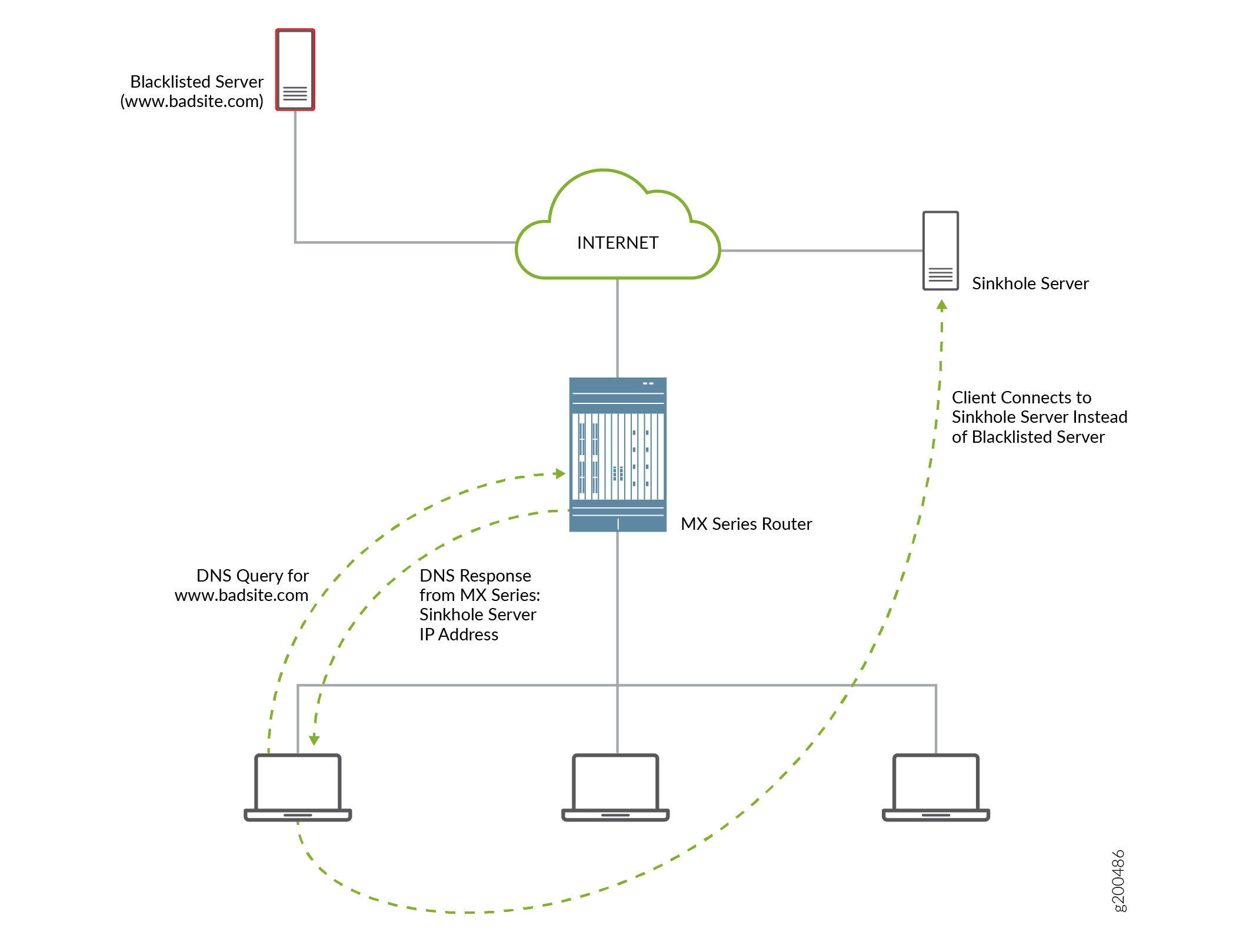 的 DNS 请求
优势
DNS 过滤将对不允许的网站域的 DNS 请求重定向到沉洞服务器,同时防止作系统的任何人看到不允许的域列表。这是因为不允许的域名采用加密格式。
不允许的域过滤器数据库文件
DNS 请求过滤需要一个不允许的域过滤器数据库.txt文件,该文件标识每个不允许的域名、对不允许的域的 DNS 请求执行的作,以及 DNS 沉洞服务器的 IP 地址或全限定域名 (FQDN)。
DNS 过滤器配置文件
您可以配置 DNS 过滤器配置文件以指定要使用的不允许的域过滤器数据库文件。您还可以指定执行 DNS 请求过滤的接口,将过滤限制为对特定 DNS 服务器的请求,并将过滤限制为来自特定源 IP 地址前缀的请求。
如何配置 DNS 请求过滤
要过滤不允许网站域的 DNS 请求,请执行以下作:
如何配置域过滤器数据库
创建一个或多个域筛选器数据库文件,其中包含每个不允许的域的条目。每个条目都指定如何处理对不允许的网站域的 DNS 请求。
要配置域过滤器数据库文件:
如何配置 DNS 过滤器配置文件
DNS 过滤器配置文件包括用于过滤不允许的网站域的 DNS 请求的常规设置,并且最多包含 32 个模板。模板设置适用于特定上行链路和下行链路逻辑接口或路由实例上的 DNS 请求,或来自特定源 IP 地址前缀的 DNS 请求,并覆盖 DNS 配置文件级别的相应设置。您最多可以配置八个 DNS 过滤器配置文件。
要配置 DNS 过滤器配置文件:
如何配置 DNS 过滤服务集
[edit services service-set service-set-name]
user@host# set web-filter-profile profile-name
user@host# set syslog host hostname class urlf-logs
user@host# set next-hop-service inside-service-interface interface-name.unit-number
user@host# set next-hop-service outside-service-interface interface-name.unit-number
DNS 过滤的多租户支持
概述
从 Junos OS 21.1R1 版开始,您可以为每个客户或 IP 子组配置自定义域源。您可以:
- 为多个租户配置域名和作,以便可以按租户管理域源。
- 按配置文件、dns-filter-template 或 /dns-filter-term 配置分层域源管理。
- 在 IP、子网或 CIDR 级别豁免域源。
要实现对 DNS 过滤的 mutiltenant 支持,禁用在模板或配置文件级别下创建域过滤器数据库文件。无需在模板或配置文件级别指定文件。从 Junos OS 21.1R1 开始,默认情况下,可以使用具有固定名称、 nsf_multi_tenant_dn_custom_file.txt (纯文本格式)或 dnsf_multi_tenant_dn_custom_file_hashed.txt (加密文件)的全局文件。
数据库文件中的每个条目都有以下项:
hashed-domain-name、IPv4 沉洞地址、IPv6 沉洞地址、沉洞 FQDN、ID、action、feed-name。
系统会计算文件哈希并将其附加到文件中的域名条目列表中。文件哈希使用全局密钥和方法计算,使用在层次结构中 [edit services web-filter] 配置的哈希密钥计算的文件哈希进行验证。仅当计算出的文件哈希与文件中存在的文件哈希匹配时,文件验证才成功。
nsf_multi_tenant_dn_custom_file.txt文件中的每个条目都包含一个名为 feed-name 的附加字段。此源名称用作对域名集进行分组并将其映射到租户(配置文件、模板、术语或 IP 地址)的指示器。
当从特定 SRC IP 地址接收 DNS 数据包时,将获取相应的源名,并针对与与该术语关联的源名映射的域名进行查找。如果未为该 IP 地址配置 feed-name,则它会回退到在模板级别配置的 feed-name,并针对与模板关联的 feed-name 映射的域名进行查找。如果未在模板上配置 feed-name,则查找将针对映射到与配置文件关联的 feed-name 的域名。
为 DNS 过滤配置多租户支持
示例:为 DNS 过滤配置多租户支持
配置
CLI 快速配置
要快速配置此示例,请复制以下命令,将其粘贴到文本文件中,移除所有换行符,更改任何必要的详细信息以匹配您的网络配置,然后将命令复制粘贴到 [edit] 层级的 CLI 中。
set services service-set Test Zone3 syslog mode stream
set services service-set Test Zone3 syslog source-address 10.1.1.1
set services service-set Test Zone3 syslog stream t1 category urlf
set services service-set Test Zone3 syslog stream t1 host 10.10.1.1
set services service-set Test Zone3 syslog stream t1 routing-instance client_vr4
set services service-set Test Zone3 web-filter-profile Test-Profile-3-Zone3
set services service-set Test Zone3 next-hop-service inside-service-interface ams3.24
set services service-set Test Zone3 next-hop-service outside-service-interface ams3.25
set services web-filter multi-tenant-support
set services web-filter  multi-tenant-hash file-hash-key ascii-text "$9$VjsgJikP36AGD6Ap0hcbs2"
set services web-filter  multi-tenant-hash hash-method hmac-sha2-256
set services web-filter profile Test-Profile-3-Zone3 feed-name abc
set services web-filter profile Test-Profile-3-Zone3 global-dns-filter-stats-log-timer 20
set services web-filter profile Test-Profile-3-Zone3 dns-filter statistics-log-timer 5
set services web-filter profile Test-Profile-3-Zone3 dns-filter dns-resp-ttl 100
set services web-filter profile Test-Profile-3-Zone3 dns-filter wildcarding-level 10
 set services web-filter profile Test-Profile-3-Zone3 dns-filter-template Test-Profile-3-Zone3-Area1 inactive: client-interfaces xe-7/0/2.32
set services web-filter profile Test-Profile-3-Zone3 dns-filter-template Test-Profile-3-Zone3-Area1 inactive: server-interfaces xe-7/2/0.36
set services web-filter profile Test-Profile-3-Zone3 dns-filter-template Test-Profile-3-Zone3-Area1 inactive: client-routing-instance client_vr4
set services web-filter profile Test-Profile-3-Zone3 dns-filter-template Test-Profile-3-Zone3-Area1 inactive: server-routing-instance server_vr4
set services web-filter profile Test-Profile-3-Zone3 dns-filter-template Test-Profile-3-Zone3-Area1 term Test-Profile-3-Zone3-Area1-Customer1 feed-name customer2
set services web-filter profile Test-Profile-3-Zone3 dns-filter-template Test-Profile-3-Zone3-Area1 term Test-Profile-3-Zone3-Area1-Customer1 from src-ip-prefix 10.12.1.1
set services web-filter profile Test-Profile-3-Zone3 dns-filter-template Test-Profile-3-Zone3-Area1 term Test-Profile-3-Zone3-Area1-Customer1 then dns-sinkhole
set services web-filter profile Test-Profile-3-Zone3 dns-filter-template Test-Profile-3-Zone3-Area1 term Test-Profile-3-Zone3-Area1-Customer2 feed-name customer2
set services web-filter profile Test-Profile-3-Zone3 dns-filter-template Test-Profile-3-Zone3-Area1 term Test-Profile-3-Zone3-Area1-Customer2 from src-ip-prefix 2001:db8::0/96
 set services web-filter profile Test-Profile-3-Zone3 dns-filter-template Test-Profile-3-Zone3-Area1 term Test-Profile-3-Zone3-Area1-Customer2 then dns-sinkhole
set services web-filter profile Test-Profile-3-Zone3 dns-filter-template Test-Profile-3-Zone3-Area1 term Test-Profile-3-Zone3-Area1-Customer3 from src-ip-prefix 2001:db8:bbbb::/96
set services web-filter profile Test-Profile-3-Zone3 dns-filter-template Test-Profile-3-Zone3-Area1 term Test-Profile-3-Zone3-Area1-Customer3 then dns-sinkhole
set services web-filter profile Test-Profile-3-Zone3 dns-filter-template Test-Profile-3-Zone3-Area2 inactive: client-interfaces xe-7/0/2.32
set services web-filter profile Test-Profile-3-Zone3 dns-filter-template Test-Profile-3-Zone3-Area2 inactive: server-interfaces xe-7/2/0.36
set services web-filter profile Test-Profile-3-Zone3 dns-filter-template Test-Profile-3-Zone3-Area2 inactive: client-routing-instance client_vr4
set services web-filter profile Test-Profile-3-Zone3 dns-filter-template Test-Profile-3-Zone3-Area2 inactive: server-routing-instance server_vr4
set services web-filter profile Test-Profile-3-Zone3 dns-filter-template Test-Profile-3-Zone3-Area2 term Test-Profile-3-Zone3-Area2-Customer1 from src-ip-prefix 22.21.128.0/17
set services web-filter profile Test-Profile-3-Zone3 dns-filter-template Test-Profile-3-Zone3-Area2 term Test-Profile-3-Zone3-Area2-Customer1 then dns-sinkhole
set services web-filter profile Test-Profile-3-Zone3 dns-filter-template Test-Profile-3-Zone4-Area2 feed-name customer2
set services web-filter profile Test-Profile-3-Zone3 dns-filter-template Test-Profile-3-Zone4-Area2 inactive: client-routing-instance client_vr4
set services web-filter profile Test-Profile-3-Zone3 dns-filter-template Test-Profile-3-Zone4-Area2 inactive: server-routing-instance server_vr4
set services web-filter profile Test-Profile-3-Zone3 dns-filter-template Test-Profile-3-Zone4-Area2 term Test-Profile-3-Zone4-Area2-Customer1 from src-ip-prefix 2001:0db8:0001:/48
set services web-filter profile Test-Profile-3-Zone3 dns-filter-template Test-Profile-3-Zone4-Area2 term Test-Profile-3-Zone4-Area2-Customer1 then dns-sinkhole
set services web-filter profile Test-Profile-3-Zone3 dns-filter-template Test-Profile-3-Zone4-Area2 term wildcard then dns-sinkhole
set interfaces xe-7/0/0 unit 0 family inet address 10.11.1.1/24
set interfaces xe-7/0/1 unit 0 family inet address 10.12.1.1/24
set interfaces xe-7/0/2 flexible-vlan-tagging
set interfaces xe-7/0/2 mtu 9192
set interfaces xe-7/0/2 encapsulation flexible-ethernet-services
set interfaces xe-7/0/2 unit 1 vlan-id 10
set interfaces xe-7/0/2 unit 1 family inet address 198.31.100.1/24
set interfaces xe-7/0/2 unit 31 vlan-id 31
set interfaces xe-7/0/2 unit 31 family inet address 198.51.70.1/24;
set interfaces xe-7/0/2 unit 31 family inet6 address 2001:db8:10::0/96
set interfaces xe-7/0/2 unit 32 vlan-id 32
set interfaces xe-7/0/2 unit 32 family inet address 198.51.71.1/24;
set interfaces xe-7/0/2 unit 32 family inet6 address 2001:db8:11::0/96
set interfaces xe-7/0/2 unit 33 vlan-id 33
set interfaces xe-7/0/2 unit 33 family inet address 198.51.72.1/24
set interfaces xe-7/0/2 unit 33 family inet6 address 2001:db8:12::0/96
set interfaces xe-7/0/2 unit 34 vlan-id 34
set interfaces xe-7/0/2 unit 34 family inet address 198.51.73.1/24
set interfaces xe-7/0/2 unit 34 family inet6 address 2001:db8:13::0/96
set interfaces xe-7/0/2 unit 35 vlan-id 35
set interfaces xe-7/0/2 unit 35 vlan-id 35 family inet address 198.51.74.1/24
set interfaces xe-7/0/2 unit 3135 vlan-id 35 family inet6 address 2001:db8:14::0/96
set interfaces xe-7/0/2 unit 36 vlan-id 36
set interfaces xe-7/0/2 unit 36 family inet address 198.51.75.1/24
set interfaces xe-7/0/2 unit 36 family inet6 address 2001:db8:15::0/96
set interfaces xe-7/0/2 unit 37 vlan-id 37
set interfaces xe-7/0/2 unit 37 family inet address 198.51.76.1/24
set interfaces xe-7/0/2 unit 37 family inet6 address 2001:db8:16::0/96
set interfaces xe-7/0/2 unit 38 vlan-id 38
set interfaces xe-7/0/2 unit 38 family inet address 198.51.77.1/24
set interfaces xe-7/0/2 unit 38 family inet6 address 2001:db8:17::0/96
set interfaces xe-7/0/2 unit 39 vlan-id 39
set interfaces xe-7/0/2 unit 39 family inet address 198.51.78.1/24
set interfaces xe-7/0/2 unit 39 family inet6 address 2001:db8:18::0/96
set interfaces xe-7/0/2 unit 40 vlan-id 40
set interfaces xe-7/0/2 unit 40 family inet address 198.51.79.1/24
set interfaces xe-7/0/2 unit 40 family inet6 address 2001:db8:19::0/96
set interfaces xe-7/0/2 unit 41 vlan-id 41
set interfaces xe-7/0/2 unit 41 family inet address 198.51.80.1/24
set interfaces xe-7/0/2 unit 41 family inet6 address 2001:db8:20::0/96
set interfaces xe-7/2/0 flexible-vlan-tagging
set interfaces xe-7/2/0 mtu 1514
set interfaces xe-7/2/0 encapsulation flexible-ethernet-services
set interfaces xe-7/2/0 inactive unit 1 vlan-id 1
set interfaces xe-7/2/0 inactive unit 1 family inet address 198.168.50.0/24
set interfaces xe-7/2/0 inactive unit 1 family inet6 address 2001:0db0:1600:0::1/112
set interfaces xe-7/2/0 unit 2 vlan-id 2
set interfaces xe-7/2/0 unit 2 vlan-id 2 family inet address 198.100.70.0/24
set interfaces xe-7/2/0 unit 31 vlan-id 31
set interfaces xe-7/2/0 unit 31 family inet address 10.1.0.1/16
set interfaces xe-7/2/0 unit 31 family inet6 address 2001:0db0:1601:0::1/112
set interfaces xe-7/2/0 unit 32 vlan-id 32
set interfaces xe-7/2/0 unit 32 family inet address 10.2.0.1/16
set interfaces xe-7/2/0 unit 32 family inet6 address 2001:0db0:1602:0::1/112
set interfaces xe-7/2/0 unit 33 vlan-id 33
set interfaces xe-7/2/0 unit 33 family inet address 10.3.0.1/16
set interfaces xe-7/2/0unit 33 vlan-id 33 family inet6 address 2001:0db0:1603:0::1/112
set interfaces xe-7/2/0 unit 34 vlan-id 34
set interfaces xe-7/2/0 unit 34 family inet address 10.0.0.1/16
set interfaces xe-7/2/0 unit 34 family inet6 address 2001:0db0:1600:0::1/112
set interfaces xe-7/2/0 unit 35 vlan-id 35
set interfaces xe-7/2/0 unit 35 family inet address 10.4.0.1/16
set interfaces xe-7/2/0 unit 35 family inet6 address 2001:0db0:1604:0::1/112
set interfaces xe-7/2/0 unit 36 vlan-id 36
set interfaces xe-7/2/0 unit 36 family inet address 10.5.0.1/16
set interfaces xe-7/2/0 unit 36 family inet6 address 2001:0db0:1605:0::1/112
set interfaces xe-7/2/0 unit 37 vlan-id 37
set interfaces xe-7/2/0 unit 37 family inet address 10.6.0.1/16
set interfaces xe-7/2/0unit 37 family inet6 address 2001:0db0:1606:0::1/112
set interfaces xe-7/2/0 unit 38 vlan-id 38
set interfaces xe-7/2/0 unit 38 family inet address 10.7.0.1/16
set interfaces xe-7/2/0 unit 38 vlan-id 38 family inet6 address 2001:0db0:160:0::1/112
set interfaces ams3  load-balancing-options member-interface mams-3/0/0
set interfaces ams3  load-balancing-options member-interface mams-3/1/0
set interfaces ams3  load-balancing-options member-failure-options redistribute-all-traffic enable-rejoin
set interfaces ams3  load-balancing-options high-availability-options many-to-one preferred-backup mams-3/1/0
set interfaces ams3  unit 22 family inet
set interfaces ams3  unit 22 family inet6
set interfaces ams3  unit 22 service-domain inside
set interfaces ams3  unit 22 load-balancing-options hash-keys ingress-key (source-ip destination-ip )
set interfaces ams3  unit 24 family inet
set interfaces ams3  unit 24 family inet6
set interfaces ams3  unit 24 service-domain inside
set interfaces ams3  unit 24 family inet6 load-balancing-options hash-keys ingress-key (source-ip destination-ip)
set interfaces ams3  unit 25 family inet
set interfaces ams3  unit 25 family inet6
set interfaces ams3  unit 25 service-domain inside
set interfaces ams3  unit 25 load-balancing-options hash-keys ingress-key (source-ip destination-ip )
set routing-instances client_vr4 instance-type virtual-router
set routing-instances client_vr4 routing-options rib client_vr4.inet6.0 static route 2001:0db0:bbbb:0::0/49 next-hop 2001:0db0:7070:71::2
set routing-instances client_vr4 routing-options rib client_vr4.inet6.0 static route 2001:0db0:aaaa:8000::0/49 next-hop 2001:0db0:7070:71::3
set routing-instances client_vr4 routing-options rib client_vr4.inet6.0 static route 60::0/64 next-hop ams3.24
set routing-instances client_vr4 routing-options static route 10.12.1.1 next-hop 192.168.1.2
set routing-instances client_vr4 routing-options static route 22.21.128.0/17 next-hop 192.168.1.3
set routing-instances client_vr4 routing-options static route 0.0.0.0/0 next-hop ams3.24
set routing-instances client_vr4 routing-options static route 10.11.10.10/16 next-hop 192.168.1.4
set routing-instances client_vr4 routing-options static route 10.10.23.10/16 next-hop 192.168.1.5
set routing-instances client_vr4 routing-options static route 10.1.0.0/16 next-hop 192.168.1.6
set routing-instances client_vr4 routing-options static route 10.20.20.0/16 next-hop 192.168.1.7
set routing-instances client_vr4 routing-options static route 10.2.0.0/16 next-hop 192.168.1.8
set routing-instances client_vr4 routing-options static route 10.30.20.0/16 next-hop 192.168.1.9
set routing-instances client_vr4 routing-options static route 10.3.0.0/16 next-hop 192.168.10.
set routing-instances client_vr4 routing-options static route 10.40.20.0/16 next-hop 192.168.1.11
set routing-instances client_vr4 routing-options static route 10.4.0.0/16 next-hop 192.168.1.12
set routing-instances client_vr4 routing-options static route 10.50.20.0/16 next-hop 192.168.1.13
set routing-instances client_vr4 interface xe-7/0/0.0
set routing-instances client_vr4 interface xe-7/0/2.32
set routing-instances client_vr4 interface ams3.24
set routing-instances server_vr4 instance-type virtual-router
set routing-instances server_vr4 routing-options rib server_vr4.inet6.0 static route 2001:0db0:2221:0::0/48 next-hop ams3.25
set routing-instances server_vr4 routing-options rib server_vr4.inet6.0 static route 2001:db8:ffff::1/128 next-hop 2001:0db0:1605:0::2
set routing-instances server_vr4 routing-options rib server_vr4.inet6.0 static route 2001:db8:bbbb::1/128 next-hop 2001:0db0:1605:0::3
set routing-instances server_vr4 routing-options static route 10.10.20.1 next-hop ams3.25
set routing-instances server_vr4 routing-options static route 60.0.6.0/24 next-hop 192.0.2.2
set routing-instances server_vr4 routing-options static route 60.0.18.0/24 next-hop 192.0.2.3
set routing-instances server_vr4 routing-options static route 10.9.9.0/24 next-hop ams3.25
set routing-instances server_vr4 routing-options static route 60.0.19.0/24 next-hop 192.0.2.4
set routing-instances server_vr4 routing-options static route 60.0.20.0/24 next-hop 192.0.2.5
set routing-instances server_vr4 routing-options static route 60.0.21.0/24 next-hop 192.0.2.6
set routing-instances server_vr4 routing-options static route 60.0.22.0/24 next-hop 192.0.2.7
set routing-instances server_vr4 routing-options static route 60.0.23.0/24 next-hop 192.0.2.8
set routing-instances server_vr4 routing-options static route 60.0.24.0/24 next-hop 192.0.2.9
set routing-instances server_vr4 routing-options static route 60.0.25.0/24 next-hop 192.0.2.10
set routing-instances server_vr4 routing-options static route 60.0.26.0/24 next-hop 192.0.2.11
set routing-instances server_vr4 routing-options static route 60.0.27.0/24 next-hop 192.0.2.12
set routing-instances server_vr4 routing-options static route 60.0.28.0/24 next-hop 192.0.2.13
set routing-instances server_vr4 routing-options static route 10.1.0.0/16 next-hop ams3.25
set routing-instances server_vr4 interface xe-7/0/1.0
set routing-instances server_vr4 interface xe-7/2/0.36
set routing-instances server_vr4 interface ams3.25
set routing-options static route 0.0.0.0/0 next-hop 10.48.179.254
在 MX 系列路由器上集成瞻博网络 ATP 云和 Web 过滤
概述
瞻博网络高级威胁防御(瞻博网络 ATP 云)与 MX 系列路由器集成,通过采用基于云的威胁检测软件和新一代防火墙系统,保护网络中的所有云主机免遭不断变化的安全威胁。
本主题将概述瞻博网络 ATP 云、策略实施器、安全性、Web 过滤及其在 MX 系列路由器上集成时的优势。
有关平台和版本信息的详细信息,请参阅 功能浏览器 。
优势
-
与 MX 路由器集成时,可简化部署并增强反威胁功能。
-
使用多种工具组合来提供针对“零日”威胁的防护,以提供对复杂隐匿威胁的强大覆盖。
-
通过策略增强功能检查入站和出站流量,允许用户阻止恶意软件、隔离受感染的系统、防止数据泄露以及中断横向移动。
-
支持高可用性,提供不间断的服务。
-
提供可扩展性,以处理需要更多计算资源的不断增加的负载、增加的网络带宽以接收更多客户提交的内容,以及用于存放恶意软件的大型存储。
-
提供深度检测、切实可行的报告和内联恶意软件拦截功能。
-
提供使用日志中的 VRF 信息提供租户信息的功能
了解策略实施器和瞻博网络 ATP 云
瞻博网络 Security Director 包含一项称为策略实施器 (PE) 的功能,使它能够从威胁状况中学习,自动创建策略,并动态将策略部署到网络中的瞻博网络设备。
图 4 展示了 PE、瞻博网络 ATP 云和 MX 路由器(充当防火墙)之间的流量。
-
策略实施器 (PE) 从威胁情况中学习,自动创建策略,并将策略实施部署到网络中的瞻博网络设备。
-
瞻博网络高级威胁防御(瞻博网络 ATP 云)通过采用基于云的威胁检测软件和新一代防火墙系统来保护网络中的所有云主机。
-
MX 路由器从策略实施器 (PE) 获取威胁情报源,并实施这些策略来隔离遭到入侵的主机。它由以下重要组件组成:
-
安全性情报流程
-
Web 过滤过程
-
防火墙进程
-
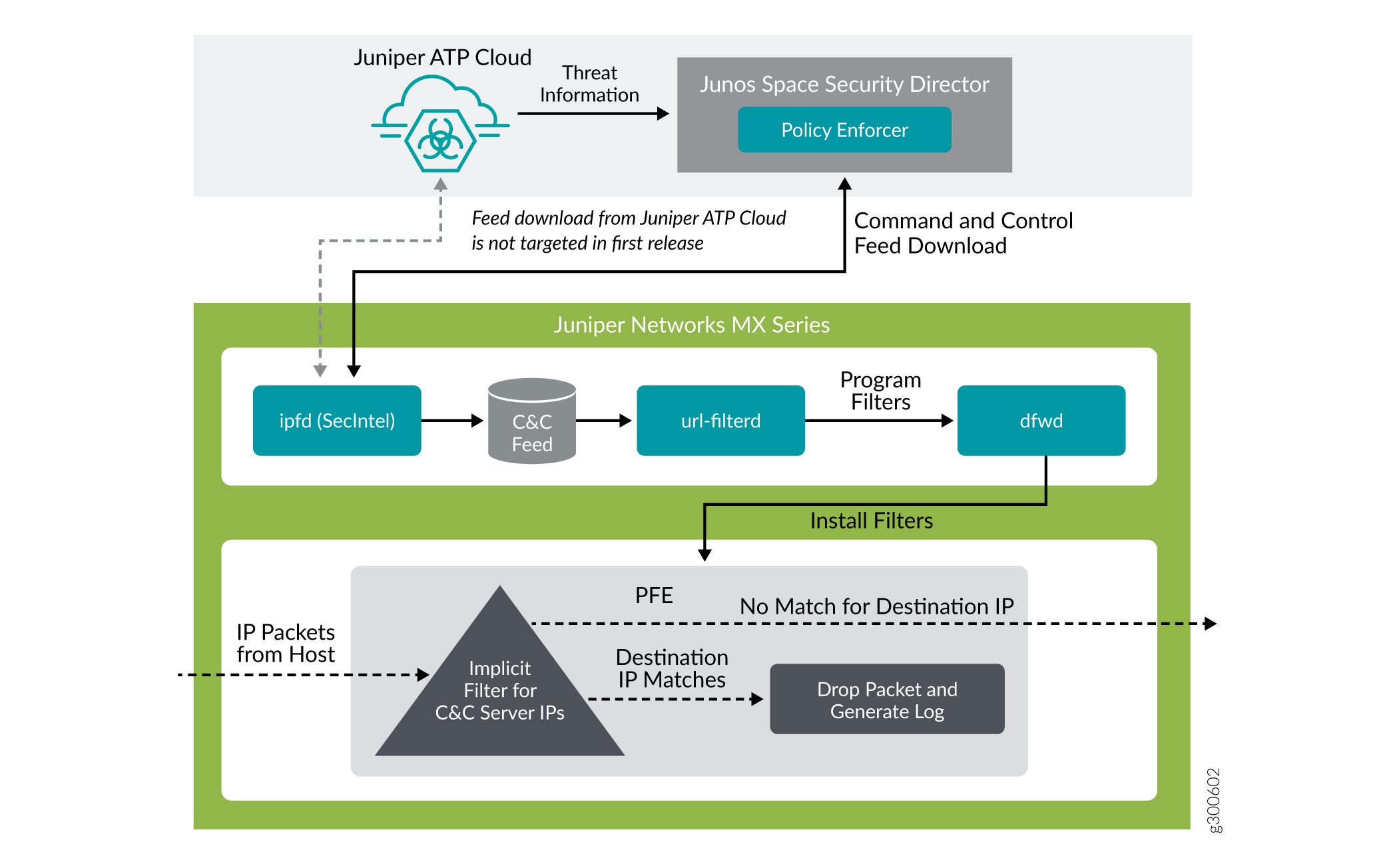
要了解系统架构的功能,请考虑以下示例:如果用户从互联网下载文件,并且该文件通过 MX 防火墙,则可以将该文件发送到瞻博网络 ATP 云云进行恶意软件检测(取决于您的配置设置)。如果文件被确定为恶意软件,PE 将识别下载该文件的主机的 IP 地址和 MAC 地址。根据用户定义的策略,该主机可放入隔离 VLAN 或阻止访问互联网。
MX 系列路由器可以与瞻博网络 ATP 云集成,以防止遭到入侵的主机(僵尸网络)与命令和控制服务器进行通信:
-
从 Junos OS 18.4R1 版开始,自适应服务作为内联安全功能
-
从 Junos OS 19.3R2 版开始,将新一代服务作为内联安全功能
MX 系列路由器可通过以下任一方法下载 C&C 和 Geo-IP:
-
间接方法策略实施器充当已定义环境中所有设备的源代理。此方法有利于避免个别设备访问互联网上的瞻博网络 ATP 云服务。因此,降低了连接到 Internet 的设备的脆弱性。
-
直接方式 - MX 系列路由器直接注册到瞻博网络 ATP 云,以下载 C&C 和 Geo-IP 源。
安全性智能 (SecIntel) - 概述
安全性智能进程 (IPFD) 负责从源连接器或 ATP 云源服务器下载安全智能源并分析云源。MX 平台上的 IPFD 进程从策略实施器获取命令和控制 IPv4/IPv6 源。C&C 源本质上是一组服务器列表,这些服务器是已知的僵尸网络命令和控制服务器。该列表还包括恶意软件下载的已知来源的服务器。由此获取的信息保存在 /var/db/url-filterd 目录下创建的文件 (urlf_si_cc_db.txt) 中。
IPFD 发送到 Web 过滤过程的不允许 IP 的文件格式如下:
IPv4 address | IPv6 address, threat-level.
是一个 threat-level 从 1 到 10 的整数,表示扫描以查找恶意软件和受感染主机的文件的威胁级别。此处,1 代表最低威胁级别,10 代表最高威胁级别。
例如:178.10.19.20、4
此处,178.10.19.20 表示不允许的 IP,4 表示 threat-level。
C&C 源数据库同步到备份路由引擎。然后,IPFD 将信息共享到 Web 过滤进程(url 过滤)。Web 过滤过程读取文件内容并相应地配置过滤器。
配置安全性智能以从策略实施器下载 CC 源
要从瞻博网络 ATP 云/策略实施器下载命令和控制 IPv4/IPv6 源,请在层次结构中[edit services]包含该security-intelligence语句,如以下示例所示:
security-intelligence {
    authentication {
        auth-token 7QGSBL5ZRKR5UHUZ2X2R6QLHB656D5EN;
    }
    url https://10.92.83.245:443/api/v1/manifest.xml;
    traceoptions {
        file security-inteligence.log size 1g;
        level all;
        flag all;
    }
}
Web 过滤(URL 过滤) - 概述
Web 过滤过程读取从 IPFD 获取的文件内容,并相应地在数据包转发引擎上配置过滤器。Web 过滤过程通过对数据包转发引擎中的过滤器进行编程来强制实施命令和控制源,以阻止发往被阻止 IP 地址的数据包,并生成日志以报告事件。
图 5 说明了 IPFD 获取 C&C 源然后由 Web 过滤过程处理的方式。
Web 过滤器配置文件可以有多个模板。每个模板都由一组用于 Web 过滤的已配置逻辑接口以及一个或多个术语组成。术语是一组匹配标准,如果满足匹配标准,则要执行作。要将 Web 过滤器配置文件配置为使用动态获取的 C&C 源,可以在层次结构级别下[edit services web-filter profile profile-name 配置命令security-intelligence-policy。无需为基于 Web 过滤器配置文件配置security-intelligence-policy术语。
您可以在层次结构级别为 edit web-filter profile profile-name security-intelligence-policy threat-level threat-level threat-action Web 过滤器配置文件配置以下威胁级别作:
-
drop -
drop-and-log -
log
您只能为每个 threat level配置一个 threat-action 。如果未为特定 threat level配置 ,threat-action则默认值threat-action为 accept。
从 Junos OS 24.4R1 版开始,对于配置了作的 log 威胁,威胁级别和租户或 VRF 信息将嵌入到传出系统日志中。服务等级策略映射通过新 user-attribute integer 关键字得到增强,用于存储和指示威胁级别。
您可以在层次结构中[editi class-of-service policy-map policy-name]配置 。user-attribute integer
每个威胁级别配置中都引用策略映射,以便将新的用户属性<>映射到 dfw 过滤器术语中,从而驱动为每个威胁级别配置的作。策略映射在层次结构或[edit services web-filter profile profile-name url-filter-template template-name security-intelligence-policy threat level integer policy-map policy-name]层次结构中[edit services web-filter profile profile-name security-intelligence-policy threat level integer policy-map policy-name]用于将威胁级别映射到用户属性。
例如,
[edit]
user@host set class-of-service policy-map threat1 user-attribute 1
user@host set class-of-service policy-map threat2 user-attribute 2
user@host set class-of-service policy-map threat3 user-attribute 3
...
...
user@host set class-of-service policy-map threat10 user-attribute 10
user@host set class-of-service policy-map white-list user-attribute 11
user@host set class-of-service policy-map black-list user-attribute 12
...
[edit]
user@host set services web-filter profile ATP-P1 security-intelligence-policy threat-level 1 threat-action log
user@host set services web-filter profile ATP-P1 security-intelligence-policy threat-level 1 policy-map  threat1
也可以看看
配置用于采样的 Web 过滤器配置文件
从 Junos OS 19.3R1 版开始,Web 过滤过程(url 过滤)支持将数据包内联采样作为威胁级别作。数据包将根据您配置的威胁作进行丢弃、记录和采样。对于扩展方案,数据包采样优先于日志记录选项。除了现有威胁级别作外,您还可以在层次结构级别对 edit web-filter profile profile-name security-intelligence-policy threat-level threat-level threat-action Web 过滤器配置文件配置以下威胁级别作:
drop-and-sampledrop-log-and-samplelog-and-samplesample
内联流监控对数据包进行采样,并将流记录以 IPFIX 格式发送到流收集器。通过将取样数据包中收到的 IP 与 /var/db/url-filterd/urlf_si_cc_db.txt 中的相应 IP 条目进行匹配,得出外部收集器收到的取样数据包的威胁级别。您可以使用以下任一方法配置采样:
将采样实例与在层次结构级别上
[edit chassis]存在媒体接口的 FPC 相关联。如果要配置 IPv4 流、IPv6 流或 VPLS 流的采样,则可以为每个系列配置流散列表大小。在层次结构级别配置
[edit services flow-monitoring用于内联流监控的模板属性。配置采样实例并关联流服务器 IP 地址、端口号、流导出速率,并在层次结构级别指定收集器
[edit forwarding-options。
将采样实例与 FPC 关联
要将定义的实例与特定 FPC、MPC 或 DPC 相关联,请在层次结构级别包含 [edit chassis fpc number]该sampling-instance语句,如以下示例所示:
chassis {
    redundancy {
        graceful-switchover;
    }
    fpc 0 {
        pic0 {
            inline-services {
                bandwidth 10g;
            }
            }
        }
        pic 2 {
            inline-services {
                bandwidth 10g;
            }
        }
        pic 3 {
            inline-services {
                bandwidth 10g;
            }
        }
        sampling-instance 1to1;
        inline-services{
        flow-table-size {
             ipv4-flow-table-size 5;
             ipv6flow-table-size 5;
        }
    }
}
配置采样实例并将模板与采样实例相关联。
要配置内联流监控的模板属性,请在层次结构级别包含 edit services flow-monitoring 以下语句,如以下示例所示:
services {
    flow-monitoring {
        version-ipfix {
        template ipv4 {
        flow-active-timeout 60;
    flow-inactive-timeout 60;
        template-refresh-rate {
            packets 48000;
            seconds 60;
        }
        option-refresh-rate {
            packets 48000;
            seconds 60;
            }
        ipv4-template;
        template ipv6 {
            flow-active-timeout 60;
            flow-inactive-timeout 60;
            template-refresh-rate {
                packets 48000;
                seconds 60;
                }
                ipv6-template;
            }
        }
}
配置示例实例并关联流服务器 IP 地址和其他参数。
要配置采样实例并关联流服务器 IP 地址和其他参数。在层次结构中 [edit forwarding-options] 包含以下语句,如以下示例所示:
forwarding-options {
    sampling {
        traceoptions {
            file ipfix.log size 10k;
        }
    instance {
        1to1 {
        input {
        rate 1;
    }
    family inet {
        output {
            flow-server 192.168.9.194;
            port 2055;;
            autonomous-system-type origin;
            version-ipfix {
                template {
            ipv4;
        }
        }
        }
        inline-jflow {
        source-address 192.168.9.195;
        }
        }
    }
    family inet6 {
        output {
            flow-server 192.168.9.194;
            port 2000;
            autonomous-system-type origin;
            version-ipfix {
                template {
            ipv6;
        }
        }
        }
        inline-jflow {
        source-address  192.168.9.195;
        }
        }
    }
    }
}
示例:配置 Web 过滤器配置文件以定义不同的威胁级别
web-filter {
    profile Profile1 ;
    security-intelligence-policy{
    file-type txt;
    threat-level 7 {
        threat-action {
        log-and-sample;
        }
    }
    threat-level 8 {
        threat-action {
        drop-log-and-sample;
        }
    }
    threat-level 10 {
        threat-action {
        drop-log-and-sample;
        }
    }
    threat-level 5{
        threat-action {
        drop-log-and-sample;
        }
    }
    threat-level 6 {
        threat-action {
        drop-log-and-sample;
        }
    }
    threat-level 9{
        threat-action {
        drop-log-and-sample;
        }
    }
    }
    url-filter-template template1 {
        client-interfaces ge-0/0/4.0;
        client-routing-instance inet.0;
    }
    }
    traceoptions {
        file webfilter_log size 1g;
        level all;
        flag all;
    }
    }
}
也可以看看
GeoIP 过滤
概述
GeoIP 源本质上是 IP 地址到国家/地区代码的映射列表。从 Junos OS 21.4R1 开始,您可以在 MX 系列路由器上配置基于 IP 的地理位置,以便从策略实施器获取 GeoIP 源。通过部署 GeoIP 源,您可以启用网络以防止设备与属于特定国家/地区的 IP 地址进行通信。
您可以在 MX 系列路由器上配置安全智能进程 (IPFD),以便从策略实施器获取 GeoIP 源。与现有 C&C IP 或 IPv6 源类似,IPFD 从策略实施器下载 GeoIP 源。IPFD 将源转换为随后由 Web 过滤过程 (url-filterd) 处理的文件格式。
从 Junos OS 22.1R1 版开始,您可以在 MX 系列路由器上配置安全智能流程 (IPFD),以便从瞻博网络 ATP 云获取 GeoIP 源。与现有 C&C IP 或 IPv6 源类似,IPFD 从瞻博网络 ATP 云下载 GeoIP 源。
如何在 MX 系列路由器上配置 GeoIP 过滤
IPFD 获取的信息保存在在 /var/db/url 过滤位置创建的文件 (urlf_si_geoip_db.txt) 中。
IPFD发送到Web过滤过程的文件格式如下:
IPv4 address|IPv6 address,Prefix,threat-level,VRF-name,Gen-num.Gen-num 始终为 0。 VRF-name 指国家/地区代码。
例如,178.10.19.22,12,255,US,0
IPFD 和 Web 过滤过程保持 pconn 连接,用于通信包含 GeoIP 源的文件的创建或更新。Web 过滤过程通过对 PFE 中的过滤器进行编程来阻止发往被阻止国家/地区的数据包,从而强制实施 GeoIP 源。liburlf 提供的 API 用于验证和解析文件。
Web 过滤过程将读取包含 IP 地址列表的文件,并使用 Feed 中列出的目标 IP 地址和为关联国家/地区配置的作对 PFE 过滤器进行编程。
-
全局过滤器 - 国家/地区在配置文件中的全局规则下配置。特定于该全局规则的国家/地区的所有 IP 地址都编程在单个过滤器中,并应用于配置文件中的所有模板。您可以通过在层次结构上
[edit services web-filter profile profile-name security-intelligence-policy]配置geo-ip rule match country country-name配置文件来动态获取 GeoIP 源。 组过滤器 - 在模板下配置国家/地区组。与组的国家/地区关联的所有 IP 地址都编程在组过滤器中,该过滤器应用于配置该组的模板。组是 liburlf 解析的 json 文件中定义的国家/地区列表。
要配置组过滤器,您必须在 /var/db/url 过滤的位置 配置一个 json 文件,其中 group.json 文件包含组映射。
json 文件的格式如下:
[{"group_name" : "group1","country" : ["ZA","YE"]},{"group_name" : "group2","country" : ["YT"]}]要动态获取 GeoIP 源,您可以使用单个配置文件配置全局过滤器,或者使用模板配置多个组过滤器。我们不支持同时支持这两种配置。
在 json 文件中创建的组在层次结构中
[edit services web-filter profile profile-name url-filter-template template-name security-intelligence-policy geo-ip rule match group group-name]定义的 GeoIP match 子句中引用。
全局白名单和全局黑名单
您可以选择通过添加自己的允许列表和阻止列表来自定义 IP 源。这有助于管理安全作中心自定义的情报源,或作为误报的临时措施。从 Junos OS 21.4R1 版开始,您可以通过 CLI 或文件根据配置允许或阻止某些 IP 地址。您可以为允许列表配置单独的列表,为阻止列表配置单独的列表,也可以将 IP 地址包含在文件中,并将文件名包含在 CLI 配置中。
您可以在层次结构中[edit services web-filter]创建一个IP-address-list。此处包含IP-address-list必须允许或阻止的 IP 地址列表。您还可以创建一个文件,其中包含需要在 /var/db/url 过滤位置中允许或阻止的 IP 地址。配置为文件或 IP 地址列表一部分的 IP 地址被编程为附加到所有模板的全局过滤器的一部分。
您可以通过在层次结构中edit services web-filter profile profile-name security-intelligence-policy进行配置white-list (IP-address-list | file-name) 来定义全局允许列表。您可以通过在层次结构中edit services web-filter profile profile-name security-intelligence-policy配置 来black-list (IP-address-list | file-name)定义全局阻止列表。此处的 IP-address-list,是指在层次结构中[edit services web-filter]指定的 IP 地址列表的名称。是指file-name包含必须允许或阻止的 IP 地址列表的文件名。该文件必须位于 /var/db/url 过滤的位置,并且必须与配置中的名称相同。
全局允许列表文件的格式如下:
Security Intelligence Policy Enforcement Version 2.0
IP Address,Prefix,Threat-level,VRF-Name,Gen-Num
198.51.100.1,32,0,junos-default-vrf,0
全局黑名单文件的格式如下:
Security Intelligence Policy Enforcement Version 2.0
IP Address,Prefix,Threat-level,VRF-Name,Gen-Num
192.168.1.1,255,junos-default-vrf,0
Web 过滤过程解析全局允许列表或全局阻止列表 IP 地址列表,并使用配置的 IP 地址对隐式过滤条款进行编程,以允许或阻止数据包。
变更历史表
是否支持某项功能取决于您使用的平台和版本。使用 功能资源管理器 确定您的平台是否支持某个功能。
[edit services web-filter] 配置文件。在 Junos OS 18.3R1 版之前,请在层次结构级别配置
[edit services url-filter] 配置文件。