
本页内容
示例:配置基于 RFC2544 的以太网伪线 NNI 方向基准测试
此示例说明如何针对以太网伪线服务的网络至网络接口 (NNI) 方向配置基准测试。
要求
此示例使用以下硬件和软件组件:
ACX 系列路由器
Junos OS 12.3X52 或更高版本
概述
考虑一个示例拓扑,其中的路由器(路由器 A)充当基于 RFC 2544 的基准测试的测试帧的启动方和终止方。路由器 A 作为提供商边缘设备 PE1 运行,PE1 一端连接到客户边缘设备 CE1,并通过以太网伪线连接到另一台路由器 B,路由器 B 充当反射器,反射回从路由器 A 接收到的测试帧。路由器 B 作为提供商边缘设备 PE2 运行 即位于服务提供商核心另一端的远程路由器。CE1 的 UNI 方向与 PE1 的 NNI 方向相连。MPLS 隧道通过以太网伪线或以太网线路 (E-Line) 连接 PE1 和 PE2。
此基准测试用于计算路由器 A 和路由器 B 之间以太网伪线服务的网络到网络接口 (NNI) 方向上的性能属性。路由器 A 上受测的逻辑接口是以 UNI 为方向的 CE1 接口,路由器 B 上受测逻辑接口是以 NNI 为方向的 CE2 接口。测试过程中,从 UNI 到达 NNI 的数据流量将被忽略。来自 NNI 的数据包不会发送到客户边缘,因为所有数据包都被视为测试帧。CCC 系列和 NNI 方向在路由器 A 和 B 上配置。
图 1 显示了用于对以太网伪线服务的 NNI 方向执行 RFC 2544 测试的示例拓扑。
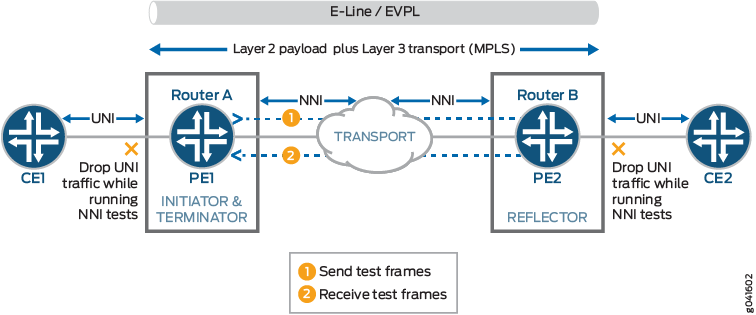 NNI 方向基准测试
配置
在此示例中,您将针对在两个路由器之间启用的以太网伪线服务的 NNI 方向配置基准测试,以检测和分析互连路由器的性能。
CLI 快速配置
要快速配置此示例,请复制以下命令,将其粘贴到文本文件中,删除所有换行符,更改详细信息,以便与网络配置匹配,然后将命令复制并粘贴到 [edit] 层级的 CLI 中:
在路由器 A 上配置基准测试参数
set interfaces ge-0/0/0 vlan-tagging
set interfaces ge-0/0/0 unit 0 encapsulation vlan-ccc
set interfaces ge-0/0/0 unit 0 vlan-id 101
set services rpm rfc2544-benchmarking profiles test-profile throughput test-type throughput
set services rpm rfc2544-benchmarking profiles test-profile throughput packet-size 64
set services rpm rfc2544-benchmarking profiles test-profile throughput test-duration 20
set services rpm rfc2544-benchmarking profiles test-profile throughput bandwidth-kbps 500
set services rpm rfc2544-benchmarking tests test-name test1 interface ge-0/0/0.1
set services rpm rfc2544-benchmarking tests test-name test1 test-profile throughput
set services rpm rfc2544-benchmarking tests test-name test1 mode initiate-and-terminate
set services rpm rfc2544-benchmarking tests test-name test1 family ccc
set services rpm rfc2544-benchmarking tests test-name test1 direction nni
在路由器 B 上配置基准测试参数
set interfaces ge-0/0/4 vlan-tagging
set interfaces ge-0/0/4 unit 0 encapsulation vlan-ccc
set interfaces ge-0/0/4 unit 0 vlan-id 101
set services rpm rfc2544-benchmarking tests test-name test1 interface ge-0/0/4.1
set services rpm rfc2544-benchmarking tests test-name test1 mode reflect
set services rpm rfc2544-benchmarking tests test-name test1 reflector-port 25
set services rpm rfc2544-benchmarking tests test-name test1 mode family ccc
set services rpm rfc2544-benchmarking tests test-name test1 direction uni
在路由器 B 上配置基准测试参数
分步过程
下面的示例要求您在各个配置层级中进行导航。有关 CLI 导航的信息,请参阅 在配置模式下使用 CLI 编辑器。
要在路由器 A 上配置测试参数:
在配置模式下,转到
[edit interfaces]层次结构级别:[edit] user@host# edit interfaces
配置必须运行测试的接口。
[edit interfaces]
user@host# edit ge-0/0/0
配置 VLAN 标记,以便传输和接收 802.1Q VLAN 标记帧。
[edit interfaces ge-0/0/0]
 user@host# set vlan-tagging
为接口配置逻辑单元。
[edit interfaces ge-0/0/0]
 user@host# edit unit 0
指定以太网 VLAN 电路的封装。
[edit interfaces ge-0/0/0 unit 0]
 user@host# set encapsulation vlan-ccc
在逻辑接口上配置 VLAN ID。
[edit interfaces ge-0/0/0 unit 0]
user@host# set vlan-id 101
转到配置命令模式的顶层。
[edit interfaces ge-0/0/0 unit 0]
user@host# top
在配置模式下,转到
[edit services]层级。[edit] user@host# edit services
配置RPM实时性能监控服务实例。
[edit services]
user@host# edit rpm
为 RPM 实例配置基于 RFC 2544 的基准测试。
[edit services rpm]
user@host# edit rfc2544-benchmarking
定义测试配置文件的名称,例如吞吐量。
[edit services rpm rfc2544-benchmarking]
user@host# edit profiles test-profile throughput
将要执行的测试类型配置为吞吐量。
[edit services rpm rfc2544-benchmarking profiles test-profile throughput]
user@host# set test-type throughput
将测试数据包的大小指定为 64 字节。
[edit services rpm rfc2544-benchmarking profiles test-profile throughput]
user@host# set test-type packet-size 64
指定一个数字,后跟字母 h(表示小时)、m(表示分钟)或 s(表示秒),以小时、分钟或秒为单位指定要执行测试的时间段(例如 20 分钟)。
[edit services rpm rfc2544-benchmarking profiles test-profile throughput]
user@host# set test-type test-duration 20m
定义测试的理论最大带宽(以千比特/秒为单位),值从 1 Kbps 到 1,000,000 Kbps。
[edit services rpm rfc2544-benchmarking profiles test-profile throughput]
user@host# set test-type bandwidth-kbps 500
输入
up命令,进入配置层次结构中的上一级。[edit services rpm rfc2544-benchmarking profiles test-profile throughput] user@host# up
输入
up命令,进入配置层次结构中的上一级。[edit services rpm rfc2544-benchmarking profiles] user@host# up
定义测试的名称,例如 test1。测试名称标识符的长度最多为 32 个字符。
[edit services rpm rfc2544-benchmarking]
user@host# edit tests test-name test1
指定要与特定测试名称关联的测试配置文件的名称(例如,吞吐量)。
[edit services rpm rfc2544-benchmarking tests test-name test1]
user@host# set test-profile throughput
指定运行基于 RFC 2544 的基准测试的逻辑接口 ge-0/0/0.1。
[edit services rpm rfc2544-benchmarking tests test-name test1]
user@host# set test-interface ge-0/0/0.1
将基准测试期间发送的数据包指定为启动和终止的测试模式。
[edit services rpm rfc2544-benchmarking tests test-name test1]
user@host# set mode initiate-and-terminate
配置用于基准测试的地址类型系列
ccc。[edit services rpm rfc2544-benchmarking tests test-name test1] user@host# set family ccc
指定必须运行测试的接口的方向,在本例中为 NNI。
[edit services rpm rfc2544-benchmarking tests test-name test1]
user@host# set direction nni
在路由器 B 上配置基准测试参数
分步过程
下面的示例要求您在各个配置层级中进行导航。有关 CLI 导航的信息,请参阅 在配置模式下使用 CLI 编辑器。
要在路由器 B 上配置测试参数,请执行以下作:
在配置模式下,转到
[edit interfaces]层次结构级别:[edit] user@host# edit interfaces
配置必须运行测试的接口。
[edit interfaces]
user@host# edit ge-0/0/4
配置 VLAN 标记,以便传输和接收 802.1Q VLAN 标记帧。
[edit interfaces ge-0/0/4]
 user@host# set vlan-tagging
为接口配置逻辑单元。
[edit interfaces ge-0/0/4]
 user@host# edit unit 0
指定以太网 VLAN 电路的封装。
[edit interfaces ge-0/0/4 unit 0]
 user@host# set encapsulation vlan-ccc
在逻辑接口上配置 VLAN ID。
[edit interfaces ge-0/0/4 unit 0]
user@host# set vlan-id 101
转到配置命令模式的顶层。
[edit interfaces ge-0/0/4 unit 0]
user@host# top
在配置模式下,转到
[edit services]层级。[edit] user@host# edit services
配置RPM实时性能监控服务实例。
[edit services]
user@host# edit rpm
为 RPM 实例配置基于 RFC 2544 的基准测试。
[edit services rpm]
user@host# edit rfc2544-benchmarking
定义测试的名称,例如 test1。测试名称标识符的长度最多为 32 个字符。
[edit services rpm rfc2544-benchmarking]
user@host# edit tests test-name test1
指定运行基于 RFC 2544 的基准测试的逻辑接口 ge-0/0/4.1。
[edit services rpm rfc2544-benchmarking tests test-name test1]
user@host# set test-interface ge-0/0/4.1
指定
reflect为基准测试期间发送的数据包的测试模式。[edit services rpm rfc2544-benchmarking tests test-name test1] user@host# set mode reflect
配置用于基准测试的地址类型系列
ccc。[edit services rpm rfc2544-benchmarking tests test-name test1] user@host# set family ccc
指定必须运行测试的接口的方向,在本例中为 NNI。
[edit services rpm rfc2544-benchmarking tests test-name test1]
user@host# set direction nni
结果
在配置模式下,输入 show 命令以确认您在路由器 A 和路由器 B 上的配置。如果输出未显示预期的配置,请重复此示例中的配置说明,以便进行更正。
在路由器 A 上配置基准测试参数:
[edit interfaces]
  ge-0/0/0 {
      vlan-tagging;
      unit 0 {
          encapsulation vlan-ccc;
          vlan-id 101;
      }
  }

  [edit services rpm]
  rfc2544-benchmarking {
      profiles {
          test-profile throughput {
              test-type throughput
              packet-size 64;
              test-duration 20m;
              bandwidth-kbps 500;
          }
      }

      tests {
          test-name test1 {
              interface ge-0/0/0.1;
              test-profile throughput;
              mode initiate-and-terminate;
              family ccc;
              direction nni;
          }
      }
  }
在路由器 B 上配置基准测试参数:
[edit interfaces]
  ge-0/0/4 {
      vlan-tagging;
      unit 0 {
          encapsulation vlan-ccc;
          vlan-id 101;
      }
  }

  [edit services rpm]
  rfc2544-benchmarking {
      # Note, When in reflector mode, test profile is not needed
      tests {
          test-name test1 {
              interface ge-0/0/4.1;
              mode reflect;
              family ccc;
              direction nni;
          }
      }
  }
配置设备后,在配置模式下输入 commit 命令。
验证以太网伪线服务 NNI 方向的基准测试结果
检查在路由器 A 和路由器 B 之间的已配置服务上执行的基准测试结果。
验证基准测试结果
目的
验证是否为在路由器 A 和路由器 B 之间的已配置服务上运行的基准测试显示必要和所需的统计值。
行动
在作模式下,输入 run show services rpm rfc2544-benchmarking (aborted-tests | active-tests | completed-tests | summary) 命令以显示有关每个实时性能监控 (RPM) 实例的基于 RFC 2544 的基准测试的每个类别或状态的结果信息,例如已终止测试、活动测试和已完成测试。
意义
输出显示已执行的基准测试的详细信息。有关 run show services rpm rfc2544-benchmarking 作命令的更多信息,请参阅 show services rpm rfc2544-benchmarking CLI 资源管理器。