
示例:采样实例配置
您可以使用采样实例配置主动采样,并将该采样实例关联到特定的灵活端口集中器 (FPC)、模块化端口集中器 (MPC) 或密集端口集中器 (DPC)。此外,您还可以定义与多个目标相关联的多个采样实例,以及每个采样实例目标的协议族。
示例网络详细信息
以下示例显示了在运行 Junos OS 9.6 版的 MX480 路由器上配置两个采样实例。
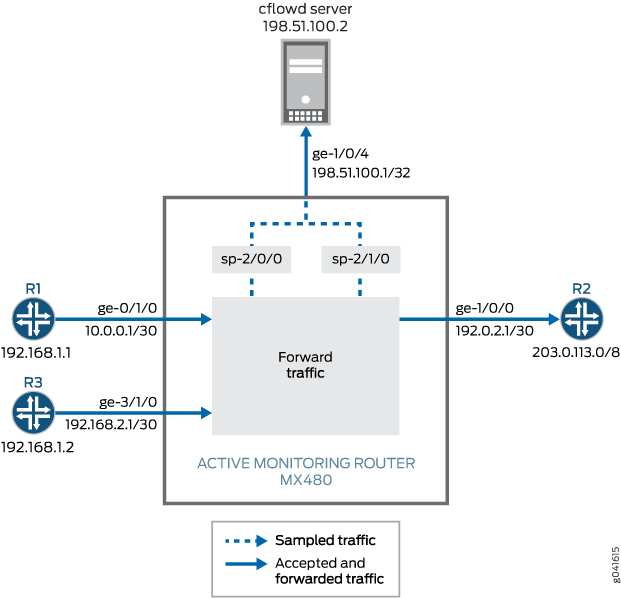
在 图 1 中,来自路由器 1 的数据包到达监控路由器的千兆以太网 ge-0/1/0 接口,数据包由服务接口 sp-2/0/0 采样并通过导出接口 ge-1/0/4发送到 cflowd 服务器。来自路由器 3 的数据包到达监控路由器的千兆以太网 ge-3/1/0 接口,数据包由服务接口 sp-2/1/0 采样并通过导出接口 ge-1/0/4发送到 cflowd 服务器。在采样过程中,进 ge-0/1/0 ge-3/1/0 ge-1/0/0 出路由器 2 的正常流量不会受到干扰。在主动流监控中,输入接口和出口接口都可以是任意接口类型(如 SONET/SDH、千兆以太网等)。
FPC、MPC 或 DPC 只能连接一个采样实例。一个采样实例下可以配置多个族。每个家庭都可以拥有自己的收藏家地址。您可以定义采样实例并将每个实例附加到不同的 FPC,也可以将单个采样实例附加到所有 FPC。
此示例的采样配置包括以下内容:
-
配置了两个采样实例和
s0s1,用于在层次结构级别收集采样数据[edit forwarding-options]。语flow-server句包含流服务器的 IP 地址、端口和模板。该interface语句包括用于流记录处理的服务接口sp-2/0/0sp-2/1/0或,以及采样接口上传入路由器的源地址。 -
将两个采样实例绑定到 FPC 0 和 FPC 3。这些都使用
sampling-instance层次[edit chassis fpc slot]结构级别的语句进行配置。 -
在输入接口
ge-0/1/0上激活采样,并在ge-3/1/0[edit interfaces interface-name unit unit-number family family]层次结构级别使用sampling语句。
在此示例中, ping 命令通过 MX480 路由器在路由器 1 上发出至路由器 2,用于生成流量。生成数据包后, show 将发出命令以验证采样配置是否按预期工作。
示例路由器配置
以下输出显示了具有两个采样实例的 MX480 路由器的配置。
user@MX480–router> show configuration
[...Output Truncated...]
}
chassis {
    fpc 0 { # The fpc number is associated with the interface on which sampling is enabled, ge-0/1/0 in this statement.
        sampling-instance s0;
    }
    fpc 3 { # The fpc number is associated with the interface on which sampling is enabled, ge-3/1/0 in this statement.
        sampling-instance s1;
    }
}
interfaces {
    ge-0/1/0 { # This interface has sampling activated.
        unit 0 {
            family inet {
                sampling { # Here sampling is activated.
                    input;
                }
                address 10.0.0.1/30;
            }
        }
    }
    ge-1/0/0 { # The interface on which packets are exiting the router.
        unit 0 {
            family inet {
                address 192.0.2.1/30;
            }
        }
    }
    ge-1/0/4 { # The interface connected to the cflowd server.
        unit 0 {
            family inet {
                address 198.51.100.1/32;
            }
        }
    }
    sp-2/0/0 { # The service interface that samples the packets from Router 1.
        unit 0 {
            family inet;
        }
    }
    sp-2/1/0 { # The service interface that samples the packets from Router 3.
        unit 0 {
            family inet;
        }
    }
    ge-3/1/0 { # This interface has sampling activated.
        unit 0 {
            family inet {
                sampling { # Here sampling is activated.
                    input;
                }
                address 192.168.2.1/30;
            }
        }
    }
}
forwarding-options {
    sampling {
        instance {
            s0 {
                input {
                    rate 1;
                    run-length 0;
                }
                family inet {
                    output {
                        flow-server 198.51.100.2 { # The address of the external server.
                            port 2055;
                            version9 {
                                template {
                                    v4
                                }
                            }
                        }
                        interface sp-2/0/0 {
                            source-address 192.168.1.1; # Source address of the sampled packets
                        }
                    }
                }
            }
            s1 {
                input {
                    rate 1;
                    run-length 0;
                }
                family inet {
                    output {
                        flow-server 198.51.100.2 { # The address of the external server.
                            port 2055;
                            version9 {
                                template {
                                    v4
                                }
                            }
                        }
                        interface sp-2/1/0 {
                            source-address 192.168.1.2; # Source address of the sampled packets
                        }
                    }
                }
            }
        }
    }
}

routing-options {
    static {
        route 203.0.113.0/8 next-hop 192.0.2.2;
    }
}
services {
    flow-monitoring {
        version9 {
            template v4 {
                flow-active-timeout 30;
                flow-inactive-timeout 30;
                ipv4-template;
            }
        }
    }
}
配置示例中使用的配置命令
set此示例中使用以下命令来配置采样实例。将这些命令中的值替换为与您自己的网络相关的值。
-
set chassis fpc 0 sampling-instance s0 -
set chassis fpc 3 sampling-instance s1 -
set interfaces ge-0/1/0 unit 0 family inet sampling input -
set interfaces ge-0/1/0 unit 0 family inet address -
set interfaces ge-1/0/0 unit 0 family inet address -
set interfaces sp-2/0/0 unit 0 family inet -
set interfaces sp-2/1/0 unit 0 family inet -
set interfaces ge-3/1/0 unit 0 family inet sampling input -
set interfaces ge-3/1/0 unit 0 family inet address -
set forwarding-options sampling instance s0 input rate 1 -
set forwarding-options sampling instance s0 input run-length 0 -
set forwarding-options sampling instance s0 family inet output flow-server 198.51.100.2 port 2055 -
set forwarding-options sampling instance s0 family inet output flow-server 198.51.100.2 version9 template v4; -
set forwarding-options sampling instance s0 family inet output interface sp-2/0/0 source-address 192.168.1.1 -
set forwarding-options sampling instance s1 input rate 1 -
set forwarding-options sampling instance s1 input run-length 0 -
set forwarding-options sampling instance s1 family inet output flow-server 198.51.100.2 port 2055 -
set forwarding-options sampling instance s1 family inet output flow-server 198.51.100.2 version9 template v4; -
set forwarding-options sampling instance s1 family inet output interface sp-2/1/0 source-address 192.168.1.2 -
set routing-options static route 203.0.113.0/8 next-hop 192.0.2.2 -
set services flow-monitoring version9 template v4 flow-active-timeout 30 -
set services flow-monitoring version9 template v4 flow-inactive-timeout 30 -
set services flow-monitoring version9 template v4 ipv4-template
验证您的工作
要验证您的配置是否按预期工作,请在配置了采样实例的路由器上使用以下命令:
-
show services accounting aggregation template template-name template-name -
show services accounting flow
下面显示了此配置示例中使用的 MX480 路由器上发出的命令 show 的输出:
user@MX480–router> show services accounting aggregation template template-name v4
                                  Src   Dst
                                Port/ Port/
Source          Destination      ICMP  ICMP                          Packet
Address         Address          Type  Code  Proto TOS                Count
10.0.0.6        203.0.113.3       100  1000     17   8                   14
10.0.0.5        203.0.113.2       100  1000     17   8                   15
10.0.0.3        203.0.113.3       100  1000     17   8                   15
10.0.0.2        203.0.113.3       100  1000     17   8                   15
10.0.0.4        203.0.113.2       100  1000     17   8                   15
10.0.0.6        203.0.113.2       100  1000     17   8                   15
10.0.0.4        203.0.113.3       100  1000     17   8                   15
10.0.0.2        203.0.113.2       100  1000     17   8                   16
10.0.0.3        203.0.113.2       100  1000     17   8                   15
10.0.0.5        203.0.113.3       100  1000     17   8                   15

user@MX480–router> show services accounting aggregation template template-name v4
                                  Src   Dst
                                Port/ Port/
Source          Destination      ICMP  ICMP                          Packet
Address         Address          Type  Code  Proto TOS                Count
10.0.0.6        203.0.113.3      100  1000     17   8                   16
10.0.0.5        203.0.113.2      100  1000     17   8                   17
10.0.0.3        203.0.113.3      100  1000     17   8                   16
10.0.0.2        203.0.113.3      100  1000     17   8                   16
10.0.0.4        203.0.113.2      100  1000     17   8                   17
10.0.0.6        203.0.113.2      100  1000     17   8                   17
10.0.0.4        203.0.113.3      100  1000     17   8                   16
10.0.0.2        203.0.113.2      100  1000     17   8                   17
10.0.0.3        203.0.113.2      100  1000     17   8                   17
10.0.0.5        203.0.113.3      100  1000     17   8                   16

user@MX480–router> show services accounting flow
  Flow information
    Interface name: sp-2/0/0, Local interface index: 152
    Flow packets: 884, Flow bytes: 56576
    Flow packets 10-second rate: 0, Flow bytes 10-second rate: 628
    Active flows: 10, Total flows: 35
    Flows exported: 75, Flows packets exported: 14
    Flows inactive timed out: 25, Flows active timed out: 75

user@MX480–router> show services accounting flow
  Flow information
    Interface name: sp-2/0/0, Local interface index: 152
    Flow packets: 898, Flow bytes: 57472
    Flow packets 10-second rate: 0, Flow bytes 10-second rate: 628
    Active flows: 10, Total flows: 35
    Flows exported: 75, Flows packets exported: 14
    Flows inactive timed out: 25, Flows active timed out: 75