
监控机箱群集接口
接口监控通过检查接口是处于运行状态还是故障状态来监控接口的状态。当一个或多个受监控接口发生故障时,冗余组将故障转移到群集中的另一个节点。有关更多信息,请参阅以下主题:
了解机箱群集冗余组接口监控
要使冗余组自动故障转移到另一个节点,必须监视其接口。配置冗余组时,您可以指定一组接口,冗余组要监控这些接口的状态(或“运行状况”),以确定接口是打开还是关闭。受监控接口可以是其任何冗余以太网接口的子接口。为要监控的冗余组配置接口时,需要为其赋予权重。
每个冗余组的阈值容差值最初设置为 255。当冗余组监控的接口不可用时,将从冗余组的阈值中减去其权重。当冗余组的阈值达到 0 时,它将故障转移到另一个节点。例如,如果冗余组 1 在节点 0 上是主冗余组,则在阈值交叉事件中,冗余组 1 在节点 1 上变为主冗余组。在这种情况下,冗余组 1 的冗余以太网接口的所有子接口都将开始处理流量。
要检查接口权重,请使用以下命令:
显示机箱群集信息
show chassis cluster interfaces
对于机箱群集中的 SRX 系列防火墙,我们不建议在冗余组 0 (RG0) 上配置数据平面模块,例如接口监控和 IP 监控。
在使用冗余组 0 手动故障转移时要谨慎和明智。冗余组 0 故障切换意味着路由引擎 (RE) 故障切换,在这种情况下,主节点上运行的所有进程都将被终止,然后在新的主路由引擎 (RE) 上生成。此故障切换可能导致状态丢失(如路由状态),并通过引入系统改动而降低性能。
发生冗余组故障切换的原因是冗余组的受监控接口的累积权重已将其阈值降至 0。当两个节点上的冗余组的受监控接口同时达到其阈值时,冗余组在节点 ID 较低的节点(在本例中为节点 0)上为主接口。
如果要抑制由于接口监控失败而发生的故障转移,请使用语
hold-down-interval句。如果冗余组 0 (RG0) 上发生故障切换,则 RG0 辅助节点上的接口监控将被禁用 30 秒。这样可以防止其他冗余组的故障切换以及 RG0 故障切换。
监控机箱群集的好处 冗余组接口
帮助确定特定冗余组设置的机箱群集中特定接口的状态。
如果接口关闭,允许将接口自动故障转移到另一个节点。
另见
示例:配置机箱群集冗余组 接口监控
此示例说明如何指定由特定冗余组监视某个接口,以便自动故障转移到另一个节点。为要监控的接口分配权重 还演示了如何通过从每个节点配置两个接口并将其映射到冗余组来验证监控接口剩余阈值的过程。
要求
开始之前,请创建一个冗余组。请参阅 示例:配置机箱群集冗余组。
概述
要在监控接口关闭后检索剩余冗余组阈值,可以将系统配置为监控属于冗余组的接口的运行状况。当您为要监控的接口分配权重时,系统会监控该接口的可用性。如果物理接口发生故障,则将从相应冗余组的阈值中扣除权重。每个冗余组的阈值为 255。如果阈值达到 0,则会触发故障切换,即使冗余组处于手动故障切换模式且未启用该 preempt 选项也是如此。
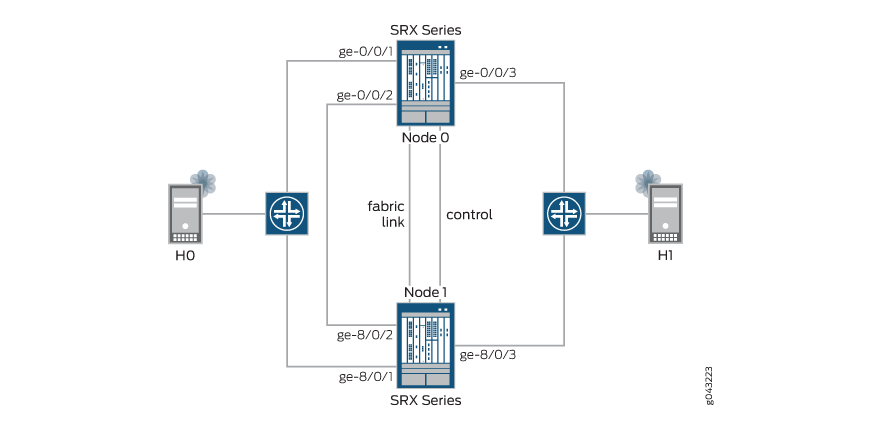
在此示例中,您将通过从每个节点配置两个接口并将其映射到冗余组 1 (RG1)(每个接口具有不同的权重)来检查监控接口剩余阈值的进程。对节点 0 接口使用 130 和 140,对节点 1 接口使用 150 和 120。您可以为每个节点配置一个接口,并将这些接口映射到冗余组 2 (RG2),每个冗余组的默认权重为 255。
图 1 说明了此示例中使用的网络拓扑。
拓扑学
配置
CLI 快速配置
要快速配置此示例,请复制以下命令,将其粘贴到文本文件中,删除所有换行符,更改详细信息,以便与网络配置匹配,将命令复制并粘贴到层 edit 级的 CLI 中,然后从配置模式进入 commit 。
               set chassis cluster reth-count 3


               set chassis cluster redundancy-group 0 node 0 priority 254


               set chassis cluster redundancy-group 0 node 1 priority 1


               set chassis cluster redundancy-group 1 node 0 priority 200


               set chassis cluster redundancy-group 1 node 1 priority 100


               set chassis cluster redundancy-group 1 interface-monitor ge-0/0/1 weight 130


               set chassis cluster redundancy-group 1 interface-monitor ge-0/0/2 weight 140


               set chassis cluster redundancy-group 1 interface-monitor ge-8/0/1 weight 150


               set chassis cluster redundancy-group 1 interface-monitor ge-8/0/2 weight 120


               set chassis cluster redundancy-group 2 node 0 priority 200


               set chassis cluster redundancy-group 2 node 1 priority 100


               set chassis cluster redundancy-group 2 interface-monitor ge-0/0/3 weight 255


               set chassis cluster redundancy-group 2 interface-monitor ge-8/0/3 weight 255


               set interfaces ge-0/0/1 gigether-options redundant-parent reth0


               set interfaces ge-0/0/2 gigether-options redundant-parent reth1


               set interfaces ge-0/0/3 gigether-options redundant-parent reth2


               set interfaces ge-8/0/1 gigether-options redundant-parent reth0


               set interfaces ge-8/0/2 gigether-options redundant-parent reth1


               set interfaces ge-8/0/3 gigether-options redundant-parent reth2


               set interfaces reth0 redundant-ether-options redundancy-group 1


               set interfaces reth0 unit 0 family inet address 10.1.1.1/24


               set interfaces reth1 redundant-ether-options redundancy-group 1


               set interfaces reth1 unit 0 family inet address 10.2.2.2/24


               set interfaces reth2 redundant-ether-options redundancy-group 2


               set interfaces reth2 unit 0 family inet address 10.3.3.3/24
程序
分步过程
下面的示例要求您在各个配置层级中进行导航。有关作说明,请参阅《Junos OS CLI 用户指南》中的在配置模式下使用 CLI 编辑器。
要配置机箱群集接口监控,请执行以下作:
-
指定冗余以太网接口的数量。
[edit chassis cluster] user@host# set reth-count 3 -
为路由引擎故障切换属性设置冗余组 0,并设置 RG1 和 RG2(此例中所有接口都在一个冗余组中),以便为冗余以太网接口定义故障切换属性。
[edit chassis cluster] user@host# set redundancy-group 0 node 0 priority 254 user@host# set redundancy-group 0 node 1 priority 1 user@host# set redundancy-group 1 node 0 priority 200 user@host# set redundancy-group 1 node 1 priority 100 user@host# set redundancy-group 2 node 0 priority 200 user@host# set redundancy-group 2 node 1 priority 100 -
设置接口监控以监控接口的运行状况并触发冗余组故障切换。
不建议对 RG0 进行接口监控,因为它会导致控制平面在发生接口翻动时从一个节点切换到另一个节点。
[edit chassis cluster]
user@host# set redundancy-group 1 interface-monitor ge-0/0/1 weight 130
user@host# set redundancy-group 1 interface-monitor ge-0/0/2 weight 140
user@host# set redundancy-group 1 interface-monitor ge-8/0/1 weight 150
user@host# set redundancy-group 1 interface-monitor ge-0/0/2 weight 120
user@host# set redundancy-group 2 interface-monitor ge-0/0/3 weight 255
user@host# set redundancy-group 2 interface-monitor ge-8/0/3 weight 255
接口故障切换只会在权重达到零后发生。
-
设置冗余以太网 (reth) 接口并将其分配给一个区段。
[edit interfaces]
user@host# set ge-0/0/1 gigether-options redundant-parent reth0
user@host# set ge-0/0/2 gigether-options redundant-parent reth1
user@host# set ge-0/0/3 gigether-options redundant-parent reth2
user@host# set ge-8/0/1 gigether-options redundant-parent reth0
user@host# set ge-8/0/2 gigether-options redundant-parent reth1
user@host# set ge-8/0/3 gigether-options redundant-parent reth2
user@host# set reth0 redundant-ether-options redundancy-group 1
user@host# set reth0 unit 0 family inet address 10.1.1.1/24
user@host# set reth1 redundant-ether-options redundancy-group 1
user@host# set reth1 unit 0 family inet address 10.2.2.2/24
user@host# set reth2 redundant-ether-options redundancy-group 2
user@host# set reth2 unit 0 family inet address 10.3.3.3/24
结果
在配置模式下,输入 show chassis 和 show interfaces 命令,以确认您的配置。如果输出未显示预期的配置,请重复此示例中的配置说明,以便进行更正。
[edit]
user@host# show chassis
    cluster {
        reth-count 3;
        redundancy-group 0 {
            node 0 priority 254;
            node 1 priority 1;
        }
        redundancy-group 1 {
            node 0 priority 200;
            node 1 priority 100;
            interface-monitor {
                ge-0/0/1 weight 130;
                ge-0/0/2 weight 140;
                ge-8/0/1 weight 150;
                ge-8/0/2 weight 120;
            }
        }
        redundancy-group 2 {
            node 0 priority 200;
            node 1 priority 100;
            interface-monitor {
                ge-0/0/3 weight 255;
                ge-8/0/3 weight 255;
            }
        }
    }
[edit]
user@host# show interfaces
ge-0/0/1 {
    gigether-options {
        redundant-parent reth0;
    }
}
ge-0/0/2 {
    gigether-options {
        redundant-parent reth1;
    }
}
ge-0/0/3 {
    gigether-options {
        redundant-parent reth2;
    }
}
ge-8/0/1 {
    gigether-options {
        redundant-parent reth0;
    }
}
ge-8/0/2 {
    gigether-options {
        redundant-parent reth1;
    }
}
ge-8/0/3 {
    gigether-options {
        redundant-parent reth2;
    }
}
reth0 {
    redundant-ether-options {
        redundancy-group 1;
    }
    unit 0 {
        family inet {
            address 10.1.1.1/24;
        }
    }
}
reth1 {
    redundant-ether-options {
        redundancy-group 1;
    }
    unit 0 {
        family inet {
            address 10.2.2.2/24;
        }
    }
}
reth2 {
    redundant-ether-options {
        redundancy-group 2;
    }
    unit 0 {
        family inet {
            address 10.3.3.3/24;
        }
    }
}
如果完成设备配置,请从配置模式输入 commit 。
验证
以下各节将指导您完成验证接口状态和(在某些情况下)故障排除的过程。该过程将向您展示如何检查冗余组中每个接口的状态,在禁用后再次检查它们,并查找有关每个接口的详细信息,直到您遍历冗余组中的所有接口。
在此示例中,您可以通过从每个节点配置两个接口并将其映射到 RG1(每个接口具有不同的权重)来验证监控接口剩余阈值的过程。对节点 0 接口使用 130 和 140,对节点 1 接口使用 150 和 120。您可以为每个节点配置一个接口,并将接口映射到 RG2,每个接口的默认权重为 255。
- 验证机箱群集状态
- 验证机箱群集接口
- 验证机箱群集信息
- 禁用节点 0 中权重为 130 的 RG1 的接口 ge-0/0/1 后,验证接口 ge-0/0/1 状态
- 禁用节点 0 中权重为 130 的 RG1 的接口 ge-0/0/1 后验证机箱群集状态
- 禁用接口 ge-0/0/1 后验证机箱群集接口 节点 0 中权重为 130 的 RG1
- 禁用接口后验证机箱群集信息 接口 ge-0/0/1 的 RG1 在节点 0 中,权重为 130
- 验证接口 ge-0/0/2 是否已禁用
- 禁用接口 ge-0/0/2 后验证机箱群集状态
- 禁用接口 ge-0/0/2 后验证机箱群集接口
- 禁用接口 ge-0/0/2 后验证机箱群集信息
- 禁用 ge-0/0/3 后验证接口状态
- 禁用接口 ge-0/0/3 后验证机箱群集状态
- 禁用接口 ge-0/0/3 后验证机箱群集接口
- 禁用接口 ge-0/0/3 后验证机箱群集信息
- 验证接口 ge-0/0/2 是否已启用
- 启用接口 ge-0/0/2 后验证机箱群集状态
- 启用接口 ge-0/0/2 后验证机箱群集接口
- 启用接口 ge-0/0/2 后验证机箱群集信息
- 验证机箱群集 RG2 抢占
- 抢占 RG2 后验证机箱群集状态
- 验证接口 ge-0/0/3 是否已启用
- 启用接口 ge-0/0/3 后验证机箱群集状态
- 启用接口 ge-0/0/3 后验证机箱群集接口
- 启用接口 ge-0/0/3 后验证机箱群集信息
验证机箱群集状态
目的
验证机箱群集状态、故障切换状态和冗余组信息。
行动
在作模式下,输入 show chassis cluster status 命令。
{primary:node0}
user@host> show chassis cluster status
Monitor Failure codes:
    CS  Cold Sync monitoring        FL  Fabric Connection monitoring
    GR  GRES monitoring             HW  Hardware monitoring
    IF  Interface monitoring        IP  IP monitoring
    LB  Loopback monitoring         MB  Mbuf monitoring
    NH  Nexthop monitoring          NP  NPC monitoring
    SP  SPU monitoring              SM  Schedule monitoring
    CF  Config Sync monitoring

Cluster ID: 2
Node   Priority Status         Preempt Manual   Monitor-failures

Redundancy group: 0 , Failover count: 1
node0  254      primary        no      no       None
node1  1        secondary      no      no       None

Redundancy group: 1 , Failover count: 1
node0  200      primary        no      no       None
node1  100      secondary      no      no       None

Redundancy group: 2 , Failover count: 1
node0  200      primary        no      no       None
node1  100      secondary      no      no       None
意义
show chassis cluster status使用命令确认机箱群集中的设备是否正常通信,一台设备用作主节点,另一台设备用作辅助节点。
验证机箱群集接口
目的
验证有关要同步的不同对象的统计信息、交换结构和控制接口查询以及群集中监控接口的状态等信息。
行动
在作模式下,输入 show chassis cluster interfaces 命令。
{primary:node0}
user@host> show chassis cluster interfaces
Control link status: Up

Control interfaces:
    Index   Interface   Monitored-Status   Internal-SA
    0       em0         Up                 Disabled
    1       em1         Down               Disabled

Fabric link status: Up

Fabric interfaces:
    Name    Child-interface    Status
                               (Physical/Monitored)
    fab0    ge-0/0/0           Up   / Up
    fab0
    fab1    ge-8/0/0           Up   / Up
    fab1

Redundant-ethernet Information:
    Name         Status      Redundancy-group
    reth0        Up          1
    reth1        Up          1
    reth2        Up          2

Redundant-pseudo-interface Information:
    Name         Status      Redundancy-group
    lo0          Up          0

Interface Monitoring:
    Interface         Weight    Status    Redundancy-group
    ge-8/0/2          120       Up        1
    ge-8/0/1          150       Up        1
    ge-0/0/2          140       Up        1
    ge-0/0/1          130       Up        1
    ge-8/0/3          255       Up        2
    ge-0/0/3          255       Up        2
意义
示例输出确认监控接口已启动,并且每个被监控接口的权重均按配置正确显示。无论接口上升还是下降,这些值都不会更改。权重只会针对冗余组而更改,并且可以在使用 show chassis cluster information 命令时查看。
验证机箱群集信息
目的
验证有关要同步的不同对象的统计信息、交换结构和控制接口查询以及群集中监控接口的状态等信息。
行动
在作模式下,输入 show chassis cluster information 命令。
{primary:node0}
user@host> show chassis cluster information

node0:
--------------------------------------------------------------------------
Redundancy Group Information:

    Redundancy Group 0 , Current State: primary, Weight: 255

        Time            From           To             Reason
        Feb 24 22:56:27 hold           secondary      Hold timer expired
        Feb 24 22:56:34 secondary      primary        Better priority (254/1)

    Redundancy Group 1 , Current State: primary, Weight: 255

        Time            From           To             Reason
        Feb 24 23:16:12 hold           secondary      Hold timer expired
        Feb 24 23:16:12 secondary      primary        Remote yield (0/0)

    Redundancy Group 2 , Current State: primary, Weight: 255

        Time            From           To             Reason
        Feb 24 23:16:12 hold           secondary      Hold timer expired
        Feb 24 23:16:13 secondary      primary        Remote yield (0/0)

Chassis cluster LED information:
    Current LED color: Green
    Last LED change reason: No failures

node1:
--------------------------------------------------------------------------
Redundancy Group Information:

    Redundancy Group 0 , Current State: secondary, Weight: 255

        Time            From           To             Reason
        Feb 24 22:56:34 hold           secondary      Hold timer expired

    Redundancy Group 1 , Current State: secondary, Weight: 255

        Time            From           To             Reason
        Feb 24 23:16:10 hold           secondary      Hold timer expired

    Redundancy Group 2 , Current State: secondary, Weight: 255

        Time            From           To             Reason
        Feb 24 23:16:10 hold           secondary      Hold timer expired

Chassis cluster LED information:
    Current LED color: Green
    Last LED change reason: No failures
意义
示例输出确认节点 0 和节点 1 运行正常,设备上的绿色 LED 表示没有故障。此外,还会显示冗余组 (255) 的默认权重。每当映射到相应冗余组的接口出现故障时,都会扣除默认权重。
请参阅后续的验证部分,了解当监控接口关闭或启动时,冗余组值有何变化。
禁用节点 0 中权重为 130 的 RG1 的接口 ge-0/0/1 后,验证接口 ge-0/0/1 状态
目的
验证接口 ge-0/0/1 是否在节点 0 上被禁用。
行动
从配置模式,输入 set interface ge-0/0/1 disable 命令。
{primary:node0}
user@host# set interface ge-0/0/1 disable
user@host# commit

node0:
configuration check succeeds
node1:
commit complete
node0:
commit complete

{primary:node0}
user@host# show interfaces ge-0/0/1
disable;
gigether-options {
    redundant-parent reth0;
}
意义
示例输出确认接口 ge-0/0/1 已禁用。
禁用节点 0 中权重为 130 的 RG1 的接口 ge-0/0/1 后验证机箱群集状态
目的
验证机箱群集状态、故障切换状态和冗余组信息。
行动
在作模式下,输入 show chassis cluster status 命令。
{primary:node0}
user@host> show chassis cluster status
Monitor Failure codes:
    CS  Cold Sync monitoring        FL  Fabric Connection monitoring
    GR  GRES monitoring             HW  Hardware monitoring
    IF  Interface monitoring        IP  IP monitoring
    LB  Loopback monitoring         MB  Mbuf monitoring
    NH  Nexthop monitoring          NP  NPC monitoring
    SP  SPU monitoring              SM  Schedule monitoring
    CF  Config Sync monitoring

Cluster ID: 2
Node   Priority Status         Preempt Manual   Monitor-failures

Redundancy group: 0 , Failover count: 1
node0  254      primary        no      no       None
node1  1        secondary      no      no       None

Redundancy group: 1 , Failover count: 1
node0  200      primary        no      no       None
node1  100      secondary      no      no       None

Redundancy group: 2 , Failover count: 1
node0  200      primary        no      no       None
node1  100      secondary      no      no       None
意义
show chassis cluster status使用命令确认机箱群集中的设备是否正常通信,一台设备用作主节点,另一台设备用作辅助节点。
禁用接口 ge-0/0/1 后验证机箱群集接口 节点 0 中权重为 130 的 RG1
目的
验证有关要同步的不同对象的统计信息、交换结构和控制接口查询以及群集中监控接口的状态等信息。
行动
在作模式下,输入 show chassis cluster interfaces 命令。
{primary:node0}
user@host> show chassis cluster interfaces
Control link status: Up

Control interfaces:
    Index   Interface   Monitored-Status   Internal-SA
    0       em0         Up                 Disabled
    1       em1         Down               Disabled

Fabric link status: Up

Fabric interfaces:
    Name    Child-interface    Status
                               (Physical/Monitored)
    fab0    ge-0/0/0           Up   / Up
    fab0
    fab1    ge-8/0/0           Up   / Up
    fab1

Redundant-ethernet Information:
    Name         Status      Redundancy-group
    reth0        Down        1
    reth1        Up          1
    reth2        Up          2

Redundant-pseudo-interface Information:
    Name         Status      Redundancy-group
    lo0          Up          0

Interface Monitoring:
    Interface         Weight    Status    Redundancy-group
    ge-8/0/2          120       Up        1
    ge-8/0/1          150       Up        1
    ge-0/0/2          140       Up        1
    ge-0/0/1          130       Down      1
    ge-8/0/3          255       Up        2
    ge-0/0/3          255       Up        2
意义
示例输出确认监控接口 ge-0/0/1 已关闭。
禁用接口后验证机箱群集信息 接口 ge-0/0/1 的 RG1 在节点 0 中,权重为 130
目的
验证有关要同步的不同对象的统计信息、交换结构和控制接口查询以及群集中监控接口的状态等信息。
行动
在作模式下,输入 show chassis cluster information 命令。
{primary:node0}
user@host> show chassis cluster information

node0:
--------------------------------------------------------------------------
Redundancy Group Information:

    Redundancy Group 0 , Current State: primary, Weight: 255

        Time            From           To             Reason
        Feb 24 22:56:27 hold           secondary      Hold timer expired
        Feb 24 22:56:34 secondary      primary        Better priority (254/1)

    Redundancy Group 1 , Current State: primary, Weight: 125

        Time            From           To             Reason
        Feb 24 23:16:12 hold           secondary      Hold timer expired
        Feb 24 23:16:12 secondary      primary        Remote yield (0/0)

    Redundancy Group 2 , Current State: primary, Weight: 255

        Time            From           To             Reason
        Feb 24 23:16:12 hold           secondary      Hold timer expired
        Feb 24 23:16:13 secondary      primary        Remote yield (0/0)

Chassis cluster LED information:
    Current LED color: Green
    Last LED change reason: No failures

Failure Information:

    Interface Monitoring Failure Information:
        Redundancy Group 1, Monitoring status: Unhealthy
          Interface                 Status
          ge-0/0/1                  Down

node1:
--------------------------------------------------------------------------
Redundancy Group Information:

    Redundancy Group 0 , Current State: secondary, Weight: 255

        Time            From           To             Reason
        Feb 24 22:56:34 hold           secondary      Hold timer expired

    Redundancy Group 1 , Current State: secondary, Weight: 255

        Time            From           To             Reason
        Feb 24 23:16:10 hold           secondary      Hold timer expired

    Redundancy Group 2 , Current State: secondary, Weight: 255

        Time            From           To             Reason
        Feb 24 23:16:10 hold           secondary      Hold timer expired

Chassis cluster LED information:
    Current LED color: Amber
    Last LED change reason: Monitored objects are down
意义
示例输出确认,在节点 0 中,RG1 权重降低到 125(即 255 减去 130),因为监控接口 ge-0/0/1(权重为 130)下降。监控状态不正常,设备 LED 呈琥珀色,接口状态为 ge-0/0/1 关闭。
如果恢复接口 ge-0/0/1,则节点 0 中 RG1 的权重变为 255。相反,如果接口 ge-0/0/2 也被禁用,则节点 0 中 RG1 的权重将变为或更小(在本例中为 125 减去 140 = -15),并触发故障切换,如下一个验证部分所示。
验证接口 ge-0/0/2 是否已禁用
目的
验证接口 ge-0/0/2 是否已在节点 0 上禁用。
行动
从配置模式,输入 set interface ge-0/0/2 disable 命令。
{primary:node0}
user@host# set interface ge-0/0/2 disable
user@host# commit

node0:
configuration check succeeds
node1:
commit complete
node0:
commit complete

{primary:node0}
user@host# show interfaces ge-0/0/2
disable;
gigether-options {
    redundant-parent reth1;
}
意义
示例输出确认接口 ge-0/0/2 已禁用。
禁用接口 ge-0/0/2 后验证机箱群集状态
目的
验证机箱群集状态、故障切换状态和冗余组信息。
行动
在作模式下,输入 show chassis cluster status 命令。
{primary:node0}
user@host> show chassis cluster status
Monitor Failure codes:
    CS  Cold Sync monitoring        FL  Fabric Connection monitoring
    GR  GRES monitoring             HW  Hardware monitoring
    IF  Interface monitoring        IP  IP monitoring
    LB  Loopback monitoring         MB  Mbuf monitoring
    NH  Nexthop monitoring          NP  NPC monitoring
    SP  SPU monitoring              SM  Schedule monitoring
    CF  Config Sync monitoring

Cluster ID: 2
Node   Priority Status         Preempt Manual   Monitor-failures

Redundancy group: 0 , Failover count: 1
node0  254      primary        no      no       None
node1  1        secondary      no      no       None

Redundancy group: 1 , Failover count: 2
node0  0        secondary      no      no       IF
node1  100      primary        no      no       None

Redundancy group: 2 , Failover count: 1
node0  200      primary        no      no       None
node1  100      secondary      no      no       None
意义
show chassis cluster status使用命令确认机箱群集中的设备是否正常通信,一台设备用作主节点,另一台设备用作辅助节点。在 RG1 上,您会看到接口故障,因为在接口监控期间,映射到节点 0 上 RG1 的两个接口都失败了。
禁用接口 ge-0/0/2 后验证机箱群集接口
目的
验证有关机箱群集接口的信息。
行动
在作模式下,输入 show chassis cluster interfaces 命令。
{primary:node0}
user@host> show chassis cluster interfaces
Control link status: Up

Control interfaces:
    Index   Interface   Monitored-Status   Internal-SA
    0       em0         Up                 Disabled
    1       em1         Down               Disabled

Fabric link status: Up

Fabric interfaces:
    Name    Child-interface    Status
                               (Physical/Monitored)
    fab0    ge-0/0/0           Up   / Up
    fab0
    fab1    ge-8/0/0           Up   / Up
    fab1

Redundant-ethernet Information:
    Name         Status      Redundancy-group
    reth0        Up          1
    reth1        Up          1
    reth2        Up          2

Redundant-pseudo-interface Information:
    Name         Status      Redundancy-group
    lo0          Up          0

Interface Monitoring:
    Interface         Weight    Status    Redundancy-group
    ge-8/0/2          120       Up        1
    ge-8/0/1          150       Up        1
    ge-0/0/2          140       Down      1
    ge-0/0/1          130       Down      1
    ge-8/0/3          255       Up        2
    ge-0/0/3          255       Up        2
意义
示例输出确认监控接口 ge-0/0/1 和 ge-0/0/2 已关闭。
禁用接口 ge-0/0/2 后验证机箱群集信息
目的
验证有关要同步的不同对象的统计信息、交换结构和控制接口查询以及群集中监控接口的状态等信息。
行动
在作模式下,输入 show chassis cluster information 命令。
{primary:node0}
user@host> show chassis cluster information

node0:
--------------------------------------------------------------------------
Redundancy Group Information:

    Redundancy Group 0 , Current State: primary, Weight: 255

        Time            From           To             Reason
        Feb 24 22:56:27 hold           secondary      Hold timer expired
        Feb 24 22:56:34 secondary      primary        Better priority (254/1)

    Redundancy Group 1 , Current State: secondary, Weight: -15

        Time            From           To             Reason
        Feb 24 23:16:12 hold           secondary      Hold timer expired
        Feb 24 23:16:12 secondary      primary        Remote yield (0/0)
        Feb 24 23:31:36 primary        secondary-hold Monitor failed: IF
        Feb 24 23:31:37 secondary-hold secondary      Ready to become secondary

    Redundancy Group 2 , Current State: primary, Weight: 255

        Time            From           To             Reason
        Feb 24 23:16:12 hold           secondary      Hold timer expired
        Feb 24 23:16:13 secondary      primary        Remote yield (0/0)

Chassis cluster LED information:
    Current LED color: Amber
    Last LED change reason: Monitored objects are down

Failure Information:

    Interface Monitoring Failure Information:
        Redundancy Group 1, Monitoring status: Failed
          Interface                 Status
          ge-0/0/2                  Down
          ge-0/0/1                  Down

node1:
--------------------------------------------------------------------------
Redundancy Group Information:

    Redundancy Group 0 , Current State: secondary, Weight: 255

        Time            From           To             Reason
        Feb 24 22:56:34 hold           secondary      Hold timer expired

    Redundancy Group 1 , Current State: primary, Weight: 255

        Time            From           To             Reason
        Feb 24 23:16:10 hold           secondary      Hold timer expired
        Feb 24 23:31:36 secondary      primary        Remote is in secondary hold

    Redundancy Group 2 , Current State: secondary, Weight: 255

        Time            From           To             Reason
        Feb 24 23:16:10 hold           secondary      Hold timer expired

Chassis cluster LED information:
    Current LED color: Amber
    Last LED change reason: Monitored objects are down
意义
示例输出确认在节点 0 中,监控接口 ge-0/0/1 和 ge-0/0/2 已关闭。节点 0 上的 RG1 权重达到零值,在使用 show chassis cluster status 命令期间触发了 RG1 故障切换。
对于 RG2,为冗余以太网接口 2 (reth2) 设置了默认权重 255。当需要接口监控时,如果没有像 RG1 那样的备份链路,我们建议您使用默认权重。也就是说,如果禁用接口 ge-0/0/3,它会立即触发故障切换,因为权重变为 0(255 减去 225),如下一个验证部分所示。
禁用 ge-0/0/3 后验证接口状态
目的
验证接口 ge-0/0/3 是否已在节点 0 上禁用。
行动
从配置模式,输入 set interface ge-0/0/3 disable 命令。
{primary:node0}
user@host# set interface ge-0/0/3 disable
user@host# commit

node0:
configuration check succeeds
node1:
commit complete
node0:
commit complete

{primary:node0}
user@host# show interfaces ge-0/0/3
disable;
gigether-options {
    redundant-parent reth2;
}
意义
示例输出确认接口 ge-0/0/3 已禁用。
禁用接口 ge-0/0/3 后验证机箱群集状态
目的
验证机箱群集状态、故障切换状态和冗余组信息。
行动
在作模式下,输入 show chassis cluster status 命令。
{primary:node0}
user@host> show chassis cluster status
Monitor Failure codes:
    CS  Cold Sync monitoring        FL  Fabric Connection monitoring
    GR  GRES monitoring             HW  Hardware monitoring
    IF  Interface monitoring        IP  IP monitoring
    LB  Loopback monitoring         MB  Mbuf monitoring
    NH  Nexthop monitoring          NP  NPC monitoring
    SP  SPU monitoring              SM  Schedule monitoring
    CF  Config Sync monitoring

Cluster ID: 2
Node   Priority Status         Preempt Manual   Monitor-failures

Redundancy group: 0 , Failover count: 1
node0  254      primary        no      no       None
node1  1        secondary      no      no       None

Redundancy group: 1 , Failover count: 2
node0  0        secondary      no      no       IF
node1  100      primary        no      no       None

Redundancy group: 2 , Failover count: 2
node0  0        secondary      no      no       IF
node1  100      primary        no      no       None
意义
show chassis cluster status使用命令确认机箱群集中的设备是否正常通信,一台设备用作主节点,另一台设备用作辅助节点。
禁用接口 ge-0/0/3 后验证机箱群集接口
目的
验证有关机箱群集接口的信息。
行动
在作模式下,输入 show chassis cluster interfaces 命令。
{primary:node0}
user@host> show chassis cluster interfaces
Control link status: Up

Control interfaces:
    Index   Interface   Monitored-Status   Internal-SA
    0       em0         Up                 Disabled
    1       em1         Down               Disabled

Fabric link status: Up

Fabric interfaces:
    Name    Child-interface    Status
                               (Physical/Monitored)
    fab0    ge-0/0/0           Up   / Up
    fab0
    fab1    ge-8/0/0           Up   / Up
    fab1

Redundant-ethernet Information:
    Name         Status      Redundancy-group
    reth0        Up          1
    reth1        Up          1
    reth2        Up          2

Redundant-pseudo-interface Information:
    Name         Status      Redundancy-group
    lo0          Up          0

Interface Monitoring:
    Interface         Weight    Status    Redundancy-group
    ge-8/0/2          120       Up        1
    ge-8/0/1          150       Up        1
    ge-0/0/2          140       Down      1
    ge-0/0/1          130       Down      1
    ge-8/0/3          255       Up        2
    ge-0/0/3          255       Down      2
意义
示例输出确认监控接口 ge-0/0/1、ge-0/0/2 和 ge-0/0/3 已关闭。
禁用接口 ge-0/0/3 后验证机箱群集信息
目的
验证有关要同步的不同对象的统计信息、交换结构和控制接口查询以及群集中监控接口的状态等信息。
行动
在作模式下,输入 show chassis cluster information 命令。
{primary:node0}
user@host> show chassis cluster information

node0:
--------------------------------------------------------------------------
Redundancy Group Information:

    Redundancy Group 0 , Current State: primary, Weight: 255

        Time            From           To             Reason
        Feb 24 22:56:27 hold           secondary      Hold timer expired
        Feb 24 22:56:34 secondary      primary        Better priority (254/1)

    Redundancy Group 1 , Current State: secondary, Weight: -15

        Time            From           To             Reason
        Feb 24 23:16:12 hold           secondary      Hold timer expired
        Feb 24 23:16:12 secondary      primary        Remote yield (0/0)
        Feb 24 23:31:36 primary        secondary-hold Monitor failed: IF
        Feb 24 23:31:37 secondary-hold secondary      Ready to become secondary

    Redundancy Group 2 , Current State: secondary, Weight: 0

        Time            From           To             Reason
        Feb 24 23:16:12 hold           secondary      Hold timer expired
        Feb 24 23:16:13 secondary      primary        Remote yield (0/0)
        Feb 24 23:35:57 primary        secondary-hold Monitor failed: IF
        Feb 24 23:35:58 secondary-hold secondary      Ready to become secondary

Chassis cluster LED information:
    Current LED color: Amber
    Last LED change reason: Monitored objects are down

Failure Information:

    Interface Monitoring Failure Information:
        Redundancy Group 1, Monitoring status: Failed
          Interface                 Status
          ge-0/0/2                  Down
          ge-0/0/1                  Down
        Redundancy Group 2, Monitoring status: Failed
          Interface                 Status
          ge-0/0/3                  Down

node1:
--------------------------------------------------------------------------
Redundancy Group Information:

    Redundancy Group 0 , Current State: secondary, Weight: 255

        Time            From           To             Reason
        Feb 24 22:56:34 hold           secondary      Hold timer expired

    Redundancy Group 1 , Current State: primary, Weight: 255

        Time            From           To             Reason
        Feb 24 23:16:10 hold           secondary      Hold timer expired
        Feb 24 23:31:36 secondary      primary        Remote is in secondary hold

    Redundancy Group 2 , Current State: primary, Weight: 255

        Time            From           To             Reason
        Feb 24 23:16:10 hold           secondary      Hold timer expired
        Feb 24 23:35:57 secondary      primary        Remote is in secondary hold

Chassis cluster LED information:
    Current LED color: Amber
    Last LED change reason: Monitored objects are down
意义
示例输出确认在节点 0 中,监控接口 ge-0/0/1、ge-0/0/2 和 ge-0/0/3 已关闭。
对于 RG1,仅当启用该 preempt 选项时,才允许节点 0 中的任何接口向上移动才会触发故障切换。在此示例中, preempt 未启用。因此,节点应恢复正常,RG1 未显示显示器故障。
验证接口 ge-0/0/2 是否已启用
目的
验证接口 ge-0/0/2 是否已在节点 0 上启用。
行动
从配置模式,输入 delete interfaces ge-0/0/2 disable 命令。
{primary:node0}
user@host# delete interfaces ge-0/0/2 disable
user@host# commit

node0:
configuration check succeeds
node1:
commit complete
node0:
commit complete
意义
示例输出确认接口 ge-0/0/2 禁用已删除。
启用接口 ge-0/0/2 后验证机箱群集状态
目的
验证机箱群集状态、故障切换状态和冗余组信息。
行动
在作模式下,输入 show chassis cluster status 命令。
{primary:node0}
user@host> show chassis cluster status
Monitor Failure codes:
    CS  Cold Sync monitoring        FL  Fabric Connection monitoring
    GR  GRES monitoring             HW  Hardware monitoring
    IF  Interface monitoring        IP  IP monitoring
    LB  Loopback monitoring         MB  Mbuf monitoring
    NH  Nexthop monitoring          NP  NPC monitoring
    SP  SPU monitoring              SM  Schedule monitoring
    CF  Config Sync monitoring

Cluster ID: 2
Node   Priority Status         Preempt Manual   Monitor-failures

Redundancy group: 0 , Failover count: 1
node0  254      primary        no      no       None
node1  1        secondary      no      no       None

Redundancy group: 1 , Failover count: 2
node0  200      secondary      no      no       None
node1  100      primary        no      no       None

Redundancy group: 2 , Failover count: 2
node0  0        secondary      no      no       IF
node1  100      primary        no      no       None
意义
show chassis cluster status使用命令确认机箱群集中的设备是否正常通信,一台设备用作主节点,另一台设备用作辅助节点。
启用接口 ge-0/0/2 后验证机箱群集接口
目的
验证有关机箱群集接口的信息。
行动
在作模式下,输入 show chassis cluster interfaces 命令。
{primary:node0}
user@host> show chassis cluster interfaces
Control link status: Up

Control interfaces:
    Index   Interface   Monitored-Status   Internal-SA
    0       em0         Up                 Disabled
    1       em1         Down               Disabled

Fabric link status: Up

Fabric interfaces:
    Name    Child-interface    Status
                               (Physical/Monitored)
    fab0    ge-0/0/0           Up   / Up
    fab0
    fab1    ge-8/0/0           Up   / Up
    fab1

Redundant-ethernet Information:
    Name         Status      Redundancy-group
    reth0        Up          1
    reth1        Up          1
    reth2        Up          2

Redundant-pseudo-interface Information:
    Name         Status      Redundancy-group
    lo0          Up          0

Interface Monitoring:
    Interface         Weight    Status    Redundancy-group
    ge-8/0/2          120       Up        1
    ge-8/0/1          150       Up        1
    ge-0/0/2          140       Up        1
    ge-0/0/1          130       Down      1
    ge-8/0/3          255       Up        2
    ge-0/0/3          255       Down      2
意义
示例输出确认监控接口 ge-0/0/1 和 ge-0/0/3 已关闭。删除禁用后,监控接口 ge-0/0/2 已启动。
启用接口 ge-0/0/2 后验证机箱群集信息
目的
验证有关要同步的不同对象的统计信息、交换结构和控制接口查询以及群集中监控接口的状态等信息。
行动
在作模式下,输入 show chassis cluster information 命令。
{primary:node0}
user@host> show chassis cluster information

node0:
--------------------------------------------------------------------------
Redundancy Group Information:

    Redundancy Group 0 , Current State: primary, Weight: 255

        Time            From           To             Reason
        Feb 24 22:56:27 hold           secondary      Hold timer expired
        Feb 24 22:56:34 secondary      primary        Better priority (254/1)

    Redundancy Group 1 , Current State: secondary, Weight: 125

        Time            From           To             Reason
        Feb 24 23:16:12 hold           secondary      Hold timer expired
        Feb 24 23:16:12 secondary      primary        Remote yield (0/0)
        Feb 24 23:31:36 primary        secondary-hold Monitor failed: IF
        Feb 24 23:31:37 secondary-hold secondary      Ready to become secondary

    Redundancy Group 2 , Current State: secondary, Weight: 0

        Time            From           To             Reason
        Feb 24 23:16:12 hold           secondary      Hold timer expired
        Feb 24 23:16:13 secondary      primary        Remote yield (0/0)
        Feb 24 23:35:57 primary        secondary-hold Monitor failed: IF
        Feb 24 23:35:58 secondary-hold secondary      Ready to become secondary

Chassis cluster LED information:
    Current LED color: Amber
    Last LED change reason: Monitored objects are down

Failure Information:

    Interface Monitoring Failure Information:
        Redundancy Group 1, Monitoring status: Unhealthy
          Interface                 Status
          ge-0/0/1                  Down
        Redundancy Group 2, Monitoring status: Failed
          Interface                 Status
          ge-0/0/3                  Down

node1:
--------------------------------------------------------------------------
Redundancy Group Information:

    Redundancy Group 0 , Current State: secondary, Weight: 255

        Time            From           To             Reason
        Feb 24 22:56:34 hold           secondary      Hold timer expired

    Redundancy Group 1 , Current State: primary, Weight: 255

        Time            From           To             Reason
        Feb 24 23:16:10 hold           secondary      Hold timer expired
        Feb 24 23:31:36 secondary      primary        Remote is in secondary hold

    Redundancy Group 2 , Current State: primary, Weight: 255

        Time            From           To             Reason
        Feb 24 23:16:10 hold           secondary      Hold timer expired
        Feb 24 23:35:57 secondary      primary        Remote is in secondary hold

Chassis cluster LED information:
    Current LED color: Amber
    Last LED change reason: Monitored objects are down
意义
示例输出确认在节点 0 中,监控接口 ge-0/0/1 和 ge-0/0/3 已关闭。删除禁用后,监控接口 ge-0/0/2 处于活动状态。
验证机箱群集 RG2 抢占
目的
验证机箱群集 RG2 是否在节点 0 上被抢占。
行动
从配置模式,输入 set chassis cluster redundancy-group 2 preempt 命令。
{primary:node0}
user@host# set chassis cluster redundancy-group 2 preempt
user@host# commit

node0:
configuration check succeeds
node1:
commit complete
node0:
commit complete
意义
示例输出确认机箱群集 RG2 已在节点 0 上抢占。
在下一节中,您将检查在禁用的节点 0 接口联机时启用抢占时,RG2 是否将故障切换回节点 0。
抢占 RG2 后验证机箱群集状态
目的
验证机箱群集状态、故障切换状态和冗余组信息。
行动
在作模式下,输入 show chassis cluster status 命令。
{primary:node0}
user@host> show chassis cluster status
Monitor Failure codes:
    CS  Cold Sync monitoring        FL  Fabric Connection monitoring
    GR  GRES monitoring             HW  Hardware monitoring
    IF  Interface monitoring        IP  IP monitoring
    LB  Loopback monitoring         MB  Mbuf monitoring
    NH  Nexthop monitoring          NP  NPC monitoring
    SP  SPU monitoring              SM  Schedule monitoring
    CF  Config Sync monitoring

Cluster ID: 2
Node   Priority Status         Preempt Manual   Monitor-failures

Redundancy group: 0 , Failover count: 1
node0  254      primary        no      no       None
node1  1        secondary      no      no       None

Redundancy group: 1 , Failover count: 2
node0  200      secondary      no      no       None
node1  100      primary        no      no       None

Redundancy group: 2 , Failover count: 2
node0  0        secondary      yes     no       IF
node1  100      primary        yes     no       None
意义
show chassis cluster status使用命令确认机箱群集中的设备是否正常通信,一台设备用作主节点,另一台设备用作辅助节点。
验证接口 ge-0/0/3 是否已启用
目的
验证接口 ge-0/0/3 是否已在节点 0 上启用。
行动
从配置模式,输入 delete interfaces ge-0/0/3 disable 命令。
{primary:node0}
user@host# delete interfaces ge-0/0/3 disable
user@host# commit

node0:
configuration check succeeds
node1:
commit complete
node0:
commit complete
意义
示例输出确认接口 ge-0/0/3 禁用已被删除。
启用接口 ge-0/0/3 后验证机箱群集状态
目的
验证机箱群集状态、故障切换状态和冗余组信息。
行动
在作模式下,输入 show chassis cluster status 命令。
{primary:node0}
user@host> show chassis cluster status
Monitor Failure codes:
    CS  Cold Sync monitoring        FL  Fabric Connection monitoring
    GR  GRES monitoring             HW  Hardware monitoring
    IF  Interface monitoring        IP  IP monitoring
    LB  Loopback monitoring         MB  Mbuf monitoring
    NH  Nexthop monitoring          NP  NPC monitoring
    SP  SPU monitoring              SM  Schedule monitoring
    CF  Config Sync monitoring

Cluster ID: 2
Node   Priority Status         Preempt Manual   Monitor-failures

Redundancy group: 0 , Failover count: 1
node0  254      primary        no      no       None
node1  1        secondary      no      no       None

Redundancy group: 1 , Failover count: 2
node0  200      secondary      no      no       None
node1  100      primary        no      no       None

Redundancy group: 2 , Failover count: 3
node0  200      primary        yes     no       None
node1  100      secondary      yes     no       None
意义
show chassis cluster status使用命令确认机箱群集中的设备是否正常通信,一台设备用作主节点,另一台设备用作辅助节点。
启用接口 ge-0/0/3 后验证机箱群集接口
目的
验证有关机箱群集接口的信息。
行动
在作模式下,输入 show chassis cluster interfaces 命令。
{primary:node0}
user@host> show chassis cluster interfaces
Control link status: Up

Control interfaces:
    Index   Interface   Monitored-Status   Internal-SA
    0       em0         Up                 Disabled
    1       em1         Down               Disabled

Fabric link status: Up

Fabric interfaces:
    Name    Child-interface    Status
                               (Physical/Monitored)
    fab0    ge-0/0/0           Up   / Up
    fab0
    fab1    ge-8/0/0           Up   / Up
    fab1

Redundant-ethernet Information:
    Name         Status      Redundancy-group
    reth0        Up          1
    reth1        Up          1
    reth2        Up          2

Redundant-pseudo-interface Information:
    Name         Status      Redundancy-group
    lo0          Up          0

Interface Monitoring:
    Interface         Weight    Status    Redundancy-group
    ge-8/0/2          120       Up        1
    ge-8/0/1          150       Up        1
    ge-0/0/2          140       Up        1
    ge-0/0/1          130       Down      1
    ge-8/0/3          255       Up        2
    ge-0/0/3          255       Up        2
意义
示例输出确认监控接口 ge-0/0/1 已关闭。删除禁用后,监控接口 ge-0/0/2 和 ge-0/0/3 已启动。
启用接口 ge-0/0/3 后验证机箱群集信息
目的
验证有关要同步的不同对象的统计信息、交换结构和控制接口查询以及群集中监控接口的状态等信息。
行动
在作模式下,输入 show chassis cluster information 命令。
{primary:node0}
user@host> show chassis cluster information

node0:
--------------------------------------------------------------------------
Redundancy Group Information:

    Redundancy Group 0 , Current State: primary, Weight: 255

        Time            From           To             Reason
        Feb 24 22:56:27 hold           secondary      Hold timer expired
        Feb 24 22:56:34 secondary      primary        Better priority (254/1)

    Redundancy Group 1 , Current State: secondary, Weight: 125

        Time            From           To             Reason
        Feb 24 23:16:12 hold           secondary      Hold timer expired
        Feb 24 23:16:12 secondary      primary        Remote yield (0/0)
        Feb 24 23:31:36 primary        secondary-hold Monitor failed: IF
        Feb 24 23:31:37 secondary-hold secondary      Ready to become secondary

    Redundancy Group 2 , Current State: primary, Weight: 255

        Time            From           To             Reason
        Feb 24 23:16:12 hold           secondary      Hold timer expired
        Feb 24 23:16:13 secondary      primary        Remote yield (0/0)
        Feb 24 23:35:57 primary        secondary-hold Monitor failed: IF
        Feb 24 23:35:58 secondary-hold secondary      Ready to become secondary
        Feb 24 23:45:45 secondary      primary        Remote is in secondary hold

Chassis cluster LED information:
    Current LED color: Green
    Last LED change reason: No failures

Failure Information:

    Interface Monitoring Failure Information:
        Redundancy Group 1, Monitoring status: Unhealthy
          Interface                 Status
          ge-0/0/1                  Down

node1:
--------------------------------------------------------------------------
Redundancy Group Information:

    Redundancy Group 0 , Current State: secondary, Weight: 255

        Time            From           To             Reason
        Feb 24 22:56:34 hold           secondary      Hold timer expired

    Redundancy Group 1 , Current State: primary, Weight: 255

        Time            From           To             Reason
        Feb 24 23:16:10 hold           secondary      Hold timer expired
        Feb 24 23:31:36 secondary      primary        Remote is in secondary hold

    Redundancy Group 2 , Current State: secondary, Weight: 255

        Time            From           To             Reason
        Feb 24 23:16:10 hold           secondary      Hold timer expired
        Feb 24 23:35:57 secondary      primary        Remote is in secondary hold
        Feb 24 23:45:45 primary        secondary-hold Preempt (100/200)
        Feb 24 23:45:46 secondary-hold secondary      Ready to become secondary

Chassis cluster LED information:
    Current LED color: Amber
    Last LED change reason: Monitored objects are down
意义
示例输出确认在节点 0 中,监控接口 ge-0/0/1 已关闭。当接口 ge-0/0/3 恢复时,节点 0 状态上的 RG2 将返回到主状态(因为抢占使能),正常权重为 255。