
设置 Overcloud
配置 Overcloud
在 undercloud 上使用此示例过程来设置 overcloud 的配置。
使用模板自定义 Contrail 服务 (contrail-services.yaml)
本节包含通过修改 contrail-services.yaml 文件为您的网络自定义 Contrail 服务的信息。
Contrail 服务自定义
vi ~/tripleo-heat-templates/environments/contrail-services.yaml
parameter_defaults:
  ContrailSettings:
    VROUTER_GATEWAY: 10.0.0.1
    # KEY1: value1
    # KEY2: value2

    VXLAN_VN_ID_MODE: "configured"
    ENCAP_PRIORITY: "VXLAN,MPLSoUDP,MPLSoGRE"

  ContrailControllerParameters:
    AAAMode: rbac
Contrail 注册表设置
vi ~/tripleo-heat-templates/environments/contrail-services.yaml
以下是各种注册表默认值的几个示例:
瞻博网络公共注册表
parameter_defaults:
  ContrailRegistry: hub.juniper.net/contrail
  ContrailRegistryUser: <USER>
  ContrailRegistryPassword: <PASSWORD>
不安全的注册表
parameter_defaults:
  ContrailRegistryInsecure: true
  DockerInsecureRegistryAddress: 10.87.64.32:5000,192.168.24.1:8787
  ContrailRegistry: 10.87.64.32:5000
私有安全注册表
parameter_defaults:
  ContrailRegistryCertUrl: http://device.example.net/pub/device.example.net.crt
  ContrailRegistry: device.example.net:5443
Contrail 容器映像设置
parameter_defaults:
  ContrailImageTag: queens-5.0-104-rhel-queens
使用模板自定义 Contrail 网络
- 概述
- 角色配置 (roles_data_contrail_aio.yaml)
- 网络参数配置 (contrail-net.yaml)
- 网络接口配置 (*-NIC-*.yaml)
- 高级 vRouter 内核模式配置
- 高级虚拟路由器 DPDK 模式配置
- 高级虚拟路由器 SRIOV + 内核模式配置
- 高级虚拟路由器 SRIOV + DPDK 模式配置
- 高级方案
概述
为了自定义网络,定义不同的网络并配置 overcloud 节点的 NIC 布局。TripleO 支持灵活的网络自定义方式。
以下网络自定义示例将网络用作:
网络 |
VLAN |
overcloud 节点 |
|---|---|---|
供应 |
- |
都 |
internal_api |
710 |
都 |
external_api |
720 |
OpenStack CTRL |
存储 |
740 |
OpenStack CTRL,计算 |
storage_mgmt |
750 |
OpenStack CTRL |
房客 |
- |
Contrail CTRL,计算 |
角色配置 (roles_data_contrail_aio.yaml)
必须在 roles_data 文件中按角色激活网络:
vi ~/tripleo-heat-templates/roles_data_contrail_aio.yaml
OpenStack 控制器
###############################################################################
# Role: Controller                                                            #
###############################################################################
- name: Controller
  description: |
    Controller role that has all the controler services loaded and handles
    Database, Messaging and Network functions.
  CountDefault: 1
  tags:
    - primary
    - controller
  networks:
    - External
    - InternalApi
    - Storage
    - StorageMgmt
计算节点
###############################################################################
# Role: Compute                                                               #
###############################################################################
- name: Compute
  description: |
    Basic Compute Node role
  CountDefault: 1
  networks:
    - InternalApi
    - Tenant
    - Storage
Contrail 控制器
###############################################################################
# Role: ContrailController                                                    #
###############################################################################
- name: ContrailController
  description: |
    ContrailController role that has all the Contrail controler services loaded
    and handles config, control and webui functions
  CountDefault: 1
  tags:
    - primary
    - contrailcontroller
  networks:
    - InternalApi
    - Tenant
计算 DPDK
###############################################################################
# Role: ContrailDpdk                                                          #
###############################################################################
- name: ContrailDpdk
  description: |
    Contrail Dpdk Node role
  CountDefault: 0
  tags:
    - contraildpdk
  networks:
    - InternalApi
    - Tenant
    - Storage
计算 SRIOV
###############################################################################
# Role: ContrailSriov
###############################################################################
- name: ContrailSriov
  description: |
    Contrail Sriov Node role
  CountDefault: 0
  tags:
    - contrailsriov
  networks:
    - InternalApi
    - Tenant
    - Storage
计算 CSN
###############################################################################
# Role: ContrailTsn
###############################################################################
- name: ContrailTsn
  description: |
    Contrail Tsn Node role
  CountDefault: 0
  tags:
    - contrailtsn
  networks:
    - InternalApi
    - Tenant
    - Storage
网络参数配置 (contrail-net.yaml)
cat ~/tripleo-heat-templates/environments/contrail/contrail-net.yaml
resource_registry:
  OS::TripleO::Controller::Net::SoftwareConfig: ../../network/config/contrail/controller-nic-config.yaml
  OS::TripleO::ContrailController::Net::SoftwareConfig: ../../network/config/contrail/contrail-controller-nic-config.yaml
  OS::TripleO::ContrailControlOnly::Net::SoftwareConfig: ../../network/config/contrail/contrail-controller-nic-config.yaml
  OS::TripleO::Compute::Net::SoftwareConfig: ../../network/config/contrail/compute-nic-config.yaml
  OS::TripleO::ContrailDpdk::Net::SoftwareConfig: ../../network/config/contrail/contrail-dpdk-nic-config.yaml
  OS::TripleO::ContrailSriov::Net::SoftwareConfig: ../../network/config/contrail/contrail-sriov-nic-config.yaml
  OS::TripleO::ContrailTsn::Net::SoftwareConfig: ../../network/config/contrail/contrail-tsn-nic-config.yaml

parameter_defaults:
  # Customize all these values to match the local environment
  TenantNetCidr: 10.0.0.0/24
  InternalApiNetCidr: 10.1.0.0/24
  ExternalNetCidr: 10.2.0.0/24
  StorageNetCidr: 10.3.0.0/24
  StorageMgmtNetCidr: 10.4.0.0/24
  # CIDR subnet mask length for provisioning network
  ControlPlaneSubnetCidr: '24'
  # Allocation pools
  TenantAllocationPools: [{'start': '10.0.0.10', 'end': '10.0.0.200'}]
  InternalApiAllocationPools: [{'start': '10.1.0.10', 'end': '10.1.0.200'}]
  ExternalAllocationPools: [{'start': '10.2.0.10', 'end': '10.2.0.200'}]
  StorageAllocationPools: [{'start': '10.3.0.10', 'end': '10.3.0.200'}]
  StorageMgmtAllocationPools: [{'start': '10.4.0.10', 'end': '10.4.0.200'}]
  # Routes
  ControlPlaneDefaultRoute: 192.168.24.1
  InternalApiDefaultRoute: 10.1.0.1
  ExternalInterfaceDefaultRoute: 10.2.0.1
  # Vlans
  InternalApiNetworkVlanID: 710
  ExternalNetworkVlanID: 720
  StorageNetworkVlanID: 730
  StorageMgmtNetworkVlanID: 740
  TenantNetworkVlanID: 3211
  # Services
  EC2MetadataIp: 192.168.24.1  # Generally the IP of the undercloud
  DnsServers: ["172.x.x.x"]
  NtpServer: 10.0.0.1
网络接口配置 (*-NIC-*.yaml)
NIC 配置文件存在于以下目录中的每个角色中:
cd ~/tripleo-heat-templates/network/config/contrail
OpenStack 控制器
heat_template_version: queens

description: >
  Software Config to drive os-net-config to configure multiple interfaces
  for the compute role. This is an example for a Nova compute node using
  Contrail vrouter and the vhost0 interface.
parameters:
  ControlPlaneIp:
    default: ''
    description: IP address/subnet on the ctlplane network
    type: string
  ExternalIpSubnet:
    default: ''
    description: IP address/subnet on the external network
    type: string
  InternalApiIpSubnet:
    default: ''
    description: IP address/subnet on the internal_api network
    type: string
  InternalApiDefaultRoute: # Not used by default in this template
    default: '10.0.0.1'
    description: The default route of the internal api network.
    type: string
  StorageIpSubnet:
    default: ''
    description: IP address/subnet on the storage network
    type: string
  StorageMgmtIpSubnet:
    default: ''
    description: IP address/subnet on the storage_mgmt network
    type: string
  TenantIpSubnet:
    default: ''
    description: IP address/subnet on the tenant network
    type: string
  ManagementIpSubnet: # Only populated when including environments/network-management.yaml
    default: ''
    description: IP address/subnet on the management network
    type: string
  ExternalNetworkVlanID:
    default: 10
    description: Vlan ID for the external network traffic.
    type: number
  InternalApiNetworkVlanID:
    default: 20
    description: Vlan ID for the internal_api network traffic.
    type: number
  StorageNetworkVlanID:
    default: 30
    description: Vlan ID for the storage network traffic.
    type: number
  StorageMgmtNetworkVlanID:
    default: 40
    description: Vlan ID for the storage mgmt network traffic.
    type: number
  TenantNetworkVlanID:
    default: 50
    description: Vlan ID for the tenant network traffic.
    type: number
  ManagementNetworkVlanID:
    default: 60
    description: Vlan ID for the management network traffic.
    type: number
  ControlPlaneSubnetCidr: # Override this via parameter_defaults
    default: '24'
    description: The subnet CIDR of the control plane network.
    type: string
  ControlPlaneDefaultRoute: # Override this via parameter_defaults
    description: The default route of the control plane network.
    type: string
  ExternalInterfaceDefaultRoute: # Not used by default in this template
    default: '10.0.0.1'
    description: The default route of the external network.
    type: string
  ManagementInterfaceDefaultRoute: # Commented out by default in this template
    default: unset
    description: The default route of the management network.
    type: string
  DnsServers: # Override this via parameter_defaults
    default: []
    description: A list of DNS servers (2 max for some implementations) that will be added to resolv.conf.
    type: comma_delimited_list
  EC2MetadataIp: # Override this via parameter_defaults
    description: The IP address of the EC2 metadata server.
    type: string

resources:
  OsNetConfigImpl:
    type: OS::Heat::SoftwareConfig
    properties:
      group: script
      config:
        str_replace:
          template:
            get_file: ../../scripts/run-os-net-config.sh
          params:
            $network_config:
              network_config:
              - type: interface
                name: nic1
                use_dhcp: false
                dns_servers:
                  get_param: DnsServers
                addresses:
                - ip_netmask:
                    list_join:
                      - '/'
                      - - get_param: ControlPlaneIp
                        - get_param: ControlPlaneSubnetCidr
                routes:
                - ip_netmask: 169.x.x.x/32
                  next_hop:
                    get_param: EC2MetadataIp
                - default: true
                  next_hop:
                    get_param: ControlPlaneDefaultRoute
              - type: vlan
                vlan_id:
                  get_param: InternalApiNetworkVlanID
                device: nic1
                addresses:
                - ip_netmask:
                    get_param: InternalApiIpSubnet
              - type: vlan
                vlan_id:
                  get_param: ExternalNetworkVlanID
                device: nic1
                addresses:
                - ip_netmask:
                    get_param: ExternalIpSubnet
              - type: vlan
                vlan_id:
                  get_param: StorageNetworkVlanID
                device: nic1
                addresses:
                - ip_netmask:
                    get_param: StorageIpSubnet
              - type: vlan
                vlan_id:
                  get_param: StorageMgmtNetworkVlanID
                device: nic1
                addresses:
                - ip_netmask:
                    get_param: StorageMgmtIpSubnet
outputs:
  OS::stack_id:
    description: The OsNetConfigImpl resource.
    value:
      get_resource: OsNetConfigImpl
Contrail 控制器
heat_template_version: queens
description: >
  Software Config to drive os-net-config to configure multiple interfaces
  for the compute role. This is an example for a Nova compute node using
  Contrail vrouter and the vhost0 interface.

parameters:
  ControlPlaneIp:
    default: ''
    description: IP address/subnet on the ctlplane network
    type: string
  ExternalIpSubnet:
    default: ''
    description: IP address/subnet on the external network
    type: string
  InternalApiIpSubnet:
    default: ''
    description: IP address/subnet on the internal_api network
    type: string
  InternalApiDefaultRoute: # Not used by default in this template
    default: '10.0.0.1'
    description: The default route of the internal api network.
    type: string
  StorageIpSubnet:
    default: ''
    description: IP address/subnet on the storage network
    type: string
  StorageMgmtIpSubnet:
    default: ''
    description: IP address/subnet on the storage_mgmt network
    type: string
  TenantIpSubnet:
    default: ''
    description: IP address/subnet on the tenant network
    type: string
  ManagementIpSubnet: # Only populated when including environments/network-management.yaml
    default: ''
    description: IP address/subnet on the management network
    type: string
  ExternalNetworkVlanID:
    default: 10
    description: Vlan ID for the external network traffic.
    type: number
  InternalApiNetworkVlanID:
    default: 20
    description: Vlan ID for the internal_api network traffic.
    type: number
  StorageNetworkVlanID:
    default: 30
    description: Vlan ID for the storage network traffic.
    type: number
  StorageMgmtNetworkVlanID:
    default: 40
    description: Vlan ID for the storage mgmt network traffic.
    type: number
  TenantNetworkVlanID:
    default: 50
    description: Vlan ID for the tenant network traffic.
    type: number
  ManagementNetworkVlanID:
    default: 60
    description: Vlan ID for the management network traffic.
    type: number
  ControlPlaneSubnetCidr: # Override this via parameter_defaults
    default: '24'
    description: The subnet CIDR of the control plane network.
    type: string
  ControlPlaneDefaultRoute: # Override this via parameter_defaults
    description: The default route of the control plane network.
    type: string
  ExternalInterfaceDefaultRoute: # Not used by default in this template
    default: '10.0.0.1'
    description: The default route of the external network.
    type: string
  ManagementInterfaceDefaultRoute: # Commented out by default in this template
    default: unset
    description: The default route of the management network.
    type: string
  DnsServers: # Override this via parameter_defaults
    default: []
    description: A list of DNS servers (2 max for some implementations) that will be added to resolv.conf.
    type: comma_delimited_list
  EC2MetadataIp: # Override this via parameter_defaults
    description: The IP address of the EC2 metadata server.
    type: string
resources:
  OsNetConfigImpl:
    type: OS::Heat::SoftwareConfig
    properties:
      group: script
      config:
        str_replace:
          template:
            get_file: ../../scripts/run-os-net-config.sh
          params:
            $network_config:
              network_config:
              - type: interface
                name: nic1
                use_dhcp: false
                dns_servers:
                  get_param: DnsServers
                addresses:
                - ip_netmask:
                    list_join:
                      - '/'
                      - - get_param: ControlPlaneIp
                        - get_param: ControlPlaneSubnetCidr
                routes:
                - ip_netmask: 169.x.x.x/32
                  next_hop:
                    get_param: EC2MetadataIp
                - default: true
                  next_hop:
                    get_param: ControlPlaneDefaultRoute
              - type: vlan
                vlan_id:
                  get_param: InternalApiNetworkVlanID
                device: nic1
                addresses:
                - ip_netmask:
                    get_param: InternalApiIpSubnet
              - type: interface
                name: nic2
                use_dhcp: false
                addresses:
                - ip_netmask:
                    get_param: TenantIpSubnet
outputs:
  OS::stack_id:
    description: The OsNetConfigImpl resource.
    value:
      get_resource: OsNetConfigImpl
计算节点
heat_template_version: queens
description: >
  Software Config to drive os-net-config to configure multiple interfaces
  for the compute role. This is an example for a Nova compute node using
  Contrail vrouter and the vhost0 interface.
parameters:
  ControlPlaneIp:
    default: ''
    description: IP address/subnet on the ctlplane network
    type: string
  ExternalIpSubnet:
    default: ''
    description: IP address/subnet on the external network
    type: string
  InternalApiIpSubnet:
    default: ''
    description: IP address/subnet on the internal_api network
    type: string
  InternalApiDefaultRoute: # Not used by default in this template
    default: '10.0.0.1'
    description: The default route of the internal api network.
    type: string
  StorageIpSubnet:
    default: ''
    description: IP address/subnet on the storage network
    type: string
  StorageMgmtIpSubnet:
    default: ''
    description: IP address/subnet on the storage_mgmt network
    type: string
  TenantIpSubnet:
    default: ''
    description: IP address/subnet on the tenant network
    type: string
  ManagementIpSubnet: # Only populated when including environments/network-management.yaml
    default: ''
    description: IP address/subnet on the management network
    type: string
  ExternalNetworkVlanID:
    default: 10
    description: Vlan ID for the external network traffic.
    type: number
  InternalApiNetworkVlanID:
    default: 20
    description: Vlan ID for the internal_api network traffic.
    type: number
  StorageNetworkVlanID:
    default: 30
    description: Vlan ID for the storage network traffic.
    type: number
  StorageMgmtNetworkVlanID:
    default: 40
    description: Vlan ID for the storage mgmt network traffic.
    type: number
  TenantNetworkVlanID:
    default: 50
    description: Vlan ID for the tenant network traffic.
    type: number
  ManagementNetworkVlanID:
    default: 60
    description: Vlan ID for the management network traffic.
    type: number
  ControlPlaneSubnetCidr: # Override this via parameter_defaults
    default: '24'
    description: The subnet CIDR of the control plane network.
    type: string
  ControlPlaneDefaultRoute: # Override this via parameter_defaults
    description: The default route of the control plane network.
    type: string
  ExternalInterfaceDefaultRoute: # Not used by default in this template
    default: '10.0.0.1'
    description: The default route of the external network.
    type: string
  ManagementInterfaceDefaultRoute: # Commented out by default in this template
    default: unset
    description: The default route of the management network.
    type: string
  DnsServers: # Override this via parameter_defaults
    default: []
    description: A list of DNS servers (2 max for some implementations) that will be added to resolv.conf.
    type: comma_delimited_list
  EC2MetadataIp: # Override this via parameter_defaults
    description: The IP address of the EC2 metadata server.
    type: string
resources:
  OsNetConfigImpl:
    type: OS::Heat::SoftwareConfig
    properties:
      group: script
      config:
        str_replace:
          template:
            get_file: ../../scripts/run-os-net-config.sh
          params:
            $network_config:
              network_config:
              - type: interface
                name: nic1
                use_dhcp: false
                dns_servers:
                  get_param: DnsServers
                addresses:
                - ip_netmask:
                    list_join:
                      - '/'
                      - - get_param: ControlPlaneIp
                        - get_param: ControlPlaneSubnetCidr
                routes:
                - ip_netmask: 169.x.x.x/32
                  next_hop:
                    get_param: EC2MetadataIp
                - default: true
                  next_hop:
                    get_param: ControlPlaneDefaultRoute
              - type: vlan
                vlan_id:
                  get_param: InternalApiNetworkVlanID
                device: nic1
                addresses:
                - ip_netmask:
                    get_param: InternalApiIpSubnet
              - type: vlan
                vlan_id:
                  get_param: StorageNetworkVlanID
                device: nic1
                addresses:
                - ip_netmask:
                    get_param: StorageIpSubnet
              - type: contrail_vrouter
                name: vhost0
                use_dhcp: false
                members:
                  -
                    type: interface
                    name: nic2
                    use_dhcp: false
                addresses:
                - ip_netmask:
                    get_param: TenantIpSubnet

outputs:
  OS::stack_id:
    description: The OsNetConfigImpl resource.
    value:
      get_resource: OsNetConfigImpl
高级 vRouter 内核模式配置
除了标准 NIC 配置外,vRouter 内核模式还支持 VLAN、绑定和绑定 + VLAN 模式。以下配置片段仅显示每种模式的 NIC 模板配置的相关部分。
VLAN
- type: vlan
  vlan_id:
    get_param: TenantNetworkVlanID
  device: nic2
- type: contrail_vrouter
  name: vhost0
  use_dhcp: false
  members:
    -
      type: interface
      name:
        str_replace:
          template: vlanVLANID
          params:
            VLANID: {get_param: TenantNetworkVlanID}
      use_dhcp: false
  addresses:
  - ip_netmask:
      get_param: TenantIpSubnet
债券
- type: linux_bond
  name: bond0
  bonding_options: "mode=4 xmit_hash_policy=layer2+3"
  use_dhcp: false
  members:
   -
     type: interface
     name: nic2
   -
     type: interface
     name: nic3
- type: contrail_vrouter
  name: vhost0
  use_dhcp: false
  members:
    -
      type: interface
      name: bond0
      use_dhcp: false
  addresses:
  - ip_netmask:
      get_param: TenantIpSubnet
绑定 + VLAN
- type: linux_bond
  name: bond0
  bonding_options: "mode=4 xmit_hash_policy=layer2+3"
  use_dhcp: false
  members:
   -
     type: interface
     name: nic2
   -
     type: interface
     name: nic3
- type: vlan
  vlan_id:
    get_param: TenantNetworkVlanID
  device: bond0
- type: contrail_vrouter
  name: vhost0
  use_dhcp: false
  members:
    -
      type: interface
      name:
        str_replace:
          template: vlanVLANID
          params:
            VLANID: {get_param: TenantNetworkVlanID}
      use_dhcp: false
  addresses:
  - ip_netmask:
      get_param: TenantIpSubnet
高级虚拟路由器 DPDK 模式配置
除了标准 NIC 配置外,vRouter DPDK 模式还支持标准、VLAN、绑定和绑定 + VLAN 模式。
网络环境配置:
vi ~/tripleo-heat-templates/environments/contrail/contrail-services.yaml
启用巨大页面的数量:
parameter_defaults:
  ContrailDpdkHugepages1GB: 10
请参见以下适用于 vRouter DPDK 模式的 NIC 模板配置。以下配置片段仅显示每种模式的 NIC 配置的相关部分。
标准
- type: contrail_vrouter_dpdk
  name: vhost0
  use_dhcp: false
  driver: uio_pci_generic
  cpu_list: 0x01
  members:
    -
      type: interface
      name: nic2
      use_dhcp: false
  addresses:
  - ip_netmask:
      get_param: TenantIpSubnet
VLAN
 - type: contrail_vrouter_dpdk
             name: vhost0
             use_dhcp: false
             driver: uio_pci_generic
             cpu_list: 0x01
             vlan_id:
               get_param: TenantNetworkVlanID
             members:
               -
                 type: interface
                 name: nic2
                 use_dhcp: false
             addresses:
             - ip_netmask:
                 get_param: TenantIpSubnet
债券
- type: contrail_vrouter_dpdk
             name: vhost0
             use_dhcp: false
             driver: uio_pci_generic
             cpu_list: 0x01
             bond_mode: 4
             bond_policy: layer2+3
             members:
               -
                 type: interface
                 name: nic2
                 use_dhcp: false
               -
                 type: interface
                 name: nic3
                 use_dhcp: false
             addresses:
             - ip_netmask:
                 get_param: TenantIpSubnet
绑定 + VLAN
 - type: contrail_vrouter_dpdk
             name: vhost0
             use_dhcp: false
             driver: uio_pci_generic
             cpu_list: 0x01
             vlan_id:
               get_param: TenantNetworkVlanID
             bond_mode: 4
             bond_policy: layer2+3
             members:
               -
                 type: interface
                 name: nic2
                 use_dhcp: false
               -
                 type: interface
                 name: nic3
                 use_dhcp: false
             addresses:
             - ip_netmask:
                 get_param: TenantIpSubnet
高级虚拟路由器 SRIOV + 内核模式配置
vRouter SRIOV + 内核模式可以通过以下组合使用:
标准
VLAN
债券
绑定 + VLAN
网络环境配置:
vi ~/tripleo-heat-templates/environments/contrail/contrail-services.yaml
启用巨大页面的数量:
parameter_defaults:
  ContrailSriovHugepages1GB: 10
SRIOV PF/VF 设置:
NovaPCIPassthrough:
- devname: "ens2f1"
  physical_network: "sriov1"
ContrailSriovNumVFs: ["ens2f1:7"]
未在 NIC 模板中配置 SRIOV NIC。但是,仍必须配置虚拟路由器 NIC。请参阅以下适用于 vRouter 内核模式的 NIC 模板配置。以下配置片段仅显示每种模式的 NIC 配置的相关部分。
VLAN
- type: vlan
  vlan_id:
    get_param: TenantNetworkVlanID
  device: nic2
- type: contrail_vrouter
  name: vhost0
  use_dhcp: false
  members:
    -
      type: interface
      name:
        str_replace:
          template: vlanVLANID
          params:
            VLANID: {get_param: TenantNetworkVlanID}
      use_dhcp: false
  addresses:
  - ip_netmask:
      get_param: TenantIpSubnet
债券
- type: linux_bond
  name: bond0
  bonding_options: "mode=4 xmit_hash_policy=layer2+3"
  use_dhcp: false
  members:
   -
     type: interface
     name: nic2
   -
     type: interface
     name: nic3
- type: contrail_vrouter
  name: vhost0
  use_dhcp: false
  members:
    -
      type: interface
      name: bond0
      use_dhcp: false
  addresses:
  - ip_netmask:
      get_param: TenantIpSubnet
绑定 + VLAN
- type: linux_bond
  name: bond0
  bonding_options: "mode=4 xmit_hash_policy=layer2+3"
  use_dhcp: false
  members:
   -
     type: interface
     name: nic2
   -
     type: interface
     name: nic3
- type: vlan
  vlan_id:
    get_param: TenantNetworkVlanID
  device: bond0
- type: contrail_vrouter
  name: vhost0
  use_dhcp: false
  members:
    -
      type: interface
      name:
        str_replace:
          template: vlanVLANID
          params:
            VLANID: {get_param: TenantNetworkVlanID}
      use_dhcp: false
  addresses:
  - ip_netmask:
      get_param: TenantIpSubnet
高级虚拟路由器 SRIOV + DPDK 模式配置
vRouter SRIOV + DPDK 可以按以下组合使用:
标准
VLAN
债券
绑定 + VLAN
网络环境配置:
vi ~/tripleo-heat-templates/environments/contrail/contrail-services.yaml
启用巨大页面的数量
parameter_defaults:
  ContrailSriovMode: dpdk
  ContrailDpdkHugepages1GB: 10
  ContrailSriovHugepages1GB: 10
SRIOV PF/VF 设置
NovaPCIPassthrough:
- devname: "ens2f1"
  physical_network: "sriov1"
ContrailSriovNumVFs: ["ens2f1:7"]
未在 NIC 模板中配置 SRIOV NIC。但是,仍必须配置虚拟路由器 NIC。请参见以下适用于 vRouter DPDK 模式的 NIC 模板配置。以下配置片段仅显示每种模式的 NIC 配置的相关部分。
标准
- type: contrail_vrouter_dpdk
  name: vhost0
  use_dhcp: false
  driver: uio_pci_generic
  cpu_list: 0x01
  members:
    -
      type: interface
      name: nic2
      use_dhcp: false
  addresses:
  - ip_netmask:
      get_param: TenantIpSubnet
VLAN
 - type: contrail_vrouter_dpdk
             name: vhost0
             use_dhcp: false
             driver: uio_pci_generic
             cpu_list: 0x01
             vlan_id:
               get_param: TenantNetworkVlanID
             members:
               -
                 type: interface
                 name: nic2
                 use_dhcp: false
             addresses:
             - ip_netmask:
                 get_param: TenantIpSubnet
债券
- type: contrail_vrouter_dpdk
             name: vhost0
             use_dhcp: false
             driver: uio_pci_generic
             cpu_list: 0x01
             bond_mode: 4
             bond_policy: layer2+3
             members:
               -
                 type: interface
                 name: nic2
                 use_dhcp: false
               -
                 type: interface
                 name: nic3
                 use_dhcp: false
             addresses:
             - ip_netmask:
                 get_param: TenantIpSubnet
绑定 + VLAN
 - type: contrail_vrouter_dpdk
             name: vhost0
             use_dhcp: false
             driver: uio_pci_generic
             cpu_list: 0x01
             vlan_id:
               get_param: TenantNetworkVlanID
             bond_mode: 4
             bond_policy: layer2+3
             members:
               -
                 type: interface
                 name: nic2
                 use_dhcp: false
               -
                 type: interface
                 name: nic3
                 use_dhcp: false
             addresses:
             - ip_netmask:
                 get_param: TenantIpSubnet
高级方案
远程计算
远程计算将数据平面扩展到远程位置 (POP),同时保持控制平面居中。每个 POP 都有自己的一套 Contrail 控制服务,这些服务在中心位置运行。难点在于确保给定 POP 的计算节点连接到分配给该概念验证的控制节点。控制节点必须具有可预测的 IP 地址,而计算节点必须知道这些 IP 地址。为了实现这一点,使用以下方法:
自定义角色
静态 IP 分配
精确的节点放置
Per Node hieradata
每个 overcloud 节点都有一个唯一的 DMI UUID。此 UUID 在 undercloud 节点和 overcloud 节点上都是已知的。因此,此 UUID 可用于映射节点特定信息。对于每个 POP,必须创建一个控制角色和一个计算角色。
概述
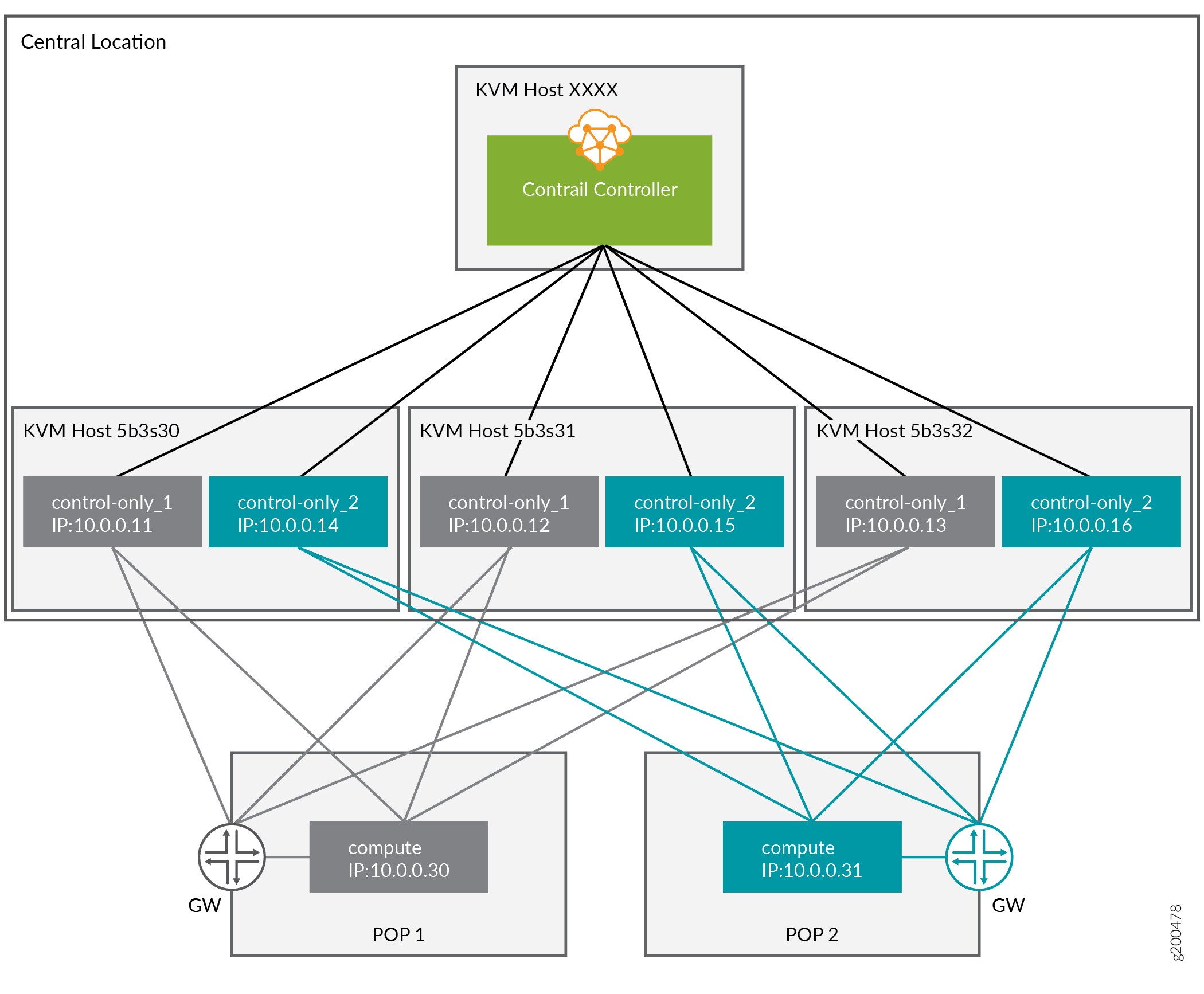
映射表
Nova 名称 |
具有讽刺意味的名字 |
UUID |
KVM的 |
IP地址 |
流行 |
|---|---|---|---|---|---|
overcloud-contrailcontrolonly-0 |
仅控制-1-5B3S30 |
具有讽刺意味的 UUID:7d758dce-2784-45fd-be09-5a41eb53e764 DMI UUID:73F8D030-E896-4A95-A9F5-E1A4FEBE322D |
5B3S30 |
10.0.0.11 |
POP1 |
overcloud-contrailcontrolonly-1 |
仅控制-2-5B3S30 |
具有讽刺意味的 UUID:d26abdeb-d514-4a37-a7fb-2cd2511c351f DMI UUID:14639A66-D62C-4408-82EE-FDDC4E509687 |
5B3S30 |
10.0.0.14 |
POP2 |
overcloud-contrailcontrolonly-2 |
仅控制-1-5B3S31 |
具有讽刺意味的 UUID:91dd9fa9-e8eb-4b51-8b5e-bbaffb6640e4 DMI UUID:28AB0B57-D612-431E-B177-1C578AE0FEA4 |
5b3s31 |
10.0.0.12 |
POP1 |
overcloud-contrailcontrolonly-3 |
仅控制-2-5B3S31 |
具有讽刺意味的 UUID:09fa57b8-580f-42ec-bf10-a19573521ed4 DMI UUID:09BEC8CB-77E9-42A6-AFF4-6D4880FD87D0 |
5b3s31 |
10.0.0.15 |
POP2 |
overcloud-contrailcontrolonly-4 |
仅控制-1-5B3S32 |
具有讽刺意味的 UUID:4766799-24c8-4e3b-af54-353f2b796ca4 DMI UUID:3993957A-ECBF-4520-9F49-0AF6EE1667A7 |
5b3s32 |
10.0.0.13 |
POP1 |
overcloud-contrailcontrolonly-5 |
仅控制-2-5B3S32 |
具有讽刺意味的 UUID:58a803ae-a785-470e-9789-139abbfa74fb DMI UUID:AF92F485-C30C-4D0A-BDC4-C6AE97D06A66 |
5b3s32 |
10.0.0.16 |
POP2 |
ControlOnly 准备
将 ControlOnly over cloud 虚拟机添加到 overcloud KVM 主机
这必须在 overcloud KVM 主机上完成
将在每个 overcloud KVM 主机上创建两个 ControlOnly overcloud VM 定义。
ROLES=control-only:2
num=4
ipmi_user=<user>
ipmi_password=<password>
libvirt_path=/var/lib/libvirt/images
port_group=overcloud
prov_switch=br0

/bin/rm ironic_list
IFS=',' read -ra role_list <<< "${ROLES}"
for role in ${role_list[@]}; do
  role_name=`echo $role|cut -d ":" -f 1`
  role_count=`echo $role|cut -d ":" -f 2`
  for count in `seq 1 ${role_count}`; do
    echo $role_name $count
    qemu-img create -f qcow2 ${libvirt_path}/${role_name}_${count}.qcow2 99G
    virsh define /dev/stdin <<EOF
 $(virt-install --name ${role_name}_${count} \
--disk ${libvirt_path}/${role_name}_${count}.qcow2 \
--vcpus=4 \
--ram=16348 \
--network network=br0,model=virtio,portgroup=${port_group} \
--network network=br1,model=virtio \
--virt-type kvm \
--cpu host \
--import \
--os-variant rhel7 \
--serial pty \
--console pty,target_type=virtio \
--graphics vnc \
--print-xml)
EOF
    vbmc add ${role_name}_${count} --port 1623${num} --username ${ipmi_user} --password ${ipmi_password}
    vbmc start ${role_name}_${count}
    prov_mac=`virsh domiflist ${role_name}_${count}|grep ${prov_switch}|awk '{print $5}'`
    vm_name=${role_name}-${count}-`hostname -s`
    kvm_ip=`ip route get 1  |grep src |awk '{print $7}'`
    echo ${prov_mac} ${vm_name} ${kvm_ip} ${role_name} 1623${num}>> ironic_list
    num=$(expr $num + 1)
  done
done
在 undercloud 上需要生成的 ironic_list 才能将节点导入 Ironic。
从 overcloud KVM 主机获取ironic_lists并将它们组合起来。
cat ironic_list_control_only
52:54:00:3a:2f:ca control-only-1-5b3s30 10.87.64.31 control-only 16234
52:54:00:31:4f:63 control-only-2-5b3s30 10.87.64.31 control-only 16235
52:54:00:0c:11:74 control-only-1-5b3s31 10.87.64.32 control-only 16234
52:54:00:56:ab:55 control-only-2-5b3s31 10.87.64.32 control-only 16235
52:54:00:c1:f0:9a control-only-1-5b3s32 10.87.64.33 control-only 16234
52:54:00:f3:ce:13 control-only-2-5b3s32 10.87.64.33 control-only 16235
进口:
ipmi_password=<password>
ipmi_user=<user>

DEPLOY_KERNEL=$(openstack image show bm-deploy-kernel -f value -c id)
DEPLOY_RAMDISK=$(openstack image show bm-deploy-ramdisk -f value -c id)

num=0
while IFS= read -r line; do
  mac=`echo $line|awk '{print $1}'`
  name=`echo $line|awk '{print $2}'`
  kvm_ip=`echo $line|awk '{print $3}'`
  profile=`echo $line|awk '{print $4}'`
  ipmi_port=`echo $line|awk '{print $5}'`
  uuid=`openstack baremetal node create --driver ipmi \
                                        --property cpus=4 \
                                        --property memory_mb=16348 \
                                        --property local_gb=100 \
                                        --property cpu_arch=x86_64 \
                                        --driver-info ipmi_username=${ipmi_user}  \
                                        --driver-info ipmi_address=${kvm_ip} \
                                        --driver-info ipmi_password=${ipmi_password} \
                                        --driver-info ipmi_port=${ipmi_port} \
                                        --name=${name} \
                                        --property capabilities=boot_option:local \
                                        -c uuid -f value`
  openstack baremetal node set ${uuid} --driver-info deploy_kernel=$DEPLOY_KERNEL --driver-info deploy_ramdisk=$DEPLOY_RAMDISK
  openstack baremetal port create --node ${uuid} ${mac}
  openstack baremetal node manage ${uuid}
  num=$(expr $num + 1)
done < <(cat ironic_list_control_only)
ControlOnly 节点自省
openstack overcloud node introspect --all-manageable --provide
获取具有讽刺意味的 ControlOnly 节点的 UUID
openstack baremetal node list |grep control-only
| 7d758dce-2784-45fd-be09-5a41eb53e764 | control-only-1-5b3s30  | None | power off | available | False |
| d26abdeb-d514-4a37-a7fb-2cd2511c351f | control-only-2-5b3s30  | None | power off | available | False |
| 91dd9fa9-e8eb-4b51-8b5e-bbaffb6640e4 | control-only-1-5b3s31  | None | power off | available | False |
| 09fa57b8-580f-42ec-bf10-a19573521ed4 | control-only-2-5b3s31  | None | power off | available | False |
| f4766799-24c8-4e3b-af54-353f2b796ca4 | control-only-1-5b3s32  | None | power off | available | False |
| 58a803ae-a785-470e-9789-139abbfa74fb | control-only-2-5b3s32  | None | power off | available | False |
每个 overcloud KVM 主机上的第一个 ControlOnly 节点将用于 POP1,第二个节点用于 POP2,依此类推。
获取具有讽刺意味的 POP 计算节点的 UUID:
openstack baremetal node list |grep compute
| 91d6026c-b9db-49cb-a685-99a63da5d81e | compute-3-5b3s30 | None | power off | available | False |
| 8028eb8c-e1e6-4357-8fcf-0796778bd2f7 | compute-4-5b3s30 | None | power off | available | False |
| b795b3b9-c4e3-4a76-90af-258d9336d9fb | compute-3-5b3s31 | None | power off | available | False |
| 2d4be83e-6fcc-4761-86f2-c2615dd15074 | compute-4-5b3s31 | None | power off | available | False |
前两个计算节点属于 POP1,后两个计算节点属于 POP2。
使用具有讽刺意味的 UUID 创建输入 YAML:
 ~/subcluster_input.yaml
---
- subcluster: subcluster1
  asn: "65413"
  control_nodes:
    - uuid: 7d758dce-2784-45fd-be09-5a41eb53e764
      ipaddress: 10.0.0.11
    - uuid: 91dd9fa9-e8eb-4b51-8b5e-bbaffb6640e4
      ipaddress: 10.0.0.12
    - uuid: f4766799-24c8-4e3b-af54-353f2b796ca4
      ipaddress: 10.0.0.13
  compute_nodes:
    - uuid: 91d6026c-b9db-49cb-a685-99a63da5d81e
      vrouter_gateway: 10.0.0.1
    - uuid: 8028eb8c-e1e6-4357-8fcf-0796778bd2f7
      vrouter_gateway: 10.0.0.1
- subcluster: subcluster2
  asn: "65414"
  control_nodes:
    - uuid: d26abdeb-d514-4a37-a7fb-2cd2511c351f
      ipaddress: 10.0.0.14
    - uuid: 09fa57b8-580f-42ec-bf10-a19573521ed4
      ipaddress: 10.0.0.15
    - uuid: 58a803ae-a785-470e-9789-139abbfa74fb
      ipaddress: 10.0.0.16
  compute_nodes:
    - uuid: b795b3b9-c4e3-4a76-90af-258d9336d9fb
      vrouter_gateway: 10.0.0.1
    - uuid: 2d4be83e-6fcc-4761-86f2-c2615dd15074
      vrouter_gateway: 10.0.0.1
仅支持 control_nodes、compute_nodes、dpdk_nodes 和 sriov_nodes。
生成子集群环境:
~/tripleo-heat-templates/tools/contrail/create_subcluster_environment.py -i ~/subcluster_input.yaml \
               -o ~/tripleo-heat-templates/environments/contrail/contrail-subcluster.yaml
检查子集群环境文件:
cat ~/tripleo-heat-templates/environments/contrail/contrail-subcluster.yaml
parameter_defaults:
  NodeDataLookup:
    041D7B75-6581-41B3-886E-C06847B9C87E:
      contrail_settings:
        CONTROL_NODES: 10.0.0.14,10.0.0.15,10.0.0.16
        SUBCLUSTER: subcluster2
        VROUTER_GATEWAY: 10.0.0.1
    09BEC8CB-77E9-42A6-AFF4-6D4880FD87D0:
      contrail_settings:
        BGP_ASN: '65414'
        SUBCLUSTER: subcluster2
    14639A66-D62C-4408-82EE-FDDC4E509687:
      contrail_settings:
        BGP_ASN: '65414'
        SUBCLUSTER: subcluster2
    28AB0B57-D612-431E-B177-1C578AE0FEA4:
      contrail_settings:
        BGP_ASN: '65413'
        SUBCLUSTER: subcluster1
    3993957A-ECBF-4520-9F49-0AF6EE1667A7:
      contrail_settings:
        BGP_ASN: '65413'
        SUBCLUSTER: subcluster1
    73F8D030-E896-4A95-A9F5-E1A4FEBE322D:
      contrail_settings:
        BGP_ASN: '65413'
        SUBCLUSTER: subcluster1
    7933C2D8-E61E-4752-854E-B7B18A424971:
      contrail_settings:
        CONTROL_NODES: 10.0.0.14,10.0.0.15,10.0.0.16
        SUBCLUSTER: subcluster2
        VROUTER_GATEWAY: 10.0.0.1
    AF92F485-C30C-4D0A-BDC4-C6AE97D06A66:
      contrail_settings:
        BGP_ASN: '65414'
        SUBCLUSTER: subcluster2
    BB9E9D00-57D1-410B-8B19-17A0DA581044:
      contrail_settings:
        CONTROL_NODES: 10.0.0.11,10.0.0.12,10.0.0.13
        SUBCLUSTER: subcluster1
        VROUTER_GATEWAY: 10.0.0.1
    E1A809DE-FDB2-4EB2-A91F-1B3F75B99510:
      contrail_settings:
        CONTROL_NODES: 10.0.0.11,10.0.0.12,10.0.0.13
        SUBCLUSTER: subcluster1
        VROUTER_GATEWAY: 10.0.0.1
部署
将 contrail-subcluster.yaml、contrail-ips-from-pool-all.yaml 和 contrail-scheduler-hints.yaml 添加到 OpenStack deploy 命令中:
openstack overcloud deploy --templates ~/tripleo-heat-templates \
 -e ~/overcloud_images.yaml \
 -e ~/tripleo-heat-templates/environments/network-isolation.yaml \
 -e ~/tripleo-heat-templates/environments/contrail/contrail-plugins.yaml \
 -e ~/tripleo-heat-templates/environments/contrail/contrail-services.yaml \
 -e ~/tripleo-heat-templates/environments/contrail/contrail-net.yaml \
 -e ~/tripleo-heat-templates/environments/contrail/contrail-subcluster.yaml \
 -e ~/tripleo-heat-templates/environments/contrail/contrail-ips-from-pool-all.yaml \
 -e ~/tripleo-heat-templates/environments/contrail/contrail-scheduler-hints.yaml \
 --roles-file ~/tripleo-heat-templates/roles_data_contrail_aio.yaml