Onboarding Egnyte applications
This section outlines the procedure for onboarding an Egnyte cloud application.
-
Go to Administration > App Management and click New.
-
Choose Egnyte from the dropdown list and click Next.
-
Enter a Name (required) and a Description (optional). The name must include only alphanumeric characters, with no special characters other than the underscore, and no spaces. Then, click Next
-
Select API Access protection mode.
-
Click Next and enter the following configuration information, depending on the protection modes you selected.
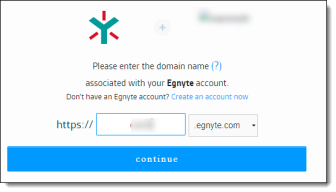
If you selected API Access, click Authorize Egnyte, and enter your Egnyte login credentials.
-
Enter a domain name associated with your Egnyte account and click Continue.
-
Once your authorization is successful, save the new cloud application.