Onboarding Azure applications
This section outlines the procedures for onboarding Azure cloud applications. For Azure Blob Storage onboarding instructions, see the next section.
Configuration steps
To use the CSPM feature for an Azure account, you need a Service Principal that has access to the corresponding subscription.
The Service Principal should have the Reader or Monitoring Reader role with access to Azure AD user, group, or service principal and associated Client Secret.
Before onboarding, you should have the Subscription ID of the account, and the following information from the Service Principal:
-
Application (Client) ID
-
Client Secret
-
Directory (Tenant) ID
Onboarding steps
-
From the Management Console, select Administration > App Management, and click Add New.
-
Select Azure. Then, enter the details for the application.
-
Enter a Name (required) and a Description (optional). The name must include only alphanumeric characters, with no special characters other than the underscore, and no spaces. Then, click Next.
-
Select one or more of the following protection modes for the application and click Next.
-
Cloud Authentication
-
API Access
-
Cloud Security Posture
The Cloud Security Posture mode is required if you want to implement Cloud Security Posture Management (CSPM) functionality.
-
Depending on the protection modes you selected, enter the required configuration details.
-
If you selected App Authorization, no additional configuration is required. Click Next to view the summary information.
-
If you selected API Access, no additional configuration is needed other than authorization. Go to the Authorization step.
-
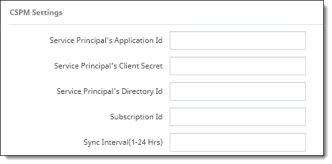
If you selected Cloud Security Posture, enter the following information from the Azure configuration steps you performed earlier.
-
Service Principal’s Application Id
-
Service Principal’s Client Secret
-
Service Principal’s Directory Id
-
Subscription Id
-
Sync Interval (1-24 Hrs) is how often (in hours) that CSPM will retrieve information from the cloud and refresh the inventory. Enter a number.
-
Click Authorize and enter your Azure login credentials.
-
Review the summary information to verify that it is correct. If it is, click Save to complete onboarding.