Monitoring user activity through Admin Audit Logs
Admin Audit Logs (Administration > Admin Audit Logs) collects security relevant system events, such as system configuration changes, user logins and logouts, system service status changes, or stopping/starting of nodes. When such changes occur, an event is generated and saved in the database.
Audit log information
The Admin Audit Logs page provides the following information.
|
Field |
Description |
|---|---|
|
Time |
The recorded time of the event. |
|
User |
If a user generated the event, the name (email address) of that user. If it is an event on a node, the node name is used. If neither a user nor a node was involved, N/A appears here. |
|
IP Address |
The IP address of the user's browser (if the user performed the action). If an event is on a node, the node’s IP address is shown. If an action is being generated with no user interaction, N/A appears here. |
|
Sub System |
The general area where the event takes place (for example, authentication for login activity). |
|
Event Type |
The type of event; for example, login, certificate upload, or key request. |
|
Target Type |
The area being acted on. |
|
Target Name |
The specific location of the event. |
|
Description |
Additional details available about the event (shown in JSON format). Click View Details. If no additional details are available, only curly braces {} appear. |
Filtering and searching for Admin Audit Log information
You can target the type of information in the Admin Audit Logs by narrowing the time range or searching for specific types of information.
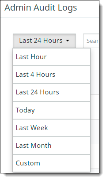
To filter by time range, select the time range from the dropdown list at the upper left.
To search for specific information:
Click the filter icon at the upper right. Then click in the boxes to select the information you want to find and click Search.
