Security Policies Import Overview
Import security policy configurations from next-generation security devices. During the onboarding process of these non-ZTP devices, you can discover and incorporate existing security policy configurations.
Juniper Security Director Cloud identifies objects, such as addresses, services, schedulers, SSL profiles, Content Security, IPS, and Layer 7 applications, by their unique names. When importing security policies, it brings in all the objects it supports and compares their names with those on the next-generation security device. A conflict arises if an object's name is the same as an existing one but its value differs.
An object conflict resolution (OCR) operation is initiated to address these naming conflicts. Table 1 lists the actions you can choose to resolve the conflicts.
| Scenario | Action |
|---|---|
|
Object name does not exist in Juniper Security Director Cloud. |
Object is added to Juniper Security Director Cloud. |
|
Object name with the same content exists. |
New object is not added, and existing object is used. |
|
Object name with different content exists. |
Object conflict resolution operation is triggered. You can choose one of these actions to resolve object conflicts.
|
|
Global default security profiles and device-specific profiles are configured. |
OCR is triggered during import for IPS or Content Security. You can choose one of these actions for manual import to resolve object conflicts.
|
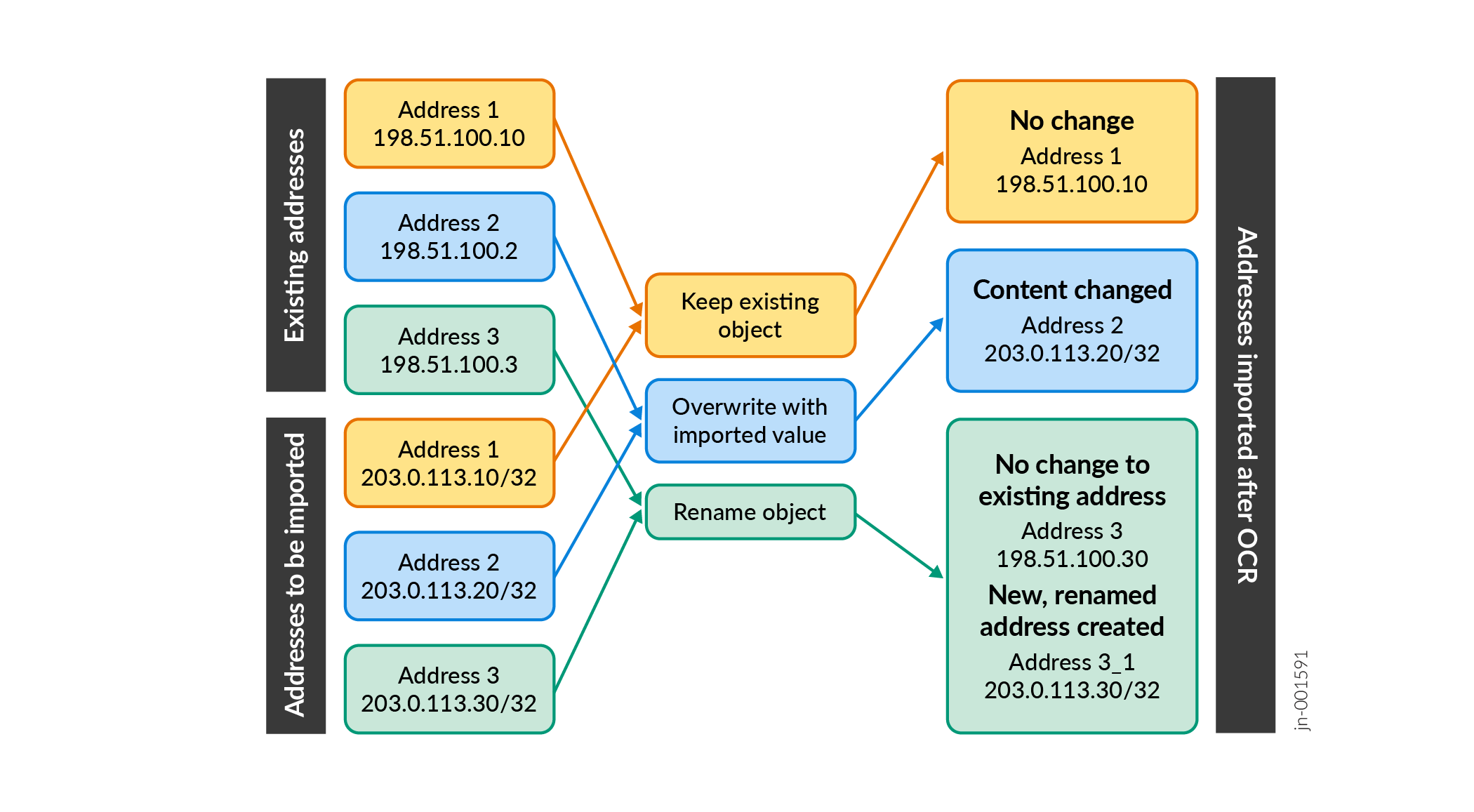
Object Conflict Resolution Example
This diagram illustrates policy import and object conflict resolution. Existing objects in Juniper Security Director Cloud are displayed under Existing Addresses. Objects on the next‑generation firewall are displayed under Addresses to be Imported.
During the security policy import, object conflict resolution (OCR) compares both sets and flags any name conflicts. The diagram shows three resolution options—Rename object, Overwrite with imported values, or Keep existing object—and the resulting objects are displayed under Addresses Imported after OCR.