Perform Day-To-Day Tasks Using Guided Workflows
Use guided workflows to quickly complete your day-to-day tasks without navigating multiple menus. Interact with Security Director Copilot to initiate and complete tasks step-by-step. The system provides personalized prompts and inputs, making it easier to execute tasks with minimal effort.
Here are a few guided workflows:
| If you want to... | You can... |
|---|---|
| Onboard Devices | Add new devices using any of the following options.
These options help streamline device onboarding for both small and large deployments. |
| Configure Devices |
Use guided forms to configure device settings. Enter required details through structured fields to reduce errors. Follow prompts to ensure all necessary configurations are completed. |
| Upload Files |
Upload files directly within supported workflows. Attach documents or data files, such as CSVs, as required during task execution. This eliminates the need to switch between tools or interfaces. |
| Analyze security policies and identify rule anomalies |
Analyze security policies and identify rule anomalies, including:
For each anomaly, Security Director Copilot recommends corrective actions to simplify and optimize the policy. When a rule can be safely removed, Security Director Copilot can assist you to delete the rule. When you delete rules through Security Director Copilot, the changes are not automatically deployed to managed devices. You must review and deploy the resulting policy changes. |
| Make Decisions Using Action Buttons |
Use action buttons based on the current task. Select options such as Confirm, Cancel, or other context-specific actions to proceed. These buttons help you quickly make decisions and move to the next step. |
Here are some sample use-cases to quickly complete your day-to-day tasks.
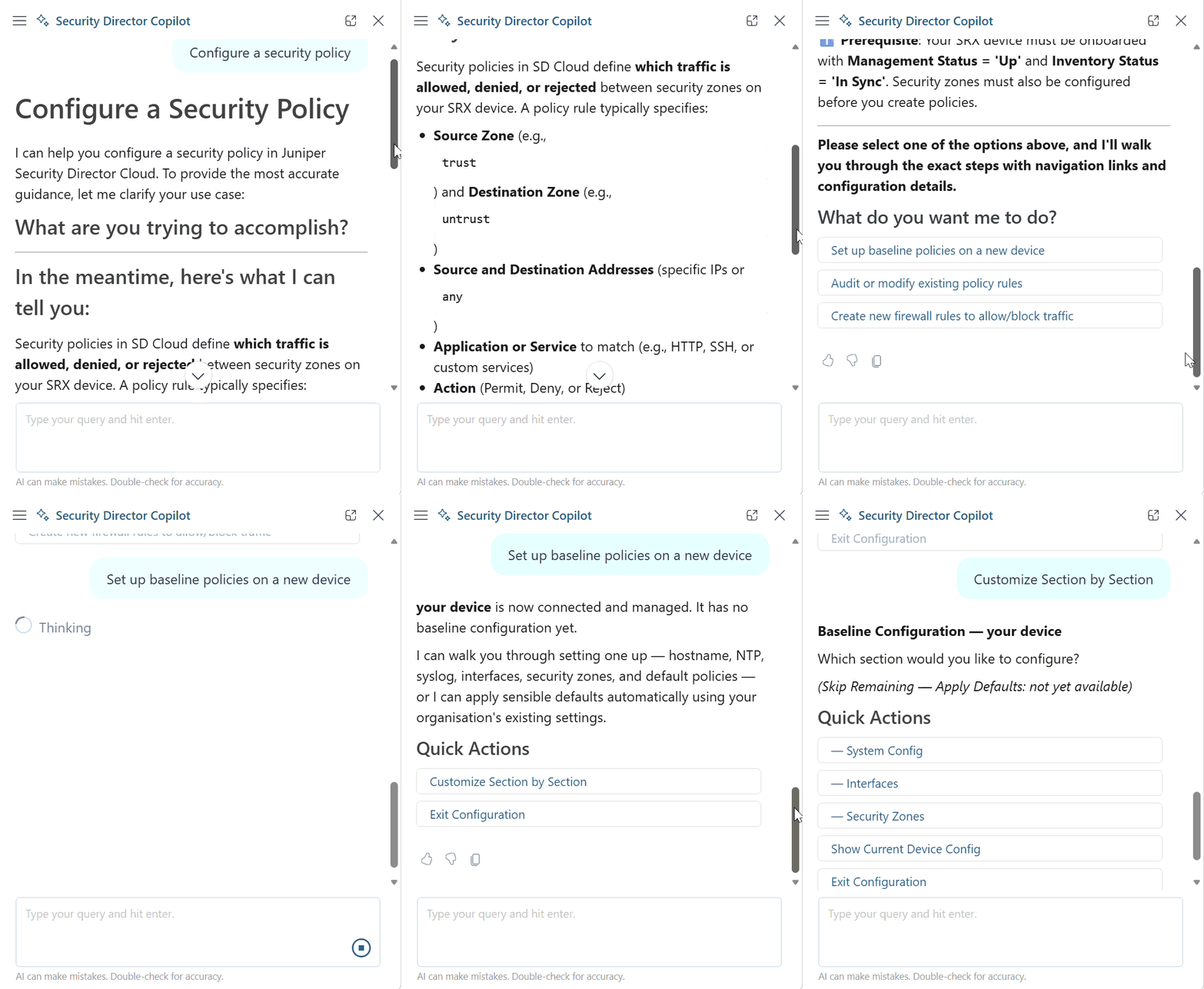
Use Case 1: Configure a Security Policy
This example shows how to configure security policies on an SRX Series Firewall. In the example, Security Director Copilot provides guided workflows for the individual tasks required to configure a security policy.
Use Case 2: Policy Rule Discovery and Structure Analysis
Copilot can answer natural-language questions about the structure and content of security policies.
These capabilities help administrators quickly understand policy intent and locate relevant rules without manually searching through policy configurations.
Example prompts:
Are there any rules that allow or reference Facebook traffic?
Find rules that apply to user Bob.
Is address book entry xyz used in any policy?
Which rules reference a specific application, user, address object, or zone?
The following figure illustrates a Copilot query that checks whether an address book entry is referenced in any rule.

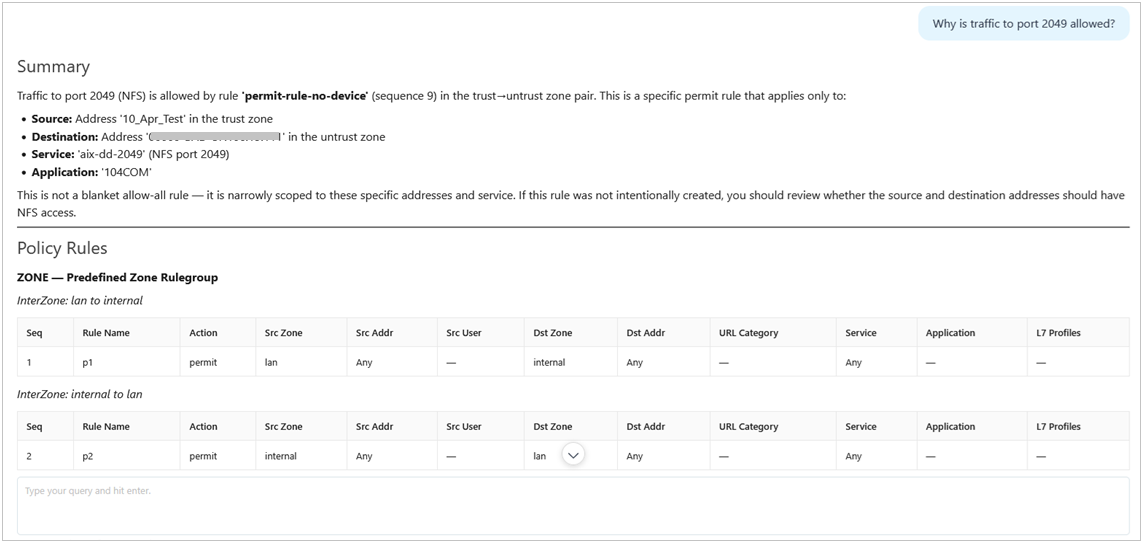
Use Case 3: Traffic Intent Analysis
Copilot can explain how traffic is handled by a security policy and determine whether specific traffic is allowed or denied. This capability provides valuable visibility into policy behavior and significantly reduces the time required for policy troubleshooting.
You can specify the policy name and source or destination zones when submitting traffic intent queries.
Example prompt:
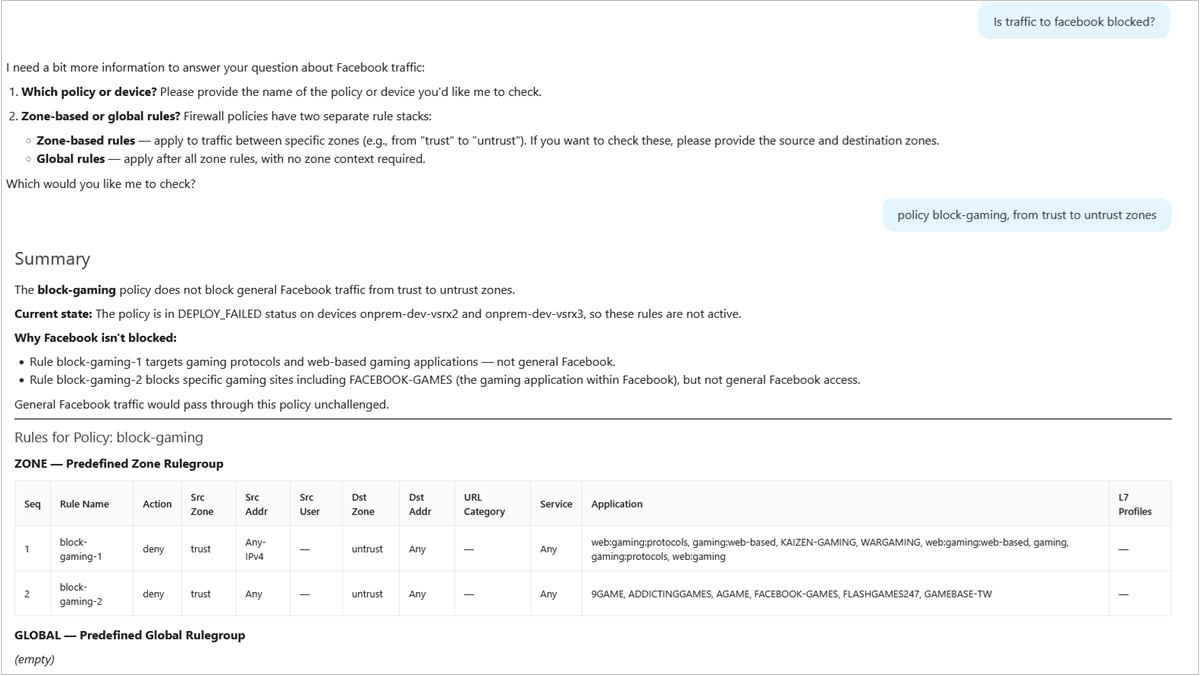
Is YouTube traffic allowed in policy HQ-Policy from corp-zone to untrust?
Copilot analyzes the policy and identifies the rules that influence the traffic decision. This helps administrator to understand:
- if traffic is allowed or denied.
- which rule is responsible for the decision.
- why the traffic matches the identified rule.
- how policy changes might affect the traffic outcome.
The following example shows how Copilot can verify whether traffic to an application is blocked by a security policy.
The following example shows a Copilot query that explains why traffic to a specific port is allowed.